lock CHRYSLER 300 2005 1.G Workshop Manual
[x] Cancel search | Manufacturer: CHRYSLER, Model Year: 2005, Model line: 300, Model: CHRYSLER 300 2005 1.GPages: 374, PDF Size: 6.8 MB
Page 158 of 374

Automatically Move Seat Back on Exit (Available
with Memory Seat Only)
When ON is selected, the driver's seat moves rearward 5
cm (2 inches) or to the farthest rearward position if this
distance is less than 5 cm (2 inches) when the key is
removed from the ignition switch so that the driver can
more easily exit the vehicle. The seat will return to the
memorized seat location (if Recall Memory with Remote
Key Unlock is set to ON) when the remote keyless entry
transmitter is used to unlock the door. Press and release
the FUNCTION SELECT button when in this display
until ªONº or ªOFFº appears to make your selection.
SETTING THE ANALOG CLOCK
To set the analog clock at the top center of the instrument
panel, press and hold the button until the setting is
correct.
Analog Clock
158 UNDERSTANDING YOUR INSTRUMENT PANEL
Page 160 of 374

MUTE Button (Radio Mode)
Press the MUTE button to cancel the sound from the
speakers.9MUTE9will be displayed. Press the MUTE
button a second time and the sound from the speakers
will return. Rotating the volume control, turning the
radio ON /OFF, or turning ON/OFF the ignition, will
cancel the MUTE feature.
NOTE:In Hands Free Phone (if equipped) mode, the
MUTE button mutes the microphone.
SCAN Button (Radio Mode)
Pressing the SCAN button causes the tuner to search for
the next listenable station, in either AM, FM or Satellite (if
equipped) frequencies, pausing for 5 seconds at each
listenable station before continuing to the next. To stop
the search, press SCAN a second time.
PSCAN Button (Radio Mode)
Pressing the PSCAN button, causes the tuner to scan
through preset stations, in either AM, FM or Satellite (if
equipped) frequencies, pausing for 5 seconds at each
preset station before continuing to the next. To stop the
search, press PSCAN a second time.
Time Button
Press the time button and the time of day will be
displayed for 5 seconds.
Clock Setting Procedure
1. Press and hold the time button until the hours blink.
2. Adjust the hours by turning the right side Tune /
Audio control.
3. After the hours are adjusted, press the right side Tune
/ Audio control to set the minutes. The minutes will
begin to blink.
4. Adjust the minutes using the right side Tune / Audio
control.
5. To exit, press any button/knob or wait 5 seconds.
RW/FF (Radio Mode)
Pressing the rewind/fast forward button causes the tuner
to search for the next frequency in the direction of the
arrows. This feature operates in either AM, FM or Satel-
lite (if equipped) frequencies.
160 UNDERSTANDING YOUR INSTRUMENT PANEL
Page 161 of 374

TUNE Control (Radio Mode)
Turn the right side rotary control clockwise to increase or
counter-clockwise to decrease the frequency.
AM/FM Button (Radio Mode)
Press the button to select AM or FM Modes.
Setting the Tone, Balance, and Fade
Press the rotary TUNE control and BASS will be dis-
played. Turn the TUNE control to the right or left to
increase or decrease the Bass tones.
Press the rotary TUNE control a second time and MID
will be displayed. Turn the TUNE control to the right or
left to increase or decrease the Mid Range tones.
Press the rotary TUNE control a third time and TREB will
be displayed. Turn the TUNE control to the right or left to
increase or decrease the Treble tones.
Press the rotary TUNE control a fourth time and BAL will
be displayed. Turn the TUNE control to the right or left to
adjust the sound level from the right or left side speakers.Press the rotary TUNE control a fifth time and FADE will
be displayed. Turn the TUNE control to the left or right to
adjust the sound level between the front and rear speak-
ers.
Press the tune control again or wait 5 seconds to exit
setting tone, balance, and fade.SET Button (Radio Mode) To SET The Push-Button
Memory
When you are receiving a station that you wish to
commit to push-button memory, press the SET button.
The symbol SET 1 will now show in the display window.
Select the button (1-6) you wish to lock onto this station
and press and release that button. If a button is not
selected within 5 seconds after pressing the SET button,
the station will continue to play but will not be stored
into push-button memory.
You may add a second station to each push-button by
repeating the above procedure with this exception: Press
the SET button twice and SET 2 will show in the display
window. Each button can be set for SET 1 and SET 2 in
both AM and FM. This allows a total of 12 AM,12 FM and
UNDERSTANDING YOUR INSTRUMENT PANEL 161
4
Page 166 of 374

MSG or INFO Button (Radio Mode)
Press the MSG or INFO button for an RBDS station (one
with call letters displayed). The radio will return a Radio
Text message broadcast from an FM station (FM mode
only).
Time Button
Press the time button and the time of day will be
displayed for 5 seconds.
Clock Setting Procedure
1. Press and hold the time button until the hours blink.
2. Adjust the hours by turning the right side Tune /
Audio control.
3. After the hours are adjusted, press the right side
Tune / Audio control to set the minutes. The minutes will
begin to blink.
4. Adjust the minutes using the right side Tune / Audio
control.
5. To exit, press any button/knob or wait 5 seconds.
RW/FF (Radio Mode)
Pressing the rewind/fast forward button causes the tuner
to search for the next frequency in the direction of the
arrows. This feature operates in either AM, FM or Satel-
lite (if equipped) frequencies.
TUNE Control (Radio Mode)
Turn the right side rotary control clockwise to increase or
counter-clockwise to decrease the frequency.
AM/FM Button (Radio Mode)
Press the button to select AM or FM Modes.
Setting the Tone, Balance, and Fade
Press the rotary TUNE control and BASS will display.
Turn the TUNE control to the right or left to increase or
decrease the Bass tones.
Press the rotary TUNE control a second time and MID
will display. Turn the TUNE control to the right or left to
increase or decrease the Mid Range tones.
Press the rotary TUNE control a third time and TREBLE
will display. Turn the TUNE control to the right or left to
increase or decrease the Treble tones.
166 UNDERSTANDING YOUR INSTRUMENT PANEL
Page 168 of 374
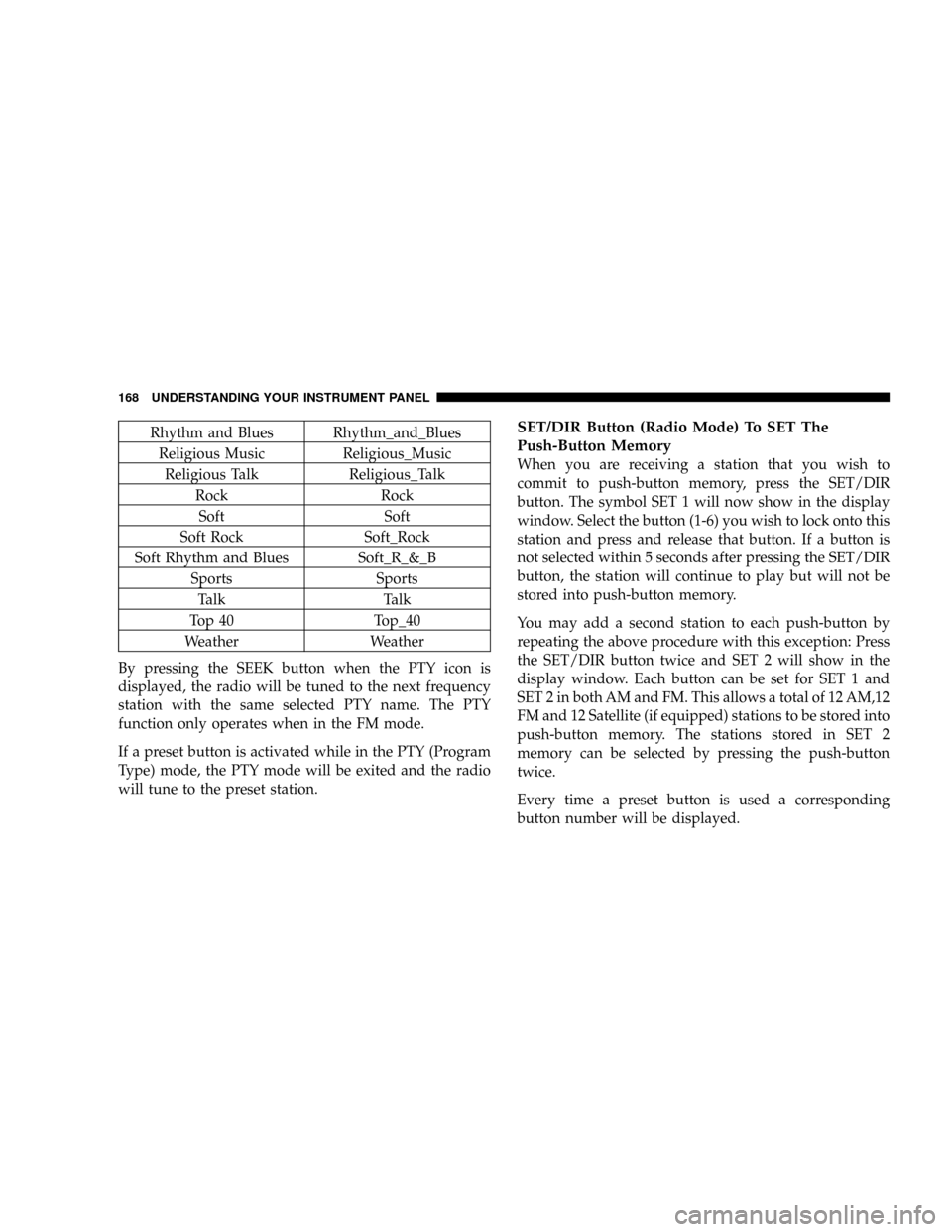
Rhythm and Blues Rhythm_and_Blues
Religious Music Religious_Music
Religious Talk Religious_Talk
Rock Rock
Soft Soft
Soft Rock Soft_Rock
Soft Rhythm and Blues Soft_R_&_B
Sports Sports
Talk Talk
Top 40 Top_40
Weather Weather
By pressing the SEEK button when the PTY icon is
displayed, the radio will be tuned to the next frequency
station with the same selected PTY name. The PTY
function only operates when in the FM mode.
If a preset button is activated while in the PTY (Program
Type) mode, the PTY mode will be exited and the radio
will tune to the preset station.SET/DIR Button (Radio Mode) To SET The
Push-Button Memory
When you are receiving a station that you wish to
commit to push-button memory, press the SET/DIR
button. The symbol SET 1 will now show in the display
window. Select the button (1-6) you wish to lock onto this
station and press and release that button. If a button is
not selected within 5 seconds after pressing the SET/DIR
button, the station will continue to play but will not be
stored into push-button memory.
You may add a second station to each push-button by
repeating the above procedure with this exception: Press
the SET/DIR button twice and SET 2 will show in the
display window. Each button can be set for SET 1 and
SET 2 in both AM and FM. This allows a total of 12 AM,12
FM and 12 Satellite (if equipped) stations to be stored into
push-button memory. The stations stored in SET 2
memory can be selected by pressing the push-button
twice.
Every time a preset button is used a corresponding
button number will be displayed.
168 UNDERSTANDING YOUR INSTRUMENT PANEL
Page 176 of 374

Operating Instructions - Radio Mode
NOTE:
The ignition switch must be in the ON or ACC
position to operate the radio.
Power Switch/Volume Control (Rotary)
Press the ON/VOL control to turn the radio ON. Press
the ON/VOL a second time to turn OFF the radio.
Electronic Volume Control
The electronic volume control turns continuously (360
degrees) in either direction without stopping. Turning the
volume control to the right increases the volume and to
the left decreases it.
When the audio system is turned on, the sound will be
set at the same volume level as last played.
Mode Button (Radio Mode)
Press the mode button repeatedly to select between the
CD player, Cassette, Satellite, or Vehicle Entertainment
System (VES) (if equipped).
SEEK Button (Radio Mode)
Press and release the SEEK button to search for the next
station in either AM/FM or Satellite (if equipped) mode.Press the right side of the button to seek up and the left
side to seek down. The radio will remained tuned to the
new station until you make another selection. Holding
the button and will bypass stations without stopping
until you release it.
SCAN Button (Radio Mode)
Pressing the SCAN button causes the tuner to search for
the next station, in either AM, FM or Satellite (if
equipped) frequencies, pausing for 5 seconds (satellite
scan 8 seconds) at each listenable station before continu-
ing to the next. To stop the search, press SCAN a second
time.
Time Button
Press the time button and the time of day will be
displayed for 5 seconds.
Clock Setting Procedure
1. Press and hold the time button until the hours blink.
2. Adjust the hours by turning the right side Tune /
Audio control.
176 UNDERSTANDING YOUR INSTRUMENT PANEL
Page 188 of 374

simultaneously for 3 seconds. All twelve ESN/SID num-
bers will be displayed. The radio will exit the ESN/SID
mode when any other button is pushed, the ignition is
turned OFF, or 5 minutes has passed since any button
was pushed.
Selecting Satellite Mode in REF, RAQ, and RAK
Radios
Selecting Satellite Mode Ð REF Radio
Press the MODE button repeatedly until the word9SAT9
appears in the display.
A CD may remain in the radio while in the Satellite radio
mode.
Selecting Satellite Mode Ð RAQ and RAK Radio
Press the MODE button repeatedly until the word9SAT9
appears in the display.
These radios will also display the current station name
and program type. For more information such as song
title and artist press the MSG or INFO button.
A CD or tape may remain in the radio while in the
Satellite radio mode.
Selecting a Channel
Press and release the SEEK or TUNE knob to search for
the next channel. Press the top of the button to search up
and the bottom of the button to search down. Holding the
TUNE button causes the radio to bypass channels until
the button is released.
Press and release the SCAN button (if equipped) to
automatically change channels every 7 seconds. The
radio will pause on each channel for 7 seconds before
moving on to the next channel. The word9SCAN9will
appear in the display between each channel change. Press
the SCAN button a second time to stop the search.
NOTE:Channels that may contain objectionable content
can be blocked. Contact Sirius Customer Care at 888-539-
7474 to discuss options for channel blocking or unblock-
ing. Please have your ESN/SID information available.
Storing and Selecting Pre-Set Channels
In addition to the 12 AM and 12 FM pre-set stations, you
may also commit 12 satellite stations to push button
memory. These satellite channel pre-set stations will not
erase any AM or FM pre-set memory stations. Follow the
memory pre-set procedures that apply to your radio.
188 UNDERSTANDING YOUR INSTRUMENT PANEL
Page 189 of 374

Using the PTY (Program Type) Button (if
equipped)
Follow the PTY button instructions that apply to your
radio.
PTY Button(SCAN(
When the desired program type is obtained, press the
9SCAN9button within five seconds. The radio will play 7
seconds of the selected channel before moving to the next
channel of the selected program type. Press the9SCAN9
button a second time to stop the search.
NOTE:Pressing the9SEEK9or9SCAN9button while
performing a music type scan will change the channel by
one and stop the search. Pressing a pre-set memory
button during a music type scan, will call up the memory
channel and stop the search.
PTY Button(SEEK(
When the desired program is obtained, press the9SEEK9
button within five seconds. The channel will change to
the next channel that matches the program type selected.
Satellite Antenna
To ensure optimum reception, do not place items on the
roof around the rooftop antenna location. Metal objects
placed within the line of sight of the antenna will cause
decreased performance. Larger luggage items should be
placed as far forward as possible. Do not place items
directly on or above the antenna.
Reception Quality
Satellite reception may be interrupted due to one of the
following reasons.
²The vehicle is parked in an underground parking
structure or under a physical obstacle.
²Dense tree coverage may interrupt reception in the
form of short audio mutes.
²Driving under wide bridges or along tall buildings can
cause intermittent reception.
²Placing objects over or too close to the antenna can
cause signal blockage.
UNDERSTANDING YOUR INSTRUMENT PANEL 189
4
Page 190 of 374

REMOTE SOUND SYSTEM CONTROLS
The remote sound system controls are located on the
surface of the steering wheel at the 3 and 9 o'clock
positions.
Some models feature an Electronic Vehicle Information
Center (EVIC) with driver-interactive display. This is
located in the upper part of the instrument cluster
between the speedometer and tachometer. The audio
mode of the EVIC can display any one of twelve radio
station preset frequencies, CD disc number, CD tracknumber, tape, or one of 200 Satellite radio channels
depending on which radio is in the vehicle.
The VOLUME switch controls the volume of
the sound system. Pressing the top of the
rocker switch will increase the volume and
pressing the bottom of the rocker switch will
decrease the volume.
The AUDIO MODE SELECT button changes
the mode of the radio from AM to FM to Tape
to CD, or to Satellite (SAT) depending on
which radio is in the vehicle.
The FUNCTION SELECT button advances the
radio to the next preset, changes the tape side
being played, or changes the current disc when
used in audio mode.
The SCROLL buttons change selections such as
radio station, CD track, or satellite radio chan-
nel depending on the current mode.
190 UNDERSTANDING YOUR INSTRUMENT PANEL
Page 194 of 374

RADIO OPERATION AND CELLULAR PHONES
Under certain conditions, the cellular phone being On in
your vehicle can cause erratic or noisy performance from
your radio. This condition may be lessened or eliminated
by relocating the cellular phone antenna. This condition
is not harmful to the radio. If your radio performance
does not satisfactorily ªclearº by the repositioning of the
antenna, it is recommended that the radio volume be
turned down or off during cellular phone operation.
CLIMATE CONTROLS
CLIMATE CONTROLS Ð Manual
Air Conditioning
The controls for the heating/air conditioning and venti-
lation system in this vehicle consist of a series of rotary
knobs. These comfort controls can be set to obtain desired
interior conditions.The instrument panel features four dual-vane airflow
registers. Two registers are located on the outer ends of
the instrument panel and two are located in the center of
the instrument panel. These registers can be closed to
partially block airflow.
Press this button to turn on and off the air condi-
tioning. Cool dehumidified air comes through the
outlets selected by the mode selector. Press the button a
second time to turn off the air conditioning. The button
includes an LED that illuminates when compressor op-
eration is selected.
194 UNDERSTANDING YOUR INSTRUMENT PANEL