ignition CHRYSLER CONCORDE 2004 2.G Owner's Manual
[x] Cancel search | Manufacturer: CHRYSLER, Model Year: 2004, Model line: CONCORDE, Model: CHRYSLER CONCORDE 2004 2.GPages: 273, PDF Size: 6 MB
Page 67 of 273
Lights-On Reminder
If the headlights or parking lights are left on after the
ignition is turned Off, a chime will sound when the
driver’s door is opened.
Automatic Headlights
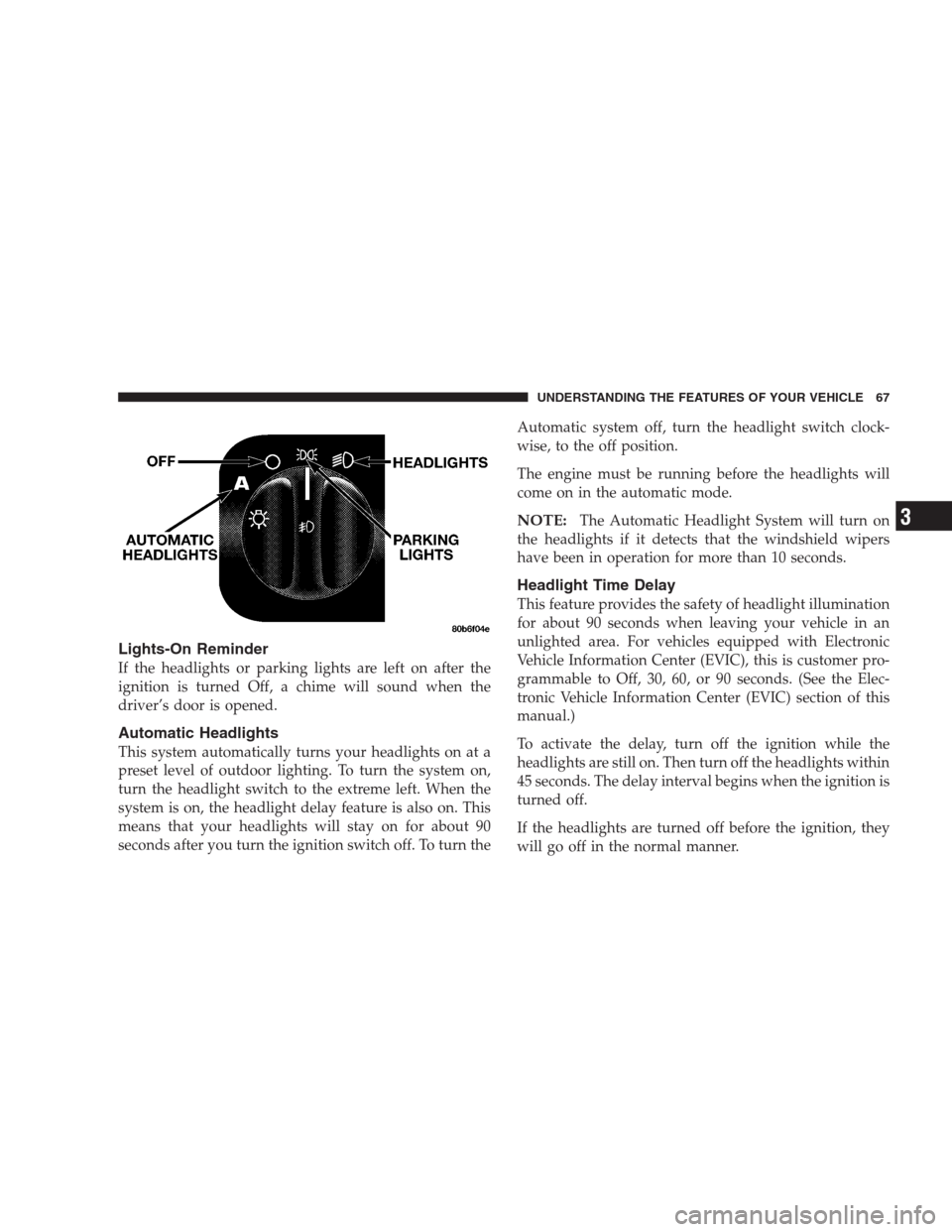
This system automatically turns your headlights on at a
preset level of outdoor lighting. To turn the system on,
turn the headlight switch to the extreme left. When the
system is on, the headlight delay feature is also on. This
means that your headlights will stay on for about 90
seconds after you turn the ignition switch off. To turn theAutomatic system off, turn the headlight switch clock-
wise, to the off position.
The engine must be running before the headlights will
come on in the automatic mode.
NOTE:The Automatic Headlight System will turn on
the headlights if it detects that the windshield wipers
have been in operation for more than 10 seconds.
Headlight Time Delay
This feature provides the safety of headlight illumination
for about 90 seconds when leaving your vehicle in an
unlighted area. For vehicles equipped with Electronic
Vehicle Information Center (EVIC), this is customer pro-
grammable to Off, 30, 60, or 90 seconds. (See the Elec-
tronic Vehicle Information Center (EVIC) section of this
manual.)
To activate the delay, turn off the ignition while the
headlights are still on. Then turn off the headlights within
45 seconds. The delay interval begins when the ignition is
turned off.
If the headlights are turned off before the ignition, they
will go off in the normal manner.
UNDERSTANDING THE FEATURES OF YOUR VEHICLE 67
3
Page 68 of 273
Battery Saver Feature
If an exterior light is left on when the ignition switch is
moved to the Off position, it will automatically turn off
after 10 minutes. Normal operation will resume when the
ignition is turned On or when the headlight switch is
turned to another position.
Fog Lights
Turn the headlight switch to any ON position,
then pull out the headlight switch knob to turn on
the fog lights. A light near the switch will illumi-
nate to show that the Fog Lights are On.
NOTE:Turning on the high beam headlights will turn
off the fog lights. Fog light operation will resume when
the high beams are turned off and the lights return to the
low beam, parking light, or automatic positions.
Daytime Running Lights (Canada Only)
The headlights are on at a dimmer level whenever the
vehicle is started and the parking brake is released. The
lights remain on until the ignition switch is turned OFF.
MULTIFUNCTION CONTROL LEVER
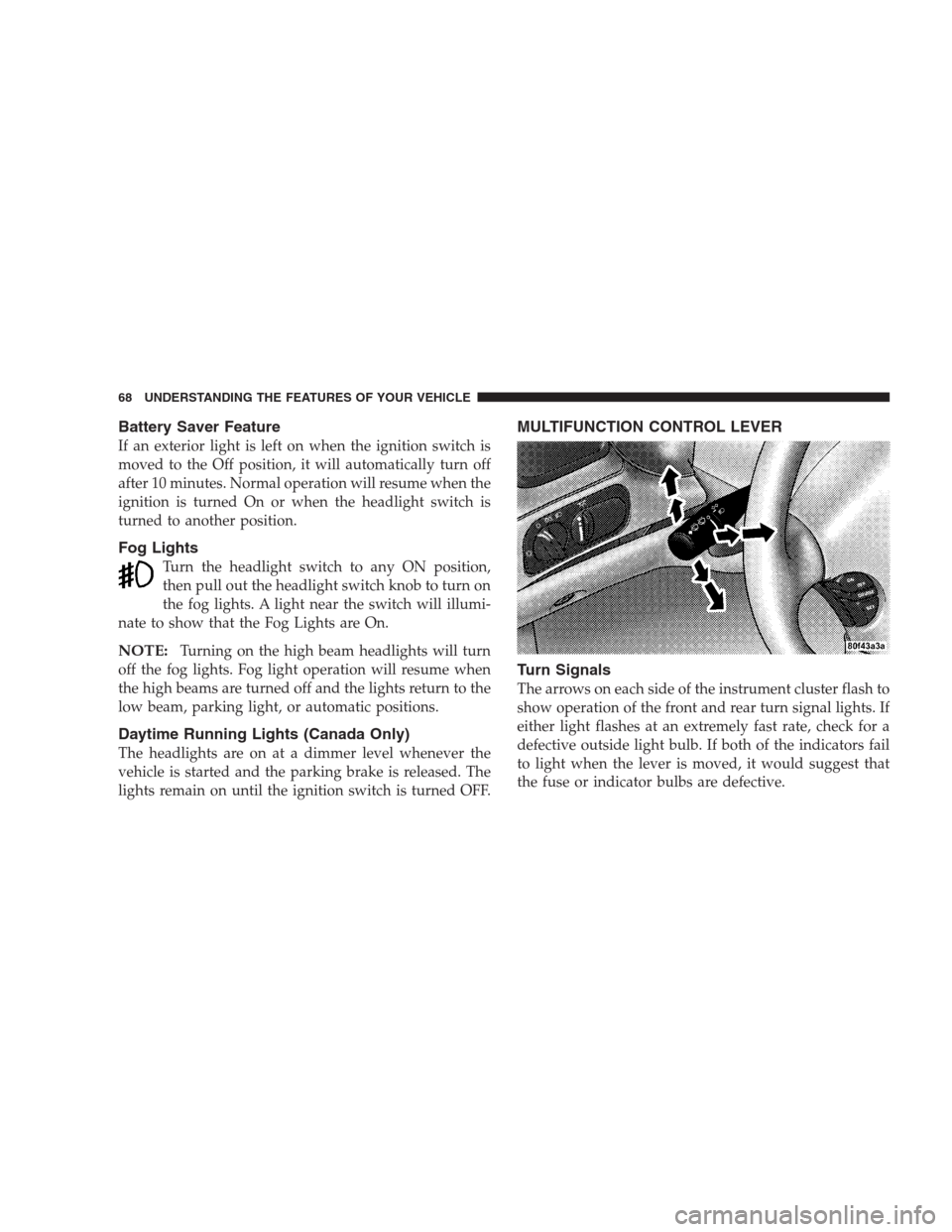
Turn Signals
The arrows on each side of the instrument cluster flash to
show operation of the front and rear turn signal lights. If
either light flashes at an extremely fast rate, check for a
defective outside light bulb. If both of the indicators fail
to light when the lever is moved, it would suggest that
the fuse or indicator bulbs are defective.
68 UNDERSTANDING THE FEATURES OF YOUR VEHICLE
Page 69 of 273
Headlight Dimmer Switch
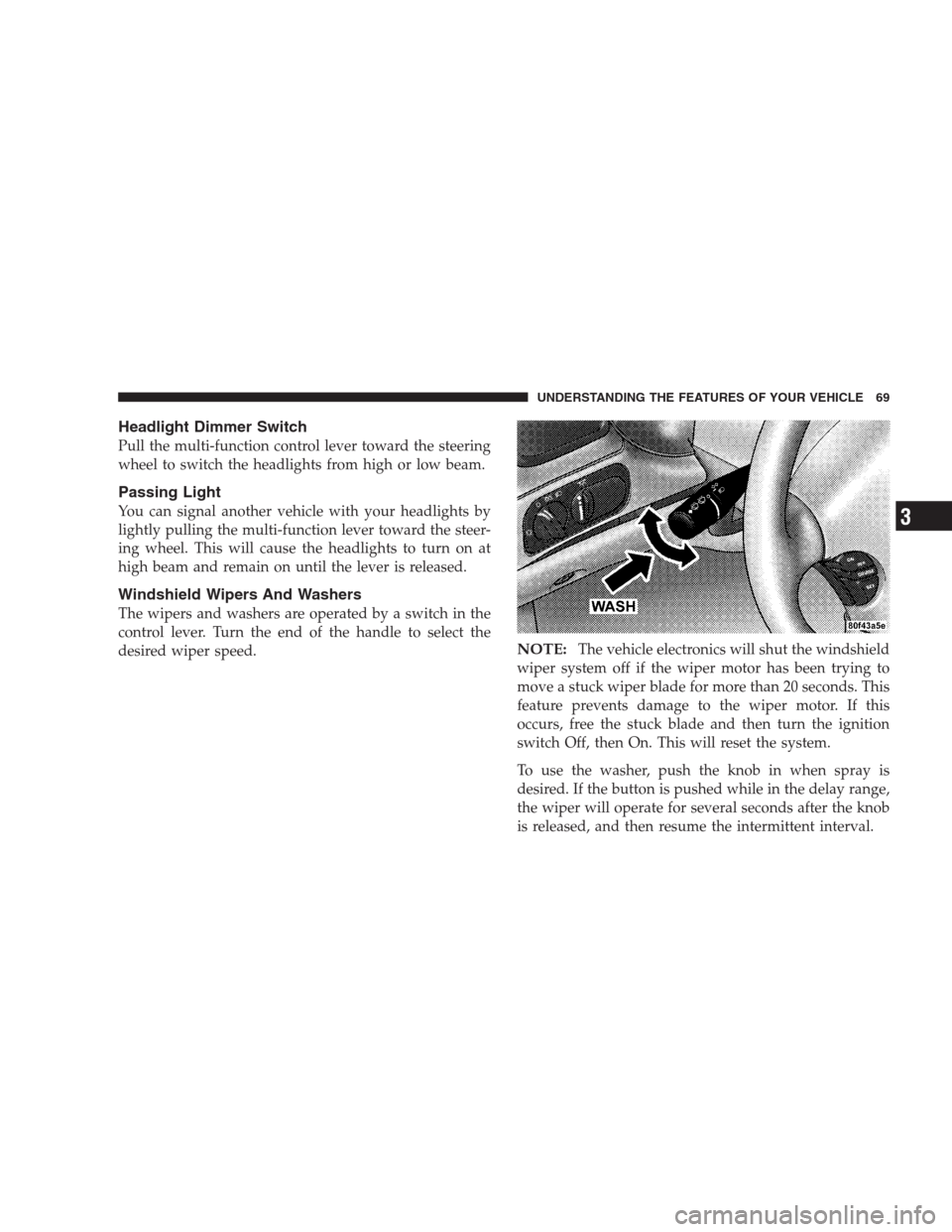
Pull the multi-function control lever toward the steering
wheel to switch the headlights from high or low beam.
Passing Light
You can signal another vehicle with your headlights by
lightly pulling the multi-function lever toward the steer-
ing wheel. This will cause the headlights to turn on at
high beam and remain on until the lever is released.
Windshield Wipers And Washers
The wipers and washers are operated by a switch in the
control lever. Turn the end of the handle to select the
desired wiper speed.
NOTE:The vehicle electronics will shut the windshield
wiper system off if the wiper motor has been trying to
move a stuck wiper blade for more than 20 seconds. This
feature prevents damage to the wiper motor. If this
occurs, free the stuck blade and then turn the ignition
switch Off, then On. This will reset the system.
To use the washer, push the knob in when spray is
desired. If the button is pushed while in the delay range,
the wiper will operate for several seconds after the knob
is released, and then resume the intermittent interval.
UNDERSTANDING THE FEATURES OF YOUR VEHICLE 69
3
Page 72 of 273
TRACTION CONTROL SWITCH — IF EQUIPPED
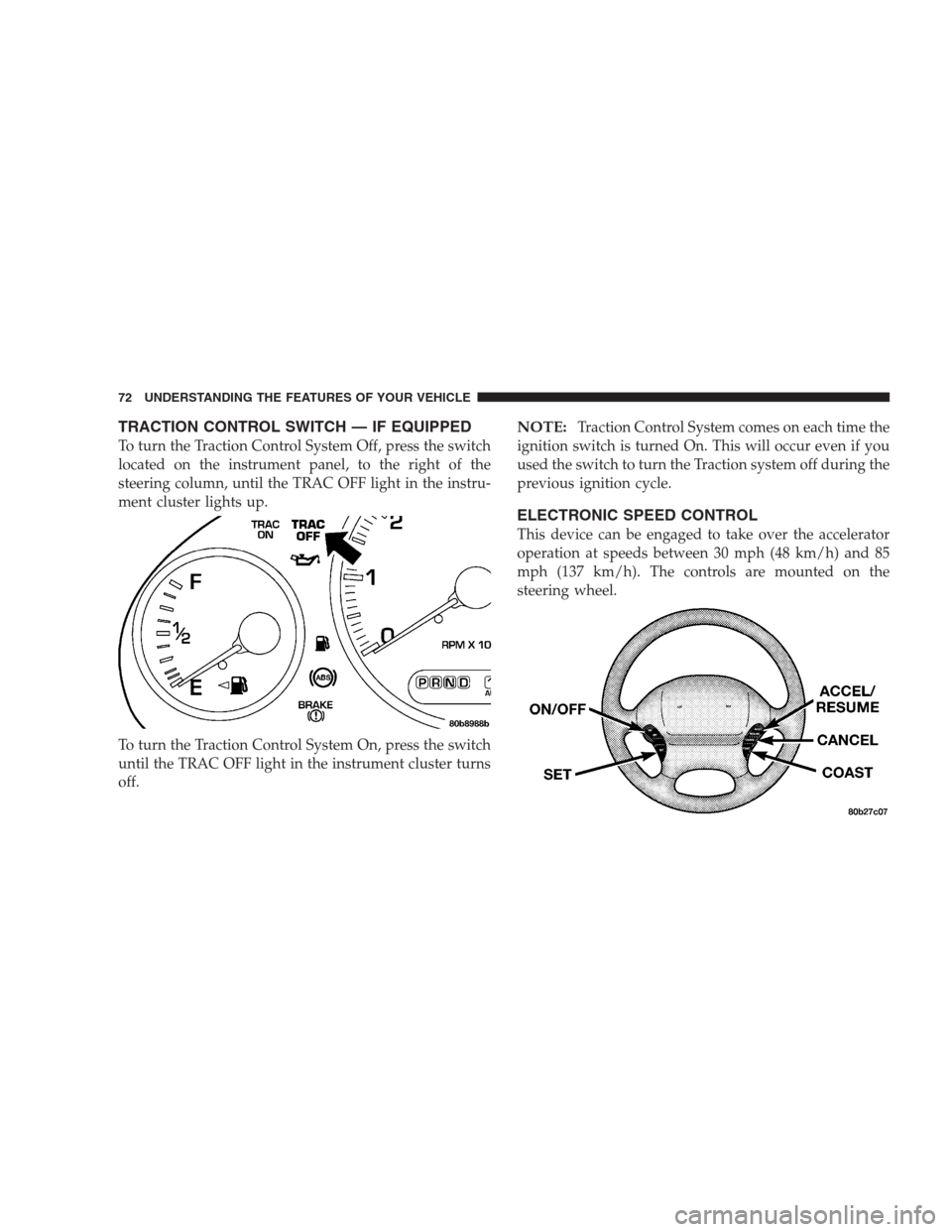
To turn the Traction Control System Off, press the switch
located on the instrument panel, to the right of the
steering column, until the TRAC OFF light in the instru-
ment cluster lights up.
To turn the Traction Control System On, press the switch
until the TRAC OFF light in the instrument cluster turns
off.
NOTE:Traction Control System comes on each time the
ignition switch is turned On. This will occur even if you
used the switch to turn the Traction system off during the
previous ignition cycle.
ELECTRONIC SPEED CONTROL
This device can be engaged to take over the accelerator
operation at speeds between 30 mph (48 km/h) and 85
mph (137 km/h). The controls are mounted on the
steering wheel.
72 UNDERSTANDING THE FEATURES OF YOUR VEHICLE
Page 73 of 273
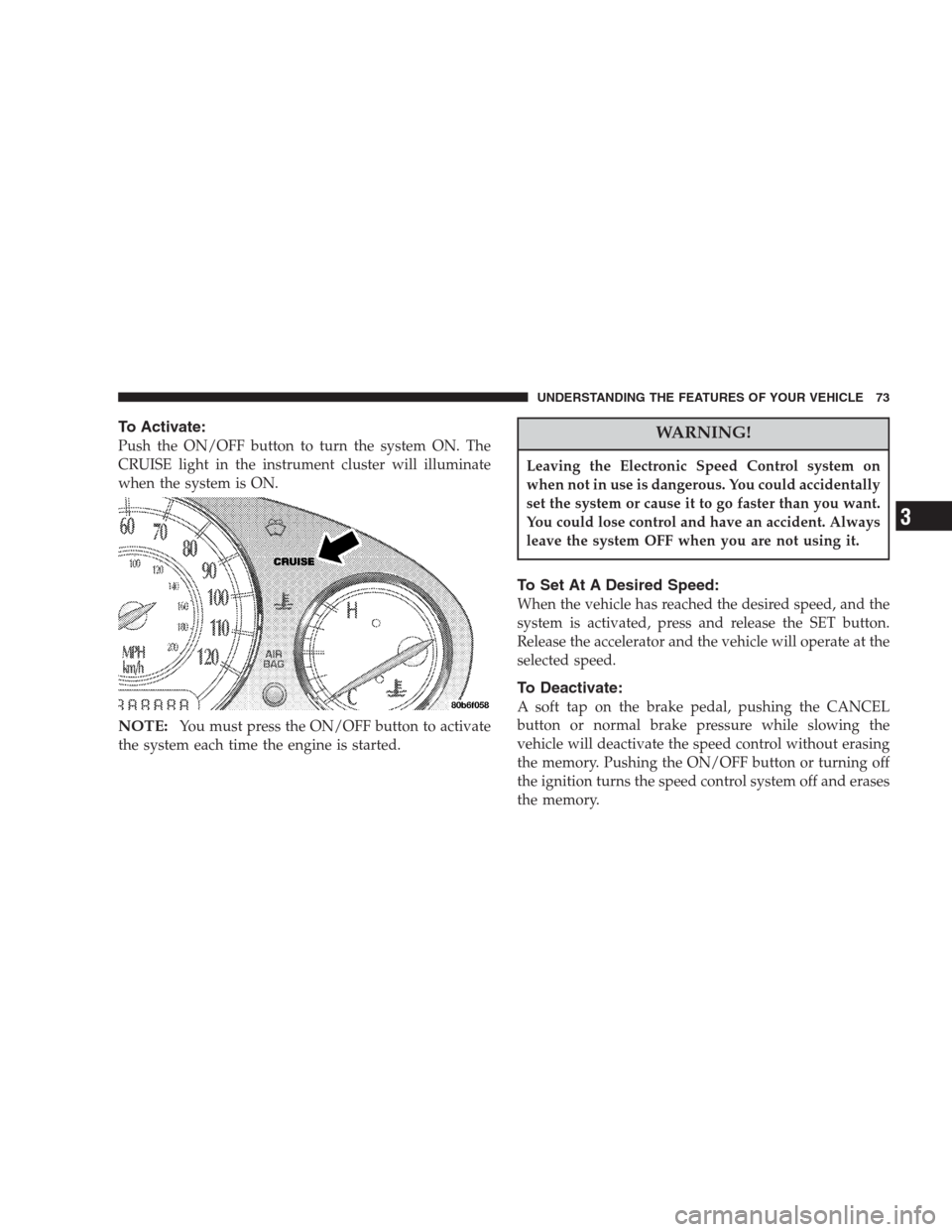
To Activate:
Push the ON/OFF button to turn the system ON. The
CRUISE light in the instrument cluster will illuminate
when the system is ON.
NOTE:You must press the ON/OFF button to activate
the system each time the engine is started.
WARNING!
Leaving the Electronic Speed Control system on
when not in use is dangerous. You could accidentally
set the system or cause it to go faster than you want.
You could lose control and have an accident. Always
leave the system OFF when you are not using it.
To Set At A Desired Speed:
When the vehicle has reached the desired speed, and the
system is activated, press and release the SET button.
Release the accelerator and the vehicle will operate at the
selected speed.
To Deactivate:
A soft tap on the brake pedal, pushing the CANCEL
button or normal brake pressure while slowing the
vehicle will deactivate the speed control without erasing
the memory. Pushing the ON/OFF button or turning off
the ignition turns the speed control system off and erases
the memory.
UNDERSTANDING THE FEATURES OF YOUR VEHICLE 73
3
Page 91 of 273
feature selected. Pressing the STEP button when in this
display will select “Yes” or “No.”
Headlamp Delay
When this feature is selected the driver can choose, when
exiting the vehicle, to have the headlamps remain on for
30, 60, or 90 seconds, or not remain on. Pressing the STEP
button when in this display will select 30, 60, 90, or OFF.
Headlamp On With Wipers (Available with Auto
Headlights Only)
When this feature is selected and the headlight switch
has at least once been moved to the AUTO position, the
headlights will turn on when the wipers are turned on.
The headlights will also turn off when the wipers are
turned off if they were turned on in this way. Pressing the
STEP button when in this display will select “Yes” or
“No.”
NOTE:Turning the headlights on during the daytime
causes the instrument panel lights to dim. To increase the
brightness, refer to “Lights” in this section.
Service Interval
When this feature is selected a service interval between
2,000 (3 200 km) and 6,000 miles (9 600 km) in 500 mile
(800 km) increments may be selected. Pressing the STEP
button when in this display will select distances between
2,000 (3 200 km) and 6,000 miles (9 600 km) in 500 mile
(800 km) increments.
Reset Service Distance (Displays Only if Service
Interval was Changed)
When this feature is selected the current accumulated
service distance can be reset to the newly selected service
interval. Pressing the STEP button when in this display
will select “Yes” or “No.”
Easy Exit Seat
When this feature is selected the driver’s seat moves
rearward two inches (55 mm) or to the farthest rearward
position if this distance is less than two inches (55 mm)
when the key is removed from the ignition switch so that
the driver can more easily exit the vehicle. The seat will
return to the memorized seat location (if REMOTE LINK
TO MEMORY is set to YES) when the remote keyless
entry transmitter is used to unlock the door. Pressing the
UNDERSTANDING THE FEATURES OF YOUR VEHICLE 91
3
Page 94 of 273
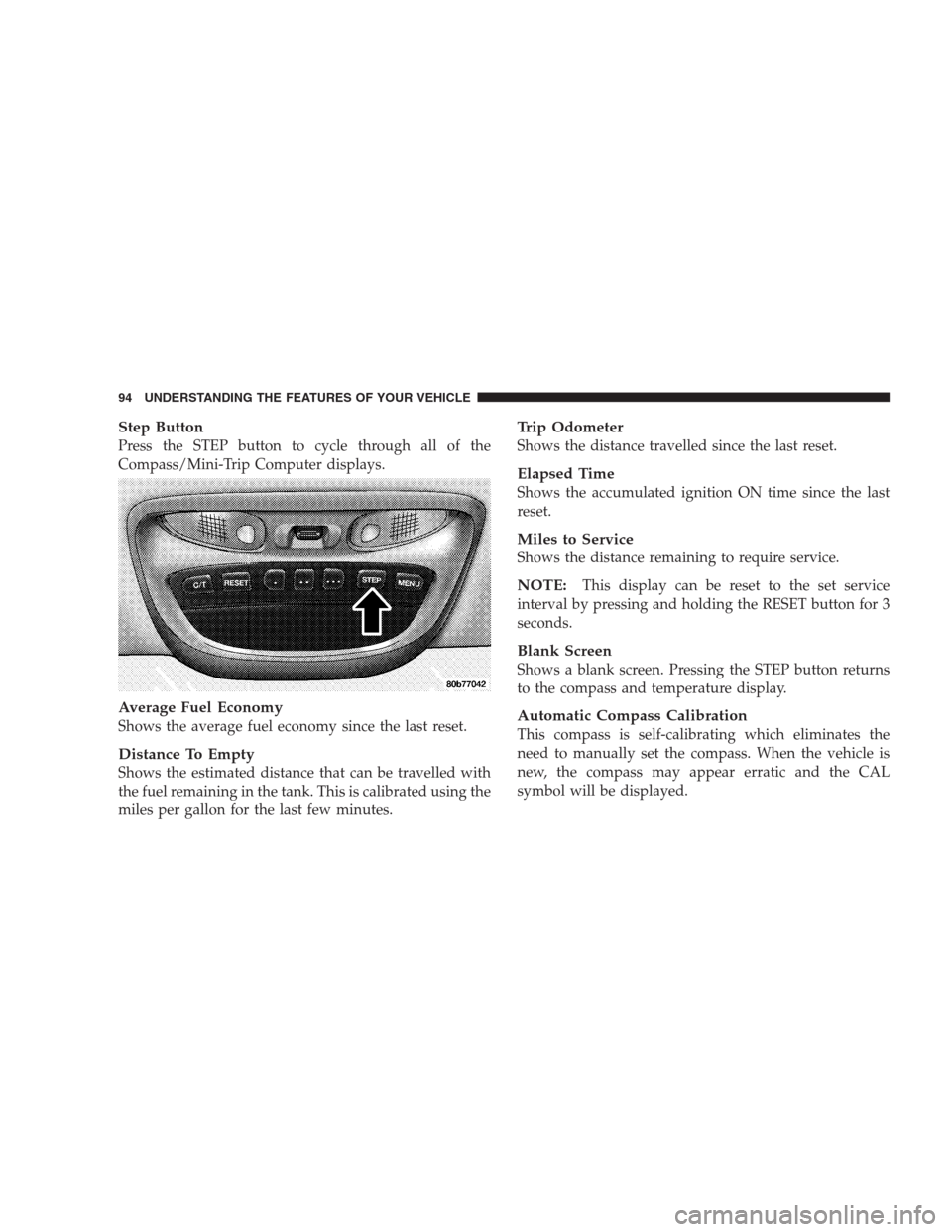
Step Button
Press the STEP button to cycle through all of the
Compass/Mini-Trip Computer displays.
Average Fuel Economy
Shows the average fuel economy since the last reset.
Distance To Empty
Shows the estimated distance that can be travelled with
the fuel remaining in the tank. This is calibrated using the
miles per gallon for the last few minutes.
Trip Odometer
Shows the distance travelled since the last reset.
Elapsed Time
Shows the accumulated ignition ON time since the last
reset.
Miles to Service
Shows the distance remaining to require service.
NOTE:This display can be reset to the set service
interval by pressing and holding the RESET button for 3
seconds.
Blank Screen
Shows a blank screen. Pressing the STEP button returns
to the compass and temperature display.
Automatic Compass Calibration
This compass is self-calibrating which eliminates the
need to manually set the compass. When the vehicle is
new, the compass may appear erratic and the CAL
symbol will be displayed.
94 UNDERSTANDING THE FEATURES OF YOUR VEHICLE
Page 95 of 273
After completing three 360° turns in an area free from
large metal or metallic objects, the CAL symbol will turn
off and the compass will function normally.
Manual Compass Calibration
If the compass appears erratic and the CAL symbol does
not appear, you must manually put the compass into the
“Calibration” mode.
NOTE:To ensure proper compass calibration, make
sure the compass variance is properly set before manu-
ally calibrating the compass (see variance map).
To Put Into a Calibration Mode
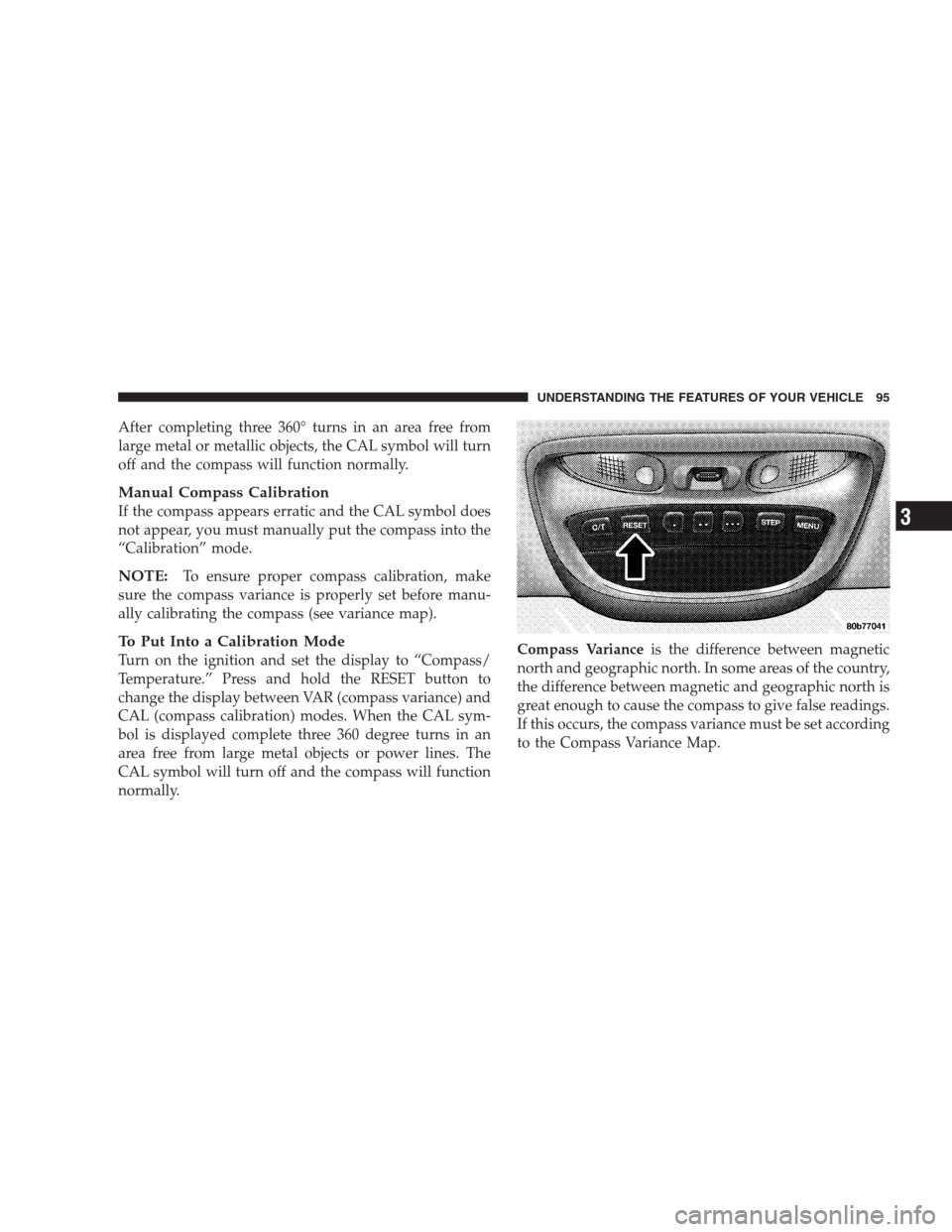
Turn on the ignition and set the display to “Compass/
Temperature.” Press and hold the RESET button to
change the display between VAR (compass variance) and
CAL (compass calibration) modes. When the CAL sym-
bol is displayed complete three 360 degree turns in an
area free from large metal objects or power lines. The
CAL symbol will turn off and the compass will function
normally.Compass Varianceis the difference between magnetic
north and geographic north. In some areas of the country,
the difference between magnetic and geographic north is
great enough to cause the compass to give false readings.
If this occurs, the compass variance must be set according
to the Compass Variance Map.
UNDERSTANDING THE FEATURES OF YOUR VEHICLE 95
3
Page 96 of 273
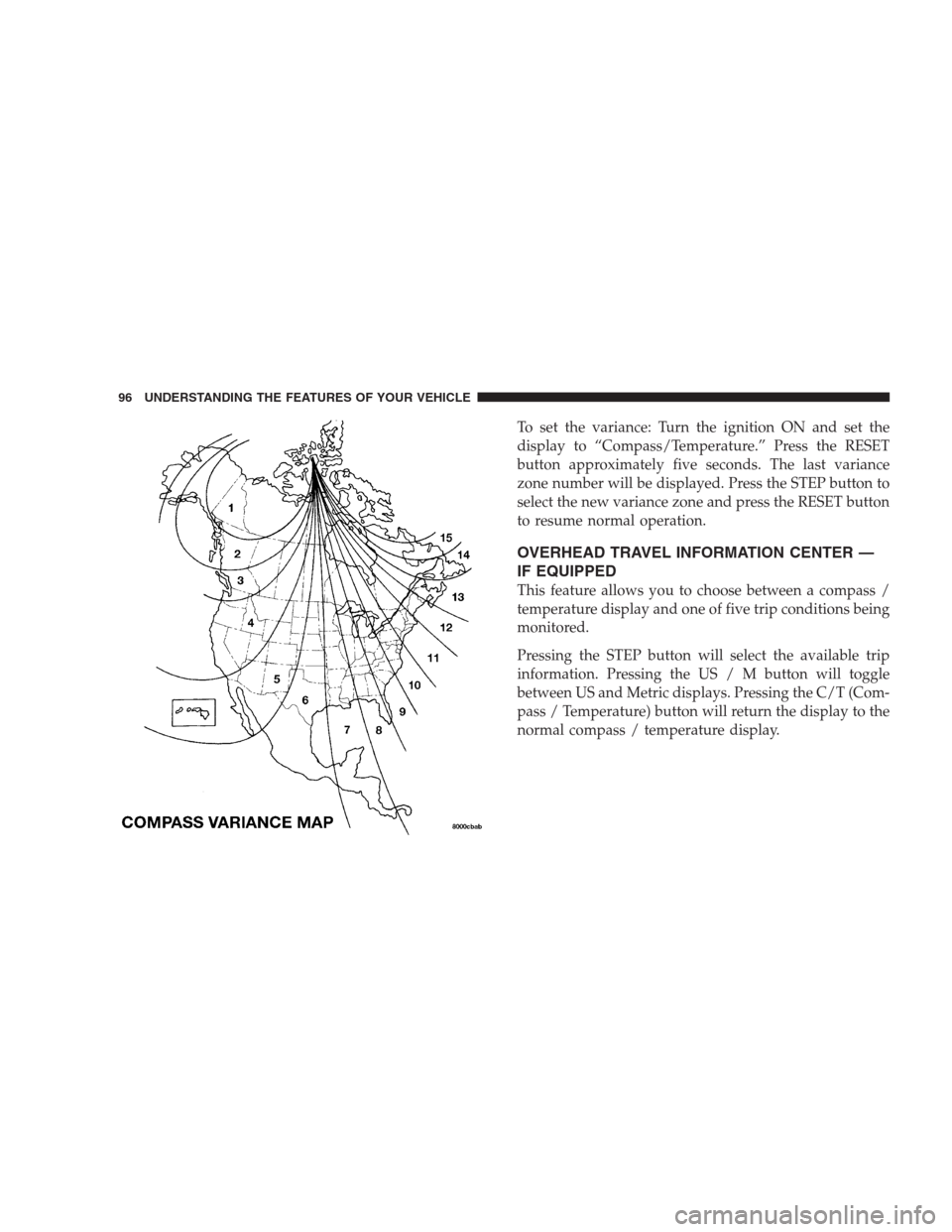
To set the variance: Turn the ignition ON and set the
display to “Compass/Temperature.” Press the RESET
button approximately five seconds. The last variance
zone number will be displayed. Press the STEP button to
select the new variance zone and press the RESET button
to resume normal operation.
OVERHEAD TRAVEL INFORMATION CENTER —
IF EQUIPPED
This feature allows you to choose between a compass /
temperature display and one of five trip conditions being
monitored.
Pressing the STEP button will select the available trip
information. Pressing the US / M button will toggle
between US and Metric displays. Pressing the C/T (Com-
pass / Temperature) button will return the display to the
normal compass / temperature display.
96 UNDERSTANDING THE FEATURES OF YOUR VEHICLE
Page 98 of 273
Trip Odometer (ODO)
This display shows the distance traveled since the last
reset.
Elapsed Time (ET)
This display shows the accumulated ignition ON time
since the last reset.
C/T Button
Use this button to select a readout of the outside tem-
perature and one of eight compass headings that indicate
the direction in which the vehicle is facing.
Compass/Temperature Display
This display provides the outside temperature and one of
eight compass readings to indicate the direction the
vehicle is facing.
Automatic Compass Calibration
The self calibrating feature of the compass eliminates the
need to calibrate the compass for normal conditions.
During a short initial period, the compass may appear
erratic and the CAL symbol will appear on the display.
The CAL symbol may also appear after the vehicle is
subjected to a high level of magnetism. After completingthree 360 turns at about 5 mph (8 km/h) in an area free
from large metal or metallic objects, the CAL symbol will
turn off and the compass will function normally.
Manual Compass Calibration
If the compass appears erratic and the CAL light does not
appear, you must calibrate the compass. Find an open
area away from large metal objects. With the ignition ON
and the compass/temperature displayed, press and hold
the RESET button until the CAL symbol appears (about
10 seconds). Drive slowly (about 5 mph) (8 km/h) in 3
complete 360 circles. The CAL light will turn off and the
compass will be calibrated.
Variance is the difference between magnetic North and
geographic North. For proper compass function, the
correct variance zone must be set. Refer to the variance
map for the correct variance zone. To check the variance
zone, the ignition must be on and the compass/
temperature displayed. Press and hold the RESET button
for about 5 seconds until VAR appears in the display. The
number displayed is the variance zone used by the
compass. To change the zone, press the STEP button to
98 UNDERSTANDING THE FEATURES OF YOUR VEHICLE