ignition CHRYSLER CONCORDE 2004 2.G Owner's Guide
[x] Cancel search | Manufacturer: CHRYSLER, Model Year: 2004, Model line: CONCORDE, Model: CHRYSLER CONCORDE 2004 2.GPages: 273, PDF Size: 6 MB
Page 100 of 273
Outside Temperature
Because engine temperature can increase the displayed
temperature, temperature readings are slowly updated
when vehicle speed is below 20 mph (30 km/h).
ELECTRCAL POWER OUTLET
Your vehicle is equipped with one power outlet which is
located in the forward portion of the center console if
your vehicle has bucket seats or in the lower center of the
instrument panel if your vehicle has bench or split bench
seats. Accessories powered through this outlet are pro-
tected by a 15 amp fuse. The outlet may be converted to
a cigar lighter by installing the dealer obtained smoker’s
package. The outlet is operated by the ignition switch,
when in the “run” or “acc” positions only. You may
convert the outlet from ignition to battery power by
performing the following:
•Remove the fuse cover from the left end of the
instrument panel (see the paragraph on fuses in sec-
tion 7 of this manual.)
•Remove fuse #6 (its on the upper right of the fuse
block) from its “IGN” position.
•Move the fuse slightly right and insert it in the fuse #6
“BAT” location in the fuse block.
•Reinstall the fuse cover.
100 UNDERSTANDING THE FEATURES OF YOUR VEHICLE
Page 109 of 273
INSTRUMENT CLUSTER DESCRIPTION
1. Fuel Gauge
When the ignition is in the ON position, the
pointer will show the level of fuel remaining in
the tank.
2. Low Fuel Warning Light
When the fuel level drops to about 2 gallons (8
liters), the Low Fuel symbol will light and re-
main lit until fuel is added. A warning chime will
sound when the light comes on.
3. Low Oil Pressure Light
This light indicates low engine oil pressure. The
light should come on briefly as a bulb check
when the engine is first started. If the light stays on or
comes on while driving, stop the vehicle and shut off
the engine. DO NOT operate the vehicle until the
cause is corrected.This light does not show how
much oil is in the engine.The engine oil level must be
checked under the hood.4. TRAC ON/OFF Lights
The Traction Control On light (TRAC ON) will come on
momentarily as a bulb check when the ignition switch is
first turned ON. If the light does not come on, have the
bulb replaced.
The TRAC ON light also will come on when the system
is controlling traction.
The Traction Control Off light (TRAC OFF) will come on
momentarily as a bulb check when the ignition switch is
first turned ON. If the TRAC OFF light does not come on,
have the bulb checked.
The TRAC OFF light will also come on when the Traction
Control switch has been used to turn the system off.
5. Trunk Ajar Light
This light indicates that the trunk is not latched
6. Tachometer
Measures engine revolutions-per-minute (RPM). The red
numbers at the end on the scale show the maximum
permissible RPM’s. Ease off on the accelerator before
reaching the red area.
UNDERSTANDING YOUR INSTRUMENT PANEL 109
4
Page 110 of 273
7. Turn Signal Indicators
The arrow will flash in unison with the exterior
turn signal, when using the turn signal lever.
8. High Beam Indicator
This light shows that the headlights are on high
beam. Pull the turn signal lever towards the
steering wheel to switch the headlights from high or
low beam.
9. Seat Belt Reminder Light
The light will come on after the ignition is
turned on. The light will remain lit until the
seatbelt is fastened.
10. Door Ajar Light
This light shows that a door is not completely
closed. A warning chime will sound if the vehicle
is moving with a door partially closed.
11. Speedometer
Shows vehicle speed in miles-per-hour or kilometers-per-
hour.
12. Low Washer Fluid Light
This symbol will light whenever the fluid reser-
voir is less than 1/4 filled. Adding washer fluid
will cause the light to go out the next time the
ignition is cycled. A warning chime will sound when
the light comes on.
13. Cruise (Speed Control) Light
This light shows that the Speed Control System is ON.
14. Engine Coolant Temperature Light
This light warns of an overheated engine cool-
ant condition. A warning chime will sound
when the light comes on.
15. Engine Coolant Temperature Gauge
The temperature gauge shows engine coolant
temperature. Any reading within the 5 gauge
marks between Hot and Cold shows that the
cooling system is operating properly. The gauge
pointer may show a higher than normal temperature
when driving in hot weather, up mountain grades, in
heavy stop and go traffic, or when towing a trailer.
110 UNDERSTANDING YOUR INSTRUMENT PANEL
Page 111 of 273
If the pointer rises to the “H” mark, stop the vehicle and
turn off the engine until the problem is corrected.
There are steps that you can take to slow down an
impending overheat condition. If your air conditioning is
on, turn it off. The air conditioning system adds heat to
the engine cooling system and turning off the A/C
removes this heat. You can also turn the Temperature
control to maximum heat, the Mode control to Floor and
the Fan control to High. This allows the heater core to act
as a supplement to the radiator and aids in removing heat
from the engine cooling system.
16. Malfunction Indicator Light
This light is part of an onboard diagnostic
system called OBD that monitors engine and
automatic transmission control systems. The
light will illuminate when the key is in the ON
position before engine start. If the bulb does not come
on when turning the key from OFF to ON, have the
condition checked promptly.
Certain conditions such as a loose or missing gas cap or
poor fuel quality may illuminate the light after engine
start. The vehicle should be serviced if the light stays onthrough several of your typical driving cycles. In most
situations the vehicle will drive normally and will not
require towing.
The Malfunction Indicator Light flashes to alert to serious
conditions that could lead to immediate loss of power or
severe catalytic converter damage. The vehicle should be
serviced as soon as possible if this occurs.
17. Trip Odometer Reset Knob
To reset the trip odometer, push the reset knob for about
two seconds.
18. Airbag Light
The light will come on and remain on for 6 to 8
seconds as a bulb check when the ignition switch
is first turned ON. If the bulb is not lit during starting,
have it replaced. If the light stays on, or comes on
while driving, have the system checked by an autho-
rized dealer.
19. Odometer/Trip Odometer
Shows the total distance the vehicle has been driven.
U.S. Federal regulations require that upon transfer of
vehicle ownership, the seller certify to the purchaser the
UNDERSTANDING YOUR INSTRUMENT PANEL 111
4
Page 112 of 273
correct mileage that the vehicle has been driven. There-
fore, if the odometer reading is changed during repair or
replacement, be sure to keep a record of the reading
before and after the service so that the correct mileage can
be determined.
The Trip Odometer shows individual trip mileage and is
accessed by pressing the reset button.
20. Charging System Light
This light shows the status of the electrical
charging system. The light should come on
briefly when the ignition is first turned on and remain
on briefly as a bulb check. If the light stays on or
comes on while driving, turn off some of the vehicle’s
electrical devices, such as the Fog Lights or Rear
Defroster. If the Charging System Light remains on, it
means that the vehicle is experiencing a problem with
the charging system and should be serviced immedi-
ately. See your local authorized dealer.
21. Transmission Range Indicator
This indicator illuminates to show the automatic trans-
mission gear selection.
22. ABS Light
This light monitors the Anti-Lock Brake system
described elsewhere in this manual. The yellow
ABS light will come on when the ignition key is turned
to the ON position and may stay on for several
seconds. If the ABS light does not come on have the
system checked by an authorized dealer.
If the ABS light remains on or comes on while driving, it
indicates that the Anti-Lock portion of the brake system
is not functioning and that service is required, however,
the conventional brake system will continue to operate
normally if the red BRAKE warning light is not on. A
warning chime will sound when the light comes on.
If the ABS light is on, the brake system should be serviced
as soon as possible to restore the benefits of Anti-Lock
brakes.
23. Brake System Warning Light
The dual brake system provides a reserve
braking capability if a failure occurs in a
portion of the hydraulic system.
112 UNDERSTANDING YOUR INSTRUMENT PANEL
Page 113 of 273
This light monitors both the brake fluid level and the
parking brake. If the light comes on, it indicates either
that the parking brake is on or there is a low fluid level in
the brake master cylinder. On vehicles equipped with
anti-lock brakes (ABS), the brake light may also indicate
reduced braking performance. If the parking brake is off
and the light remains on, have the brake system in-
spected as soon as possible.
The light will also come on when the parking brake is
applied with the ignition in the RUN position.
The warning light should be checked frequently to assure
that it is operating properly. This can be done by turning
the ignition switch to START. The light should come on.
If the red brake light does not come on, have the system
checked by an authorized dealer.
WARNING!
Driving a vehicle with the brake light on is danger-
ous. Part of the brake system may have failed. It will
take longer to stop the vehicle. You could have an
accident. Have the vehicle checked immediately.
NOTE:This light shows only that the parking brake is
on. It does not show the degree of brake application.
In an ABS equipped vehicle, the Brake System Warning
light will come on if the ABS light is not functioning or if
the ABS system is not communicating.
SETTING THE ANALOG CLOCK—IF EQUIPPED
To set the analog clock at the top center of the instrument
panel, press and hold the plus (+) or minus (-) buttons
until the setting is correct.
ELECTRONIC DIGITAL CLOCK
When the radio is on, pressing the TIME button will
allow you to select between displaying actual time con-
tinuously or information related to the mode which the
radio is in (i.e. in Radio mode, the radio frequency is
displayed.)
In the Concorde Limited only, when the radio is off, time
will not be displayed unless the TIME button is pressed,
and then the time will only be displayed for 5 seconds.
This function will operate with the ignition switch in
either the on or off positions.
UNDERSTANDING YOUR INSTRUMENT PANEL 113
4
Page 114 of 273
If your vehicle is a Concorde Limited, you can ask your
dealer to enable the digital clock to be displayed continu-
ously when the radio is off and the ignition switch is on.
Clock Setting Procedure
1. Turn the ignition switch to the ON or ACC position.
Using the point of a ballpoint pen or similar object, press
either the hour (H) or minute (M) buttons on the radio.
The display will show TIME.
2. Press the H button to set hours or the M button to set
minutes. The time setting will increase each time you
press a button.
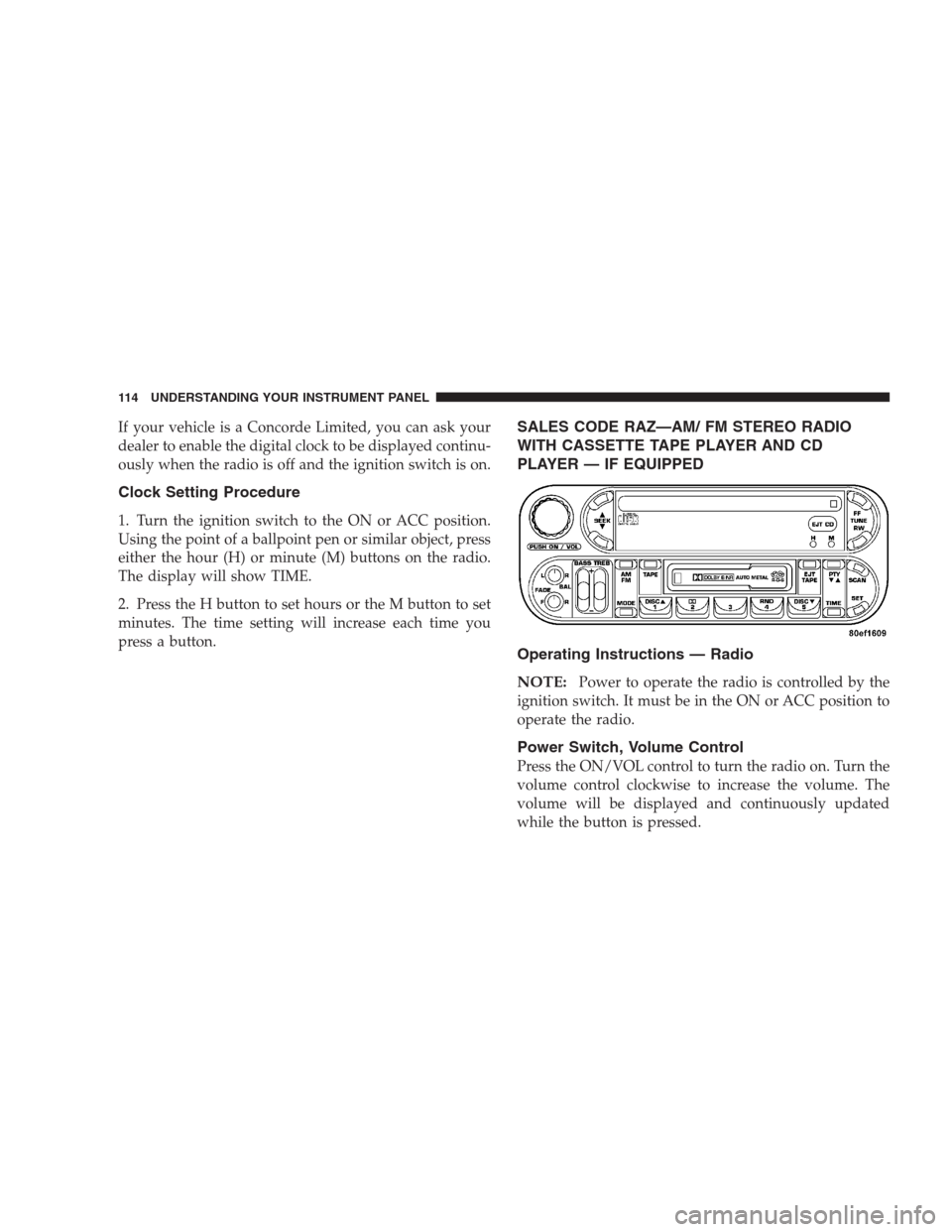
SALES CODE RAZ—AM/ FM STEREO RADIO
WITH CASSETTE TAPE PLAYER AND CD
PLAYER — IF EQUIPPED
Operating Instructions — Radio
NOTE:
Power to operate the radio is controlled by the
ignition switch. It must be in the ON or ACC position to
operate the radio.
Power Switch, Volume Control
Press the ON/VOL control to turn the radio on. Turn the
volume control clockwise to increase the volume. The
volume will be displayed and continuously updated
while the button is pressed.
114 UNDERSTANDING YOUR INSTRUMENT PANEL
Page 118 of 273
Seek Button
Press the SEEK button up for the next selection on the
tape and down to return to the beginning of the current
selection.
Press the SEEK button up or down to move the track
number to skip forward or backward 1 to 6 selections.
Press the SEEK button once to move 1 selection, twice to
move 2 selections, etc.
Fast Forward (FF)
Press the FF button up momentarily to advance the tape
in the direction that it is playing. The tape will advance
until the button is pressed again or the end of the tape is
reached. At the end of the tape, the tape will play in the
opposite direction.
Rewind (RW)
Press the RW button momentarily to reverse the tape
direction. The tape will reverse until the button is pressed
again or until the end of the tape is reached. At the end of
the tape, the tape will play in the opposite direction.
Tape Eject
Press the EJT Tape button and the cassette will disengage
and eject from the radio.
Scan Button
Press this button to play 10 seconds of each selection.
Press the scan button a second time to cancel the feature.
Changing Tape Direction
If you wish to change the direction of tape travel (side
being played), press the PTY button. The lighted arrow in
the display window will show the new direction.
Metal Tape Selection
If a standard metal tape is inserted into the player, the
player will automatically select the correct equalization
and the 70 symbol will appear in the display window.
Pinch Roller Release
If ignition power or the radio ON/OFF switch are turned
off, the pinch roller will automatically retract to protect
the tape from any damage. When power is restored to the
tape player, the pinch roller will automatically reengage
and the tape will resume play.
118 UNDERSTANDING YOUR INSTRUMENT PANEL
Page 119 of 273
Noise Reduction
The Dolby Noise Reduction System* is on whenever the
tape player is on, but may be switched off.
To turn off the Dolby Noise reduction System: Press the
Dolby button (button 2) after you insert the tape. The NR
light in the display will go off when the Dolby System is
off. The Dolby System is automatically reactivated each
time a tape is inserted.
* ”Dolby” noise reduction manufactured under license
from Dolby Laboratories Licensing Corporation. Dolby
and the double-D symbol are trademarks of Dolby Labo-
ratories Licensing Corporation.
Operating Instructions — CD Player
NOTE:
The ignition switch must be in the ON or ACC
position and the volume control ON before the CD player
will operate.
Inserting The Compact Disc
The CD player contained within the radio is not a
multi-disc changer, and will only accept one CD. Gently
insert one CD into the CD player with the CD label facingup. The CD will automatically be pulled into the CD
Player.
If the volume control is ON, the unit will switch from
radio to CD mode and begin to play. The display will
show the track number and index time in minutes and
seconds. Play will begin at the start of track one.
NOTE:
•
You may eject a disc with the radio OFF. The ignition
switch must be in the ON or ACC position to insert a
disc with the radio OFF.
•If you insert a disc with the ignition ON and the radio
OFF, the CD will automatically be pulled into the CD
Player and the display will show the time of day. If
you insert a disc with the ignition OFF, the display will
show the time of day for about 5 seconds, then go out.
Seek Button
Press the top of the SEEK button for the next selection on
the CD. Press the bottom of the button to return to the
beginning of the current selection, or return to the
beginning of the previous selection if the CD is within the
first 10 seconds of the current selection.
UNDERSTANDING YOUR INSTRUMENT PANEL 119
4
Page 121 of 273
Tape CD Button
Press this button to select between CD player and Tape
player.
Time Button
Press this button to change the display from elapsed CD
playing time to time of day.
Scan Button
Press this button to play the first 10 seconds of each track.
To stop the scan function, press the button a second time.
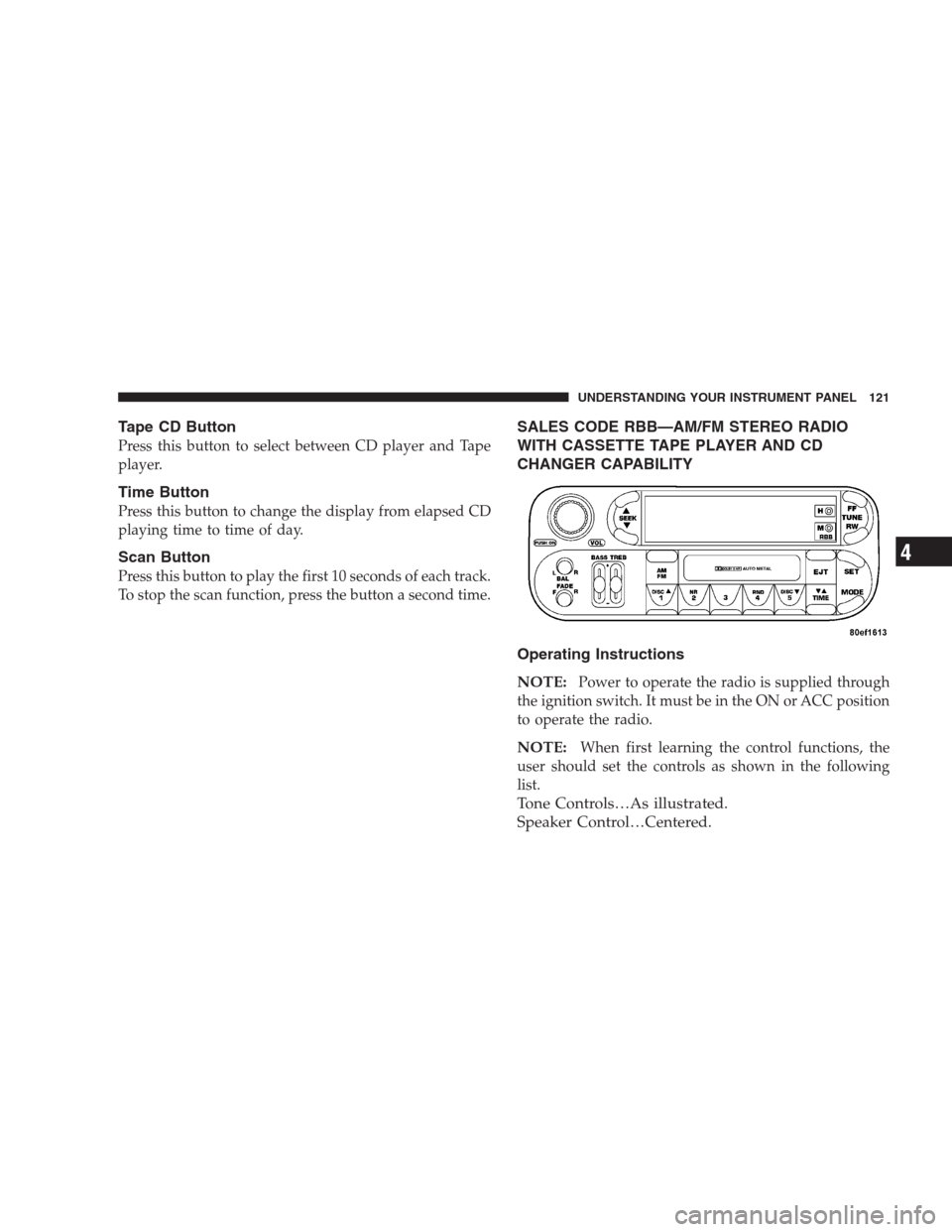
SALES CODE RBB—AM/FM STEREO RADIO
WITH CASSETTE TAPE PLAYER AND CD
CHANGER CAPABILITY
Operating Instructions
NOTE:
Power to operate the radio is supplied through
the ignition switch. It must be in the ON or ACC position
to operate the radio.
NOTE:When first learning the control functions, the
user should set the controls as shown in the following
list.
Tone Controls…As illustrated.
Speaker Control…Centered.
UNDERSTANDING YOUR INSTRUMENT PANEL 121
4