U connect CHRYSLER PACIFICA 2020 Workshop Manual
[x] Cancel search | Manufacturer: CHRYSLER, Model Year: 2020, Model line: PACIFICA, Model: CHRYSLER PACIFICA 2020Pages: 516, PDF Size: 28.69 MB
Page 226 of 516
224STARTING AND OPERATING
PARK and the ENGINE START/STOP button
is pushed once, the instrument cluster will
display a “Vehicle Not In Park” message and
the engine will remain running. Never leave
a vehicle out of the PARK position, or it
could roll.
NOTE:
If the ignition switch is left in the ACC or RUN
(engine not running) position and the transmis -
sion is in PARK, the system will automatically
time out after 30 minutes of inactivity and the
ignition will switch to the OFF position.
ENGINE BLOCK HEATER — IF EQUIPPED
The engine block heater warms the engine and
permits quicker starts in cold weather.
Connect the cord to a 110-115 Volt AC electrical
outlet with a grounded, three-wire extension
cord.
For ambient temperatures below 0°F (-18°C),
the engine block heater is recommended. For
ambient temperatures below -20°F (-29°C),
the engine block heater is required. The engine block heater cord is routed under
the hood, behind to the passenger’s side
headlamp. Follow the steps below to properly
use the engine block heater:
1. Locate the engine block heater cord
(behind the passenger’s side headlamp).
2. Undo the hook-and-loop strap that secures the heater cord in place.
3. Pull the cord to the front of the vehicle and plug it into a grounded, three-wire extension
cord.
4. After the vehicle is running, reattach the cord to the hook-and-loop strap and
properly stow away behind the passenger’s
side headlamp.
NOTE:
The engine block heater cord is a factory
installed option. If your vehicle is not
equipped, heater cords are available from an
authorized Mopar dealer.
The engine block heater will require 110
Volts AC and 6.5 Amps to activate the heater
element.
The engine block heater must be plugged in
at least one hour to have an adequate
warming effect on the engine.
ENGINE BREAK-IN RECOMMENDATIONS
A long break-in period is not required for the
engine and drivetrain (transmission and axle) in
your vehicle.
Drive moderately during the first 300 miles
(500 km). After the initial 60 miles (100 km),
speeds up to 50 or 55 mph (80 or 90 km/h) are
desirable.
WARNING!
Remember to disconnect the engine block
heater cord before driving. Damage to the
110-115 Volt electrical cord could cause
electrocution.
20_RU_OM_EN_US_t.book Page 224
Page 227 of 516
STARTING AND OPERATING225
While cruising, brief full-throttle acceleration
within the limits of local traffic laws contributes
to a good break-in. Wide-open throttle
acceleration in low gear can be detrimental and
should be avoided.
The engine oil installed in the engine at the
factory is a high-quality energy conserving type
lubricant. Oil changes should be consistent with
anticipated climate conditions under which
vehicle operations will occur. For the
recommended viscosity and quality grades,
refer to “Dealer Service” in “Servicing And
Maintenance”.
NOTE:
A new engine may consume some oil during its
first few thousand miles (kilometers) of opera -
tion. This should be considered a normal part of
the break-in and not interpreted as a problem.PARK BRAKE
Electric Park Brake (EPB)
Your vehicle is equipped with an Electric Park
Brake System (EPB) that offers simple
operation, and some additional features that
make the park brake more convenient and
useful.
The park brake is primarily intended to prevent
the vehicle from rolling while parked. Before
leaving the vehicle, make sure that the park
brake is applied. Also, be certain to leave the
transmission in PARK.
You can engage the park brake in two ways;
Manually, by applying the park brake switch.
Automatically, by enabling the Auto Park
Brake feature in the customer programmable
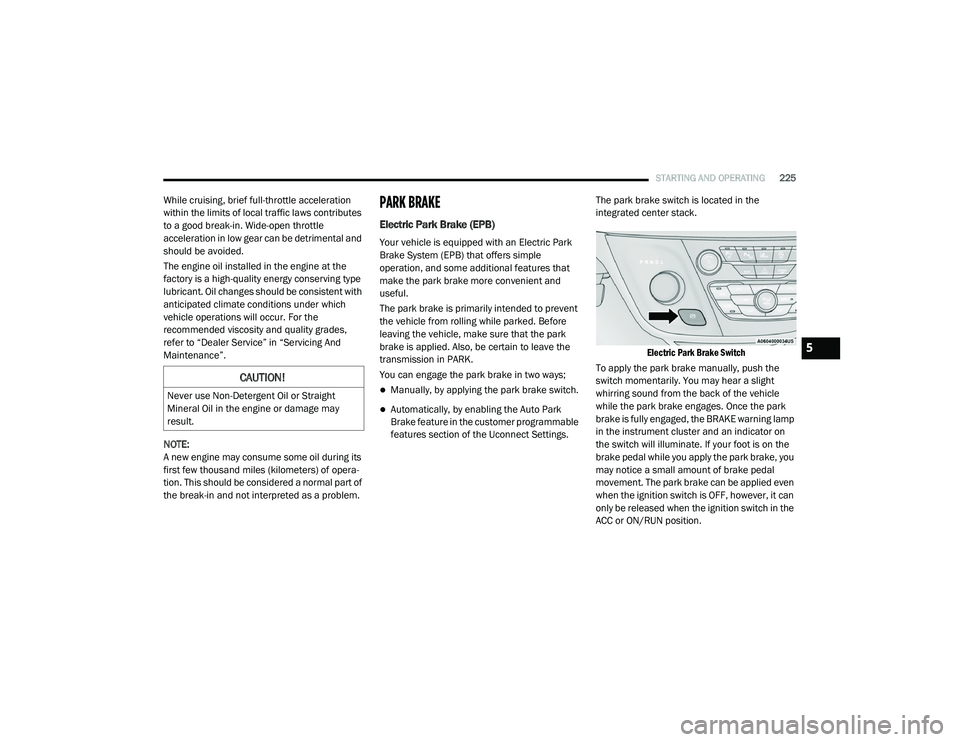
features section of the Uconnect Settings. The park brake switch is located in the
integrated center stack.
Electric Park Brake Switch
To apply the park brake manually, push the
switch momentarily. You may hear a slight
whirring sound from the back of the vehicle
while the park brake engages. Once the park
brake is fully engaged, the BRAKE warning lamp
in the instrument cluster and an indicator on
the switch will illuminate. If your foot is on the
brake pedal while you apply the park brake, you
may notice a small amount of brake pedal
movement. The park brake can be applied even
when the ignition switch is OFF, however, it can
only be released when the ignition switch in the
ACC or ON/RUN position.
CAUTION!
Never use Non-Detergent Oil or Straight
Mineral Oil in the engine or damage may
result.
5
20_RU_OM_EN_US_t.book Page 225
Page 229 of 516
STARTING AND OPERATING227
If exceptional circumstances should make it
necessary to engage the park brake while the
vehicle is in motion, push on the electric park
brake switch for as long as engagement is
desired. The BRAKE warning lamp will
illuminate, and a continuous chime will sound.
The rear stop lamps will also be illuminated
automatically while the vehicle remains in
motion. To disengage the park brake while the vehicle is
in motion, release the switch. If the vehicle is
brought to a complete stop using the park
brake, when the vehicle reaches approximately
3 mph (4.8 km/h), the park brake will remain
engaged.
In the unlikely event of a malfunction of the
Electric Park Brake system, a yellow EPB fault
lamp will illuminate. This may be accompanied
by the BRAKE warning lamp flashing. In this
case, urgent service of the electric park brake
system is required. Do not rely on the park
brake to hold the vehicle stationary.
Auto Park Brake
The Electric Park Brake can be programmed to
be applied automatically whenever the vehicle
is at a standstill and the automatic transmission
is placed in PARK. Auto Park Brake is enabled
and disabled by customer selection through the
“Customer Programmable Features” section of
the “Uconnect Settings”.
SafeHold
SafeHold is a safety feature of the Electric Park
Brake System that will engage the park brake
automatically if the vehicle is left unsecured. If
the automatic transmission is not in PARK, the
seat belt is unbuckled, the driver door is open,
the vehicle is at a standstill, and there is no
attempt to depress the brake pedal or
accelerator pedal, the park brake will
automatically engage to prevent the vehicle
from rolling.
SafeHold can be temporarily bypassed by
pushing the Electric Park Brake Switch while the
driver door is open and brake pedal is pressed.
Once manually bypassed, SafeHold will be
enabled again once the vehicle reaches
12 mph (20 km/h) or the ignition is cycled to
the OFF position and back to ON again.
Brake Service Mode
We recommend having your brakes serviced by
an authorized dealer. You should only make
repairs for which you have the knowledge and
the right equipment. You should only enter
Brake Service Mode during brake service.
When servicing your rear brakes, it may be
necessary for you or your technician to push the
rear piston into the rear caliper bore. With the
Driving the vehicle with the parking brake
engaged, or repeated use of the parking
brake to slow the vehicle may cause
serious damage to the brake system.
CAUTION!
If the Brake System Warning Light remains on
with the parking brake released, a brake
system malfunction is indicated. Have the
brake system serviced by an authorized
dealer immediately.
WARNING!
(Continued)
5
20_RU_OM_EN_US_t.book Page 227
Page 230 of 516
228STARTING AND OPERATING
(Continued)
(Continued)
Electric Park Brake system, this can only be
done after retracting the Electric Park Brake
actuator. Fortunately, actuator retraction can
be done easily by entering the “Brake Service”
through the “Uconnect Settings” in your vehicle.
This menu based system will guide you through
the steps necessary to retract the EPB actuator
in order to perform rear brake service.
Brake Service Mode has requirements that
must be met in order to be activated:
The vehicle must be at a standstill.
The park brake must be unapplied.
The transmission must be in PARK or
NEUTRAL.
While in service mode, the Electric Park Brake
fault lamp will flash continuously while the
ignition switch is ON.
When brake service work is complete, the
following steps must be followed to reset the
parking brake system to normal operation:
Ensure the vehicle is at a standstill.
Press the brake pedal with moderate force.
Apply the Electric Park Brake Switch.
AUTOMATIC TRANSMISSION
WARNING!
You can be badly injured working on or
around a motor vehicle. Do only that service
work for which you have the knowledge and
the right equipment. If you have any doubt
about your ability to perform a service job,
take your vehicle to a competent mechanic.
WARNING!
Never use the PARK position as a substi -
tute for the parking brake. Always apply the
parking brake fully when exiting the vehicle
to guard against vehicle movement and
possible injury or damage.
Your vehicle could move and injure you and
others if it is not in PARK. Check by trying to
move the transmission gear selector out of
PARK with the brake pedal released. Make
sure the transmission is in PARK before
exiting the vehicle.
The transmission may not engage PARK if
the vehicle is moving. Always bring the
vehicle to a complete stop before shifting to
PARK, and verify that the transmission gear
position indicator solidly indicates PARK (P)
without blinking. Ensure that the vehicle is
completely stopped, and the PARK position
is properly indicated, before exiting the
vehicle.
It is dangerous to shift out of PARK or
NEUTRAL if the engine speed is higher than
idle speed. If your foot is not firmly pressing
the brake pedal, the vehicle could accel -
erate quickly forward or in reverse. You
could lose control of the vehicle and hit
someone or something. Only shift into gear
when the engine is idling normally and your
foot is firmly pressing the brake pedal.
WARNING! (Continued)
20_RU_OM_EN_US_t.book Page 228
Page 256 of 516
254STARTING AND OPERATING
PARKSENSE REAR PARK ASSIST — IF
EQUIPPED
The ParkSense Rear Park Assist system
provides visual and audible indications of the
distance between the rear fascia and a
detected obstacle when backing up (e.g. during
a parking maneuver). If your vehicle is equipped
with an Automatic Transmission, the vehicle
brakes may be automatically applied and
released when performing a reverse parking
maneuver if the system detects a possible
collision with an obstacle.
NOTE:
The driver can override the automatic
braking function by pressing the gas pedal,
turning ParkSense off via ParkSense switch,
or changing the gear while the automatic
brakes are being applied.
Automatic brakes will not be available if ESC
is not available.
Automatic brakes will not be available if there
is a faulted condition detected with the Park -
Sense Park Assist system or the Braking
System Module.
The automatic braking function may not provide
enough vehicle deceleration to avoid colliding
with a detected obstacle depending on vehicle
speed, road conditions, and brake capability.
The automatic braking function may not be
applied fast enough for moving obstacles that
approach the rear of the vehicle from the left
and/or right sides.
The automatic braking function can be
enabled/disabled from the Customer-Program -
mable Features section of the Uconnect
System.
ParkSense will retain its last known configura -
tion state for the automatic braking function
through ignition cycles.
The automatic braking function is intended to
assist the driver in avoiding possible collisions
with detected obstacles when backing up in
REVERSE gear.
NOTE:
The driver is always responsible for
controlling the vehicle.
The system is provided to assist the driver
and not to substitute the driver.
The driver must stay in full control of the
vehicle's acceleration and braking and is
responsible for the vehicle's movements.
Refer to “ParkSense System Usage
Precautions” for limitations of this system and
recommendations.
ParkSense will retain the last system state
(enabled or disabled) from the last ignition cycle
when the ignition is changed to the ON/RUN
position.
ParkSense can be active only when the gear
selector is in REVERSE. If ParkSense is enabled
at this gear selector position, the system will
remain active until the vehicle speed is
increased to approximately 7 mph (11 km/h) or
above. When in REVERSE and above the
system's operating speed, a warning will appear
within the instrument cluster display indicating
the vehicle speed is too fast. The system will
become active again if the vehicle speed is
decreased to speeds less than approximately
6 mph (9 km/h).
20_RU_OM_EN_US_t.book Page 254
Page 257 of 516
STARTING AND OPERATING255
ParkSense Sensors
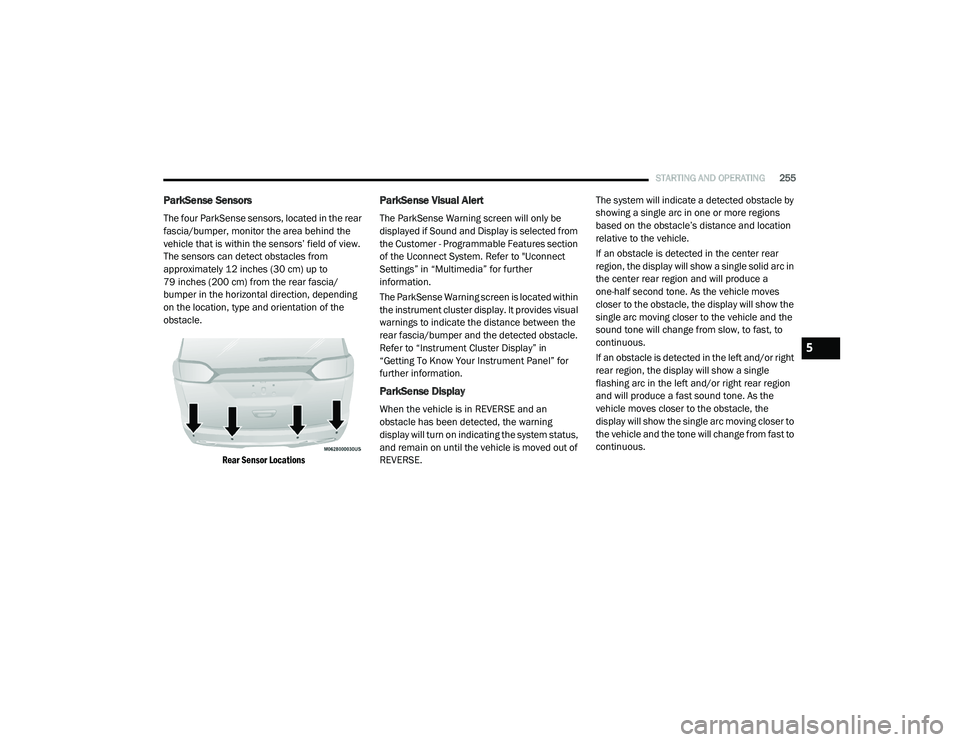
The four ParkSense sensors, located in the rear
fascia/bumper, monitor the area behind the
vehicle that is within the sensors’ field of view.
The sensors can detect obstacles from
approximately 12 inches (30 cm) up to
79 inches (200 cm) from the rear fascia/
bumper in the horizontal direction, depending
on the location, type and orientation of the
obstacle.
Rear Sensor Locations
ParkSense Visual Alert
The ParkSense Warning screen will only be
displayed if Sound and Display is selected from
the Customer - Programmable Features section
of the Uconnect System. Refer to "Uconnect
Settings” in “Multimedia” for further
information.
The ParkSense Warning screen is located within
the instrument cluster display. It provides visual
warnings to indicate the distance between the
rear fascia/bumper and the detected obstacle.
Refer to “Instrument Cluster Display” in
“Getting To Know Your Instrument Panel” for
further information.
ParkSense Display
When the vehicle is in REVERSE and an
obstacle has been detected, the warning
display will turn on indicating the system status,
and remain on until the vehicle is moved out of
REVERSE. The system will indicate a detected obstacle by
showing a single arc in one or more regions
based on the obstacle’s distance and location
relative to the vehicle.
If an obstacle is detected in the center rear
region, the display will show a single solid arc in
the center rear region and will produce a
one-half second tone. As the vehicle moves
closer to the obstacle, the display will show the
single arc moving closer to the vehicle and the
sound tone will change from slow, to fast, to
continuous.
If an obstacle is detected in the left and/or right
rear region, the display will show a single
flashing arc in the left and/or right rear region
and will produce a fast sound tone. As the
vehicle moves closer to the obstacle, the
display will show the single arc moving closer to
the vehicle and the tone will change from fast to
continuous.
5
20_RU_OM_EN_US_t.book Page 255
Page 259 of 516
STARTING AND OPERATING257
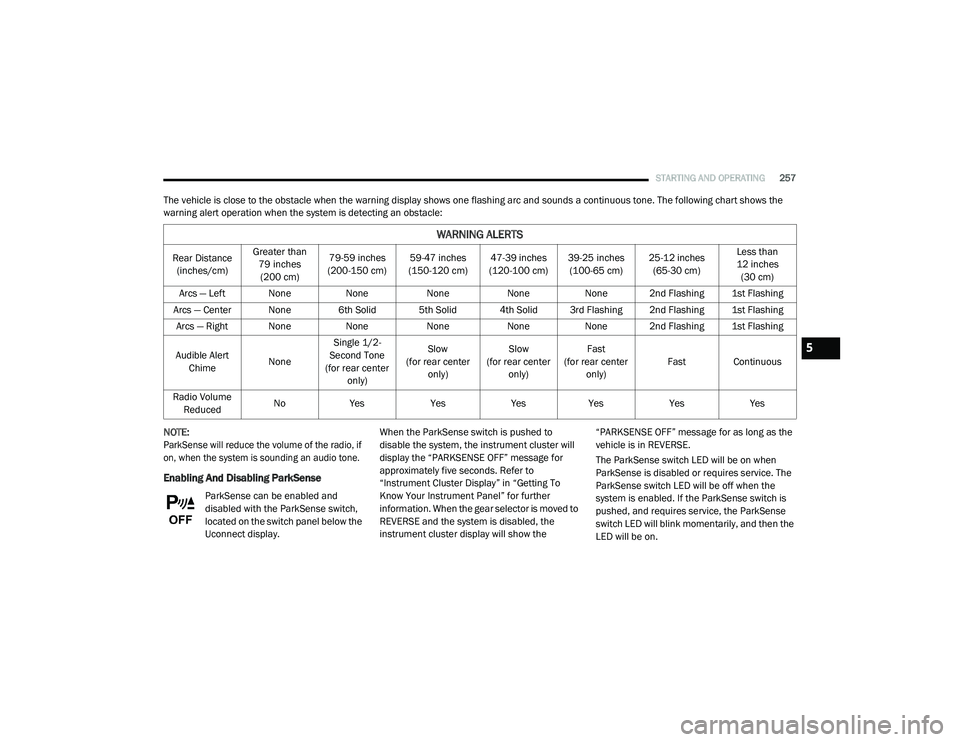
The vehicle is close to the obstacle when the warning display shows one flashing arc and sounds a continuous tone. The following chart shows the
warning alert operation when the system is detecting an obstacle:
NOTE:
ParkSense will reduce the volume of the radio, if
on, when the system is sounding an audio tone.
Enabling And Disabling ParkSense
ParkSense can be enabled and
disabled with the ParkSense switch,
located on the switch panel below the
Uconnect display. When the ParkSense switch is pushed to
disable the system, the instrument cluster will
display the “PARKSENSE OFF” message for
approximately five seconds. Refer to
“Instrument Cluster Display” in “Getting To
Know Your Instrument Panel” for further
information. When the gear selector is moved to
REVERSE and the system is disabled, the
instrument cluster display will show the “PARKSENSE OFF” message for as long as the
vehicle is in REVERSE.
The ParkSense switch LED will be on when
ParkSense is disabled or requires service. The
ParkSense switch LED will be off when the
system is enabled. If the ParkSense switch is
pushed, and requires service, the ParkSense
switch LED will blink momentarily, and then the
LED will be on.
WARNING ALERTS
Rear Distance
(inches/cm) Greater than
79 inches (200 cm) 79-59 inches
(200-150 cm) 59-47 inches
(150-120 cm) 47-39 inches
(120-100 cm) 39-25 inches
(100-65 cm) 25-12 inches
(65-30 cm) Less than
12 inches (30 cm)
Arcs — Left None NoneNoneNoneNone 2nd Flashing 1st Flashing
Arcs — Center None 6th Solid 5th Solid 4th Solid 3rd Flashing 2nd Flashing 1st Flashing Arcs — Right None NoneNoneNoneNone 2nd Flashing 1st Flashing
Audible Alert Chime NoneSingle 1/2-
Second Tone
(for rear center only) Slow
(for rear center only) Slow
(for rear center only) Fast
(for rear center only) Fast Continuous
Radio Volume Reduced No
Yes YesYesYes YesYes
5
20_RU_OM_EN_US_t.book Page 257
Page 261 of 516
STARTING AND OPERATING259
(Continued)
(Continued)
ParkSense should be disabled when the lift
-
gate is in the open position.
Use the ParkSense switch to turn the Park -
Sense system off if objects such as bicycle
carriers, trailer hitches, etc. are placed within
12 inches (30 cm) from the rear fascia/
bumper. Failure to do so can result in the
system misinterpreting a close object as a
sensor problem, causing the “PARKSENSE
UNAVAILABLE SERVICE REQUIRED” message
to be displayed in the instrument cluster
display.
PARKSENSE FRONT AND REAR PARK ASSIST
— IF EQUIPPED
The ParkSense Park Assist system provides
visual and audible indications of the distance
between the rear and/or front fascia and a
detected obstacle when backing up or moving
forward (e.g. during a parking maneuver). If your
vehicle is equipped with an Automatic
Transmission, the vehicle brakes may be
automatically applied and released when
performing a reverse parking maneuver if the
system detects a possible collision with an
obstacle.
WARNING!
Drivers must be careful when backing up
even when using ParkSense. Always check
carefully behind your vehicle, look behind
you, and be sure to check for pedestrians,
animals, other vehicles, obstructions, and
blind spots before backing up. You are
responsible for safety and must continue to
pay attention to your surroundings. Failure to
do so can result in serious injury or death.
Before using ParkSense, it is strongly
recommended that the ball mount and
hitch ball assembly is disconnected from
the vehicle when the vehicle is not used for
towing. Failure to do so can result in injury
or damage to vehicles or obstacles
because the hitch ball will be much closer
to the obstacle than the rear fascia when
the loudspeaker sounds the continuous
tone. Also, the sensors could detect the ball
mount and hitch ball assembly, depending
on its size and shape, giving a false indica -
tion that an obstacle is behind the vehicle.
CAUTION!
ParkSense is only a parking aid and it is
unable to recognize every obstacle,
including small obstacles. Parking curbs
might be temporarily detected or not
detected at all. Obstacles located above or
below the sensors will not be detected
when they are in close proximity.
WARNING! (Continued)
The vehicle must be driven slowly when
using ParkSense in order to be able to stop
in time when an obstacle is detected. It is
recommended that the driver looks over
his/her shoulder when using ParkSense.
CAUTION! (Continued)
5
20_RU_OM_EN_US_t.book Page 259
Page 262 of 516
260STARTING AND OPERATING
NOTE:
The driver can override the automatic
braking function by pressing the gas pedal,
turning ParkSense off via ParkSense switch,
or changing the gear while the automatic
brakes are being applied.
Automatic brakes will not be available if ESC
is not available.
Automatic brakes will not be available if there
is a faulted condition detected with the Park -
Sense Park Assist system or the Braking
System Module.
The automatic braking function may not
provide enough vehicle deceleration to avoid
colliding with a detected obstacle depending
on vehicle speed, road conditions, and brake
capability.
The automatic braking function may not be
applied fast enough for moving obstacles
that approach the rear of the vehicle from the
left and/or right sides.
The automatic braking function can be
enabled/disabled from the
Customer-Programmable Features section of
the Uconnect System.
ParkSense will retain its last known configu -
ration state for the automatic braking func -
tion through ignition cycles.
The automatic braking function is intended to
assist the driver in avoiding possible collisions
with detected obstacles when backing up in
REVERSE gear.
NOTE:
The driver is always responsible for
controlling the vehicle.
The system is provided to assist the driver
and not to substitute the driver.
The driver must stay in full control of the
vehicle's acceleration and braking and is
responsible for the vehicle's movements. Refer to “ParkSense System Usage
Precautions” for limitations of this system and
recommendations.
ParkSense will retain the last system state
(enabled or disabled) from the last ignition cycle
when the ignition is changed to the ON/RUN
position.
ParkSense can be active only when the gear
selector is in REVERSE or DRIVE. If ParkSense is
enabled at one of these gear selector positions,
the system will remain active until the vehicle
speed is increased to approximately 7 mph
(11 km/h) or above. When in REVERSE and
above the system's operating speed, a warning
will appear in the instrument cluster display
indicating the vehicle speed is too fast. The
system will become active again if the vehicle
speed is decreased to speeds less than
approximately 6 mph (9 km/h).
20_RU_OM_EN_US_t.book Page 260
Page 263 of 516
STARTING AND OPERATING261
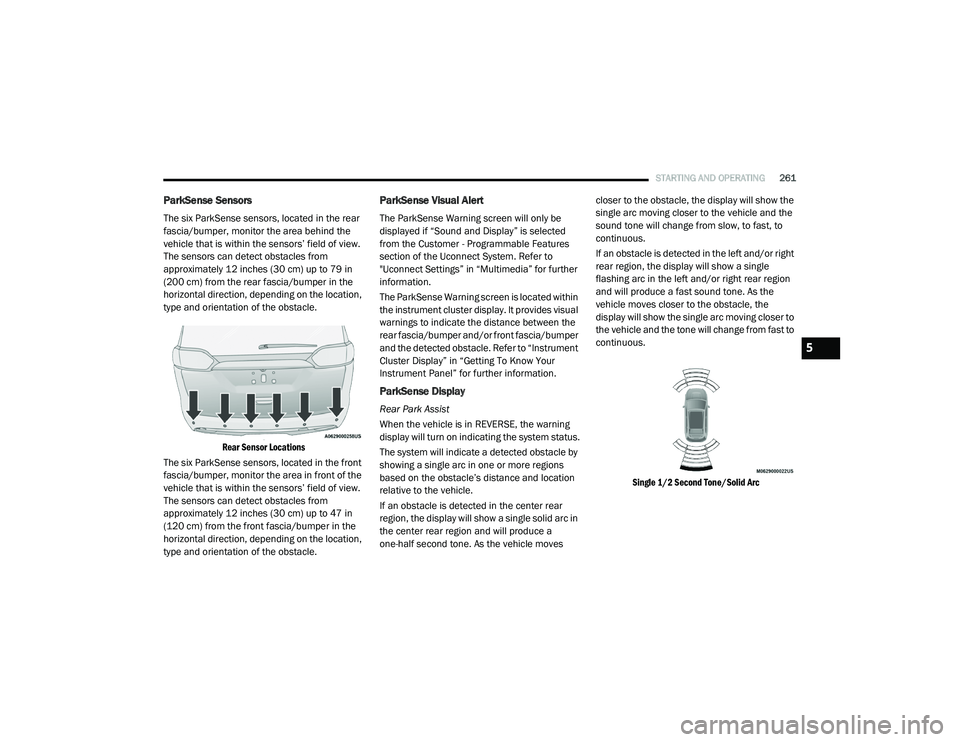
ParkSense Sensors
The six ParkSense sensors, located in the rear
fascia/bumper, monitor the area behind the
vehicle that is within the sensors’ field of view.
The sensors can detect obstacles from
approximately 12 inches (30 cm) up to 79 in
(200 cm) from the rear fascia/bumper in the
horizontal direction, depending on the location,
type and orientation of the obstacle.
Rear Sensor Locations
The six ParkSense sensors, located in the front
fascia/bumper, monitor the area in front of the
vehicle that is within the sensors’ field of view.
The sensors can detect obstacles from
approximately 12 inches (30 cm) up to 47 in
(120 cm) from the front fascia/bumper in the
horizontal direction, depending on the location,
type and orientation of the obstacle.
ParkSense Visual Alert
The ParkSense Warning screen will only be
displayed if “Sound and Display” is selected
from the Customer - Programmable Features
section of the Uconnect System. Refer to
"Uconnect Settings” in “Multimedia” for further
information.
The ParkSense Warning screen is located within
the instrument cluster display. It provides visual
warnings to indicate the distance between the
rear fascia/bumper and/or front fascia/bumper
and the detected obstacle. Refer to “Instrument
Cluster Display” in “Getting To Know Your
Instrument Panel” for further information.
ParkSense Display
Rear Park Assist
When the vehicle is in REVERSE, the warning
display will turn on indicating the system status.
The system will indicate a detected obstacle by
showing a single arc in one or more regions
based on the obstacle’s distance and location
relative to the vehicle.
If an obstacle is detected in the center rear
region, the display will show a single solid arc in
the center rear region and will produce a
one-half second tone. As the vehicle moves closer to the obstacle, the display will show the
single arc moving closer to the vehicle and the
sound tone will change from slow, to fast, to
continuous.
If an obstacle is detected in the left and/or right
rear region, the display will show a single
flashing arc in the left and/or right rear region
and will produce a fast sound tone. As the
vehicle moves closer to the obstacle, the
display will show the single arc moving closer to
the vehicle and the tone will change from fast to
continuous.
Single 1/2 Second Tone/Solid Arc
5
20_RU_OM_EN_US_t.book Page 261