ignition CHRYSLER VOYAGER 1996 Owners Manual
[x] Cancel search | Manufacturer: CHRYSLER, Model Year: 1996, Model line: VOYAGER, Model: CHRYSLER VOYAGER 1996Pages: 1938, PDF Size: 55.84 MB
Page 472 of 1938
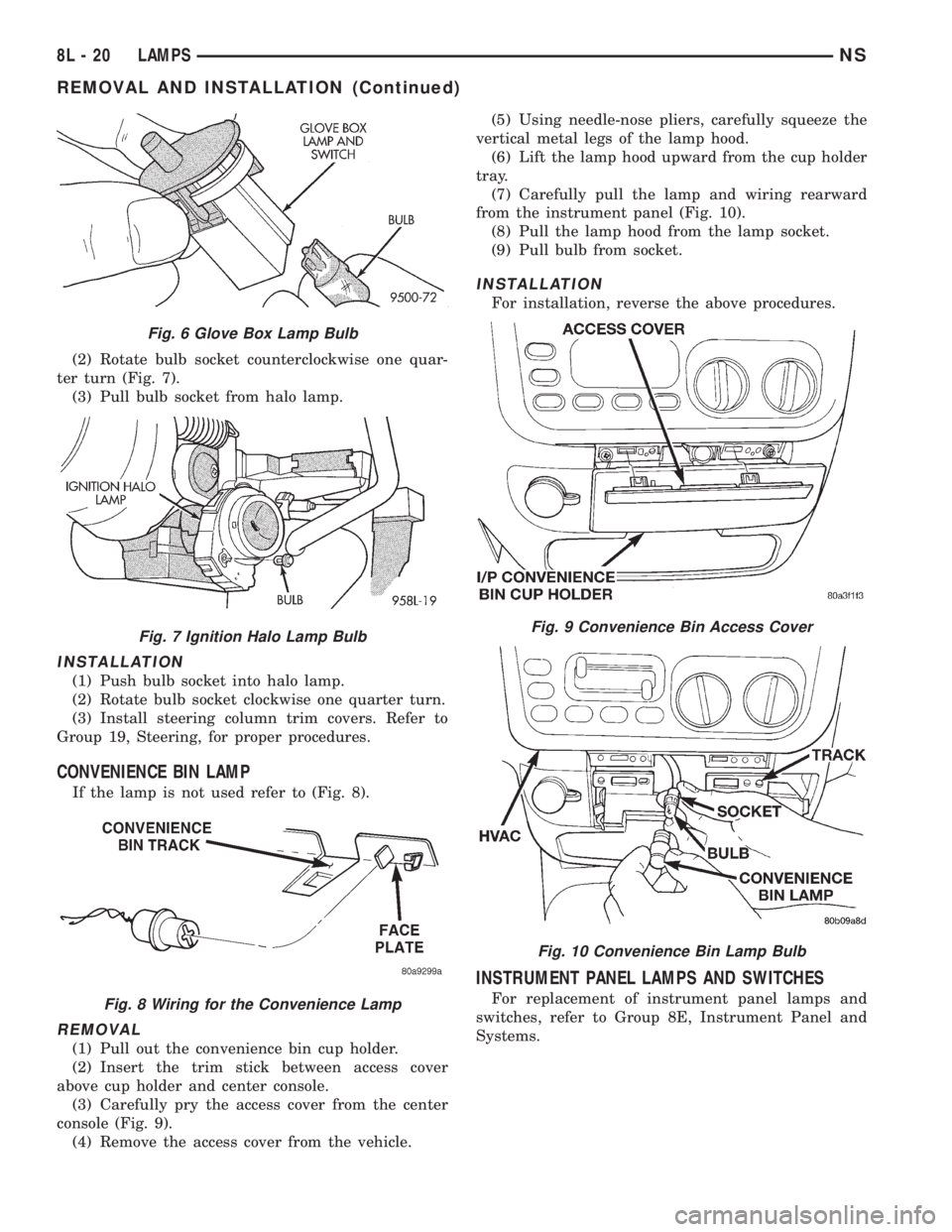
(2) Rotate bulb socket counterclockwise one quar-
ter turn (Fig. 7).
(3) Pull bulb socket from halo lamp.
INSTALLATION
(1) Push bulb socket into halo lamp.
(2) Rotate bulb socket clockwise one quarter turn.
(3) Install steering column trim covers. Refer to
Group 19, Steering, for proper procedures.
CONVENIENCE BIN LAMP
If the lamp is not used refer to (Fig. 8).
REMOVAL
(1) Pull out the convenience bin cup holder.
(2) Insert the trim stick between access cover
above cup holder and center console.
(3) Carefully pry the access cover from the center
console (Fig. 9).
(4) Remove the access cover from the vehicle.(5) Using needle-nose pliers, carefully squeeze the
vertical metal legs of the lamp hood.
(6) Lift the lamp hood upward from the cup holder
tray.
(7) Carefully pull the lamp and wiring rearward
from the instrument panel (Fig. 10).
(8) Pull the lamp hood from the lamp socket.
(9) Pull bulb from socket.
INSTALLATION
For installation, reverse the above procedures.
INSTRUMENT PANEL LAMPS AND SWITCHES
For replacement of instrument panel lamps and
switches, refer to Group 8E, Instrument Panel and
Systems.
Fig. 6 Glove Box Lamp Bulb
Fig. 7 Ignition Halo Lamp Bulb
Fig. 8 Wiring for the Convenience Lamp
Fig. 9 Convenience Bin Access Cover
Fig. 10 Convenience Bin Lamp Bulb
8L - 20 LAMPSNS
REMOVAL AND INSTALLATION (Continued)
Page 480 of 1938

HEADLAMP LEVELING MOTOR
This vehicle is equipped with a remote headlamp
leveling system. This system allows the driver to
adjust the vertical headlamp aim from the interior of
the vehicle to compensate for passenger or cargo
load. A headlamp leveling switch is located in the
instrument panel and controls the headlamp leveling
motor found on the back of the headlamp module.
DIAGNOSIS AND TESTING
DIAGNOSTIC PROCEDURES
When a vehicle experiences problems with the head-
lamp system, verify the condition of the battery connec-
tions, charging system, headlamp bulbs, wire
connectors, relay, high beam dimmer switch and head-
lamp switch. Refer to Group 8W, Wiring Diagrams, for
component locations and circuit information.
HEADLAMP DIAGNOSIS
CONDITION POSSIBLE CAUSES CORRECTION
HEADLAMPS ARE DIM
WITH ENGINE IDLING OR
IGNITION TURNED OFF1. Loose or corroded battery cables. 1. Clean and secure battery cable clamps
and posts.
2. Loose or worn alternator drive
belt.2. Adjust or replace alternator drive belt.
3. Charging system output too low. 3. Test and repair charging system. Refer
to Group 8A.
4. Battery has insufficient charge. 4. Test battery state-of -charge. Refer to
Group 8A.
5. Battery is sulfated or shorted. 5. Load test battery. Refer to Group 8A.
6. Poor lighting circuit Z1-ground. 6. Test for voltage drop across Z1-ground
locations. Refer to Group 8W.
HEADLAMP BULBS BURN
OUT FREQUENTLY1. Charging system output too high. 1. Test and repair charging system. Refer
to Group 8A.
2. Loose or corroded terminals or
splices in circuit.2. Inspect and repair all connectors and
splices. Refer to Group 8W.
HEADLAMPS ARE DIM
WITH ENGINE RUNNING
ABOVE IDLE1. Charging system output too low. 1. Test and repair charging system. Refer
to Group 8A.
2. Poor lighting circuit Z1-ground. 2. Test for voltage drop across Z1-ground
locations. Refer to Group 8W.
3. High resistance in headlamp
circuit.3. Test amperage draw of headlamp circuit.
HEADLAMPS FLASH
RANDOMLY1. Poor lighting circuit Z1-ground. 1. Test for voltage drop across Z1-ground
locations, refer to Group 8W.
2. High resistance in headlamp
circuit.2. Test amperage draw of headlamp circuit.
3. Loose or corroded terminals or
splices in circuit.3. Inspect and repair all connectors and
splices. Refer to Group 8W.
HEADLAMPS DO NOT
ILLUMINATE1. No voltage to headlamps. 1. Repair open headlamp circuit. Refer to
Group 8W.
2. No Z1-ground at headlamps. 2. Repair circuit ground. Refer to Group
8W.
3. Faulty headlamp switch. 3. Replace headlamp switch.
4. Faulty headlamp dimmer
(multi-function) switch.4. Replace multi-function switch.
5. Broken connector terminal or wire
splice in headlamp circuit.5. Repair connector terminal or wire splice.
6. Defective or burned out bulb. 6. Replace bulb.
7. Body controller malfunction. 7. Refer to appropriate body controller
diagnostics.
8L - 2 LAMPSNS/GS
GENERAL INFORMATION (Continued)
Page 481 of 1938
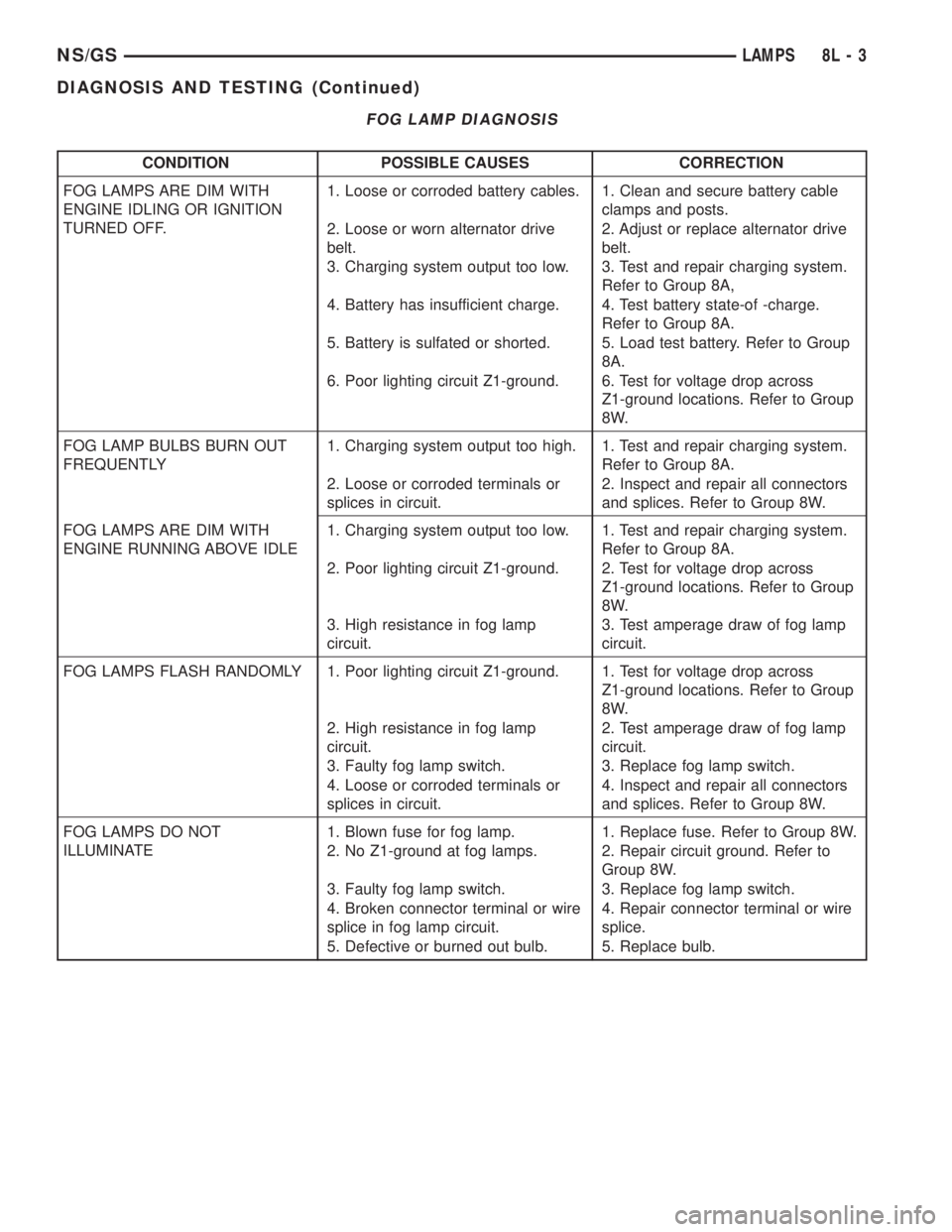
FOG LAMP DIAGNOSIS
CONDITION POSSIBLE CAUSES CORRECTION
FOG LAMPS ARE DIM WITH
ENGINE IDLING OR IGNITION
TURNED OFF.1. Loose or corroded battery cables. 1. Clean and secure battery cable
clamps and posts.
2. Loose or worn alternator drive
belt.2. Adjust or replace alternator drive
belt.
3. Charging system output too low. 3. Test and repair charging system.
Refer to Group 8A,
4. Battery has insufficient charge. 4. Test battery state-of -charge.
Refer to Group 8A.
5. Battery is sulfated or shorted. 5. Load test battery. Refer to Group
8A.
6. Poor lighting circuit Z1-ground. 6. Test for voltage drop across
Z1-ground locations. Refer to Group
8W.
FOG LAMP BULBS BURN OUT
FREQUENTLY1. Charging system output too high. 1. Test and repair charging system.
Refer to Group 8A.
2. Loose or corroded terminals or
splices in circuit.2. Inspect and repair all connectors
and splices. Refer to Group 8W.
FOG LAMPS ARE DIM WITH
ENGINE RUNNING ABOVE IDLE1. Charging system output too low. 1. Test and repair charging system.
Refer to Group 8A.
2. Poor lighting circuit Z1-ground. 2. Test for voltage drop across
Z1-ground locations. Refer to Group
8W.
3. High resistance in fog lamp
circuit.3. Test amperage draw of fog lamp
circuit.
FOG LAMPS FLASH RANDOMLY 1. Poor lighting circuit Z1-ground. 1. Test for voltage drop across
Z1-ground locations. Refer to Group
8W.
2. High resistance in fog lamp
circuit.2. Test amperage draw of fog lamp
circuit.
3. Faulty fog lamp switch. 3. Replace fog lamp switch.
4. Loose or corroded terminals or
splices in circuit.4. Inspect and repair all connectors
and splices. Refer to Group 8W.
FOG LAMPS DO NOT
ILLUMINATE1. Blown fuse for fog lamp. 1. Replace fuse. Refer to Group 8W.
2. No Z1-ground at fog lamps. 2. Repair circuit ground. Refer to
Group 8W.
3. Faulty fog lamp switch. 3. Replace fog lamp switch.
4. Broken connector terminal or wire
splice in fog lamp circuit.4. Repair connector terminal or wire
splice.
5. Defective or burned out bulb. 5. Replace bulb.
NS/GSLAMPS 8L - 3
DIAGNOSIS AND TESTING (Continued)
Page 498 of 1938

ACM monitors the system to determine the system
readiness. The ACM contains on-board diagnostics
and will light the AIRBAG warning lamp in the mes-
sage center when a problem occurs.
The driver and passenger airbag system is a safety
device designed to reduce the risk of fatality or seri-
ous injury, caused by a frontal impact of the vehicle.
The impact sensor provides verification of the
direction and severity of the impact. One impact sen-
sor is used. It is located inside the Airbag Control
Module (ACM) which is mounted on a bracket, just
forward of the center console. The impact sensor is
an accelerometer that senses deceleration. The decel-
eration pulses are sent to a microprocessor which
contains a decision algorithm. When an impact is
severe enough to require airbag protection, the ACM
micro processor sends a signal that completes the
electrical circuit to the driver and passenger airbags.
The sensor is calibrated for the specific vehicle and
reacts to the severity and direction of the impact.
CLOCKSPRING
The clockspring is snapped into a plastic mounting
platform on the steering column behind the steering
wheel. The clockspring is used to maintain a contin-
uous electrical circuit between the wiring harness
and the driver's airbag module. This assembly con-
sists of a flat ribbon like electrically conductive tape
which winds and unwinds with the steering wheel
rotation.
DRIVER AND PASSENGER AIRBAG MODULES
The Driver Airbag Module is located in the center
of the steering wheel. The Passenger Airbag Module
is located in the instrument panel above the glove
box (Fig. 1). The Driver Airbag Module cover contains
the horn switch, inflator device, and a fabric bag. The
airbag cover/horn switch is serviced separately from
the inflator and bag components. Refer to Group 8G,
Horns for proper service procedure for horn switch.
The Passenger Airbag Module is serviced as an
assembly.
WARNING: WHEN THE AIRBAG SYSTEM IS
DEPLOYED BECAUSE OF A COLLISION, THE FOL-
LOWING MUST BE REPLACED:
²COMPLETE STEERING COLUMN ASSEMBLY
²LOWER STEERING COUPLER
²STEERING WHEEL
²STEERING COLUMN CLOCKSPRING
²DRIVER AIRBAG COVER/HORN SWITCH
²DRIVER AIRBAG MODULE
²PASSENGER AIRBAG MODULE
²UPPER INSTRUMENT PANEL WITH PAD
DIAGNOSIS AND TESTING
AIRBAG SYSTEM TEST
(1) Disconnect and isolate the battery negative
cable.
WARNING: DISCONNECT AND ISOLATE THE BAT-
TERY NEGATIVE CABLE BEFORE BEGINNING AIR-
BAG SYSTEM COMPONENT SERVICE
PROCEDURES. THIS WILL DISABLE THE AIRBAG
SYSTEM. FAILURE TO DISCONNECT THE BATTERY
COULD RESULT IN ACCIDENTAL AIRBAG DEPLOY-
MENT AND POSSIBLE PERSONAL INJURY. ALLOW
SYSTEM CAPACITOR TO DISCHARGE FOR TWO
MINUTES BEFORE REMOVING AIRBAG COMPO-
NENTS.
(2) Connect scan tool (DRB) to Data Link connec-
tor, located at left side of the steering column and at
the lower edge of the lower instrument panel.
(3) Turn the ignition key to ON position. Exit vehi-
cle with scan tool. Use the latest version of the
proper cartridge.
(4) After checking that no one is inside the vehicle,
connect the battery negative terminal.
(5) Using the scan tool, read and record active
diagnostic code data.
(6) Read and record any stored diagnostic codes.
(7) Refer to the proper Body Diagnostic Procedures
Manual if any diagnostic codes are found in Step 5 or
Step 6.
(8) Erase stored diagnostic codes if there are no
active diagnostic codes. If problems remain, diagnos-
tic codes will not erase. Refer to the Passive
Restraint Diagnostic Test Manual to diagnose the
problem.If airbag warning lamp either fails to
light, or goes on and stays on, there is a system
malfunction. Refer to the proper Body Diagnos-
tic Procedures Manual to diagnose the problem.
Fig. 1 Airbag Module Locations
8M - 2 RESTRAINT SYSTEMNS
DESCRIPTION AND OPERATION (Continued)
Page 505 of 1938
ELECTRICALLY HEATED SYSTEMS
CONTENTS
page page
DESCRIPTION AND OPERATION
HVAC MOUNTED SWITCH................. 1
INTRODUCTION......................... 1
DIAGNOSIS AND TESTING
GRID LINE TEST......................... 2SYSTEM TEST.......................... 2
SERVICE PROCEDURES
GRID LINE AND TERMINAL REPAIR......... 3
DESCRIPTION AND OPERATION
INTRODUCTION
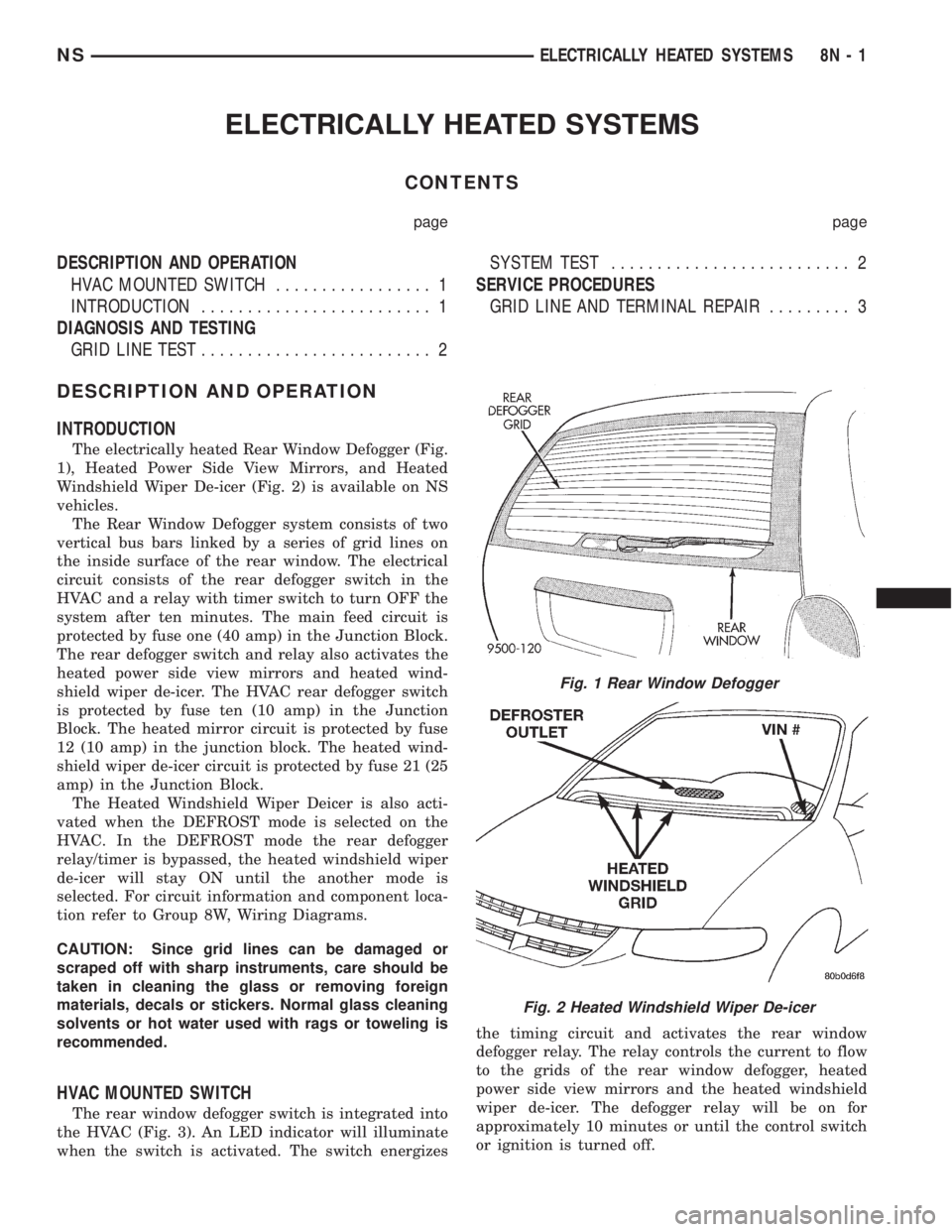
The electrically heated Rear Window Defogger (Fig.
1), Heated Power Side View Mirrors, and Heated
Windshield Wiper De-icer (Fig. 2) is available on NS
vehicles.
The Rear Window Defogger system consists of two
vertical bus bars linked by a series of grid lines on
the inside surface of the rear window. The electrical
circuit consists of the rear defogger switch in the
HVAC and a relay with timer switch to turn OFF the
system after ten minutes. The main feed circuit is
protected by fuse one (40 amp) in the Junction Block.
The rear defogger switch and relay also activates the
heated power side view mirrors and heated wind-
shield wiper de-icer. The HVAC rear defogger switch
is protected by fuse ten (10 amp) in the Junction
Block. The heated mirror circuit is protected by fuse
12 (10 amp) in the junction block. The heated wind-
shield wiper de-icer circuit is protected by fuse 21 (25
amp) in the Junction Block.
The Heated Windshield Wiper Deicer is also acti-
vated when the DEFROST mode is selected on the
HVAC. In the DEFROST mode the rear defogger
relay/timer is bypassed, the heated windshield wiper
de-icer will stay ON until the another mode is
selected. For circuit information and component loca-
tion refer to Group 8W, Wiring Diagrams.
CAUTION: Since grid lines can be damaged or
scraped off with sharp instruments, care should be
taken in cleaning the glass or removing foreign
materials, decals or stickers. Normal glass cleaning
solvents or hot water used with rags or toweling is
recommended.
HVAC MOUNTED SWITCH
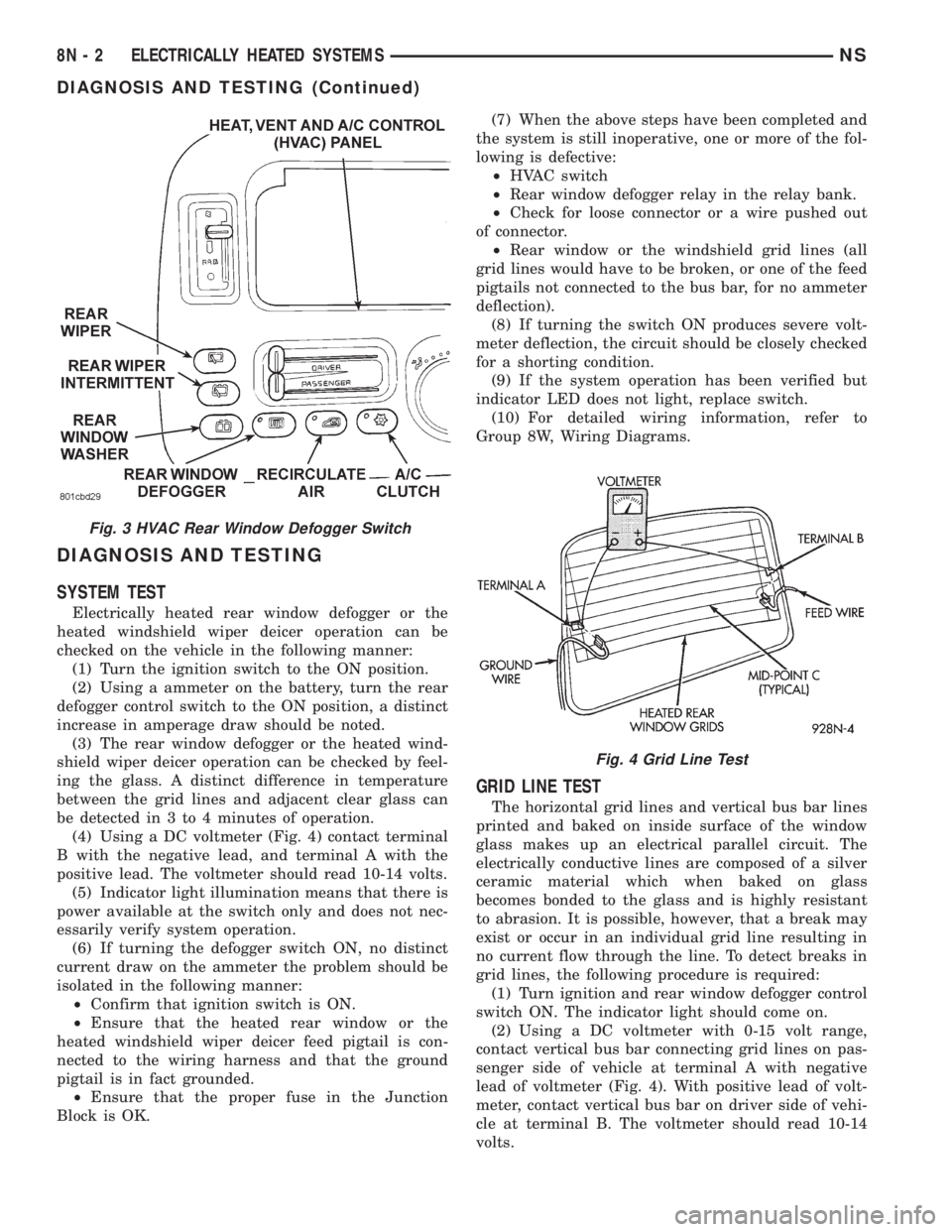
The rear window defogger switch is integrated into
the HVAC (Fig. 3). An LED indicator will illuminate
when the switch is activated. The switch energizesthe timing circuit and activates the rear window
defogger relay. The relay controls the current to flow
to the grids of the rear window defogger, heated
power side view mirrors and the heated windshield
wiper de-icer. The defogger relay will be on for
approximately 10 minutes or until the control switch
or ignition is turned off.
Fig. 1 Rear Window Defogger
Fig. 2 Heated Windshield Wiper De-icer
NSELECTRICALLY HEATED SYSTEMS 8N - 1
Page 506 of 1938
DIAGNOSIS AND TESTING
SYSTEM TEST
Electrically heated rear window defogger or the
heated windshield wiper deicer operation can be
checked on the vehicle in the following manner:
(1) Turn the ignition switch to the ON position.
(2) Using a ammeter on the battery, turn the rear
defogger control switch to the ON position, a distinct
increase in amperage draw should be noted.
(3) The rear window defogger or the heated wind-
shield wiper deicer operation can be checked by feel-
ing the glass. A distinct difference in temperature
between the grid lines and adjacent clear glass can
be detected in 3 to 4 minutes of operation.
(4) Using a DC voltmeter (Fig. 4) contact terminal
B with the negative lead, and terminal A with the
positive lead. The voltmeter should read 10-14 volts.
(5) Indicator light illumination means that there is
power available at the switch only and does not nec-
essarily verify system operation.
(6) If turning the defogger switch ON, no distinct
current draw on the ammeter the problem should be
isolated in the following manner:
²Confirm that ignition switch is ON.
²Ensure that the heated rear window or the
heated windshield wiper deicer feed pigtail is con-
nected to the wiring harness and that the ground
pigtail is in fact grounded.
²Ensure that the proper fuse in the Junction
Block is OK.(7) When the above steps have been completed and
the system is still inoperative, one or more of the fol-
lowing is defective:
²HVAC switch
²Rear window defogger relay in the relay bank.
²Check for loose connector or a wire pushed out
of connector.
²Rear window or the windshield grid lines (all
grid lines would have to be broken, or one of the feed
pigtails not connected to the bus bar, for no ammeter
deflection).
(8) If turning the switch ON produces severe volt-
meter deflection, the circuit should be closely checked
for a shorting condition.
(9) If the system operation has been verified but
indicator LED does not light, replace switch.
(10) For detailed wiring information, refer to
Group 8W, Wiring Diagrams.
GRID LINE TEST
The horizontal grid lines and vertical bus bar lines
printed and baked on inside surface of the window
glass makes up an electrical parallel circuit. The
electrically conductive lines are composed of a silver
ceramic material which when baked on glass
becomes bonded to the glass and is highly resistant
to abrasion. It is possible, however, that a break may
exist or occur in an individual grid line resulting in
no current flow through the line. To detect breaks in
grid lines, the following procedure is required:
(1) Turn ignition and rear window defogger control
switch ON. The indicator light should come on.
(2) Using a DC voltmeter with 0-15 volt range,
contact vertical bus bar connecting grid lines on pas-
senger side of vehicle at terminal A with negative
lead of voltmeter (Fig. 4). With positive lead of volt-
meter, contact vertical bus bar on driver side of vehi-
cle at terminal B. The voltmeter should read 10-14
volts.
Fig. 3 HVAC Rear Window Defogger Switch
Fig. 4 Grid Line Test
8N - 2 ELECTRICALLY HEATED SYSTEMSNS
DIAGNOSIS AND TESTING (Continued)
Page 510 of 1938

DOOR LOCK INHIBIT FEATURE
The BCM cancels out the door lock switch actua-
tion, when the key is in the Ignition Switch and a
door is open. After the key is removed from the Igni-
tion Switch, or the doors are closed, the power door
locks will operate normally.
SLIDING DOOR LOCK MEMORY FEATURE
The door locks on the sliding door(s) can be actu-
ated when the door(s) are closed. If the sliding
door(s) are open when the door locks are actuated,
the BCM will hold the lock command in memory
until the door(s) is closed. When the door is closed
and the door jamb terminals make contact, signaling
the BCM to lock the sliding door(s) automatically.
Actuating the door lock switch to the unlock position
before the sliding door(s) are closed will cancel the
lock request.
DIAGNOSIS AND TESTING
AUTOMATIC DOOR LOCK SYSTEM TEST
When using a scan tool (DRB) for testing the auto-
matic door lock system, refer to the Body Diagnostic
Procedures Manual. Refer to Group 8W, Wiring Dia-
grams for circuit information and component loca-
tions.
DOOR LOCK MOTOR
Verify battery condition before testing door lock
motor(s), refer to Group 8A, Battery for proper diag-
nosis procedures.
To determine which motor is faulty, check each
individual door for electrical lock and unlock or dis-
connect the motor connectors one at a time, while
operating the door lock switch. In the event that
none of the motors work, the problem may be caused
by a shorted motor, a relay or a bad switch. Discon-
necting the defective motor will allow the others to
work.
To test an individual door lock motor, disconnect
the electrical connector from the motor. To lock the
door, connect a 12 volt power source to the positive
pin of the lock motor and a ground wire to the other
pin (Fig. 1), (Fig. 2), (Fig. 3) and refer to Group 8W,
Wiring Diagrams for pin locations. To unlock the door
reverse the wire connections at the motor pin termi-
nals. If these results are NOT obtained, replace the
motor.
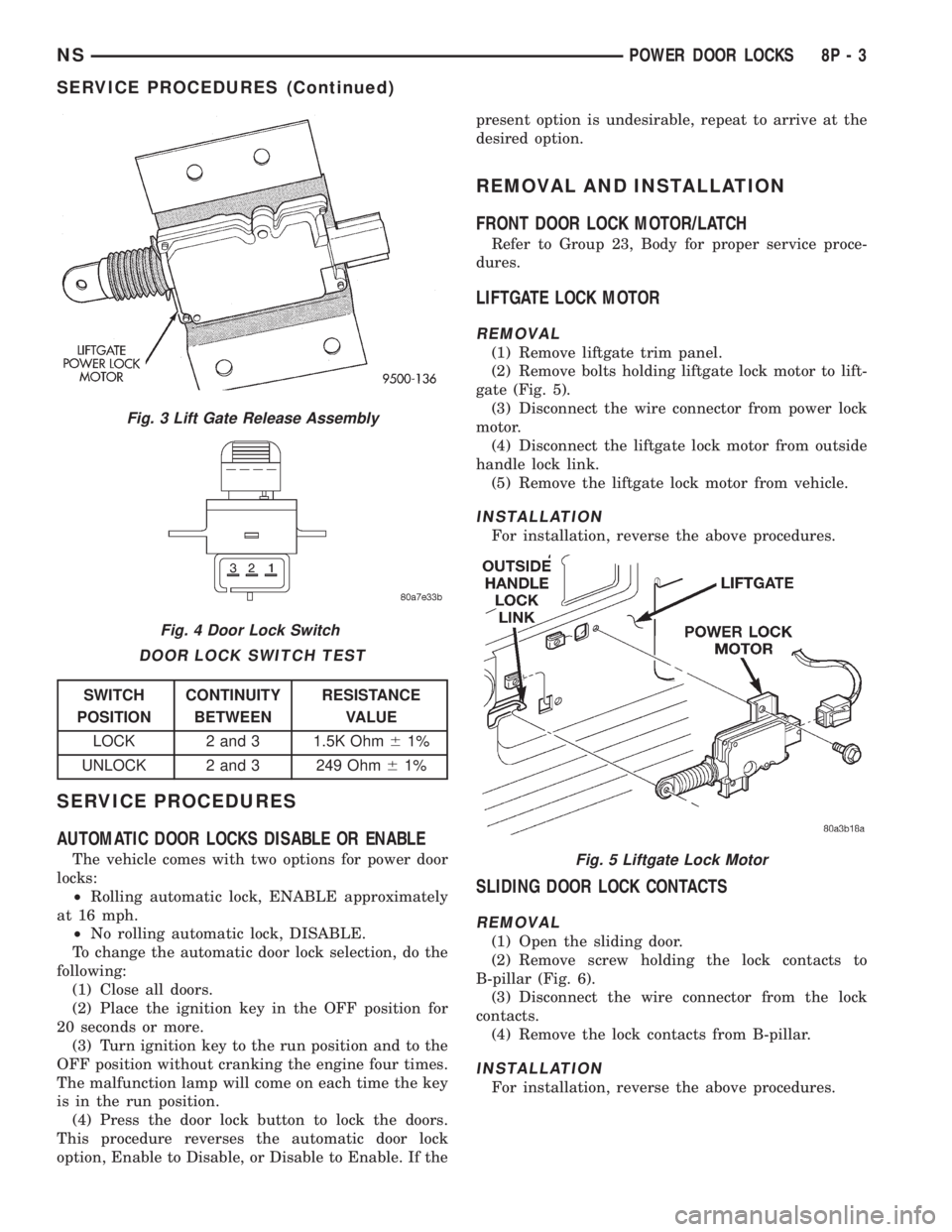
DOOR LOCK SWITCH TEST
(1) Remove door lock switch bezel assembly from
door. Refer to Group 23, Body for removal proce-
dures.
(2) Disconnect wire connector from back of door
lock switch.(3) Depress switch to LOCK position.
(4) Using an ohmmeter, test switch resistance
between Pins 2 and 3. Refer to Door Lock Switch
Test and (Fig. 4).
(5) Depress switch to UNLOCK position.
(6) Test resistance between Pins 2 and 3.
(7) If resistance values are not within the param-
eters shown replace the door lock switch.
Fig. 1 Sliding Door Lock Motor±Typical
Fig. 2 Front Door Lock Motor
8P - 2 POWER DOOR LOCKSNS
DESCRIPTION AND OPERATION (Continued)
Page 511 of 1938
SERVICE PROCEDURES
AUTOMATIC DOOR LOCKS DISABLE OR ENABLE
The vehicle comes with two options for power door
locks:
²Rolling automatic lock, ENABLE approximately
at 16 mph.
²No rolling automatic lock, DISABLE.
To change the automatic door lock selection, do the
following:
(1) Close all doors.
(2) Place the ignition key in the OFF position for
20 seconds or more.
(3) Turn ignition key to the run position and to the
OFF position without cranking the engine four times.
The malfunction lamp will come on each time the key
is in the run position.
(4) Press the door lock button to lock the doors.
This procedure reverses the automatic door lock
option, Enable to Disable, or Disable to Enable. If thepresent option is undesirable, repeat to arrive at the
desired option.
REMOVAL AND INSTALLATION
FRONT DOOR LOCK MOTOR/LATCH
Refer to Group 23, Body for proper service proce-
dures.
LIFTGATE LOCK MOTOR
REMOVAL
(1) Remove liftgate trim panel.
(2) Remove bolts holding liftgate lock motor to lift-
gate (Fig. 5).
(3) Disconnect the wire connector from power lock
motor.
(4) Disconnect the liftgate lock motor from outside
handle lock link.
(5) Remove the liftgate lock motor from vehicle.
INSTALLATION
For installation, reverse the above procedures.
SLIDING DOOR LOCK CONTACTS
REMOVAL
(1) Open the sliding door.
(2) Remove screw holding the lock contacts to
B-pillar (Fig. 6).
(3) Disconnect the wire connector from the lock
contacts.
(4) Remove the lock contacts from B-pillar.
INSTALLATION
For installation, reverse the above procedures.
Fig. 3 Lift Gate Release Assembly
Fig. 4 Door Lock Switch
DOOR LOCK SWITCH TEST
SWITCH
POSITIONCONTINUITY
BETWEENRESISTANCE
VALUE
LOCK 2 and 3 1.5K Ohm61%
UNLOCK 2 and 3 249 Ohm61%
Fig. 5 Liftgate Lock Motor
NSPOWER DOOR LOCKS 8P - 3
SERVICE PROCEDURES (Continued)
Page 513 of 1938
REMOTE KEYLESS ENTRY
INDEX
page page
DESCRIPTION AND OPERATION
INTRODUCTION......................... 5
VEHICLE ACCESS CODE (VAC)
PROGRAMMING........................ 5
DIAGNOSIS AND TESTING
RKE DIAGNOSTICS....................... 5
SERVICE PROCEDURES
HORN CHIRP DISABLE OR ENABLE.......... 6REMOVAL AND INSTALLATION
RKE MODULE........................... 6
ADJUSTMENTS
PROGRAMMING RKE MODULE.............. 6
SPECIFICATIONS
RKE TRANSMITTER BATTERY.............. 6
RKE TRANSMITTER RANGE................ 6
DESCRIPTION AND OPERATION
INTRODUCTION
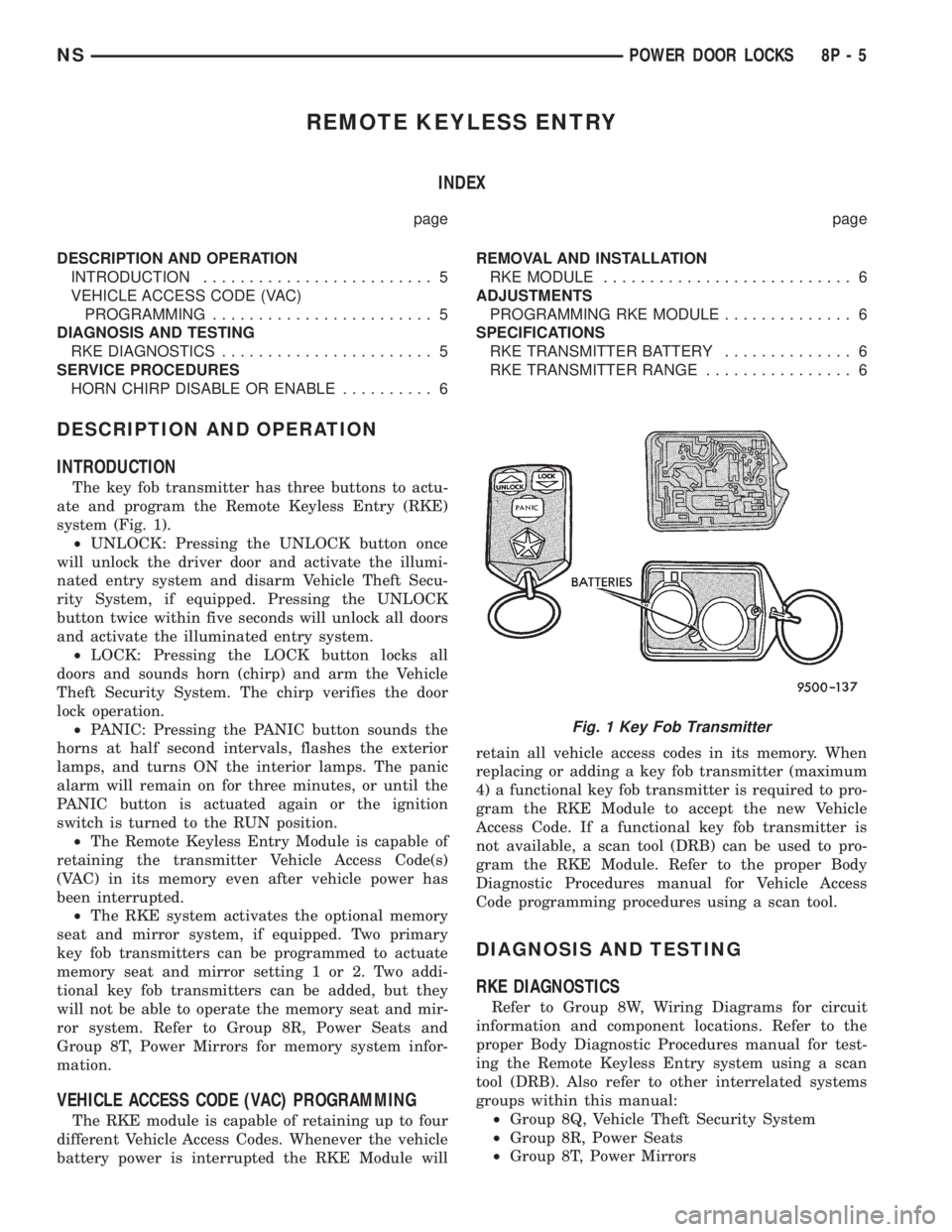
The key fob transmitter has three buttons to actu-
ate and program the Remote Keyless Entry (RKE)
system (Fig. 1).
²UNLOCK: Pressing the UNLOCK button once
will unlock the driver door and activate the illumi-
nated entry system and disarm Vehicle Theft Secu-
rity System, if equipped. Pressing the UNLOCK
button twice within five seconds will unlock all doors
and activate the illuminated entry system.
²LOCK: Pressing the LOCK button locks all
doors and sounds horn (chirp) and arm the Vehicle
Theft Security System. The chirp verifies the door
lock operation.
²PANIC: Pressing the PANIC button sounds the
horns at half second intervals, flashes the exterior
lamps, and turns ON the interior lamps. The panic
alarm will remain on for three minutes, or until the
PANIC button is actuated again or the ignition
switch is turned to the RUN position.
²The Remote Keyless Entry Module is capable of
retaining the transmitter Vehicle Access Code(s)
(VAC) in its memory even after vehicle power has
been interrupted.
²The RKE system activates the optional memory
seat and mirror system, if equipped. Two primary
key fob transmitters can be programmed to actuate
memory seat and mirror setting 1 or 2. Two addi-
tional key fob transmitters can be added, but they
will not be able to operate the memory seat and mir-
ror system. Refer to Group 8R, Power Seats and
Group 8T, Power Mirrors for memory system infor-
mation.
VEHICLE ACCESS CODE (VAC) PROGRAMMING
The RKE module is capable of retaining up to four
different Vehicle Access Codes. Whenever the vehicle
battery power is interrupted the RKE Module willretain all vehicle access codes in its memory. When
replacing or adding a key fob transmitter (maximum
4) a functional key fob transmitter is required to pro-
gram the RKE Module to accept the new Vehicle
Access Code. If a functional key fob transmitter is
not available, a scan tool (DRB) can be used to pro-
gram the RKE Module. Refer to the proper Body
Diagnostic Procedures manual for Vehicle Access
Code programming procedures using a scan tool.
DIAGNOSIS AND TESTING
RKE DIAGNOSTICS
Refer to Group 8W, Wiring Diagrams for circuit
information and component locations. Refer to the
proper Body Diagnostic Procedures manual for test-
ing the Remote Keyless Entry system using a scan
tool (DRB). Also refer to other interrelated systems
groups within this manual:
²Group 8Q, Vehicle Theft Security System
²Group 8R, Power Seats
²Group 8T, Power Mirrors
Fig. 1 Key Fob Transmitter
NSPOWER DOOR LOCKS 8P - 5
Page 514 of 1938
SERVICE PROCEDURES
HORN CHIRP DISABLE OR ENABLE
The horn chirp can be DISABLED or ENABLED
using the following procedure.
To DISABLE (cancelling) the horn chirp feature,
press and hold the transmitter LOCK button for a
minimum four seconds. While pressing LOCK button
in, press the UNLOCK button. The horn chirp fea-
ture will not function until the above procedure is
repeated. To ENABLE (reinstate) the horn chirp fea-
ture, use any one of the four key fob transmitters
and reverse the above procedures. It will ENABLE
the horn chirp feature for all transmitters.
REMOVAL AND INSTALLATION
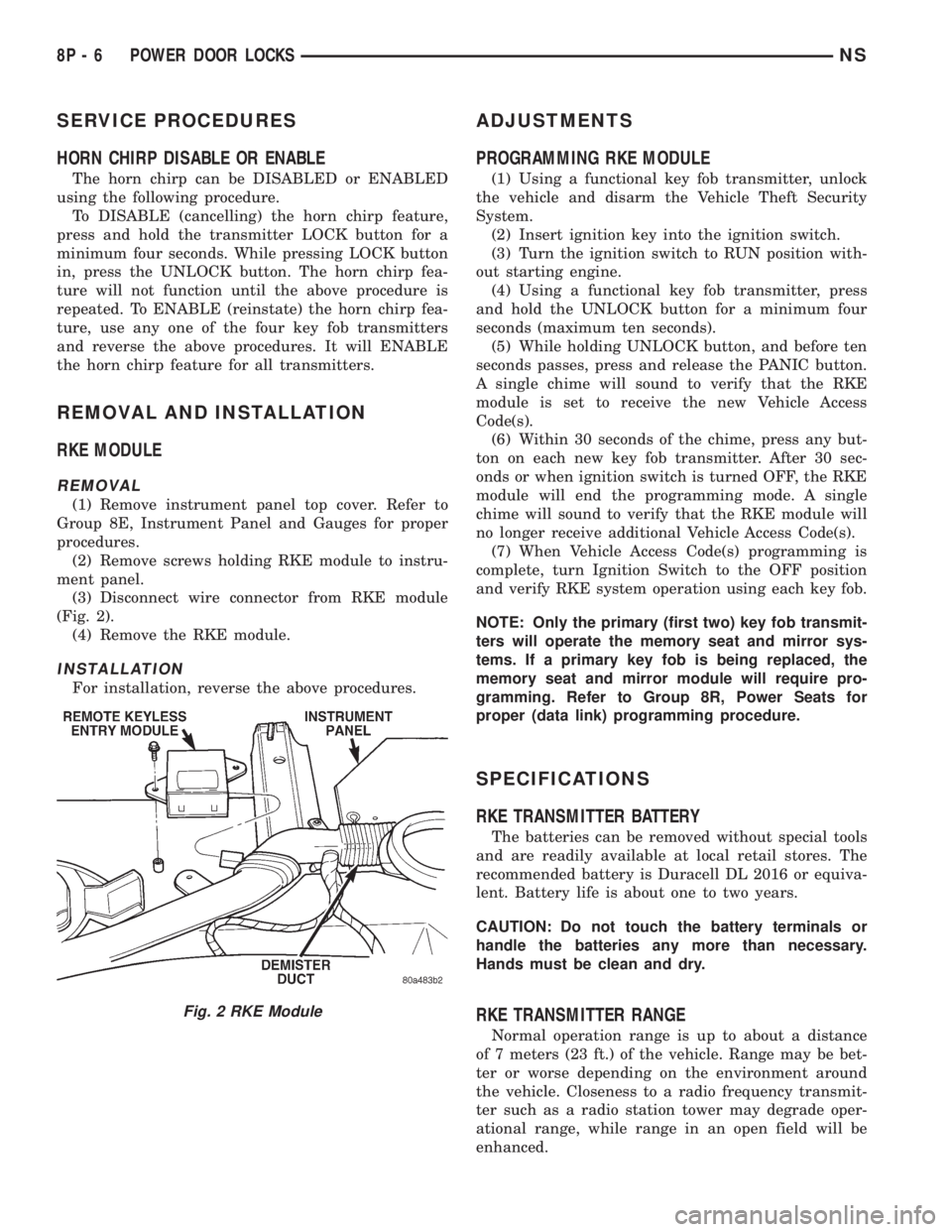
RKE MODULE
REMOVAL
(1) Remove instrument panel top cover. Refer to
Group 8E, Instrument Panel and Gauges for proper
procedures.
(2) Remove screws holding RKE module to instru-
ment panel.
(3) Disconnect wire connector from RKE module
(Fig. 2).
(4) Remove the RKE module.
INSTALLATION
For installation, reverse the above procedures.
ADJUSTMENTS
PROGRAMMING RKE MODULE
(1) Using a functional key fob transmitter, unlock
the vehicle and disarm the Vehicle Theft Security
System.
(2) Insert ignition key into the ignition switch.
(3) Turn the ignition switch to RUN position with-
out starting engine.
(4) Using a functional key fob transmitter, press
and hold the UNLOCK button for a minimum four
seconds (maximum ten seconds).
(5) While holding UNLOCK button, and before ten
seconds passes, press and release the PANIC button.
A single chime will sound to verify that the RKE
module is set to receive the new Vehicle Access
Code(s).
(6) Within 30 seconds of the chime, press any but-
ton on each new key fob transmitter. After 30 sec-
onds or when ignition switch is turned OFF, the RKE
module will end the programming mode. A single
chime will sound to verify that the RKE module will
no longer receive additional Vehicle Access Code(s).
(7) When Vehicle Access Code(s) programming is
complete, turn Ignition Switch to the OFF position
and verify RKE system operation using each key fob.
NOTE: Only the primary (first two) key fob transmit-
ters will operate the memory seat and mirror sys-
tems. If a primary key fob is being replaced, the
memory seat and mirror module will require pro-
gramming. Refer to Group 8R, Power Seats for
proper (data link) programming procedure.
SPECIFICATIONS
RKE TRANSMITTER BATTERY
The batteries can be removed without special tools
and are readily available at local retail stores. The
recommended battery is Duracell DL 2016 or equiva-
lent. Battery life is about one to two years.
CAUTION: Do not touch the battery terminals or
handle the batteries any more than necessary.
Hands must be clean and dry.
RKE TRANSMITTER RANGE
Normal operation range is up to about a distance
of 7 meters (23 ft.) of the vehicle. Range may be bet-
ter or worse depending on the environment around
the vehicle. Closeness to a radio frequency transmit-
ter such as a radio station tower may degrade oper-
ational range, while range in an open field will be
enhanced.
Fig. 2 RKE Module
8P - 6 POWER DOOR LOCKSNS