roof CHRYSLER VOYAGER 1996 Service Manual
[x] Cancel search | Manufacturer: CHRYSLER, Model Year: 1996, Model line: VOYAGER, Model: CHRYSLER VOYAGER 1996Pages: 1938, PDF Size: 55.84 MB
Page 334 of 1938
REMOVAL
(1) Disconnect negative cable from battery.
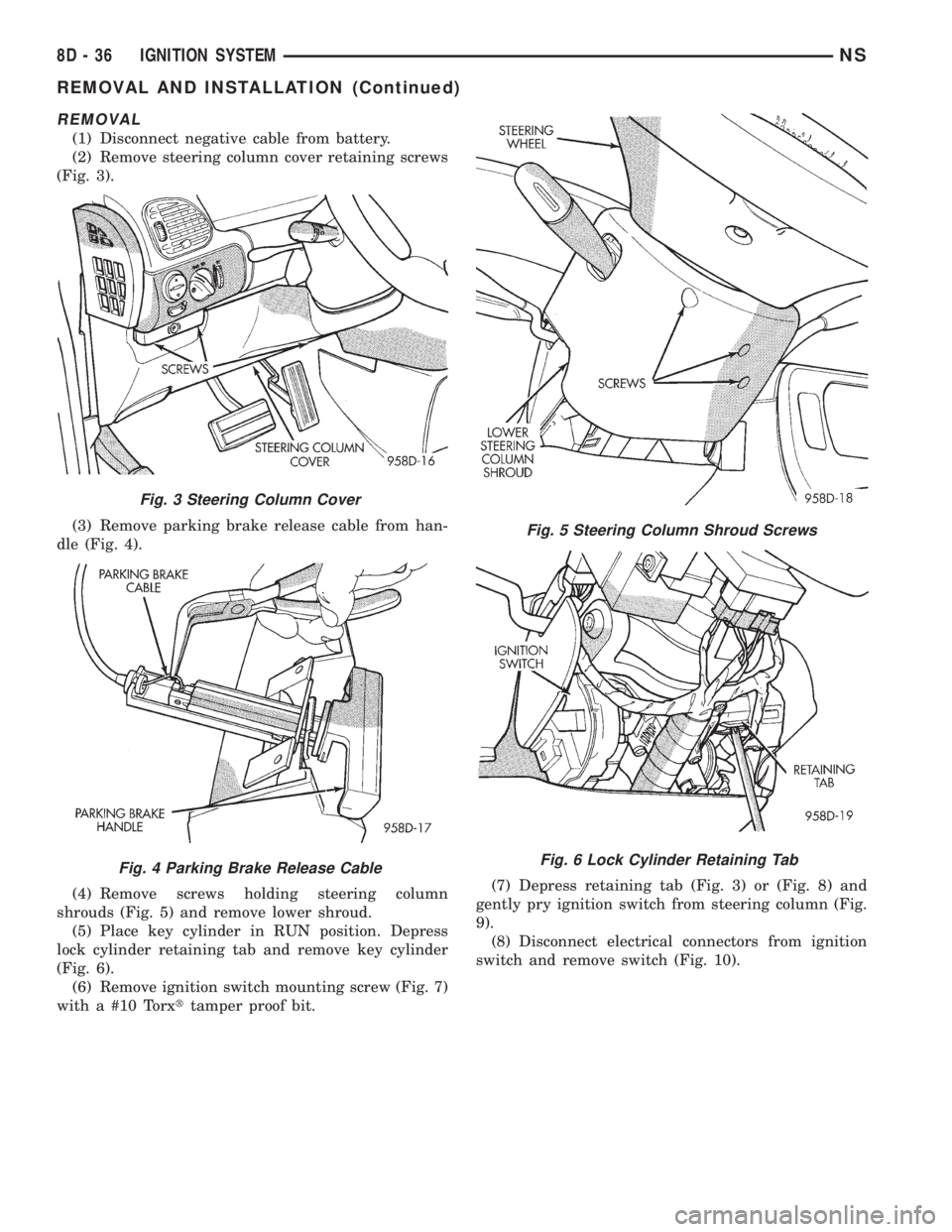
(2) Remove steering column cover retaining screws
(Fig. 3).
(3) Remove parking brake release cable from han-
dle (Fig. 4).
(4) Remove screws holding steering column
shrouds (Fig. 5) and remove lower shroud.
(5) Place key cylinder in RUN position. Depress
lock cylinder retaining tab and remove key cylinder
(Fig. 6).
(6) Remove ignition switch mounting screw (Fig. 7)
with a #10 Torxttamper proof bit.(7) Depress retaining tab (Fig. 3) or (Fig. 8) and
gently pry ignition switch from steering column (Fig.
9).
(8) Disconnect electrical connectors from ignition
switch and remove switch (Fig. 10).
Fig. 3 Steering Column Cover
Fig. 4 Parking Brake Release Cable
Fig. 5 Steering Column Shroud Screws
Fig. 6 Lock Cylinder Retaining Tab
8D - 36 IGNITION SYSTEMNS
REMOVAL AND INSTALLATION (Continued)
Page 470 of 1938
INTERIOR LAMPS
INDEX
page page
REMOVAL AND INSTALLATION
CONVENIENCE BIN LAMP................. 20
DOME LAMP BULB...................... 21
DOME LAMP........................... 21
FRONT DOOR COURTESY LAMP BULB...... 22
FRONT DOOR COURTESY LAMP........... 21
GLOVE BOX LAMP AND SWITCH........... 19
GLOVE BOX LAMP BULB.................. 19
HEADER READING/COURTESY LAMP BULB . . . 19HEADER READING/COURTESY LAMP....... 18
IGNITION HALO LAMP BULB............... 19
INSTRUMENT PANEL LAMPS AND SWITCHES . 20
LIFTGATE COURTESY LAMP BULB.......... 24
LIFTGATE COURTESY LAMP............... 23
OVERHEAD CONSOLE READING/COURTESY
LAMP BULB.......................... 18
RAIL LAMP MODULE BULB................ 23
REMOVAL AND INSTALLATION
OVERHEAD CONSOLE READING/COURTESY LAMP
BULB
REMOVAL
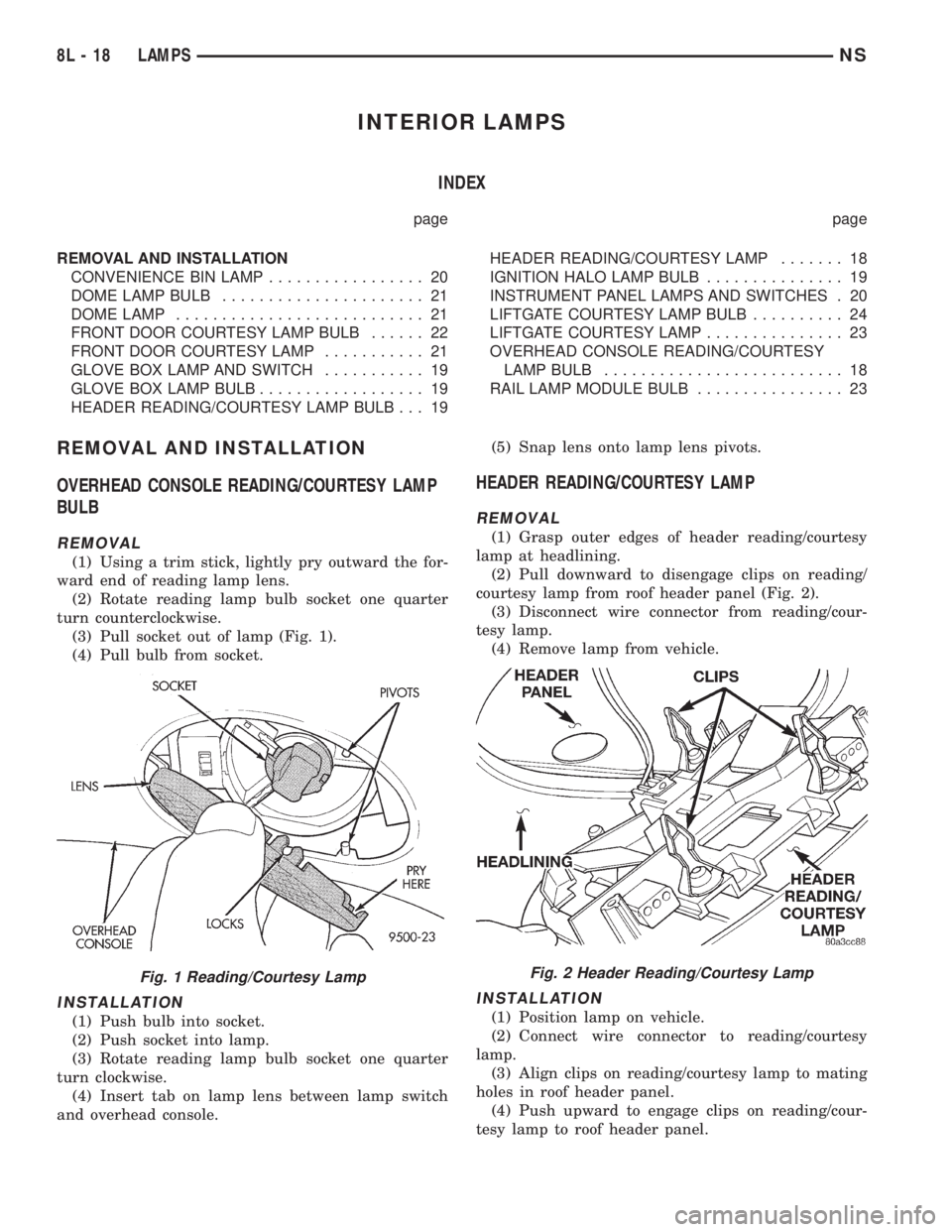
(1) Using a trim stick, lightly pry outward the for-
ward end of reading lamp lens.
(2) Rotate reading lamp bulb socket one quarter
turn counterclockwise.
(3) Pull socket out of lamp (Fig. 1).
(4) Pull bulb from socket.
INSTALLATION
(1) Push bulb into socket.
(2) Push socket into lamp.
(3) Rotate reading lamp bulb socket one quarter
turn clockwise.
(4) Insert tab on lamp lens between lamp switch
and overhead console.(5) Snap lens onto lamp lens pivots.
HEADER READING/COURTESY LAMP
REMOVAL
(1) Grasp outer edges of header reading/courtesy
lamp at headlining.
(2) Pull downward to disengage clips on reading/
courtesy lamp from roof header panel (Fig. 2).
(3) Disconnect wire connector from reading/cour-
tesy lamp.
(4) Remove lamp from vehicle.
INSTALLATION
(1) Position lamp on vehicle.
(2) Connect wire connector to reading/courtesy
lamp.
(3) Align clips on reading/courtesy lamp to mating
holes in roof header panel.
(4) Push upward to engage clips on reading/cour-
tesy lamp to roof header panel.
Fig. 1 Reading/Courtesy LampFig. 2 Header Reading/Courtesy Lamp
8L - 18 LAMPSNS
Page 552 of 1938
THERMOMETER AND COMPASS
THERMOMETER
Engine temperature can increase the displayed
temperature. The CMTC is designed to dampen tem-
perature readings when the vehicle is moving at a
rate slower than 18 miles per hour.
The outside temperature is measured from a sen-
sor mounted in the front of the vehicle. If the tem-
perature is more than 55ÉC (131ÉF) or the
temperature sending line is shorted to ground, the
temperature display should read SC. If the tempera-
ture is less than -40ÉC (-40ÉF), or the sending line is
an open circuit, the display should read OC.
The CMTC will not allow the temperature reading
to increase when the vehicle is not moving.
COMPASS
The CMTC is self calibrating and usually requires
no adjustment. The compass will continuously per-
form a slow calibration to compensate for small mag-
netic variations common to any automobile.
Uncommon magnetic shifts may be caused by items
such as magnetic base antennas, which can perma-
nently alter the magnetic field of the vehicle roof
panel. If excessive magnetic field continues for 5 min-
utes, the compass heading will go blank and only the
CAL symbol will illuminate. When this occurs, the
vehicle roof panel may require demagnetizing. Refer
to the demagnetizing procedure in this section.
Moderate magnetic shifts may, on very rare occa-
sions, cause the compass heading to display only one
or two of the eight possible headings. Although the
compass will eventually compensate for this shift, it
could take several ignition cycles. The compensation
process can be expedited by manually activating the
fast calibration routine. Refer to the fast calibrating
procedure in this section. This procedure may be per-formed anytime that the compass appears to be inac-
curate.
If the calibration data stored in the body control
module is not received, the compass will read only
NE North-East. The CMTC is self calibrating and
requires no adjusting. The word CAL is displayed to
show that the compass is in calibration mode. CAL
will turn off after the vehicle has gone through three
complete circles without stopping, in an area free of
magnetic disturbance. If module displays tempera-
ture while the compass is blank, turn off ignition and
run self diagnostics then demagnetize the vehicle.
After demagnetizing, check compass calibration num-
ber, refer to Self Diagnostic Test. If greater than 15,
demagnetize again until reading is less than 15. If
compass still goes blank after demagnetizing then
check internal diagnostics and demagnetize.
UNIVERSAL TRANSMITTER
The Universal Transmitter, replaces the hand held
remote controls that open the garage door, motorized
gates, or home lighting in/outside the home. This
device memorizes the activator codes for up to three
remote controlled devices. It triggers those devices at
the push of a button, located in a unit permanently
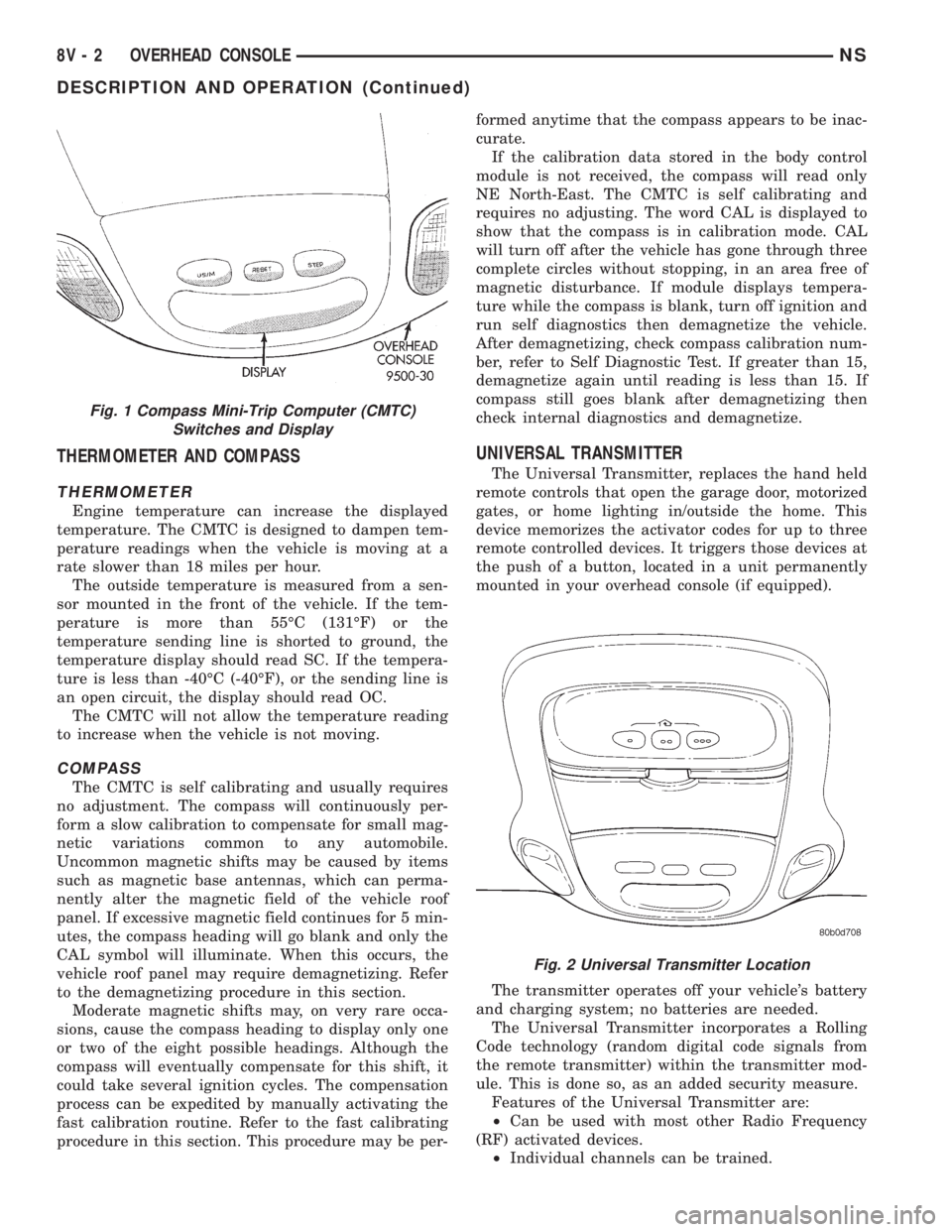
mounted in your overhead console (if equipped).
The transmitter operates off your vehicle's battery
and charging system; no batteries are needed.
The Universal Transmitter incorporates a Rolling
Code technology (random digital code signals from
the remote transmitter) within the transmitter mod-
ule. This is done so, as an added security measure.
Features of the Universal Transmitter are:
²Can be used with most other Radio Frequency
(RF) activated devices.
²Individual channels can be trained.
Fig. 1 Compass Mini-Trip Computer (CMTC)
Switches and Display
Fig. 2 Universal Transmitter Location
8V - 2 OVERHEAD CONSOLENS
DESCRIPTION AND OPERATION (Continued)
Page 554 of 1938
²Rotate your hand-held transmitter end-over-end
and train again. For best results, place the end oppo-
site from the battery compartment against the uni-
versal transmitter while training.
²The frequency of the hand-held transmitter may
not be in the desired frequencies between 286MHz
and 399MHz set by FCC.
SERVICE PROCEDURES
COMPASS CALIBRATION PROCEDURE
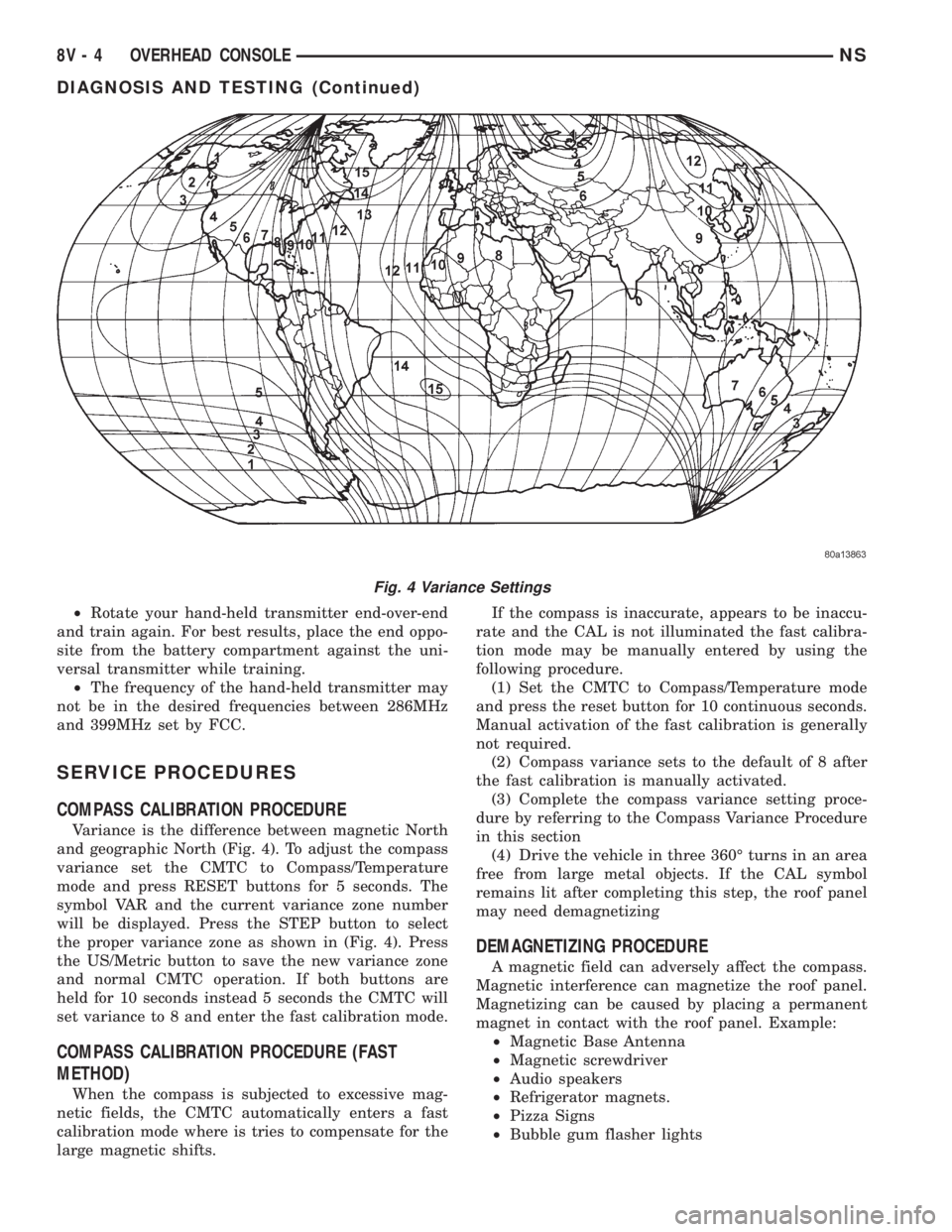
Variance is the difference between magnetic North
and geographic North (Fig. 4). To adjust the compass
variance set the CMTC to Compass/Temperature
mode and press RESET buttons for 5 seconds. The
symbol VAR and the current variance zone number
will be displayed. Press the STEP button to select
the proper variance zone as shown in (Fig. 4). Press
the US/Metric button to save the new variance zone
and normal CMTC operation. If both buttons are
held for 10 seconds instead 5 seconds the CMTC will
set variance to 8 and enter the fast calibration mode.
COMPASS CALIBRATION PROCEDURE (FAST
METHOD)
When the compass is subjected to excessive mag-
netic fields, the CMTC automatically enters a fast
calibration mode where is tries to compensate for the
large magnetic shifts.If the compass is inaccurate, appears to be inaccu-
rate and the CAL is not illuminated the fast calibra-
tion mode may be manually entered by using the
following procedure.
(1) Set the CMTC to Compass/Temperature mode
and press the reset button for 10 continuous seconds.
Manual activation of the fast calibration is generally
not required.
(2) Compass variance sets to the default of 8 after
the fast calibration is manually activated.
(3) Complete the compass variance setting proce-
dure by referring to the Compass Variance Procedure
in this section
(4) Drive the vehicle in three 360É turns in an area
free from large metal objects. If the CAL symbol
remains lit after completing this step, the roof panel
may need demagnetizing
DEMAGNETIZING PROCEDURE
A magnetic field can adversely affect the compass.
Magnetic interference can magnetize the roof panel.
Magnetizing can be caused by placing a permanent
magnet in contact with the roof panel. Example:
²Magnetic Base Antenna
²Magnetic screwdriver
²Audio speakers
²Refrigerator magnets.
²Pizza Signs
²Bubble gum flasher lights
Fig. 4 Variance Settings
8V - 4 OVERHEAD CONSOLENS
DIAGNOSIS AND TESTING (Continued)
Page 555 of 1938
Removing magnetic interfering objects will usually
restore normal compass operation. If the compass
display remains blank while the CAL label is illumi-
nated, then the roof panel requires demagnetizing. To
demagnetize use Special Tool 6029 for demagnetizing
the roof panel. The demagnetizing procedure will
demagnetize the roof and mounting screws in the
overhead console. It is important that you follow the
instructions below exactly. The mounting screws and
the mounting brackets around the compass area are
steel, and therefore aid in the demagnetizing of the
roof panel.
(1) Be sure the ignition switch is in the OFF posi-
tion before you begin the demagnetize procedure.
(2) Plug the demagnetizing tool into a standard
110/115 volt AC outlet, keeping the demagnetizing
tool at least 12 inches away from the compass area
when plugging it in.
(3) Slowly approach and contact the console
mounting screw with the plastic coated tip of the tool
for at least two seconds.
(4) With the demagnetizing tool still energized,
slowly back it away from the screw until the tip is at
least 12 inches from the screw head.
(5) Repeat the last step with all the console
mounting screws.
(6) After you have pulled at least 12 inches from
the last screw, remove the demagnetizing tool from
inside vehicle and disconnect it from the electrical
outlet.
(7) Place an 8 1/2 X 11 inch piece of paper length-
wise on the roof of vehicle directly above compass.
The purpose of the paper is to protect the roof panel
from scratches and define the area to be demagne-
tized.
(8) Plug in the demagnetizing tool, keeping it at
least two feet away from the compass unit.
(9) Slowly approach the center of the roof panel at
the windshield with the demagnetizing tool plugged
in.
(10) Contact the roof panel with the tip of the tool.
Using slow sweeping motions of 1/2 inch between
sweeps. Move the tool approximately four inches
either side of the center line and at least 11 inches
back from the windshield.
(11) With the demagnetizing tool still energized,
slowly back away from the roof panel until the tip is
at least two feet from the roof before unplugging the
tool.
(12) Recalibrate compass, refer to the compass cal-
ibration procedure in this section.
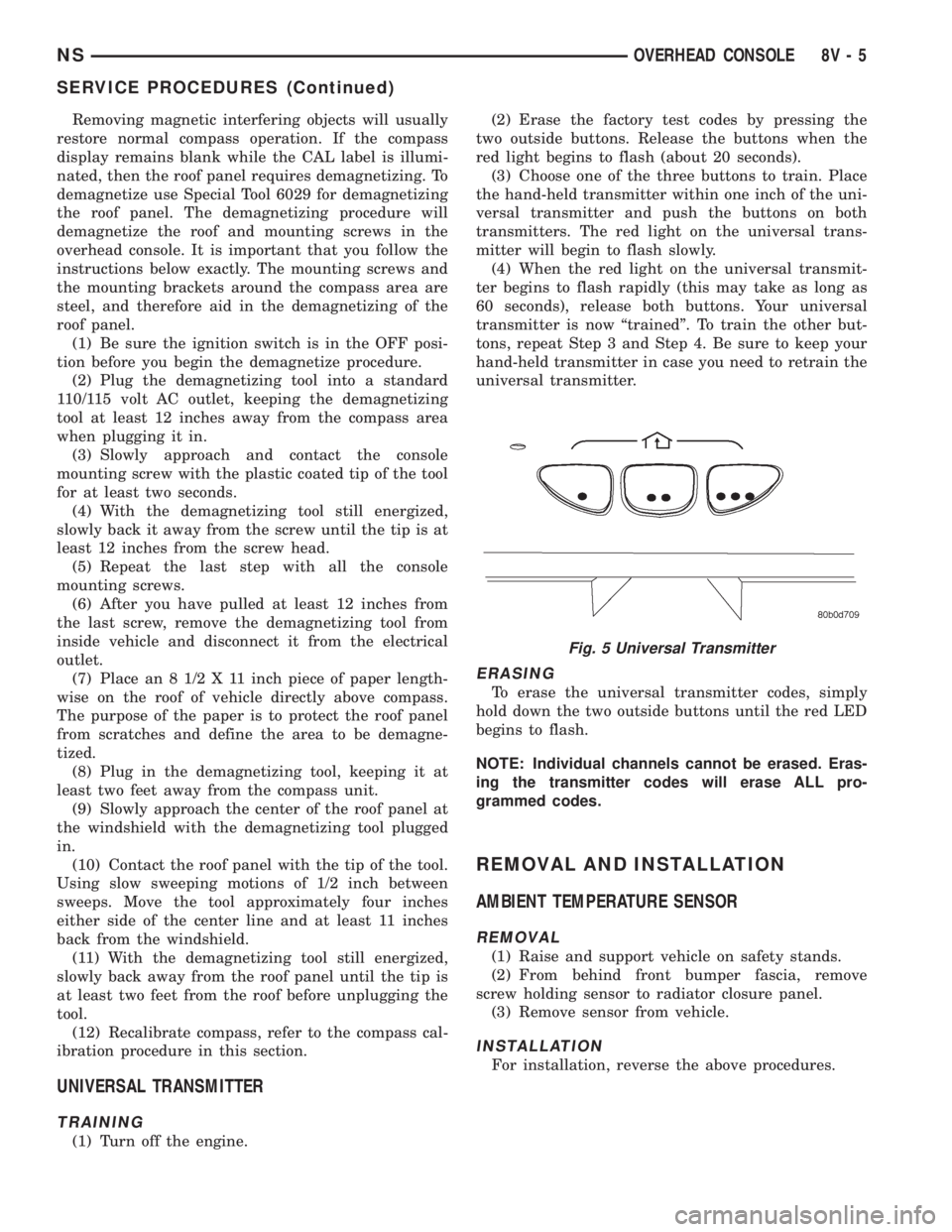
UNIVERSAL TRANSMITTER
TRAINING
(1) Turn off the engine.(2) Erase the factory test codes by pressing the
two outside buttons. Release the buttons when the
red light begins to flash (about 20 seconds).
(3) Choose one of the three buttons to train. Place
the hand-held transmitter within one inch of the uni-
versal transmitter and push the buttons on both
transmitters. The red light on the universal trans-
mitter will begin to flash slowly.
(4) When the red light on the universal transmit-
ter begins to flash rapidly (this may take as long as
60 seconds), release both buttons. Your universal
transmitter is now ªtrainedº. To train the other but-
tons, repeat Step 3 and Step 4. Be sure to keep your
hand-held transmitter in case you need to retrain the
universal transmitter.
ERASING
To erase the universal transmitter codes, simply
hold down the two outside buttons until the red LED
begins to flash.
NOTE: Individual channels cannot be erased. Eras-
ing the transmitter codes will erase ALL pro-
grammed codes.
REMOVAL AND INSTALLATION
AMBIENT TEMPERATURE SENSOR
REMOVAL
(1) Raise and support vehicle on safety stands.
(2) From behind front bumper fascia, remove
screw holding sensor to radiator closure panel.
(3) Remove sensor from vehicle.
INSTALLATION
For installation, reverse the above procedures.
Fig. 5 Universal Transmitter
NSOVERHEAD CONSOLE 8V - 5
SERVICE PROCEDURES (Continued)
Page 556 of 1938
COMPASS MINI-TRIP COMPUTER (CMTC)
MODULE
REMOVAL
(1) Disconnect battery negative cable.
(2) Remove overhead console.
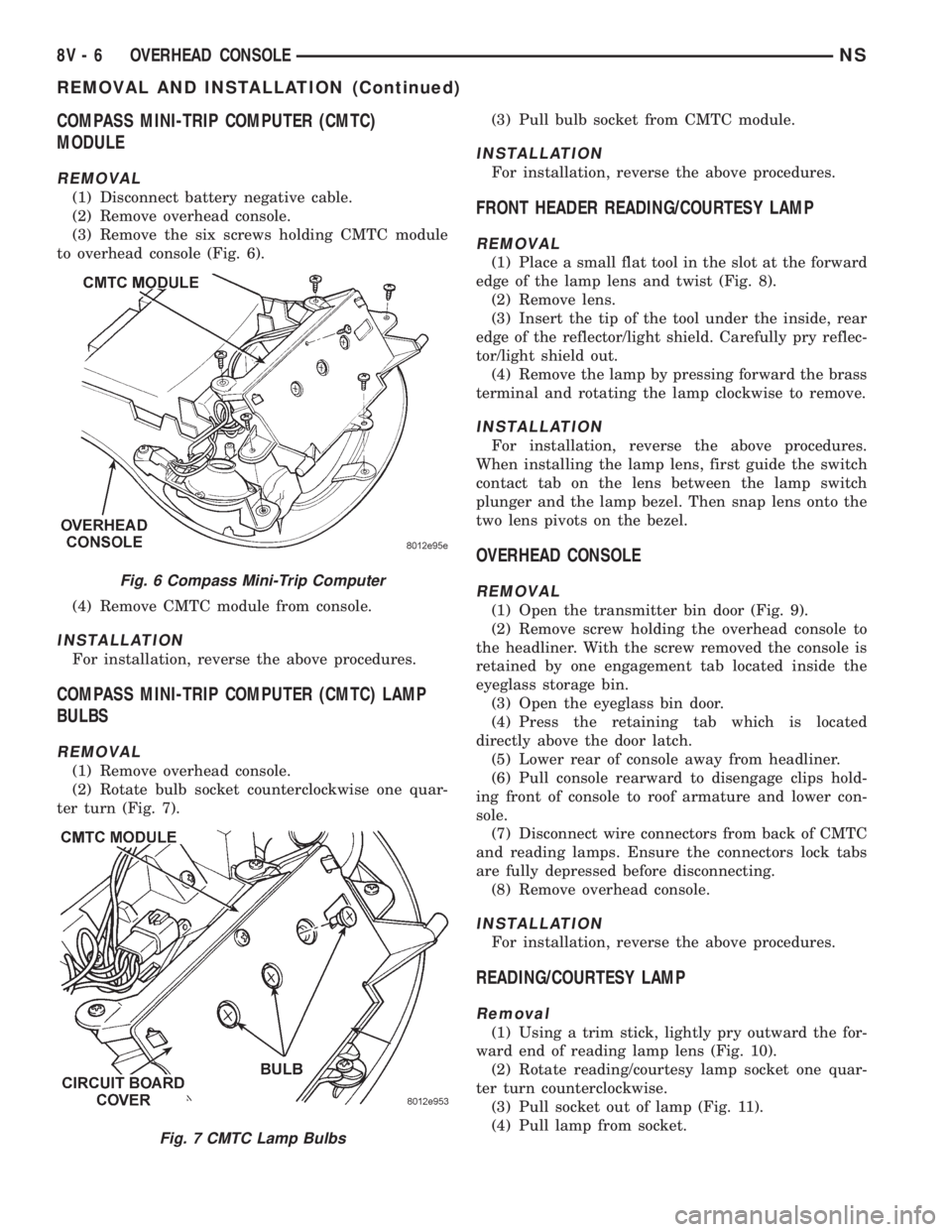
(3) Remove the six screws holding CMTC module
to overhead console (Fig. 6).
(4) Remove CMTC module from console.
INSTALLATION
For installation, reverse the above procedures.
COMPASS MINI-TRIP COMPUTER (CMTC) LAMP
BULBS
REMOVAL
(1) Remove overhead console.
(2) Rotate bulb socket counterclockwise one quar-
ter turn (Fig. 7).(3) Pull bulb socket from CMTC module.
INSTALLATION
For installation, reverse the above procedures.
FRONT HEADER READING/COURTESY LAMP
REMOVAL
(1) Place a small flat tool in the slot at the forward
edge of the lamp lens and twist (Fig. 8).
(2) Remove lens.
(3) Insert the tip of the tool under the inside, rear
edge of the reflector/light shield. Carefully pry reflec-
tor/light shield out.
(4) Remove the lamp by pressing forward the brass
terminal and rotating the lamp clockwise to remove.
INSTALLATION
For installation, reverse the above procedures.
When installing the lamp lens, first guide the switch
contact tab on the lens between the lamp switch
plunger and the lamp bezel. Then snap lens onto the
two lens pivots on the bezel.
OVERHEAD CONSOLE
REMOVAL
(1) Open the transmitter bin door (Fig. 9).
(2) Remove screw holding the overhead console to
the headliner. With the screw removed the console is
retained by one engagement tab located inside the
eyeglass storage bin.
(3) Open the eyeglass bin door.
(4) Press the retaining tab which is located
directly above the door latch.
(5) Lower rear of console away from headliner.
(6) Pull console rearward to disengage clips hold-
ing front of console to roof armature and lower con-
sole.
(7) Disconnect wire connectors from back of CMTC
and reading lamps. Ensure the connectors lock tabs
are fully depressed before disconnecting.
(8) Remove overhead console.
INSTALLATION
For installation, reverse the above procedures.
READING/COURTESY LAMP
Removal
(1) Using a trim stick, lightly pry outward the for-
ward end of reading lamp lens (Fig. 10).
(2) Rotate reading/courtesy lamp socket one quar-
ter turn counterclockwise.
(3) Pull socket out of lamp (Fig. 11).
(4) Pull lamp from socket.
Fig. 6 Compass Mini-Trip Computer
Fig. 7 CMTC Lamp Bulbs
8V - 6 OVERHEAD CONSOLENS
REMOVAL AND INSTALLATION (Continued)
Page 988 of 1938
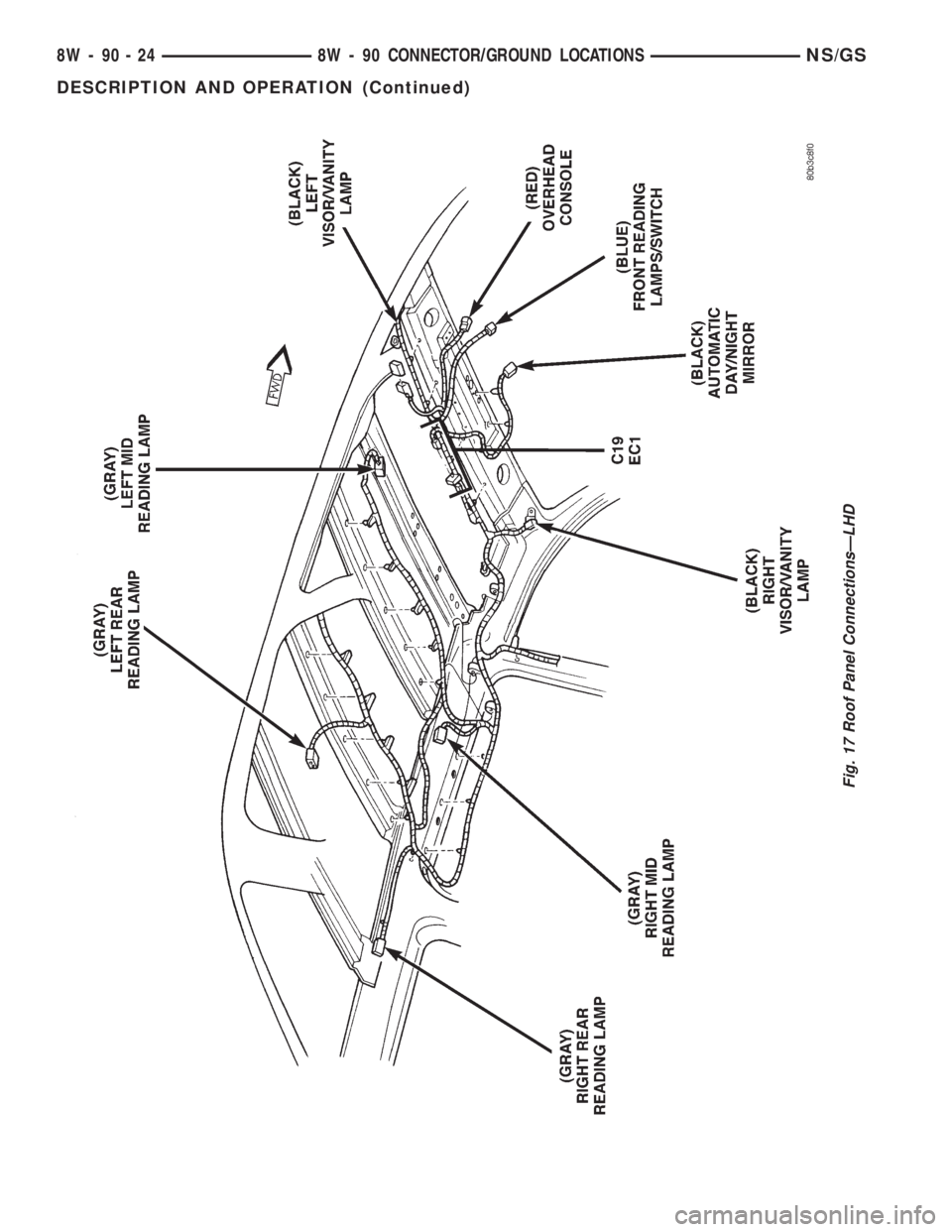
Fig. 17 Roof Panel ConnectionsÐLHD
8W - 90 - 24 8W - 90 CONNECTOR/GROUND LOCATIONSNS/GS
DESCRIPTION AND OPERATION (Continued)
Page 1017 of 1938
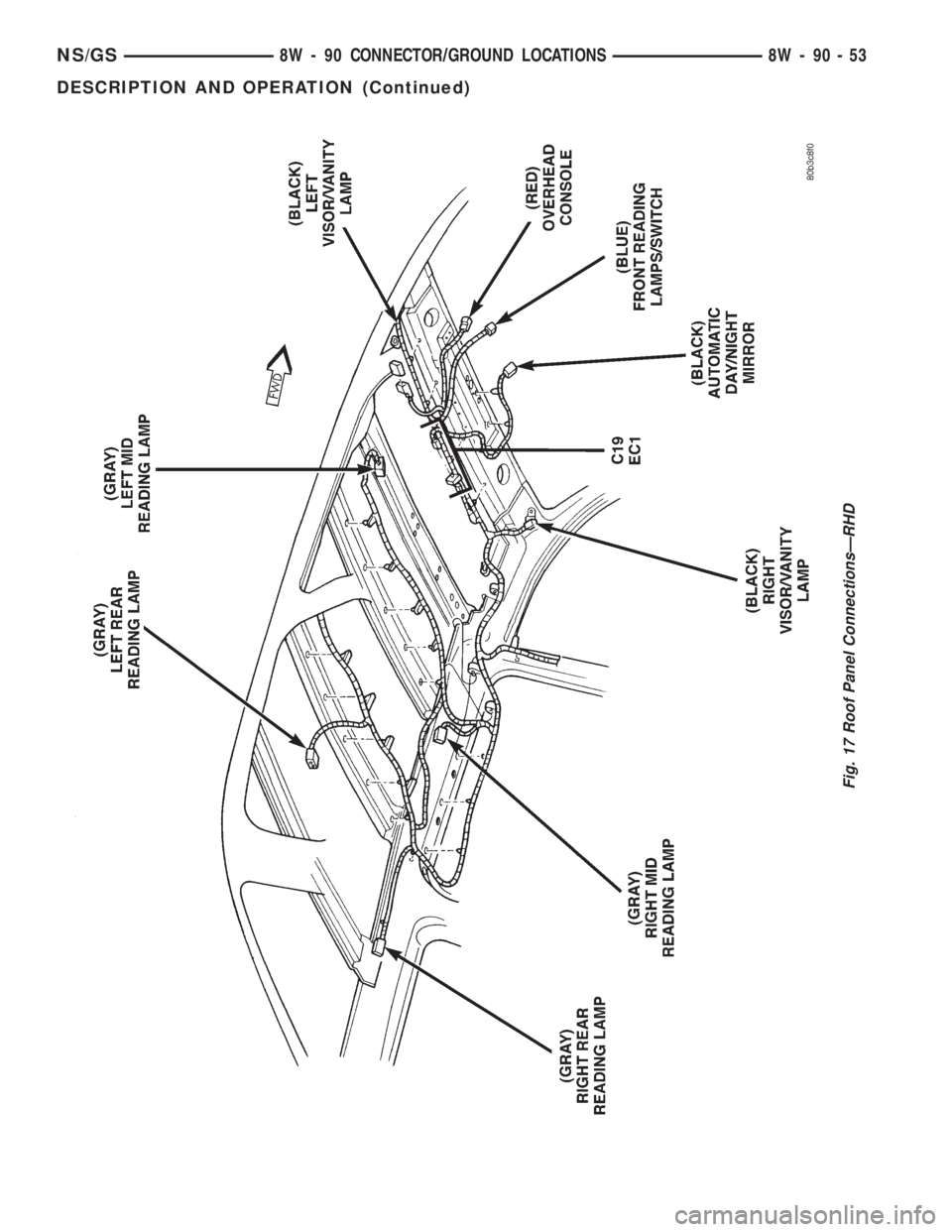
Fig. 17 Roof Panel ConnectionsÐRHD
NS/GS8W - 90 CONNECTOR/GROUND LOCATIONS 8W - 90 - 53
DESCRIPTION AND OPERATION (Continued)
Page 1734 of 1938

STATIONARY GLASS
INDEX
page page
DESCRIPTION AND OPERATION
SAFETY PRECAUTIONS................... 4
REMOVAL AND INSTALLATION
BODY SIDE/SLIDING DOOR STATIONARY
GLASS............................... 6REAR WINDOW.......................... 7
WINDSHIELD............................ 4
DESCRIPTION AND OPERATION
SAFETY PRECAUTIONS
WARNING: DO NOT OPERATE THE VEHICLE
WITHIN 24 HOURS OF WINDSHIELD INSTALLATION.
IT TAKES AT LEAST 24 HOURS FOR URETHANE
ADHESIVE TO CURE. IF IT IS NOT CURED, THE
WINDSHIELD MAY NOT PERFORM PROPERLY IN
AN ACCIDENT.
URETHANE ADHESIVES ARE APPLIED AS A SYS-
TEM. USE GLASS CLEANER, GLASS PREP SOL-
VENT, GLASS PRIMER, PVC (VINYL) PRIMER AND
PINCHWELD (FENCE) PRIMER PROVIDED BY THE
ADHESIVE MANUFACTURER. IF NOT, STRUCTURAL
INTEGRITY COULD BE COMPROMISED.
CHRYSLER DOES NOT RECOMMEND GLASS
ADHESIVE BY BRAND. TECHNICIANS SHOULD
REVIEW PRODUCT LABELS AND TECHNICAL DATA
SHEETS, AND USE ONLY ADHESIVES THAT THEIR
MANUFACTURES WARRANT WILL RESTORE A
VEHICLE TO THE REQUIREMENTS OF FMVSS 212.
TECHNICIANS SHOULD ALSO INSURE THAT PRIM-
ERS AND CLEANERS ARE COMPATIBLE WITH THE
PARTICULAR ADHESIVE USED.
BE SURE TO REFER TO THE URETHANE MANU-
FACTURER'S DIRECTIONS FOR CURING TIME
SPECIFICATIONS, AND DO NOT USE ADHESIVE
AFTER ITS EXPIRATION DATE.
VAPORS THAT ARE EMITTED FROM THE URE-
THANE ADHESIVE OR PRIMER COULD CAUSE
PERSONAL INJURY. USE THEM IN A WELL-VENTI-
LATED AREA.
SKIN CONTACT WITH URETHANE ADHESIVE
SHOULD BE AVOIDED. PERSONAL INJURY MAY
RESULT.
ALWAYS WEAR EYE AND HAND PROTECTION
WHEN WORKING WITH GLASS.
CAUTION: Protect all painted and trimmed surfaces
from coming in contact with urethane or primers.Be careful not to damage painted surfaces when
removing moldings or cutting urethane around
windshield.
It is difficult to salvage a windshield during the
removal operation. The windshield is part of the
structural support for the roof. The urethane bonding
used to secure the windshield to the fence is difficult
to cut or clean from any surface. If the moldings are
set in urethane, it would also be unlikely they could
be salvaged. Before removing the windshield, check
the availability of the windshield and moldings from
the parts supplier.
REMOVAL AND INSTALLATION
WINDSHIELD
The urethane adhesive holding the windshield to
the opening pinch weld (fence) can be cut using a
sharp cold knife from the exterior of the vehicle.
Using the cold knife method is effective if the wind-
shield is already broken. If the glass must be sal-
vaged, cutting the urethane adhesive from the
interior of the vehicle using a reciprocating or oscil-
lating power knife is recommended.
WINDSHIELD REMOVAL ± EXTERIOR METHOD
(1) Remove inside rear view mirror.
(2) Remove windshield wiper arms.
(3) Remove cowl cover.
(4) Remove A-pillar trim panels.
(5) Disconnect wire connectors to windshield
defroster grid.
(6) Place protective covers over instrument panel
and hood.
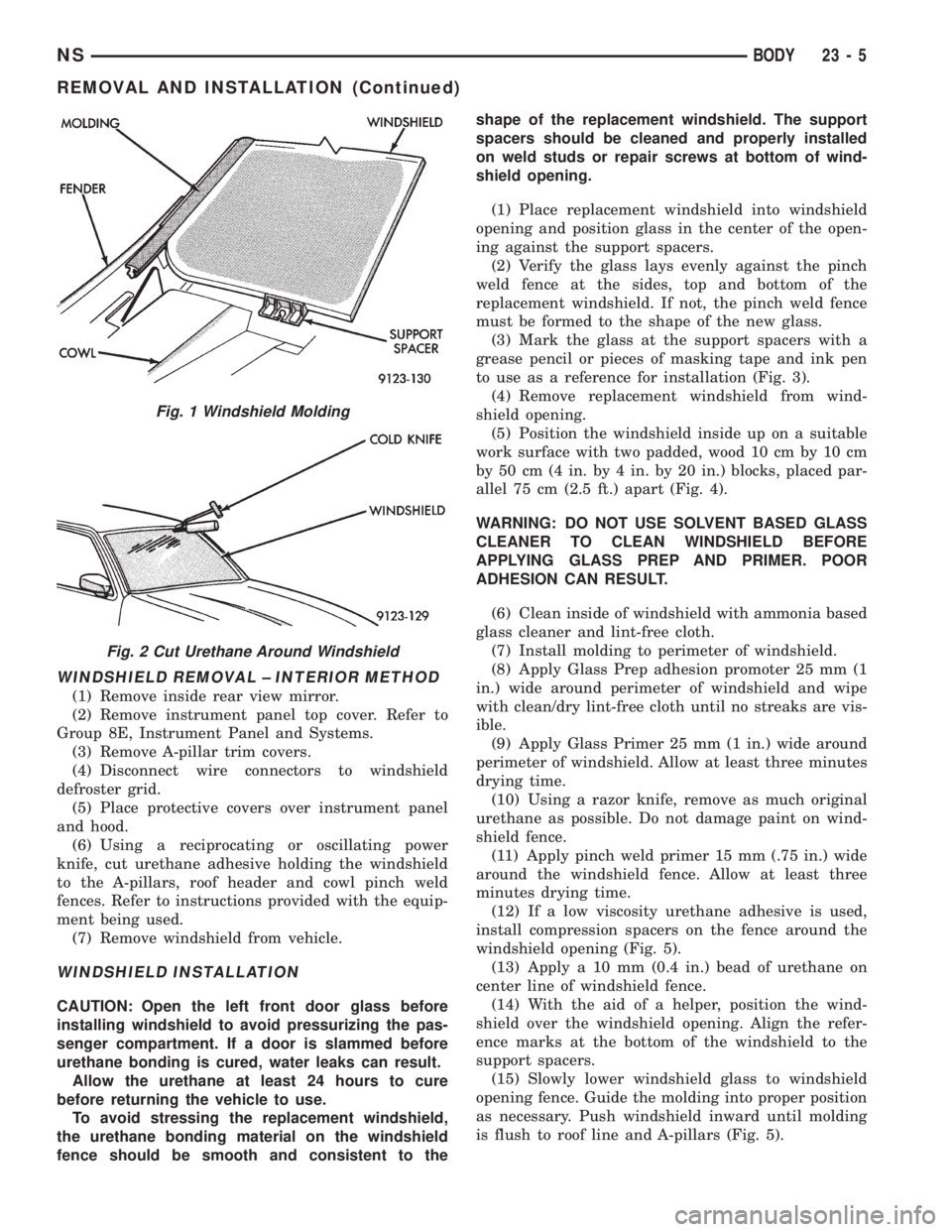
(7) Remove windshield molding (Fig. 1). Using pli-
ers, pull outward on molding at the bottom of A-pil-
lars.
(8) Using a sharp cold knife, cut urethane adhe-
sive holding the windshield to the A-pillars, roof
header and cowl pinch weld fences (Fig. 2). A power
cutting device can be used if available.
(9) Remove windshield from vehicle.
23 - 4 BODYNS
Page 1735 of 1938
WINDSHIELD REMOVAL ± INTERIOR METHOD
(1) Remove inside rear view mirror.
(2) Remove instrument panel top cover. Refer to
Group 8E, Instrument Panel and Systems.
(3) Remove A-pillar trim covers.
(4) Disconnect wire connectors to windshield
defroster grid.
(5) Place protective covers over instrument panel
and hood.
(6) Using a reciprocating or oscillating power
knife, cut urethane adhesive holding the windshield
to the A-pillars, roof header and cowl pinch weld
fences. Refer to instructions provided with the equip-
ment being used.
(7) Remove windshield from vehicle.
WINDSHIELD INSTALLATION
CAUTION: Open the left front door glass before
installing windshield to avoid pressurizing the pas-
senger compartment. If a door is slammed before
urethane bonding is cured, water leaks can result.
Allow the urethane at least 24 hours to cure
before returning the vehicle to use.
To avoid stressing the replacement windshield,
the urethane bonding material on the windshield
fence should be smooth and consistent to theshape of the replacement windshield. The support
spacers should be cleaned and properly installed
on weld studs or repair screws at bottom of wind-
shield opening.
(1) Place replacement windshield into windshield
opening and position glass in the center of the open-
ing against the support spacers.
(2) Verify the glass lays evenly against the pinch
weld fence at the sides, top and bottom of the
replacement windshield. If not, the pinch weld fence
must be formed to the shape of the new glass.
(3) Mark the glass at the support spacers with a
grease pencil or pieces of masking tape and ink pen
to use as a reference for installation (Fig. 3).
(4) Remove replacement windshield from wind-
shield opening.
(5) Position the windshield inside up on a suitable
work surface with two padded, wood 10 cm by 10 cm
by 50 cm (4 in. by 4 in. by 20 in.) blocks, placed par-
allel 75 cm (2.5 ft.) apart (Fig. 4).
WARNING: DO NOT USE SOLVENT BASED GLASS
CLEANER TO CLEAN WINDSHIELD BEFORE
APPLYING GLASS PREP AND PRIMER. POOR
ADHESION CAN RESULT.
(6) Clean inside of windshield with ammonia based
glass cleaner and lint-free cloth.
(7) Install molding to perimeter of windshield.
(8) Apply Glass Prep adhesion promoter 25 mm (1
in.) wide around perimeter of windshield and wipe
with clean/dry lint-free cloth until no streaks are vis-
ible.
(9) Apply Glass Primer 25 mm (1 in.) wide around
perimeter of windshield. Allow at least three minutes
drying time.
(10) Using a razor knife, remove as much original
urethane as possible. Do not damage paint on wind-
shield fence.
(11) Apply pinch weld primer 15 mm (.75 in.) wide
around the windshield fence. Allow at least three
minutes drying time.
(12) If a low viscosity urethane adhesive is used,
install compression spacers on the fence around the
windshield opening (Fig. 5).
(13) Apply a 10 mm (0.4 in.) bead of urethane on
center line of windshield fence.
(14) With the aid of a helper, position the wind-
shield over the windshield opening. Align the refer-
ence marks at the bottom of the windshield to the
support spacers.
(15) Slowly lower windshield glass to windshield
opening fence. Guide the molding into proper position
as necessary. Push windshield inward until molding
is flush to roof line and A-pillars (Fig. 5).
Fig. 1 Windshield Molding
Fig. 2 Cut Urethane Around Windshield
NSBODY 23 - 5
REMOVAL AND INSTALLATION (Continued)