light CHRYSLER VOYAGER 1996 Owner's Manual
[x] Cancel search | Manufacturer: CHRYSLER, Model Year: 1996, Model line: VOYAGER, Model: CHRYSLER VOYAGER 1996Pages: 1938, PDF Size: 55.84 MB
Page 181 of 1938
Before test driving a brake complaint vehicle, note
whether the Red or Amber Brake Warning Lamp is
turned on. If it is the Red Brake Warning Lamp,
refer to the hydraulic system section in the brake
group of this manual. If the ABS Warning lamp
was/is on, test drive the vehicle as described below, to
verify the complaint. While the ABS Warning Lamp
is on, the ABS is not functional. The standard brake
system and the ability to stop the car may not be
affected if only the ABS Warning Lamp is on.
Discuss with the owner of the vehicle or note any
other electrical problems or conditions that may be
occurring on the vehicle. They may have an effect on
the antilock brake system's function.
(1) Turn the key to the off position and then back
to the on position. Note whether the ABS Warning
Lamp continues to stay on. If it does, refer to the
diagnostic manual covering the ITT Teves Mark 20
ABS system for the required test procedures.
(2) If the ABS Warning Lamp goes out, shift into
gear and drive the car to a speed of 20 kph (12 mph)
to complete the ABS start up cycle. If at this time the
ABS Warning Lamp goes on refer to the ITT Teves
Mark 20 Diagnostic Manual.
(3) If the ABS Warning Lamp remains OUT, drive
the vehicle a short distance. During this test drive be
sure that the vehicle achieves at least 40 mph. Brake
to at least one complete stop in an ABS cycle, and
again accelerate to 25 mph.
(4) If a functional problem with the ABS system is
determined while test driving a vehicle, refer to the
diagnostic manual covering the ITT Teves Mark 20
ABS system for the required test procedures and
proper use of the DRB diagnostic scan tool.
ABS SERVICE PRECAUTIONS
The ABS uses an electronic control module, the
CAB. This module is designed to withstand normal
current draws associated with vehicle operation.
Care must be taken to avoid overloading the CAB
circuits.In testing for open or short circuits, do
not ground or apply voltage to any of the cir-
cuits unless instructed to do so for a diagnostic
procedure.These circuits should only be tested
using a high impedance multi-meter or the DRB
tester as described in this section. Power should
never be removed or applied to any control module
with the ignition in the ON position. Before removing
or connecting battery cables, fuses, or connectors,
always turn the ignition to the OFF position.
CAUTION: Use only factory wiring harnesses. Do
not cut or splice wiring to the brake circuits. The
addition of after-market electrical equipment (car
phone, radar detector, citizen band radio, trailer
lighting, trailer brakes, ect.) on a vehicle equippedwith antilock brakes may affect the function of the
antilock brake system.
SERVICE PROCEDURES
BRAKE FLUID LEVEL INSPECTION
CAUTION: Use only Mopar brake fluid or an equiv-
alent from a tightly sealed container. Brake fluid
must conform to DOT 3 specifications. Do not use
petroleum-based fluid because seal damage in the
brake system will result.
For the specific procedure covering the inspection
of the brake fluid level and adding brake fluid to the
reservoir, refer to the Service Adjustments Section in
this group of the service manual.
BLEEDING TEVES MARK 20 HYDRAULIC SYSTEM
The base brake system must be bled anytime air is
permitted to enter the hydraulic system, due to dis-
connection of brake lines, hoses or components. The
ABS system, particularly the HCU, should only be
bled when the HCU is replaced or removed from the
vehicle, or if there is reason to believe the HCU has
ingested air. Under most circumstances that would
require brake bleeding, only the base brake system
needs to be bled.
It is important to note that excessive air in the
brake system will cause a soft or spongy feeling
brake pedal.
During bleeding operations, be sure that the brake
fluid level remains close to the FULL level in the res-
ervoir. Check the fluid level periodically during the
bleeding procedure and add DOT 3 brake fluid as
required.
The Teves Mark 20 ABS hydraulic system and the
base brake hydraulic system must be bled as two
independent braking systems. The non ABS portion
of the brake system is to be bled the same as any
non ABS system. Refer to the Service Adjustments
section in this manual for the proper bleeding proce-
dure to be used. This brake system can be either
pressure bled or manually bled.
The ABS portion of the brake system MUST be
bled separately. This bleeding procedure requires the
use of the DRB Diagnostic Tester and the bleeding
sequence procedure outlined below.
ABS BLEEDING PROCEDURE
When bleeding the ABS system, the following
bleeding sequenceMUSTbe followed to insure com-
plete and adequate bleeding. The ABS system can be
bled using a manual bleeding procedure or standard
pressure bleeding equipment.
NSBRAKES 5 - 99
DIAGNOSIS AND TESTING (Continued)
Page 206 of 1938
CLUTCH COVER AND DISC RUNOUT
Check condition of the clutch cover before installa-
tion. A warped cover or diaphragm spring will cause
grab and/or incomplete release or engagement. Use
care when handling the clutch assembly. Impact can
distort the cover, diaphragm spring, and release fin-
gers.
CLUTCH CHATTER COMPLAINTS
For all clutch chatter complaints, do the following:
(1) Check for loose, misaligned, or broken engine
and transmission mounts. If present, they should be
corrected at this time. Test vehicle for chatter. If
chatter is gone, there is no need to go any further. If
chatter persists:
(2) Check to see if clutch cable routing is correct
and operates smoothly (LHD applications).
(3) Check for loose connections in drivetrain. Cor-
rect any problems and determine if clutch chatter
complaints have been satisfied. If not:
(4) Remove transaxle. See Group 21, Manual Tran-
saxle for procedure.
(5) Check to see if the release bearing is sticky or
binding. Replace bearing, if needed.
(6) Check linkage for excessive wear on the pivot
shaft, fork, and bushings. Replace all worn parts.
(7) Check clutch assembly for contamination (dirt,
oil). Replace clutch assembly, if required.
(8) Check to see if the clutch disc hub splines are
damaged. Replace with new clutch assembly, if nec-
essary.
(9) Check input shaft splines for damage. Replace,
if necessary.
(10) Check for uneven wear on clutch fingers.
(11) Check for broken clutch cover diaphragm
spring fingers. Replace with new clutch assembly, if
necessary.
CLASH±INTO±REVERSE COMPLAINTS
(1) Depress clutch pedal to floor and hold. After
three seconds, shift to reverse. If clash is present,
clutch has excessive spin time.
NOTE: Verify that nothing is obstructing pedal
travel. Floormats or other articles located under-
neath the clutch pedal could prevent the clutch
from disengaging fully.
(2) Remove transaxle. See Group 21, Manual Tran-
saxle for procedure.
(3) Check the input shaft spline, clutch disc
splines, and release bearing for dry rust. If present,
clean rust off and apply a light coat of bearing grease
to the input shaft splines. Apply grease on the input
shaft splines only where the clutch disc slides. Verify
that the clutch disc slides freely along the input shaft
spline.(4) Check to see if the clutch disc hub splines are
damaged, and replace with new clutch assembly if
required.
(5) Check the input shaft for damaged splines.
Replace as necessary.
(6) Check for broken clutch cover diaphragm
spring fingers.
(7) Install clutch assembly and transaxle.
REMOVAL AND INSTALLATION
CLUTCH CABLE SYSTEM Ð LHD
REMOVAL
(1) Hoist vehicle
(2) Using a pair of pliers, grasp end of clutch cable
and pull downward.
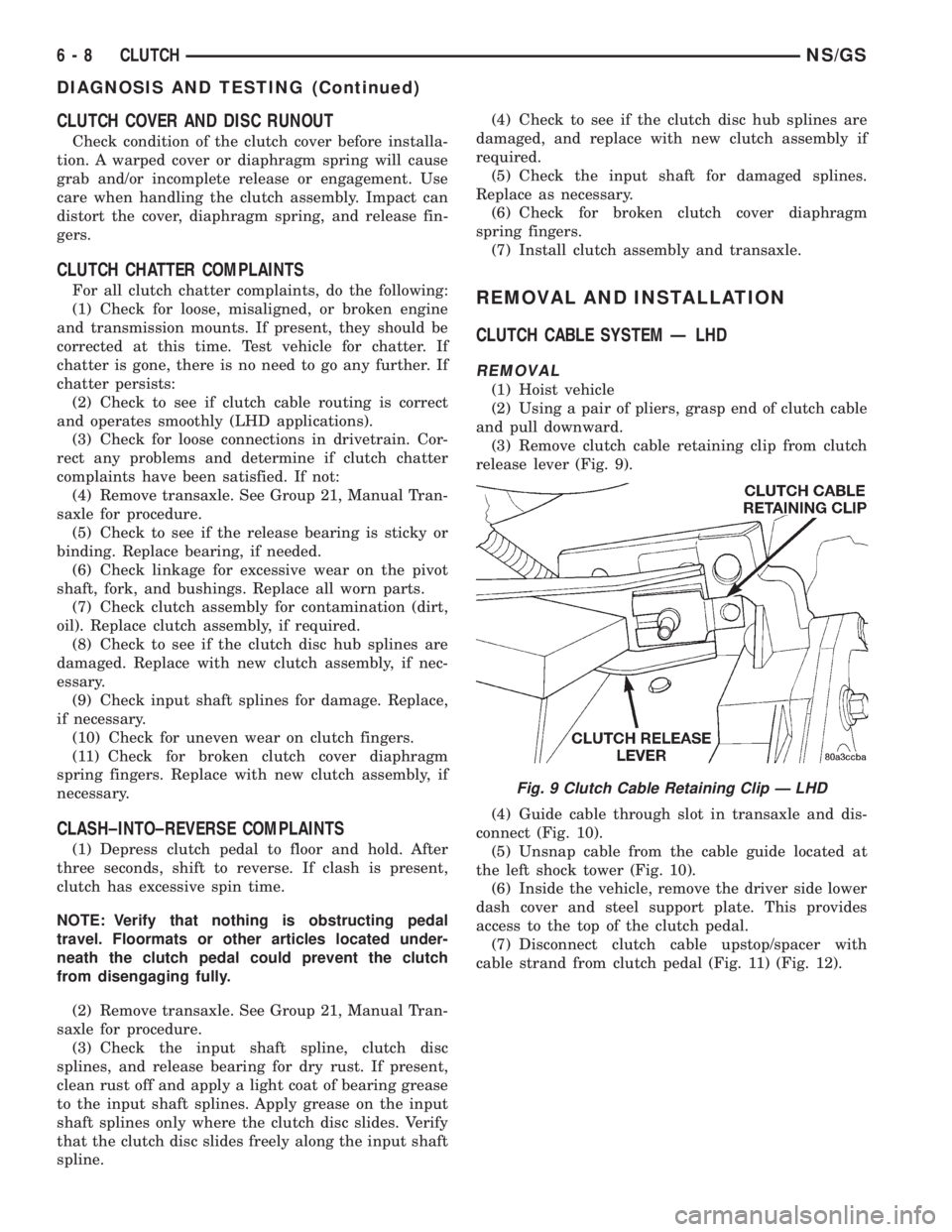
(3) Remove clutch cable retaining clip from clutch
release lever (Fig. 9).
(4) Guide cable through slot in transaxle and dis-
connect (Fig. 10).
(5) Unsnap cable from the cable guide located at
the left shock tower (Fig. 10).
(6) Inside the vehicle, remove the driver side lower
dash cover and steel support plate. This provides
access to the top of the clutch pedal.
(7) Disconnect clutch cable upstop/spacer with
cable strand from clutch pedal (Fig. 11) (Fig. 12).
Fig. 9 Clutch Cable Retaining Clip Ð LHD
6 - 8 CLUTCHNS/GS
DIAGNOSIS AND TESTING (Continued)
Page 207 of 1938
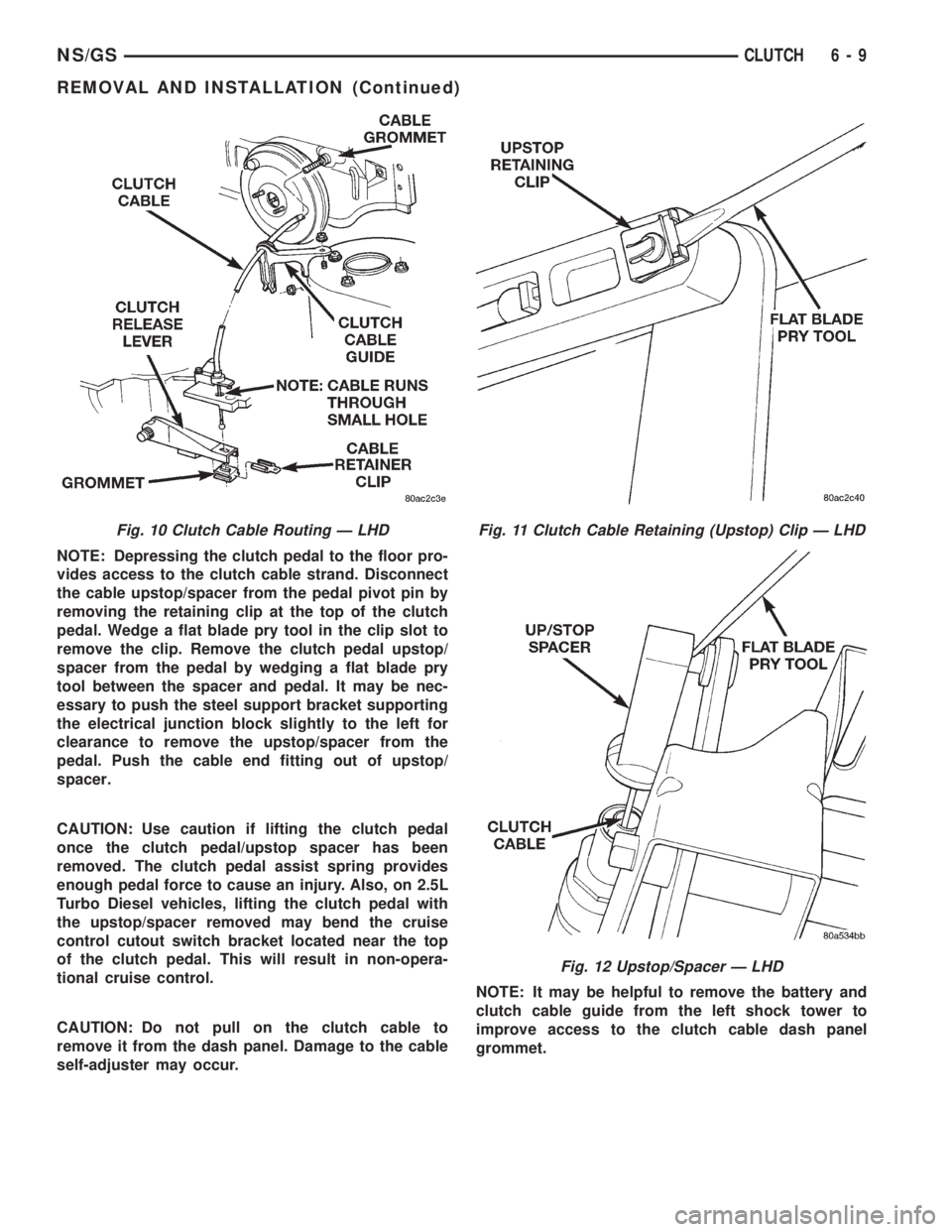
NOTE: Depressing the clutch pedal to the floor pro-
vides access to the clutch cable strand. Disconnect
the cable upstop/spacer from the pedal pivot pin by
removing the retaining clip at the top of the clutch
pedal. Wedge a flat blade pry tool in the clip slot to
remove the clip. Remove the clutch pedal upstop/
spacer from the pedal by wedging a flat blade pry
tool between the spacer and pedal. It may be nec-
essary to push the steel support bracket supporting
the electrical junction block slightly to the left for
clearance to remove the upstop/spacer from the
pedal. Push the cable end fitting out of upstop/
spacer.
CAUTION: Use caution if lifting the clutch pedal
once the clutch pedal/upstop spacer has been
removed. The clutch pedal assist spring provides
enough pedal force to cause an injury. Also, on 2.5L
Turbo Diesel vehicles, lifting the clutch pedal with
the upstop/spacer removed may bend the cruise
control cutout switch bracket located near the top
of the clutch pedal. This will result in non-opera-
tional cruise control.
CAUTION: Do not pull on the clutch cable to
remove it from the dash panel. Damage to the cable
self-adjuster may occur.NOTE: It may be helpful to remove the battery and
clutch cable guide from the left shock tower to
improve access to the clutch cable dash panel
grommet.
Fig. 10 Clutch Cable Routing Ð LHDFig. 11 Clutch Cable Retaining (Upstop) Clip Ð LHD
Fig. 12 Upstop/Spacer Ð LHD
NS/GSCLUTCH 6 - 9
REMOVAL AND INSTALLATION (Continued)
Page 208 of 1938
(8) Use a slight twisting motion while grasping the
grommet and body to remove the cable from the dash
panel and clutch bracket.
INSTALLATION
(1) Using a slight twisting motion, insert the self-
±adjuster mechanism end of the clutch cable through
the dash panel hole and into the bracket.
NOTE: It may be helpful to lubricate the dash panel
grommet using MoparTDoor-Ease or equivalent to
aid installation.
(2) Seat the cylindrical part of the cable grommet
in the dash panel. Be sure the self±adjuster is firmly
seated against the clutch bracket to ensure proper
adjuster mechanism function.
(3) Connect the clutch cable to the upstop/spacer.
(4) Connect the upstop/spacer to the clutch pedal.
(5) Replace the upstop/spacer retainer clip.
(6) Lift the clutch pedal and perform the Adjuster
Mechanism Function Check before finishing installa-
tion.
NOTE: If the adjuster mechanism does not function
properly, the most likely cause is that the cable is
not properly seated in the bracket.
ADJUSTER MECHANISM FUNCTION CHECK Ð LHD
(1) With slight pressure, pull the clutch release
lever end of the cable to draw the cable taut. Push
the clutch cable housing toward the dash panel (With
less than 20 lbs. of effort, the cable housing should
move 30-50mm.). This indicates proper adjuster
mechanism function. If the cable does not adjust,
determine if the mechanism is properly seated on the
bracket.
(2) If the adjust mechanism functions properly,
route cable to the transaxle. Install battery and cable
guide.
(3) Snap cable into cable guide located at the left
shock tower.
(4) Insert cable into transaxle and through clutch
release lever. Ensure the cable is routed through the
smaller hole in the transaxle deck (Fig. 10).
(5) Pull down on cable and insert cable retaining
clip onto clutch cable end.
(6) Check clutch pedal position switch operation.
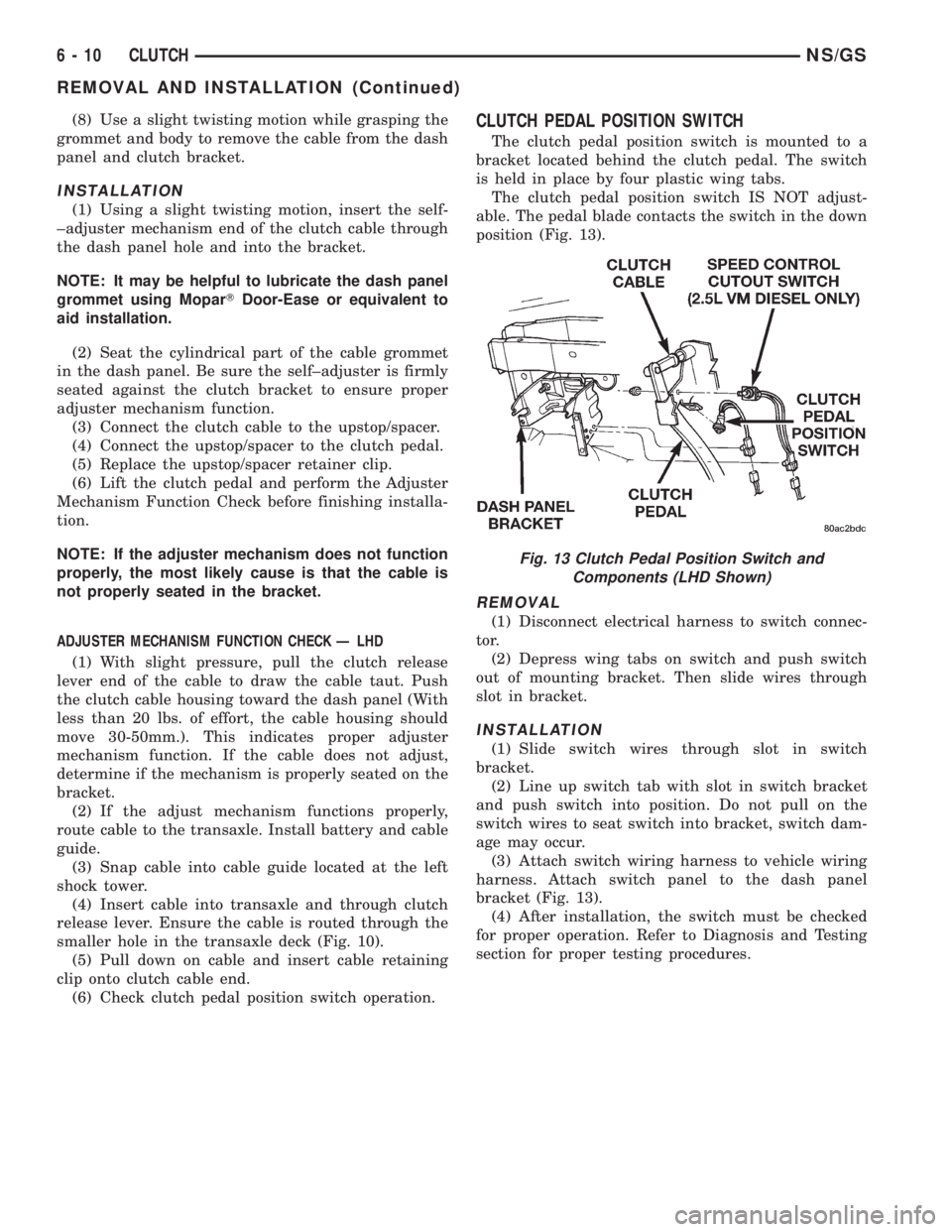
CLUTCH PEDAL POSITION SWITCH
The clutch pedal position switch is mounted to a
bracket located behind the clutch pedal. The switch
is held in place by four plastic wing tabs.
The clutch pedal position switch IS NOT adjust-
able. The pedal blade contacts the switch in the down
position (Fig. 13).
REMOVAL
(1) Disconnect electrical harness to switch connec-
tor.
(2) Depress wing tabs on switch and push switch
out of mounting bracket. Then slide wires through
slot in bracket.
INSTALLATION
(1) Slide switch wires through slot in switch
bracket.
(2) Line up switch tab with slot in switch bracket
and push switch into position. Do not pull on the
switch wires to seat switch into bracket, switch dam-
age may occur.
(3) Attach switch wiring harness to vehicle wiring
harness. Attach switch panel to the dash panel
bracket (Fig. 13).
(4) After installation, the switch must be checked
for proper operation. Refer to Diagnosis and Testing
section for proper testing procedures.
Fig. 13 Clutch Pedal Position Switch and
Components (LHD Shown)
6 - 10 CLUTCHNS/GS
REMOVAL AND INSTALLATION (Continued)
Page 210 of 1938
QUICK CONNECT COUPLING Ð RHD
CAUTION: Do not actuate the master cylinder or
step on the clutch pedal before the quick connect
coupling is joined, or an over pressure condition
could result in damage to the master cylinder, the
quick connect coupling, or the dash panel.
REMOVAL
1. Disconnect the quick connect coupling by lightly
pushing down on the black release collar on the male
side of the quick connect coupling while separating it
from the female side of the quick connect coupling
(Fig. 14).
INSTALLATION
1. Connect the male side of the quick connect cou-
pling (part of the master cylinder assembly) by hold-
ing the clutch tube at the rear and inserting it into
the female side of the quick connect coupling (part of
the slave cylinder assembly) until an audible click is
heard (Fig. 14).Do not push on the black release
collar on the male side of the quick connect
coupling while inserting it into the female side
of the quick connect coupling.
2. Confirm the connection by pulling firmly on the
clutch tube.
MASTER CYLINDER SYSTEM Ð RHD
REMOVAL
(1) Disconnect the quick connect coupling. Refer to
the ªQuick Connect Couplingº removal and installa-
tion procedure in this section.
(2) Remove the master cylinder pushrod from the
clutch pedal pin by prying between the self-retaining
snap-on bushing, located in the master cylinder
pushrod, and the clutch pedal pin (Fig. 15).
(3) Disconnect the hydraulic line from the weld
stud clips (Fig. 14).
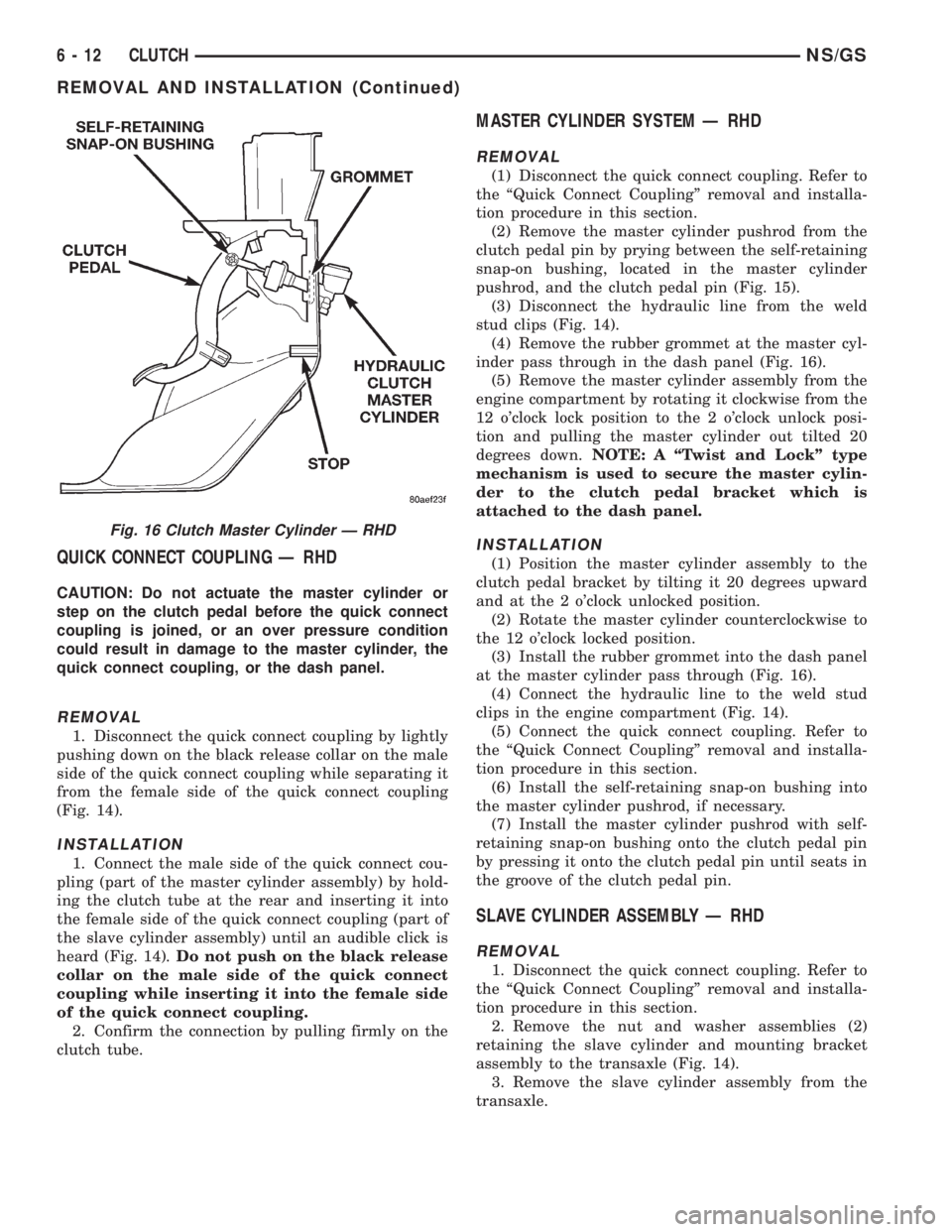
(4) Remove the rubber grommet at the master cyl-
inder pass through in the dash panel (Fig. 16).
(5) Remove the master cylinder assembly from the
engine compartment by rotating it clockwise from the
12 o'clock lock position to the 2 o'clock unlock posi-
tion and pulling the master cylinder out tilted 20
degrees down.NOTE: A ªTwist and Lockº type
mechanism is used to secure the master cylin-
der to the clutch pedal bracket which is
attached to the dash panel.
INSTALLATION
(1) Position the master cylinder assembly to the
clutch pedal bracket by tilting it 20 degrees upward
and at the 2 o'clock unlocked position.
(2) Rotate the master cylinder counterclockwise to
the 12 o'clock locked position.
(3) Install the rubber grommet into the dash panel
at the master cylinder pass through (Fig. 16).
(4) Connect the hydraulic line to the weld stud
clips in the engine compartment (Fig. 14).
(5) Connect the quick connect coupling. Refer to
the ªQuick Connect Couplingº removal and installa-
tion procedure in this section.
(6) Install the self-retaining snap-on bushing into
the master cylinder pushrod, if necessary.
(7) Install the master cylinder pushrod with self-
retaining snap-on bushing onto the clutch pedal pin
by pressing it onto the clutch pedal pin until seats in
the groove of the clutch pedal pin.
SLAVE CYLINDER ASSEMBLY Ð RHD
REMOVAL
1. Disconnect the quick connect coupling. Refer to
the ªQuick Connect Couplingº removal and installa-
tion procedure in this section.
2. Remove the nut and washer assemblies (2)
retaining the slave cylinder and mounting bracket
assembly to the transaxle (Fig. 14).
3. Remove the slave cylinder assembly from the
transaxle.
Fig. 16 Clutch Master Cylinder Ð RHD
6 - 12 CLUTCHNS/GS
REMOVAL AND INSTALLATION (Continued)
Page 211 of 1938
INSTALLATION
1. Position the slave cylinder assembly to the tran-
saxle deck and secure with the nut and washer
assemblies (2) and tighten to specifications (Fig. 14).
2. Make sure the slave cylinder pushrod is prop-
erly seated in the cup end of the clutch release lever.
3. Connect the quick connect coupling. Refer to the
ªQuick Connect Couplingº removal and installation
procedure in this section.
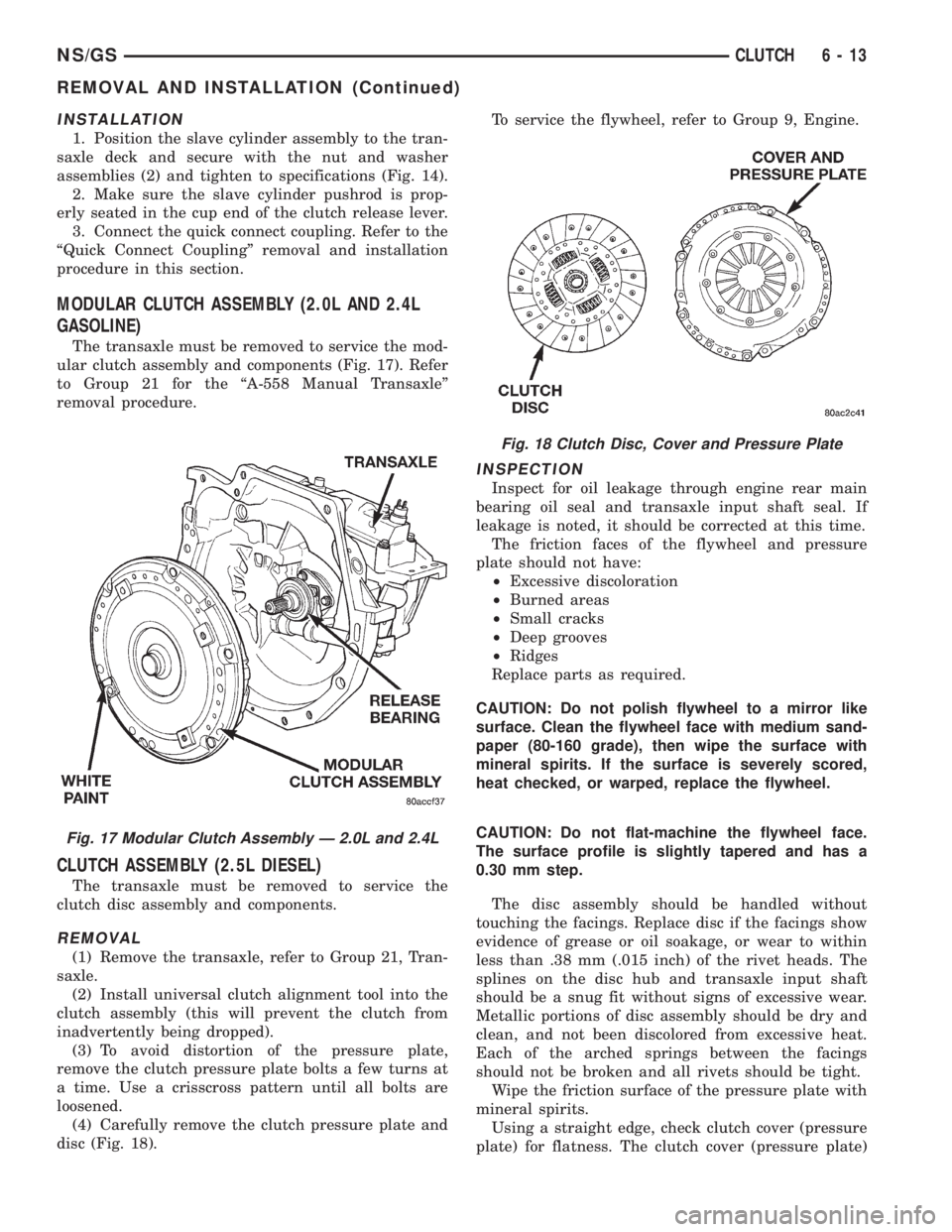
MODULAR CLUTCH ASSEMBLY (2.0L AND 2.4L
GASOLINE)
The transaxle must be removed to service the mod-
ular clutch assembly and components (Fig. 17). Refer
to Group 21 for the ªA-558 Manual Transaxleº
removal procedure.
CLUTCH ASSEMBLY (2.5L DIESEL)
The transaxle must be removed to service the
clutch disc assembly and components.
REMOVAL
(1) Remove the transaxle, refer to Group 21, Tran-
saxle.
(2) Install universal clutch alignment tool into the
clutch assembly (this will prevent the clutch from
inadvertently being dropped).
(3) To avoid distortion of the pressure plate,
remove the clutch pressure plate bolts a few turns at
a time. Use a crisscross pattern until all bolts are
loosened.
(4) Carefully remove the clutch pressure plate and
disc (Fig. 18).To service the flywheel, refer to Group 9, Engine.
INSPECTION
Inspect for oil leakage through engine rear main
bearing oil seal and transaxle input shaft seal. If
leakage is noted, it should be corrected at this time.
The friction faces of the flywheel and pressure
plate should not have:
²Excessive discoloration
²Burned areas
²Small cracks
²Deep grooves
²Ridges
Replace parts as required.
CAUTION: Do not polish flywheel to a mirror like
surface. Clean the flywheel face with medium sand-
paper (80-160 grade), then wipe the surface with
mineral spirits. If the surface is severely scored,
heat checked, or warped, replace the flywheel.
CAUTION: Do not flat-machine the flywheel face.
The surface profile is slightly tapered and has a
0.30 mm step.
The disc assembly should be handled without
touching the facings. Replace disc if the facings show
evidence of grease or oil soakage, or wear to within
less than .38 mm (.015 inch) of the rivet heads. The
splines on the disc hub and transaxle input shaft
should be a snug fit without signs of excessive wear.
Metallic portions of disc assembly should be dry and
clean, and not been discolored from excessive heat.
Each of the arched springs between the facings
should not be broken and all rivets should be tight.
Wipe the friction surface of the pressure plate with
mineral spirits.
Using a straight edge, check clutch cover (pressure
plate) for flatness. The clutch cover (pressure plate)
Fig. 17 Modular Clutch Assembly Ð 2.0L and 2.4L
Fig. 18 Clutch Disc, Cover and Pressure Plate
NS/GSCLUTCH 6 - 13
REMOVAL AND INSTALLATION (Continued)
Page 212 of 1938
friction area should be slightly concave, with the
inner diameter 0.02 mm to 0.1 mm (.0008 in. to .0039
in.) below the outer diameter. It should also be free
from discoloration, burned areas, cracks, grooves, or
ridges.
Using a surface plate, test cover for flatness. All
sections around attaching bolt holes should be in con-
tact with surface plate within .015 inch.
The cover should be a snug fit on flywheel dowels.
If the clutch assembly does not meet these require-
ments, it should be replaced.
INSTALLATION
(1) Position the clutch and pressure plate onto the
flywheel.
(2) Insert the universal clutch alignment tool into
the clutch disc.
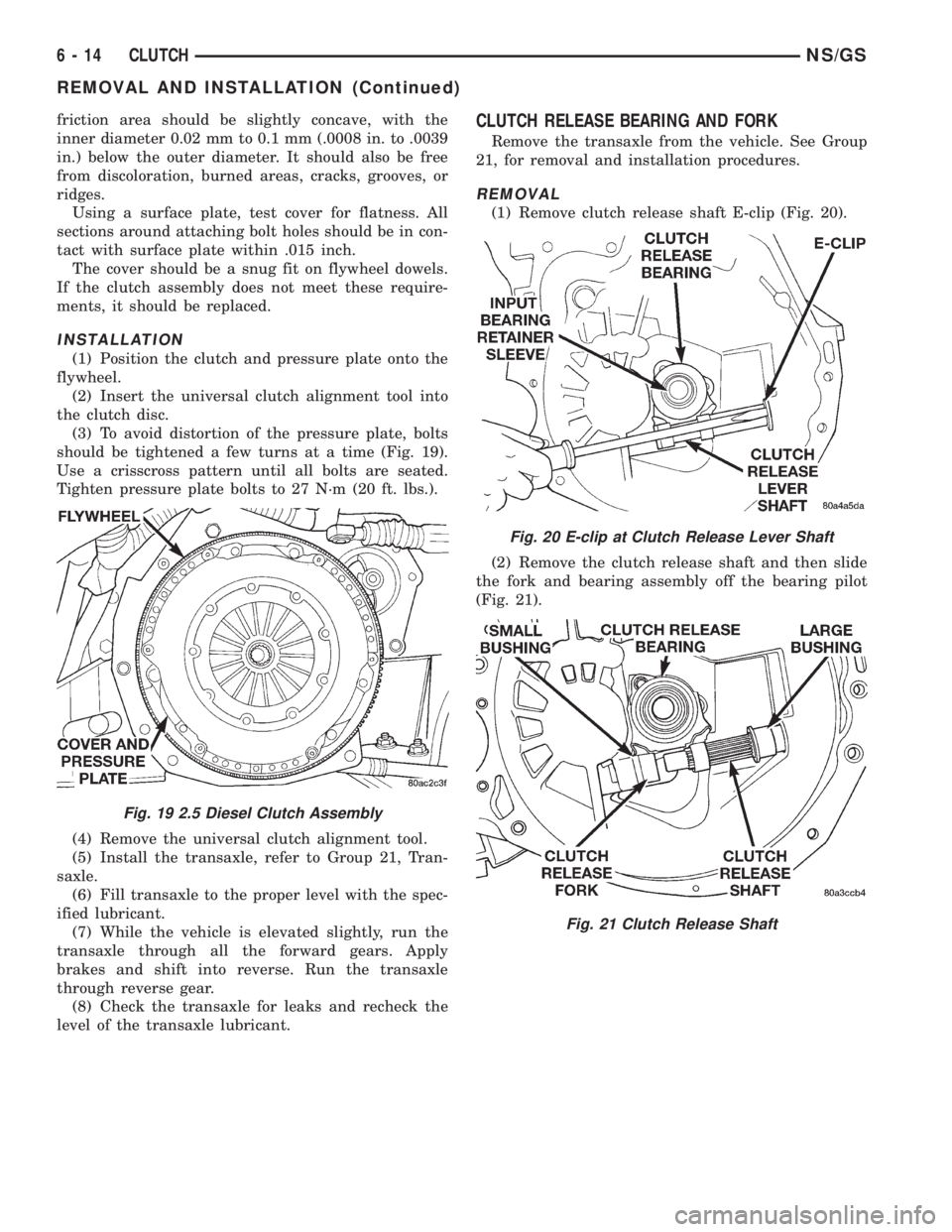
(3) To avoid distortion of the pressure plate, bolts
should be tightened a few turns at a time (Fig. 19).
Use a crisscross pattern until all bolts are seated.
Tighten pressure plate bolts to 27 N´m (20 ft. lbs.).
(4) Remove the universal clutch alignment tool.
(5) Install the transaxle, refer to Group 21, Tran-
saxle.
(6) Fill transaxle to the proper level with the spec-
ified lubricant.
(7) While the vehicle is elevated slightly, run the
transaxle through all the forward gears. Apply
brakes and shift into reverse. Run the transaxle
through reverse gear.
(8) Check the transaxle for leaks and recheck the
level of the transaxle lubricant.
CLUTCH RELEASE BEARING AND FORK
Remove the transaxle from the vehicle. See Group
21, for removal and installation procedures.
REMOVAL
(1) Remove clutch release shaft E-clip (Fig. 20).
(2) Remove the clutch release shaft and then slide
the fork and bearing assembly off the bearing pilot
(Fig. 21).
Fig. 19 2.5 Diesel Clutch Assembly
Fig. 20 E-clip at Clutch Release Lever Shaft
Fig. 21 Clutch Release Shaft
6 - 14 CLUTCHNS/GS
REMOVAL AND INSTALLATION (Continued)
Page 213 of 1938
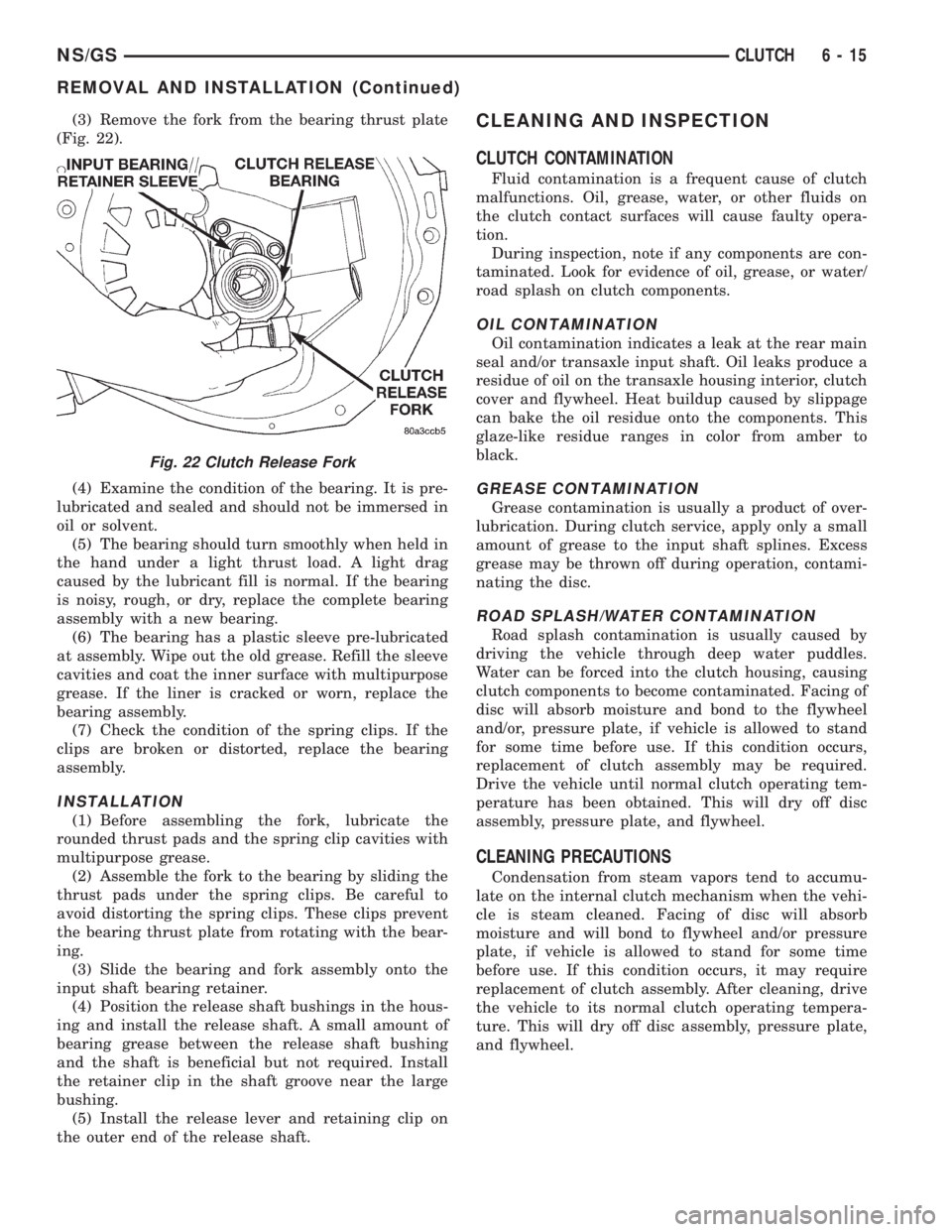
(3) Remove the fork from the bearing thrust plate
(Fig. 22).
(4) Examine the condition of the bearing. It is pre-
lubricated and sealed and should not be immersed in
oil or solvent.
(5) The bearing should turn smoothly when held in
the hand under a light thrust load. A light drag
caused by the lubricant fill is normal. If the bearing
is noisy, rough, or dry, replace the complete bearing
assembly with a new bearing.
(6) The bearing has a plastic sleeve pre-lubricated
at assembly. Wipe out the old grease. Refill the sleeve
cavities and coat the inner surface with multipurpose
grease. If the liner is cracked or worn, replace the
bearing assembly.
(7) Check the condition of the spring clips. If the
clips are broken or distorted, replace the bearing
assembly.
INSTALLATION
(1) Before assembling the fork, lubricate the
rounded thrust pads and the spring clip cavities with
multipurpose grease.
(2) Assemble the fork to the bearing by sliding the
thrust pads under the spring clips. Be careful to
avoid distorting the spring clips. These clips prevent
the bearing thrust plate from rotating with the bear-
ing.
(3) Slide the bearing and fork assembly onto the
input shaft bearing retainer.
(4) Position the release shaft bushings in the hous-
ing and install the release shaft. A small amount of
bearing grease between the release shaft bushing
and the shaft is beneficial but not required. Install
the retainer clip in the shaft groove near the large
bushing.
(5) Install the release lever and retaining clip on
the outer end of the release shaft.
CLEANING AND INSPECTION
CLUTCH CONTAMINATION
Fluid contamination is a frequent cause of clutch
malfunctions. Oil, grease, water, or other fluids on
the clutch contact surfaces will cause faulty opera-
tion.
During inspection, note if any components are con-
taminated. Look for evidence of oil, grease, or water/
road splash on clutch components.
OIL CONTAMINATION
Oil contamination indicates a leak at the rear main
seal and/or transaxle input shaft. Oil leaks produce a
residue of oil on the transaxle housing interior, clutch
cover and flywheel. Heat buildup caused by slippage
can bake the oil residue onto the components. This
glaze-like residue ranges in color from amber to
black.
GREASE CONTAMINATION
Grease contamination is usually a product of over-
lubrication. During clutch service, apply only a small
amount of grease to the input shaft splines. Excess
grease may be thrown off during operation, contami-
nating the disc.
ROAD SPLASH/WATER CONTAMINATION
Road splash contamination is usually caused by
driving the vehicle through deep water puddles.
Water can be forced into the clutch housing, causing
clutch components to become contaminated. Facing of
disc will absorb moisture and bond to the flywheel
and/or, pressure plate, if vehicle is allowed to stand
for some time before use. If this condition occurs,
replacement of clutch assembly may be required.
Drive the vehicle until normal clutch operating tem-
perature has been obtained. This will dry off disc
assembly, pressure plate, and flywheel.
CLEANING PRECAUTIONS
Condensation from steam vapors tend to accumu-
late on the internal clutch mechanism when the vehi-
cle is steam cleaned. Facing of disc will absorb
moisture and will bond to flywheel and/or pressure
plate, if vehicle is allowed to stand for some time
before use. If this condition occurs, it may require
replacement of clutch assembly. After cleaning, drive
the vehicle to its normal clutch operating tempera-
ture. This will dry off disc assembly, pressure plate,
and flywheel.
Fig. 22 Clutch Release Fork
NS/GSCLUTCH 6 - 15
REMOVAL AND INSTALLATION (Continued)
Page 214 of 1938
ADJUSTMENTS
CLUTCH CABLE Ð LHD
The manual transaxle clutch release system has a
unique self-adjusting mechanism to compensate for
clutch disc wear. This adjuster mechanism is located
within the clutch cable assembly. The preload spring
maintains tension on the cable. This tension keeps
the clutch release bearing continuously loaded
against the fingers of the clutch cover assembly.
ADJUSTER MECHANISM FUNCTION CHECK Ð
LHD
(1) With slight pressure, pull the clutch release
lever end of the cable to draw the cable taut. Push
the clutch cable housing toward the dash panel (With
less than 20 lbs. of effort, the cable housing should
move 30-50mm.). This indicates proper adjuster
mechanism function. If the cable does not adjust,
determine if the mechanism is properly seated on the
bracket.
(2) If the adjust mechanism functions properly,
route cable to the transaxle.
(3) Insert cable into transaxle and through clutch
release lever. Ensure the cable is routed through the
smaller hole in the transaxle deck (Fig. 10).
(4) Pull down on cable and insert cable retaining
clip onto clutch cable end.
(5) Check clutch pedal position switch operation.
CLUTCH PEDAL POSITION SWITCH
The clutch pedal position switch is mounted to a
bracket located behind the clutch pedal. The switch
is held in place by four plastic wing tabs.
The clutch pedal position switch IS NOT adjust-
able. The pedal blade contacts the switch in the down
position.
SPECIFICATIONS
CLUTCH TIGHTENING REFERENCE
2.0/2.4 LITER GASOLINE ENGINE
DESCRIPTION TORQUE
Drive Plate Bolts............95N´m(70ft.lbs.)
Lower Trans. Cover.........12N´m(105 in. lbs.)
Modular Clutch Bolts.........74N´m(55ft.lbs.)
Upper Trans. Cover.........12N´m(105 in. lbs.)
2.5 LITER DIESEL ENGINE
DESCRIPTION TORQUE
Flywheel Bolts..............95N´m(70ft.lbs.)
Lower Trans. Cover.........12N´m(105 in. lbs.)
Clutch Pressure Plate Bolts....27N´m(20ft.lbs.)
Upper Trans. Cover.........12N´m(105 in. lbs.)
6 - 16 CLUTCHNS/GS
Page 230 of 1938

at running operating temperature the high pressure
inlet tank runs full and the low pressure outlet tank
drops:
²Transmission oil will become hotter.
²High reading shown on the temperature gauge.
²Air in the coolant can cause loss of flow through
the heater.
²Exhaust gas leaks into the coolant also can
cause the same problems.
DEAERATION
Air can only be removed from the system by gath-
ering under the pressure cap. On the next heat up it
will be pushed past the pressure cap into the CRS
tank by thermal expansion of the coolant. It then
escapes to the atmosphere in the CRS tank and is
replaced with solid coolant on cool down.
TEMPERATURE GAUGE INDICATION
At idle with Air Conditioning off the temperature
gauge will rise slowly to about 5/8 gauge travel, the
fan will come on and the gauge will quickly drop to
about 1/2 gauge travel. This is normal.
SERVICE PROCEDURES
COOLANT LEVEL CHECKÐROUTINE
Do not remove radiator cap for routine cool-
ant level inspections.
The coolant reserve system provides a quick visual
method for determining the coolant level without
removing the radiator cap.With the engine cold
and not running,simply observe the level of the
coolant in the reserve tank (Fig. 3). The coolant level
should be between the minimum and maximum
marks.
COOLANTÐADDING ADDITIONAL
The radiator cap should not be removed.
When additional coolant is needed to maintain this
level, it should be added to the coolant reserve tank.
Use only 50/50 mix of ethylene glycol type antifreeze
and water.
CAUTION: Do not use well water, or suspect water
supply in cooling system. A 50/50 ethylene glycol
and distilled water mix is recommended.
COOLANT LEVEL SERVICE
The cooling system is closed and designed to main-
tain coolant level to the top of the radiator.
When servicing requires a coolant level check in
the radiator, the engine must beoffandnotunder
pressure. Drain several ounces of coolant from the
radiator draincock while observing the CoolantRecovery System (CRS) Tank. Coolant level in the
CRS tank should drop slightly. Then remove the radi-
ator cap. The radiator should be full to the top. If
not, and the coolant level in the CRS tank is at the
MIN mark there is an air leak in the CRS system.
Check hose or hose connections to the CRS tank,
radiator filler neck or the pressure cap seal to the
radiator filler neck for leaks.
COOLING SYSTEMÐDRAINING
Without removing radiator pressure cap and
with system not under pressure,shut engine off
and open draincock. The coolant reserve tank should
empty first, then remove radiator pressure cap. (if
not, see Testing Cooling System for leaks). To vent
2.4L engine remove the coolant temperature sensor
located above water outlet housing (Fig. 15). The 3.0/
3.3/3.8L engines have an air bleed vent on the ther-
mostat.
Removal of a sensor is required because the ther-
mostat does not have an air vent. Sensor removal
allows an air bleed for coolant to drain from the
engine block.
COOLING SYSTEMÐREFILLING
First clean system to remove old coolant, see Cool-
ing System Cleaning.
Fill the system, using the correct antifreeze as
described in the Coolant Section. Fill the system to
50 percent of its capacity with 100 percent glycol.
Then complete filling system with water. The 2.4L
engine requires venting by removal of the coolant
sensor on top of the water outlet connector (Fig. 15).
When coolant reaches this hole:
²Install coolant sensor and tighten to 7 N´m (60
in. lbs.) for 2.4L Engines.
Fig. 15 Coolant Temperature SensorÐ2.4L Engine
Drain/Fill
7 - 16 COOLING SYSTEMNS
DIAGNOSIS AND TESTING (Continued)