belt CHRYSLER VOYAGER 1996 Owner's Guide
[x] Cancel search | Manufacturer: CHRYSLER, Model Year: 1996, Model line: VOYAGER, Model: CHRYSLER VOYAGER 1996Pages: 1938, PDF Size: 55.84 MB
Page 288 of 1938

GENERATOR
The generator is belt-driven by the engine. It is
serviced only as a complete assembly. If the genera-
tor fails for any reason, the entire assembly must be
replaced.
As the energized rotor begins to rotate within the
generator, the spinning magnetic field induces a cur-
rent into the windings of the stator coil. Once the
generator begins producing sufficient current, it also
provides the current needed to energize the rotor.
The Y type stator winding connections deliver the
induced AC current to 3 positive and 3 negative
diodes for rectification. From the diodes, rectified DC
current is delivered to the vehicle electrical system
through the generator, battery, and ground terminals.
Noise emitting from the generator may be caused
by:
²Worn, loose or defective bearings
²Loose or defective drive pulley
²Incorrect, worn, damaged or misadjusted drive
belt
²Loose mounting bolts
²Misaligned drive pulley
²Defective stator or diode
BATTERY TEMPERATURE SENSOR
The temperature sensor, in the PCM, is used to
determine the battery temperature. This temperature
data, along with data from monitored line voltage, is
used by the PCM to vary the battery charging rate.
System voltage will be higher at colder temperatures
and is gradually reduced at warmer temperatures.
ELECTRONIC VOLTAGE REGULATOR
The Electronic Voltage Regulator (EVR) is not a
separate component. It is actually a voltage regulat-
ing circuit located within the Powertrain Control
Module (PCM). The EVR is not serviced separately. If
replacement is necessary, the PCM must be replaced.
Operation:The amount of DC current produced
by the generator is controlled by EVR circuitry con-
tained within the PCM. This circuitry is connected in
series with the generators second rotor field terminal
and its ground.
Voltage is regulated by cycling the ground path to
control the strength of the rotor magnetic field. The
EVR circuitry monitors system line voltage and bat-
tery temperature (refer to Battery Temperature Sen-
sor for more information). It then compensates and
regulates generator current output accordingly. Also
refer to Charging System Operation for additional
information.
DIAGNOSIS AND TESTING
CHARGING SYSTEM
When the ignition switch is turned to the ON posi-
tion, battery potential will register on the voltmeter.
During engine cranking a lower voltage will appear
on the meter. With the engine running, a voltage
reading higher than the first reading (ignition in ON)
should register.
The following are possible symptoms of a charging
system fault:
²The voltmeter does not operate properly
²An undercharged or overcharged battery condi-
tion occurs.
Remember that an undercharged battery is often
caused by:
²Accessories being left on with the engine not
running
²A faulty or improperly adjusted switch that
allows a lamp to stay on. See Ignition-Off Draw Test
in Group 8A, Battery for more information.
The following procedures may be used to correct a
problem diagnosed as a charging system fault.
INSPECTION
(1) Inspect condition of battery cable terminals,
battery posts, connections at engine block, starter
solenoid and relay. They should be clean and tight.
Repair as required.
(2) Inspect all fuses in the fuseblock module and
Power Distribution Center (PDC) for tightness in
receptacles. They should be properly installed and
tight. Repair or replace as required.
(3) Inspect the electrolyte level in the battery.
Replace battery if electrolyte level is low.
(4) Inspect generator mounting bolts for tightness.
Replace or tighten bolts if required. Refer to the Gen-
erator Removal/Installation section of this group for
torque specifications.
(5) Inspect generator drive belt condition and ten-
sion. Tighten or replace belt as required. Refer to
Belt Tension Specifications in Group 7, Cooling Sys-
tem.
(6) Inspect automatic belt tensioner (if equipped).
Refer to Group 7, Cooling System for information.
(7) Inspect connections at generator field, battery
output, and ground terminals. Also check ground con-
nection at engine. They should all be clean and tight.
Repair as required.
8C - 2 CHARGING SYSTEMNS
DESCRIPTION AND OPERATION (Continued)
Page 290 of 1938
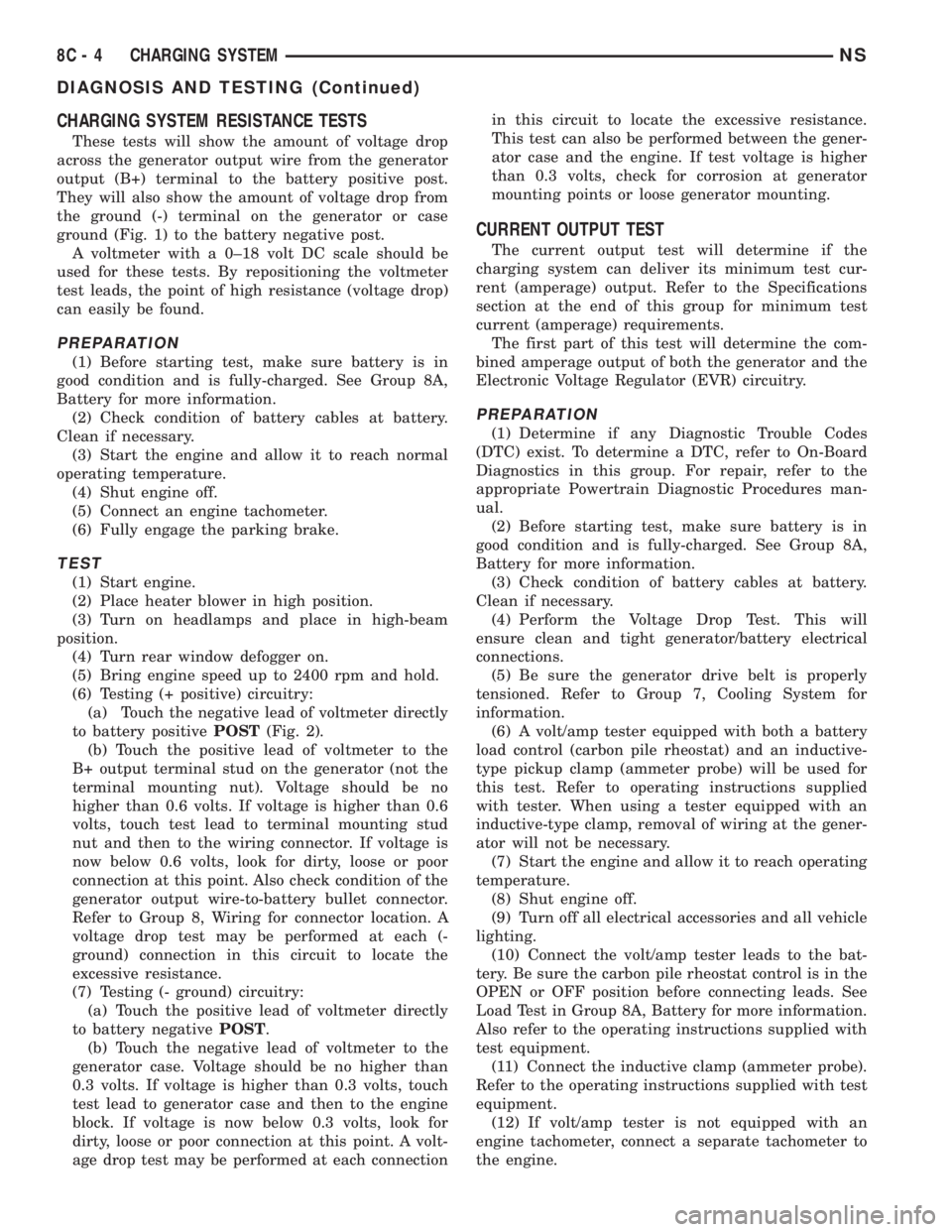
CHARGING SYSTEM RESISTANCE TESTS
These tests will show the amount of voltage drop
across the generator output wire from the generator
output (B+) terminal to the battery positive post.
They will also show the amount of voltage drop from
the ground (-) terminal on the generator or case
ground (Fig. 1) to the battery negative post.
A voltmeter with a 0±18 volt DC scale should be
used for these tests. By repositioning the voltmeter
test leads, the point of high resistance (voltage drop)
can easily be found.
PREPARATION
(1) Before starting test, make sure battery is in
good condition and is fully-charged. See Group 8A,
Battery for more information.
(2) Check condition of battery cables at battery.
Clean if necessary.
(3) Start the engine and allow it to reach normal
operating temperature.
(4) Shut engine off.
(5) Connect an engine tachometer.
(6) Fully engage the parking brake.
TEST
(1) Start engine.
(2) Place heater blower in high position.
(3) Turn on headlamps and place in high-beam
position.
(4) Turn rear window defogger on.
(5) Bring engine speed up to 2400 rpm and hold.
(6) Testing (+ positive) circuitry:
(a) Touch the negative lead of voltmeter directly
to battery positivePOST(Fig. 2).
(b) Touch the positive lead of voltmeter to the
B+ output terminal stud on the generator (not the
terminal mounting nut). Voltage should be no
higher than 0.6 volts. If voltage is higher than 0.6
volts, touch test lead to terminal mounting stud
nut and then to the wiring connector. If voltage is
now below 0.6 volts, look for dirty, loose or poor
connection at this point. Also check condition of the
generator output wire-to-battery bullet connector.
Refer to Group 8, Wiring for connector location. A
voltage drop test may be performed at each (-
ground) connection in this circuit to locate the
excessive resistance.
(7) Testing (- ground) circuitry:
(a) Touch the positive lead of voltmeter directly
to battery negativePOST.
(b) Touch the negative lead of voltmeter to the
generator case. Voltage should be no higher than
0.3 volts. If voltage is higher than 0.3 volts, touch
test lead to generator case and then to the engine
block. If voltage is now below 0.3 volts, look for
dirty, loose or poor connection at this point. A volt-
age drop test may be performed at each connectionin this circuit to locate the excessive resistance.
This test can also be performed between the gener-
ator case and the engine. If test voltage is higher
than 0.3 volts, check for corrosion at generator
mounting points or loose generator mounting.
CURRENT OUTPUT TEST
The current output test will determine if the
charging system can deliver its minimum test cur-
rent (amperage) output. Refer to the Specifications
section at the end of this group for minimum test
current (amperage) requirements.
The first part of this test will determine the com-
bined amperage output of both the generator and the
Electronic Voltage Regulator (EVR) circuitry.
PREPARATION
(1) Determine if any Diagnostic Trouble Codes
(DTC) exist. To determine a DTC, refer to On-Board
Diagnostics in this group. For repair, refer to the
appropriate Powertrain Diagnostic Procedures man-
ual.
(2) Before starting test, make sure battery is in
good condition and is fully-charged. See Group 8A,
Battery for more information.
(3) Check condition of battery cables at battery.
Clean if necessary.
(4) Perform the Voltage Drop Test. This will
ensure clean and tight generator/battery electrical
connections.
(5) Be sure the generator drive belt is properly
tensioned. Refer to Group 7, Cooling System for
information.
(6) A volt/amp tester equipped with both a battery
load control (carbon pile rheostat) and an inductive-
type pickup clamp (ammeter probe) will be used for
this test. Refer to operating instructions supplied
with tester. When using a tester equipped with an
inductive-type clamp, removal of wiring at the gener-
ator will not be necessary.
(7) Start the engine and allow it to reach operating
temperature.
(8) Shut engine off.
(9) Turn off all electrical accessories and all vehicle
lighting.
(10) Connect the volt/amp tester leads to the bat-
tery. Be sure the carbon pile rheostat control is in the
OPEN or OFF position before connecting leads. See
Load Test in Group 8A, Battery for more information.
Also refer to the operating instructions supplied with
test equipment.
(11) Connect the inductive clamp (ammeter probe).
Refer to the operating instructions supplied with test
equipment.
(12) If volt/amp tester is not equipped with an
engine tachometer, connect a separate tachometer to
the engine.
8C - 4 CHARGING SYSTEMNS
DIAGNOSIS AND TESTING (Continued)
Page 295 of 1938

REMOVAL AND INSTALLATION
GENERATORÐ2.4L ENGINE
REMOVAL
(1) Release hood latch and open hood.
(2) Disconnect battery negative cable (Fig. 3).
(3) Remove accessory drive belt, refer to Group 7,
Cooling System for proper procedures.
(4) Disconnect the push-in field wire connector
from back of generator (Fig. 4).
(5) Remove nut holding B+ wire to terminal on
back of generator.
(6) Separate B+ wire from generator terminal.
(7) Remove nut holding top of generator to adjust-
able T-bolt (Fig. 5).
(8) Remove bolt holding bottom generator pivot to
lower mount.
(9) Remove generator.
INSTALLATION
(1) Place generator in position on vehicle.
(2) Install bolt to hold bottom generator pivot to
lower mount.(3) Install nut to hold top of generator to adjust-
able T-bolt.
(4) Place B+ wire in position on generator termi-
nal.
(5) Install nut to hold B+ wire to terminal on back
of generator.
(6) Connect the push-in field wire connector onto
back of generator.
(7) Install accessory drive belt, refer to Group 7,
Cooling System for proper procedures.
(8) Connect battery negative cable.
(9) Verify generator charge rate.
GENERATORÐ3.0L ENGINE
REMOVAL
(1) Release hood latch and open hood.
(2) Disconnect battery negative cable (Fig. 3).
(3) Remove windshield wiper housing, refer to
Group 8K, Windshield Wipers and Washers for
proper procedures.
(4) Remove accessory drive belt, refer to Group 7,
Cooling System for proper procedures.
(5) Remove bolt holding top of generator to mount
bracket (Fig. 6).
(6) Remove bolt holding bottom of generator to
lower pivot bracket (Fig. 4).
(7) Disengage push-in field wire connector from
back of generator.
(8) Remove nut holding B+ wire terminal to back
of generator.
(9) Remove B+ terminal from generator.
INSTALLATION
(1) Place B+ terminal in position on generator.
(2) Install nut to hold B+ wire terminal to back of
generator
(3) Connect the push-in field wire connector into
back of generator.
Fig. 3 Removal/Installation of Battery Cables
Fig. 4 Wire Connectors
Fig. 5 Generator±2.4L Engine
NSCHARGING SYSTEM 8C - 9
Page 296 of 1938

(4) Install bolt to hold bottom of generator to lower
pivot bracket.
(5) Install bolt to hold top of generator to mount
bracket.
(6) Install accessory drive belt, refer to Group 7,
Cooling System for proper procedures.
(7) Install windshield wiper housing, refer to
Group 8K, Windshield Wipers and Washers for
proper procedures.
(8) Connect battery negative cable.
(9) Verify generator charge rate.
GENERATORÐ3.3/3.8 L ENGINE
REMOVAL
(1) Release hood latch and open hood.
(2) Disconnect battery negative cable (Fig. 3).
(3) Remove windshield wiper housing, refer to
Group 8K, Windshield Wipers and Washers for
proper procedures.
(4) Remove accessory drive belt, refer to Group 7,
Cooling System for proper procedures.
(5) Remove bolt holding top of generator mount
bracket to engine air intake plenum (Fig. 7).
(6) Remove bolts holding outside of generator
mount bracket to generator mount plate.
(7) Remove bolt holding top of generator to mount
bracket.
(8) Remove generator mount bracket from vehicle.
(9) Rotate generator toward rear dash panel.
(10) Disconnect the push-in field wire connector
from back of generator (Fig. 6).
(11) Remove nut holding B+ wire terminal to back
of generator.
(12) Separate B+ terminal from generator.
(13) Remove bolt holding bottom of generator to
lower pivot bracket (Fig. 8).
(14) Remove generator from vehicle (Fig. 9).
INSTALLATION
(1) Place generator in position on vehicle.
Fig. 6 Generator±3.0L EngineFig. 7 Generator Mounting Bracket
Fig. 8 Generator pivot Bolt
Fig. 9 Generator±3.3/3.8 L Engine
8C - 10 CHARGING SYSTEMNS
REMOVAL AND INSTALLATION (Continued)
Page 297 of 1938

(2) Install bolt to hold bottom of generator to lower
pivot bracket.
(3) Place B+ terminal in position on generator.
(4) Install nut to hold B+ wire terminal to back of
generator.
(5) Connect the push-in field wire connector into
back of generator.
(6) Rotate generator forward away from dash
panel.
(7) Place generator mount bracket in position on
vehicle.
(8) Install bolt to hold top of generator to mount
bracket.
(9) Install bolts to hold outside of generator mount
bracket to generator mount plate.
(10) Install bolt to hold top of generator mount
bracket to engine air intake plenum.
(11) Install accessory drive belt, refer to Group 7,
Cooling System for proper procedures.
(12) Install windshield wiper housing, refer to
Group 8K, Windshield Wipers and Washers for
proper procedures.
(13) Connect battery negative cable.
(14) Verify generator charge rate.SPECIFICATIONS
GENERATOR
Part number is located on the side of the generator.
TORQUE
DESCRIPTION TORQUE
Battery Hold Down Bolt.......14N´m(125 in. lbs.)
Generator Mounting Bolts......54N´m(40ft.lbs.)
Generator B+ Terminal.........9N´m(75in.lbs.)
Starter Mounting Bolts.........54N´m(40ft.lbs.)
Starter Solenoid Battery Nut. . . .10 N´m (90 in. lbs.)
TypePart Num-
berAmperage out-
put
Nippondenso 90 A
HS4727220 86 Amp
Nippondenso 120 A
HS4727221 98 Amp
NSCHARGING SYSTEM 8C - 11
REMOVAL AND INSTALLATION (Continued)
Page 327 of 1938
CAUTION: Never coat the inside of spark plug
boots with silicone grease. Some types of silicone
grease can damage the ignition cable conductor.
SPARK PLUG CABLES #3 AND #5
REMOVAL
(1) Remove the resonator.
(2) Grasp the spark plug boot/heat shield as close
as possible to the spark plug.Twist the boot
slightly to break its seal with the plug and pull
straight back. Do not use pliers, pull on the
ignition cable, or pull the spark plug boot at an
angle.This could damage the spark plug insulator,
terminal, or the cable insulation. Wipe spark plug
insulator clean with a dry cloth before installation.
(3) Remove the cable from the retaining bracket.
Make sure that they are also detached from the rear
retaining clip mounted on the rear of the intake
manifold.
INSTALLATION
(1) When installing the spark plug cables, make
sure the coil and spark plug insulator and terminals
are fully seated. Aclick sound should be heard or
terminal engagement is felt when the terminals
are properly attached.
(2) Install the cable into the retaining bracket.
Make sure that they are also attached to the rear
retaining clip mounted on the rear of the intake
manifold.
(3) Install the resonator.
SPARK PLUG CABLE #1
REMOVAL
(1) Remove the accessory drive belt, refer to Group
7, Cooling.
(2) Remove the four bolts from the upper half of
the generator bracket.
(3) Push the Generator rearward.
(4) Grasp the spark plug boot/shield assembly as
close as possible to the spark plug.Twist the boot
slightly to break its seal with the plug and pull
straight back. Do not use pliers, pull on the
ignition cable, or pull the spark plug boot at an
angle.This could damage the spark plug insulator,
terminal, or the cable insulation. Wipe spark plug
insulator clean with a dry cloth before installation.
(5) Remove the cable from the retaining bracket.
INSTALLATION
(1) When installing the spark plug cables, make
sure the coil and spark plug insulator and terminals
are fully seated. Aclick sound should be heard orterminal engagement is felt when the terminals
are properly attached.
(2) Rotate Generator back into place.
(3) Install upper Generator bracket with the four
bolts.
(4) Install the accessory drive belt, refer to Group
7, Cooling.
SPARK PLUG SERVICEÐ3.3/3.8L ENGINES
WARNING: The ignition cables should not be
removed while the engine is hot. This could cause
server injury/burns and can cause damage to the
ignition cables.
Use extreme care when removing and installing
the spark plug cables.
The spark plug boot heat shield needs to be
installed correctly on the boot before being installed
on the engine (Fig. 1). If it is not installed correctly
engine misfire would occur.
Do not use pliers to pull the boot/heat shield
assembly from the spark plugs. This will damage the
shield assembly.
SPARK PLUG #3 AND #5
REMOVAL
(1) Remove the resonator.
(2) Remove intake strut to cylinder head bolt at
cylinder head.
(3) Loosen bolt for intake strut at intake.
(4) Swing strut away.
(5) Grasp the spark plug boot/shield assembly as
close as possible to the spark plug.Twist the boot/
shield assembly slightly to break the seal with
the plug and pull straight out. Do not use pli-
ers, pull on the ignition cable, or pull the spark
plug boot at an angle.This could damage the
spark plug insulator, terminal, heat shield or the
insulation. Wipe spark plug insulator clean with a
dry cloth before installation.
(6) Remove spark plug
INSTALLATION
(1) Install spark plug and tighten to 28 N´m (20 ft.
lbs.).
(2) When installing the spark plug cables, make
sure spark plug insulator and terminals are fully
seated. Aclick sound should be heard or felt
when the terminals are properly attached.
(3) Install the cable into the retaining bracket.
Make sure that they are also attached to the rear
retaining clip mounted on the rear of the intake
manifold.
(4) Swing strut back into place.
NSIGNITION SYSTEM 8D - 29
REMOVAL AND INSTALLATION (Continued)
Page 328 of 1938

(5) Install intake strut bolt to cylinder head at cyl-
inder head.
(6) Tighten bolt to intake strut at intake.
(7) Tighten bolt at cylinder head.
(8) Install the resonator.
SPARK PLUG #1
REMOVAL
(1) Remove the accessory drive belt, refer to Group
7, Cooling.
(2) Remove the 4 bolts from the upper half of the
generator bracket.
(3) Push the Generator rearward.
(4) Grasp the spark plug boot/shield assembly as
close as possible to the spark plug.Twist the boot/
shield assembly slightly to break its seal with
the plug and pull straight out. Do not use pli-
ers, pull on the ignition cable, or pull the spark
plug boot at an angle.This could damage the
spark plug insulator, terminal, or the insulation.
Wipe spark plug insulator clean with a dry cloth
before installation.
(5) Remove spark plug
INSTALLATION
(1) Install spark plug and tighten to 28 N´m (20 ft.
lbs.).
(2) When installing the spark plug cables, make
sure the coil or spark plug insulator and terminals
are fully seated. Aclick sound should be heard or
felt when the terminals are properly attached.
(3) Pull Generator back into place.
(4) Install upper Generator bracket with the 4
bolts.
(5) Install the accessory drive belt, refer to Group
7, Cooling.
IGNITION COIL
REMOVAL
(1) Remove spark plug cables from coil (Fig. 2).
Always twist the spark plug boots to break the seal
with the plug and pull straight back on the boot.
(2) Remove ignition coil electrical connector.
(3) Remove ignition coil mounting screws.
(4) Remove ignition coil.
INSTALLATION
(1) Reverse the above procedure for installation.
Tighten mounting screws to 12 N´m (105 in. lbs.)
torque.
(2) Transfer spark plug cables to new coil pack.
The coil pack towers and cables are numbered with
the cylinder identification.
CRANKSHAFT POSITION SENSOR
REMOVAL
(1) Raise and support vehicle.
(2) Disconnect crankshaft position sensor electrical
connector from the wiring harness connector (Fig. 3).
(3) Remove crankshaft position sensor retaining
bolt.
(4) Pull crankshaft position sensor straight up out
of the transaxle housing.
INSTALLATION
NOTE: If the removed sensor is to be reinstalled,
clean off the old spacer on the sensor face. A NEW
SPACER must be attached to the sensor face before
installation. If the sensor is being replaced, confirm
that the paper spacer is attached to the face of the
new sensor (Fig. 4).
(1) Install sensor in transaxle and push sensor
down until contact is made with the drive plate.
Fig. 2 Ignition Coil Removal
Fig. 3 Crankshaft Position Sensor Connector
8D - 30 IGNITION SYSTEMNS
REMOVAL AND INSTALLATION (Continued)
Page 338 of 1938
The instrument cluster is equipped with the follow-
ing warning lamps.
²Lift Gate Ajar
²Low Fuel Level
²Low Windshield Washer Fluid Level
²Cruise
²Battery Voltage
²Fasten Seat Belt
²Door Ajar
DIAGNOSIS AND TESTING
DIAGNOSTIC PROCEDURES
NS vehicle instrument clusters are equipped with a
self diagnostic test feature to help identify electronic
problems. Prior to any test, perform Self Diagnostic
Test. The self diagnostic system monitors the CCD
bus messages. If an electronic problem occurs, a
Diagnostic Trouble Code (DTC) will be displayed in
the odometer window of the cluster.
The following CCD bus messages are continuously
monitored by the diagnostic system:
²Body Control Module
²Powertrain Control Module
²Transmission Control Module, if equipped
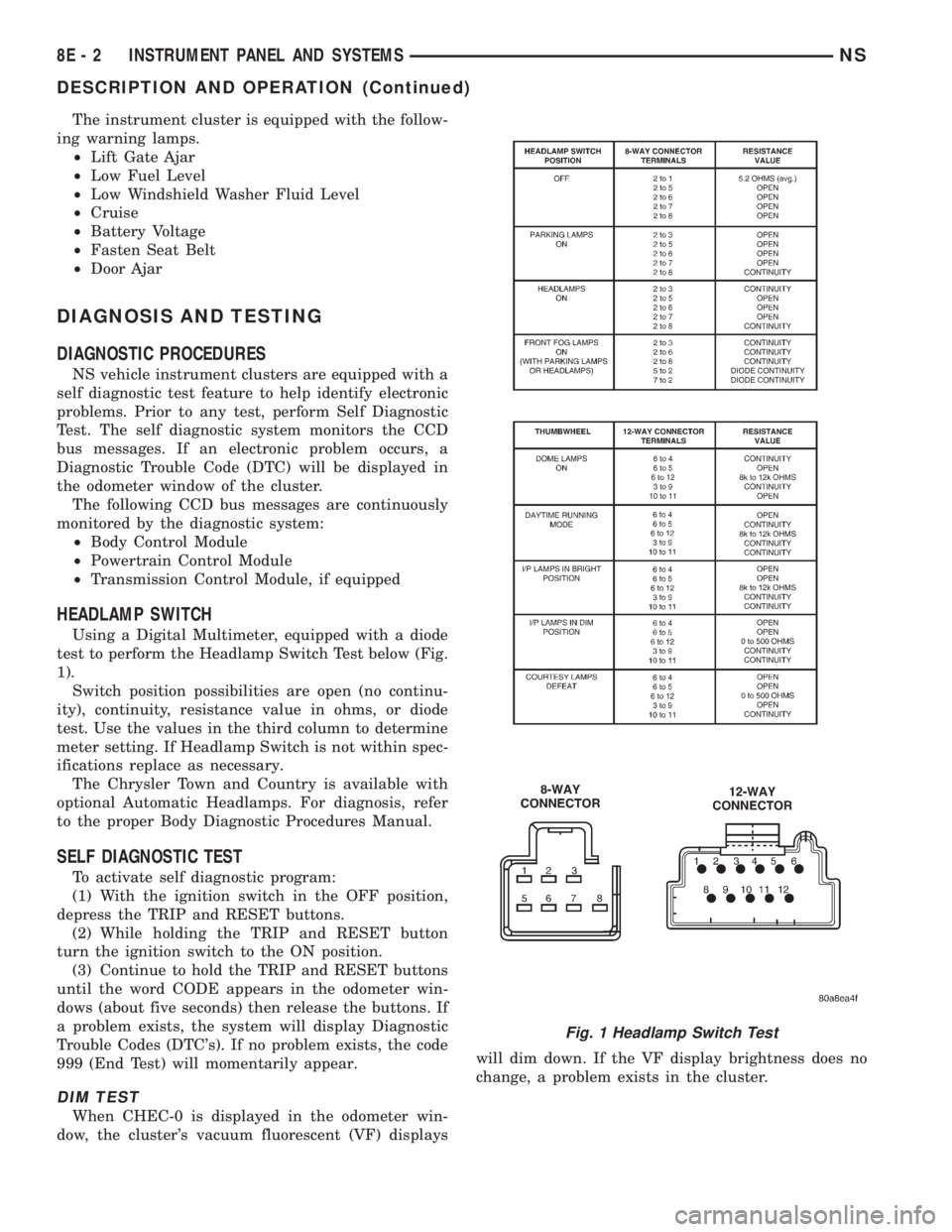
HEADLAMP SWITCH
Using a Digital Multimeter, equipped with a diode
test to perform the Headlamp Switch Test below (Fig.
1).
Switch position possibilities are open (no continu-
ity), continuity, resistance value in ohms, or diode
test. Use the values in the third column to determine
meter setting. If Headlamp Switch is not within spec-
ifications replace as necessary.
The Chrysler Town and Country is available with
optional Automatic Headlamps. For diagnosis, refer
to the proper Body Diagnostic Procedures Manual.
SELF DIAGNOSTIC TEST
To activate self diagnostic program:
(1) With the ignition switch in the OFF position,
depress the TRIP and RESET buttons.
(2) While holding the TRIP and RESET button
turn the ignition switch to the ON position.
(3) Continue to hold the TRIP and RESET buttons
until the word CODE appears in the odometer win-
dows (about five seconds) then release the buttons. If
a problem exists, the system will display Diagnostic
Trouble Codes (DTC's). If no problem exists, the code
999 (End Test) will momentarily appear.
DIM TEST
When CHEC-0 is displayed in the odometer win-
dow, the cluster's vacuum fluorescent (VF) displayswill dim down. If the VF display brightness does no
change, a problem exists in the cluster.
Fig. 1 Headlamp Switch Test
8E - 2 INSTRUMENT PANEL AND SYSTEMSNS
DESCRIPTION AND OPERATION (Continued)
Page 455 of 1938
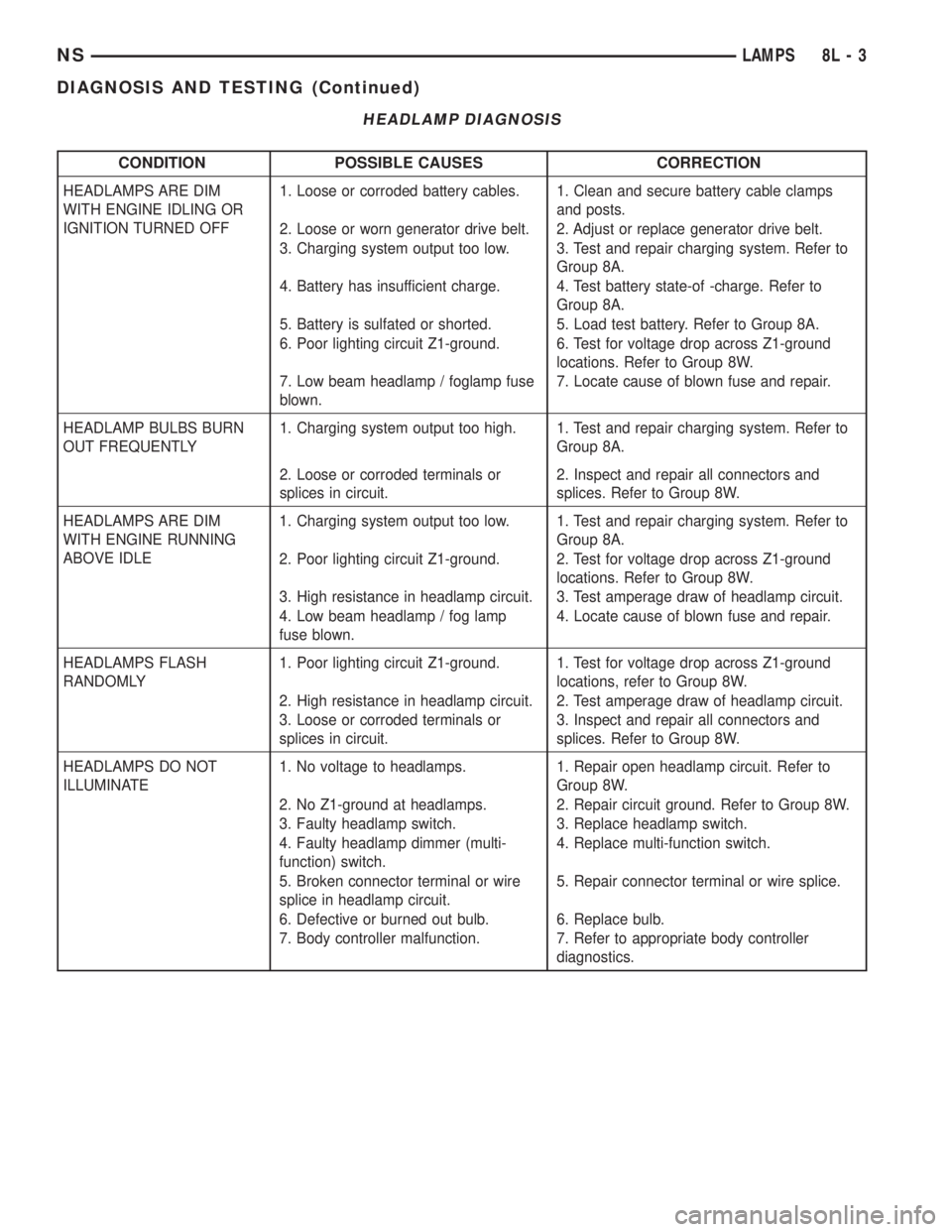
HEADLAMP DIAGNOSIS
CONDITION POSSIBLE CAUSES CORRECTION
HEADLAMPS ARE DIM
WITH ENGINE IDLING OR
IGNITION TURNED OFF1. Loose or corroded battery cables. 1. Clean and secure battery cable clamps
and posts.
2. Loose or worn generator drive belt. 2. Adjust or replace generator drive belt.
3. Charging system output too low. 3. Test and repair charging system. Refer to
Group 8A.
4. Battery has insufficient charge. 4. Test battery state-of -charge. Refer to
Group 8A.
5. Battery is sulfated or shorted. 5. Load test battery. Refer to Group 8A.
6. Poor lighting circuit Z1-ground. 6. Test for voltage drop across Z1-ground
locations. Refer to Group 8W.
7. Low beam headlamp / foglamp fuse
blown.7. Locate cause of blown fuse and repair.
HEADLAMP BULBS BURN
OUT FREQUENTLY1. Charging system output too high. 1. Test and repair charging system. Refer to
Group 8A.
2. Loose or corroded terminals or
splices in circuit.2. Inspect and repair all connectors and
splices. Refer to Group 8W.
HEADLAMPS ARE DIM
WITH ENGINE RUNNING
ABOVE IDLE1. Charging system output too low. 1. Test and repair charging system. Refer to
Group 8A.
2. Poor lighting circuit Z1-ground. 2. Test for voltage drop across Z1-ground
locations. Refer to Group 8W.
3. High resistance in headlamp circuit. 3. Test amperage draw of headlamp circuit.
4. Low beam headlamp / fog lamp
fuse blown.4. Locate cause of blown fuse and repair.
HEADLAMPS FLASH
RANDOMLY1. Poor lighting circuit Z1-ground. 1. Test for voltage drop across Z1-ground
locations, refer to Group 8W.
2. High resistance in headlamp circuit. 2. Test amperage draw of headlamp circuit.
3. Loose or corroded terminals or
splices in circuit.3. Inspect and repair all connectors and
splices. Refer to Group 8W.
HEADLAMPS DO NOT
ILLUMINATE1. No voltage to headlamps. 1. Repair open headlamp circuit. Refer to
Group 8W.
2. No Z1-ground at headlamps. 2. Repair circuit ground. Refer to Group 8W.
3. Faulty headlamp switch. 3. Replace headlamp switch.
4. Faulty headlamp dimmer (multi-
function) switch.4. Replace multi-function switch.
5. Broken connector terminal or wire
splice in headlamp circuit.5. Repair connector terminal or wire splice.
6. Defective or burned out bulb. 6. Replace bulb.
7. Body controller malfunction. 7. Refer to appropriate body controller
diagnostics.
NSLAMPS 8L - 3
DIAGNOSIS AND TESTING (Continued)
Page 456 of 1938
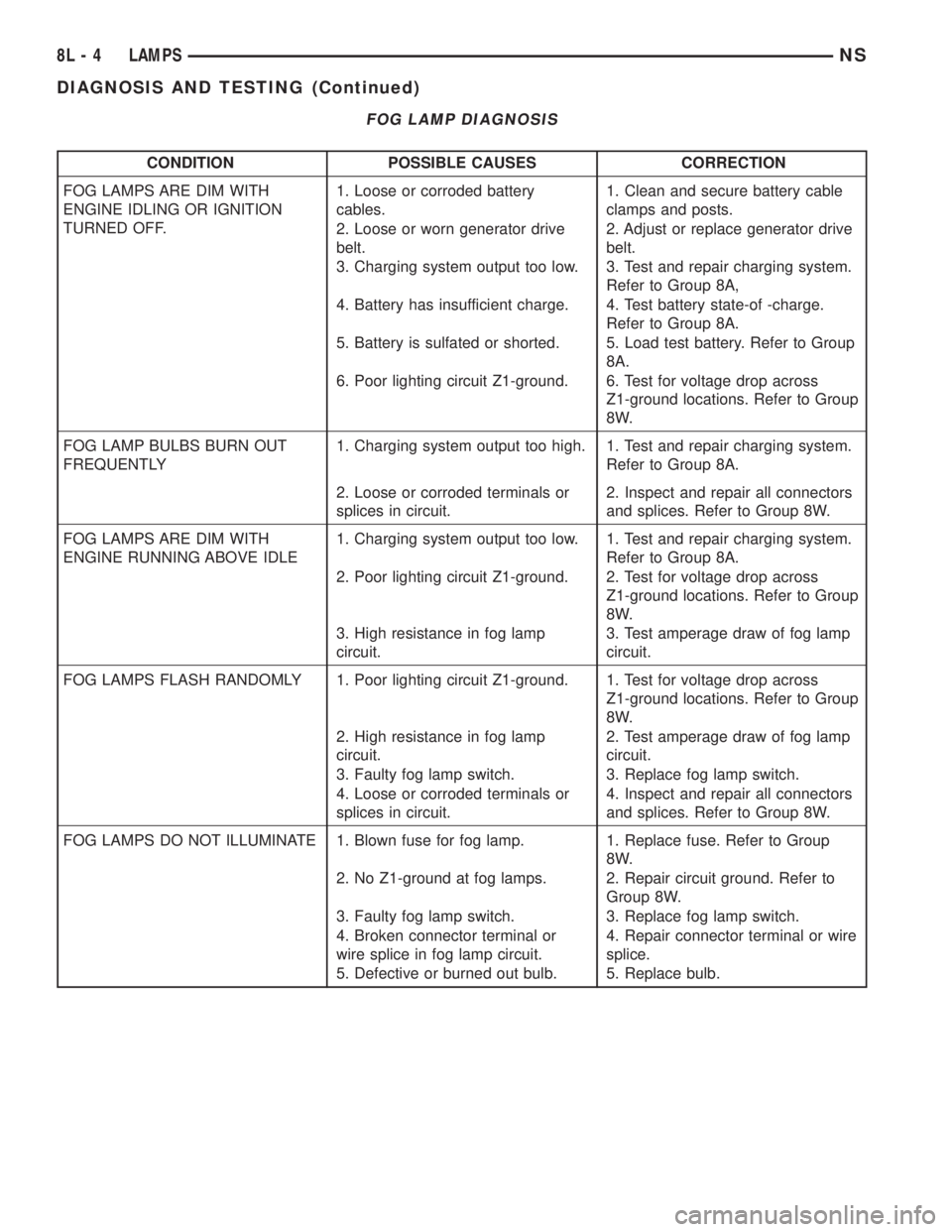
FOG LAMP DIAGNOSIS
CONDITION POSSIBLE CAUSES CORRECTION
FOG LAMPS ARE DIM WITH
ENGINE IDLING OR IGNITION
TURNED OFF.1. Loose or corroded battery
cables.1. Clean and secure battery cable
clamps and posts.
2. Loose or worn generator drive
belt.2. Adjust or replace generator drive
belt.
3. Charging system output too low. 3. Test and repair charging system.
Refer to Group 8A,
4. Battery has insufficient charge. 4. Test battery state-of -charge.
Refer to Group 8A.
5. Battery is sulfated or shorted. 5. Load test battery. Refer to Group
8A.
6. Poor lighting circuit Z1-ground. 6. Test for voltage drop across
Z1-ground locations. Refer to Group
8W.
FOG LAMP BULBS BURN OUT
FREQUENTLY1. Charging system output too high. 1. Test and repair charging system.
Refer to Group 8A.
2. Loose or corroded terminals or
splices in circuit.2. Inspect and repair all connectors
and splices. Refer to Group 8W.
FOG LAMPS ARE DIM WITH
ENGINE RUNNING ABOVE IDLE1. Charging system output too low. 1. Test and repair charging system.
Refer to Group 8A.
2. Poor lighting circuit Z1-ground. 2. Test for voltage drop across
Z1-ground locations. Refer to Group
8W.
3. High resistance in fog lamp
circuit.3. Test amperage draw of fog lamp
circuit.
FOG LAMPS FLASH RANDOMLY 1. Poor lighting circuit Z1-ground. 1. Test for voltage drop across
Z1-ground locations. Refer to Group
8W.
2. High resistance in fog lamp
circuit.2. Test amperage draw of fog lamp
circuit.
3. Faulty fog lamp switch. 3. Replace fog lamp switch.
4. Loose or corroded terminals or
splices in circuit.4. Inspect and repair all connectors
and splices. Refer to Group 8W.
FOG LAMPS DO NOT ILLUMINATE 1. Blown fuse for fog lamp. 1. Replace fuse. Refer to Group
8W.
2. No Z1-ground at fog lamps. 2. Repair circuit ground. Refer to
Group 8W.
3. Faulty fog lamp switch. 3. Replace fog lamp switch.
4. Broken connector terminal or
wire splice in fog lamp circuit.4. Repair connector terminal or wire
splice.
5. Defective or burned out bulb. 5. Replace bulb.
8L - 4 LAMPSNS
DIAGNOSIS AND TESTING (Continued)