belt CHRYSLER VOYAGER 1996 Owner's Manual
[x] Cancel search | Manufacturer: CHRYSLER, Model Year: 1996, Model line: VOYAGER, Model: CHRYSLER VOYAGER 1996Pages: 1938, PDF Size: 55.84 MB
Page 246 of 1938
Initial belt adjustment is done with a adjustable
tensioner pulley. After the initial adjustment is per-
formed, an automatic belt tensioner is used to main-
tain correct belt tension at all times. Do not attempt
to check belt tension with a belt tension gauge on
vehicles equipped with an automatic belt tensioner.
Refer to Automatic Belt Tensioner in this group.
AUTOMATIC BELT TENSIONER
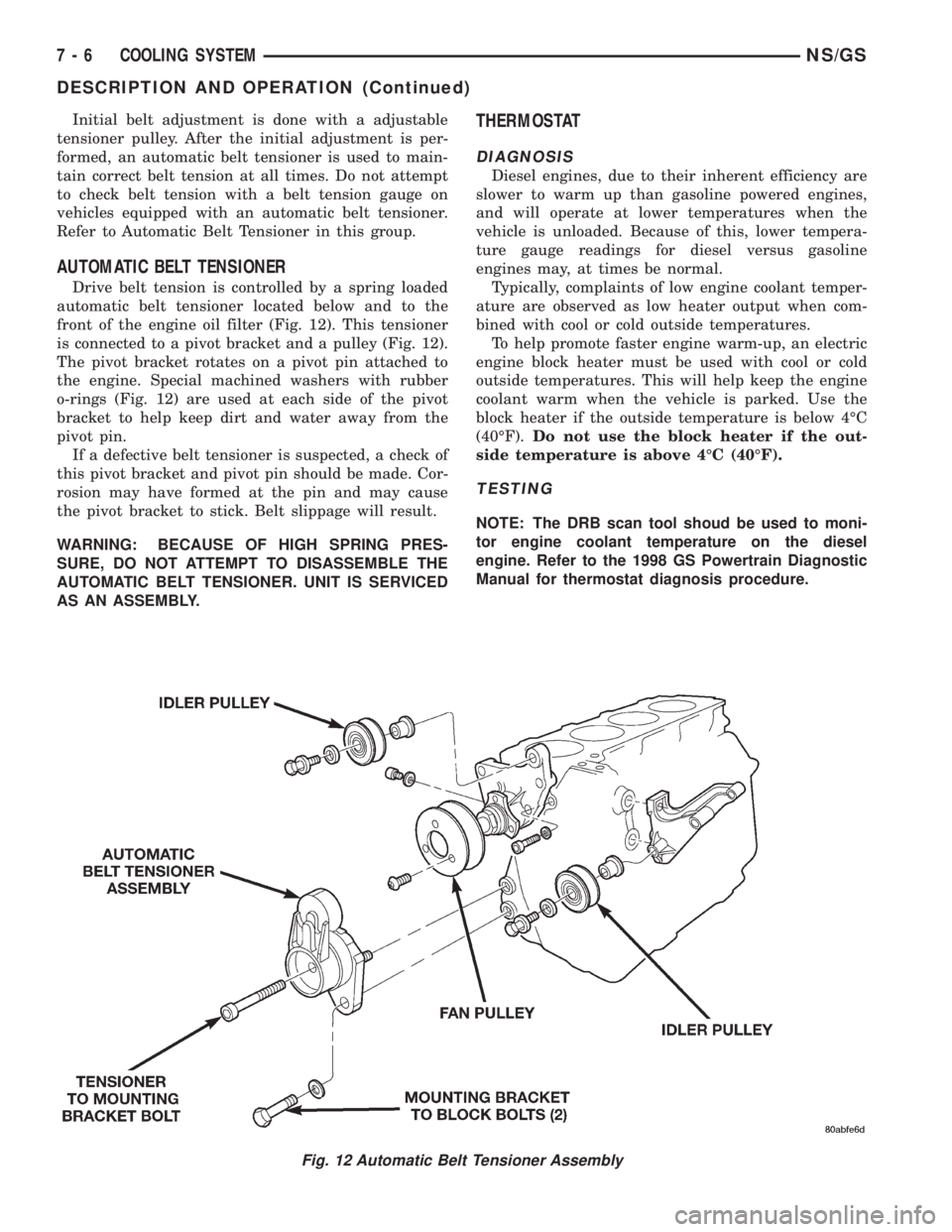
Drive belt tension is controlled by a spring loaded
automatic belt tensioner located below and to the
front of the engine oil filter (Fig. 12). This tensioner
is connected to a pivot bracket and a pulley (Fig. 12).
The pivot bracket rotates on a pivot pin attached to
the engine. Special machined washers with rubber
o-rings (Fig. 12) are used at each side of the pivot
bracket to help keep dirt and water away from the
pivot pin.
If a defective belt tensioner is suspected, a check of
this pivot bracket and pivot pin should be made. Cor-
rosion may have formed at the pin and may cause
the pivot bracket to stick. Belt slippage will result.
WARNING: BECAUSE OF HIGH SPRING PRES-
SURE, DO NOT ATTEMPT TO DISASSEMBLE THE
AUTOMATIC BELT TENSIONER. UNIT IS SERVICED
AS AN ASSEMBLY.
THERMOSTAT
DIAGNOSIS
Diesel engines, due to their inherent efficiency are
slower to warm up than gasoline powered engines,
and will operate at lower temperatures when the
vehicle is unloaded. Because of this, lower tempera-
ture gauge readings for diesel versus gasoline
engines may, at times be normal.
Typically, complaints of low engine coolant temper-
ature are observed as low heater output when com-
bined with cool or cold outside temperatures.
To help promote faster engine warm-up, an electric
engine block heater must be used with cool or cold
outside temperatures. This will help keep the engine
coolant warm when the vehicle is parked. Use the
block heater if the outside temperature is below 4ÉC
(40ÉF).Do not use the block heater if the out-
side temperature is above 4ÉC (40ÉF).
TESTING
NOTE: The DRB scan tool shoud be used to moni-
tor engine coolant temperature on the diesel
engine. Refer to the 1998 GS Powertrain Diagnostic
Manual for thermostat diagnosis procedure.
Fig. 12 Automatic Belt Tensioner Assembly
7 - 6 COOLING SYSTEMNS/GS
DESCRIPTION AND OPERATION (Continued)
Page 247 of 1938
SERVICE PROCEDURES
ADDING ADDITIONAL COOLANT
2.5L VM DIESEL
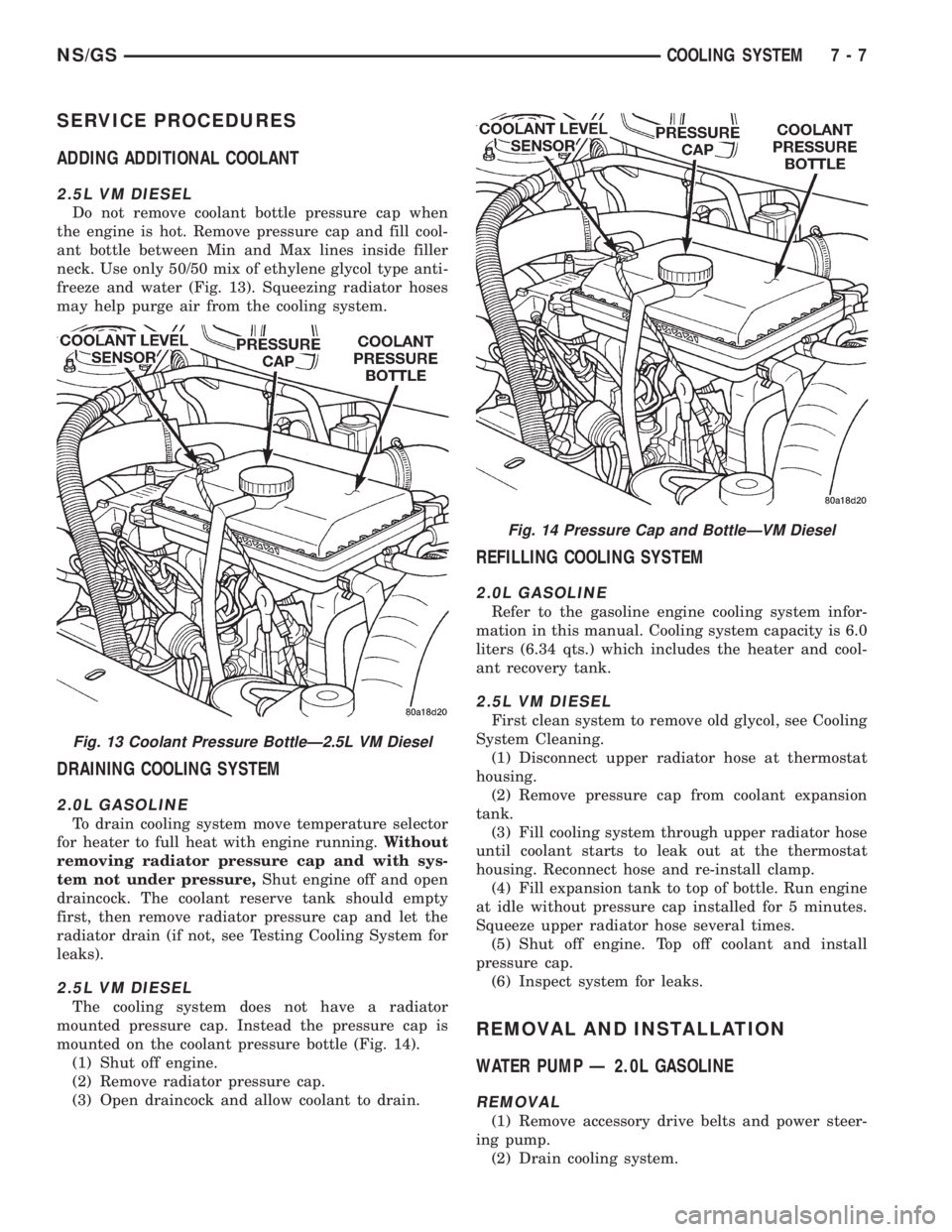
Do not remove coolant bottle pressure cap when
the engine is hot. Remove pressure cap and fill cool-
ant bottle between Min and Max lines inside filler
neck. Use only 50/50 mix of ethylene glycol type anti-
freeze and water (Fig. 13). Squeezing radiator hoses
may help purge air from the cooling system.
DRAINING COOLING SYSTEM
2.0L GASOLINE
To drain cooling system move temperature selector
for heater to full heat with engine running.Without
removing radiator pressure cap and with sys-
tem not under pressure,Shut engine off and open
draincock. The coolant reserve tank should empty
first, then remove radiator pressure cap and let the
radiator drain (if not, see Testing Cooling System for
leaks).
2.5L VM DIESEL
The cooling system does not have a radiator
mounted pressure cap. Instead the pressure cap is
mounted on the coolant pressure bottle (Fig. 14).
(1) Shut off engine.
(2) Remove radiator pressure cap.
(3) Open draincock and allow coolant to drain.
REFILLING COOLING SYSTEM
2.0L GASOLINE
Refer to the gasoline engine cooling system infor-
mation in this manual. Cooling system capacity is 6.0
liters (6.34 qts.) which includes the heater and cool-
ant recovery tank.
2.5L VM DIESEL
First clean system to remove old glycol, see Cooling
System Cleaning.
(1) Disconnect upper radiator hose at thermostat
housing.
(2) Remove pressure cap from coolant expansion
tank.
(3) Fill cooling system through upper radiator hose
until coolant starts to leak out at the thermostat
housing. Reconnect hose and re-install clamp.
(4) Fill expansion tank to top of bottle. Run engine
at idle without pressure cap installed for 5 minutes.
Squeeze upper radiator hose several times.
(5) Shut off engine. Top off coolant and install
pressure cap.
(6) Inspect system for leaks.
REMOVAL AND INSTALLATION
WATER PUMP Ð 2.0L GASOLINE
REMOVAL
(1) Remove accessory drive belts and power steer-
ing pump.
(2) Drain cooling system.
Fig. 13 Coolant Pressure BottleÐ2.5L VM Diesel
Fig. 14 Pressure Cap and BottleÐVM Diesel
NS/GSCOOLING SYSTEM 7 - 7
Page 248 of 1938
(3) Remove power steering pump bracket bolts and
set pump and bracket assembly aside. Power steering
lines do not need to be disconnected.
(4) Remove timing belt.
(5) Remove inner timing belt cover.
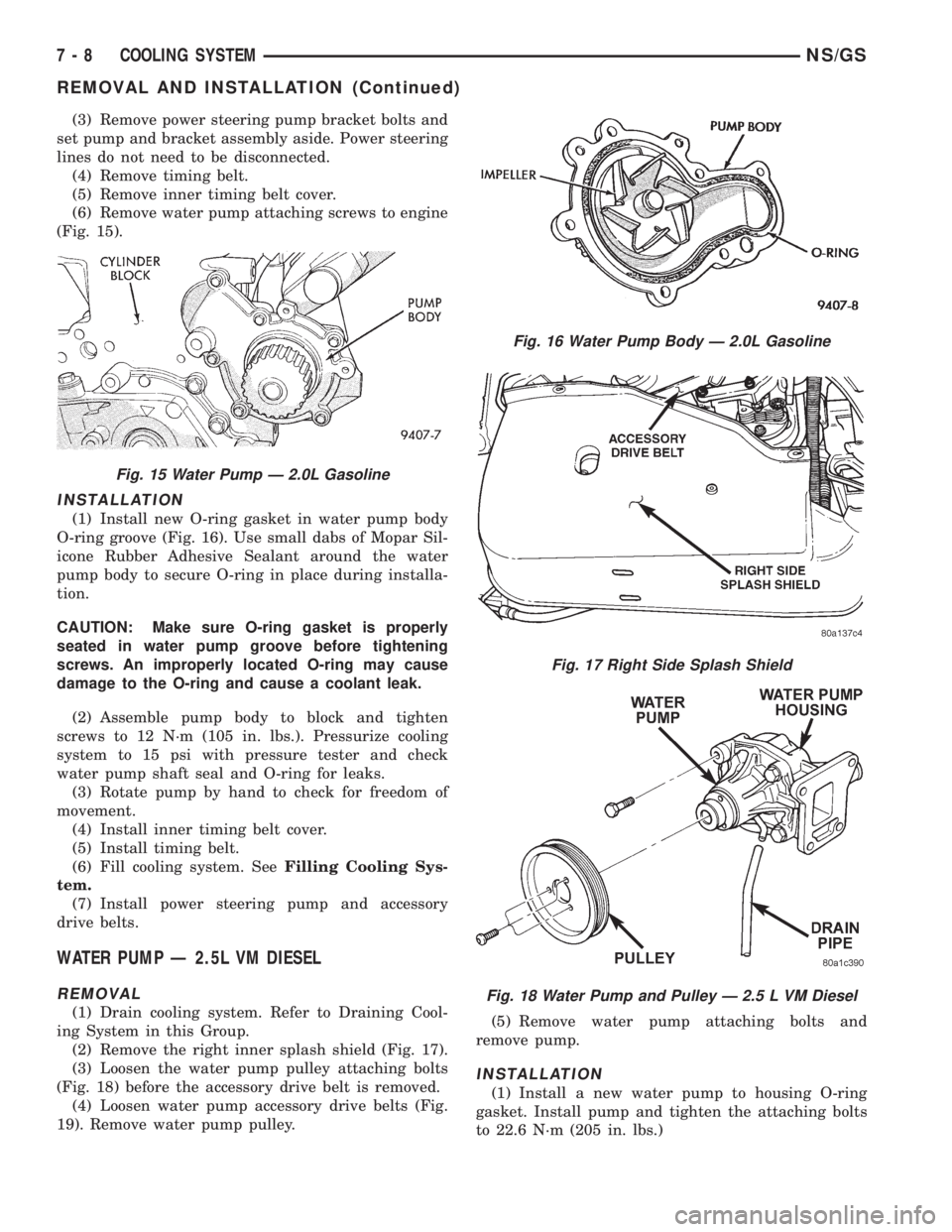
(6) Remove water pump attaching screws to engine
(Fig. 15).
INSTALLATION
(1) Install new O-ring gasket in water pump body
O-ring groove (Fig. 16). Use small dabs of Mopar Sil-
icone Rubber Adhesive Sealant around the water
pump body to secure O-ring in place during installa-
tion.
CAUTION: Make sure O-ring gasket is properly
seated in water pump groove before tightening
screws. An improperly located O-ring may cause
damage to the O-ring and cause a coolant leak.
(2) Assemble pump body to block and tighten
screws to 12 N´m (105 in. lbs.). Pressurize cooling
system to 15 psi with pressure tester and check
water pump shaft seal and O-ring for leaks.
(3) Rotate pump by hand to check for freedom of
movement.
(4) Install inner timing belt cover.
(5) Install timing belt.
(6) Fill cooling system. SeeFilling Cooling Sys-
tem.
(7) Install power steering pump and accessory
drive belts.
WATER PUMP Ð 2.5L VM DIESEL
REMOVAL
(1) Drain cooling system. Refer to Draining Cool-
ing System in this Group.
(2) Remove the right inner splash shield (Fig. 17).
(3) Loosen the water pump pulley attaching bolts
(Fig. 18) before the accessory drive belt is removed.
(4) Loosen water pump accessory drive belts (Fig.
19). Remove water pump pulley.(5) Remove water pump attaching bolts and
remove pump.
INSTALLATION
(1) Install a new water pump to housing O-ring
gasket. Install pump and tighten the attaching bolts
to 22.6 N´m (205 in. lbs.)
Fig. 15 Water Pump Ð 2.0L Gasoline
Fig. 16 Water Pump Body Ð 2.0L Gasoline
Fig. 17 Right Side Splash Shield
Fig. 18 Water Pump and Pulley Ð 2.5 L VM Diesel
7 - 8 COOLING SYSTEMNS/GS
REMOVAL AND INSTALLATION (Continued)
Page 249 of 1938
(2) Install water pump pulley.
(3) Install drive belt, Refer to Accessory Drive
Belts, this Group. Tighten water pump pulley attach-
ing bolts to 27.5 N´m (240 in. lbs.)
(4) Install right inner splash shield.
(5) Refill cooling system. Refer to Refilling Cooling
System in this Group.
ENGINE THERMOSTATÐ 2.0L GASOLINE
REMOVAL
(1) Drain cooling system to the thermostat level or
below.
(2) Remove coolant recovery system (CRS) hose
and thermostat/engine outlet connector bolts.
(3) Remove thermostat and seal, and clean sealing
surfaces.
INSTALLATION
(1) Place the new thermostat assembly into the
thermostat housing/outlet connector. Align air bleed
vent with notch in cylinder head.
(2) Install thermostat housing/outlet connector
onto cylinder head and tighten bolts to 12.5 N´m (110
in. lbs.). Connect the upper radiator hose.
(3) Refill cooling system (seeRefilling System).
THERMOSTAT Ð 2.5L VM DIESEL
REMOVAL
(1) Drain cooling system down below the thermo-
stat level. Refer to Draining Cooling System in this
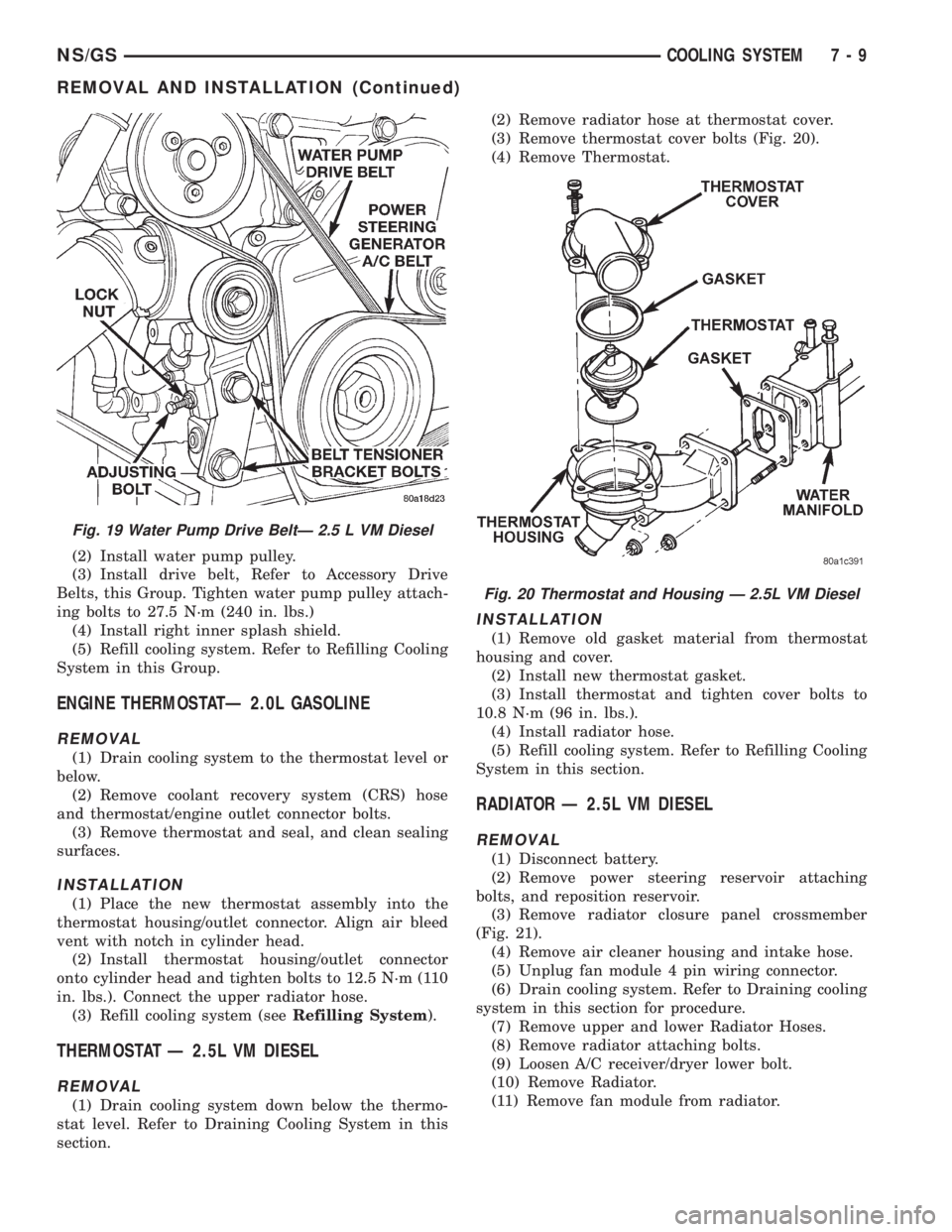
section.(2) Remove radiator hose at thermostat cover.
(3) Remove thermostat cover bolts (Fig. 20).
(4) Remove Thermostat.
INSTALLATION
(1) Remove old gasket material from thermostat
housing and cover.
(2) Install new thermostat gasket.
(3) Install thermostat and tighten cover bolts to
10.8 N´m (96 in. lbs.).
(4) Install radiator hose.
(5) Refill cooling system. Refer to Refilling Cooling
System in this section.
RADIATOR Ð 2.5L VM DIESEL
REMOVAL
(1) Disconnect battery.
(2) Remove power steering reservoir attaching
bolts, and reposition reservoir.
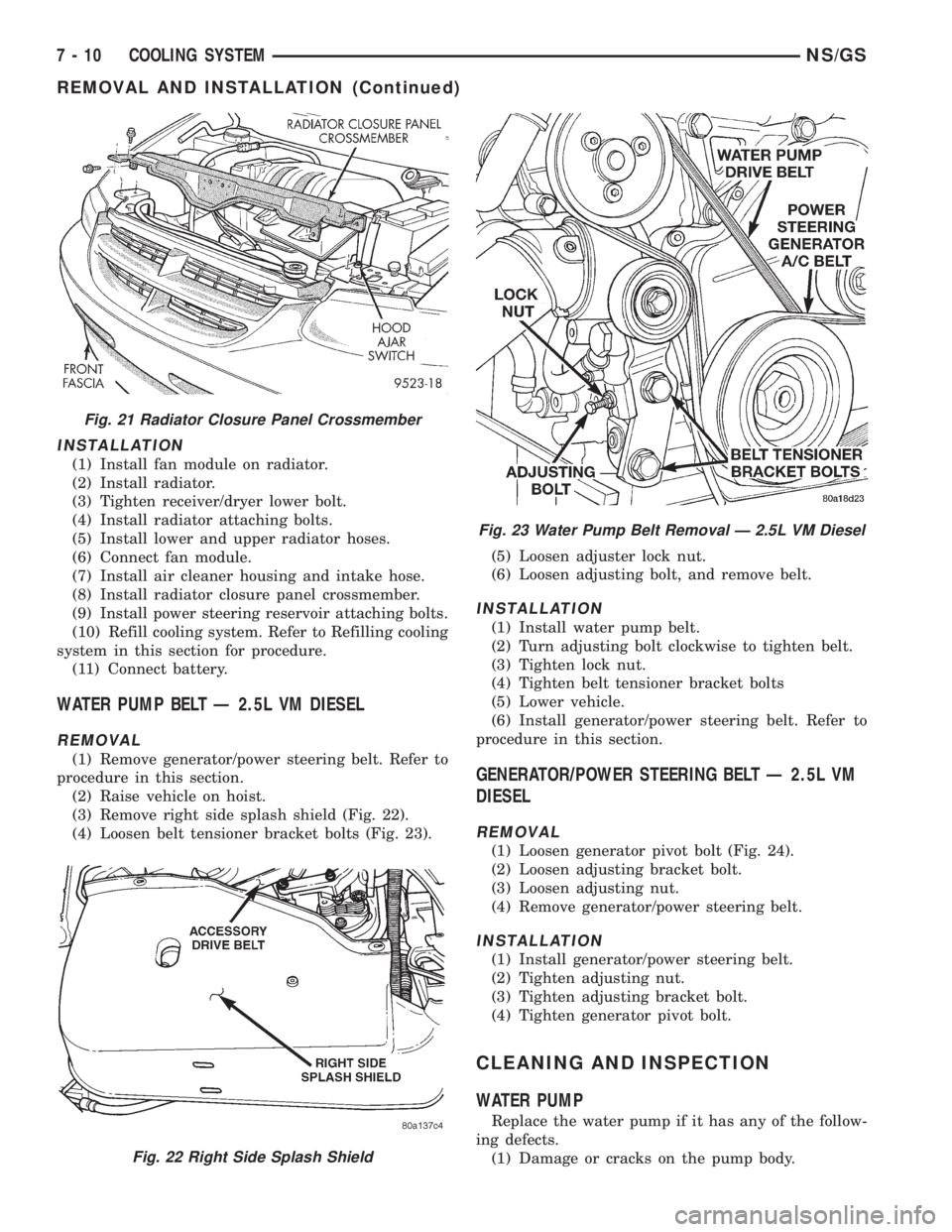
(3) Remove radiator closure panel crossmember
(Fig. 21).
(4) Remove air cleaner housing and intake hose.
(5) Unplug fan module 4 pin wiring connector.
(6) Drain cooling system. Refer to Draining cooling
system in this section for procedure.
(7) Remove upper and lower Radiator Hoses.
(8) Remove radiator attaching bolts.
(9) Loosen A/C receiver/dryer lower bolt.
(10) Remove Radiator.
(11) Remove fan module from radiator.
Fig. 19 Water Pump Drive BeltÐ 2.5 L VM Diesel
Fig. 20 Thermostat and Housing Ð 2.5L VM Diesel
NS/GSCOOLING SYSTEM 7 - 9
REMOVAL AND INSTALLATION (Continued)
Page 250 of 1938
INSTALLATION
(1) Install fan module on radiator.
(2) Install radiator.
(3) Tighten receiver/dryer lower bolt.
(4) Install radiator attaching bolts.
(5) Install lower and upper radiator hoses.
(6) Connect fan module.
(7) Install air cleaner housing and intake hose.
(8) Install radiator closure panel crossmember.
(9) Install power steering reservoir attaching bolts.
(10) Refill cooling system. Refer to Refilling cooling
system in this section for procedure.
(11) Connect battery.
WATER PUMP BELT Ð 2.5L VM DIESEL
REMOVAL
(1) Remove generator/power steering belt. Refer to
procedure in this section.
(2) Raise vehicle on hoist.
(3) Remove right side splash shield (Fig. 22).
(4) Loosen belt tensioner bracket bolts (Fig. 23).(5) Loosen adjuster lock nut.
(6) Loosen adjusting bolt, and remove belt.
INSTALLATION
(1) Install water pump belt.
(2) Turn adjusting bolt clockwise to tighten belt.
(3) Tighten lock nut.
(4) Tighten belt tensioner bracket bolts
(5) Lower vehicle.
(6) Install generator/power steering belt. Refer to
procedure in this section.
GENERATOR/POWER STEERING BELT Ð 2.5L VM
DIESEL
REMOVAL
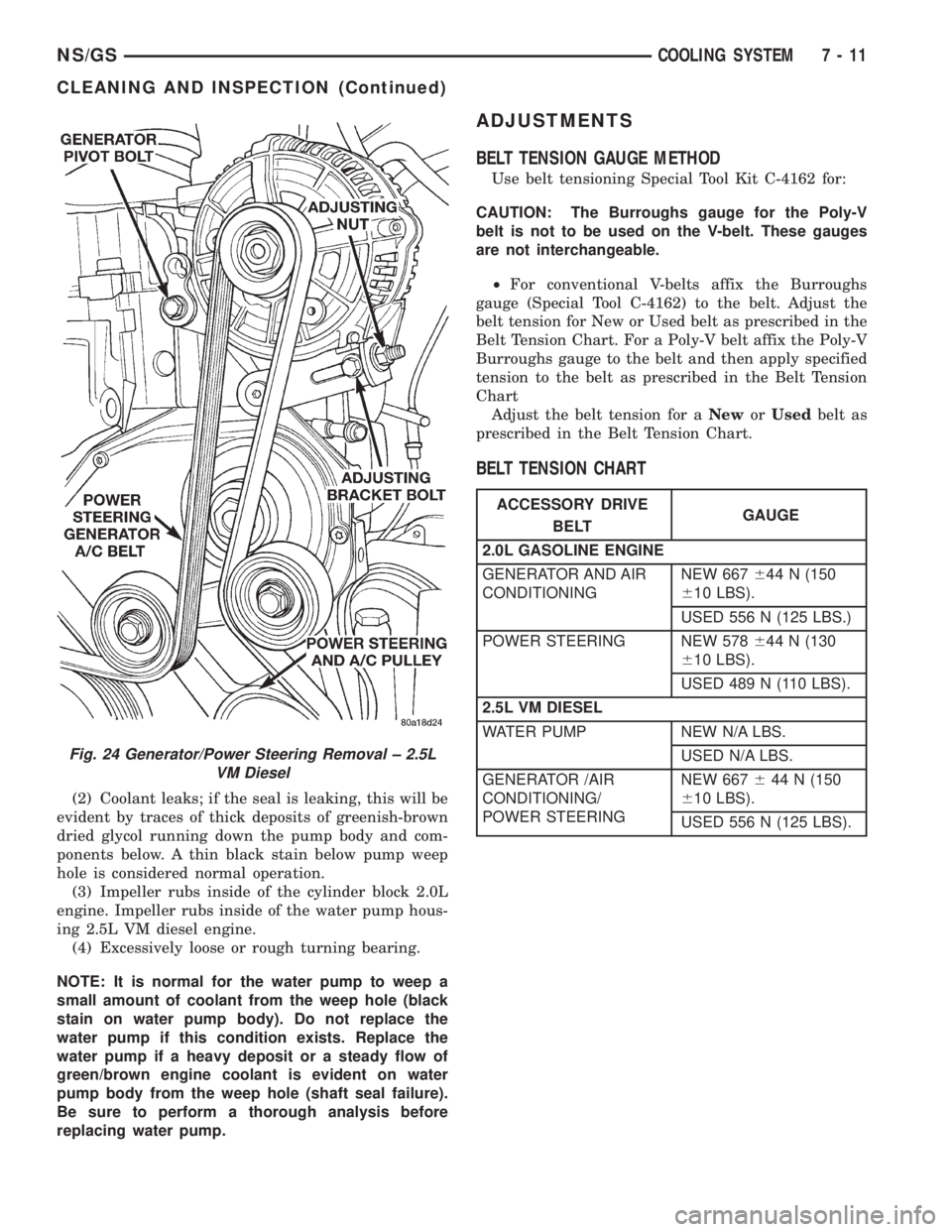
(1) Loosen generator pivot bolt (Fig. 24).
(2) Loosen adjusting bracket bolt.
(3) Loosen adjusting nut.
(4) Remove generator/power steering belt.
INSTALLATION
(1) Install generator/power steering belt.
(2) Tighten adjusting nut.
(3) Tighten adjusting bracket bolt.
(4) Tighten generator pivot bolt.
CLEANING AND INSPECTION
WATER PUMP
Replace the water pump if it has any of the follow-
ing defects.
(1) Damage or cracks on the pump body.
Fig. 21 Radiator Closure Panel Crossmember
Fig. 22 Right Side Splash Shield
Fig. 23 Water Pump Belt Removal Ð 2.5L VM Diesel
7 - 10 COOLING SYSTEMNS/GS
REMOVAL AND INSTALLATION (Continued)
Page 251 of 1938
(2) Coolant leaks; if the seal is leaking, this will be
evident by traces of thick deposits of greenish-brown
dried glycol running down the pump body and com-
ponents below. A thin black stain below pump weep
hole is considered normal operation.
(3) Impeller rubs inside of the cylinder block 2.0L
engine. Impeller rubs inside of the water pump hous-
ing 2.5L VM diesel engine.
(4) Excessively loose or rough turning bearing.
NOTE: It is normal for the water pump to weep a
small amount of coolant from the weep hole (black
stain on water pump body). Do not replace the
water pump if this condition exists. Replace the
water pump if a heavy deposit or a steady flow of
green/brown engine coolant is evident on water
pump body from the weep hole (shaft seal failure).
Be sure to perform a thorough analysis before
replacing water pump.
ADJUSTMENTS
BELT TENSION GAUGE METHOD
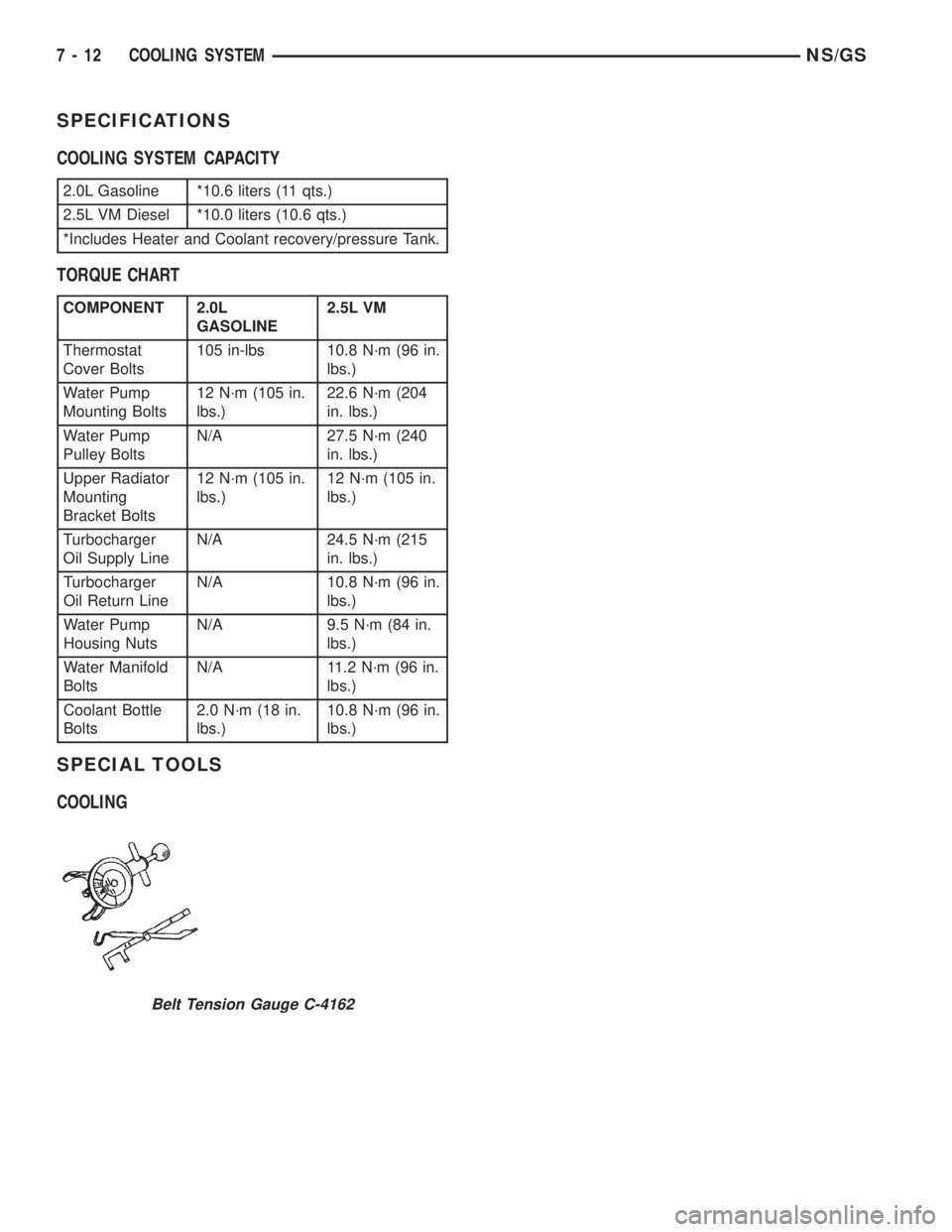
Use belt tensioning Special Tool Kit C-4162 for:
CAUTION: The Burroughs gauge for the Poly-V
belt is not to be used on the V-belt. These gauges
are not interchangeable.
²For conventional V-belts affix the Burroughs
gauge (Special Tool C-4162) to the belt. Adjust the
belt tension for New or Used belt as prescribed in the
Belt Tension Chart. For a Poly-V belt affix the Poly-V
Burroughs gauge to the belt and then apply specified
tension to the belt as prescribed in the Belt Tension
Chart
Adjust the belt tension for aNeworUsedbelt as
prescribed in the Belt Tension Chart.
BELT TENSION CHART
Fig. 24 Generator/Power Steering Removal ± 2.5L
VM Diesel
ACCESSORY DRIVE
BELTGAUGE
2.0L GASOLINE ENGINE
GENERATOR AND AIR
CONDITIONINGNEW 667644 N (150
610 LBS).
USED 556 N (125 LBS.)
POWER STEERING NEW 578644 N (130
610 LBS).
USED 489 N (110 LBS).
2.5L VM DIESEL
WATER PUMP NEW N/A LBS.
USED N/A LBS.
GENERATOR /AIR
CONDITIONING/
POWER STEERINGNEW 667644 N (150
610 LBS).
USED 556 N (125 LBS).
NS/GSCOOLING SYSTEM 7 - 11
CLEANING AND INSPECTION (Continued)
Page 252 of 1938
SPECIFICATIONS
COOLING SYSTEM CAPACITY
TORQUE CHART
SPECIAL TOOLS
COOLING
2.0L Gasoline *10.6 liters (11 qts.)
2.5L VM Diesel *10.0 liters (10.6 qts.)
*Includes Heater and Coolant recovery/pressure Tank.
COMPONENT 2.0L
GASOLINE2.5L VM
Thermostat
Cover Bolts105 in-lbs 10.8 N´m (96 in.
lbs.)
Water Pump
Mounting Bolts12 N´m (105 in.
lbs.)22.6 N´m (204
in. lbs.)
Water Pump
Pulley BoltsN/A 27.5 N´m (240
in. lbs.)
Upper Radiator
Mounting
Bracket Bolts12 N´m (105 in.
lbs.)12 N´m (105 in.
lbs.)
Turbocharger
Oil Supply LineN/A 24.5 N´m (215
in. lbs.)
Turbocharger
Oil Return LineN/A 10.8 N´m (96 in.
lbs.)
Water Pump
Housing NutsN/A 9.5 N´m (84 in.
lbs.)
Water Manifold
BoltsN/A 11.2 N´m (96 in.
lbs.)
Coolant Bottle
Bolts2.0 N´m (18 in.
lbs.)10.8 N´m (96 in.
lbs.)
Belt Tension Gauge C-4162
7 - 12 COOLING SYSTEMNS/GS
Page 255 of 1938

use. Refer to Causes of Battery Discharging in this
Group for more information.
NOTE: CLEAR COLOR = Replace Battery
WARNING: DO NOT CHARGE, ASSIST BOOST,
LOAD TEST, OR ADD WATER TO THE BATTERY
WHEN CLEAR COLOR DOT IS VISIBLE. PERSONAL
INJURY MAY OCCUR.
A clear color dot shows electrolyte level in battery
is below the test indicator (Fig. 1). Water cannot be
added to a maintenance free battery. The battery
must be replaced. A low electrolyte level may be
caused by an over charging condition. Refer to Gen-
erator Test Procedures on Vehicle.
CAUSES OF BATTERY DISCHARGING
It is normal to have a small 5 to 25 milliamperes
continuous electrical draw from the battery. This
draw will take place with the ignition in the OFF
position, and the courtesy, dome, storage compart-
ments, and engine compartment lights OFF. The con-
tinuous draw is due to various electronic features or
accessories that require electrical current with the
ignition OFF to function properly. When a vehicle is
not used over an extended period of approximately 20
days the IOD fuse should be pulled. The fuse is
located in the power distribution center. Disconnec-
tion of this fuse will reduce the level of battery dis-
charge. Refer to Battery Diagnosis and Testing table
and to the proper procedures.
ABNORMAL BATTERY DISCHARGING
²Corroded battery posts, cables or terminals.
²Loose or worn generator drive belt.
²Electrical loads that exceed the output of the
charging system due to equipment or accessories
installed after delivery.
²Slow driving speeds in heavy traffic conditions
or prolonged idling with high-amperage electrical
systems in use.²Defective electrical circuit or component causing
excess Ignition Off Draw (IOD). Refer to Battery
Ignition Off Draw (IOD).
²Defective charging system.
²Defective battery.
BATTERY IGNITION OFF DRAW (IOD)
High current draw on the battery with the ignition
OFF will discharge a battery. After a dead battery is
serviced the vehicle Ignition Off Draw (IOD) should
be checked. Determine if a high current draw condi-
tion exists first check the vehicle with a test lamp.
(1) Verify that all electrical accessories are OFF.
²Remove key from ignition switch
²Turn off all lights
²Liftgate and glove box door is closed
²Sun visor vanity lights are OFF
²All doors are closed
²Allow the Illuminated Entry System to time out
in approximately 30 seconds, if equipped.
²During Transmission Control Module (TCM)
power down there will be 500 milliamperes present
for 20 minutes. Afterwards less than 1.0 milliampere.
(2) Disconnect battery negative cable (Fig. 4).
CAUTION: Always disconnect the meter before
opening a door.
(3) Using an multimeter, that has least a milliam-
pere range of 200 mA. Set meter to the highest mA
range. Install meter between the battery negative
cable and battery negative post (Fig. 5). Carefully
remove the test lamp without disconnecting the
meter. After all modules time-out the total vehicle
IOD should be less than 25 milliamperes. If ignition
off draw is more than 25 milliamperes go to Step 4.
(4) Each time the test lamp or milliampere meter
is disconnected and connected, all electronic timer
functions will be activated for approximately one
minute. The Body Control Module (BCM) ignition off
draw can reach 90 milliamperes.
(5) Remove the PDC fuses:
²Interior lamps
²Brake lamp
²IOD
(6) If there is any reading, with fuses removed
there is a short circuit in the wiring. Refer to Group
8W, wiring diagrams. If reading is less than 25 mA
go to Step 8.
(7) Install all fuses. After installing fuse, the cur-
rent can reach 90 mA. After time-out the reading
should not exceed 25 mA. If OK go to. If not, discon-
nect:
²Radio
²Body Control Module
²Remote Keyless Entry Module
Fig. 3 Test Indicator
NSBATTERY 8A - 3
DIAGNOSIS AND TESTING (Continued)
Page 265 of 1938
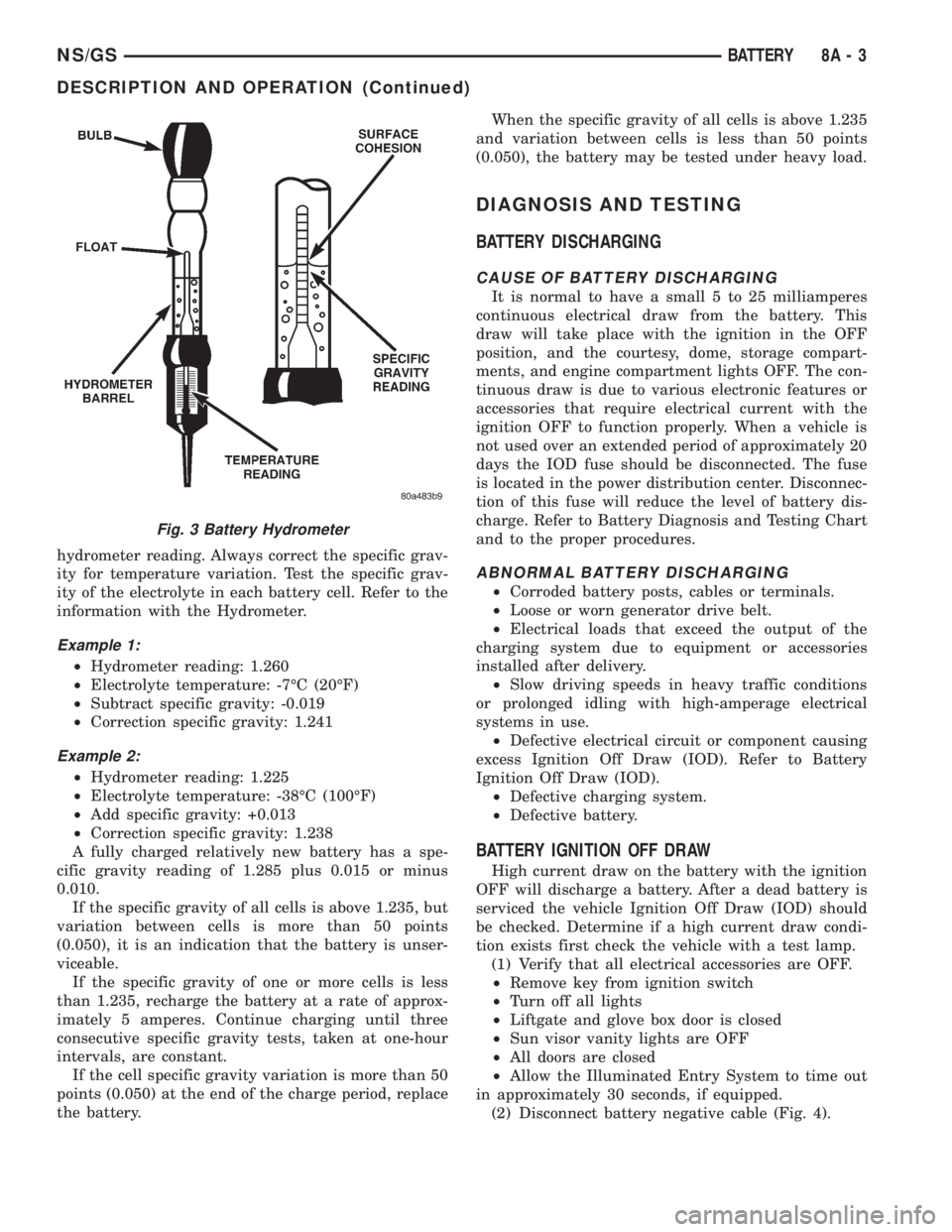
hydrometer reading. Always correct the specific grav-
ity for temperature variation. Test the specific grav-
ity of the electrolyte in each battery cell. Refer to the
information with the Hydrometer.
Example 1:
²Hydrometer reading: 1.260
²Electrolyte temperature: -7ÉC (20ÉF)
²Subtract specific gravity: -0.019
²Correction specific gravity: 1.241
Example 2:
²Hydrometer reading: 1.225
²Electrolyte temperature: -38ÉC (100ÉF)
²Add specific gravity: +0.013
²Correction specific gravity: 1.238
A fully charged relatively new battery has a spe-
cific gravity reading of 1.285 plus 0.015 or minus
0.010.
If the specific gravity of all cells is above 1.235, but
variation between cells is more than 50 points
(0.050), it is an indication that the battery is unser-
viceable.
If the specific gravity of one or more cells is less
than 1.235, recharge the battery at a rate of approx-
imately 5 amperes. Continue charging until three
consecutive specific gravity tests, taken at one-hour
intervals, are constant.
If the cell specific gravity variation is more than 50
points (0.050) at the end of the charge period, replace
the battery.When the specific gravity of all cells is above 1.235
and variation between cells is less than 50 points
(0.050), the battery may be tested under heavy load.
DIAGNOSIS AND TESTING
BATTERY DISCHARGING
CAUSE OF BATTERY DISCHARGING
It is normal to have a small 5 to 25 milliamperes
continuous electrical draw from the battery. This
draw will take place with the ignition in the OFF
position, and the courtesy, dome, storage compart-
ments, and engine compartment lights OFF. The con-
tinuous draw is due to various electronic features or
accessories that require electrical current with the
ignition OFF to function properly. When a vehicle is
not used over an extended period of approximately 20
days the IOD fuse should be disconnected. The fuse
is located in the power distribution center. Disconnec-
tion of this fuse will reduce the level of battery dis-
charge. Refer to Battery Diagnosis and Testing Chart
and to the proper procedures.
ABNORMAL BATTERY DISCHARGING
²Corroded battery posts, cables or terminals.
²Loose or worn generator drive belt.
²Electrical loads that exceed the output of the
charging system due to equipment or accessories
installed after delivery.
²Slow driving speeds in heavy traffic conditions
or prolonged idling with high-amperage electrical
systems in use.
²Defective electrical circuit or component causing
excess Ignition Off Draw (IOD). Refer to Battery
Ignition Off Draw (IOD).
²Defective charging system.
²Defective battery.
BATTERY IGNITION OFF DRAW
High current draw on the battery with the ignition
OFF will discharge a battery. After a dead battery is
serviced the vehicle Ignition Off Draw (IOD) should
be checked. Determine if a high current draw condi-
tion exists first check the vehicle with a test lamp.
(1) Verify that all electrical accessories are OFF.
²Remove key from ignition switch
²Turn off all lights
²Liftgate and glove box door is closed
²Sun visor vanity lights are OFF
²All doors are closed
²Allow the Illuminated Entry System to time out
in approximately 30 seconds, if equipped.
(2) Disconnect battery negative cable (Fig. 4).
Fig. 3 Battery Hydrometer
NS/GSBATTERY 8A - 3
DESCRIPTION AND OPERATION (Continued)
Page 287 of 1938
CHARGING SYSTEM
CONTENTS
page page
GENERAL INFORMATION
OVERVIEW............................. 1
DESCRIPTION AND OPERATION
BATTERY TEMPERATURE SENSOR.......... 2
CHARGING SYSTEM OPERATION........... 1
ELECTRONIC VOLTAGE REGULATOR......... 2
GENERATOR............................ 2
DIAGNOSIS AND TESTING
CHARGING SYSTEM RESISTANCE TESTS..... 4
CHARGING SYSTEM...................... 2CURRENT OUTPUT TEST.................. 4
ON-BOARD DIAGNOSTIC SYSTEM TEST...... 7
REMOVAL AND INSTALLATION
GENERATORÐ2.4L ENGINE................ 9
GENERATORÐ3.0L ENGINE................ 9
GENERATORÐ3.3/3.8 L ENGINE........... 10
SPECIFICATIONS
GENERATOR........................... 11
TORQUE.............................. 11
GENERAL INFORMATION
OVERVIEW
The battery, starting, and charging systems oper-
ate with one another, and must be tested as a com-
plete system. In order for the vehicle to start and
charge properly, all of the components involved in
these systems must perform within specifications.
Group 8A covers the battery, Group 8B covers the
starting system, and Group 8C covers the charging
system. Refer to Group 8W - Wiring Diagrams for
complete circuit descriptions and diagrams. We have
separated these systems to make it easier to locate
the information you are seeking within this Service
Manual. However, when attempting to diagnose any
of these systems, it is important that you keep their
interdependency in mind.
The diagnostic procedures used in these groups
include the most basic conventional diagnostic meth-
ods to the more sophisticated On-Board Diagnostics
(OBD) built into the Powertrain Control Module
(PCM). Use of an induction ammeter, volt/ohmmeter,
battery charger, carbon pile rheostat (load tester),
and 12-volt test lamp may be required.
All OBD-sensed systems are monitored by the
PCM. Each monitored circuit is assigned a Diagnos-
tic Trouble Code (DTC). The PCM will store a DTC in
electronic memory for any failure it detects. See the
On-Board Diagnostics Test in Group 8C - Charging
System for more information.
DESCRIPTION AND OPERATION
CHARGING SYSTEM OPERATION
The charging system consists of:
²Generator
²Electronic Voltage Regulator (EVR) circuitry
within the Powertrain Control Module (PCM)
²Ignition switch (refer to Group 8D, Ignition Sys-
tem for information)
²Battery (refer to Group 8A, Battery for informa-
tion)
²Temperature is measured by a sensor in the
PCM circuitry
²Wiring harness and connections (refer to Group
8W, Wiring for information)
The charging system is turned on and off with the
ignition switch. When the ignition switch is turned to
the ON position, battery voltage is applied to the
generator rotor through one of the two field termi-
nals to produce a magnetic field. The generator is
driven by the engine through a serpentine belt and
pulley arrangement.
The amount of DC current produced by the gener-
ator is controlled by the EVR (field control) circuitry,
contained within the PCM. This circuitry is con-
nected in series with the second rotor field terminal
and ground.
All vehicles are equipped with On-Board Diagnos-
tics (OBD). All OBD-sensed systems, including the
EVR (field control) circuitry, are monitored by the
PCM. Each monitored circuit is assigned a Diagnos-
tic Trouble Code (DTC). The PCM will store a DTC in
electronic memory for any failure it detects. See On-
Board Diagnostic System Test in this group for more
information.
NSCHARGING SYSTEM 8C - 1