ABS CHRYSLER VOYAGER 1996 Workshop Manual
[x] Cancel search | Manufacturer: CHRYSLER, Model Year: 1996, Model line: VOYAGER, Model: CHRYSLER VOYAGER 1996Pages: 1938, PDF Size: 55.84 MB
Page 182 of 1938
If the brake system is to be bled using pressurized
bleeding equipment, refer to Bleeding Brake System
in the Service Adjustments section at the beginning
of this group for proper equipment usage and proce-
dures.
(1) Assemble and install all brake system compo-
nents on the vehicle making sure all hydraulic fluid
lines are installed and properly torqued.
(2) Connect the DRB Diagnostics Tester to the
diagnostics connector. The Teves Mark 20 ABS diag-
nostic connector is located under the instrument
panel to the left of the steering column cover.
(3) Using the DRB, check to make sure the CAB
does not have any fault codes stored. If it does,
remove them using the DRB.
WARNING: WHEN BLEEDING THE BRAKE SYS-
TEM WEAR SAFETY GLASSES. A CLEAR BLEED
TUBE MUST BE ATTACHED TO THE BLEEDER
SCREWS AND SUBMERGED IN A CLEAR CON-
TAINER FILLED PART WAY WITH CLEAN BRAKE
FLUID. DIRECT THE FLOW OF BRAKE FLUID AWAY
FROM THE PAINTED SURFACES OF THE VEHICLE.
BRAKE FLUID AT HIGH PRESSURE MAY COME
OUT OF THE BLEEDER SCREWS WHEN OPENED.
(4) Bleed the base brake system using the stan-
dard pressure or manual bleeding procedure as out-
lined in the Service Adjustments section of this
service manual.
(5) Using the DRB, go to the9Bleed ABS9routine.
Apply the brake pedal firmly and initiate the9Bleed
ABS9cycle one time. Release the brake pedal.
(6) Bleed the base brake system again, as in step
Step 4 above.
(7) Repeat steps Step 5 and Step 6 above until
brake fluid flows clear and is free of any air bubbles.
Check brake fluid level in reservoir periodically to
prevent reservoir from running low on brake fluid.
(8) Test drive the vehicle to be sure brakes are
operating correctly and that brake pedal is solid.
REMOVAL AND INSTALLATION
ABS GENERAL SERVICE PRECAUTIONS
CAUTION: Review this entire section prior to per-
forming any mechanical work on a vehicle equipped
with the ITT Tevis Mark 20 ABS brake system. This
section contains information on precautions per-
taining to potential component damage, vehicle
damage and personal injury which could result
when servicing an ABS equipped vehicle.
CAUTION: Only the recommended jacking or hoist-
ing positions for this vehicle are to be used when-ever it is necessary to lift a vehicle. Failure to raise
a vehicle from the recommended locations could
result in lifting a vehicle by the hydraulic control
unit mounting bracket. Lifting a vehicle by the
hydraulic control unit mounting bracket will result
in damage to the mounting bracket and the hydrau-
lic control unit.
CAUTION: Certain components of the ABS System
are not intended to be serviced individually.
Attempting to remove or disconnect certain system
components may result in improper system opera-
tion. Only those components with approved
removal and installation procedures in this manual
should be serviced.
CAUTION: Brake fluid will damage painted sur-
faces. If brake fluid is spilled on any painted sur-
faces, wash off with water immediately.
CAUTION: When performing any service procedure
on a vehicle equipped with ABS do not apply a 12
volt power source to the ground circuit of the pump
motor in the CAB. Doing this will damage the pump
motor and will require replacement of the HCU.
The following are general cautions which should be
observed when servicing the ABS system and/or
other vehicle systems. Failure to observe these pre-
cautions may result in ABS System component dam-
age.
If welding work is to be performed on the vehicle,
using an electric arc welder, the CAB connector
should be disconnected during the welding operation.
The CAB 25 way connector connector should never
be connected or disconnected with the ignition switch
in the ON position.
Many components of the ABS System are not ser-
viceable and must be replaced as an assembly. Do not
disassemble any component which is not designed to
be serviced.
HYDRAULIC CONTROL UNIT
REMOVE
(1) Disconnect the negative (ground) cable from
the battery and isolate cable.
(2) Using a brake pedal depressor, move and lock
the brake pedal to a position past the first inch of
pedal travel.This will prevent brake fluid from
draining out of the master cylinder when the
brake tubes are removed from the HCU.
(3) Raise vehicle. Vehicle is to be raised and sup-
ported on jackstands or on a frame contact type
5 - 100 BRAKESNS
SERVICE PROCEDURES (Continued)
Page 184 of 1938
INSTALL
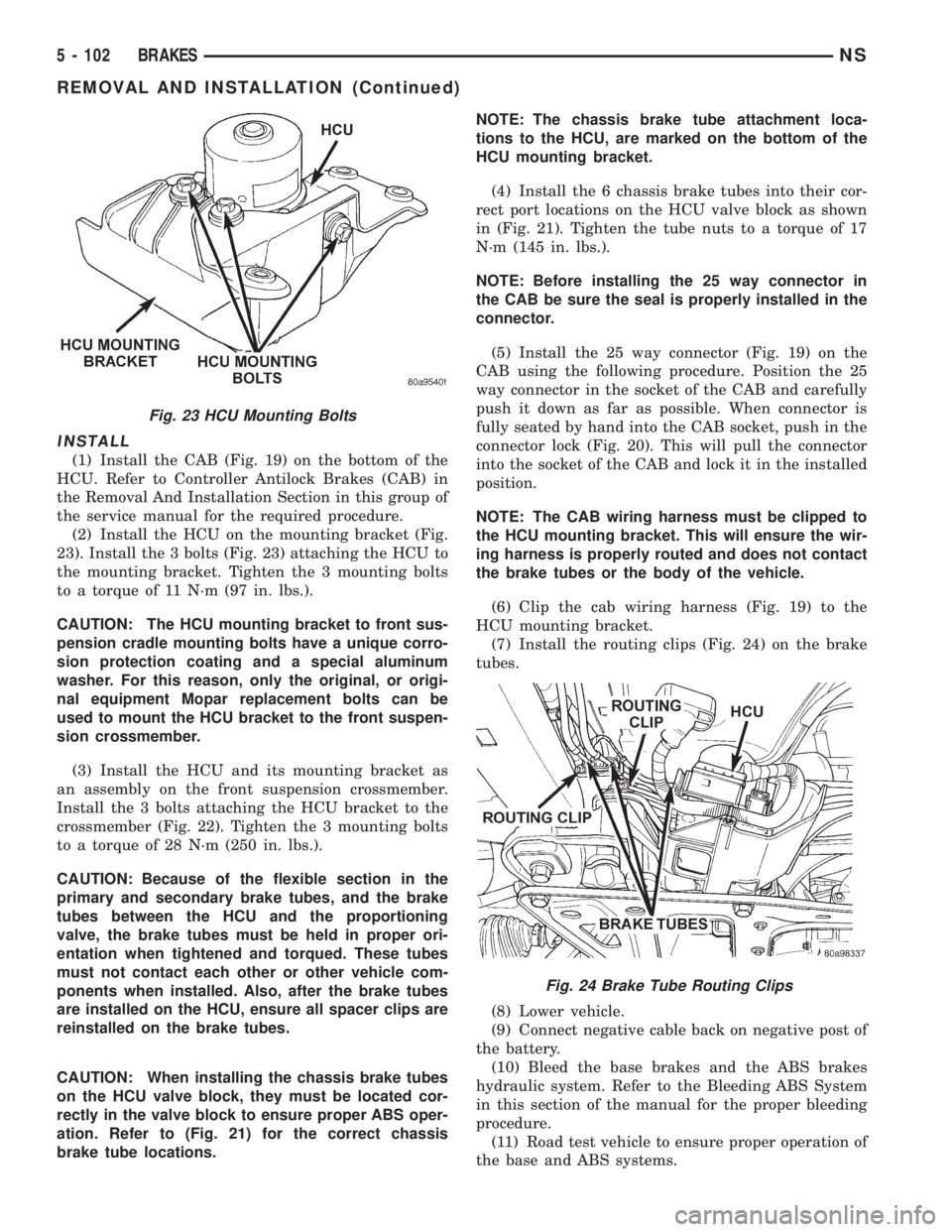
(1) Install the CAB (Fig. 19) on the bottom of the
HCU. Refer to Controller Antilock Brakes (CAB) in
the Removal And Installation Section in this group of
the service manual for the required procedure.
(2) Install the HCU on the mounting bracket (Fig.
23). Install the 3 bolts (Fig. 23) attaching the HCU to
the mounting bracket. Tighten the 3 mounting bolts
to a torque of 11 N´m (97 in. lbs.).
CAUTION: The HCU mounting bracket to front sus-
pension cradle mounting bolts have a unique corro-
sion protection coating and a special aluminum
washer. For this reason, only the original, or origi-
nal equipment Mopar replacement bolts can be
used to mount the HCU bracket to the front suspen-
sion crossmember.
(3) Install the HCU and its mounting bracket as
an assembly on the front suspension crossmember.
Install the 3 bolts attaching the HCU bracket to the
crossmember (Fig. 22). Tighten the 3 mounting bolts
to a torque of 28 N´m (250 in. lbs.).
CAUTION: Because of the flexible section in the
primary and secondary brake tubes, and the brake
tubes between the HCU and the proportioning
valve, the brake tubes must be held in proper ori-
entation when tightened and torqued. These tubes
must not contact each other or other vehicle com-
ponents when installed. Also, after the brake tubes
are installed on the HCU, ensure all spacer clips are
reinstalled on the brake tubes.
CAUTION: When installing the chassis brake tubes
on the HCU valve block, they must be located cor-
rectly in the valve block to ensure proper ABS oper-
ation. Refer to (Fig. 21) for the correct chassis
brake tube locations.NOTE: The chassis brake tube attachment loca-
tions to the HCU, are marked on the bottom of the
HCU mounting bracket.
(4) Install the 6 chassis brake tubes into their cor-
rect port locations on the HCU valve block as shown
in (Fig. 21). Tighten the tube nuts to a torque of 17
N´m (145 in. lbs.).
NOTE: Before installing the 25 way connector in
the CAB be sure the seal is properly installed in the
connector.
(5) Install the 25 way connector (Fig. 19) on the
CAB using the following procedure. Position the 25
way connector in the socket of the CAB and carefully
push it down as far as possible. When connector is
fully seated by hand into the CAB socket, push in the
connector lock (Fig. 20). This will pull the connector
into the socket of the CAB and lock it in the installed
position.
NOTE: The CAB wiring harness must be clipped to
the HCU mounting bracket. This will ensure the wir-
ing harness is properly routed and does not contact
the brake tubes or the body of the vehicle.
(6) Clip the cab wiring harness (Fig. 19) to the
HCU mounting bracket.
(7) Install the routing clips (Fig. 24) on the brake
tubes.
(8) Lower vehicle.
(9) Connect negative cable back on negative post of
the battery.
(10) Bleed the base brakes and the ABS brakes
hydraulic system. Refer to the Bleeding ABS System
in this section of the manual for the proper bleeding
procedure.
(11) Road test vehicle to ensure proper operation of
the base and ABS systems.
Fig. 23 HCU Mounting Bolts
Fig. 24 Brake Tube Routing Clips
5 - 102 BRAKESNS
REMOVAL AND INSTALLATION (Continued)
Page 187 of 1938

CAUTION: Because of the flexible section in the
primary and secondary brake tubes, and the brake
tubes between the HCU and the proportioning
valve, the brake tubes must be held in proper ori-
entation when tightened and torqued. These tubes
must not contact each other or other vehicle com-
ponents when installed.
CAUTION: When installing the chassis brake tubes
on the HCU valve block, they must be located cor-
rectly in the valve block to ensure proper ABS oper-
ation. Refer to (Fig. 27) for the correct chassis
brake tube locations.
NOTE: The chassis brake tube attachment loca-
tions to the HCU, are marked on the bottom of the
HCU mounting bracket.
(6) Install the 6 chassis brake tubes into their cor-
rect port locations on the HCU valve block as shown
in (Fig. 27). Tighten the tube nuts to a torque of 17
N´m (145 in. lbs.).
NOTE: Before installing the 25 way connector in
the CAB be sure the seal is properly installed in the
connector.
(7) Install the 25 way connector on the CAB using
the following procedure. Position the 25 way connec-
tor in the socket of the CAB and carefully push it
down as far as possible. When connector is fully
seated by hand into the CAB socket, push in the con-
nector lock (Fig. 26). This will pull the connector into
the socket of the CAB and lock it in the installed
position.
(8) Install the routing clips (Fig. 33) on the brake
tubes.(9) Lower vehicle.
(10) Connect negative cable back on negative post
of the battery.
(11) Bleed the base brakes and the ABS brakes
hydraulic system. Refer to the Bleeding ABS System
in this section of the manual for the proper bleeding
procedure.
(12) Road test vehicle to ensure proper operation
of the base and ABS brake systems.
WHEEL SPEED SENSOR (FRONT)
REMOVE
(1) Raise vehicle on jack stands or centered on a
frame contact type hoist. See Hoisting in the Lubri-
cation and Maintenance section of this service man-
ual, for the required lifting procedure to be used for
this vehicle.
(2) Remove the tire and wheel assembly from the
vehicle.
(3) Remove the 2 screws (Fig. 34) attaching front
channel bracket and grommet retainer to the outer
frame rail.
CAUTION: When disconnecting the wheel speed
sensor from vehicle wiring harness, be careful not
to damage pins on connector
(4) Pull speed sensor cable grommet and connector
through the hole in the strut tower (Fig. 35). Discon-
nect speed sensor cable from vehicle wiring harness
(Fig. 35).
(5) Remove the wheel speed sensor head to steer-
ing knuckle attaching bolt (Fig. 36).
(6) Remove sensor head from steering knuckle. If
the sensor has seized, due to corrosion,DO NOT
USE PLIERS ON SENSOR HEAD.Use a hammer
and a punch and tap edge of sensor ear, rocking the
sensor side to side until free.
Fig. 33 Brake Tube Routing Clips
Fig. 34 Front Speed Sensor Cable Channel Bracket
NSBRAKES 5 - 105
REMOVAL AND INSTALLATION (Continued)
Page 188 of 1938

(7) Remove the wheel speed sensor cable grommets
from the retaining bracket (Fig. 37).(8) Remove front wheel speed sensor assembly
from the vehicle.
INSTALL
CAUTION: Proper installation of wheel speed sen-
sor cables is critical to continued system operation.
Be sure that cables are installed in retainers. Fail-
ure to install cables in retainers as shown in this
section may result in contact with moving parts
and/or over extension of cables, resulting in an
open circuit.
(1) Connect the front wheel speed sensor cable to
the vehicle wiring harness connector (Fig. 35). Be
sure speed sensor cable connector is fully seated and
locked into vehicle wiring harness connector, then
insert cable and grommet into hole in strut tower
(Fig. 35).
CAUTION: When installing channel bracket, do not
pinch the speed sensor cable under the channel
bracket.
(2) Install the channel bracket and grommet
retainer on the frame rail (Fig. 34).
(3) Install the 2 bolts (Fig. 34) attaching the chan-
nel bracket to frame. Tighten the 2 attaching bolts to
a torque of 11 N´m (95 in. lbs.).
(4) Insert speed sensor cable grommets into inter-
mediate bracket on strut (Fig. 37). Route cable from
strut to steering knuckle on the rearward side of the
stabilizer bar link.
(5) Install the wheel speed sensor to steering
knuckle attaching bolt (Fig. 36). Tighten the speed
sensor attaching bolt to a torque of 12 N´m (105 in.
lbs.)
(6) Check the air gap between the face of the
wheel speed sensor and the top surface of the tone-
wheel. Air gap must be less then the maximum
allowable tolerance of 1.2 mm (.047 in.).
(7) Install the wheel and tire assembly on vehicle.
(8) Road test vehicle to ensure proper operation of
the base and ABS brake systems.
WHEEL SPEED SENSOR (REAR FWD)
REMOVE
(1) Raise vehicle on jack stands or centered on a
frame contact type hoist. See Hoisting in the Lubri-
cation and Maintenance section of this manual, for
the required lifting procedure to be used for this
vehicle.
(2) Remove the tire and wheel assembly from the
vehicle.
Fig. 35 Speed Sensor Cable To Vehicle Wiring
Harness
Fig. 36 Front Wheel Speed Sensor Attaching Bolt
Fig. 37 Front Wheel Speed Sensor Cable Routing
5 - 106 BRAKESNS
REMOVAL AND INSTALLATION (Continued)
Page 190 of 1938

INSTALL
CAUTION: Proper installation of wheel speed sen-
sor cables is critical to continued system operation.
Be sure that cables are installed in retainers. Fail-
ure to install cables in retainers as shown in this
section may result in contact with moving parts
and/or over extension of cables, resulting in an
open circuit.
(1) Install wheel speed sensor head. Note, the plas-
tic anti rotation pin must be fully seated prior to
installing the attaching bolt.
CAUTION: Prior to installing the speed sensor
head attaching bolt, the plastic anti-rotation pin
must be fully seated into the bearing flange.
(2) Install the wheel speed sensor head to bearing
flange attaching bolt (Fig. 42). Tighten the attaching
bolt to a torque 12 N´m (105 in. lbs.)
(3) Check the air gap between the face of the
wheel speed sensor and the top surface of the tone-
wheel. Air gap must be less then the maximum
allowable tolerance of 1.2 mm (.047 in.).
(4) Install the 2 routing brackets attaching the
speed sensor cable and brake tube to the rear axle
(Fig. 41).The rear wheel speed sensor cable
should be routed under the rear brake tube
(Fig. 41).
CAUTION: When installing rear wheel speed sen-
sor cable in the routing clips on rear brake flex
hose, be sure not to damage the routing clips.
Routing clips are molded onto the hose and will
require replacement of the brake flex hose if dam-
aged during installation of the wheel speed sensor
cable.(5) Install speed sensor cable into routing clips on
rear brake flex hose (Fig. 41).
(6) If installing a right rear speed sensor cable,
install the speed sensor cable grommet on the axle
brake flex hose bracket (Fig. 40).
CAUTION: The wheel speed sensor cable connec-
tors for the left and right rear wheel speed sensors
are keyed differently. Therefore, when connecting a
wheel speed sensor cable to the vehicle wiring har-
ness, do not force the connectors together. If the
connectors are forced together, damage to the con-
nectors will occur.
(7) Plug speed sensor cable connector into vehicle
wiring harness (Fig. 38).Be sure speed sensor
cable connector is fully seated and locked into
vehicle wiring harness connector.
(8) Install the speed sensor cable grommet into the
body, being sure the grommet is fully seated into the
body hole.
(9) Install the tire and wheel assembly on vehicle.
(10) Road test vehicle to ensure proper operation
of the base and ABS braking systems.
WHEEL SPEED SENSOR (REAR AWD)
REMOVE
(1) Raise vehicle on jack stands or centered on a
frame contact type hoist. See Hoisting in the Lubri-
cation and Maintenance section of this manual, for
the required lifting procedure to be used for this
vehicle.
(2) Remove the tire and wheel assembly from the
vehicle.
CAUTION: When unplugging speed sensor cable
from vehicle wiring harness be careful not to dam-
age pins on the electrical connectors. Also inspect
connectors for any signs of previous damage.
(3) Remove grommet from floor pan of vehicle and
unplug speed sensor cable connector from vehicle
wiring harness (Fig. 43).
CAUTION: When removing rear wheel speed sen-
sor cable from routing clips on rear brake flex hose,
be sure not to damage the routing clips. Routing
clips are molded onto the hose and will require
replacement of the brake flex hose if damaged dur-
ing removal of the speed sensor cable.
Fig. 42 Rear Wheel Speed Sensor Attaching Bolt
5 - 108 BRAKESNS
REMOVAL AND INSTALLATION (Continued)
Page 192 of 1938

(2) Install the wheel speed sensor head attaching
bolt (Fig. 46). Tighten the attaching bolt to a torque
12 N´m (105 in. lbs.)
(3) Check the air gap between the face of the
wheel speed sensor and the top surface of the tone-
wheel. Air gap must be less then the maximum
allowable tolerance of 1.2 mm (.047 in.).
(4) Install the routing brackets attaching the speed
sensor cable and brake tube to the rear axle (Fig.
45).The rear wheel speed sensor cable should
be routed under the rear brake tube (Fig. 45).
CAUTION: When installing rear wheel speed sen-
sor cable in the routing clips on rear brake flex
hose, be sure not to damage the routing clips.
Routing clips are molded onto the hose and will
require replacement of the brake flex hose if dam-
aged during installation of the wheel speed sensor
cable.
(5) Install speed sensor cable into routing clips on
rear brake flex hose (Fig. 44).
CAUTION: The wheel speed sensor cable connec-
tors for the left and right rear wheel speed sensors
are keyed differently. Therefore, when connecting a
wheel speed sensor cable to the vehicle wiring har-
ness, do not force the connectors together. If the
connectors are forced together, damage to the con-
nectors will occur.
(6) Plug speed sensor cable connector into vehicle
wiring harness (Fig. 43).Be sure speed sensor
cable connector is fully seated and locked into
vehicle wiring harness connector.
(7) Install the speed sensor cable grommet into the
body, being sure the grommet is fully seated into the
body hole.
(8) Install the tire and wheel assembly on vehicle.
(9) Road test vehicle to ensure proper operation of
the base and ABS braking systems.
TONE WHEEL (REAR FWD)
REMOVE
(1) Raise vehicle on jackstands or centered on a
frame contact type hoist. See Hoisting in the Lubri-
cation and Maintenance section of this service man-
ual for required lifting procedure.
(2) Remove the wheel and tire assembly.
(3) Remove rear brake drum from the hub/bearing
assembly.
(4) Remove the rear wheel speed sensor from the
rear hub/bearing flange (Fig. 47). This will prevent
damage to the speed sensor during removal and
installation of the hub/bearing assembly.(5) Remove the 4 bolts (Fig. 48) attaching the hub/
bearing assembly to the flange of the rear axle.
(6) Remove the hub/bearing assembly from the
rear axle and brake support plate (Fig. 49).
Fig. 47 Rear Wheel Speed Sensor
Fig. 48 Rear Hub/Bearing Mounting Bolts
Fig. 49 Removing Rear Hub/Bearing From Axle
5 - 110 BRAKESNS
REMOVAL AND INSTALLATION (Continued)
Page 194 of 1938
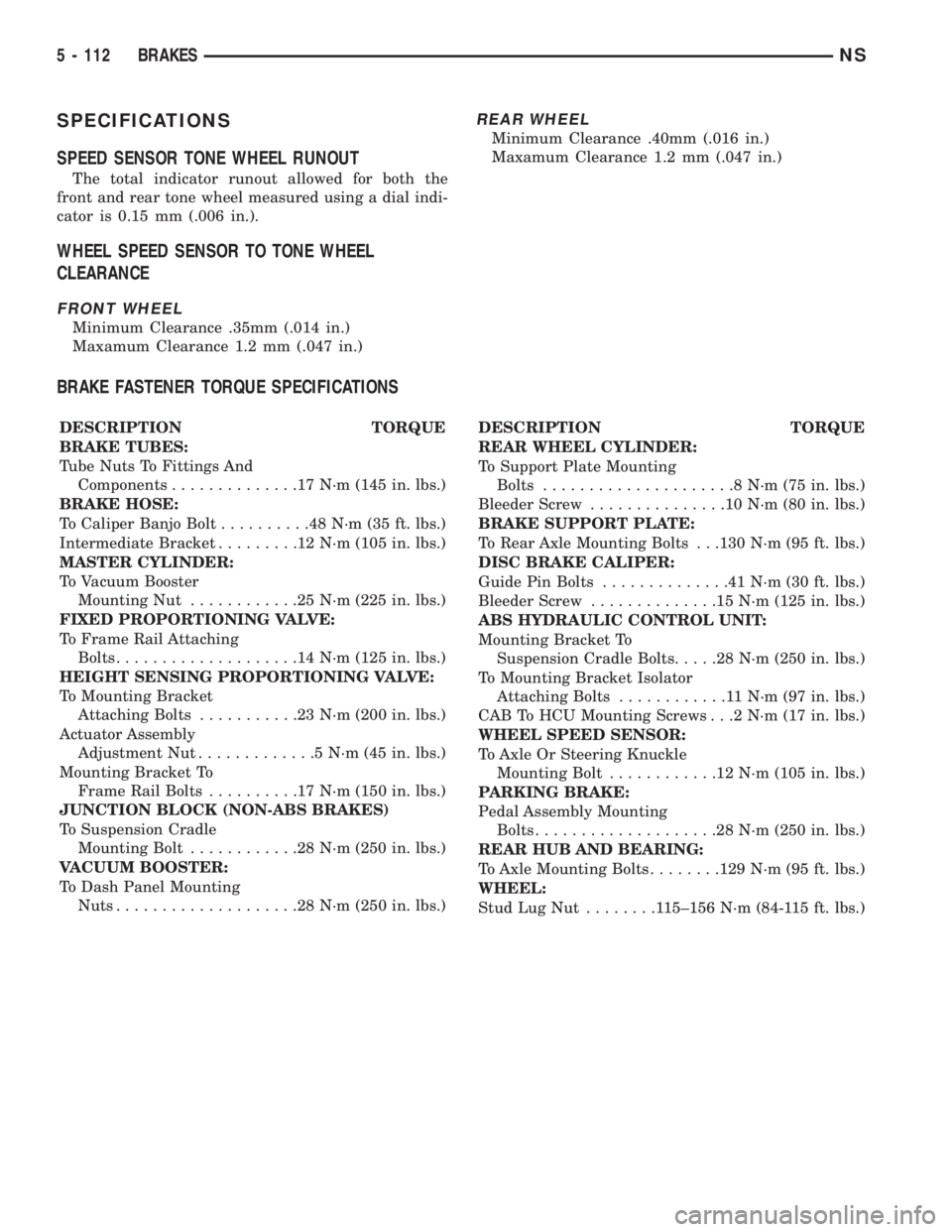
SPECIFICATIONS
SPEED SENSOR TONE WHEEL RUNOUT
The total indicator runout allowed for both the
front and rear tone wheel measured using a dial indi-
cator is 0.15 mm (.006 in.).
WHEEL SPEED SENSOR TO TONE WHEEL
CLEARANCE
FRONT WHEEL
Minimum Clearance .35mm (.014 in.)
Maxamum Clearance 1.2 mm (.047 in.)
REAR WHEEL
Minimum Clearance .40mm (.016 in.)
Maxamum Clearance 1.2 mm (.047 in.)
BRAKE FASTENER TORQUE SPECIFICATIONS
DESCRIPTION TORQUE
BRAKE TUBES:
Tube Nuts To Fittings And
Components..............17N´m(145 in. lbs.)
BRAKE HOSE:
To Caliper Banjo Bolt..........48N´m(35ft.lbs.)
Intermediate Bracket.........12N´m(105 in. lbs.)
MASTER CYLINDER:
To Vacuum Booster
Mounting Nut............25N´m(225 in. lbs.)
FIXED PROPORTIONING VALVE:
To Frame Rail Attaching
Bolts....................14N´m(125 in. lbs.)
HEIGHT SENSING PROPORTIONING VALVE:
To Mounting Bracket
Attaching Bolts...........23N´m(200 in. lbs.)
Actuator Assembly
Adjustment Nut.............5N´m(45in.lbs.)
Mounting Bracket To
Frame Rail Bolts..........17N´m(150 in. lbs.)
JUNCTION BLOCK (NON-ABS BRAKES)
To Suspension Cradle
Mounting Bolt............28N´m(250 in. lbs.)
VACUUM BOOSTER:
To Dash Panel Mounting
Nuts....................28N´m(250 in. lbs.)DESCRIPTION TORQUE
REAR WHEEL CYLINDER:
To Support Plate Mounting
Bolts.....................8N´m(75in.lbs.)
Bleeder Screw...............10N´m(80in.lbs.)
BRAKE SUPPORT PLATE:
To Rear Axle Mounting Bolts . . .130 N´m (95 ft. lbs.)
DISC BRAKE CALIPER:
Guide Pin Bolts..............41N´m(30ft.lbs.)
Bleeder Screw..............15N´m(125 in. lbs.)
ABS HYDRAULIC CONTROL UNIT:
Mounting Bracket To
Suspension Cradle Bolts.....28N´m(250 in. lbs.)
To Mounting Bracket Isolator
Attaching Bolts............11N´m(97in.lbs.)
CAB To HCU Mounting Screws . . .2 N´m (17 in. lbs.)
WHEEL SPEED SENSOR:
To Axle Or Steering Knuckle
Mounting Bolt............12N´m(105 in. lbs.)
PARKING BRAKE:
Pedal Assembly Mounting
Bolts....................28N´m(250 in. lbs.)
REAR HUB AND BEARING:
To Axle Mounting Bolts........129 N´m (95 ft. lbs.)
WHEEL:
Stud Lug Nut........115±156 N´m (84-115 ft. lbs.)
5 - 112 BRAKESNS
Page 202 of 1938
DESCRIPTION AND OPERATION
CLUTCH RELEASE SYSTEM
CLUTCH CABLE Ð LHD
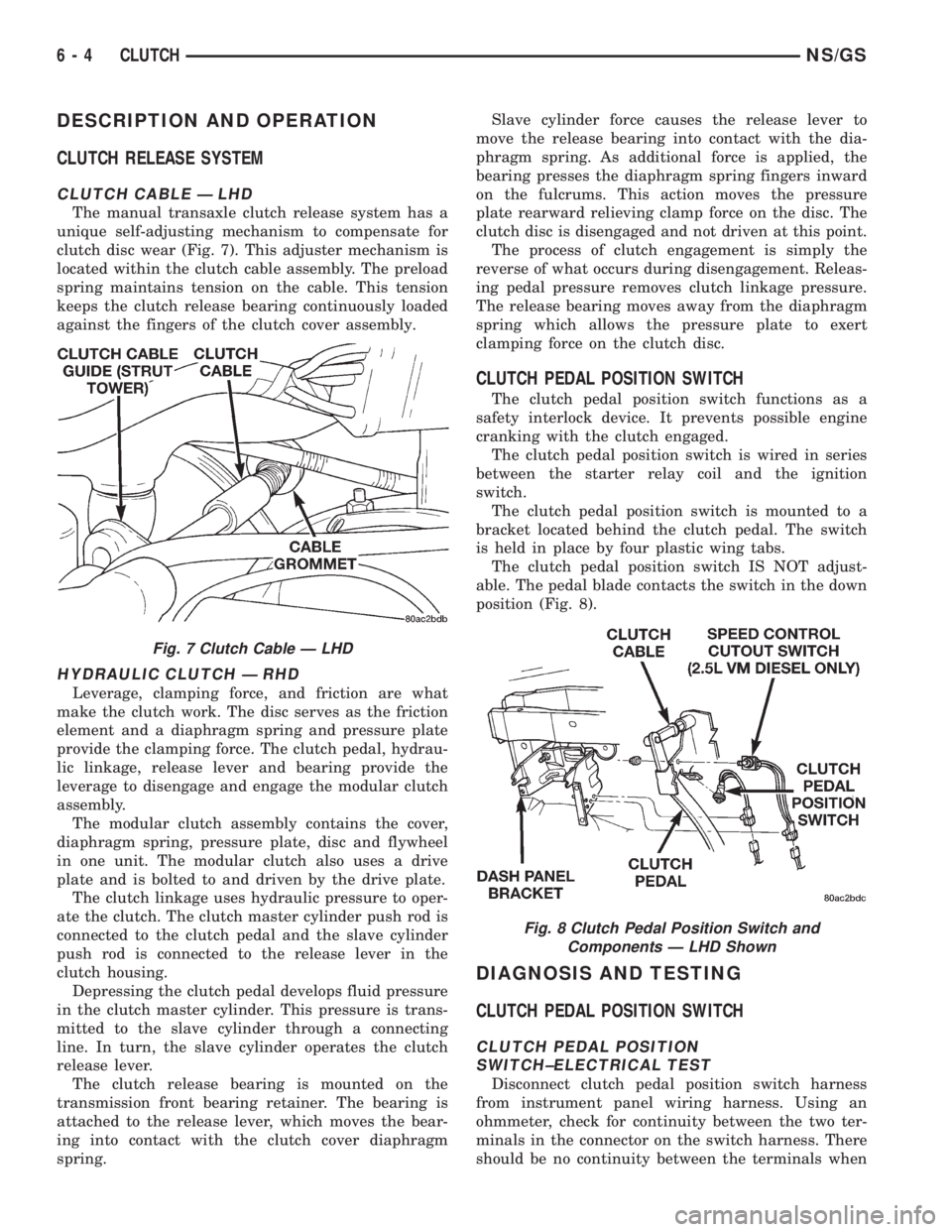
The manual transaxle clutch release system has a
unique self-adjusting mechanism to compensate for
clutch disc wear (Fig. 7). This adjuster mechanism is
located within the clutch cable assembly. The preload
spring maintains tension on the cable. This tension
keeps the clutch release bearing continuously loaded
against the fingers of the clutch cover assembly.
HYDRAULIC CLUTCH Ð RHD
Leverage, clamping force, and friction are what
make the clutch work. The disc serves as the friction
element and a diaphragm spring and pressure plate
provide the clamping force. The clutch pedal, hydrau-
lic linkage, release lever and bearing provide the
leverage to disengage and engage the modular clutch
assembly.
The modular clutch assembly contains the cover,
diaphragm spring, pressure plate, disc and flywheel
in one unit. The modular clutch also uses a drive
plate and is bolted to and driven by the drive plate.
The clutch linkage uses hydraulic pressure to oper-
ate the clutch. The clutch master cylinder push rod is
connected to the clutch pedal and the slave cylinder
push rod is connected to the release lever in the
clutch housing.
Depressing the clutch pedal develops fluid pressure
in the clutch master cylinder. This pressure is trans-
mitted to the slave cylinder through a connecting
line. In turn, the slave cylinder operates the clutch
release lever.
The clutch release bearing is mounted on the
transmission front bearing retainer. The bearing is
attached to the release lever, which moves the bear-
ing into contact with the clutch cover diaphragm
spring.Slave cylinder force causes the release lever to
move the release bearing into contact with the dia-
phragm spring. As additional force is applied, the
bearing presses the diaphragm spring fingers inward
on the fulcrums. This action moves the pressure
plate rearward relieving clamp force on the disc. The
clutch disc is disengaged and not driven at this point.
The process of clutch engagement is simply the
reverse of what occurs during disengagement. Releas-
ing pedal pressure removes clutch linkage pressure.
The release bearing moves away from the diaphragm
spring which allows the pressure plate to exert
clamping force on the clutch disc.
CLUTCH PEDAL POSITION SWITCH
The clutch pedal position switch functions as a
safety interlock device. It prevents possible engine
cranking with the clutch engaged.
The clutch pedal position switch is wired in series
between the starter relay coil and the ignition
switch.
The clutch pedal position switch is mounted to a
bracket located behind the clutch pedal. The switch
is held in place by four plastic wing tabs.
The clutch pedal position switch IS NOT adjust-
able. The pedal blade contacts the switch in the down
position (Fig. 8).
DIAGNOSIS AND TESTING
CLUTCH PEDAL POSITION SWITCH
CLUTCH PEDAL POSITION
SWITCH±ELECTRICAL TEST
Disconnect clutch pedal position switch harness
from instrument panel wiring harness. Using an
ohmmeter, check for continuity between the two ter-
minals in the connector on the switch harness. There
should be no continuity between the terminals when
Fig. 7 Clutch Cable Ð LHD
Fig. 8 Clutch Pedal Position Switch and
Components Ð LHD Shown
6 - 4 CLUTCHNS/GS
Page 208 of 1938
(8) Use a slight twisting motion while grasping the
grommet and body to remove the cable from the dash
panel and clutch bracket.
INSTALLATION
(1) Using a slight twisting motion, insert the self-
±adjuster mechanism end of the clutch cable through
the dash panel hole and into the bracket.
NOTE: It may be helpful to lubricate the dash panel
grommet using MoparTDoor-Ease or equivalent to
aid installation.
(2) Seat the cylindrical part of the cable grommet
in the dash panel. Be sure the self±adjuster is firmly
seated against the clutch bracket to ensure proper
adjuster mechanism function.
(3) Connect the clutch cable to the upstop/spacer.
(4) Connect the upstop/spacer to the clutch pedal.
(5) Replace the upstop/spacer retainer clip.
(6) Lift the clutch pedal and perform the Adjuster
Mechanism Function Check before finishing installa-
tion.
NOTE: If the adjuster mechanism does not function
properly, the most likely cause is that the cable is
not properly seated in the bracket.
ADJUSTER MECHANISM FUNCTION CHECK Ð LHD
(1) With slight pressure, pull the clutch release
lever end of the cable to draw the cable taut. Push
the clutch cable housing toward the dash panel (With
less than 20 lbs. of effort, the cable housing should
move 30-50mm.). This indicates proper adjuster
mechanism function. If the cable does not adjust,
determine if the mechanism is properly seated on the
bracket.
(2) If the adjust mechanism functions properly,
route cable to the transaxle. Install battery and cable
guide.
(3) Snap cable into cable guide located at the left
shock tower.
(4) Insert cable into transaxle and through clutch
release lever. Ensure the cable is routed through the
smaller hole in the transaxle deck (Fig. 10).
(5) Pull down on cable and insert cable retaining
clip onto clutch cable end.
(6) Check clutch pedal position switch operation.
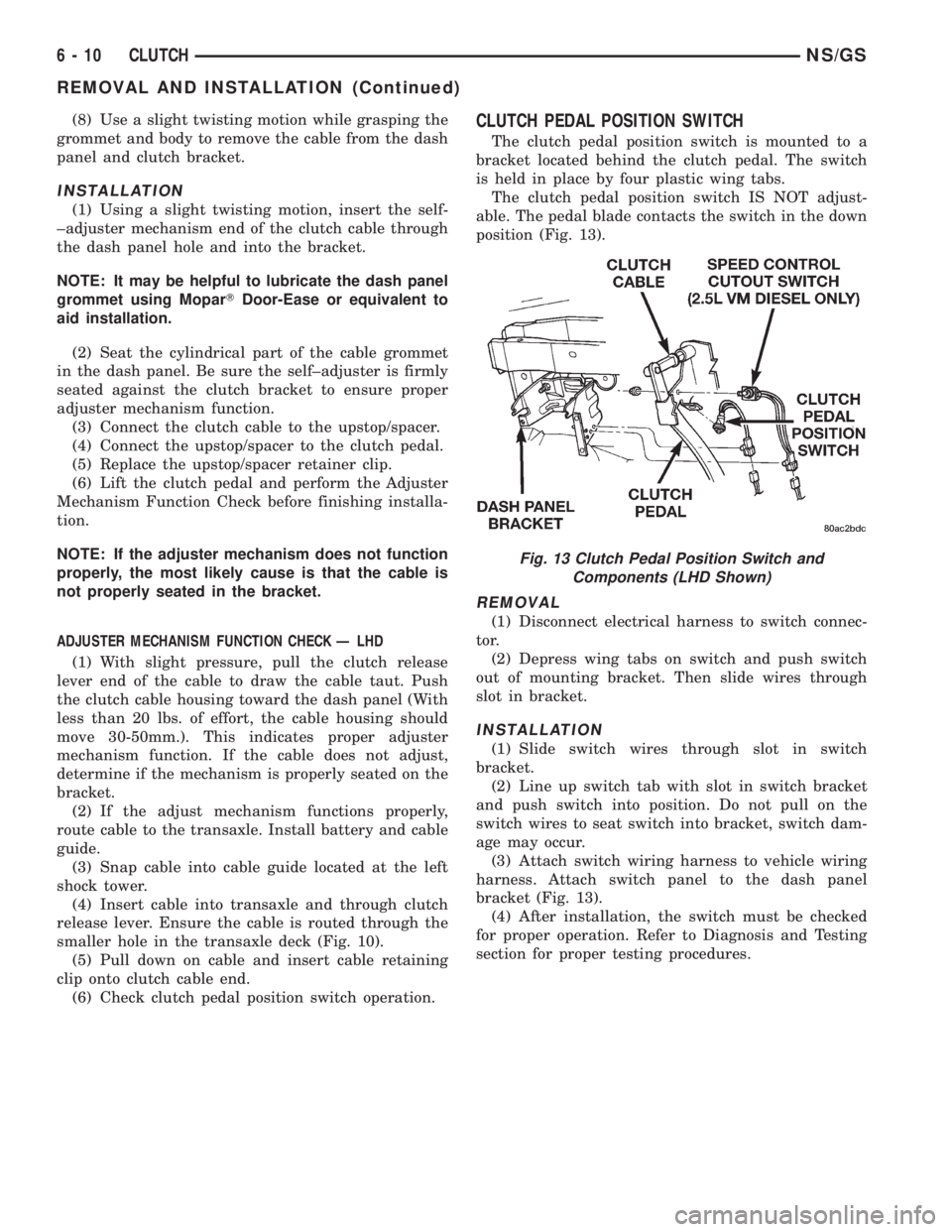
CLUTCH PEDAL POSITION SWITCH
The clutch pedal position switch is mounted to a
bracket located behind the clutch pedal. The switch
is held in place by four plastic wing tabs.
The clutch pedal position switch IS NOT adjust-
able. The pedal blade contacts the switch in the down
position (Fig. 13).
REMOVAL
(1) Disconnect electrical harness to switch connec-
tor.
(2) Depress wing tabs on switch and push switch
out of mounting bracket. Then slide wires through
slot in bracket.
INSTALLATION
(1) Slide switch wires through slot in switch
bracket.
(2) Line up switch tab with slot in switch bracket
and push switch into position. Do not pull on the
switch wires to seat switch into bracket, switch dam-
age may occur.
(3) Attach switch wiring harness to vehicle wiring
harness. Attach switch panel to the dash panel
bracket (Fig. 13).
(4) After installation, the switch must be checked
for proper operation. Refer to Diagnosis and Testing
section for proper testing procedures.
Fig. 13 Clutch Pedal Position Switch and
Components (LHD Shown)
6 - 10 CLUTCHNS/GS
REMOVAL AND INSTALLATION (Continued)
Page 213 of 1938
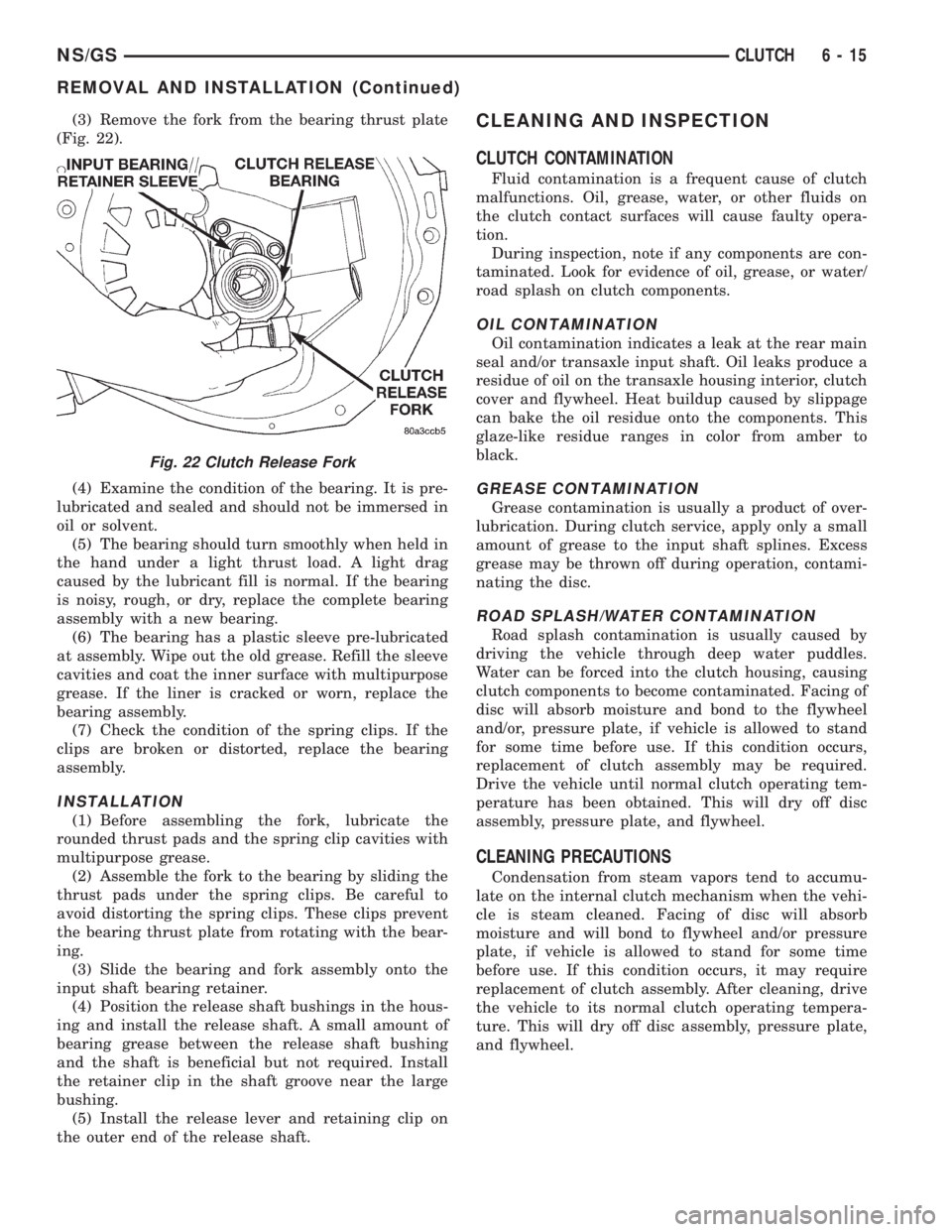
(3) Remove the fork from the bearing thrust plate
(Fig. 22).
(4) Examine the condition of the bearing. It is pre-
lubricated and sealed and should not be immersed in
oil or solvent.
(5) The bearing should turn smoothly when held in
the hand under a light thrust load. A light drag
caused by the lubricant fill is normal. If the bearing
is noisy, rough, or dry, replace the complete bearing
assembly with a new bearing.
(6) The bearing has a plastic sleeve pre-lubricated
at assembly. Wipe out the old grease. Refill the sleeve
cavities and coat the inner surface with multipurpose
grease. If the liner is cracked or worn, replace the
bearing assembly.
(7) Check the condition of the spring clips. If the
clips are broken or distorted, replace the bearing
assembly.
INSTALLATION
(1) Before assembling the fork, lubricate the
rounded thrust pads and the spring clip cavities with
multipurpose grease.
(2) Assemble the fork to the bearing by sliding the
thrust pads under the spring clips. Be careful to
avoid distorting the spring clips. These clips prevent
the bearing thrust plate from rotating with the bear-
ing.
(3) Slide the bearing and fork assembly onto the
input shaft bearing retainer.
(4) Position the release shaft bushings in the hous-
ing and install the release shaft. A small amount of
bearing grease between the release shaft bushing
and the shaft is beneficial but not required. Install
the retainer clip in the shaft groove near the large
bushing.
(5) Install the release lever and retaining clip on
the outer end of the release shaft.
CLEANING AND INSPECTION
CLUTCH CONTAMINATION
Fluid contamination is a frequent cause of clutch
malfunctions. Oil, grease, water, or other fluids on
the clutch contact surfaces will cause faulty opera-
tion.
During inspection, note if any components are con-
taminated. Look for evidence of oil, grease, or water/
road splash on clutch components.
OIL CONTAMINATION
Oil contamination indicates a leak at the rear main
seal and/or transaxle input shaft. Oil leaks produce a
residue of oil on the transaxle housing interior, clutch
cover and flywheel. Heat buildup caused by slippage
can bake the oil residue onto the components. This
glaze-like residue ranges in color from amber to
black.
GREASE CONTAMINATION
Grease contamination is usually a product of over-
lubrication. During clutch service, apply only a small
amount of grease to the input shaft splines. Excess
grease may be thrown off during operation, contami-
nating the disc.
ROAD SPLASH/WATER CONTAMINATION
Road splash contamination is usually caused by
driving the vehicle through deep water puddles.
Water can be forced into the clutch housing, causing
clutch components to become contaminated. Facing of
disc will absorb moisture and bond to the flywheel
and/or, pressure plate, if vehicle is allowed to stand
for some time before use. If this condition occurs,
replacement of clutch assembly may be required.
Drive the vehicle until normal clutch operating tem-
perature has been obtained. This will dry off disc
assembly, pressure plate, and flywheel.
CLEANING PRECAUTIONS
Condensation from steam vapors tend to accumu-
late on the internal clutch mechanism when the vehi-
cle is steam cleaned. Facing of disc will absorb
moisture and will bond to flywheel and/or pressure
plate, if vehicle is allowed to stand for some time
before use. If this condition occurs, it may require
replacement of clutch assembly. After cleaning, drive
the vehicle to its normal clutch operating tempera-
ture. This will dry off disc assembly, pressure plate,
and flywheel.
Fig. 22 Clutch Release Fork
NS/GSCLUTCH 6 - 15
REMOVAL AND INSTALLATION (Continued)