shaft CHRYSLER VOYAGER 1996 Repair Manual
[x] Cancel search | Manufacturer: CHRYSLER, Model Year: 1996, Model line: VOYAGER, Model: CHRYSLER VOYAGER 1996Pages: 1938, PDF Size: 55.84 MB
Page 330 of 1938

MANIFOLD ABSOLUTE PRESSURE (MAP) SENSOR
REMOVAL
(1) Disconnect electrical connector from MAP sen-
sor.
(2) Remove 2 screws holding sensor to intake man-
ifold (Fig. 9).
(3) Remove sensor from manifold.
INSTALLATION
Reverse the above procedure for installation.
ENGINE COOLANT TEMPERATURE SENSOR
The Engine Coolant Temperature (ECT) sensor is
located below the ignition coil (Fig. 10).
REMOVAL
(1) Drain cooling system until coolant level is
below sensor. Refer to Group 7, Cooling System.
(2) Remove electrical connector from coil (Fig. 11).
(3) Remove coil mounting screws.
(4) Rotate coil away from engine coolant tempera-
ture sensor.
(5) Disconnect electrical connector from engine
coolant temperature sensor.
(6) Remove sensor from engine.
INSTALLATION
(1) Tighten the sensor to 7 N´m (60 in. lbs.) torque.
(2) Connect electrical connector to sensor.
(3) Fill cooling system. Refer to Group 7, Cooling
System.
(4) Install coil. Tighten coil mounting screws to 12
N´m (105 in. lbs.) torque.
(5) Connect electrical connector to coil.
THROTTLE POSITION SENSOR
Refer to Group 14, Fuel Injection Section, for
Removal/Installation.
KNOCK SENSORÐ3.3/3.8L
The knock sensor threads into the side of the cyl-
inder block in front of the starter (Fig. 12).
Fig. 8 Camshaft Position Sensor and Spacer
Fig. 9 Manifold Absolute Pressure Sensor
Fig. 10 Engine Coolant Temperature Sensor
Fig. 11 Ignition Coil Removal
8D - 32 IGNITION SYSTEMNS
REMOVAL AND INSTALLATION (Continued)
Page 332 of 1938

SPARK PLUG
* New Spark Plug Gap
TORQUE
DESCRIPTION......................TORQUE
3.3L Camshaft Position
Sensor Screw.............12N´m(105 in. lbs.)
3.3L Engine Coolant Sensor......7N´m(60in.lbs.)
3.3L Crankshaft Position
Sensor Screw.............12N´m(105 in. lbs.)
3.3/3.8L Ignition Coil.........12N´m(105 in. lbs.)
Ignition Switch...............2N´m(17in.lbs.)
Spark Plugs.................28N´m(20ft.lbs.)
SPARK PLUG CABLE RESISTANCEÐ3.3/3.8L
Engine Spark Plug Gap * Thread Size
3.3L RN14PMP5 0.048 TO 0.053 14mm (3/4 in.) reach
3.8L RN14PMP5 0.048 TO 0.053 14mm (3/4 in. ) reach
CABLE Maximum
Resistance
#1 18.5K ohms
#2 15.5K ohms
#3 20.4K ohms
#4 21.2K ohms
#5 27.7K ohms
#6 26.7K ohms
8D - 34 IGNITION SYSTEMNS
SPECIFICATIONS (Continued)
Page 335 of 1938
INSTALLATION
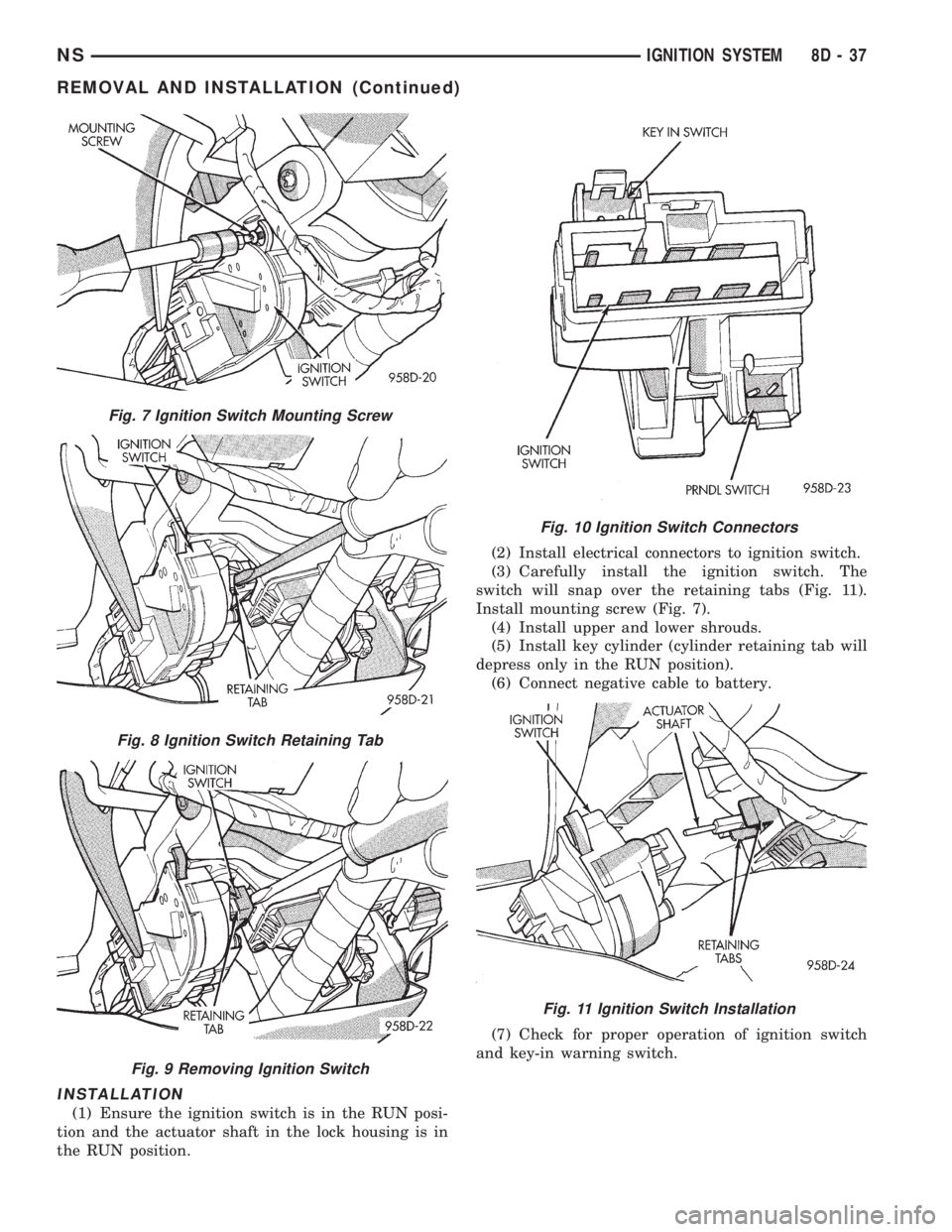
(1) Ensure the ignition switch is in the RUN posi-
tion and the actuator shaft in the lock housing is in
the RUN position.(2) Install electrical connectors to ignition switch.
(3) Carefully install the ignition switch. The
switch will snap over the retaining tabs (Fig. 11).
Install mounting screw (Fig. 7).
(4) Install upper and lower shrouds.
(5) Install key cylinder (cylinder retaining tab will
depress only in the RUN position).
(6) Connect negative cable to battery.
(7) Check for proper operation of ignition switch
and key-in warning switch.
Fig. 7 Ignition Switch Mounting Screw
Fig. 8 Ignition Switch Retaining Tab
Fig. 9 Removing Ignition Switch
Fig. 10 Ignition Switch Connectors
Fig. 11 Ignition Switch Installation
NSIGNITION SYSTEM 8D - 37
REMOVAL AND INSTALLATION (Continued)
Page 336 of 1938
LOCK KEY CYLINDER
REMOVAL
(1) Disconnect negative cable from battery.
(2) Remove steering column cover retaining screws
(Fig. 3).
(3) Remove screws holding steering column
shrouds (Fig. 5) and remove lower shroud.
(4) Place key cylinder in RUN position. Depress
lock cylinder retaining tab and remove key cylinder
(Fig. 6).
INSTALLATION
(1) Install key in lock cylinder. Turn key to run
position (retaining tab on lock cylinder can be
depressed).
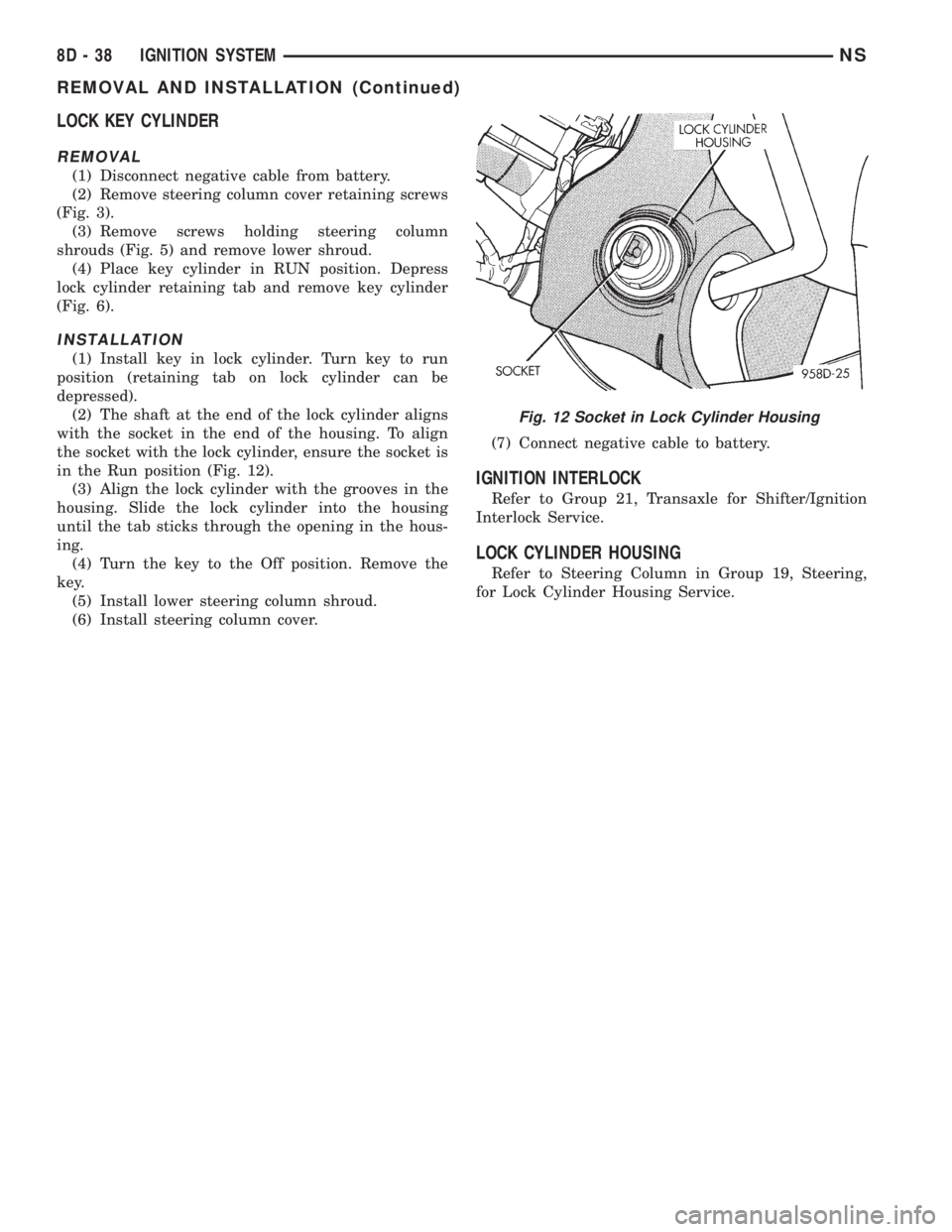
(2) The shaft at the end of the lock cylinder aligns
with the socket in the end of the housing. To align
the socket with the lock cylinder, ensure the socket is
in the Run position (Fig. 12).
(3) Align the lock cylinder with the grooves in the
housing. Slide the lock cylinder into the housing
until the tab sticks through the opening in the hous-
ing.
(4) Turn the key to the Off position. Remove the
key.
(5) Install lower steering column shroud.
(6) Install steering column cover.(7) Connect negative cable to battery.
IGNITION INTERLOCK
Refer to Group 21, Transaxle for Shifter/Ignition
Interlock Service.
LOCK CYLINDER HOUSING
Refer to Steering Column in Group 19, Steering,
for Lock Cylinder Housing Service.
Fig. 12 Socket in Lock Cylinder Housing
8D - 38 IGNITION SYSTEMNS
REMOVAL AND INSTALLATION (Continued)
Page 361 of 1938

(8) Using the indicator adjuster thumbwheel on
the indicator clip below the steering column. Rotate
the indicator thumbwheel to position the indicator
calibration arrow to the center of the N slot on the
instrument cluster mask.
(9) After the indicator has been properly adjusted,
move the shift lever through each gear position to
verify the appropriate gear position has been selected
and the slot is fully covered by the indicator. The left
edge of the indicator will just peek at the left edge of
the P slot in Park.
(10) If the indicator is not covering each of the
selected gear positions when selected, place the shift
lever back into neutral N and readjust the indicator.
Repeat the process until each gear is covered when
selected.
(11) Install the metal knee blocker panel.
(12) Install the lower steering column cover.
INSTRUMENT PANEL
The instrument panel is removed as a unit. The
steering column and wiring harnesses are assembled
into the panel before installation. Service procedures
for interior trim not related to the instrument panel
can be found in Group 23, Body.
REMOVAL
(1) Disconnect the battery, negative cable first.
(2) Remove the lower console.
(3) Remove the screw holding the lower heat duct
to the instrument panel support (Fig. 26).
(4) Disconnect the heat duct from the vehicle.
(5) Remove the bolts holding the lower supports to
the instrument panel frame (Fig. 27).(6) Remove the bolts holding the lower supports to
the floor pan.
(7) Remove the right and left end covers.
(8) Disconnect the wire connectors from the Pas-
senger Airbag Module.
(9) Remove the front door sill trim covers.
(10) Remove the A-pillar trim covers.
(11) Remove the glove box.
(12) Disconnect the antenna lead connector from
behind the glove box.
(13) Remove the lower steering column cover.
(14) Remove the knee blocker panel.
(15) Disconnect the lower two, forty pin wire har-
ness connectors, from the main Junction Block near
left cowl side panel (Fig. 28).
(16) Disconnect the instrument panel wire harness
connector from the bottom of Body Control Module.
(17) Disconnect the two forty pin connectors from
the right of the steering column (Fig. 29).
(18) Remove the clinch bolt holding upper the
steering shaft to the lower steering shaft (Fig. 29).
Fig. 25 Range Indicator Cable
Fig. 26 Heat Duct
Fig. 27 Lower Supports
NSINSTRUMENT PANEL AND SYSTEMS 8E - 25
REMOVAL AND INSTALLATION (Continued)
Page 362 of 1938
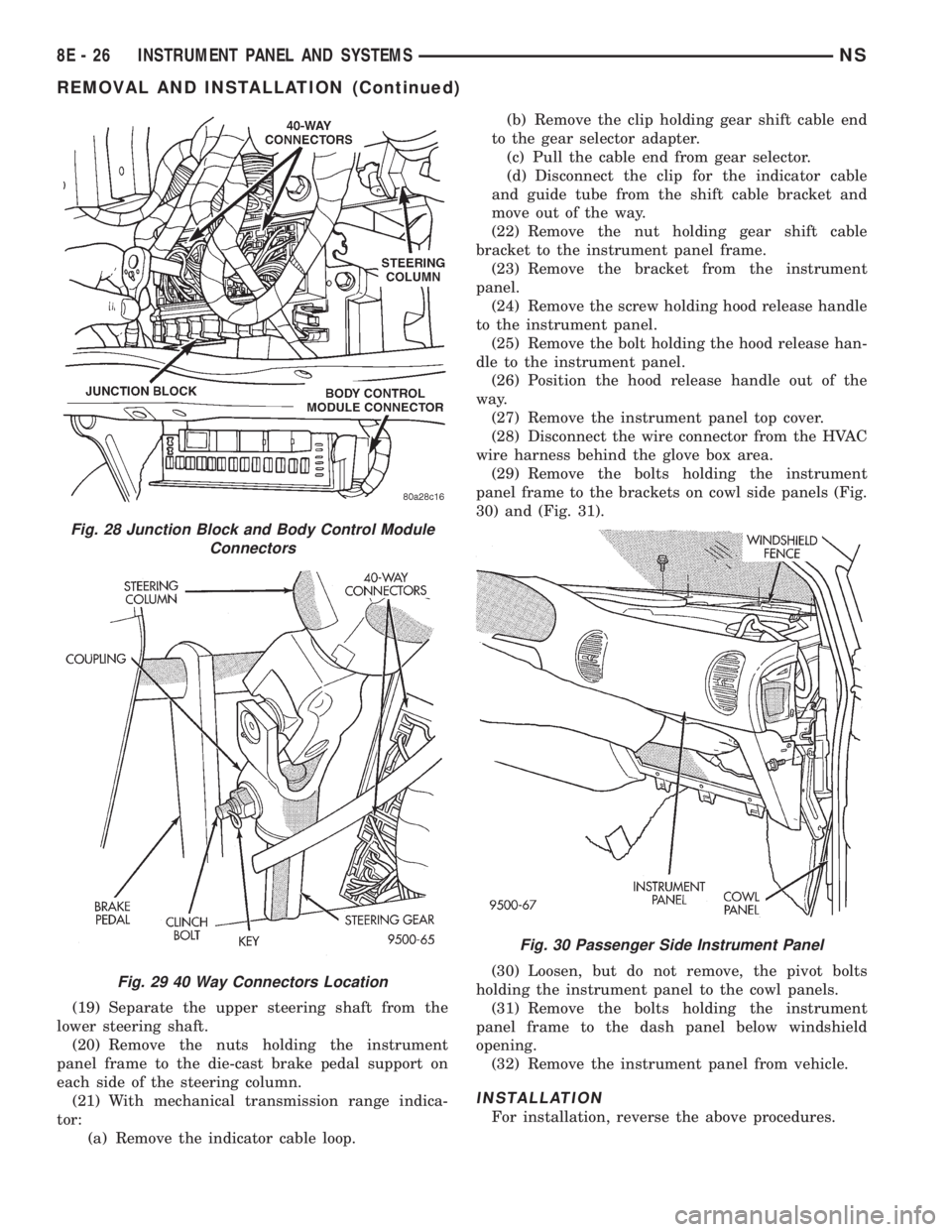
(19) Separate the upper steering shaft from the
lower steering shaft.
(20) Remove the nuts holding the instrument
panel frame to the die-cast brake pedal support on
each side of the steering column.
(21) With mechanical transmission range indica-
tor:
(a) Remove the indicator cable loop.(b) Remove the clip holding gear shift cable end
to the gear selector adapter.
(c) Pull the cable end from gear selector.
(d) Disconnect the clip for the indicator cable
and guide tube from the shift cable bracket and
move out of the way.
(22) Remove the nut holding gear shift cable
bracket to the instrument panel frame.
(23) Remove the bracket from the instrument
panel.
(24) Remove the screw holding hood release handle
to the instrument panel.
(25) Remove the bolt holding the hood release han-
dle to the instrument panel.
(26) Position the hood release handle out of the
way.
(27) Remove the instrument panel top cover.
(28) Disconnect the wire connector from the HVAC
wire harness behind the glove box area.
(29) Remove the bolts holding the instrument
panel frame to the brackets on cowl side panels (Fig.
30) and (Fig. 31).
(30) Loosen, but do not remove, the pivot bolts
holding the instrument panel to the cowl panels.
(31) Remove the bolts holding the instrument
panel frame to the dash panel below windshield
opening.
(32) Remove the instrument panel from vehicle.
INSTALLATION
For installation, reverse the above procedures.
Fig. 28 Junction Block and Body Control Module
Connectors
Fig. 29 40 Way Connectors Location
Fig. 30 Passenger Side Instrument Panel
8E - 26 INSTRUMENT PANEL AND SYSTEMSNS
REMOVAL AND INSTALLATION (Continued)
Page 393 of 1938
(6) Remove the bolts holding the lower supports to
the floor pan.
(7) Remove the right and left end covers.
(8) Disconnect the wire connectors from the Pas-
senger Airbag Module.
(9) Remove the front door sill trim covers.
(10) Remove the A-pillar trim covers.
(11) Remove the glove box.
(12) Disconnect the antenna lead connector from
behind the glove box.
(13) Remove the lower steering column cover.
(14) Remove the knee blocker panel.
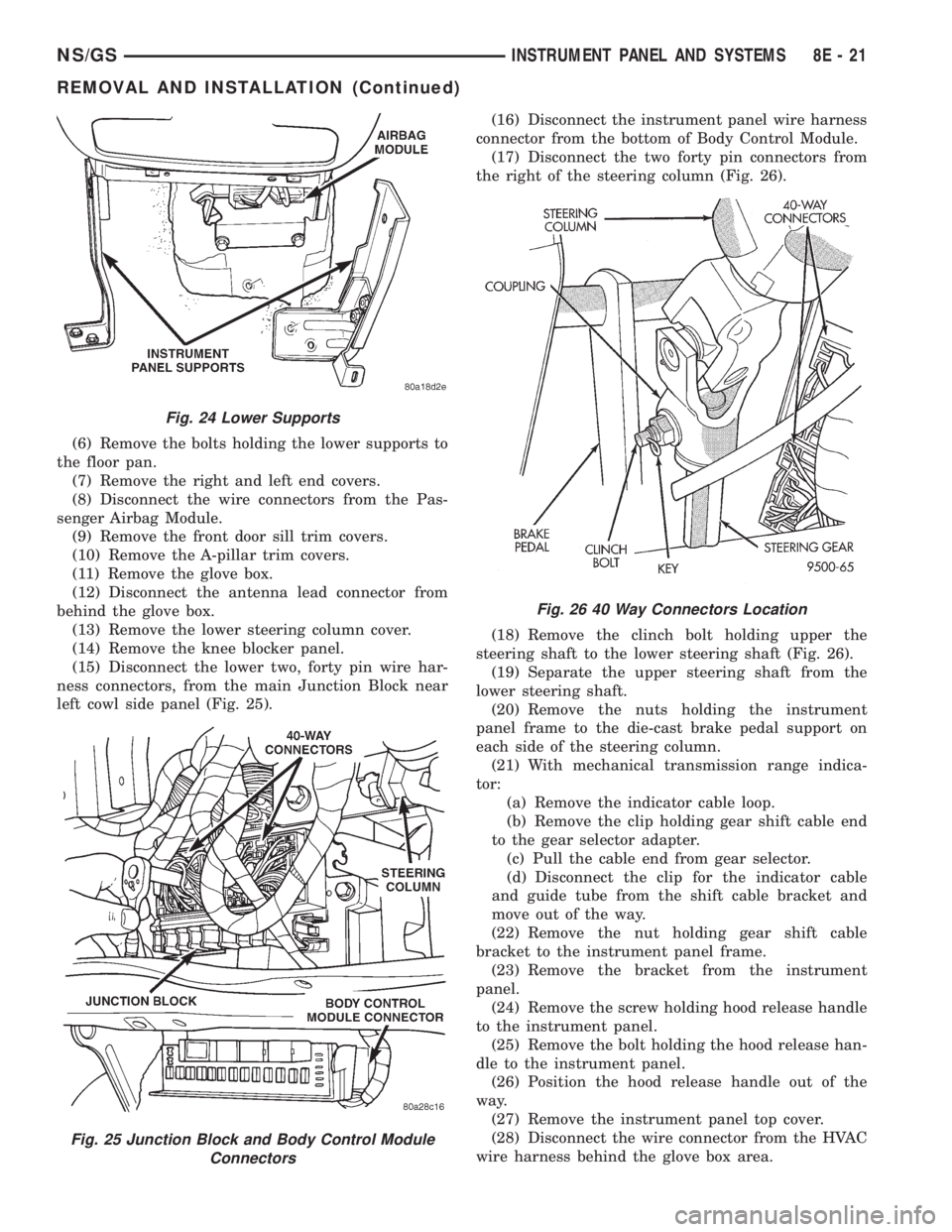
(15) Disconnect the lower two, forty pin wire har-
ness connectors, from the main Junction Block near
left cowl side panel (Fig. 25).(16) Disconnect the instrument panel wire harness
connector from the bottom of Body Control Module.
(17) Disconnect the two forty pin connectors from
the right of the steering column (Fig. 26).
(18) Remove the clinch bolt holding upper the
steering shaft to the lower steering shaft (Fig. 26).
(19) Separate the upper steering shaft from the
lower steering shaft.
(20) Remove the nuts holding the instrument
panel frame to the die-cast brake pedal support on
each side of the steering column.
(21) With mechanical transmission range indica-
tor:
(a) Remove the indicator cable loop.
(b) Remove the clip holding gear shift cable end
to the gear selector adapter.
(c) Pull the cable end from gear selector.
(d) Disconnect the clip for the indicator cable
and guide tube from the shift cable bracket and
move out of the way.
(22) Remove the nut holding gear shift cable
bracket to the instrument panel frame.
(23) Remove the bracket from the instrument
panel.
(24) Remove the screw holding hood release handle
to the instrument panel.
(25) Remove the bolt holding the hood release han-
dle to the instrument panel.
(26) Position the hood release handle out of the
way.
(27) Remove the instrument panel top cover.
(28) Disconnect the wire connector from the HVAC
wire harness behind the glove box area.
Fig. 24 Lower Supports
Fig. 25 Junction Block and Body Control Module
Connectors
Fig. 26 40 Way Connectors Location
NS/GSINSTRUMENT PANEL AND SYSTEMS 8E - 21
REMOVAL AND INSTALLATION (Continued)
Page 419 of 1938

STEP IS NOT DONE A DIAGONSTIC TROUBLE
CODE (DTC) MAY BE SET.
VACUUM RESERVOIR
The reservoir contains a one-way check valve to
trap engine vacuum in the reservoir. When engine
vacuum drops, as in climbing a grade while driving,
the reservoir supplies the vacuum needed to main-
tain proper speed control operation. The vacuum res-
ervoir cannot be repaired and must be replaced if
faulty.
VEHICLE SPEED AND DISTANCE
The 4 speed automatic Transmission Control Mod-
ule (TCM) supplies the speed input to the PCM. The
PCM determines acceleration rates. The speed con-
trol software in the PCM uses vehicle speed and
acceleration to control to the set speed.
Vehicles with a 3 speed automatic or manual trans-
mission have a vehicle speed sensor (VSS) mounted
to an adapter near the transmission output shaft.
The sensor is driven through the adapter by a speed-
ometer pinion gear. The VSS pulse signal is moni-
tored by the PCM to determine vehicle speed and to
maintain speed control set speed. Refer to the appro-
priate Powertrain Diagnostic Procedures manual for
diagnosis and testing of this component. Refer to
group 14, Fuel System for Removal/Installation
DIAGNOSIS AND TESTING
ROAD TEST
Perform a vehicle road test to verify reports of
speed control system malfunction. The road test
should include attention to the speedometer. Speed-
ometer operation should be smooth and without flut-
ter at all speeds.
Flutter in the speedometer indicates a problem
which might cause surging in the speed control sys-
tem. The cause of any speedometer problems should
be corrected before proceeding. Refer to Group 8E,
Instrument Panel and Gauges for speedometer diag-
nosis.
If a road test verifies a surge following a set and
the speedometer operates properly see ªOvershoot/
Undershoot on speed control setº.
If a road test verifies an inoperative system, and
the speedometer operates properly, check for:
²A Diagnostic Trouble Code (DTC). If a DTC
exists, conduct tests per the Powertrain Diagnostic
Procedures service manual.
²A misadjusted brake (stop) lamp switch. This
could also cause an intermittent problem.
²Loose or corroded electrical connections at the
servo. Corrosion should be removed from electricalterminals and a light coating of Mopar Multipurpose
Grease, or equivalent, applied.
²Leaking vacuum reservoir.
²Loose or leaking vacuum hoses or connections.
²Defective one-way vacuum check valve.
²Secure attachment at both ends of the speed
control servo cable.
²Smooth operation of throttle linkage and throttle
body air valve.
²Conduct electrical test at PCM.
²Failed speed control servo. Do the servo vacuum
test.
CAUTION: When test probing for voltage or conti-
nuity at electrical connectors, care must be taken
not to damage connector, terminals or seals. If
these components are damaged, intermittent or
complete system failure may occur.
OVERSHOOT/UNDERSHOOT FOLLOWING SPEED
CONTROL SET
If the operator repeatedly presses and releases the
set button with their foot off of the accelerator (a ªlift
foot setº to begin speed control operation), the vehicle
may accelerate and exceed the desired set speed by
up to 5 MPH (8 km/h) and then decelerate to less
than the desired set speed before finally achieving
the desired set speed.
The Speed Control has an adaptive strategy that
compensates for vehicle-to-vehicle variations in speed
control cable lengths. When the speed control is set
with the vehicle operators foot off of the accelerator
pedal, the speed control thinks there is excessive
speed control cable slack and adapts. If the lift foot
sets are continually used, the speed control over-
shoot/undershoot condition will develop.
To ªunlearnº the overshoot/undershoot condition,
the vehicle operator has to press and release the set
button while maintaining the desired set speed with
the accelerator pedal (not decelerating or accelerat-
ing), and then turn the cruise control switch to the
OFF position (or press the CANCEL button if
equipped) after waiting 10 seconds. This procedure
must be performed approximately 10±15 times to
completely unlearn the overshoot/undershoot condi-
tion.
CHECKING FOR DIAGNOSTIC CODES
When trying to verify a speed control system elec-
tronic malfunction: Connect a DRB scan tool if avail-
able to the data link connector. The connector is
located at left side of the steering column, and at
lower edge of the panel.
(1) A speed control malfunction may occur without
a diagnostic code being indicated.
NSVEHICLE SPEED CONTROL SYSTEM 8H - 3
DESCRIPTION AND OPERATION (Continued)
Page 442 of 1938
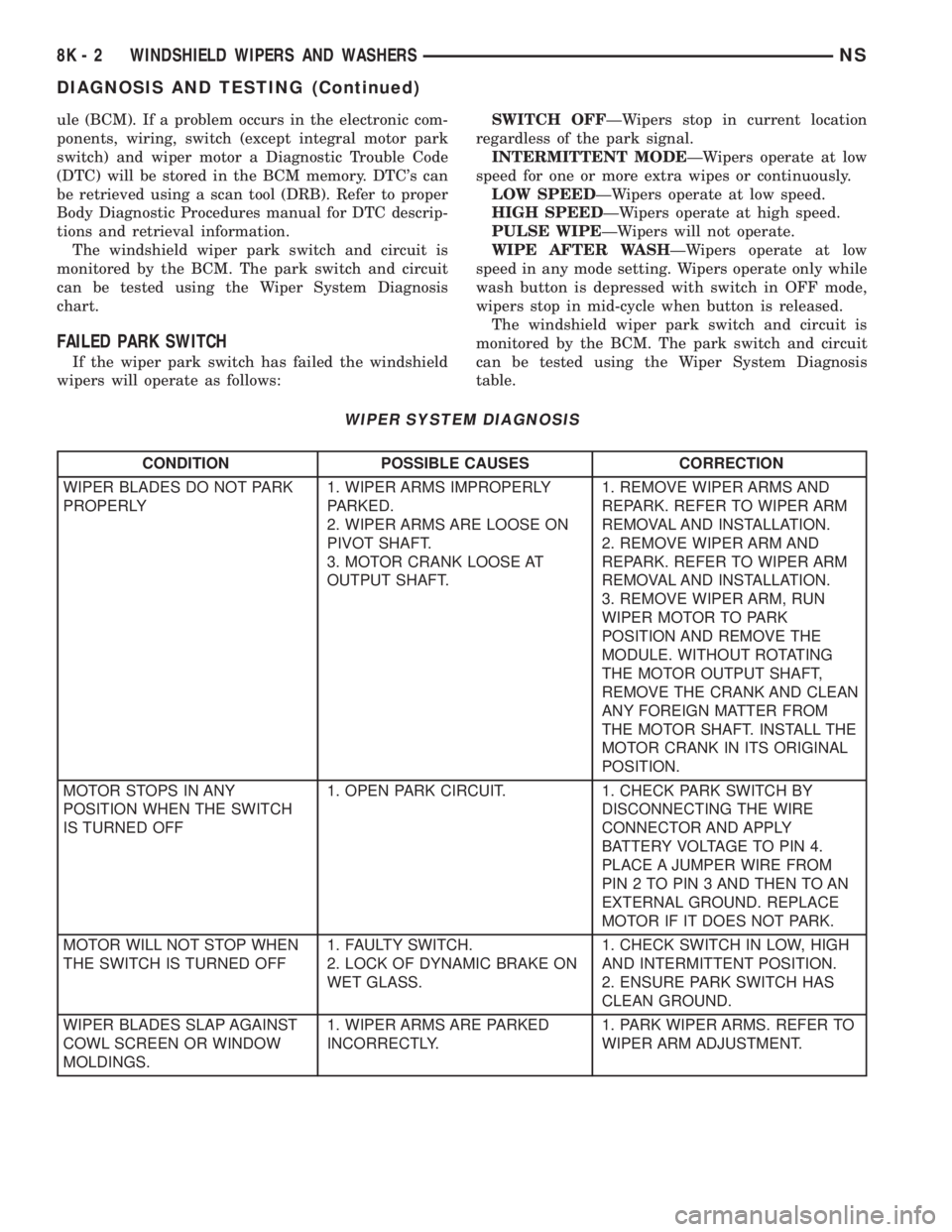
ule (BCM). If a problem occurs in the electronic com-
ponents, wiring, switch (except integral motor park
switch) and wiper motor a Diagnostic Trouble Code
(DTC) will be stored in the BCM memory. DTC's can
be retrieved using a scan tool (DRB). Refer to proper
Body Diagnostic Procedures manual for DTC descrip-
tions and retrieval information.
The windshield wiper park switch and circuit is
monitored by the BCM. The park switch and circuit
can be tested using the Wiper System Diagnosis
chart.
FAILED PARK SWITCH
If the wiper park switch has failed the windshield
wipers will operate as follows:SWITCH OFFÐWipers stop in current location
regardless of the park signal.
INTERMITTENT MODEÐWipers operate at low
speed for one or more extra wipes or continuously.
LOW SPEEDÐWipers operate at low speed.
HIGH SPEEDÐWipers operate at high speed.
PULSE WIPEÐWipers will not operate.
WIPE AFTER WASHÐWipers operate at low
speed in any mode setting. Wipers operate only while
wash button is depressed with switch in OFF mode,
wipers stop in mid-cycle when button is released.
The windshield wiper park switch and circuit is
monitored by the BCM. The park switch and circuit
can be tested using the Wiper System Diagnosis
table.
WIPER SYSTEM DIAGNOSIS
CONDITION POSSIBLE CAUSES CORRECTION
WIPER BLADES DO NOT PARK
PROPERLY1. WIPER ARMS IMPROPERLY
PARKED.
2. WIPER ARMS ARE LOOSE ON
PIVOT SHAFT.
3. MOTOR CRANK LOOSE AT
OUTPUT SHAFT.1. REMOVE WIPER ARMS AND
REPARK. REFER TO WIPER ARM
REMOVAL AND INSTALLATION.
2. REMOVE WIPER ARM AND
REPARK. REFER TO WIPER ARM
REMOVAL AND INSTALLATION.
3. REMOVE WIPER ARM, RUN
WIPER MOTOR TO PARK
POSITION AND REMOVE THE
MODULE. WITHOUT ROTATING
THE MOTOR OUTPUT SHAFT,
REMOVE THE CRANK AND CLEAN
ANY FOREIGN MATTER FROM
THE MOTOR SHAFT. INSTALL THE
MOTOR CRANK IN ITS ORIGINAL
POSITION.
MOTOR STOPS IN ANY
POSITION WHEN THE SWITCH
IS TURNED OFF1. OPEN PARK CIRCUIT. 1. CHECK PARK SWITCH BY
DISCONNECTING THE WIRE
CONNECTOR AND APPLY
BATTERY VOLTAGE TO PIN 4.
PLACE A JUMPER WIRE FROM
PIN 2 TO PIN 3 AND THEN TO AN
EXTERNAL GROUND. REPLACE
MOTOR IF IT DOES NOT PARK.
MOTOR WILL NOT STOP WHEN
THE SWITCH IS TURNED OFF1. FAULTY SWITCH.
2. LOCK OF DYNAMIC BRAKE ON
WET GLASS.1. CHECK SWITCH IN LOW, HIGH
AND INTERMITTENT POSITION.
2. ENSURE PARK SWITCH HAS
CLEAN GROUND.
WIPER BLADES SLAP AGAINST
COWL SCREEN OR WINDOW
MOLDINGS.1. WIPER ARMS ARE PARKED
INCORRECTLY.1. PARK WIPER ARMS. REFER TO
WIPER ARM ADJUSTMENT.
8K - 2 WINDSHIELD WIPERS AND WASHERSNS
DIAGNOSIS AND TESTING (Continued)
Page 528 of 1938
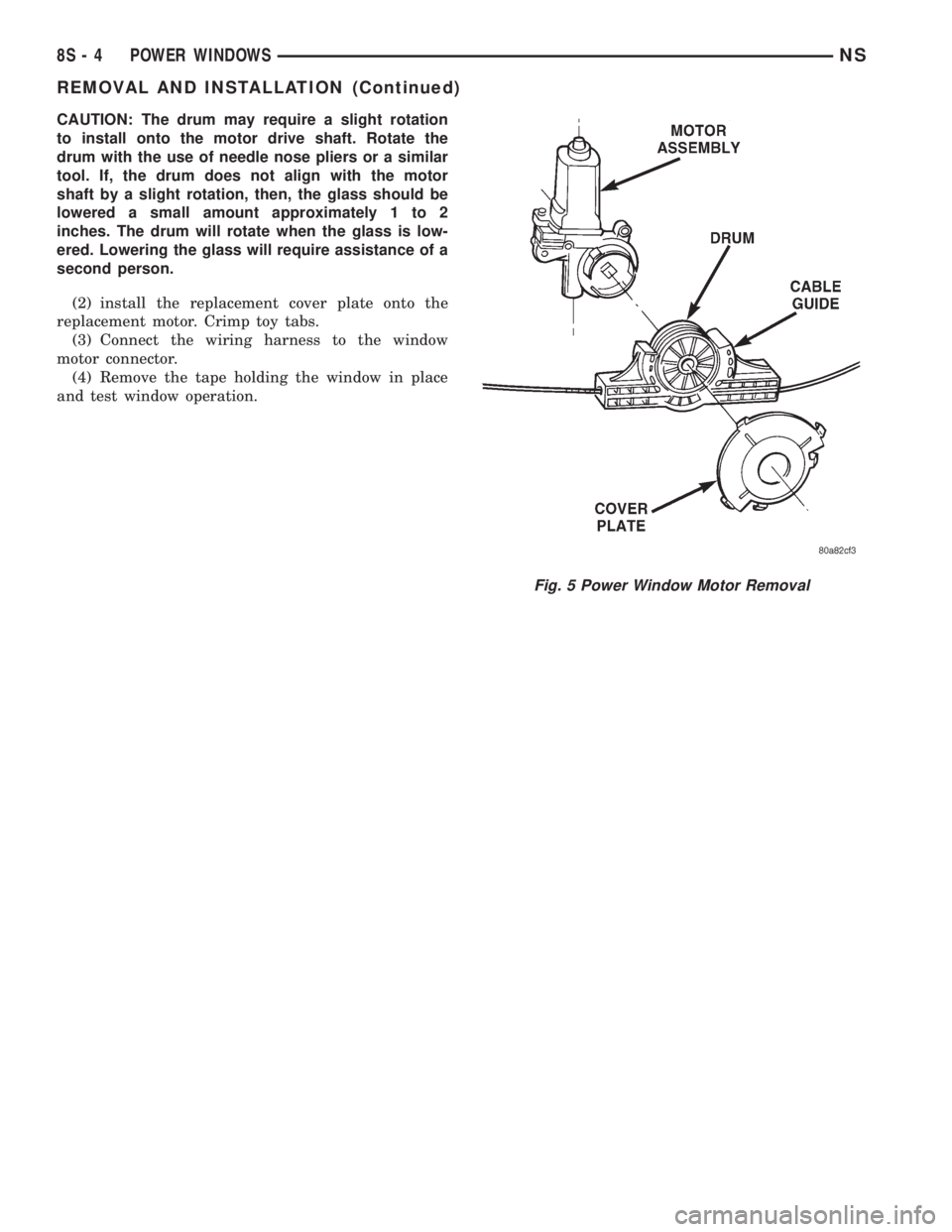
CAUTION: The drum may require a slight rotation
to install onto the motor drive shaft. Rotate the
drum with the use of needle nose pliers or a similar
tool. If, the drum does not align with the motor
shaft by a slight rotation, then, the glass should be
lowered a small amount approximately 1 to 2
inches. The drum will rotate when the glass is low-
ered. Lowering the glass will require assistance of a
second person.
(2) install the replacement cover plate onto the
replacement motor. Crimp toy tabs.
(3) Connect the wiring harness to the window
motor connector.
(4) Remove the tape holding the window in place
and test window operation.
Fig. 5 Power Window Motor Removal
8S - 4 POWER WINDOWSNS
REMOVAL AND INSTALLATION (Continued)