light CHRYSLER VOYAGER 2001 Service Manual
[x] Cancel search | Manufacturer: CHRYSLER, Model Year: 2001, Model line: VOYAGER, Model: CHRYSLER VOYAGER 2001Pages: 4284, PDF Size: 83.53 MB
Page 1161 of 4284
the brake pedal is applied the test will be run at 40
km/h (24 mph) regardless of brake switch state. If,
during the dynamic test, the brake pedal is applied,
the driver may feel the test through brake pedal
pulsations. This is a normal condition.
If any component exhibits a trouble condition
during system initialization or dynamic check, the
CAB will illuminate the ABS warning indicator and
TRAC OFF lamp if equipped.
3.3.6 DIAGNOSTIC MODE
To enter diagnostic mode, a vehicle speed must be
below 10 km/h (6 mph) and no ABS condition
present. If vehicle speed is not below 10 km/h
(6 mph), a ªNo Responseº message could be dis-
played by the DRBIIIt. The following are charac-
teristics of diagnostic mode:
± The amber ABS warning indicator will blink
rapidly (about 1/2 second ON and 1/2 second
OFF). If a hard trouble code, such as Valve
Power Feed Failure code is present, the indi-
cator will be illuminated without blinking un-
til the trouble condition is cleared.
± Antilock operation is disabled.
± The HCU valves cannot be actuated when the
vehicle speed is above 8 km/h (5 mph). If valve
actuation is attempted above 8 km/h (5 mph), a
ªNo Responseº message will be displayed on
the DRBIIIt.
3.4 DIAGNOSTIC TROUBLE CODES
The controller antilock brake may report any of
the following diagnostic trouble codes:
CLUSTER LAMP FAILURE
VALVE POWER FEED FAILURE
BUS SYSTEM COMMUNICATION FAILURE
CAB INTERNAL FAILURE
LEFT FRONT SENSOR CIRCUIT FAILURE
LEFT FRONT WHEEL SPEED SIGNAL
FAILURE
LEFT REAR SENSOR CIRCUIT FAILURE
LEFT REAR WHEEL SPEED SIGNAL
FAILURE
PUMP CIRCUIT FAILURE
RIGHT FRONT SENSOR CIRCUIT FAILURE
RIGHT FRONT WHEEL SPEED SIGNAL
FAILURE
RIGHT REAR SENSOR CIRCUIT FAILURE
RIGHT REAR WHEEL SPEED SIGNAL
FAILURE
SYSTEM OVERVOLTAGE
SYSTEM UNDERVOLTAGE
3.5 DRBIIITERROR MESSAGES AND
BLANK SCREEN
Under normal operation, the DRBIIItwill dis-
play one of only two error messages:
± User-Requested WARM Boot or User-
Requested COLD Boot.
If the DRBIIItshould display any other error
message, record the entire display and call the
STAR Center for information. This is a sample of
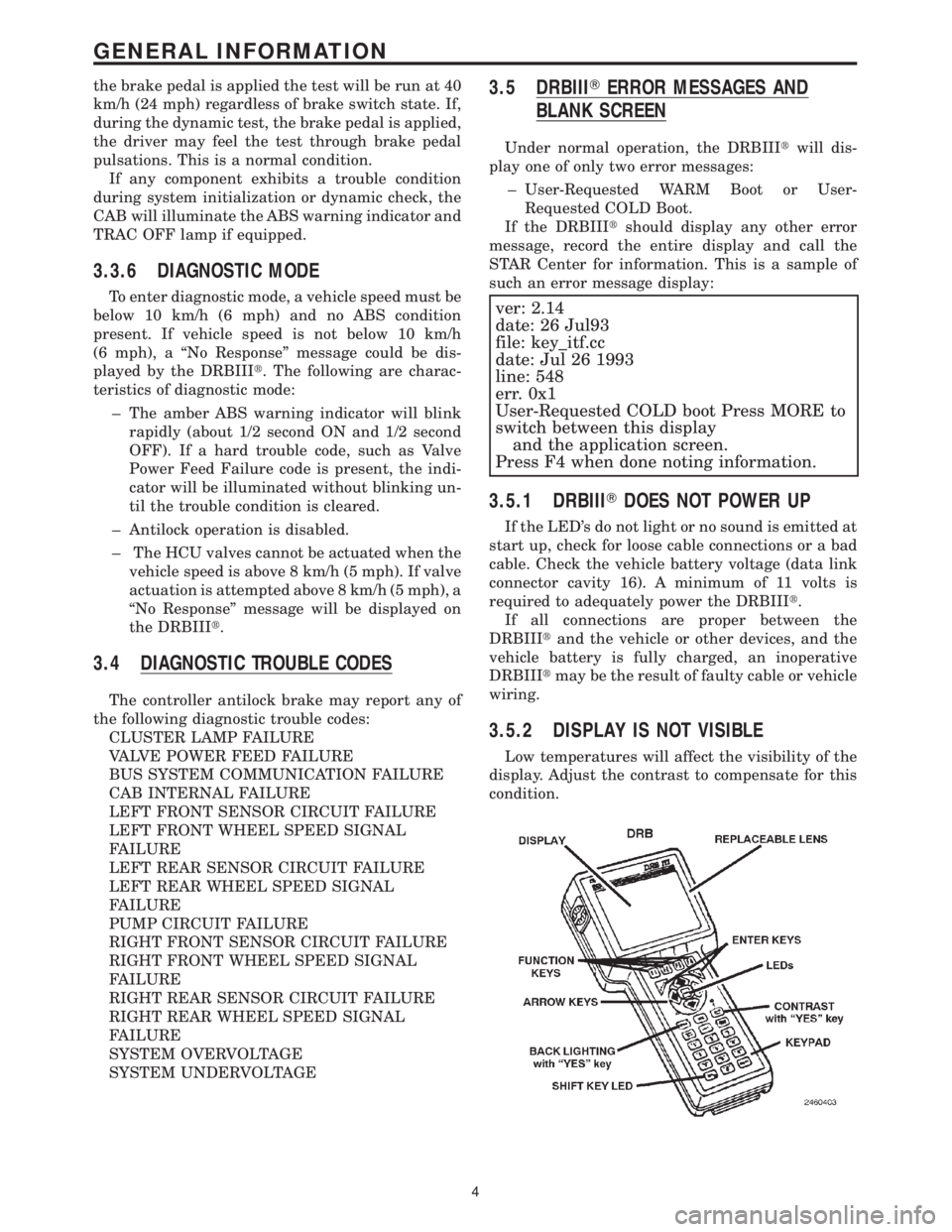
such an error message display:
ver: 2.14
date: 26 Jul93
file: key_itf.cc
date: Jul 26 1993
line: 548
err. 0x1
User-Requested COLD boot Press MORE to
switch between this display
and the application screen.
Press F4 when done noting information.
3.5.1 DRBIIITDOES NOT POWER UP
If the LED's do not light or no sound is emitted at
start up, check for loose cable connections or a bad
cable. Check the vehicle battery voltage (data link
connector cavity 16). A minimum of 11 volts is
required to adequately power the DRBIIIt.
If all connections are proper between the
DRBIIItand the vehicle or other devices, and the
vehicle battery is fully charged, an inoperative
DRBIIItmay be the result of faulty cable or vehicle
wiring.
3.5.2 DISPLAY IS NOT VISIBLE
Low temperatures will affect the visibility of the
display. Adjust the contrast to compensate for this
condition.
4
GENERAL INFORMATION
Page 1163 of 4284
4.3 WARNINGS
4.3.1 VEHICLE DAMAGE WARNINGS
Before disconnecting any control module, make
sure the ignition is ``off ''. Failure to do so could
damage the module.
When testing voltage or continuity at any control
module, use the terminal side (not the wire end) of
the connector. Do not probe a wire through the
insulation, this will damage it and eventually cause
it to fail because of corrosion.
Be careful when performing electrical tests so as
to prevent accidental shorting of terminals. Such
mistakes can damage fuses or components. Also, a
second code could be set, making diagnosis of the
original problem more difficult.
4.3.2 ROAD TESTING A COMPLAINT
VEHICLE
Some complaints will require a test drive as part
of the repair verification procedure. The purpose of
the test drive is to try to duplicate the diagnostic
code or symptom condition.
WARNING: BEFORE ROAD TESTING A
VEHICLE, BE SURE THAT ALL
COMPONENTS ARE REASSEMBLED.
DURING THE TEST DRIVE, DO NOT TRY TO
READ THE DRB SCREEN WHILE IN MOTION.
DO NOT HANG THE DRBIIITFROM THE
REAR VIEW MIRROR OR OPERATE IT
YOURSELF. HAVE AN ASSISTANT
AVAILABLE TO OPERATE THE DRBIIIT.
4.4 DIAGNOSIS
1. Your diagnostic test procedure must begin with a
thorough visual inspection of the ABS system for
damaged components or disconnected connec-
tors. The brake lamps must be operational, and
if they are not, repair them prior to continuing.
2. Connect the DRBIIItto the data link connector,
which is located under the dash to the left of the
steering column. If the DRBIIItdoes not power
up, check the power and ground supplies to the
connector.
3. Turn the ignition on. Select ªAntilock Brakesº. If
the DRBIIItdisplays ªNo Responseº condition
you must diagnose that first.
4. Read and record all ABS diagnostic trouble
codes. If the ªCAB Power Feed Circuitº diagnos-
tic trouble code is present, it must be repaired
prior to addressing any other DTC's. If any
additional DTC's are present, proceed to theappropriate test by locating the matching test in
the Table of Contents and begin to diagnose the
symptom.
5. If there are no diagnostic trouble codes present,
identify the customer complaint. Select ªInputs/
Outputsº and read the brake switch input as you
press and release the brake pedal. If the display
does not match the state of the pedal, perform
the proper test by locating the matching test in
the Table of Contents and begin to diagnose the
symptom. If a problem exists with the yellow
ªABSº warning indicator or the red ªBrakeº
indicator exists, refer to the proper tests by
locating the matching test in the Table of Con-
tents and begin to diagnose the symptom. Read
the traction control switch input as you press
and release the switch. If the display does not
match the state of the indicator perform the
proper test by locating the matching test in the
Table of Contents and begin to diagnose the
symptom.
6. If no other problems are found, it will be neces-
sary to road test the vehicle. Perform several
antilock stops from above 50 Km/h (30 mph) and
then repeat step 4. If any diagnostic trouble
codes are present, proceed to the appropriate test.
7. The following conditions should be considered
ªNORMALº operation, and no repairs should be
attempted to correct them.
± Brake pedal feedback during an ABS stop
(clicking, vibrating).
± Clicking, groaning or buzzing at 25 Km/h (15
mph) or 40 Km/h (24 mph) (drive off self test).
± Groaning noise during an ABS stop.
± Slight brake pedal drop and pop noise when
ignition is initially turned on.
± Brake pedal ratcheting down at the end of an
ABS stop.
8. If the complaint is ABS ªcyclingº at the end of a
stop at low speeds, it may be caused by a
marginal wheel speed sensor signal. The sensor
air gap, tone wheel condition, and/or brakes
hanging up are possible causes of this condition.
9. After a road test in which no problems were
found, refer to any Technical Service Bulletins
that may apply.
5.0 REQUIRED TOOLS AND
EQUIPMENT
DRBIIIt(diagnostic read-out box)
jumper wires
ohmmeter
voltmeter
test light
6
GENERAL INFORMATION
Page 1172 of 4284

POSSIBLE CAUSES
CAB - INTERNAL FAULT
INTERMITTENT CIRCUIT DTC
TEST ACTION APPLICABILITY
1 Turn the ignition on.
With the DRBIIIt, record and erase DTC's.
Turn the ignition off.
Turn the ignition on.
With the DRBIIIt, read DTC's.
Does the DRBIIItdisplay a Wheel Speed Sensor Circuit Failure DTC?All
Ye s®Go To 2
No®Go To 5
2 Turn the ignition off.
Inspect the affected Wheel Speed Sensor and Connector.
Is the Sensor or Connector Damaged?All
Ye s®Repair as necessary.
Perform ABS VERIFICATION TEST - VER 1.
No®Go To 3
3 Turn the ignition off.
Disconnect the affected Wheel Speed Sensor connector.
Note: Check connector - Clean/repair as necessary.
Turn the ignition on.
Using a 12-volt test light connected to ground, check the Sensor 12 volt Supply
circuit.
Measure the resistance between ground and the Sensor Signal circuit.
Was the test light bright and the resistance between 100 and 300 ohms?All
Ye s®Replace the Wheel Speed Sensor in accordance with the Service
Information.
Perform ABS VERIFICATION TEST - VER 1.
No®Go To 4
4 Turn the ignition off.
Disconnect the affected Wheel Speed Sensor connector.
Note: Check connector - Clean/repair as necessary.
Disconnect the CAB connector.
Note: Check connector - Clean/repair as necessary.
Turn the ignition on.
Check the Wheel Speed Sensor 12 volt Supply and Signal circuits for a short to
battery, ground, to each other and for an open.
For the purposes of this test, a short to ground must be below 15k ohms.
Was any circuit short or open found?All
Ye s®Repair the Wheel Speed Sensor circuit short or open.
Perform ABS VERIFICATION TEST - VER 1.
No®Replace the Controller Antilock Brake in accordance with the
Service Information.
Perform ABS VERIFICATION TEST - VER 1.
15
BRAKES (CAB)
LEFT FRONT SENSOR CIRCUIT FAILURE ÐContinued
Page 1180 of 4284

TEST ACTION APPLICABILITY
7 Turn the ignition off.
Disconnect the CAB connector.
Note: Check connector - Clean/repair as necessary.
Turn the ignition on.
Using a 12-volt test light connected to ground, check the Pump Motor Fused B+
circuit.
Does the test light illuminate brightly?All
Ye s®Go To 8
No®Repair the Fused B(+) circuit for an open. The vehicle must be
driven at 25 km/h (15 mph) to extinguish the ABS indicator.
Perform ABS VERIFICATION TEST - VER 1.
8 If there are no possible causes remaining, view repair. All
Repair
Replace the Controller Anti-Lock Brake in accordance with the
Service Information. The vehicle must be driven at 25 km/h (15
mph) to extinguish the ABS indicator.
Perform ABS VERIFICATION TEST - VER 1.
23
BRAKES (CAB)
PUMP CIRCUIT FAILURE ÐContinued
Page 1190 of 4284
TEST ACTION APPLICABILITY
3 Turn the ignition off.
Remove the ABS Fuse 21 from the IPM.
Disconnect the CAB harness connector.
Note: Check connector - Clean/repair as necessary.
Using a test light connected to 12 volts, probe the Fused B(+) Circuit.
Does the test light illuminate brightly?All
Ye s®Repair the Fused B(+) Circuit short to ground.
Perform ABS VERIFICATION TEST - VER 1.
No®Go To 4
4 Turn the ignition off.
Remove the ABS Fuse 21 from the IPM.
The CAB must be connected for the results of this test to be valid.
Using a test light connected to 12 volts, probe the Fused B(+) Circuit at the IPM fuse
terminal.
Does the test light illuminate brightly?All
Ye s®Replace the Controller Antilock Brake in accordance with the
Service Information.
Perform ABS VERIFICATION TEST - VER 1.
No®Go To 5
5 Turn the ignition off.
If there are no potential causes remaining, view repair.All
Continue
Replace the Fuse.
Perform ABS VERIFICATION TEST - VER 1.
6 Remove the ABS Fuse 21 from the IPM.
Turn the ignition on.
Measure the voltage of the Fused B+ supply to Fuse 21 in the IPM.
Is the voltage above 10 volts?All
Ye s®Go To 7
No®Repair the B+ Supply circuit for an open.
Perform ABS VERIFICATION TEST - VER 1.
7 Turn the ignition off.
Remove the ABS Fuse 21 from the IPM.
Disconnect the CAB harness connector.
Note: Check connector - Clean/repair as necessary.
Measure the resistance of the Fused B(+) circuit between IPM Fuse terminal 21 and
the CAB connector.
Is the resistance below 5 ohms?All
Ye s®Go To 8
No®Repair the Fuse B+ circuit for an open.
Perform ABS VERIFICATION TEST - VER 1.
8 If there are no possible causes remaining, view repair. All
Repair
Replace the Controller Antilock Brake in accordance with the
Service Information.
Perform ABS VERIFICATION TEST - VER 1.
33
BRAKES (CAB)
VALVE POWER FEED FAILURE ÐContinued
Page 1192 of 4284
Symptom:
*BRAKE LAMP SWITCH
POSSIBLE CAUSES
CHECK BRAKE LAMP SWITCH OUTPUT
BRAKE LAMP SWITCH B+ OPEN
BRAKE LAMP SWITCH OUTPUT CIRCUIT SHORT OR OPEN
BRAKE LAMP SWITCH OPEN
CAB -- INTERNAL OPEN
TEST ACTION APPLICABILITY
1 With the DRBIIItin Inputs/Outputs, read the Brake Lamp Switch state.
Press and release the brake pedal.
Does the DRBIIItdisplay PRESSED and RELEASED?All
Ye s®The Brake Lamp Switch is OK.
Perform ABS VERIFICATION TEST - VER 1.
No®Go To 2
2 Disconnect the Brake Lamp Switch harness connector.
Using a 12-volt test light connected to ground, check the Brake Lamp Switch Fused
B+ circuit.
Does the test light illuminate brightly ?All
Ye s®Go To 3
No®Repair the Brake Lamp Switch Fused B+ circuit for an open.
Perform ABS VERIFICATION TEST - VER 1.
3 Disconnect the Brake Lamp Switch harness connector.
Connect a jumper wire between the Brake Lamp Switch B+ and Output circuits.
With the DRBIIItin Inputs/Outputs, read the Brake Lamp Switch state.
Does the DRBIIItdisplay PRESSED?All
Ye s®Replace the Brake Lamp Switch in accordance with the Service
Information.
Perform ABS VERIFICATION TEST - VER 1.
No®Go To 4
4 Disconnect the CAB harness connector.
Disconnect the Brake Lamp Switch harness connector.
Check the Brake Lamp Switch Output circuit for a short to voltage and an open.
Is the Brake Lamp Switch Output circuit shorted or open?All
Ye s®Repair the Brake Lamp Switch Output circuit for a short to
voltage or an open.
Perform ABS VERIFICATION TEST - VER 1.
No®Replace the Controller Anti-Lock Brake in accordance with the
Service Information.
Perform ABS VERIFICATION TEST - VER 1.
35
BRAKES (CAB)
Page 1193 of 4284
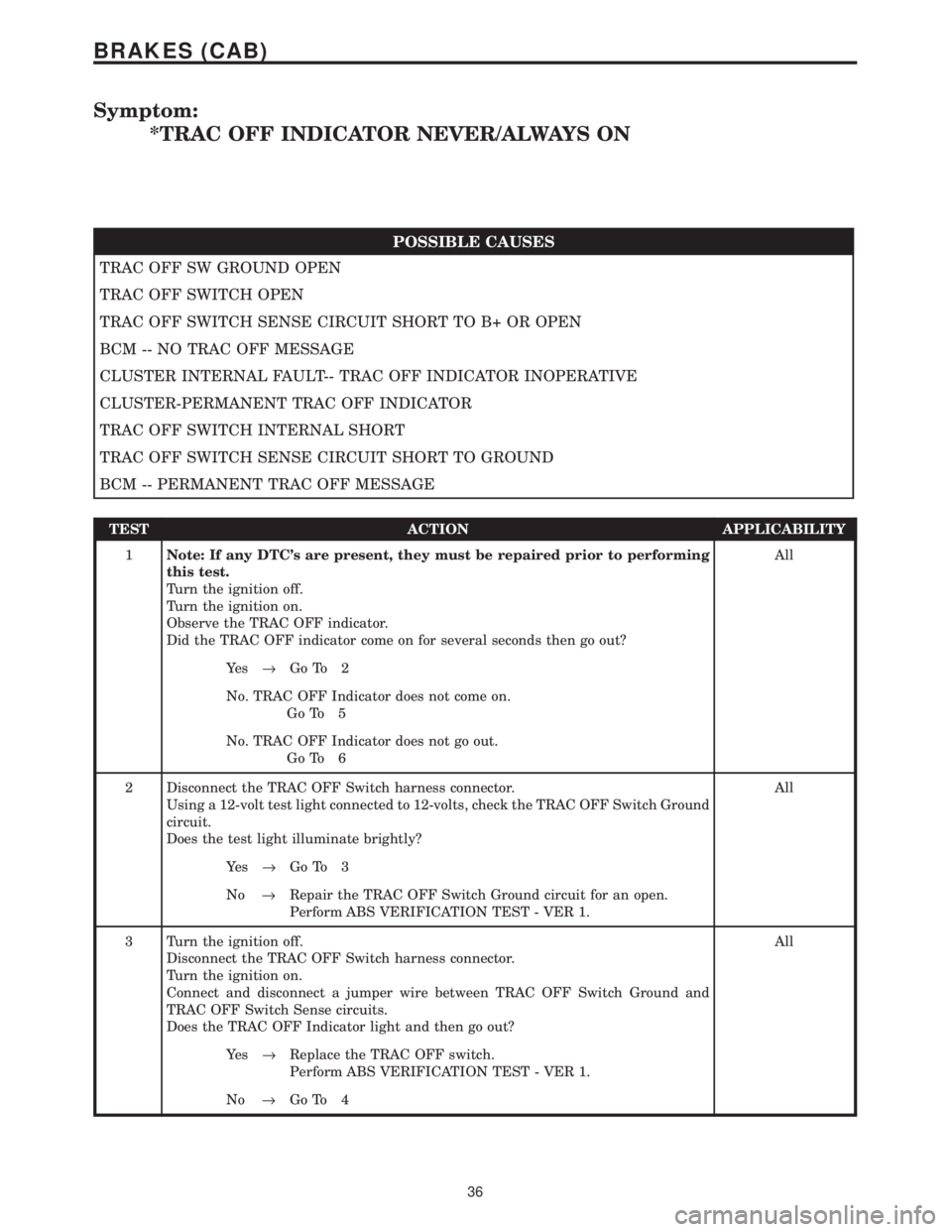
Symptom:
*TRAC OFF INDICATOR NEVER/ALWAYS ON
POSSIBLE CAUSES
TRAC OFF SW GROUND OPEN
TRAC OFF SWITCH OPEN
TRAC OFF SWITCH SENSE CIRCUIT SHORT TO B+ OR OPEN
BCM -- NO TRAC OFF MESSAGE
CLUSTER INTERNAL FAULT-- TRAC OFF INDICATOR INOPERATIVE
CLUSTER-PERMANENT TRAC OFF INDICATOR
TRAC OFF SWITCH INTERNAL SHORT
TRAC OFF SWITCH SENSE CIRCUIT SHORT TO GROUND
BCM -- PERMANENT TRAC OFF MESSAGE
TEST ACTION APPLICABILITY
1Note: If any DTC's are present, they must be repaired prior to performing
this test.
Turn the ignition off.
Turn the ignition on.
Observe the TRAC OFF indicator.
Did the TRAC OFF indicator come on for several seconds then go out?All
Ye s®Go To 2
No. TRAC OFF Indicator does not come on.
Go To 5
No. TRAC OFF Indicator does not go out.
Go To 6
2 Disconnect the TRAC OFF Switch harness connector.
Using a 12-volt test light connected to 12-volts, check the TRAC OFF Switch Ground
circuit.
Does the test light illuminate brightly?All
Ye s®Go To 3
No®Repair the TRAC OFF Switch Ground circuit for an open.
Perform ABS VERIFICATION TEST - VER 1.
3 Turn the ignition off.
Disconnect the TRAC OFF Switch harness connector.
Turn the ignition on.
Connect and disconnect a jumper wire between TRAC OFF Switch Ground and
TRAC OFF Switch Sense circuits.
Does the TRAC OFF Indicator light and then go out?All
Ye s®Replace the TRAC OFF switch.
Perform ABS VERIFICATION TEST - VER 1.
No®Go To 4
36
BRAKES (CAB)
Page 1194 of 4284

TEST ACTION APPLICABILITY
4 Turn the ignition off.
Disconnect the TRAC OFF Switch harness connector.
Disconnect the CAB harness connector.
Turn the ignition on.
Check the TRAC OFF Switch Sense circuit for short to B+ and for an open.
Is the Sense circuit shorted or open?All
Ye s®Repair the TRAC OFF Switch Sense circuit for a short to battery
or for an open.
Perform ABS VERIFICATION TEST - VER 1.
No®Replace the Body Control Module in accordance with the Service
Information.
Perform ABS VERIFICATION TEST - VER 1.
5 Turn the ignition off.
NOTE: The purpose of this test is to perform the Instrument Cluster self
test.
Depress and hold the Odometer Reset Button.
Turn the Key from OFF to ON and then back to OFF.
Release the Odometer Reset Button.
Do the Instrument Cluster Indicators and Gauges activate and deactivate?All
Ye s®Replace the Body Control Module in accordance with the Service
Information.
Perform ABS VERIFICATION TEST - VER 1.
No®Replace the Instrument Cluster in accordance with the Service
Information.
Perform ABS VERIFICATION TEST - VER 1.
6NOTE: The purpose of this test is to perform the Instrument Cluster self
test.
Depress and hold the Odometer Reset Button.
Turn the Key from OFF to ON and then back to OFF.
Release the Odometer Reset Button.
Do the Instrument Cluster Indicators and Gauges activate and deactivate?All
Ye s®Go To 7
No®Replace the Instrument Cluster in accordance with the Service
Information.
Perform ABS VERIFICATION TEST - VER 1.
7 Turn the ignition off.
Disconnect the TRAC OFF Switch harness connector.
Turn the ignition on.
Does the TRAC OFF Indicator light and then go out?All
Ye s®Replace the TRAC OFF switch.
Perform ABS VERIFICATION TEST - VER 1.
No®Go To 8
37
BRAKES (CAB)
*TRAC OFF INDICATOR NEVER/ALWAYS ON ÐContinued
Page 1225 of 4284
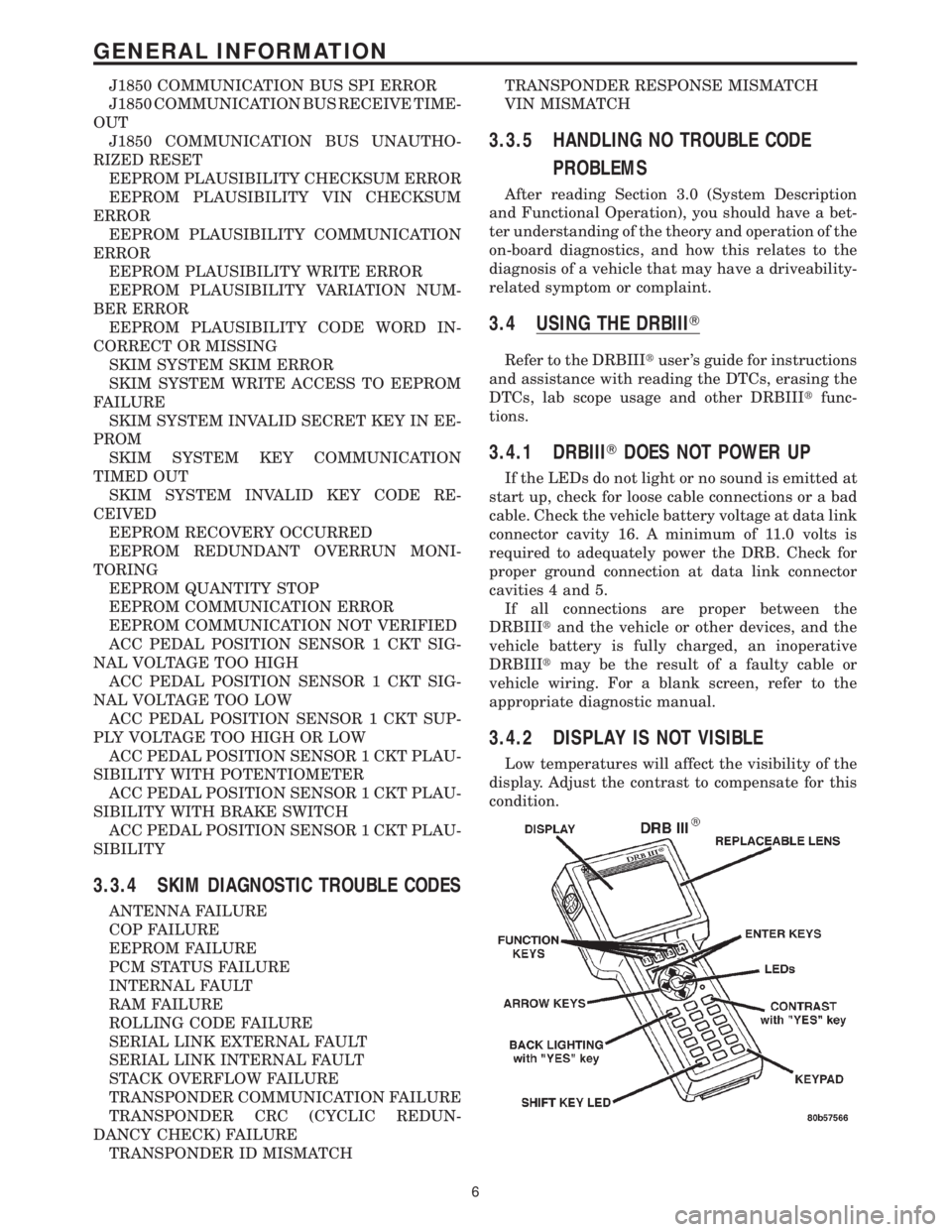
J1850 COMMUNICATION BUS SPI ERROR
J1850 COMMUNICATION BUS RECEIVE TIME-
OUT
J1850 COMMUNICATION BUS UNAUTHO-
RIZED RESET
EEPROM PLAUSIBILITY CHECKSUM ERROR
EEPROM PLAUSIBILITY VIN CHECKSUM
ERROR
EEPROM PLAUSIBILITY COMMUNICATION
ERROR
EEPROM PLAUSIBILITY WRITE ERROR
EEPROM PLAUSIBILITY VARIATION NUM-
BER ERROR
EEPROM PLAUSIBILITY CODE WORD IN-
CORRECT OR MISSING
SKIM SYSTEM SKIM ERROR
SKIM SYSTEM WRITE ACCESS TO EEPROM
FAILURE
SKIM SYSTEM INVALID SECRET KEY IN EE-
PROM
SKIM SYSTEM KEY COMMUNICATION
TIMED OUT
SKIM SYSTEM INVALID KEY CODE RE-
CEIVED
EEPROM RECOVERY OCCURRED
EEPROM REDUNDANT OVERRUN MONI-
TORING
EEPROM QUANTITY STOP
EEPROM COMMUNICATION ERROR
EEPROM COMMUNICATION NOT VERIFIED
ACC PEDAL POSITION SENSOR 1 CKT SIG-
NAL VOLTAGE TOO HIGH
ACC PEDAL POSITION SENSOR 1 CKT SIG-
NAL VOLTAGE TOO LOW
ACC PEDAL POSITION SENSOR 1 CKT SUP-
PLY VOLTAGE TOO HIGH OR LOW
ACC PEDAL POSITION SENSOR 1 CKT PLAU-
SIBILITY WITH POTENTIOMETER
ACC PEDAL POSITION SENSOR 1 CKT PLAU-
SIBILITY WITH BRAKE SWITCH
ACC PEDAL POSITION SENSOR 1 CKT PLAU-
SIBILITY
3.3.4 SKIM DIAGNOSTIC TROUBLE CODES
ANTENNA FAILURE
COP FAILURE
EEPROM FAILURE
PCM STATUS FAILURE
INTERNAL FAULT
RAM FAILURE
ROLLING CODE FAILURE
SERIAL LINK EXTERNAL FAULT
SERIAL LINK INTERNAL FAULT
STACK OVERFLOW FAILURE
TRANSPONDER COMMUNICATION FAILURE
TRANSPONDER CRC (CYCLIC REDUN-
DANCY CHECK) FAILURE
TRANSPONDER ID MISMATCHTRANSPONDER RESPONSE MISMATCH
VIN MISMATCH
3.3.5 HANDLING NO TROUBLE CODE
PROBLEMS
After reading Section 3.0 (System Description
and Functional Operation), you should have a bet-
ter understanding of the theory and operation of the
on-board diagnostics, and how this relates to the
diagnosis of a vehicle that may have a driveability-
related symptom or complaint.
3.4 USING THE DRBIIIT
Refer to the DRBIIItuser 's guide for instructions
and assistance with reading the DTCs, erasing the
DTCs, lab scope usage and other DRBIIItfunc-
tions.
3.4.1 DRBIIITDOES NOT POWER UP
If the LEDs do not light or no sound is emitted at
start up, check for loose cable connections or a bad
cable. Check the vehicle battery voltage at data link
connector cavity 16. A minimum of 11.0 volts is
required to adequately power the DRB. Check for
proper ground connection at data link connector
cavities 4 and 5.
If all connections are proper between the
DRBIIItand the vehicle or other devices, and the
vehicle battery is fully charged, an inoperative
DRBIIItmay be the result of a faulty cable or
vehicle wiring. For a blank screen, refer to the
appropriate diagnostic manual.
3.4.2 DISPLAY IS NOT VISIBLE
Low temperatures will affect the visibility of the
display. Adjust the contrast to compensate for this
condition.
6
GENERAL INFORMATION
Page 1300 of 4284
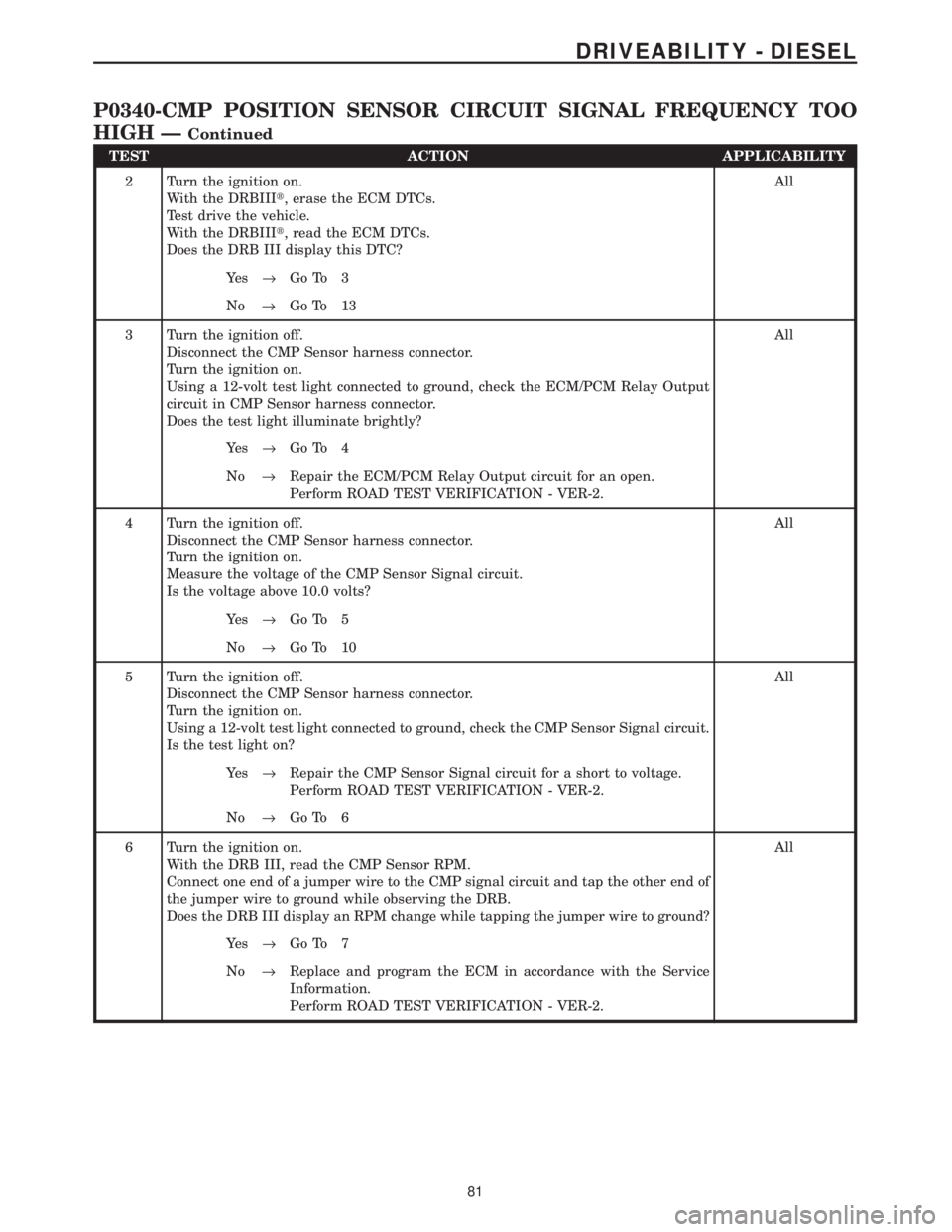
TEST ACTION APPLICABILITY
2 Turn the ignition on.
With the DRBIIIt, erase the ECM DTCs.
Test drive the vehicle.
With the DRBIIIt, read the ECM DTCs.
Does the DRB III display this DTC?All
Ye s®Go To 3
No®Go To 13
3 Turn the ignition off.
Disconnect the CMP Sensor harness connector.
Turn the ignition on.
Using a 12-volt test light connected to ground, check the ECM/PCM Relay Output
circuit in CMP Sensor harness connector.
Does the test light illuminate brightly?All
Ye s®Go To 4
No®Repair the ECM/PCM Relay Output circuit for an open.
Perform ROAD TEST VERIFICATION - VER-2.
4 Turn the ignition off.
Disconnect the CMP Sensor harness connector.
Turn the ignition on.
Measure the voltage of the CMP Sensor Signal circuit.
Is the voltage above 10.0 volts?All
Ye s®Go To 5
No®Go To 10
5 Turn the ignition off.
Disconnect the CMP Sensor harness connector.
Turn the ignition on.
Using a 12-volt test light connected to ground, check the CMP Sensor Signal circuit.
Is the test light on?All
Ye s®Repair the CMP Sensor Signal circuit for a short to voltage.
Perform ROAD TEST VERIFICATION - VER-2.
No®Go To 6
6 Turn the ignition on.
With the DRB III, read the CMP Sensor RPM.
Connect one end of a jumper wire to the CMP signal circuit and tap the other end of
the jumper wire to ground while observing the DRB.
Does the DRB III display an RPM change while tapping the jumper wire to ground?All
Ye s®Go To 7
No®Replace and program the ECM in accordance with the Service
Information.
Perform ROAD TEST VERIFICATION - VER-2.
81
DRIVEABILITY - DIESEL
P0340-CMP POSITION SENSOR CIRCUIT SIGNAL FREQUENCY TOO
HIGH Ð
Continued