wiring CHRYSLER VOYAGER 2001 Service Manual
[x] Cancel search | Manufacturer: CHRYSLER, Model Year: 2001, Model line: VOYAGER, Model: CHRYSLER VOYAGER 2001Pages: 4284, PDF Size: 83.53 MB
Page 1436 of 4284
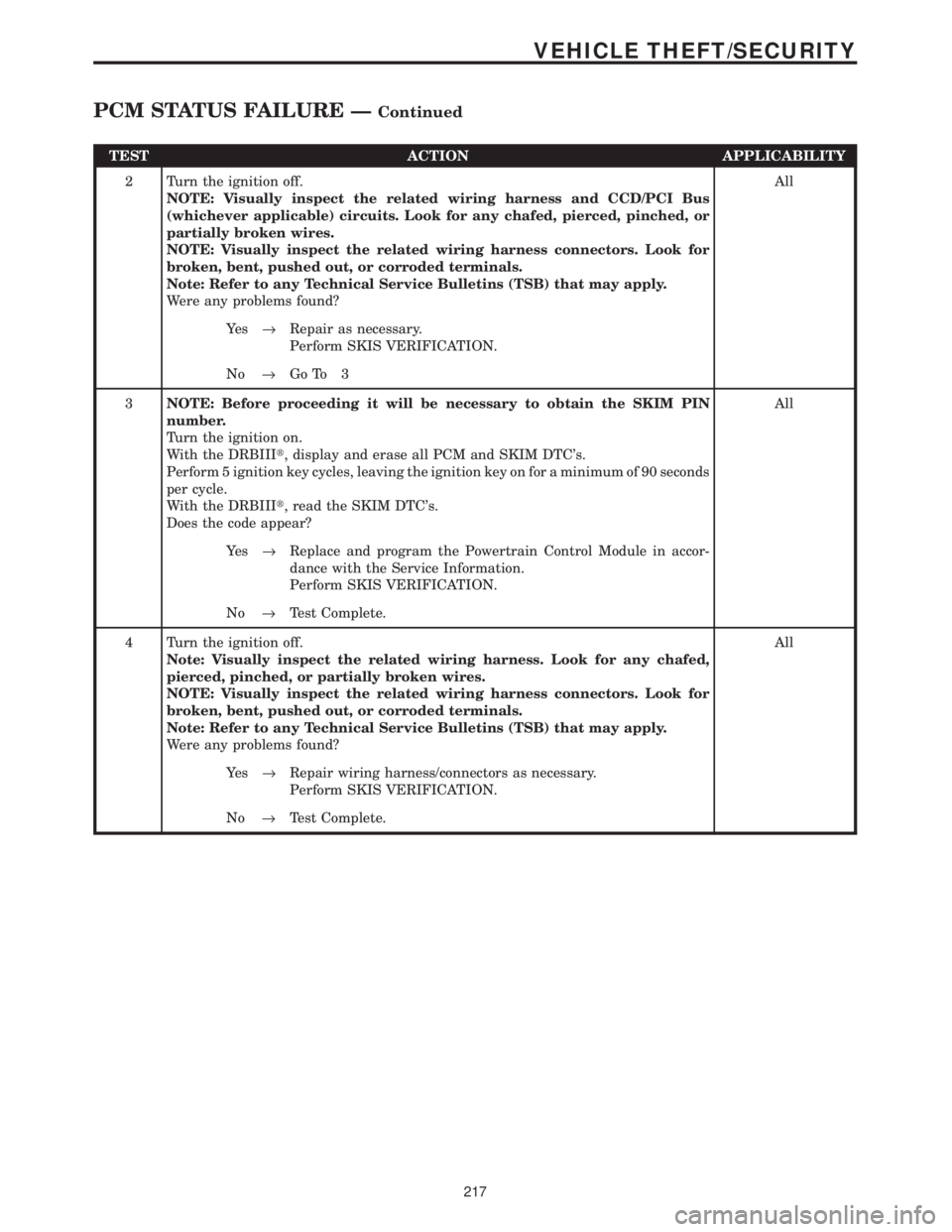
TEST ACTION APPLICABILITY
2 Turn the ignition off.
NOTE: Visually inspect the related wiring harness and CCD/PCI Bus
(whichever applicable) circuits. Look for any chafed, pierced, pinched, or
partially broken wires.
NOTE: Visually inspect the related wiring harness connectors. Look for
broken, bent, pushed out, or corroded terminals.
Note: Refer to any Technical Service Bulletins (TSB) that may apply.
Were any problems found?All
Ye s®Repair as necessary.
Perform SKIS VERIFICATION.
No®Go To 3
3NOTE: Before proceeding it will be necessary to obtain the SKIM PIN
number.
Turn the ignition on.
With the DRBIIIt, display and erase all PCM and SKIM DTC's.
Perform 5 ignition key cycles, leaving the ignition key on for a minimum of 90 seconds
per cycle.
With the DRBIIIt, read the SKIM DTC's.
Does the code appear?All
Ye s®Replace and program the Powertrain Control Module in accor-
dance with the Service Information.
Perform SKIS VERIFICATION.
No®Test Complete.
4 Turn the ignition off.
Note: Visually inspect the related wiring harness. Look for any chafed,
pierced, pinched, or partially broken wires.
NOTE: Visually inspect the related wiring harness connectors. Look for
broken, bent, pushed out, or corroded terminals.
Note: Refer to any Technical Service Bulletins (TSB) that may apply.
Were any problems found?All
Ye s®Repair wiring harness/connectors as necessary.
Perform SKIS VERIFICATION.
No®Test Complete.
217
VEHICLE THEFT/SECURITY
PCM STATUS FAILURE ÐContinued
Page 1437 of 4284
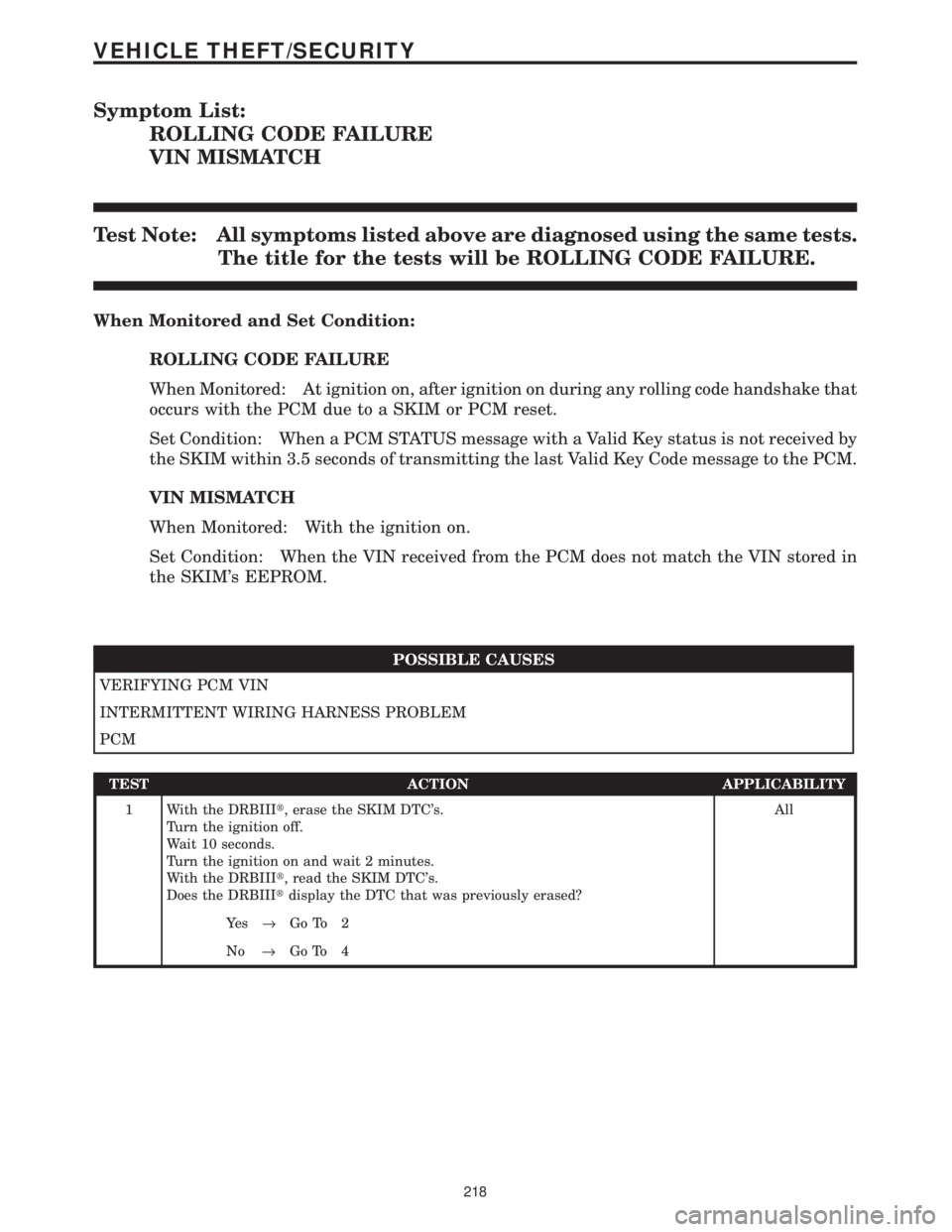
Symptom List:
ROLLING CODE FAILURE
VIN MISMATCH
Test Note: All symptoms listed above are diagnosed using the same tests.
The title for the tests will be ROLLING CODE FAILURE.
When Monitored and Set Condition:
ROLLING CODE FAILURE
When Monitored: At ignition on, after ignition on during any rolling code handshake that
occurs with the PCM due to a SKIM or PCM reset.
Set Condition: When a PCM STATUS message with a Valid Key status is not received by
the SKIM within 3.5 seconds of transmitting the last Valid Key Code message to the PCM.
VIN MISMATCH
When Monitored: With the ignition on.
Set Condition: When the VIN received from the PCM does not match the VIN stored in
the SKIM's EEPROM.
POSSIBLE CAUSES
VERIFYING PCM VIN
INTERMITTENT WIRING HARNESS PROBLEM
PCM
TEST ACTION APPLICABILITY
1 With the DRBIIIt, erase the SKIM DTC's.
Turn the ignition off.
Wait 10 seconds.
Turn the ignition on and wait 2 minutes.
With the DRBIIIt, read the SKIM DTC's.
Does the DRBIIItdisplay the DTC that was previously erased?All
Ye s®Go To 2
No®Go To 4
218
VEHICLE THEFT/SECURITY
Page 1438 of 4284

TEST ACTION APPLICABILITY
2NOTE: Ensure that a VIN has been programmed into the PCM. If a VIN is not
displayed, attempt to program the PCM with the correct vehicle VIN before
continuing.
Turn the ignition on.
With the DRBIIIt, select Engine system from the main menu.
Display and record the Vehicle Identification Number.
Does the VIN recorded from the PCM match the VIN of the vehicle?All
Ye s®Go To 3
No®Replace and program the Powertrain Control Module in accor-
dance with the Service Information.
Perform SKIS VERIFICATION.
3 Turn the ignition off.
Replace and program the Sentry Key Immobilizer Module in accordance with the
Service Information.
Turn the ignition on.
With the DRBIIIt, display and clear all PCM and SKIM DTC's.
Perform 5 ignition key cycles leaving the ignition key on for 90 seconds per cycle.
With the DRBIIIt, check for SKIM DTC's.
Does the DRBIIItdisplay the same DTC?All
Ye s®Replace and program the Powertrain Control Module in accor-
dance with the Service Information.
Perform SKIS VERIFICATION.
No®Test Complete.
4 Turn the ignition off.
Note: Visually inspect the related wiring harness. Look for any chafed,
pierced, pinched, or partially broken wires.
NOTE: Visually inspect the related wiring harness connectors. Look for
broken, bent, pushed out, or corroded terminals.
Note: Refer to any Technical Service Bulletins (TSB) that may apply.
Were any problems found?All
Ye s®Repair wiring harness/connectors as necessary.
Perform SKIS VERIFICATION.
No®Test Complete.
219
VEHICLE THEFT/SECURITY
ROLLING CODE FAILURE ÐContinued
Page 1439 of 4284
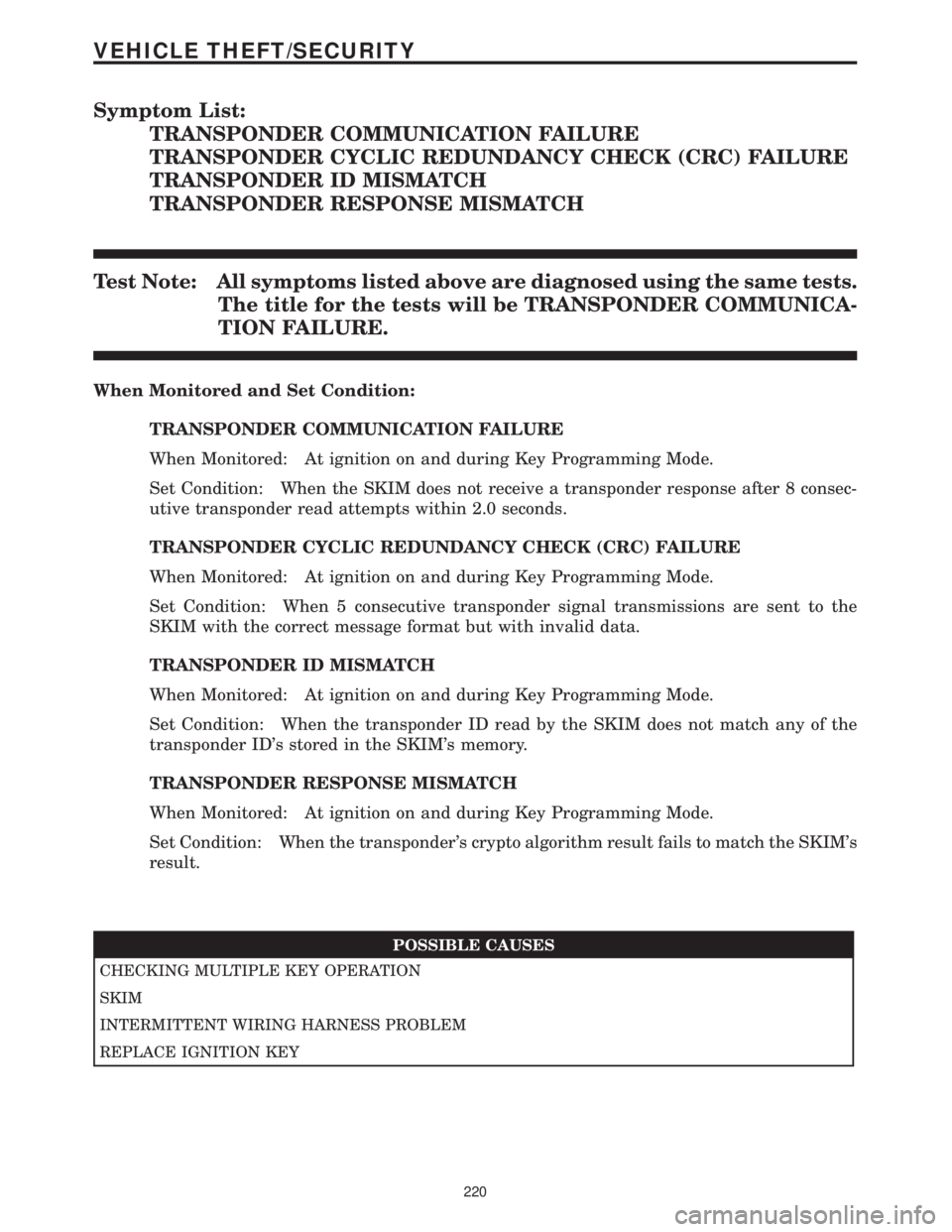
Symptom List:
TRANSPONDER COMMUNICATION FAILURE
TRANSPONDER CYCLIC REDUNDANCY CHECK (CRC) FAILURE
TRANSPONDER ID MISMATCH
TRANSPONDER RESPONSE MISMATCH
Test Note: All symptoms listed above are diagnosed using the same tests.
The title for the tests will be TRANSPONDER COMMUNICA-
TION FAILURE.
When Monitored and Set Condition:
TRANSPONDER COMMUNICATION FAILURE
When Monitored: At ignition on and during Key Programming Mode.
Set Condition: When the SKIM does not receive a transponder response after 8 consec-
utive transponder read attempts within 2.0 seconds.
TRANSPONDER CYCLIC REDUNDANCY CHECK (CRC) FAILURE
When Monitored: At ignition on and during Key Programming Mode.
Set Condition: When 5 consecutive transponder signal transmissions are sent to the
SKIM with the correct message format but with invalid data.
TRANSPONDER ID MISMATCH
When Monitored: At ignition on and during Key Programming Mode.
Set Condition: When the transponder ID read by the SKIM does not match any of the
transponder ID's stored in the SKIM's memory.
TRANSPONDER RESPONSE MISMATCH
When Monitored: At ignition on and during Key Programming Mode.
Set Condition: When the transponder's crypto algorithm result fails to match the SKIM's
result.
POSSIBLE CAUSES
CHECKING MULTIPLE KEY OPERATION
SKIM
INTERMITTENT WIRING HARNESS PROBLEM
REPLACE IGNITION KEY
220
VEHICLE THEFT/SECURITY
Page 1441 of 4284
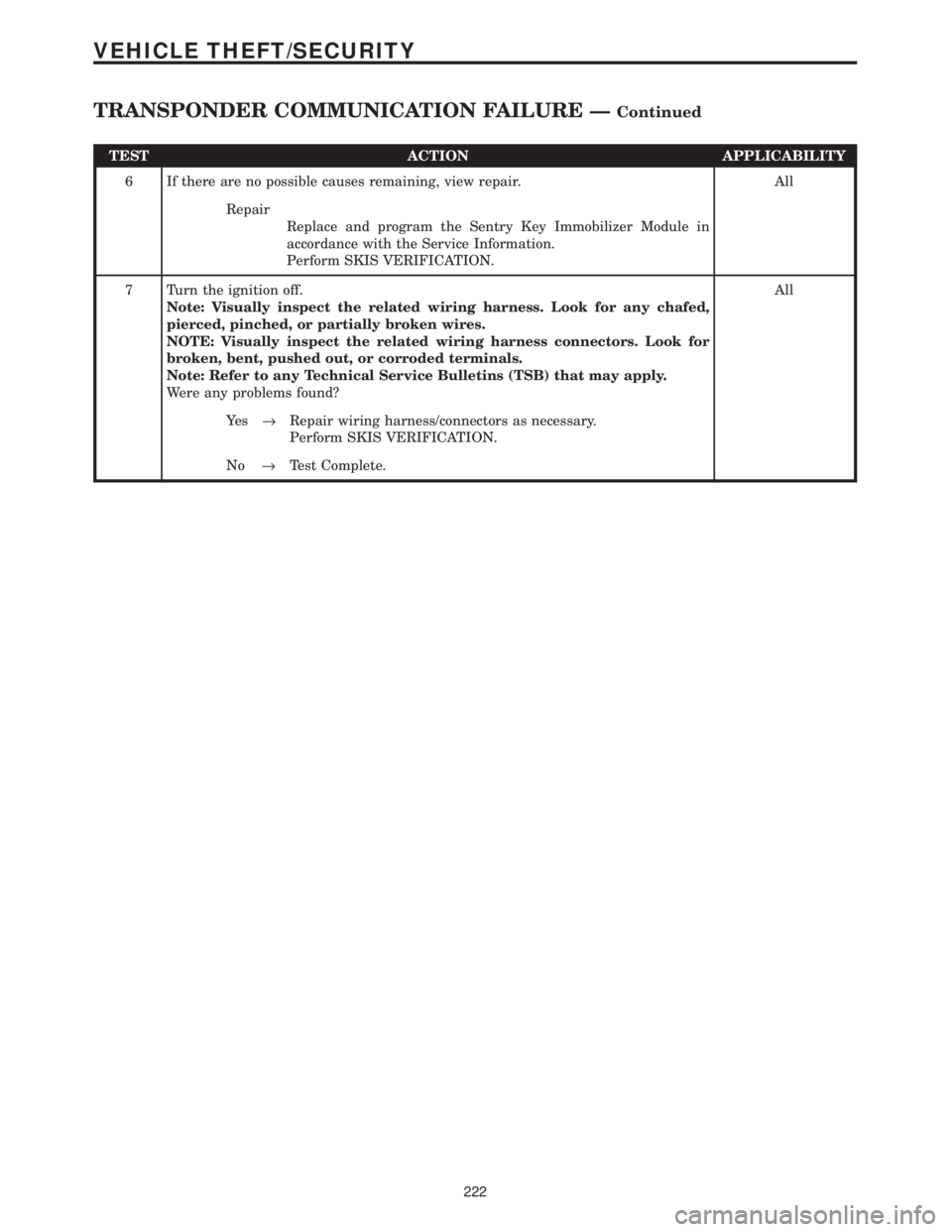
TEST ACTION APPLICABILITY
6 If there are no possible causes remaining, view repair. All
Repair
Replace and program the Sentry Key Immobilizer Module in
accordance with the Service Information.
Perform SKIS VERIFICATION.
7 Turn the ignition off.
Note: Visually inspect the related wiring harness. Look for any chafed,
pierced, pinched, or partially broken wires.
NOTE: Visually inspect the related wiring harness connectors. Look for
broken, bent, pushed out, or corroded terminals.
Note: Refer to any Technical Service Bulletins (TSB) that may apply.
Were any problems found?All
Ye s®Repair wiring harness/connectors as necessary.
Perform SKIS VERIFICATION.
No®Test Complete.
222
VEHICLE THEFT/SECURITY
TRANSPONDER COMMUNICATION FAILURE ÐContinued
Page 1468 of 4284

GROUP TAB LOCATOR
INIntroduction
INaIntroduction
0Lubrication & Maintenance
0aLubrication & Maintenance
2Suspension
2aSuspension
3Differential & Driveline
5Brakes
5aBrakes
6aClutch
7Cooling
7aCooling
8AAudio
8AaAudio
8BChime/Buzzer
8BaChime/Buzzer
8EElectronic Control Modules
8FEngine Systems
8FaEngine Systems
8GHeated Systems
8HHorn
8IIgnition Control
8JInstrument Cluster
8JaInstrument Cluster
8LLamps
8LaLamps
8MMessage Systems
8NPower Systems
8NaPower Systems
8ORestraints
8PSpeed Control
8QVehicle Theft Security
8RWipers/Washers
8WaWiring
9Engine
9aEngine
11Exhaust System
11aExhaust System
13Frame & Bumpers
14Fuel System
14aFuel System
19Steering
19aSteering
21Transmission/Transaxle
21aTransmission/Transaxle
22Tires/Wheels
23Body
24Heating & Air Conditioning
24aHeating & Air Conditioning
25Emissions Control
25aEmissions Control
Service Manual Comment Forms
Page 1630 of 4284
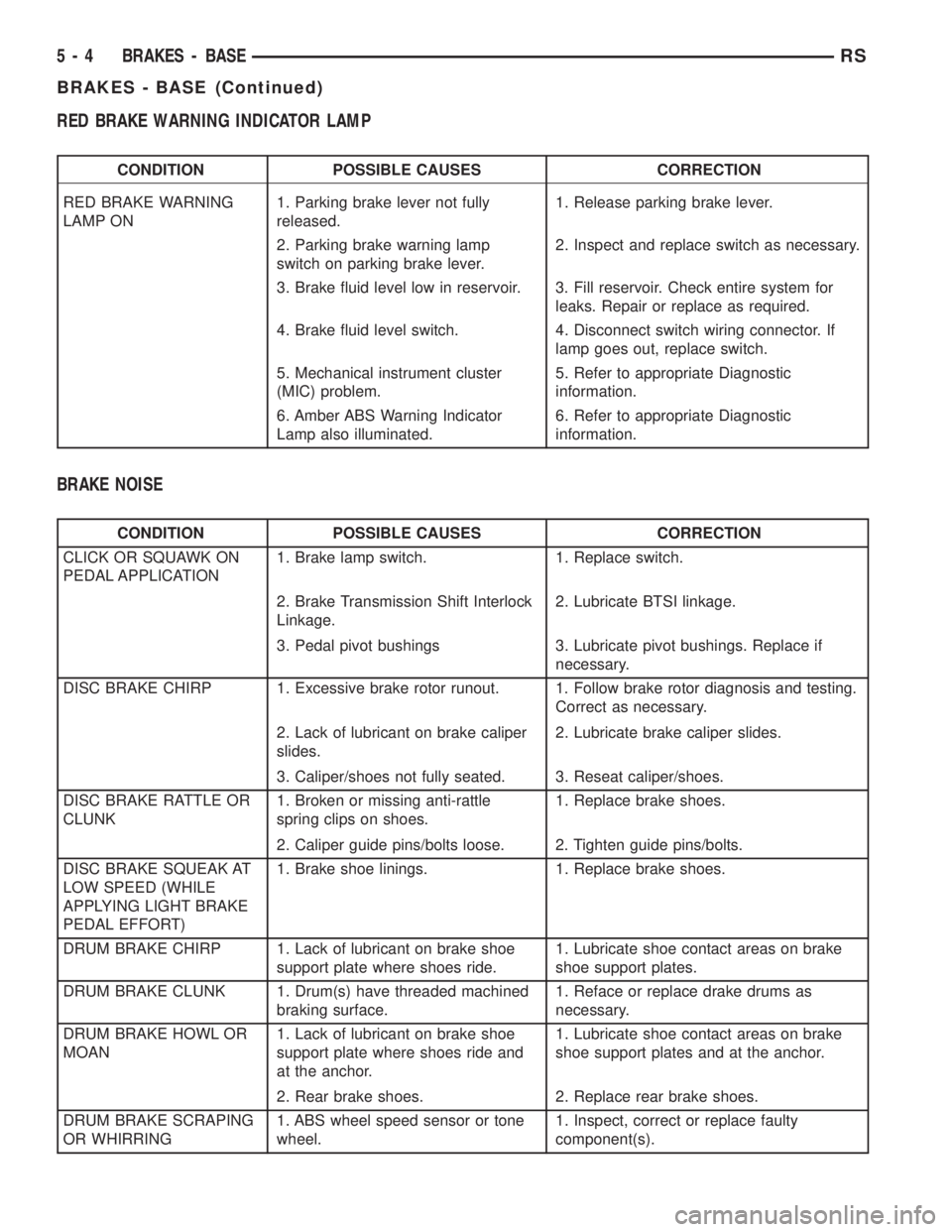
RED BRAKE WARNING INDICATOR LAMP
CONDITION POSSIBLE CAUSES CORRECTION
RED BRAKE WARNING
LAMP ON1. Parking brake lever not fully
released.1. Release parking brake lever.
2. Parking brake warning lamp
switch on parking brake lever.2. Inspect and replace switch as necessary.
3. Brake fluid level low in reservoir. 3. Fill reservoir. Check entire system for
leaks. Repair or replace as required.
4. Brake fluid level switch. 4. Disconnect switch wiring connector. If
lamp goes out, replace switch.
5. Mechanical instrument cluster
(MIC) problem.5. Refer to appropriate Diagnostic
information.
6. Amber ABS Warning Indicator
Lamp also illuminated.6. Refer to appropriate Diagnostic
information.
BRAKE NOISE
CONDITION POSSIBLE CAUSES CORRECTION
CLICK OR SQUAWK ON
PEDAL APPLICATION1. Brake lamp switch. 1. Replace switch.
2. Brake Transmission Shift Interlock
Linkage.2. Lubricate BTSI linkage.
3. Pedal pivot bushings 3. Lubricate pivot bushings. Replace if
necessary.
DISC BRAKE CHIRP 1. Excessive brake rotor runout. 1. Follow brake rotor diagnosis and testing.
Correct as necessary.
2. Lack of lubricant on brake caliper
slides.2. Lubricate brake caliper slides.
3. Caliper/shoes not fully seated. 3. Reseat caliper/shoes.
DISC BRAKE RATTLE OR
CLUNK1. Broken or missing anti-rattle
spring clips on shoes.1. Replace brake shoes.
2. Caliper guide pins/bolts loose. 2. Tighten guide pins/bolts.
DISC BRAKE SQUEAK AT
LOW SPEED (WHILE
APPLYING LIGHT BRAKE
PEDAL EFFORT)1. Brake shoe linings. 1. Replace brake shoes.
DRUM BRAKE CHIRP 1. Lack of lubricant on brake shoe
support plate where shoes ride.1. Lubricate shoe contact areas on brake
shoe support plates.
DRUM BRAKE CLUNK 1. Drum(s) have threaded machined
braking surface.1. Reface or replace drake drums as
necessary.
DRUM BRAKE HOWL OR
MOAN1. Lack of lubricant on brake shoe
support plate where shoes ride and
at the anchor.1. Lubricate shoe contact areas on brake
shoe support plates and at the anchor.
2. Rear brake shoes. 2. Replace rear brake shoes.
DRUM BRAKE SCRAPING
OR WHIRRING1. ABS wheel speed sensor or tone
wheel.1. Inspect, correct or replace faulty
component(s).
5 - 4 BRAKES - BASERS
BRAKES - BASE (Continued)
Page 1635 of 4284
BRAKE FLUID LEVEL SWITCH
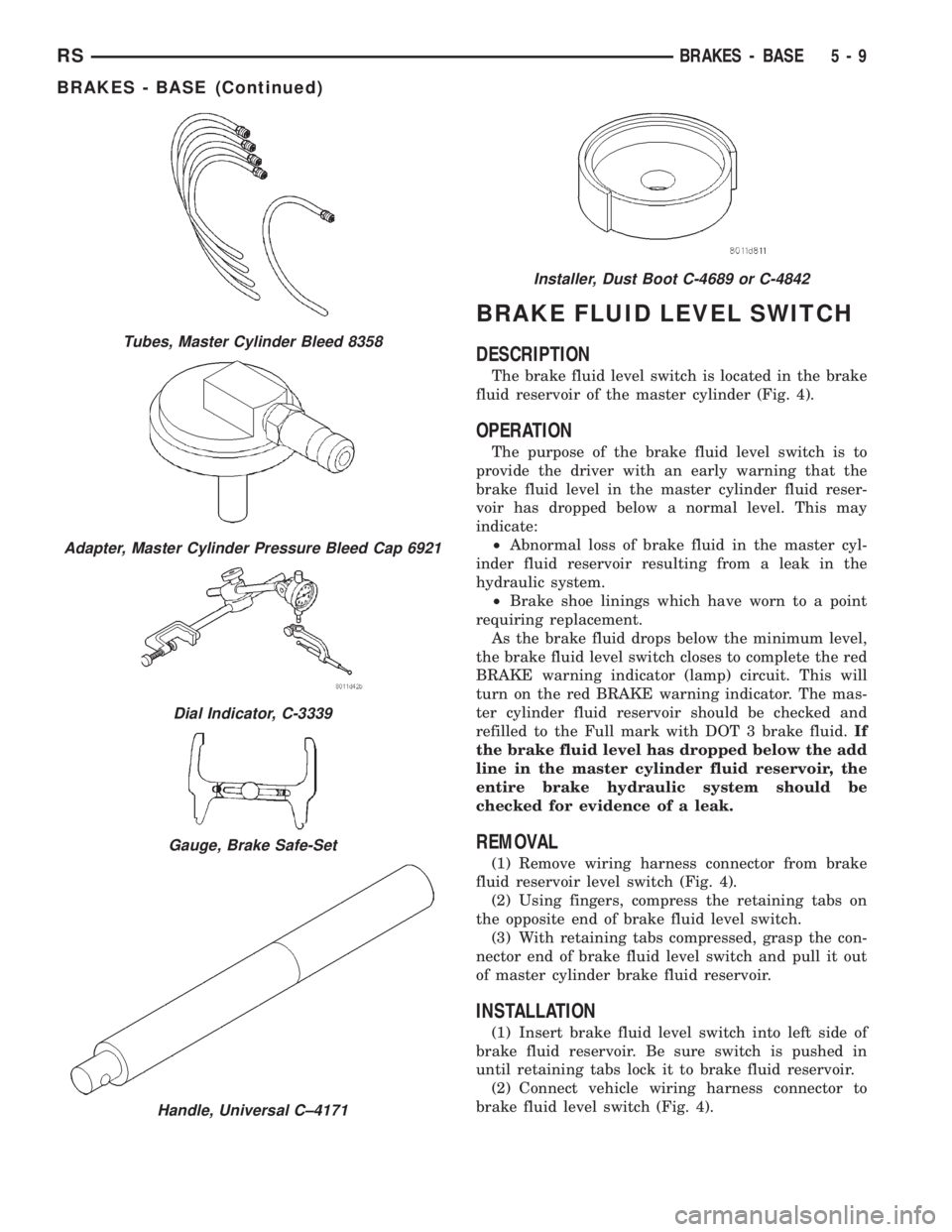
DESCRIPTION
The brake fluid level switch is located in the brake
fluid reservoir of the master cylinder (Fig. 4).
OPERATION
The purpose of the brake fluid level switch is to
provide the driver with an early warning that the
brake fluid level in the master cylinder fluid reser-
voir has dropped below a normal level. This may
indicate:
²Abnormal loss of brake fluid in the master cyl-
inder fluid reservoir resulting from a leak in the
hydraulic system.
²Brake shoe linings which have worn to a point
requiring replacement.
As the brake fluid drops below the minimum level,
the brake fluid level switch closes to complete the red
BRAKE warning indicator (lamp) circuit. This will
turn on the red BRAKE warning indicator. The mas-
ter cylinder fluid reservoir should be checked and
refilled to the Full mark with DOT 3 brake fluid.If
the brake fluid level has dropped below the add
line in the master cylinder fluid reservoir, the
entire brake hydraulic system should be
checked for evidence of a leak.
REMOVAL
(1) Remove wiring harness connector from brake
fluid reservoir level switch (Fig. 4).
(2) Using fingers, compress the retaining tabs on
the opposite end of brake fluid level switch.
(3) With retaining tabs compressed, grasp the con-
nector end of brake fluid level switch and pull it out
of master cylinder brake fluid reservoir.
INSTALLATION
(1) Insert brake fluid level switch into left side of
brake fluid reservoir. Be sure switch is pushed in
until retaining tabs lock it to brake fluid reservoir.
(2) Connect vehicle wiring harness connector to
brake fluid level switch (Fig. 4).
Tubes, Master Cylinder Bleed 8358
Adapter, Master Cylinder Pressure Bleed Cap 6921
Dial Indicator, C-3339
Gauge, Brake Safe-Set
Handle, Universal C±4171
Installer, Dust Boot C-4689 or C-4842
RSBRAKES - BASE5-9
BRAKES - BASE (Continued)
Page 1659 of 4284

(4) Remove the four chassis brake tubes from the
top of the junction block (Fig. 46).
(5) Remove the primary and secondary brake
tubes from the top of the junction block.
(6) Remove the bolts attaching the junction block
mounting bracket to the front suspension crossmem-
ber (Fig. 46), then remove the junction block.
INSTALLATION - NON-ABS JUNCTION BLOCK
(1) Install the junction block and mounting bracket
on the front suspension crossmember (Fig. 46).
Install the mounting bolts and tighten to a torque of
28 N´m (250 in. lbs.).
(2) Install the primary and secondary brake tubes
from the master cylinder in their ports. Tighten tube
nuts to a torque of 17 N´m (145 in. lbs.).Take care
not to twist tubes when tightening tube nuts.
They must be properly positioned to allow free
movement with rubber isolated suspension
crossmember.
(3) Install the four chassis brake tubes into the
outlet ports of the junction block. Tighten all 6 tube
nuts to a torque of 17 N´m (145 in. lbs.).
(4) If the vehicle is equipped with speed control,
perform the following:
(a) Install the speed control servo with its
mounting nuts.
(b) Connect the wiring harness to the speed con-
trol servo.
(c) Install the battery tray (Refer to 8 - ELEC-
TRICAL/BATTERY SYSTEM/TRAY - INSTALLA-
TION).(d) Install the screw securing the coolant filler
neck to the battery tray.
(e) Reconnect the vacuum hose connector at the
tank built into the battery tray.
(f) Install the battery (Refer to 8 - ELECTRI-
CAL/BATTERY SYSTEM/BATTERY - INSTALLA-
TION).
(g) Install the battery shield.
(5) Remove the brake pedal holder.
(6) Connect negative cable back on negative post of
the battery.
(7) Bleed the brake system thoroughly to ensure
that all air has been expelled from the hydraulic sys-
tem. (Refer to 5 - BRAKES - STANDARD PROCE-
DURE).
(8) Road test the vehicle to verify proper operation
of the brake system.
MASTER CYLINDER
DESCRIPTION
The master cylinder is located on the power brake
booster in the engine compartment on the driver's
side (Fig. 47). This vehicle uses 3 different master
cylinders. Master cylinder usage depends on what
type of brake system the vehicle is equipped with.
CAUTION: Master cylinders are not interchangeable
between systems. Performance and stopping dis-
tance issues will result if the incorrect master cyl-
inder is installed on the vehicle.
Fig. 46 NON-ABS JUNCTION BLOCK
1 - MASTER CYLINDER
2 - JUNCTION BLOCK
3 - SUSPENSION CROSSMEMBER
4 - MOUNTING BOLTS
Fig. 47 MASTER CYLINDER AND BOOSTER
LOCATION
1 - MASTER CYLINDER
2 - POWER BRAKE BOOSTER
RSBRAKES - BASE5-33
JUNCTION BLOCK (Continued)
Page 1661 of 4284
(6) Thoroughly clean all surfaces of the brake fluid
reservoir and master cylinder. Use only solvent such
as MopartBrake Parts Cleaner or equivalent.
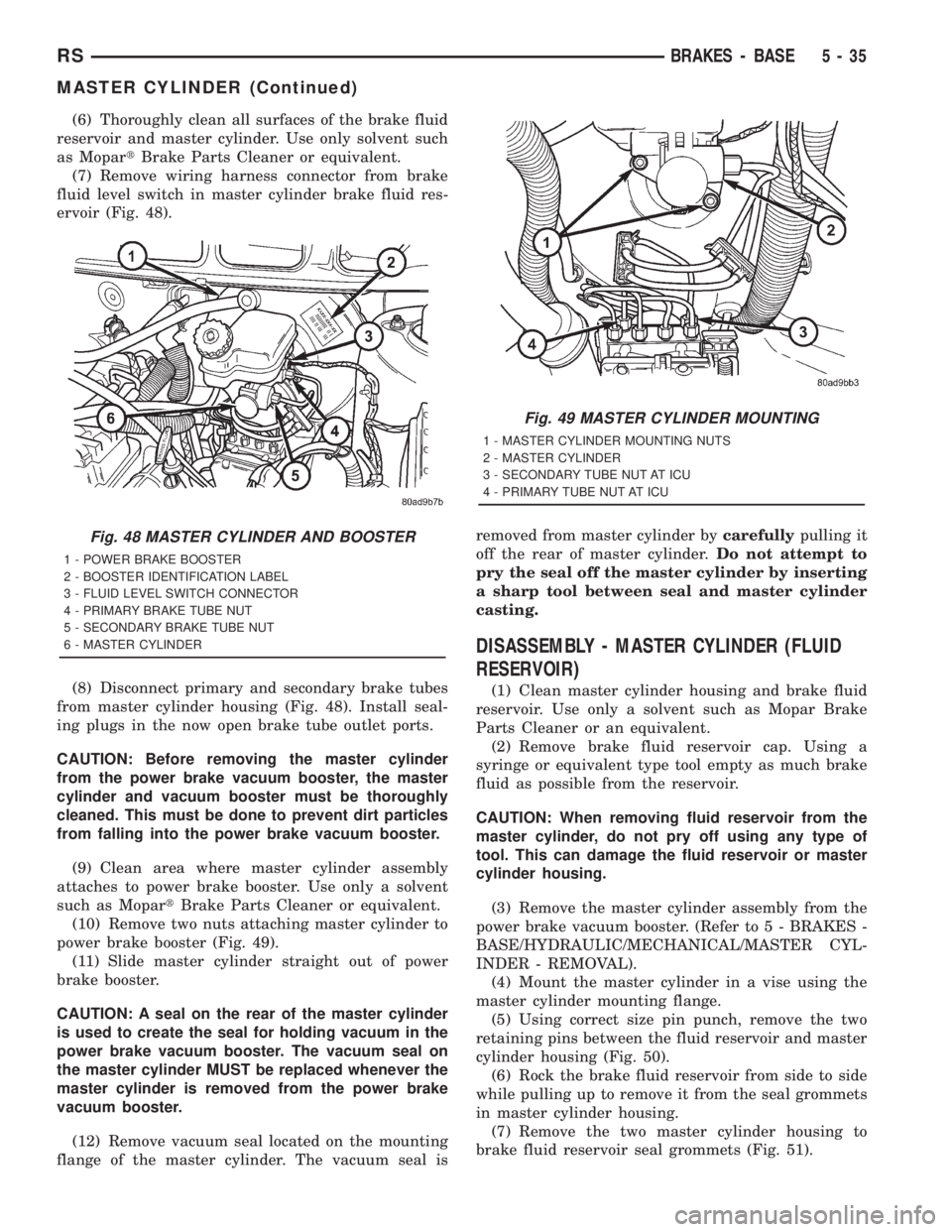
(7) Remove wiring harness connector from brake
fluid level switch in master cylinder brake fluid res-
ervoir (Fig. 48).
(8) Disconnect primary and secondary brake tubes
from master cylinder housing (Fig. 48). Install seal-
ing plugs in the now open brake tube outlet ports.
CAUTION: Before removing the master cylinder
from the power brake vacuum booster, the master
cylinder and vacuum booster must be thoroughly
cleaned. This must be done to prevent dirt particles
from falling into the power brake vacuum booster.
(9) Clean area where master cylinder assembly
attaches to power brake booster. Use only a solvent
such as MopartBrake Parts Cleaner or equivalent.
(10) Remove two nuts attaching master cylinder to
power brake booster (Fig. 49).
(11) Slide master cylinder straight out of power
brake booster.
CAUTION: A seal on the rear of the master cylinder
is used to create the seal for holding vacuum in the
power brake vacuum booster. The vacuum seal on
the master cylinder MUST be replaced whenever the
master cylinder is removed from the power brake
vacuum booster.
(12) Remove vacuum seal located on the mounting
flange of the master cylinder. The vacuum seal isremoved from master cylinder bycarefullypulling it
off the rear of master cylinder.Do not attempt to
pry the seal off the master cylinder by inserting
a sharp tool between seal and master cylinder
casting.
DISASSEMBLY - MASTER CYLINDER (FLUID
RESERVOIR)
(1) Clean master cylinder housing and brake fluid
reservoir. Use only a solvent such as Mopar Brake
Parts Cleaner or an equivalent.
(2) Remove brake fluid reservoir cap. Using a
syringe or equivalent type tool empty as much brake
fluid as possible from the reservoir.
CAUTION: When removing fluid reservoir from the
master cylinder, do not pry off using any type of
tool. This can damage the fluid reservoir or master
cylinder housing.
(3) Remove the master cylinder assembly from the
power brake vacuum booster. (Refer to 5 - BRAKES -
BASE/HYDRAULIC/MECHANICAL/MASTER CYL-
INDER - REMOVAL).
(4) Mount the master cylinder in a vise using the
master cylinder mounting flange.
(5) Using correct size pin punch, remove the two
retaining pins between the fluid reservoir and master
cylinder housing (Fig. 50).
(6) Rock the brake fluid reservoir from side to side
while pulling up to remove it from the seal grommets
in master cylinder housing.
(7) Remove the two master cylinder housing to
brake fluid reservoir seal grommets (Fig. 51).
Fig. 48 MASTER CYLINDER AND BOOSTER
1 - POWER BRAKE BOOSTER
2 - BOOSTER IDENTIFICATION LABEL
3 - FLUID LEVEL SWITCH CONNECTOR
4 - PRIMARY BRAKE TUBE NUT
5 - SECONDARY BRAKE TUBE NUT
6 - MASTER CYLINDER
Fig. 49 MASTER CYLINDER MOUNTING
1 - MASTER CYLINDER MOUNTING NUTS
2 - MASTER CYLINDER
3 - SECONDARY TUBE NUT AT ICU
4 - PRIMARY TUBE NUT AT ICU
RSBRAKES - BASE5-35
MASTER CYLINDER (Continued)