traction control CITROEN BERLINGO VAN 2019 User Guide
[x] Cancel search | Manufacturer: CITROEN, Model Year: 2019, Model line: BERLINGO VAN, Model: CITROEN BERLINGO VAN 2019Pages: 324, PDF Size: 9.41 MB
Page 99 of 324
97
Safety
5Operation
The system is activated automatically when the
ignition is switched on.
The electronic stability control system (ESC)
must not have any faults.
The vehicle speed must be between 37 and 99
mph (60 and 160 km/h).
If the system detects that the trailer is
snaking, it applies the brakes to stabilise
the trailer and reduces engine power, if
necessary, to slow the vehicle (indicated by the
flashing of this warning lamp on the instrument
panel and the brake lamps coming on).
For information on weights and towed loads,
refer to the Engine technical data and towed
loads section or your vehicle’s registration
certificate.
To ensure safe driving with a Towing device,
refer to the corresponding section.
Malfunction
If a fault occurs, this warning lamp lights
up on the instrument panel, accompanied
by a message and an audible signal.
To continue towing a trailer, reduce speed and
drive carefully!
Have it checked by a CITROËN dealer or a
qualified workshop.
The trailer stability control system provides an extra safety feature under
normal driving conditions, when following the
recommendations for use of trailers and
current legislation in force in your country. It
must not encourage the driver to take extra
risks, such as using a trailer in unsuitable
conditions of operation (e.g.
excessive load,
exceeded nose weight, worn or under-inflated
tyres, faulty braking system) or driving at
excessive speed.
In certain cases, the system may not detect
trailer snaking, particularly with a light trailer.
When driving on slippery or poor surfaces, the
system may not be able to prevent sudden
trailer snaking.
Advanced Grip Control
(Depending on version)
A special, patented traction control system,
which improves driveability on snow, mud and
sand.
This system, optimised for operation in a range
of conditions, enables you to manoeuvre in most
slippery conditions (encountered during normal
passenger car use).
When combined with all-season Peak Mountain
Snow Flake tyres, this system offers a
compromise between safety, grip and driveability.
When combined with suitable tyres, this system
offers a compromise between safety, grip and
driveability.
The accelerator pedal should be pressed
sufficiently to allow the system to harness the
power of the engine. Operation at high engine
speeds is completely normal.
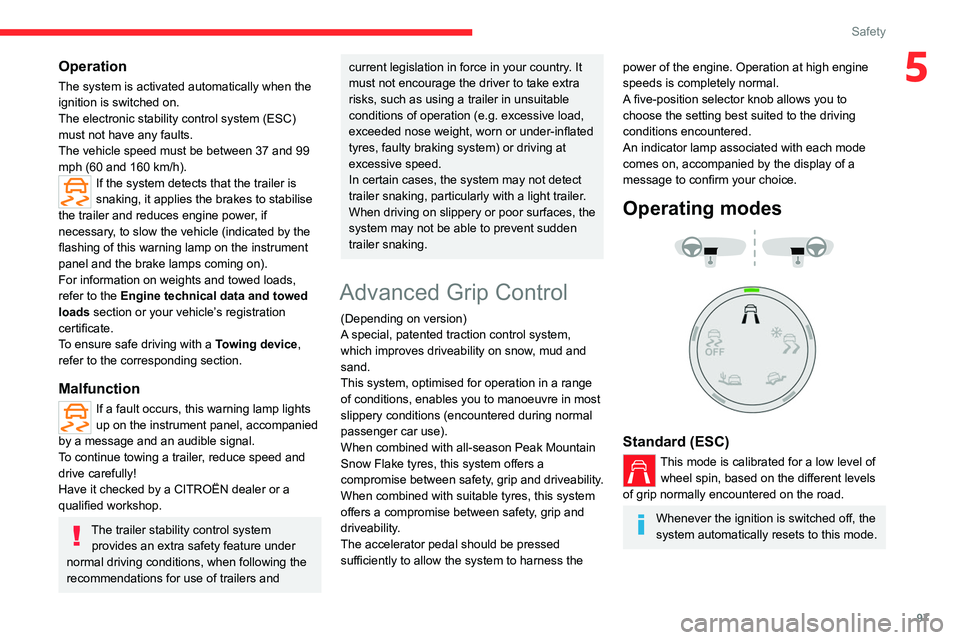
A five-position selector knob allows you to
choose the setting best suited to the driving
conditions encountered.
An indicator lamp associated with each mode
comes on, accompanied by the display of a
message to confirm your choice.
Operating modes
Standard (ESC)
This mode is calibrated for a low level of wheel spin, based on the different levels
of grip normally encountered on the road.
Whenever the ignition is switched off, the
system automatically resets to this mode.
Page 134 of 324
132
Driving
Switching the vehicle off
Regardless of the current gearbox mode, mode
P is immediately engaged automatically when
the ignition is switched off.
However, in mode N, mode P will be engaged
after a delay of 5 seconds (time to enable free-
wheeling mode).
Check that mode P has been engaged and
that the electric parking brake was applied
automatically; if not, apply it manually.
The corresponding indicator lamps on the gear selector and the electric parking
brake control must be on, as well as the
indicator
lamps on the instrument panel.
Gearbox malfunction
This warning lamp comes on, accompanied by an audible signal and
the display of a message.
Visit a CITROËN dealer or a qualified workshop.
Do not drive faster than 62
mph (100 km/h),
keeping to the speed limit.
Switching of the gearbox to back-up mode
Mode D locks in third gear.
The paddles on the steering wheel do not work
and mode M is no longer accessible.
You may feel a significant jolt on engaging
reverse gear. This will not damage the gearbox.
Selector malfunction
Minor malfunction
This warning lamp comes on, accompanied by the display of a message
and an audible signal.
Drive carefully.
Visit a CITROËN dealer or a qualified workshop.
In some cases, the selector indicator lamps may
no longer come on, but the gearbox state is still
displayed on the instrument panel.
Major malfunction
This warning lamp comes on, accompanied by the display of a
message.
You must stop the vehicle.
Stop as soon as it is safe to do so and
switch off the ignition.
Contact a CITROËN dealer or a qualified
workshop.
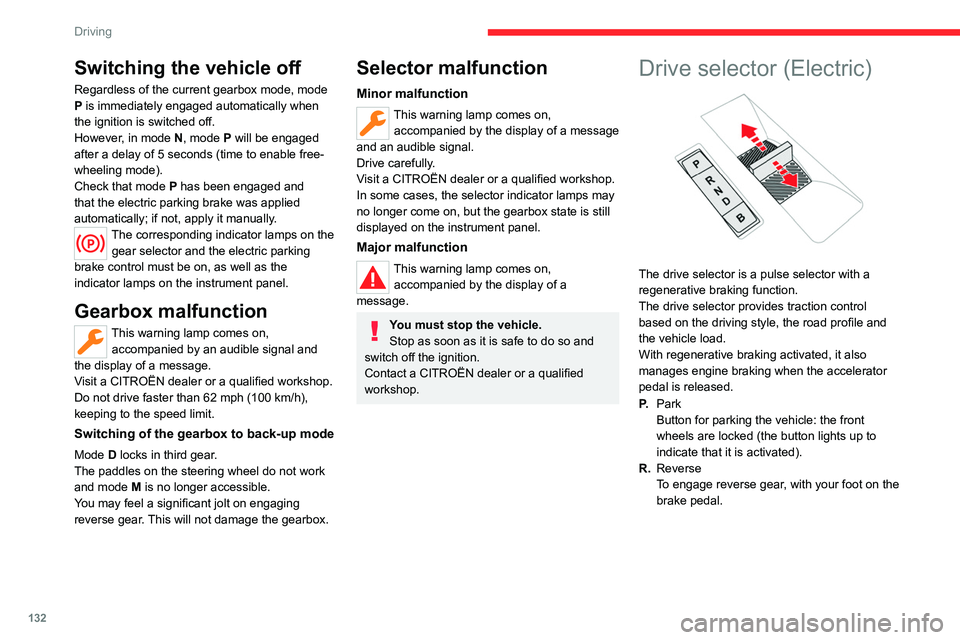
Drive selector (Electric)
The drive selector is a pulse selector with a
regenerative braking function.
The drive selector provides traction control
based on the driving style, the road profile and
the vehicle load.
With regenerative braking activated, it also
manages engine braking when the accelerator
pedal is released.
P. Park
Button for parking the vehicle: the front
wheels are locked (the button lights up to
indicate that it is activated).
R. Reverse
To engage reverse gear, with your foot on the
brake pedal.
Page 135 of 324
133
Driving
6N.Neutral
To move the vehicle with the ignition off and
so allow it to free-wheel.
For more information on Free-wheeling, refer
to the corresponding section.
D. Drive (automatic forward gear)
B. Brake (regenerative braking)
Regenerative braking (the button lights up to
indicate its activation).
Information displayed on
the instrument panel
When the ignition is switched on, the drive
selector status is displayed on the instrument
panel:
P : Park.
R : Reverse.
N : Neutral.
D : Drive (automatic forward gear).
B : Brake (regenerative braking activated).
Operation
► Move the selector by pressing it forwards
( N or R) or rearwards (N or D) once or twice,
passing the point of resistance if necessary.
For example, to change from
P to R (with your
foot on the brake pedal), either push forwards
twice without passing the point of resistance or
push just once, passing the point of resistance.
Regenerative braking
With the Brake function and when
decelerating
The Brake function emulates engine braking,
slowing the vehicle with no need to depress the
brake pedal. The vehicle slows more quickly
when the driver releases the accelerator pedal.
The energy recovered when the accelerator
pedal is released is then used to partially
recharge the traction battery, thereby increasing
the vehicle's driving range.
The resulting deceleration of the vehicle does not cause the brake lamps to come
on.
►
From mode
D/R, press button B to activate/
deactivate the function (the button lights up when
the function is activated).
D/R on the instrument panel is replaced with B.
The system status is not saved when the ignition
is switched off.
In some situations (e.g. battery full,
extreme temperatures), the amount of
regenerative braking may be temporarily
limited, resulting in less deceleration.
The driver must remain alert to traffic
conditions and must always be ready to use
the brake pedal.
With the brake pedal
When the brake pedal is depressed, the
intelligent braking system automatically recovers
some of the energy and uses it to recharge the
traction battery.
This energy recovery also reduces use of the
brake pads, thereby limiting their wear.
The driver may experience a different sensation when depressing the brake
pedal compared to a vehicle without
regenerative braking.
Driving modes
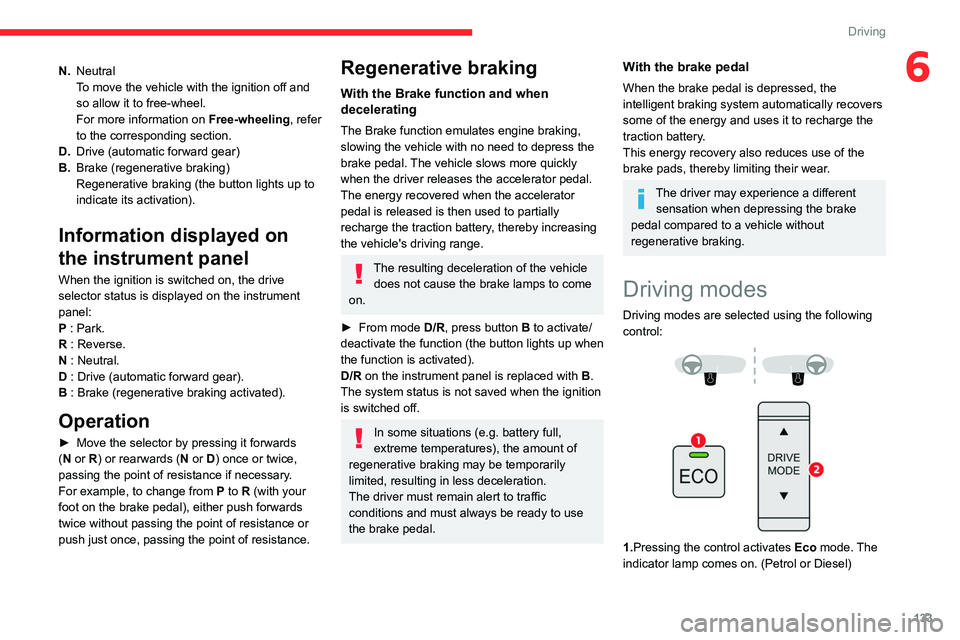
Driving modes are selected using the following
control:
1.Pressing the control activates Eco mode. The
indicator lamp comes on. (Petrol or Diesel)
Page 136 of 324
134
Driving
2.Pressing the control displays the modes on the
instrument panel.
With an electric motor, when starting the vehicle,
no mode can be selected until the READY
indicator lamp is displayed.
When the message disappears, the selected
mode is activated and remains indicated on the
instrument panel (except Normal
mode).
Whenever the ignition is switched on,
Normal
driving mode is selected by default.
Normal
To restore the default settings.
Eco
To reduce energy consumption by reducing the
performance of the heating and air conditioning,
without deactivating them.
To reduce consumption of the traction battery's
electrical energy by limiting engine torque.
Power (Electric)
Allows a fully laden vehicle (GVW) to obtain
equivalent performance to that of an unladen
vehicle in Normal mode.
All modes are displayed on the instrument panel, except for Normal
mode.
Coasting mode
Depending on version or engine, with an
EAT8 gearbox and the gear selector in mode
D, gradually releasing the accelerator pedal
fully allows free-wheeling which can save fuel.
A drop in engine speed is normal (rev counter
at idle, drop in engine noise).
Gear shift indicator
(Depending on engine)
This system is designed to reduce fuel
consumption by recommending the most suitable
gear.
Operation
Depending on the driving situation and
the vehicle's equipment, the system may
recommend skipping one or more gears.
Gear engagement recommendations are
not to be considered mandatory. Indeed, the
configuration of the road, the traffic density and
safety remain determining factors when choosing
the best gear. Therefore, the driver remains
responsible for deciding whether or not to follow
the system’s advice.
The system cannot be deactivated.
With an automatic gearbox, the system is
only active in manual operation.
The information appears on the instrument panel, in the form of an “up” or
“down” arrow and the recommended gear.
The system adapts the gear change instructions according to the driving
conditions (e.g.
slope, load) and driving style
(e.g.
power demand, acceleration, braking).
The system never suggests:
–
engaging first gear;
–
engaging reverse gear
.
Stop & Start (Petrol or
Diesel)
The Stop & Start function puts the engine temporarily into standby - STOP mode - during
phases when the vehicle is stationary (e.g.
red
lights, traffic jams). The engine automatically
restarts - START mode - as soon as the driver
indicates the intention of moving off again.
Primarily designed for urban use, the function
is intended to reduce fuel consumption and
exhaust emissions as well as the noise level
when stationary.
The function does not affect the functionalities of
the vehicle, in particular the braking.
Opening the bonnet
Before doing anything under the bonnet,
deactivate the Stop & Start system to avoid
any risk of injury caused by the engine
restarting automatically.
Page 287 of 324
285
Event data recorders
13Event data recorders
Electronic control units are installed in your
vehicle. Control units process data which is
received by vehicle sensors, for example, or
which they generate themselves or exchange
amongst themselves. Some control units are
necessary for the safe functioning of your
vehicle, others assist you while you drive (driver
assistance systems), while others provide
comfort or infotainment functions.
The following contains general information about
data processing in the vehicle. You will find
additional information as to which specific data is
uploaded, stored and passed on to third parties
and for what purpose in your vehicle under
the key word Data Protection closely linked
to the references for the affected functional
characteristics in the relevant owner's manual
or in the general terms of sale. These are also
available online.
Vehicle operating data
The control units process the data used for the
operation of the vehicle.
This data includes, for example:
–
Information about the state of the vehicle
(e.g.
speed, travel time, lateral acceleration,
wheel rotation rate, fastened seat belts display).
–
Environmental conditions (e.g.
temperature,
rain sensor, distance sensor).
As a general rule, this data is temporary, is
not stored for longer than one operating cycle and is only used within the vehicle itself. The
control units often record this data (including the
vehicle's key). This function allows either the
temporary or permanent storage of information
about the state of the vehicle, stresses on
components, servicing requirements, as well as
events and technical errors.
Depending on the vehicle's equipment level, the
data stored is as follows:
–
Operating state of system components
(e.g.
filling level, tyre pressures, battery charge
status).
–
Faults and malfunctions in important system
components (e.g.
lamps, brakes).
–
System reactions in specific driving situations
(e.g.
deployment of an airbag, triggering of
stability control and braking systems).
–
Information about events which have
damaged the vehicle.
–
For electric and rechargeable hybrid vehicles,
the traction battery charge level and the
estimated driving range.
In particular circumstances (e.g.
if the vehicle
has detected a malfunction), it may be necessary
to record data which would otherwise simply not
be stored.
When taking your vehicle in for servicing
(e.g.
repairs, maintenance), the stored operating
data may be read along with the vehicle's
identification number and used if necessary.
The personnel working for the servicing network
(e.g.
garages, manufacturers) or third parties
(e.g.
roadside assistance agents) may read the vehicle's data. This also applies to work
carried out under warranty and quality assurance
measures.
This data is generally read via the OBD
(On-Board Diagnostics) port fitted by law to
the vehicle. It is used to report on the technical
state of the vehicle or its components and
facilitates the diagnosis of malfunctions, in
compliance with warranty obligations and for
quality improvement. This data, in particular the
information relating to stress on components,
technical events, operator errors and other
malfunctions, is sent to the Manufacturer, if
necessary, along with the vehicle's identification
number. The Manufacturer's liability may also be
engaged. The Manufacturer may also use the
operating data taken from the vehicle for product
recalls. This data may also be used to check the
customer's warranty and any claims made under
warranty.
Any malfunctions stored in the vehicle may be
reset by an after-sales service company during
servicing or repair work, or at your request.
Comfort and infotainment
functions
Comfort settings and personalised settings
may
be saved in the vehicle and modified or
reinitialised at any time.
Depending on the vehicle's equipment level,
this
may
include:
–
Seat and steering wheel position settings.
Page 291 of 324
289
Alphabetical index
Changing a wheel 203, 206
Changing a wiper blade
89–90
Changing the remote control battery
40
Changing to free-wheeling
199, 218
Charger, induction
62
Charger, wireless
62
Charging cable
180
Charging cable (Electric)
179
Charging connector (Electric)
178, 183, 185–186
Charging flap (Electric)
178, 183, 185–186
Charging system (Electric)
5, 9, 30, 176, 193
Charging the traction battery
(Electric)
176, 183, 185–186
Checking the levels
193–195
Checking tyre pressures
(using the kit)
204–205
Checks
193, 195–197
Checks, routine
195–197
Child lock
11 6
Children
102, 110, 114–116
Children (safety)
11 6
Child seats
102, 106–107, 109–111, 114–115
Child seats, conventional
109
Child seats, i-Size
11 5
Child seats, ISOFIX
114–116
Cleaning (advice)
177, 200–201
Closing the doors
32, 37
Collision Risk Alert
152–153
Configuration, vehicle
29–30
Connected applications
272Connection, Bluetooth 242–243, 255–256,
272–273, 277–278
Connection, MirrorLink
254
Connection, Wi-Fi network
273
Connectivity
271
Consumption figures
30
Container, AdBlue®
198
Control, emergency boot release
39
Control, emergency door
32, 38–39
Control, heated seats
52–53
Controls, steering mounted
131
Control stalk, lighting
83–84
Control stalk, wipers
88–90
Control unit
179–180
Courtesy lamp
81–82
Courtesy lamp, front
82
Courtesy lamp, rear
82
Courtesy lamps
82
Cover, load space
65
Cruise control
142–143, 146–148, 152
Cruise control, adaptive
148
Cruise control by speed limit
recognition
142–143
Cruise control, dynamic with Stop
function
142–143
Cup holder
60
D
DAB (Digital Audio Broadcasting) -
Digital radio
240, 252, 275
Date (setting) 258, 280
Daytime running lamps
85, 210–211
Deactivating the passenger
airbag
104, 108–109
Deactivation of DSC (ESC)
96
Deadlocking
38
Deferred charging
31
Deferred charging (Electric)
30, 178, 183, 186
Defrosting
54, 77
Defrosting, front
77
Demisting
77
Demisting, front
77
Demisting, rear
53, 78
Demisting, rear screen
53, 78
Dials and gauges
10, 12
Digital instrument panel
11–13
Dimensions
221
Dipstick
193
Direction indicators
84, 210, 212–213
Display, head-up
138
Display screen, instrument panel
10
Domestic charging
180
Domestic charging (Electric)
185–186, 236
Doors, side
43
Doors, side-hinged
37–38
Driver’s attention warning
160
Drive selector (Electric)
132, 196
Driving
117–118
Driving aids camera (warnings)
139
Driving aids (recommendations)
139
Driving economically
8
Driving modes
133–134
Page 294 of 324
292
Alphabetical index
N
Navigation 266–268
Navigation, connected
269–271
Net
65–66
Net, high load retaining
64
Number plate lamps
214
O
Obstacle detection 161
Oil change
193
Oil consumption
193
OIl, engine
193
On-board tools
202–203
Opening the bonnet
192
Opening the boot
32–33
Opening the doors
32–33
Overhead storage
60
P
Pads, brake 196
Paint
201, 236
Paint colour code
236
Park Assist
169
Parking brake
123, 196
Parking brake, electric
123–125, 197
Parking sensors, audible and visual
161
Parking sensors, front
162
Parking sensors, rear 161
Passenger compartment temperature pre-
conditioning (Electric)
81
Passenger's air bag
70
Pedestrian horn (Electric)
95, 118
Personalisation
12–13
Plates, identification
236
Player, Apple®
241, 253, 276
Player, USB
241, 252, 275
Port, USB
62, 241, 252–253, 271, 275
Power indicator (Electric)
9
Pressures, tyres
197, 206, 209, 236
Pre-tensioning seat belts
102
Priming pump
202
Priming the fuel system
202
Profiles
256, 280
Programmable cruise control
146
Protecting children
104, 106–108, 110, 114–116
Public fast charging station
179, 185
Puncture
204, 206
R
Radar (warnings) 139
Radio
239–241, 250–251, 274
Radio, digital (Digital Audio
Broadcasting - DAB)
240, 252, 275
Range, AdBlue®
195
RDS
240, 251, 274
Rear screen, demisting
78
Recharging the battery
216–217
Recharging the traction battery 180
Recharging the traction battery
(Electric)
176, 183, 185–186
Recirculation, air
75–76
Recovery
218
Recovery of the vehicle
218
Reduction of electrical load
188
Regeneration of the particle filter
196
Regenerative braking (deceleration by engine
braking)
132–133
Reinitialisation of the under-inflation
detection system
137
Reinitialising the remote control
41
Reminder, key in ignition
121
Reminder, lighting on
84
Remote control
32–35, 37–38, 119
Remotely operable functions (Electric)
81, 186
Removing a wheel
207–208
Removing the mat
60
Replacing bulbs
209–210
Replacing fuses
214
Replacing the air filter
196
Replacing the oil filter
196
Replacing the passenger compartment
filter
196
Reservoir, screenwash
195
Rev counter
10, 12
Reversing camera
139, 163, 166–167
Reversing lamps
213
Roof
60
Roof bars
191
Roof flap
44
Page 295 of 324
293
Alphabetical index
Running out of fuel (Diesel) 202
S
Safety, children 104, 106–108, 110, 114–116
Saturation of the particle filter (Diesel)
196
Screen, cold climate
188
Screen menu map
254
Screenwash
89
Screenwash, front
88
Screenwash, rear
89
SCR (Selective Catalytic Reduction)
197
Seat belts
99–102, 109
Seat, bench front, 2-seat
55–56, 100
Seat, rear bench
56, 58
Seats, front
50–52, 55–56
Seats, front bench
55–56
Seats, heated
52–53
Seats, Multiflex ~ Extenso Cab
68
Seats, rear
50, 55–58, 107
Selector, gear
130–132
Sensors (warnings)
140
Serial number, vehicle
236
Service indicator
20
Servicing
20, 195
Settings, equipment
29–30
Settings, system
244, 257, 280
Shield, snow
188
Sidelamps
83–85, 210–211
Side parking sensors
162
Side repeater
2 11
Silent vehicle warning sound (Electric)
95, 118
Sliding side door, electric 37, 44
Smartphone
62
Snow chains
137, 188
Snow screen
188
Socket, 12 V accessory
60–61
Socket, 220 V
62
Socket, auxiliary
241, 252, 275
Socket, Jack
275
Speed limiter
142–145, 152
Speed limit recognition
140, 142
Speedometer
10, 12, 140
Sport mode
134
Stability control (ESC)
95–98
Starting a Diesel engine
174
Starting the engine
119, 121
Starting the vehicle
120, 122, 127–129, 131
Starting using another battery
122, 215
Station, radio
239–240, 250–251, 274
Stay, bonnet
192
Steering mounted controls, audio
237–238, 248, 261
Steering wheel, adjustment
53
Stickers, customising ~ Stickers,
expressive
201
Stopping the vehicle
121–122,
127–129, 131–132
Stop & Start
28, 74, 78, 134–136, 174, 192, 195, 218
Storage
60
Storage boxes
63
Stowing rings
67
Sunshine sensor
73
Super-fast charging (Electric)
185–186, 236Surround Rear Vision 164
Switching off the engine
119, 121
Synchronising the remote control
41
T
Tables of engines 236
Tank, fuel
174–175
Technical data
227–231, 235, 236
Telephone
242–243, 255–256, 277–279
Time (setting)
244, 257, 281
TMC (Traffic info)
268
Tools
203
Topping-up AdBlue®
198
Touch screen
28–30, 81
Towbar
96, 189
Towed loads
227–231, 235, 236
Towing another vehicle
218–219
Towing eye
219
Traction battery charge
180
Traction battery (Electric)
30, 176–177, 236
Traction control (ASR)
96–98
Traffic information (TMC)
268
Trailer
96, 189
Trailer stability assist (TSA)
96
Trajectory control systems
95
Triangle, warning
67
Trip computer
27–28
Type of bulbs
210
Tyres
197, 236
Tyre under-inflation detection
136–137, 206