roof CITROEN BERLINGO VAN 2019 Owner's Manual
[x] Cancel search | Manufacturer: CITROEN, Model Year: 2019, Model line: BERLINGO VAN, Model: CITROEN BERLINGO VAN 2019Pages: 324, PDF Size: 9.41 MB
Page 194 of 324
192
Practical information
To fit the transverse roof bars or a roof rack, use
the fixing points provided for this purpose:
►
Remove the fixing covers installed on the
vehicle.
►
Put each fixing in place and lock them on the
roof one by one.
►
Ensure that the roof bars or the roof rack are
correctly fitted (by shaking them).
The bars are adaptable for each fixing point.
Bonnet
Stop & Start
Before doing anything under the bonnet,
you must switch off the ignition to avoid any
risk of the engine restarting automatically.
Take care with objects or clothing that could
be caught in the blades of the cooling fan
or in certain moving components - risk of
strangulation and serious injury!
The location of the interior bonnet release lever prevents the bonnet being
opened when the left-hand front door is
closed.
When the engine is hot, handle the
exterior safety catch and the bonnet stay
with care (risk of burns), using the protected
area.
When the bonnet is open, take care not to
damage the safety catch.
Do not open the bonnet under very windy
conditions.
Cooling of the engine when stopped
The engine cooling fan may start after
the engine has been switched off.
Take care with objects or clothing that
could be caught in the blades of the fan!
Opening
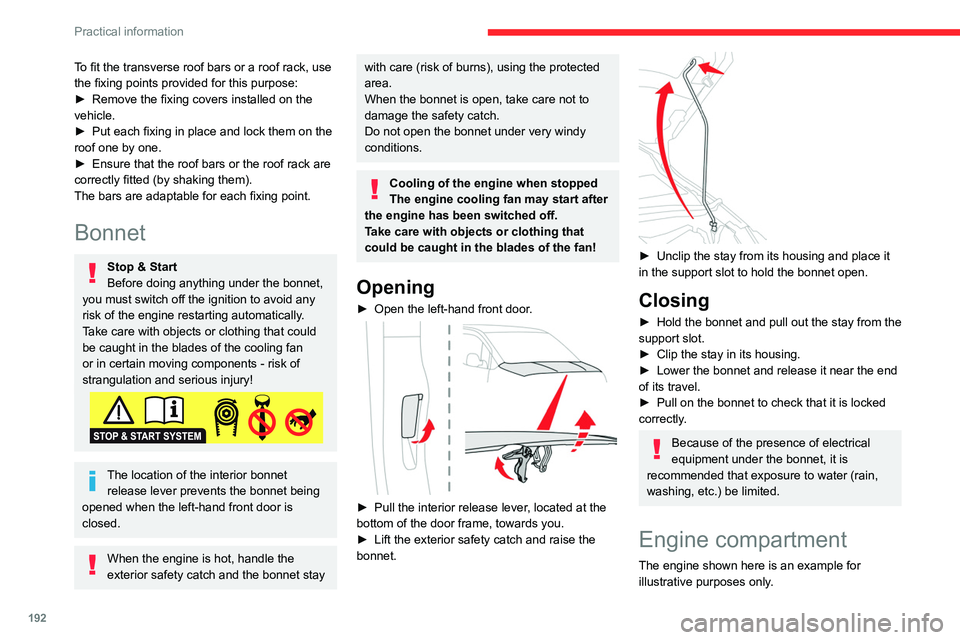
► Open the left-hand front door .
► Pull the interior release lever, located at the
bottom of the door frame, towards you.
►
Lift the exterior safety catch and raise the
bonnet.
► Unclip the stay from its housing and place it
in the support slot to hold the bonnet open.
Closing
► Hold the bonnet and pull out the stay from the
support slot.
►
Clip the stay in its housing.
►
Lower the bonnet and release it near the end
of its travel.
►
Pull on the bonnet to check that it is locked
correctly
.
Because of the presence of electrical
equipment under the bonnet, it is
recommended that exposure to water (rain,
washing, etc.) be limited.
Engine compartment
The engine shown here is an example for
illustrative purposes only.
Page 219 of 324
217
In the event of a breakdown
8• the positive (+) red cable to the (+) terminal
of battery A,
•
the negative (-) black cable to earth point C
on the vehicle.
►
At the end of the charging operation, switch
off charger B
before disconnecting the cables
from battery A.
If this label is present, use only a 12 V
charger to avoid causing irreversible
damage to the electrical components.
24V
12V
Frozen battery
Never try to charge a frozen battery - risk
of explosion!
If the battery has frozen, have it checked by a
CITROËN dealer or by a qualified workshop,
who will verify that the internal components
have not been damaged and that the case
has not cracked, which could lead to a risk of
leakage of toxic and corrosive acid.
Disconnecting/reconnecting
the battery
In order to maintain an adequate state of
charge for starting the engine, we recommend disconnecting the battery if the vehicle is to be
unused for an extended period.
Before disconnecting the battery:
►
Close all openings (doors, tailgate, windows,
roof).
►
Switch off all electricity-consuming devices
(audio system, wipers, lamps, etc.).
►
Switch off the ignition and wait for 4
minutes.
After accessing the battery, it is only necessary
to disconnect the (+) terminal.
Quick-release terminal clamp
Disconnecting the (+) terminal
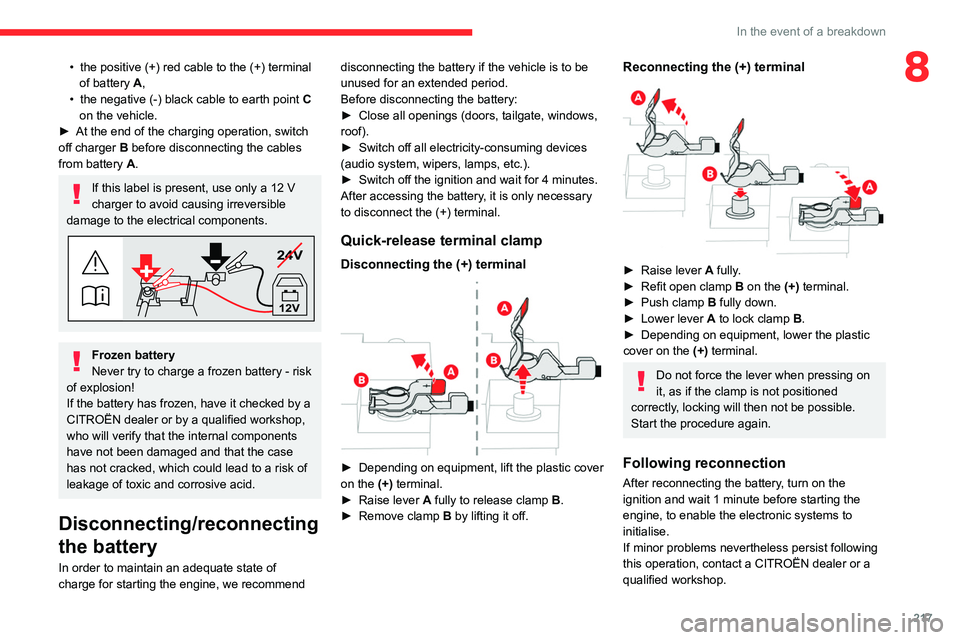
► Depending on equipment, lift the plastic cover
on the (+) terminal.
►
Raise lever
A
fully to release clamp
B
.
►
Remove clamp
B
by lifting it off.
Reconnecting the (+) terminal
► Raise lever A fully.
► Refit open clamp B on the (+) terminal.
►
Push clamp
B fully down.
►
Lower lever
A
to lock clamp B.
►
Depending on equipment, lower the plastic
cover on the
(+) terminal.
Do not force the lever when pressing on
it, as if the clamp is not positioned
correctly, locking will then not be possible.
Start the procedure again.
Following reconnection
After reconnecting the battery, turn on the
ignition and wait 1 minute before starting the
engine, to enable the electronic systems to
initialise.
If minor problems nevertheless persist following
this operation, contact a CITROËN dealer or a
qualified workshop.
Page 226 of 324
224
Technical data
Vehicle length
M (L1) XL (L2)
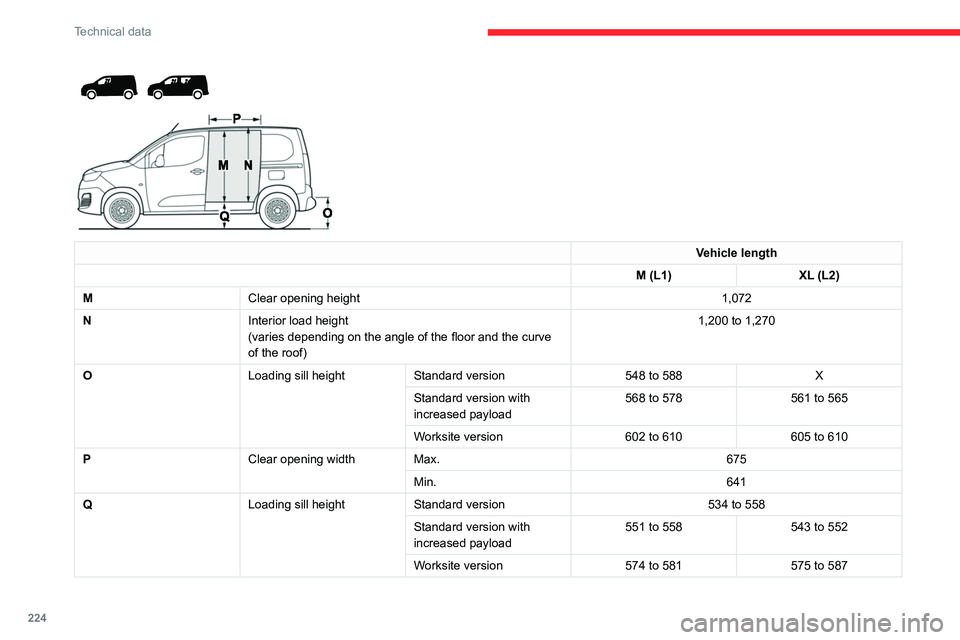
M Clear opening height 1,072
N Interior load height
(varies depending on the angle of the floor and the curve
of the roof) 1,200 to 1,270 O
Loading sill height
Standard version 548 to 588X
Standard version with
increased payload 568 to 578
561 to 565
Worksite version 602 to 610605 to 610
P Clear opening width Max. 675
Min. 641
Q Loading sill heightStandard version 534 to 558
Standard version with
increased payload 551 to 558
543 to 552
Worksite version 574 to 581575 to 587
Page 228 of 324
226
Technical data
Vehicle length
M (L1) XL (L2)
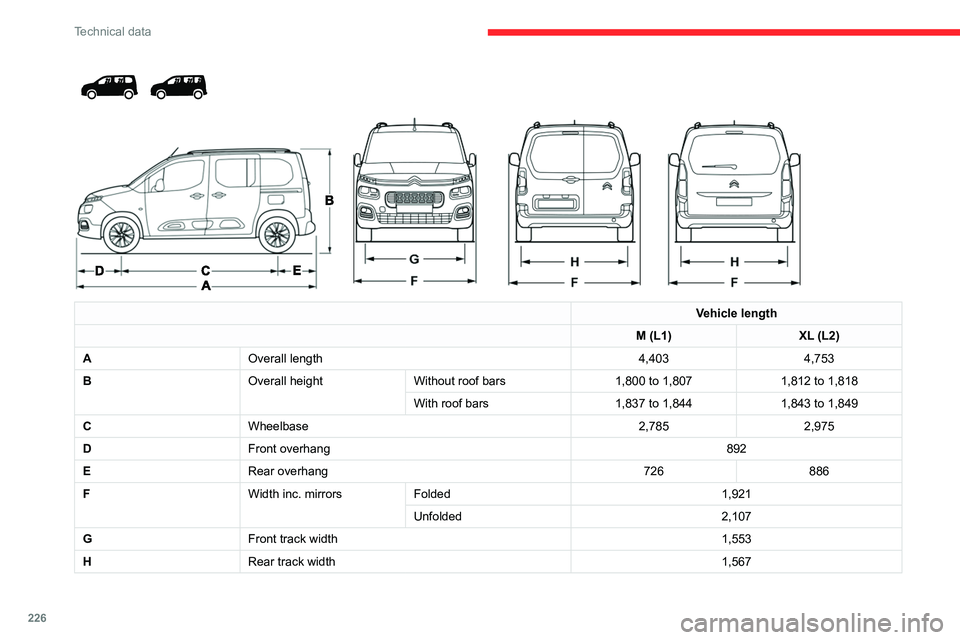
A Overall length 4,4034,753
B Overall heightWithout roof bars 1,800 to 1,8071,812 to 1,818
With roof bars 1,837 to 1,8441,843 to 1,849
C Wheelbase 2,7852,975
D Front overhang 892
E Rear overhang 726886
F Width inc. mirrorsFolded 1,921
Unfolded 2,107
G Front track width 1,553
H Rear track width 1,567
Page 265 of 324
263
CITROËN Connect Nav
12Voice commands
Steering wheel-mounted
controls
Voice commands:
Voice commands can be issued from any
screen page after a short press on the "Voice
commands" button located on the steering
wheel or at the end of the lighting control stalk
(depending on equipment), as long as there is no
telephone call in progress.
To ensure that voice commands are always recognised by the system, please
follow these recommendations:
–
use natural language in a normal tone
without breaking up words or raising your
voice.
–
always wait for the "beep" (audible signal)
before speaking.
–
for best results, closing the windows and
sunroof is recommended, to avoid extraneous
interference (depending on version).
–
before issuing a voice command, ask any
other passengers to refrain from speaking.
First steps
Example of a "voice command" for
navigation:
"Navigate to address 11 regent street,
London"
Example of a "voice command" for the radio and
media:
"Play artist Madonna"
Example of a "voice command" for the
telephone:
"Call David Miller"
The voice commands, with a choice of 17 languages (Arabic, Brazilian, Czech,
Danish, Dutch, English, Farsi, French,
German, Italian, Norwegian, Polish,
Portuguese, Russian, Spanish, Swedish,
Turkish), are made using the language
previously chosen and set in the system.
For some voice commands, there are
alternative synonyms.
Example: Guide to / Navigate to / Go to / ...
The voice commands in Arabic for: "Navigate
to address" and "Display POI in the city", are
not available.
Information - Using the
system
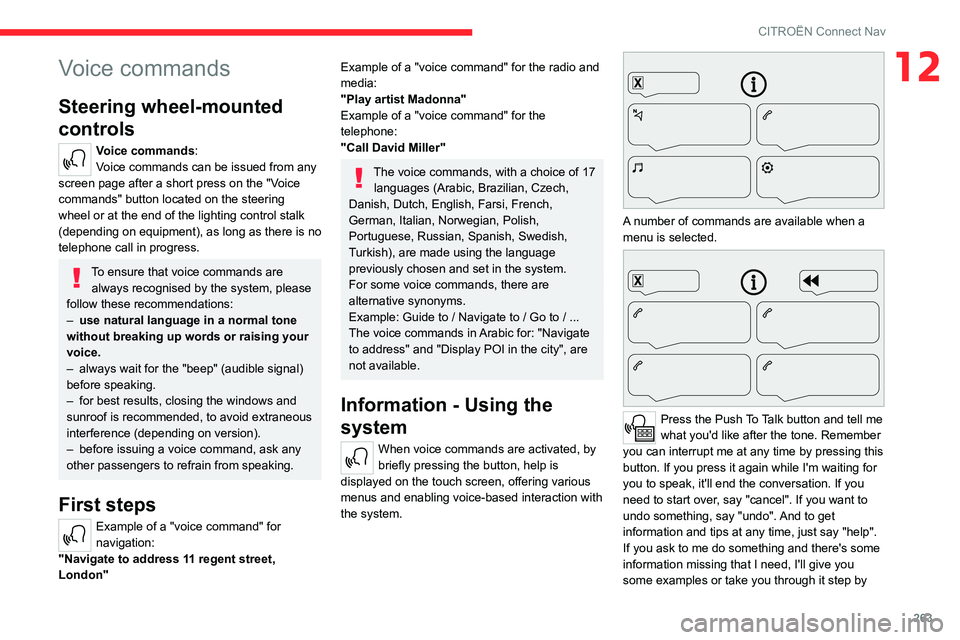
When voice commands are activated, by
briefly pressing the button, help is
displayed on the touch screen, offering various
menus and enabling voice-based interaction with
the system.
A number of commands are available when a
menu is selected.
Press the Push To Talk button and tell me
what you'd like after the tone. Remember
you can interrupt me at any time by pressing this
button. If you press it again while I'm waiting for
you to speak, it'll end the conversation. If you
need to start over, say "cancel". If you want to
undo something, say "undo". And to get
information and tips at any time, just say "help".
If you ask to me do something and there's some
information missing that I need, I'll give you
some examples or take you through it step by
Page 292 of 324
290
Alphabetical index
Dynamic stability control (DSC) 96–98
E
EBFD 95
Eco-driving (advice)
8
ECO mode
134
Economy mode
187
Electric motor
5, 9, 30, 176, 190,
193, 215, 218, 236
Electric windows
47
Electronic brake force distribution (EBFD)
95
Emergency braking assistance (EBA)
95
Emergency call
92–93
Emergency warning lamps
67, 94
Emissions control system, SCR
197
Energy economy mode
187
Energy flows
30
Energy recovery
133
Engine compartment
193
Engine, Diesel
174, 193, 202, 229–231, 235
Engine, petrol
193, 227–228
Engines
227–231, 235
Environment
8, 40, 81, 118
ESC (electronic stability control)
95
Expanded traffic sign recognition
143
Exterior lighting
86
F
Fatigue detection 160
Filling the AdBlue® tank
195, 198
Filling the fuel tank
174–175
Filter, air
196
Filter, oil
196
Filter, particle
195–196
Filter, passenger compartment
73, 196
Finisher
209
Fitting a wheel
207–208
Fitting roof bars
191
Fittings, interior
60, 64
Flap, fuel filler
174–175
Flap, removable
69
Flashing indicators
84, 213
Fluid, brake
194
Fluid, engine coolant
194
Foglamp, rear
213
Foglamps
212
Foglamps, front
83, 210
Foglamps, rear
83
Folding the rear seats
56–57
Frequency (radio)
274
Fuel
8, 174
Fuel consumption
8
Fuel tank
174–176
Fuses
214
G
Gauge, fuel 174–175
Gearbox, automatic
126–132, 196, 216
Gearbox, manual
126–127, 196
Gear lever, automatic gearbox
127–129
Gear lever, manual gearbox
126–127
Gear shift indicator ~ Gear efficiency
indicator
134
Glove box
60
G.P.S.
268
H
Hazard warning lamps 67, 94
Headlamp adjustment
88
Headlamps, automatic dipping
86–87
Headlamps, automatic illumination
84–86
Headlamps, dipped beam
83, 210–211
Headlamps, halogen
210
Headlamps, main beam
83, 86, 210, 212
Head restraints, front
59
Head restraints, rear
56–57
Head-up display
138–139
Heating
73–75, 79–80
Heating, additional
46, 79–80
Heating, programmable
46, 79–81
High voltage
176
Hill Assist Descent Control (HADC)
98
Hill start assist
126
Histogramme, fuel consumption
30
Page 294 of 324
292
Alphabetical index
N
Navigation 266–268
Navigation, connected
269–271
Net
65–66
Net, high load retaining
64
Number plate lamps
214
O
Obstacle detection 161
Oil change
193
Oil consumption
193
OIl, engine
193
On-board tools
202–203
Opening the bonnet
192
Opening the boot
32–33
Opening the doors
32–33
Overhead storage
60
P
Pads, brake 196
Paint
201, 236
Paint colour code
236
Park Assist
169
Parking brake
123, 196
Parking brake, electric
123–125, 197
Parking sensors, audible and visual
161
Parking sensors, front
162
Parking sensors, rear 161
Passenger compartment temperature pre-
conditioning (Electric)
81
Passenger's air bag
70
Pedestrian horn (Electric)
95, 118
Personalisation
12–13
Plates, identification
236
Player, Apple®
241, 253, 276
Player, USB
241, 252, 275
Port, USB
62, 241, 252–253, 271, 275
Power indicator (Electric)
9
Pressures, tyres
197, 206, 209, 236
Pre-tensioning seat belts
102
Priming pump
202
Priming the fuel system
202
Profiles
256, 280
Programmable cruise control
146
Protecting children
104, 106–108, 110, 114–116
Public fast charging station
179, 185
Puncture
204, 206
R
Radar (warnings) 139
Radio
239–241, 250–251, 274
Radio, digital (Digital Audio
Broadcasting - DAB)
240, 252, 275
Range, AdBlue®
195
RDS
240, 251, 274
Rear screen, demisting
78
Recharging the battery
216–217
Recharging the traction battery 180
Recharging the traction battery
(Electric)
176, 183, 185–186
Recirculation, air
75–76
Recovery
218
Recovery of the vehicle
218
Reduction of electrical load
188
Regeneration of the particle filter
196
Regenerative braking (deceleration by engine
braking)
132–133
Reinitialisation of the under-inflation
detection system
137
Reinitialising the remote control
41
Reminder, key in ignition
121
Reminder, lighting on
84
Remote control
32–35, 37–38, 119
Remotely operable functions (Electric)
81, 186
Removing a wheel
207–208
Removing the mat
60
Replacing bulbs
209–210
Replacing fuses
214
Replacing the air filter
196
Replacing the oil filter
196
Replacing the passenger compartment
filter
196
Reservoir, screenwash
195
Rev counter
10, 12
Reversing camera
139, 163, 166–167
Reversing lamps
213
Roof
60
Roof bars
191
Roof flap
44