ignition Citroen C4 2015 2.G Manual Online
[x] Cancel search | Manufacturer: CITROEN, Model Year: 2015, Model line: C4, Model: Citroen C4 2015 2.GPages: 494, PDF Size: 20.49 MB
Page 230 of 494
228
C4-2_en_Chap10_verification_ed01-2015
C4-2_en_Chap10_verification_ed01-2015
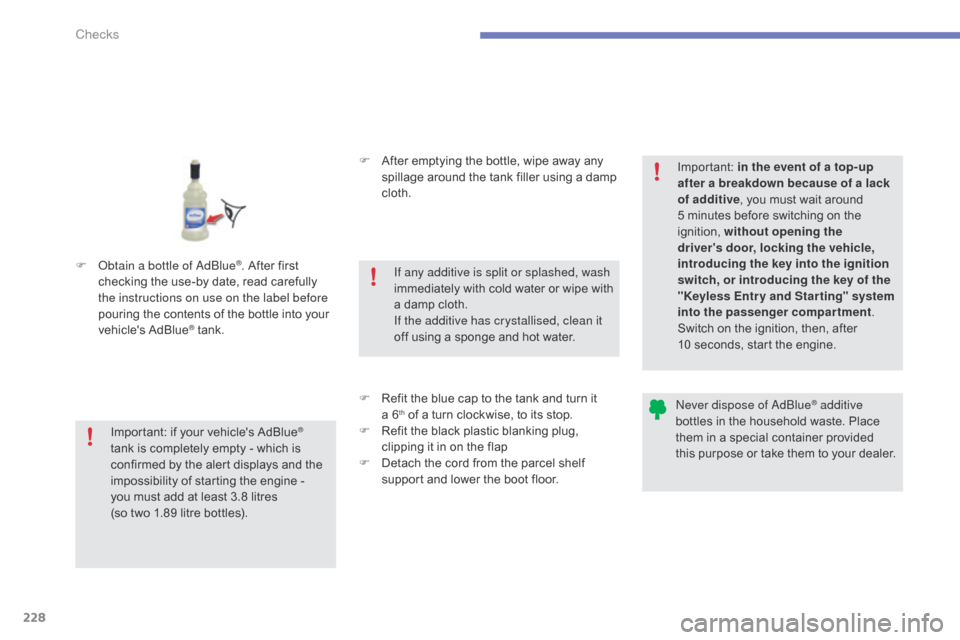
F obtain a bottle of adbl ue®. After first c
hecking
the
use-by
date,
read carefully
t
he instructions on use on the label before
pouring
the
contents
of
the bottle into your
v
ehicle's
Ad
Blue
® tank. F
A
fter emptying the bottle, wipe away any
s
pillage around the tank filler using a damp
c
loth.
F
R
efit the blue cap to the tank and turn it
a
6
th of a turn clockwise, to its stop.
F
R
efit the black plastic blanking plug,
c
lipping it in on the flap
F
D
etach the cord from the parcel shelf
s
upport and lower the boot floor.
Important:
if
your
vehicle's
AdBlue®
tank
is
completely
empty
-
which
is
c
onfirmed
by
the
alert
displays
and
the
i
mpossibility
of
starting
the
engine
-
you
must
add
at
least
3.8 litres
(so
two
1.89
litre
bottles). If any additive is split or splashed, wash
immediately
w
ith
c
old
w
ater
o
r
w
ipe
w
ith
a
damp cloth.
If the additive has crystallised, clean it
off using a sponge and hot water.Important:
i
n the event of a top-up
after a breakdown because of a lack
of additive , you must wait around
5 minutes before switching on the
ig
nition,
w
ithout opening the
driver's door, locking the vehicle,
introducing the key into the ignition
switch, or introducing the key of the
"Keyless Entr y and Star ting" system
into the passenger compartment .
Switch on the ignition, then, after
10 seconds, start the engine.
ne
ver dispose of a
dbl
ue
® additive
bottles
in
the
household
waste. Place
t
hem
in
a
special
container provided
t
his
p
urpose
o
r
t
ake
t
hem
t
o
y
our
d
ealer.
Checks
Page 232 of 494
230
C4-2_en_Chap11_info-pratique_ed01-2015
C4-2_en_Chap11_info-pratique_ed01-2015
Repair procedure
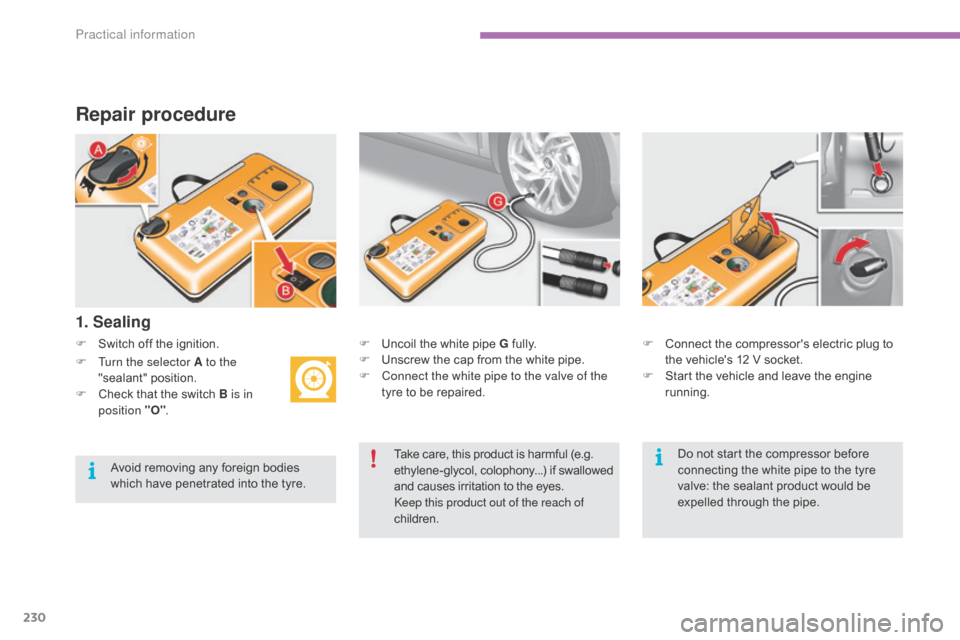
F Switch off the ignition.
1. Sealing
F Uncoil the white pipe G f ully.
F U nscrew the cap from the white pipe.
F
C
onnect the white pipe to the valve of the
tyre
to be repaired. F
C onnect the compressor's electric plug to t
he vehicle's 12 V socket.
F
S
tart the vehicle and leave the engine
r
unning.
F
T
urn the selector A to the
"sealant"
p
osition.
F
C
heck
that
the
switch
B is in
position "O" .
Take
care, this product is harmful (e.g.
e
thylene-glycol, colophony...) if swallowed
a
nd causes irritation to the eyes.
ke
ep this product out of the reach of
children.
Avoid
removing
any
foreign
bodies
w
hich
have
penetrated
into
the
tyre. Do
not start the compressor before
c
onnecting the white pipe to the tyre
v
alve: the sealant product would be
e
xpelled through the pipe.
Practical information
Page 239 of 494
237
C4-2_en_Chap11_info-pratique_ed01-2015
C4-2_en_Chap11_info-pratique_ed01-2015
Removing a wheel
* position R for an electronic gearbox; P for an
automatic gearbox.
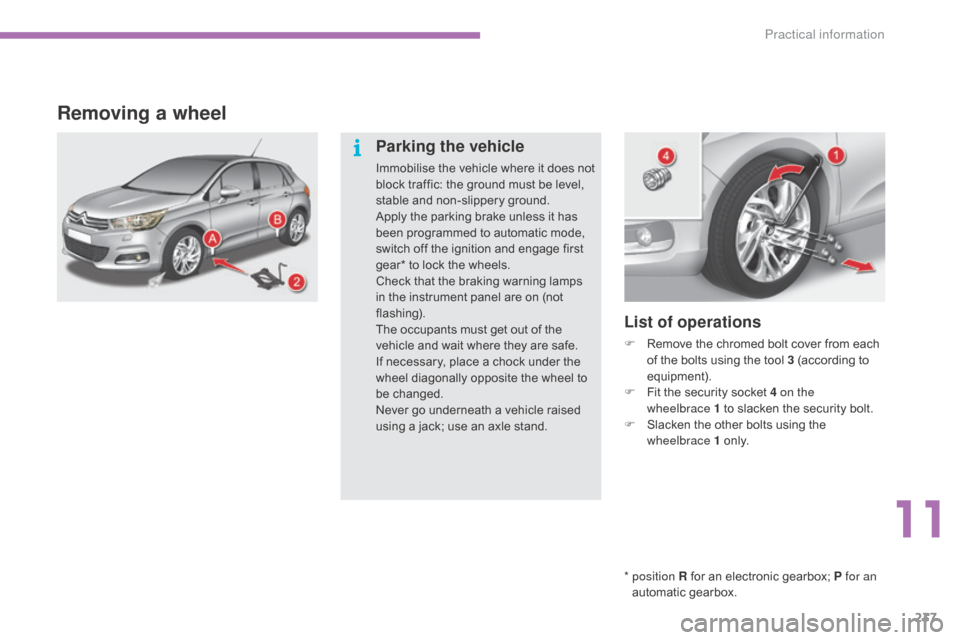
List of operations
F Remove the chromed bolt cover from each o
f the bolts using the tool 3 (according to
e
quipment).
F
F
it the security socket 4 on the
wheelbrace
1 to slacken the security bolt.
F
S
lacken the other bolts using the
w
heelbrace 1
o
n l y.
Parking the vehicle
Immobilise the vehicle where it does not block traffic: the ground must be level,
s
table and non-slippery ground.
Apply
the parking brake unless it has
b
een programmed to automatic mode,
s
witch off the ignition and engage first
g
ear* to lock the wheels.
Check
that the braking warning lamps
i
n the instrument panel are on (not
f
lashing).
The
occupants must get out of the
v
ehicle and wait where they are safe.
If
necessary, place a chock under the
w
heel diagonally opposite the wheel to
be c
hanged.
Never
go underneath a vehicle raised
u
sing a jack; use an axle stand.
11
Practical information
Page 259 of 494
257
C4-2_en_Chap11_info-pratique_ed01-2015
C4-2_en_Chap11_info-pratique_ed01-2015
When your vehicle's battery is discharged, the engine can be started using a slave battery
(
external or on another vehicle) and jump lead
c
ables.
Starting using another
battery
First check that the slave battery has a n ominal voltage of 12 V and a capacity
a
t least equal to that of the discharged
b
attery.
Do
not try to start the engine by
c
onnecting a battery charger.
Do
not disconnect the (+) terminal when
t
he engine is running. F
S
tart the engine of the vehicle with the
g
ood battery and leave it running for a few
m
inutes.
F
O
perate the starter on the broken down
v
ehicle and let the engine run. I
f the engine does not start straight away, s
witch off the ignition and wait a few
m
oments before trying again.
Before disconnecting the battery
Wait 2 minutes after switching off the ignition before disconnecting the battery.
Close the windows and the doors before
disconnecting
the battery.
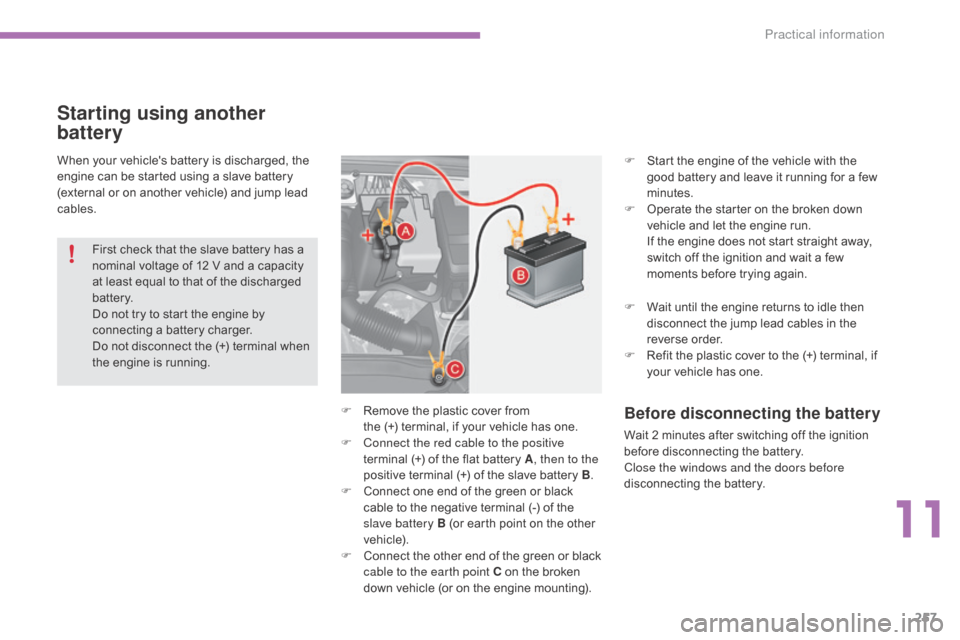
F
R
emove
the
plastic
cover
from
the
(+)
terminal,
if
your
vehicle
has
one.
F
C
onnect the red cable to the positive
terminal
(+)
of
the
flat
battery
A , then to the
positive
terminal
(+)
of
the
slave
battery
B.
F
C
onnect
one
end
of
the
green
or
black
c
able
to
the
negative
terminal
(-)
of
the
s
lave battery B
(or
earth
point
on
the
other
v
ehicle).
F
C
onnect
t
he
o
ther
e
nd
o
f
t
he
g
reen
o
r
b
lack
c
able to the earth point C
on
the
broken
d
own
vehicle
(or
on
the
engine
mounting). F
W
ait until the engine returns to idle then
d
isconnect the jump lead cables in the
r
everse
o
rder.
F
R
efit the plastic cover to the (+) terminal, if
y
our vehicle has one.
11
Practical information
Page 261 of 494
259
C4-2_en_Chap11_info-pratique_ed01-2015
C4-2_en_Chap11_info-pratique_ed01-2015
Charging the battery using
a battery charger
F Disconnect the battery from the vehicle.
F F ollow the instructions for use provided by
the
manufacturer of the charger.
F
C
onnect the battery starting with the
n
egative terminal (-).
F
C
heck that the terminals and connectors
a
re clean. If they are covered
w
ith
s
ulphate
(
whitish or greenish deposit), remove them
a
nd clean them.
Reinitialisation after
reconnection
after any reconnection of the battery, switch on
the ignition and wait at least one minute before
s
tarting, to allow time for the initialisation of the
e
lectronic systems.
By
referring to the corresponding sections, you
s
hould set or initialise the following systems
y
ourself:
-
o
ne-touch electric windows,
-
t
ime and date,
-
a
udio and navigation system settings.
Check
that no alert message or warning lamp
c
omes on after switching on the ignition.
However,
if minor problems persist after
c
arrying out these operations, contact a
C
ITROËN dealer or a qualified workshop.
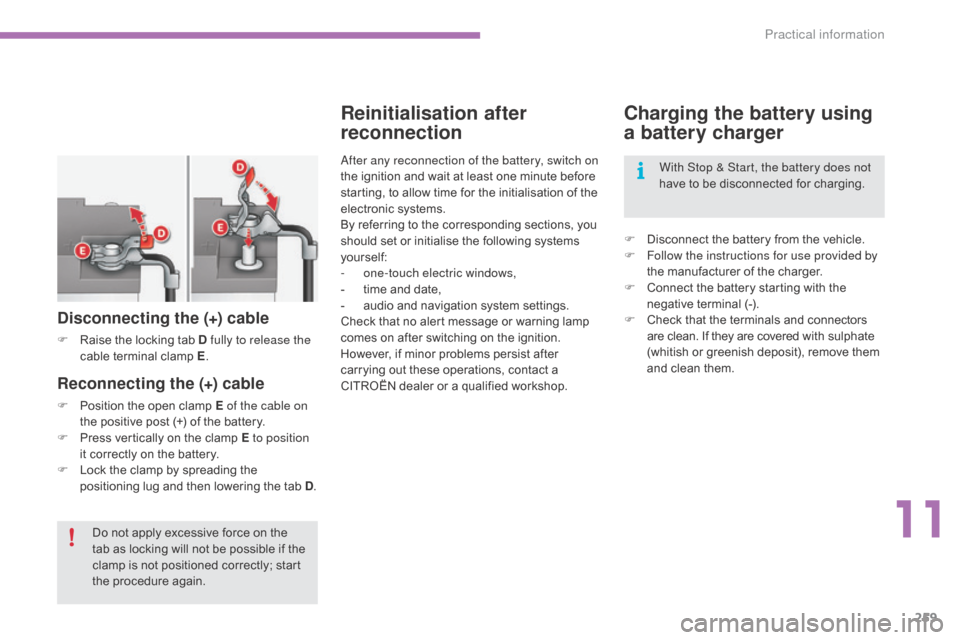
Reconnecting the (+) cable
F Position the open clamp E of the cable on
the positive post (+) of the battery.
F
P
ress vertically on the clamp E to position
it
correctly on the battery.
F
L
ock the clamp by spreading the
p
ositioning lug and then lowering the tab D.
Disconnecting the (+) cable
F Raise the locking tab D fully to release the
cable t erminal c lamp E.
D
o not apply excessive force on the
t
ab as locking will not be possible if the
c
lamp is not positioned correctly; start
t
he procedure again. With Stop & Start, the battery does not
have
to be disconnected for charging.
11
Practical information
Page 263 of 494
261
C4-2_en_Chap11_info-pratique_ed01-2015
C4-2_en_Chap11_info-pratique_ed01-2015
Changing a wiper blade
Before removing a front
wiper blade
F Within one minute after switching off t
he ignition, operate the wiper stalk to
p
osition the wiper blades vertically on the
windscreen.
Removing
F Raise the corresponding wiper arm.
F U nclip the wiper blade and remove it.
Fitting
F Put the corresponding new wiper blade in p
lace and clip it.
F
F
old down the wiper arm carefully.
After fitting a front wiper
blade
F Switch on the ignition.
F O perate the wiper stalk again to park the
w
iper blades.
11
Practical information
Page 266 of 494
264
C4-2_en_Chap11_info-pratique_ed01-2015
C4-2_en_Chap11_info-pratique_ed01-2015
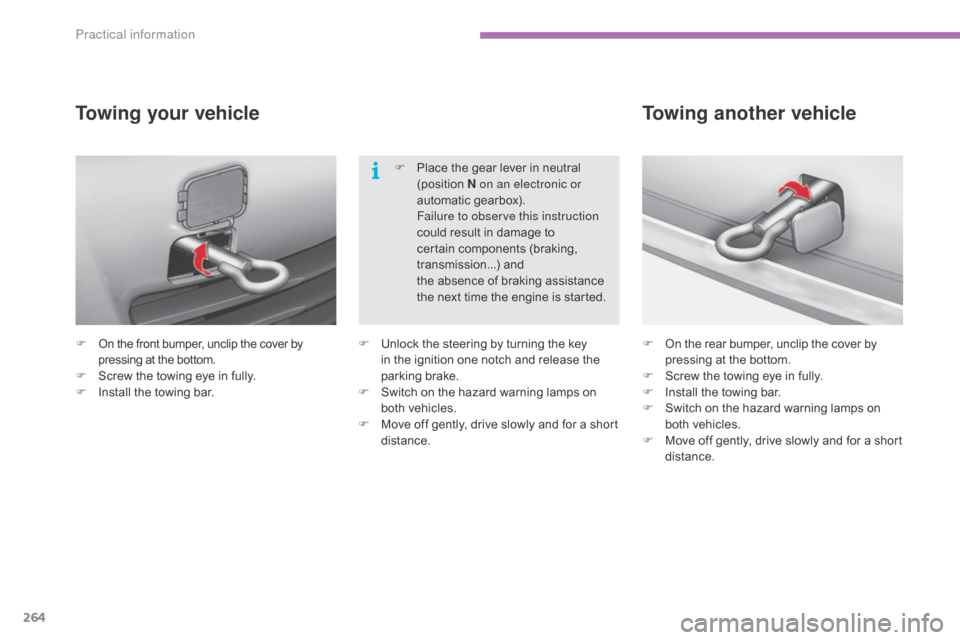
F On the front bumper, unclip the cover by p
ressing at the bottom.
F
S
crew the towing eye in fully.
F
I
nstall the towing bar.
Towing your vehicle
F On the rear bumper, unclip the cover b y p
ressing at the bottom.
F
S
crew the towing eye in fully.
F
I
nstall the towing bar.
F
S
witch on the hazard warning lamps on
b
oth vehicles.
F
M
ove off gently, drive slowly and for a short
di
stance.
Towing another vehicle
F Unlock the steering by turning the key i
n the ignition one notch and release the
par
king
b
rake.
F
S
witch on the hazard warning lamps on
b
oth vehicles.
F
M
ove off gently, drive slowly and for a short
di
stance.F
P
lace the gear lever in neutral
(
position
N
on an electronic or
automatic gearbox).
F
ailure to observe this instruction
could result in damage to
c
ertain components (braking,
t
ransmission...) and
the absence of braking assistance
t
he next time the engine is started.
Practical information
Page 274 of 494
272
C4-2_en_Chap11_info-pratique_ed01-2015
C4-2_en_Chap11_info-pratique_ed01-2015
Audio pre-equipment
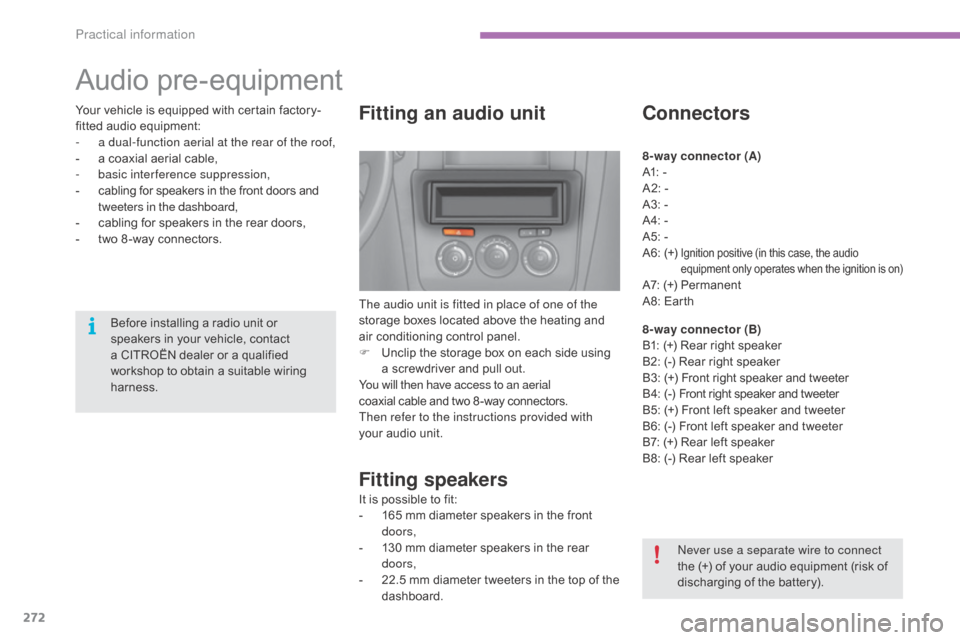
Fitting an audio unit
The audio unit is fitted in place of one of the
storage boxes located above the heating and
a
ir conditioning control panel.
F
U
nclip the storage box on each side using
a
screwdriver and pull out.
You will then have access to an aerial
coaxial
cable and two 8 -way connectors.
Then refer to the instructions provided with
your
audio unit.
Fitting speakers
It is possible to fit:
- 1 65 mm diameter speakers in the front
d
oors,
-
1
30 mm diameter speakers in the rear
d
oors,
-
2
2.5 mm diameter tweeters in the top of the
das
hboard.
Connectors
8-way connector (A)
A1: -
A2:
-
A3:
-
A4:
-
A5:
-
A6:
(+)
Ignition positive (in this case, the audio equipment only operates when the ignition is on)
A7: (+) Permanent
A 8: Earth
8-way connector (B)
B1:
(+) Rear right speaker
B2:
(-) Rear right speaker
B3:
(
+)
F
ront right speaker and tweeter
B 4:
(
-)
F
ront right speaker and tweeter
B5:
(+) Front left speaker and tweeter
B6:
(-) Front left speaker and tweeter
B7:
(+) Rear left speaker
B8:
(-) Rear left speaker
ne
ver use a separate wire to connect
the
(+) of your audio equipment (risk of
d
ischarging of the battery).
Before
installing
a
radio
unit
or
s
peakers
in
your
vehicle,
contact
a
CITROËN
dealer
or
a
qualified
w
orkshop
to
obtain
a
suitable
wiring
har
ness.
Your
vehicle
is
equipped
with
certain
factory-
fitted
audio
equipment:
-
a d
ual-function aerial at the rear of the roof,
-
a
coaxial
aerial
cable,
-
b
asic interference suppression,
-
c
abling
for
speakers
in
the
front
doors
and
t
weeters in the dashboard,
-
c
abling
for
speakers
in
the
rear
doors,
-
t
wo
8 -way
connectors.
Practical information
Page 290 of 494
288
C4-2_en_Chap13a_BTA_ed01-2015
C4-2_en_Chap13a_BTA_ed01-2015
EMERGENCY OR ASSIST ANCE CALL
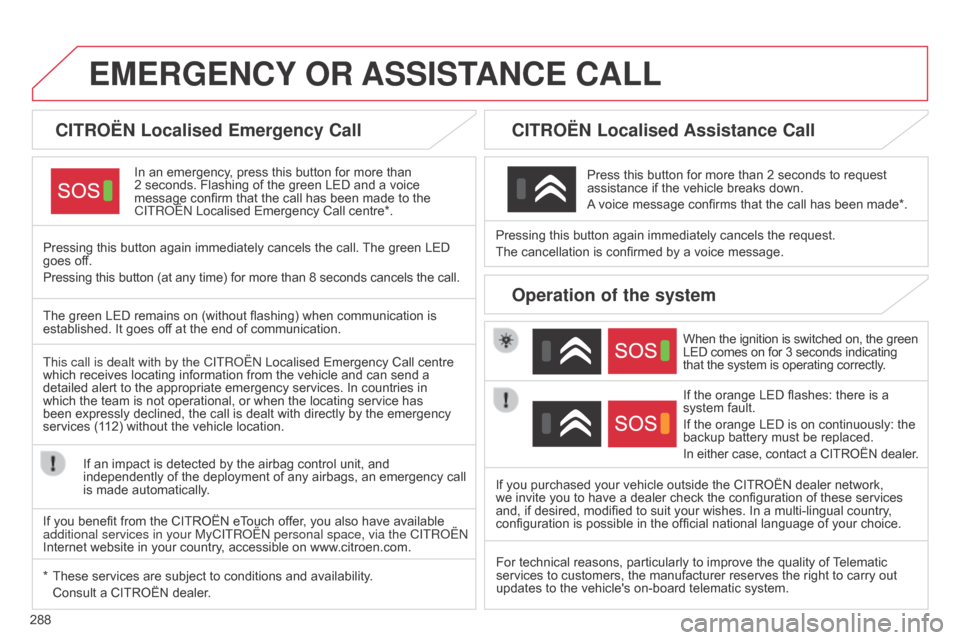
CITROËN Localised Emergency Call
In an emergency, press this button for more than 2 seconds.
Flashing of the green LED and a voice
message
confirm that the call has been made to the
C
ITR o Ë n Localised Emergency Call centre*.
Pressing
this
button again immediately cancels the call.
The
green LED
goes
off.
Pressing
this
button (at any time) for more than 8 seconds cancels the call.
CITROËN Localised Assistance Call
When the ignition is switched on, the green LED comes on for 3 seconds indicating that
the system is operating correctly.
If
the orange LED flashes: there is a
system
fault.
If
the orange LED is on continuously: the
backup
battery must be replaced.
In
either case, contact a CITROËN dealer.
Pressing
this
button
again
immediately cancels the request.
The
cancellation
is
confirmed
by
a voice message.
Press
this
button for more than 2 seconds to request
assistance
if
the
vehicle breaks down.
A
voice
message confirms that the call has been made*.
Operation of the system
The green LED remains on (without flashing) when communication is established.
It goes off at the end of communication.
This call is dealt with by the C
ITR o Ë n Localised Emergency Call centre
which
receives locating information from the vehicle and can send a
detailed
alert to the appropriate emergency services. In countries in
which
the team is not operational, or when the locating service has
been
expressly declined, the call is dealt with directly by the emergency
services
(112) without the vehicle location.
If
an impact is detected by the airbag control unit, and
independently
of the deployment of any airbags, an emergency call
is
made automatically.
*
These
services are subject to conditions and availability.
Consult
a CITROËN dealer. If
you purchased your vehicle outside the CITROËN dealer network,
we
invite you to have a dealer check the configuration of these services
and,
if desired, modified to suit your wishes. In a multi-lingual country,
configuration
is possible in the official national language of your choice.
For
technical reasons, particularly to improve the quality of
T
elematic
services
to customers, the manufacturer reserves the right to carry out
updates
to the vehicle's on-board telematic system.
If
you benefit from the CITROËN eTouch offer, you also have available
additional
services in your MyCITR o Ë n personal space, via the CITR o Ë n
Internet
website in your country, accessible on www.citroen.com.
Page 294 of 494
02
292
C4-2_en_Chap13b_SMEGplus_ed01-2015
C4-2_en_Chap13b_SMEGplus_ed01-2015
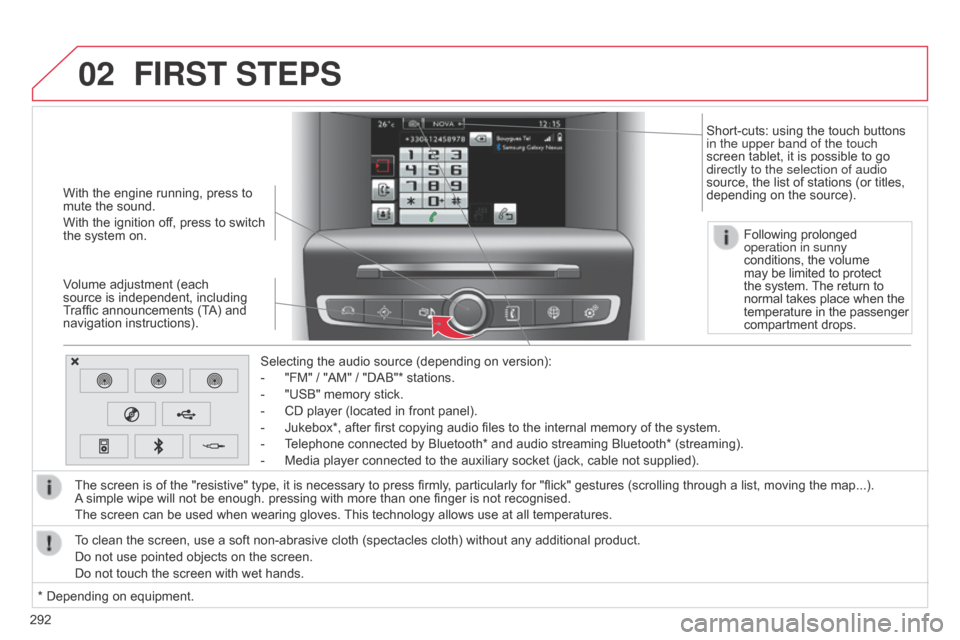
With the engine running, press to mute the sound.
With
the ignition off, press to switch
the
system on.
Volume
adjustment (each
source
is independent, including
T
raffic announcements (TA) and
navigation
instructions). Selecting
the audio source (depending on version):
-
"FM"
/ "AM" / "DAB"* stations.
-
"USB"
memory stick.
-
CD
player (located in front panel).
-
Jukebox*,
after first copying audio files to the internal memory of the system.
-
T
elephone connected by Bluetooth* and audio streaming Bluetooth* (streaming).
-
Media
player connected to the auxiliary socket (jack, cable not supplied).
The
screen is of the "resistive" type, it is necessary to press firmly, particularly for "flick" gestures (scrolling through a list, moving the map...).
A
simple wipe will not be enough. pressing with more than one finger is not recognised.
The
screen can be used when wearing gloves.
This
technology allows use at all temperatures.
FIRST STEPS
* Depending on equipment.
T o clean the screen, use a soft non-abrasive cloth (spectacles cloth) without any additional product.
Do not use pointed objects on the screen.
Do not touch the screen with wet hands. Following prolonged
operation in sunny
conditions, the volume
may
be limited to protect
the
system.
The
return to
normal
takes place when the
temperature
in the passenger
compartment
drops.
Short-cuts: using the touch buttons
in the upper band of the touch
screen
tablet, it is possible to go
directly to the selection of audio
source,
the list of stations (or titles,
depending
on the source).