Lighting Citroen C4 2016 2.G Owner's Guide
[x] Cancel search | Manufacturer: CITROEN, Model Year: 2016, Model line: C4, Model: Citroen C4 2016 2.GPages: 396, PDF Size: 10.22 MB
Page 127 of 396
125
C4-2_en_Chap04_eclairage-et-visibilite_ed02-2015
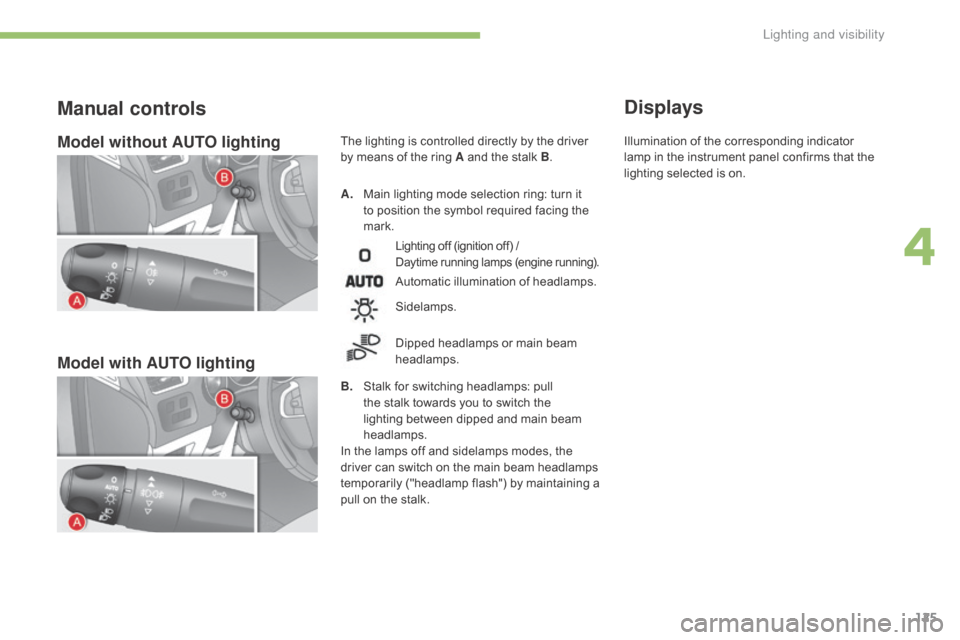
Model without AUTO lighting
Model with AUTO lighting
A. Main lighting mode selection ring: turn it t
o position the symbol required facing the
ma
rk.
Manual controls
Lighting off (ignition off) /
D aytime running lamps (engine running).
Automatic illumination of headlamps.
B.
S
talk
for switching headlamps: pull
t
he
stalk towards you to switch the
l
ighting between dipped and main beam
h
eadlamps.
In
the
lamps off and sidelamps modes, the
d
river
can
switch on the main beam headlamps
t
emporarily ("headlamp flash") by maintaining a
p
ull
on
the stalk.
Sidelamps.
Dipped
headlamps or main beam
h
eadlamps.
Displays
The lighting is controlled directly by the driver by means of the ring A and the stalk B. Illumination
of the corresponding indicator l
amp in the instrument panel confirms that the
l
ighting selected is on.
4
Lighting and visibility
Page 128 of 396

126
C4-2_en_Chap04_eclairage-et-visibilite_ed02-2015
C. Foglamp selection ring.
The foglamps operate with the dipped and main
b
eam
h
eadlamps.
They
operates with the dipped beam
h
eadlamps and main beam headlamps.
F
T
o switch on the rear foglamps, turn the
r
ing C
fo
rwards.
F
T
o switch off the rear foglamps, turn the
r
ing C
r
earwards.Model with rear foglamps only
rear foglamps Rotate and release the ring C:
F
f
or wards a first time to switch on the front
fo
glamps,
F
f
or wards a second time to switch on the
r
ear
fo
glamps,
F
r
ear wards a first time to switch off the rear
fo
glamps,
F
r
ear wards a second time to switch of the
f
ront fog lamps.
Model with front and rear
foglamps
front and rear foglamps
W
hen
the
headlamps switch off with automatic
i
llumination of headlamps (AUTO model)
o
r
when
the dipped beam headlamps are
s
witched
off manually, the foglamps and
si
delamps
re
main
o
n.
F
T
urn
the ring rear wards to switch off
t
he
foglamps, the sidelamps will then
s
witch off.
When
automatic
illumination
of
headlamps
i
s
on
(with
AUTO
model),
the
dipped
beam
h
eadlamps
and
sidelamps
remain
on
while
the
r
ear
foglamps
are
on.
Lighting and visibility
Page 129 of 396

127
C4-2_en_Chap04_eclairage-et-visibilite_ed02-2015
In good or rainy weather, by both day and night, the front foglamps and the
r
ear foglamps are prohibited. In these
s
ituations, the power of their beams
m
ay dazzle other drivers. They should
o
nly be used in fog or falling snow.
In these weather conditions, you should
switch
on the foglamps and dipped
b
eam headlamps manually, as the
s
unshine sensor may detect sufficient
l
ight.
Do
not forget to switch off the front and
r
ear foglamps when they are no longer
n
ecessary.Switching off the lighting when
switching off the ignition
When the ignition is switched off, all of the lamps switch off immediately, except for t
he dipped beam headlamps if automatic
g
uide-me-home lighting is activated.
Switching on the lighting
when switching on the
ignition
To reactivate the lighting control stalk, turn the ring A to position "0" - lighting
o
ff, then to the position of your choice.
When
the driver's door is opened, a
t
emporary audible signal warns you that
t
he vehicle's lighting is on.
They
switch off automatically after a
p
eriod which depends on the state of
charge
of the battery (entry to energy
ec
onomy
mo
de).
4
Lighting and visibility
Page 130 of 396
128
C4-2_en_Chap04_eclairage-et-visibilite_ed02-2015
Parking lamps
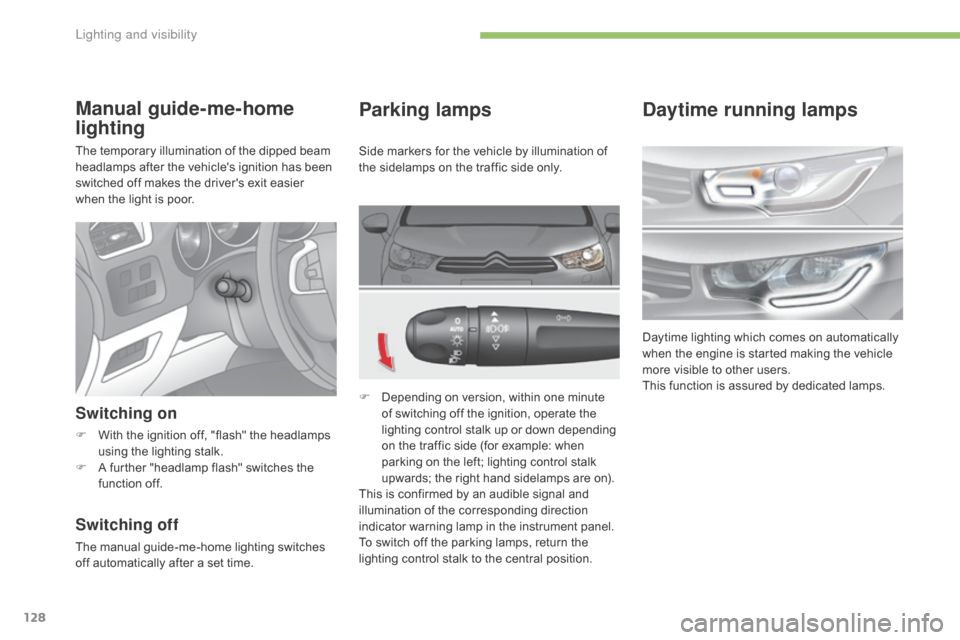
F Depending on version, within one minute o
f switching off the ignition, operate the
l
ighting control stalk up or down depending
o
n the traffic side (for example: when
p
arking on the left; lighting control stalk
u
pwards; the right hand sidelamps are on).
This
is confirmed by an audible signal and
i
llumination of the corresponding direction
i
ndicator warning lamp in the instrument panel.
To
switch off the parking lamps, return the
l
ighting control stalk to the central position.
Manual guide-me-home
lighting
The temporary illumination of the dipped beam headlamps after the vehicle's ignition has been
s
witched off makes the driver's exit easier
w
hen the light is poor.
Switching on
F With the ignition off, "flash" the headlamps u
sing the lighting stalk.
F
A
further "headlamp flash" switches the
f
unction off.
Switching off
The manual guide-me-home lighting switches off automatically after a set time.Side
markers for the vehicle by illumination of
t
he sidelamps on the traffic side only.
Daytime running lamps
Daytime lighting which comes on automatically w
hen the engine is started making the vehicle
m
ore visible to other users.
This
function is assured by dedicated lamps.
Lighting and visibility
Page 131 of 396
129
C4-2_en_Chap04_eclairage-et-visibilite_ed02-2015
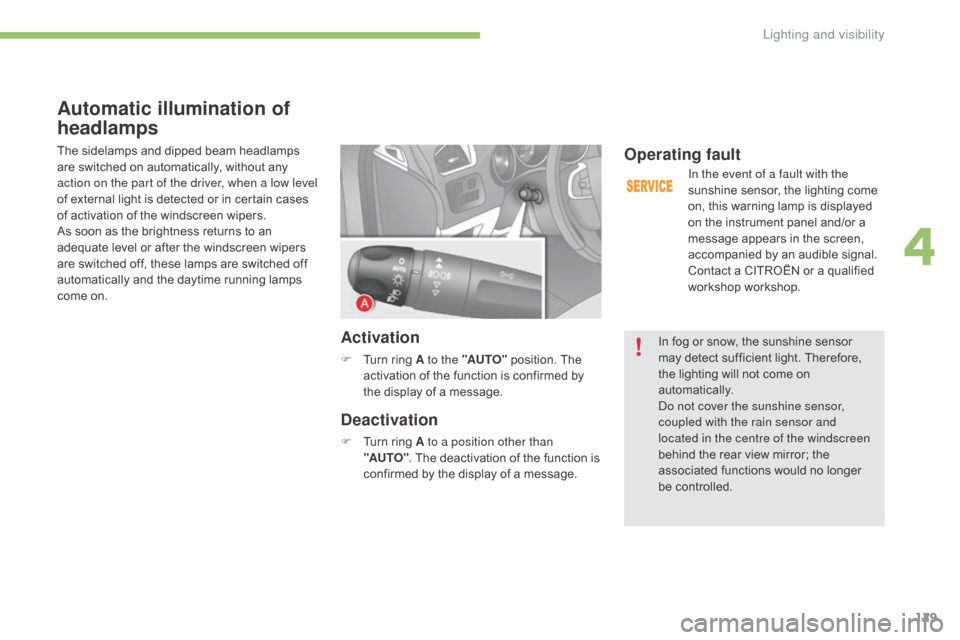
Automatic illumination of
headlamps
The sidelamps and dipped beam headlamps are switched on automatically, without any
a
ction on the part of the driver, when a low level
of
external light is detected or in certain cases
o
f activation of the windscreen wipers.
As
soon as the brightness returns to an
a
dequate level or after the windscreen wipers
a
re switched off, these lamps are switched off
a
utomatically and the daytime running lamps
c
ome on.
Activation
F Turn ring A to the "AUTO" position. The a
ctivation of the function is confirmed by
t
he display of a message.
Deactivation
F Turn ring A to a position other than
"AUTO" .
The deactivation of the function is
c
onfirmed by the display of a message.
Operating fault
In the event of a fault with the
sunshine sensor, the lighting come
o
n, this warning lamp is displayed
o
n the instrument panel and/or a
m
essage appears in the screen,
a
ccompanied by an audible signal.
Contact
a CITROËN or a qualified
w
orkshop workshop.
In
fog or snow, the sunshine sensor
m
ay
detect sufficient light. Therefore,
t
he
lighting will not come on
au
tomatically.
Do not cover the sunshine sensor,
coupled with the rain sensor and
located in the centre of the windscreen
behind
the rear view mirror; the
a
ssociated functions would no longer
be c
ontrolled.
4
Lighting and visibility
Page 132 of 396
130
C4-2_en_Chap04_eclairage-et-visibilite_ed02-2015
Switching off
The welcome lighting switches off automatically after a programmed time, when the ignition is
s
witched on or on locking the vehicle.
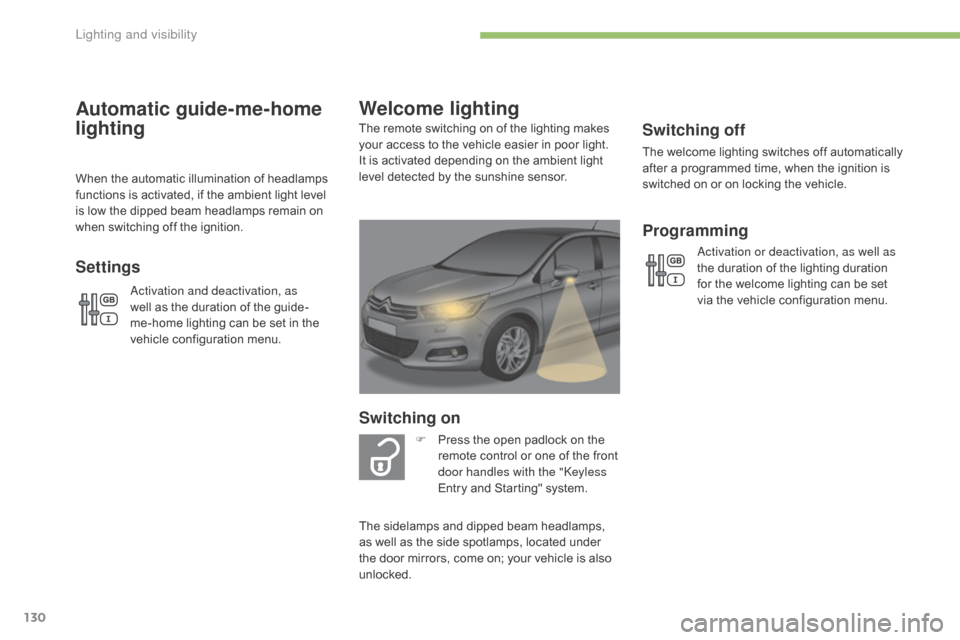
Welcome lighting
Switching on
F Press the open padlock on the r
emote control or one of the front
d
oor handles with the "Keyless
Entry
and Starting" system.
The
remote switching on of the lighting makes
y
our
access to the vehicle easier in poor light.
I
t
is
activated depending on the ambient light
l
evel
detected by the sunshine sensor.
The
sidelamps and dipped beam headlamps,
a
s
well
as
the side spotlamps, located under
t
he
door
mirrors, come on; your vehicle is also
u
nlocked.
Programming
Activation or deactivation, as well as
the duration of the lighting duration
f
or the welcome lighting can be set
v
ia the vehicle configuration menu.
Automatic guide-me-home
lighting
When the automatic illumination of headlamps functions is activated, if the ambient light level
i
s low the dipped beam headlamps remain on
w
hen switching off the ignition.
Settings
Activation and deactivation, as
well as the duration of the guide-
me-home
lighting can be set in the
v
ehicle configuration menu.
Lighting and visibility
Page 133 of 396
131
C4-2_en_Chap04_eclairage-et-visibilite_ed02-2015
Direction indicators
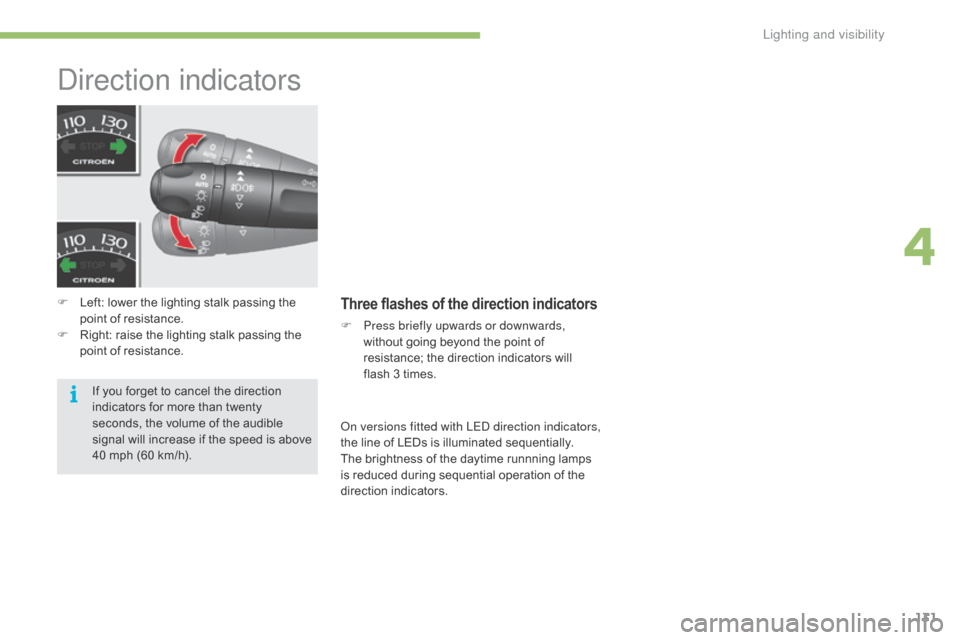
F Left: lower the lighting stalk passing the p
oint of resistance.
F
R
ight: raise the lighting stalk passing the
p
oint of resistance.Three flashes of the direction indicators
F Press briefly upwards or downwards, without going beyond the point of
r
esistance; the direction indicators will
f
lash 3 times.
If
you
forget
to
cancel
the
direction
i
ndicators
for
more
than
twenty
s
econds,
the
volume
of
the
audible
s
ignal
will
increase
if
the
speed
is
above
4
0
mph
(60
km/h). On versions fitted with LED direction indicators,
the
line of LEDs is illuminated sequentially.
The
brightness of the daytime runnning lamps
i
s reduced during sequential operation of the
d
irection
i
ndicators.
4
Lighting and visibility
Page 134 of 396
132
C4-2_en_Chap04_eclairage-et-visibilite_ed02-2015
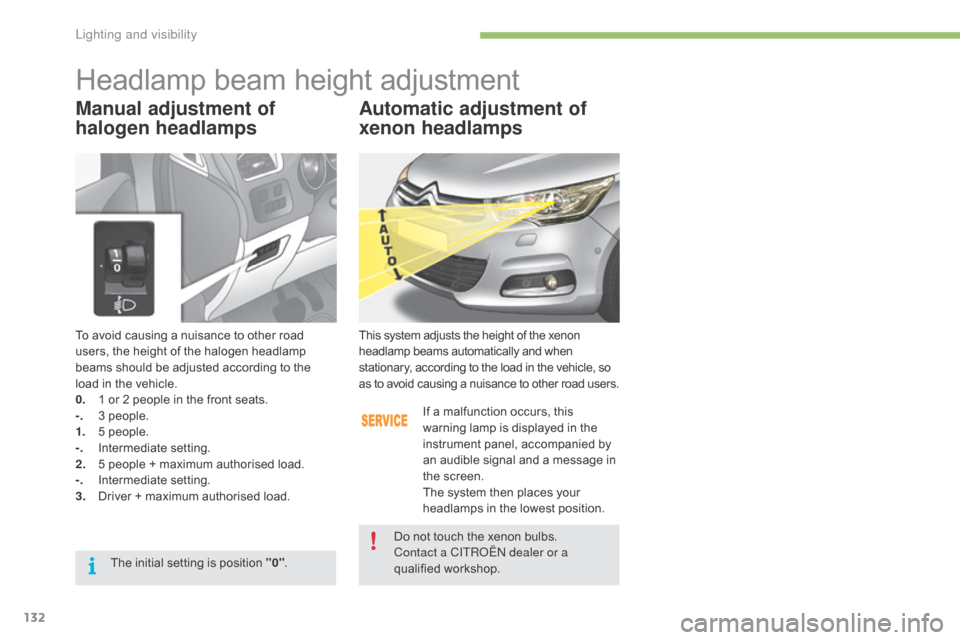
To avoid causing a nuisance to other road users, the height of the halogen headlamp
b
eams should be adjusted according to the
l
oad in the vehicle.
0.
1
or 2 people in the front seats.
-.
3
people.
1.
5
people.
-.
I
ntermediate
s
etting.
2.
5
people + maximum authorised load.
-.
I
ntermediate
s
etting.
3.
D
river + maximum authorised load.
Headlamp beam height adjustment
Automatic adjustment of
xenon headlamps
This system adjusts the height of the xenon headlamp beams automatically and when s
tationary, according to the load in the vehicle, so
a
s to avoid causing a nuisance to other road users.
If
a malfunction occurs, this
w
arning lamp is displayed in the
i
nstrument panel, accompanied by
a
n audible signal and a message in
t
he screen.
The
system then places your
h
eadlamps in the lowest position.
Do
not touch the xenon bulbs.
Contact a CITROËN dealer or a
qualified
w
orkshop.
The
initial
setting
is
position
"0" .
Manual adjustment of
halogen headlamps
Lighting and visibility
Page 135 of 396
133
C4-2_en_Chap04_eclairage-et-visibilite_ed02-2015
Directional lighting
Programming
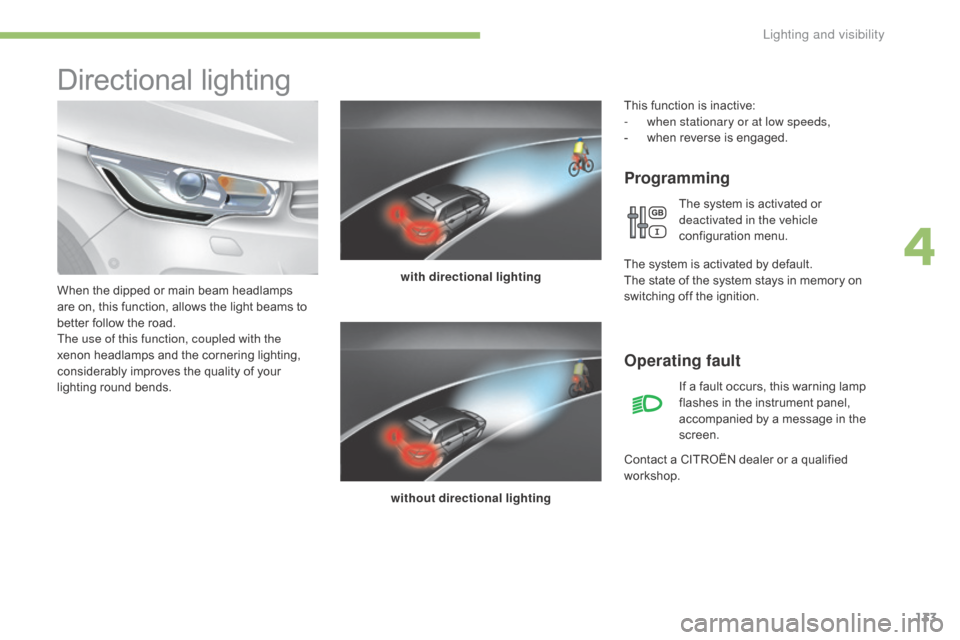
with directional lighting
without directional lighting
When
the
dipped
or
main
beam
headlamps
a
re
on,
this
function,
allows
the
light
beams
to
b
etter
follow
the
road.
The use of this function, coupled with the
xenon
headlamps
and
the
cornering
lighting,
c
onsiderably
improves
the
quality
of
your
l
ighting
r
ound
b
ends.
Operating fault
If a fault occurs, this warning lamp f lashes in the instrument panel,
a
ccompanied by a message in the
sc
reen.
Contact
a
CITROËN dealer or a qualified
w
orkshop.
This
function is inactive:
-
w
hen stationary or at low speeds,
-
w
hen
r
everse
i
s
enga
ged.
The system is activated or
d
eactivated in the vehicle
configuration
m
enu.
T
he
system is activated by default.
The
state
of the system stays in memory on
s
witching
off the ignition.
4
Lighting and visibility
Page 136 of 396
134
C4-2_en_Chap04_eclairage-et-visibilite_ed02-2015
Cornering lighting
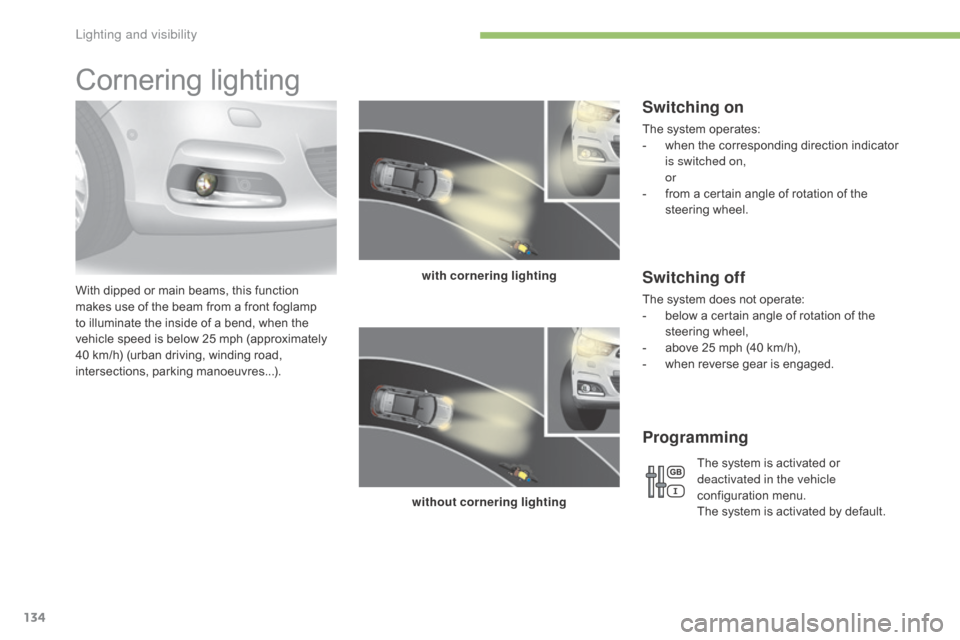
With dipped or main beams, this function makes use of the beam from a front foglamp
t
o illuminate the inside of a bend, when the
v
ehicle speed is below 25 mph (approximately
4
0 km/h) (urban driving, winding road,
in
tersections,
par
king
m
anoeuvres...). with cornering lighting
without cornering lighting
Switching on
The system operates:
- w hen the corresponding direction indicator
i
s switched on,
or
-
f
rom a certain angle of rotation of the
s
teering
w
heel.
Switching off
The system does not operate:
- b elow a certain angle of rotation of the
s
teering
w
heel,
-
a
bove 25 mph (40 km/h),
-
w
hen reverse gear is engaged.
Programming
The system is activated or
d eactivated in the vehicle
configuration
m
enu.
The
system is activated by default.
Lighting and visibility