ESP Citroen C4 2016 2.G Repair Manual
[x] Cancel search | Manufacturer: CITROEN, Model Year: 2016, Model line: C4, Model: Citroen C4 2016 2.GPages: 396, PDF Size: 10.22 MB
Page 269 of 396
267
C4-2_en_Chap08_en-cas-de-panne_ed02-2015
Charging the battery using
a battery charger
F Disconnect the battery from the vehicle.
F F ollow the instructions for use provided by
the
manufacturer of the charger.
F
C
onnect the battery starting with the
n
egative terminal (-).
F
C
heck that the terminals and connectors
a
re clean. If they are covered
w
ith
s
ulphate
(
whitish or greenish deposit), remove them
a
nd clean them.
Reinitialisation after
reconnection
After any reconnection of the battery, switch on
the ignition and wait at least one minute before
s
tarting, to allow time for the initialisation of the
e
lectronic systems.
By
referring to the corresponding sections, you
s
hould set or initialise the following systems
y
ourself:
-
o
ne-touch electric windows,
-
t
ime and date,
-
a
udio and navigation system settings.
Check
that no alert message or warning lamp
c
omes on after switching on the ignition.
However,
if minor problems persist after
c
arrying out these operations, contact a
C
ITROËN dealer or a qualified workshop.
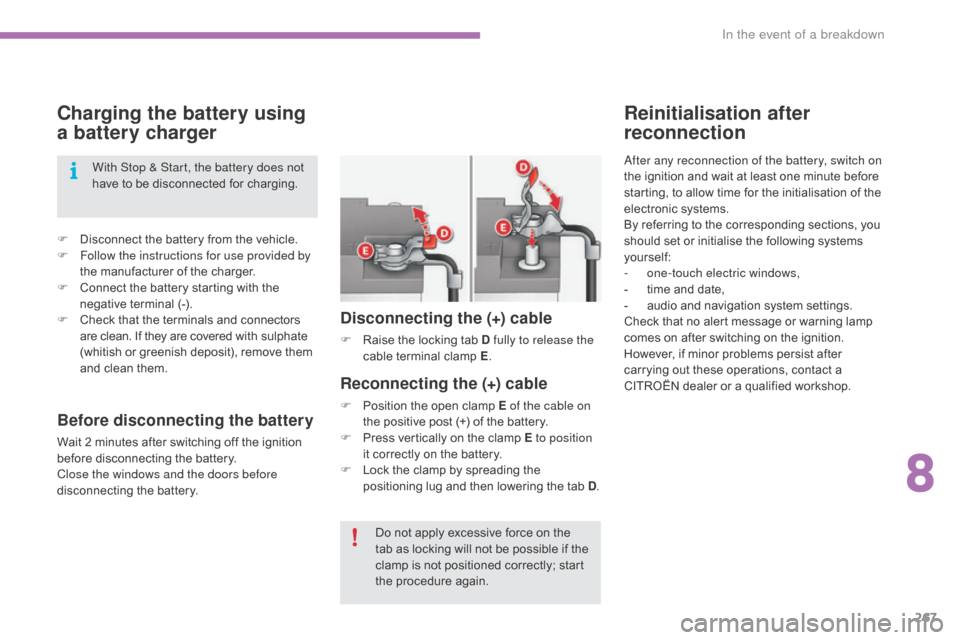
Reconnecting the (+) cable
F Position the open clamp E of the cable on
the positive post (+) of the battery.
F
P
ress vertically on the clamp E to position
it
correctly on the battery.
F
L
ock the clamp by spreading the
p
ositioning lug and then lowering the tab D.
Disconnecting the (+) cable
F Raise the locking tab D fully to release the
cable t erminal c lamp E.
D
o not apply excessive force on the
t
ab as locking will not be possible if the
c
lamp is not positioned correctly; start
t
he procedure again.
With Stop & Start, the battery does not
have
to
be
disconnected
for
charging.
Before disconnecting the battery
Wait 2 minutes after switching off the ignition b
efore disconnecting the battery.
Close the windows and the doors before
disconnecting
the battery.
8
In the event of a breakdown
Page 273 of 396
271
C4-2_en_Chap09_caracteristiques_ed02-2015
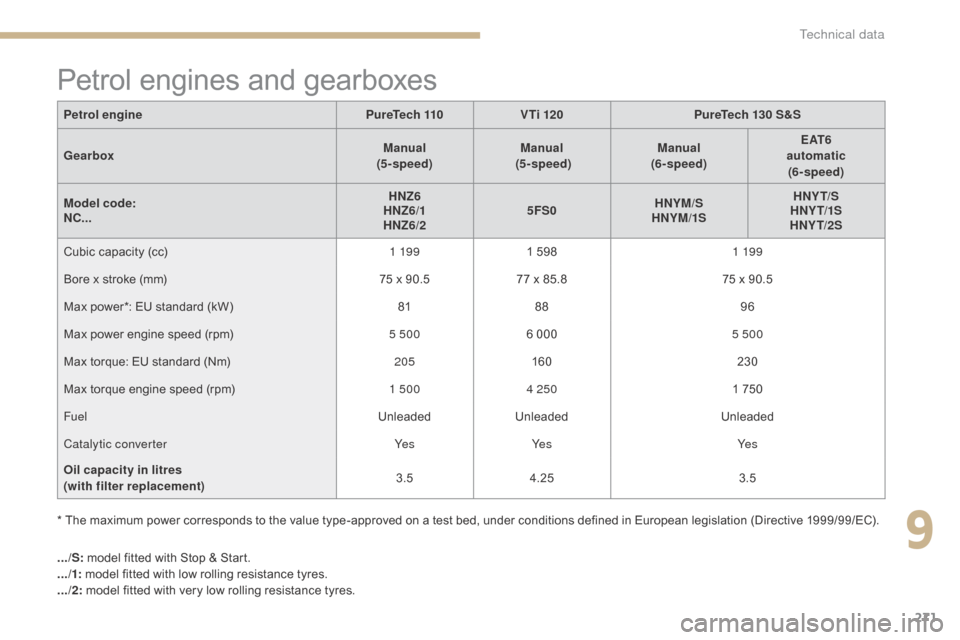
Petrol engines and gearboxes
Petrol enginePureTech 110 V Ti 120 PureTech 130 S&S
Gearbox Manual
(5 - speed) Manual
(5 - speed) Manual
(6- speed) E AT 6
automatic (6- speed)
Model c ode:
NC... HNZ6
HNZ6/1
HNZ6/2 5FS0
HNYM/S
HNYM/1S HNY T/S
HNY T/1S
HNY T/2S
Cubic
capacity (cc) 1 19 91
5981 19 9
Bore
x stroke (mm) 75
x 90.577
x 85.875
x 90.5
Max
power*: EU standard (kW) 8188 96
Max
power engine speed (rpm) 5 5006
0005 500
Max
torque: EU standard (Nm) 205160 230
Max
torque engine speed (rpm) 1 5004 250 1
750
Fuel UnleadedUnleaded Unleaded
Catalytic converter Ye sYe s Ye s
Oil capacity in litres
(with filter replacement) 3.5
4.25 3.5
.../S:
model fitted with Stop & Start.
.../1: model
fitted with low rolling resistance tyres.
.../2: model
fitted with very low rolling resistance tyres.
*
The maximum power corresponds to the value type-approved on a test bed, under conditions defined in European legislation (Directive 1999/99/EC).
9
Technical data
Page 275 of 396
273
C4-2_en_Chap09_caracteristiques_ed02-2015
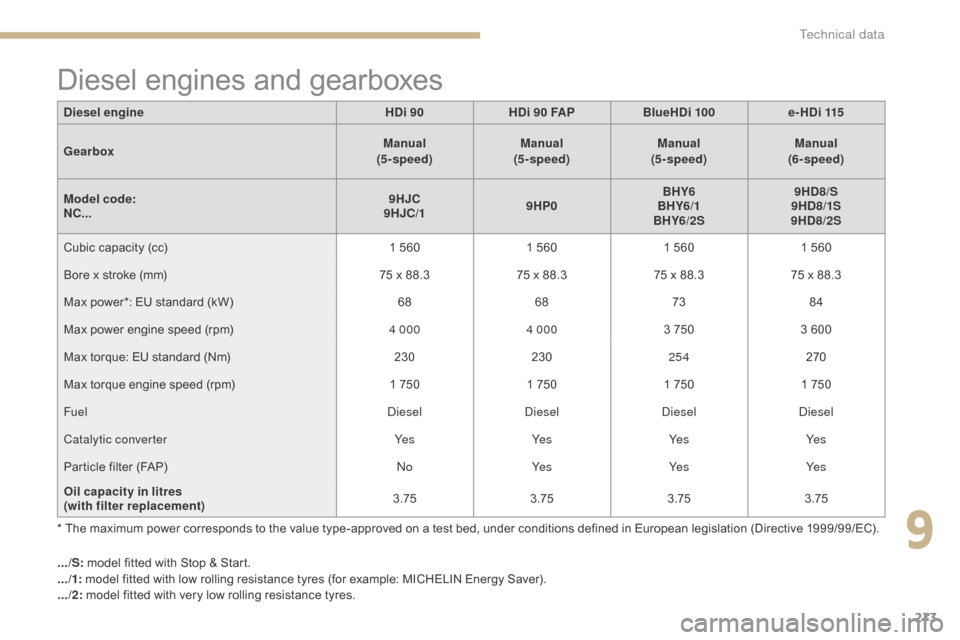
Diesel engines and gearboxes
* The maximum power corresponds to the value type-approved on a test bed, under conditions defined in European legislation (Directive 1999/99/EC).
D iesel engine
HDi 90HDi 90 FAP BlueHDi 100 e-HDi 115
Gearbox Manual
(5 - speed) Manual
(5 - speed) Manual
(5 - speed) Manual
(6- speed)
Model code:
NC... 9HJC
9HJC/1 9HP0BHY6
BHY6/1
BHY6/2S 9HD8/S
9HD8/1S
9HD8/2S
Cubic capacity (cc)
1 560
1 560
1 560
1 560
Bore x stroke (mm)
75 x 88.3
75 x 88.3
75 x 88.3
75 x 88.3
Max power*: EU standard (kW)
6868 7384
Max power engine speed (rpm)
4 0004 000 3 750
3 600
Max torque: EU standard (Nm)
230230254 270
Max torque engine speed (rpm)
1 750
1 750
1 750
1 750
Fuel DieselDieselDieselDiesel
Catalytic converter Ye sYe sYe sYe s
Particle filter (FAP)
NoYe s Ye sYe s
Oil capacity in litres
(with filter replacement) 3.75
3.753.753.75
.../S:
model fitted with Stop & Start.
.../1:
model fitted with low rolling resistance tyres (for example: MICHELIN Energy Saver).
.../2:
model fitted with very low rolling resistance tyres.
9
Technical data
Page 276 of 396
274
C4-2_en_Chap09_caracteristiques_ed02-2015
.../S: model fitted with Stop & Start.
.../1: model fitted with low rolling resistance tyres (for example: MICHELIN Energy Saver).
.../2:
model fitted with very low rolling resistance tyres.
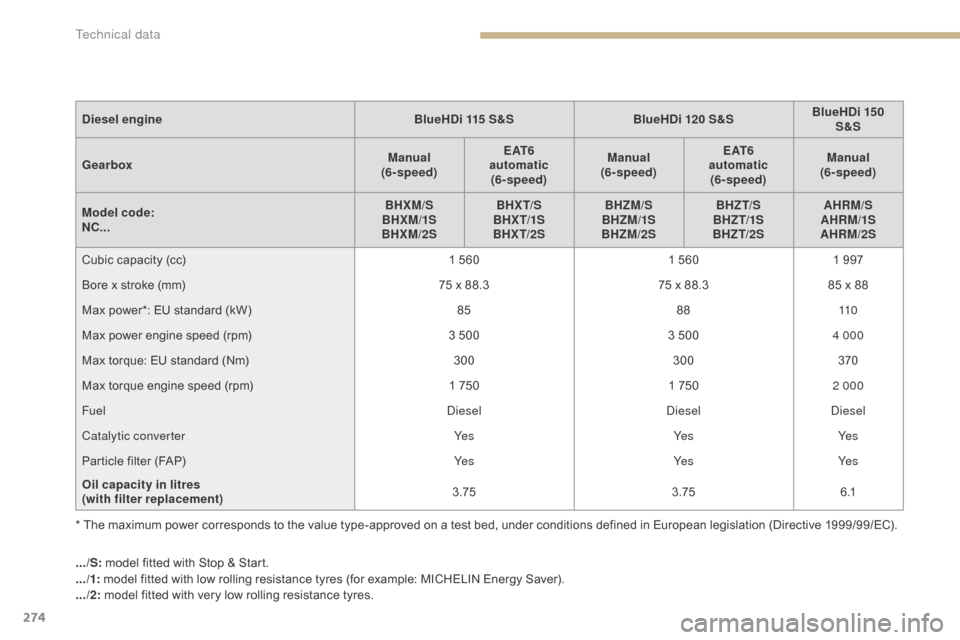
Diesel engine
BlueHDi 115 S&SBlueHDi 120 S&SBlueHDi 150
S&S
Gearbox Manual
(6- speed) E AT 6
automatic (6- speed) Manual
(6- speed) E AT 6
automatic (6- speed) Manual
(6- speed)
Model code:
NC... BHXM/S
BHXM/1S
BHXM/2S BHX T/S
BHX T/1S
BHX T/2S BHZM/S
BHZM/1S
BHZM/2S BHZT/S
BHZ T/1S
BHZT/2S AHRM/S
AHRM/1S
AHRM/2S
Cubic capacity (cc)
1 560
1 560
1 997
Bore x stroke (mm)
75 x 88.3
75 x 88.3
85 x 88
Max power*: EU standard (kW)
858811 0
Max power engine speed (rpm)
3 500
3 500
4 000
Max torque: EU standard (Nm)
300300370
Max torque engine speed (rpm)
1 750
1 750
2 000
Fuel DieselDieselDiesel
Catalytic converter Ye sYe sYe s
Particle filter (FAP)
Ye sYe sYe s
Oil capacity in litres
(with filter replacement) 3.75
3.756 .1
* The maximum power corresponds to the value type-approved on a test bed, under conditions defined in European legislation (Directive 1999/99/EC).
Technical data
Page 311 of 396
309
C4-2_en_Chap10b_SMEGplus_ed02-2015
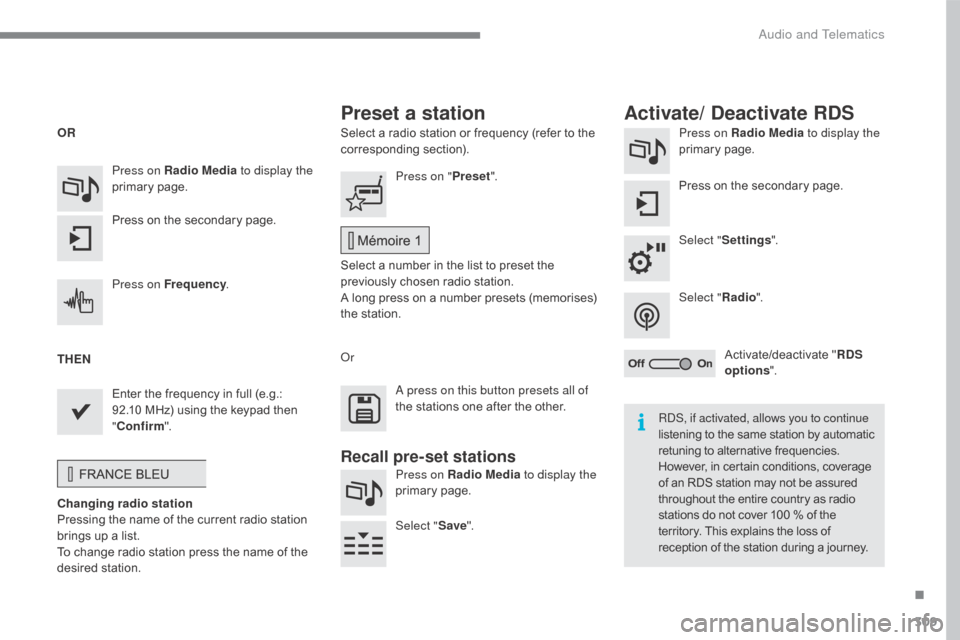
Select a radio station or frequency (refer to the corresponding s ection). Press on Radio Media
to display the
primary pag e.
Press
on the secondary page.
Select " Settings ".
Select " Radio".
Activate/deactivate
" R
DS
options ".
Press on Radio Media
to display the
primary
pag
e.
Press
on
the
secondary
page. Press on "
Preset".
Select
a number in the list to preset the
p
reviously chosen radio station.
A
long press on a number presets (memorises)
t
he station.
Press on Frequency
.
Enter
the
frequency
in
full
(e.g.:
9
2.10
MHz)
using
the
keypad
then
" Co
nfirm ".
Changing radio station
Pressing
the
name
of
the
current
radio
station
b
rings
up
a
list.
To
change
radio
station
press
the
name
of
the
de
sired
s
tation. Or
Press on Radio Media to display the
primary
pag
e.
Select " Save".
Preset a station Activate/ Deactivate RDS
OR
THEN
A press on this button presets all of
the
stations one after the other.
Recall pre-set stations
RDS, if activated, allows you to continue
listening to the same station by automatic r
etuning to alternative frequencies.
H
owever, in certain conditions, coverage
o
f an RDS station may not be assured
t
hroughout the entire country as radio
s
tations do not cover 100 % of the
t
erritory. This explains the loss of
r
eception of the station during a journey.
.
Audio and Telematics
Page 313 of 396
311
C4-2_en_Chap10b_SMEGplus_ed02-2015
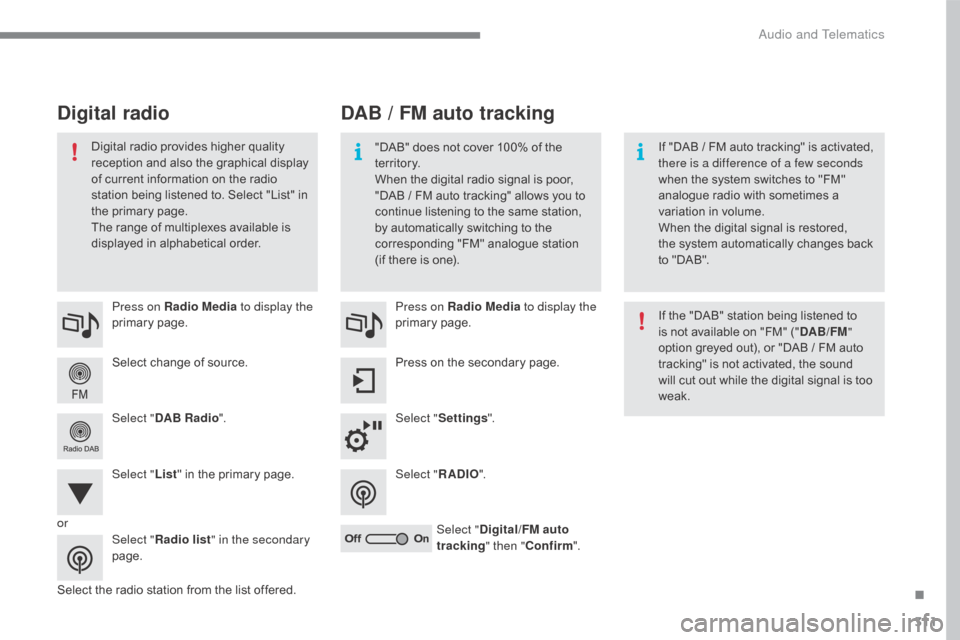
Select change of source.
P ress on Radio Media
to display the
primary
pag
e.
Select " DAB Radio ".
Select " List"
in the primary page.
Select
the radio station from the list offered.Press on Radio Media
to display the
primary
pag
e.
Press on the secondary page.
Select " Settings ".
Select " RADIO".
Select " Digital/FM auto
tracking " then "Confirm ".
DAB / FM auto tracking
Digital radio
"DAB" does not cover 100% of the t
e r r i to r y.
When
the digital radio signal is poor,
"
DAB / FM auto tracking" allows you to
c
ontinue listening to the same station,
b
y automatically switching to the
c
orresponding "FM" analogue station
(
if there is one). If
"DAB / FM auto tracking" is activated, t
here is a difference of a few seconds
when
the system switches to "FM"
a
nalogue radio with sometimes a
v
ariation in volume.
When
the digital signal is restored,
the
system automatically changes back
t
o "DAB".
Digital
radio
provides
higher
quality
r
eception
and
also
the
graphical
display o
f
current
information
on
the
radio
s
tation
being
listened
to.
Select
"List"
in
t
he
primary
page.
The
range
of
multiplexes
available
is
d
isplayed
in
alphabetical
order. If
the "DAB" station being listened to
i
s not available on "FM" ("DAB/FM "
option
greyed out), or "DAB / FM auto
t
racking" is not activated, the sound
w
ill cut out while the digital signal is too
w
eak.
or Select "Radio list " in the secondary
page.
.
Audio and Telematics
Page 324 of 396
322
C4-2_en_Chap10b_SMEGplus_ed02-2015
Audio settings
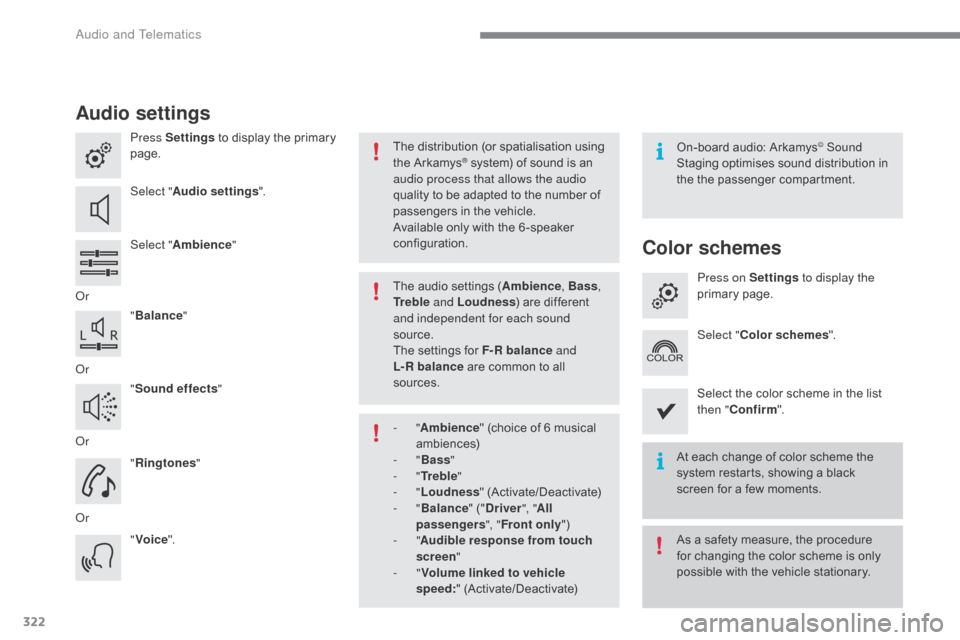
Press Settings to display the primary pag
e.
Select " Audio settings ".
Select " Ambience "
Or "Balance "
Or "Sound effects "
Or "Ringtones "
Or "Voice ". On-board
audio: Arkamys© Sound
Staging
optimises
sound
distribution in
t
he
t
he
p
assenger
c
ompartment.
The
distribution
(or
spatialisation
using
t
he
Arkamys® system) of sound is an a
udio process that allows the audio
quality
to
be
adapted to the number of
p
assengers
in the vehicle.
Available
only with the 6 -speaker
c
onfiguration.
The
audio
settings (Ambience , Bass,
Tr e b l e and Loudness )
are different
a
nd independent for each sound
source.
The
settings
for F-R balance and
L-R
balance
are common to all
s
ources.
-
" Ambience "
(choice of 6 musical
am
biences)
-
" Bass "
-
" Tr e b l e "
-
" Loudness "
(
Activate/Deactivate)
-
" Balance "
(" Driver ", "All
passengers ", "Front only ")
-
" Audible response from touch
screen "
-
" Volume linked to vehicle
speed: "
(
Activate/Deactivate) At
each change of color scheme the
s
ystem restarts, showing a black
s
creen for a few moments.
As
a safety measure, the procedure
f
or changing the color scheme is only
p
ossible with the vehicle stationary.
Color schemes
Press on Settings to display the
primary pag e.
Select " Color schemes ".
Select
the color scheme in the list
t
hen " Confirm ".
Audio and Telematics
Page 360 of 396
358
C4-2_en_Chap10c_RD5_ed02-2015
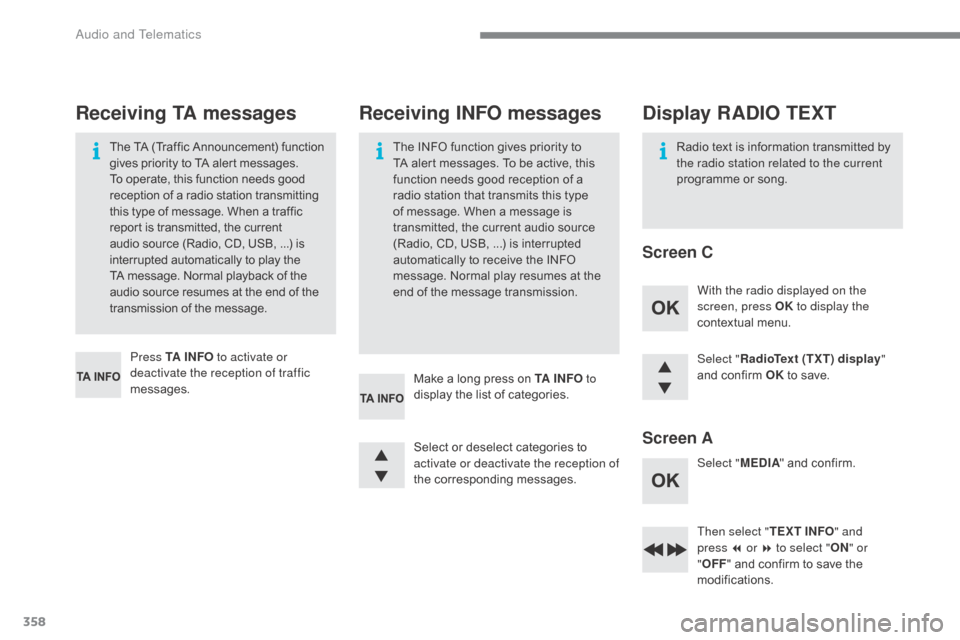
Select "RadioText (TXT) display "
and confirm OK to save.
Then select " TEXT INFO" and
press
7 or 8 to select " ON" or
" OFF "
and confirm to save the
m
odifications.
Select
or
deselect
categories
to
a
ctivate or deactivate the reception of
the
c
orresponding
m
essages.
Press TA I N FO
to activate or
deactivate the reception of traffic
messages. With the radio displayed on the
screen, press OK
to display the
contextual menu.
Select " MEDIA"
and confirm.
Make
a
long
press
on
TA I N FO to
display
the
list
of
categories.
The
TA
(Traffic
Announcement)
function
g
ives
priority
to
TA
alert
messages.
T
o
operate,
this
function
needs
good
r
eception
of
a
radio
station
transmitting
t
his
type
of
message.
When
a
traffic
r
eport
is
transmitted,
the
current
a
udio
source
(Radio,
CD,
USB,
...)
is
i
nterrupted
automatically
to
play
the
T
A
message.
Normal
playback
of
the
a
udio
source
resumes
at
the
end
of
the
t
ransmission
of
the
message.
Receiving TA messages Receiving INFO messages
The INFO function gives priority to T
A alert messages. To be active, this
f
unction needs good reception of a
r
adio station that transmits this type
o
f message. When a message is
t
ransmitted, the current audio source
(
Radio, CD, USB, ...) is interrupted
a
utomatically to receive the INFO
m
essage. Normal play resumes at the
e
nd of the message transmission. Radio
text is information transmitted by t
he radio station related to the current
programme
or song.
Display RADIO TEXT
Screen C
Screen A
Audio and Telematics
Page 362 of 396
360
C4-2_en_Chap10c_RD5_ed02-2015
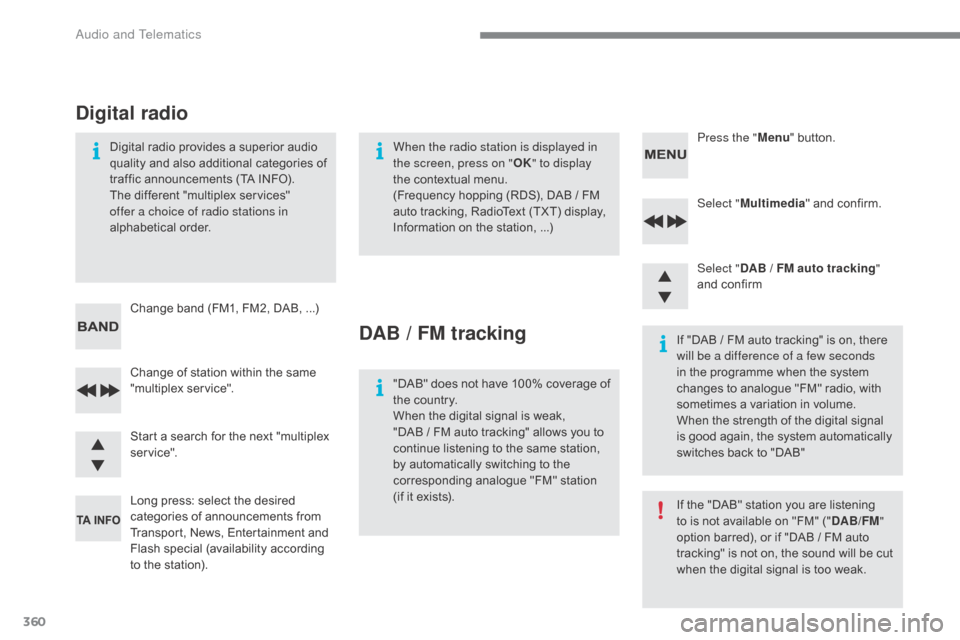
Select "Multimedia " and confirm.
Select " DAB
/ FM auto tracking "
and
confirm
Long
press:
select
the
desired
c
ategories
of
announcements
from
T
ransport,
News,
Entertainment
and
F
lash
sp
ecial
(
availability
a
ccording
t
o
the
station).
Change
of
station
within
the
same
"
multiplex
s
ervice". Press the "
Menu" button.
Start
a
search
for
the
next
"multiplex
ser
vice".
Change
band
(FM1,
FM2,
DAB, ...)
Digital
radio
provides
a
superior
audio
q
uality
and
also
additional
categories
of
t
raffic
announcements
(TA
INFO).
The
different
"multiplex
services"
o
ffer a choice of radio stations in
alphabetical
o
rder.
Digital radio
When the radio station is displayed in
the screen, press on " OK" to display
the
contextual menu.
(Frequency
hopping (RDS), DAB / FM
a
uto tracking, RadioText (TXT) display,
I
nformation on the station, ...)
DAB / FM tracking
"DAB" does not have 100% coverage of t
he country.
When
the digital signal is weak,
"DAB
/ FM auto tracking" allows you to
c
ontinue listening to the same station,
b
y automatically switching to the
c
orresponding analogue "FM" station
(
if it exists). If
"DAB / FM auto tracking" is on, there
w
ill be a difference of a few seconds
in the programme when the system c
hanges to analogue "FM" radio, with
s
ometimes a variation in volume.
When
the strength of the digital signal
i
s good again, the system automatically
s
witches back to "DAB"
If
the "DAB" station you are listening
t
o is not available on "FM" ("DAB/FM "
option
barred), or if "DAB / FM auto
t
racking" is not on, the sound will be cut
w
hen the digital signal is too weak.
Audio and Telematics
Page 373 of 396
371
C4-2_en_Chap10c_RD5_ed02-2015
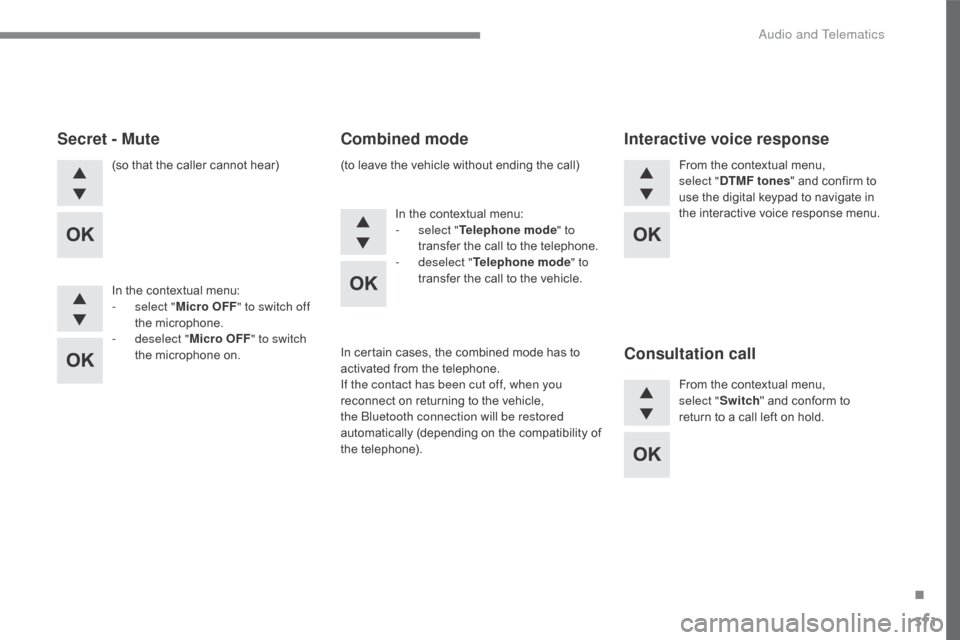
(so that the caller cannot hear)
I n the contextual menu:
-
s
elect " Micro OFF " to switch off
the
m
icrophone.
-
d
eselect " Micro OFF " to switch
the
microphone on. In
the contextual menu:
-
s
elect "Telephone mode " to
transfer
the call to the telephone.
-
d
eselect "Telephone mode " to
transfer
the call to the vehicle.From
the contextual menu, s
elect "DTMF tones "
and confirm to
u
se the digital keypad to navigate in
the
interactive voice response menu.
From
the contextual menu,
s
elect
"Switch "
and conform to
r
eturn to a call left on hold.
Secret - MuteCombined modeInteractive voice response
Consultation call
In certain cases, the combined mode has to a
ctivated from the telephone.
If the contact has been cut off, when you
reconnect
on returning to the vehicle,
t
he Bluetooth connection will be restored
automatically
(
depending
o
n
t
he
c
ompatibility
o
f
t
he
t
elephone).
(to
leave the vehicle without ending the call)
.
Audio and Telematics