ESP Citroen C4 2016 2.G Owner's Guide
[x] Cancel search | Manufacturer: CITROEN, Model Year: 2016, Model line: C4, Model: Citroen C4 2016 2.GPages: 396, PDF Size: 10.22 MB
Page 87 of 396
85
C4-2_en_Chap03_ergonomie-et-confort_ed02-2015
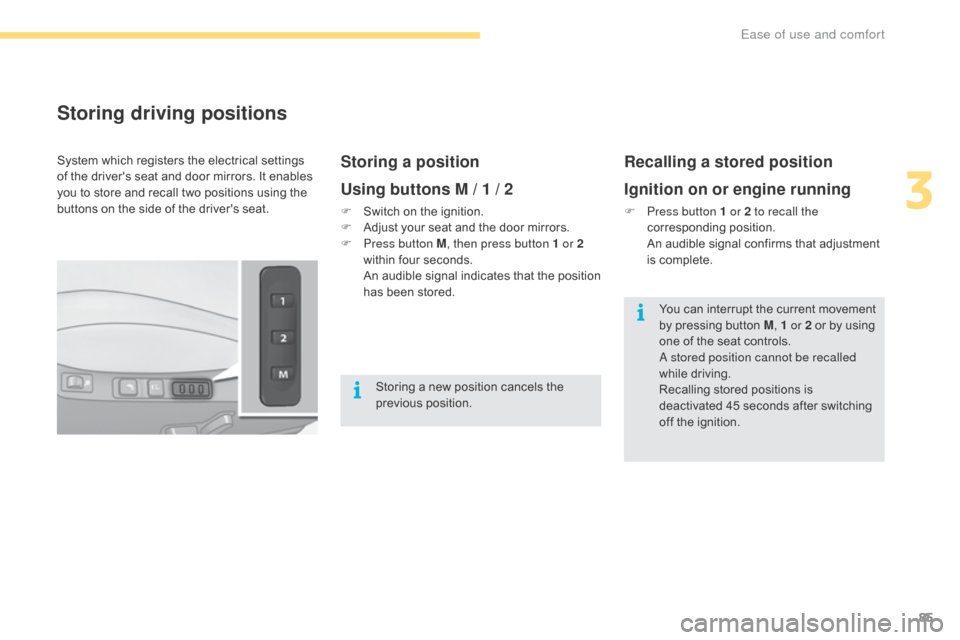
Storing driving positions
Storing a position
Using buttons M / 1 / 2
F Switch on the ignition.
F A djust your seat and the door mirrors.
F
P
ress button M , then press button 1 or 2
within
four seconds.
A
n audible signal indicates that the position
h
as been stored.
Recalling a stored position
Ignition on or engine running
F Press button 1 or 2 to recall the corresponding p osition.
A
n audible signal confirms that adjustment
i
s complete.
System
which
registers
the
electrical
settings
o
f
the
driver's
seat
and
door
mirrors.
It
enables
y
ou
to
store
and
recall
two
positions
using
the
b
uttons
on
the
side
of
the
driver's
seat.
Storing
a
new
position
cancels
the
p
revious
p
osition. You
can interrupt the current movement
b
y pressing button M, 1 or 2
or by using
o
ne of the seat controls.
A stored position cannot be recalled
while
driving.
Recalling
stored positions is
d
eactivated 45 seconds after switching
o
ff the ignition.
3
Ease of use and comfort
Page 89 of 396
87
C4-2_en_Chap03_ergonomie-et-confort_ed02-2015
Mirrors
Each fitted with an adjustable mirror glass permitting t he la teral r earward v ision n ecessary f
or overtaking or parking.
They
can also be folded for parking in confined
spa
ces.
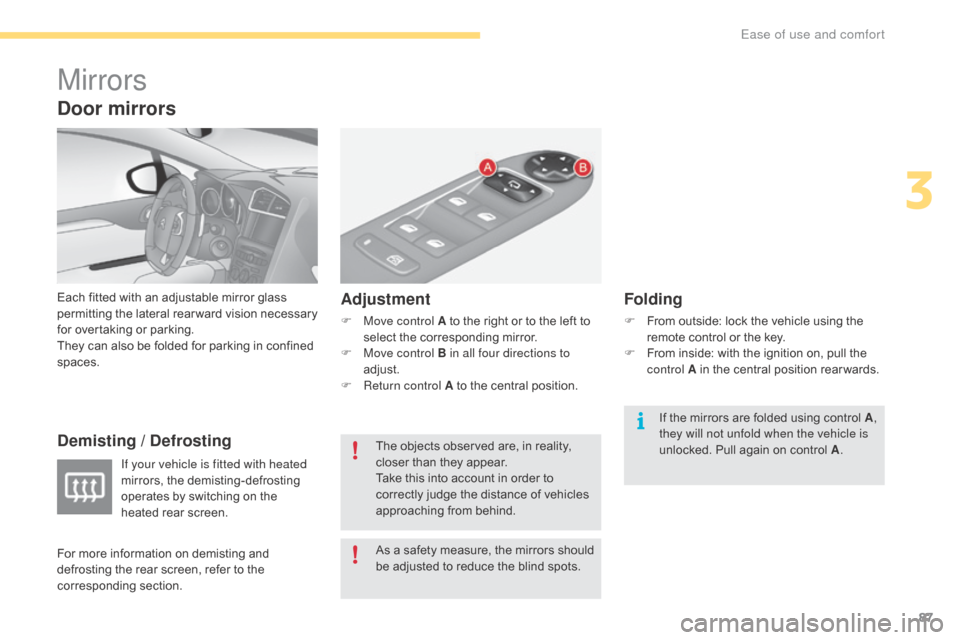
Demisting / Defrosting Adjustment
F Move control A
to the right or to the left to s
elect the corresponding mirror.
F
M
ove control B in all four directions to
adjust.
F
R
eturn control A to the central position.
Folding
F From outside: lock the vehicle using the r
emote control or the key.
F
F
rom inside: with the ignition on, pull the
c
ontrol A in the central position rear wards.
If your vehicle is fitted with heated
mirrors,
the
demisting-defrosting
o
perates
by
switching
on
the
h
eated
rear
screen. As
a
safety
measure,
the
mirrors
should
b
e
adjusted
to
reduce
the
blind
spots.
The
objects
observed
are,
in
reality,
c
loser
than
they
appear.
Take
this
into
account
in
order
to
c
orrectly
judge
the
distance
of
vehicles
a
pproaching
from
behind. If
the mirrors are folded using control A,
they will not unfold when the vehicle is
unlocked.
Pull again on control A.
Door mirrors
For more information on demisting and d
efrosting the rear screen, refer to the
c
orresponding
s
ection.
3
Ease of use and comfort
Page 90 of 396
88
C4-2_en_Chap03_ergonomie-et-confort_ed02-2015
Automatic tilting in reverse gear
System which provides a view of the ground during parking manoeuvres in reverse gear.
Programming
F With the engine running, engage reverse g
e a r.
F
S
elect and adjust the left-hand and right-
hand
mirrors in succession.
The
adjustment is stored immediately.
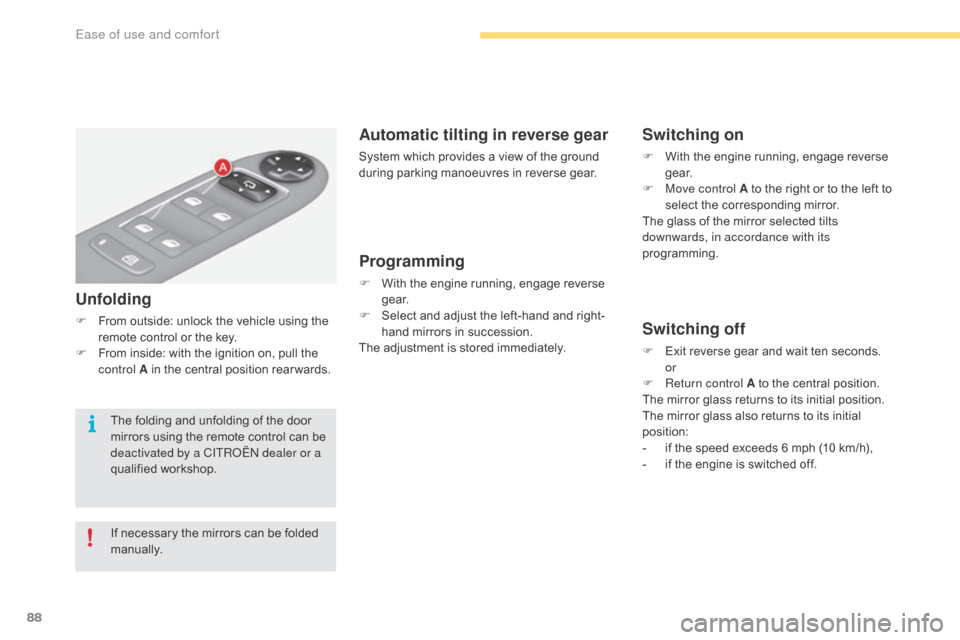
Switching on
F With the engine running, engage reverse g
e a r.
F
M
ove control A to the right or to the left to
s
elect the corresponding mirror.
The
glass of the mirror selected tilts
d
ownwards, in accordance with its
programming.
Switching off
F Exit reverse gear and wait ten seconds.
or
F
R
eturn control A to the central position.
The
mirror glass returns to its initial position.
The
mirror glass also returns to its initial
p
osition:
-
i
f the speed exceeds 6 mph (10 km/h),
-
i
f the engine is switched off.
Unfolding
F From outside: unlock the vehicle using the r
emote control or the key.
F
F
rom inside: with the ignition on, pull the
c
ontrol A in the central position rear wards.
If
necessary the mirrors can be folded
m
anually.
The
folding and unfolding of the door
m
irrors using the remote control can be
d
eactivated by a CITROËN dealer or a
qualified
w
orkshop.
Ease of use and comfort
Page 93 of 396
91
C4-2_en_Chap03_ergonomie-et-confort_ed02-2015
Stop & Start
The heating and air conditioning systems only work when the engine is
r
unning.
To
maintain a comfortable temperature
i
n the passenger compartment, you can
t
emporarily deactivate the Stop & Start
s
ystem.
For
more information on Stop & Start,
r
efer to the corresponding section.
In
order
for
these
systems
to
be
fully
effective,
follow
the
operation
and
maintenance
g
uidelines
belo
w:
F
T
o
obtain
an
even
air
distribution,
take
care
not
to
obstruct
the
exterior
air
intake
grilles
l
ocated at the base of the windscreen, the nozzles, the vents and the air outlets, as well
as
the
air
extractor
located
in
the
boot.
F
D
o
not
cover
the
sunshine
sensor,
located
on
the
dashboard;
this
is
used
for
regulation
o
f
the
air
conditioning
system.
F
O
perate
the
air
conditioning
system
for
at
least
5
to
10
minutes,
once
or
twice
a
month
t
o
keep
it
in
per fect
working
order.
F
E
nsure
that
the
passenger
compartment
filter
is
in
good
condition
and
have
the
filter
e
lements
replaced
regularly.
W
e
recommend
the
use
of
a
combined
passenger
compartment
filter.
Thanks
to
its
s
pecial active additive, it contributes to the purification of the air breathed by the
occupants
and
the
cleanliness
of
the
passenger
compartment
(reduction
of
allergic
s
ymptoms,
bad
odours
and
greasy
deposits).
F
T
o
ensure
correct
operation
of
the
air
conditioning
system,
you
are
also
advised
to
have
i
t
checked
regularly
as
recommended
in
the
maintenance
and
warranty
guide.
F
I
f
the
system
does
not
produce
cold
air,
switch
it
off
and
contact
a
CITROËN
dealer
or
a
q
ualified
w
orkshop.
When
towing
the
maximum
load
on
a
steep
gradient
in
high
temperatures,
switching
off
the
a
ir
conditioning
increases
the
available
engine
power
and
so
improves
the
towing
ability. The condensation created by the air
conditioning
results in a discharge
o
f water under the vehicle which is
per fectly normal.
If after an extended stop in sunshine,
t
he interior temperature is very
h
igh, first ventilate the passenger
c
ompartment for a few moments.
Put the air flow control at a setting high
e
nough to quickly change the air in the
p
assenger
c
ompartment.
The air conditioning system does not
c
ontain chlorine and does not present
any danger to the ozone layer.
Recommendations for ventilation and air conditioning
3
Ease of use and comfort
Page 98 of 396
96
C4-2_en_Chap03_ergonomie-et-confort_ed02-2015
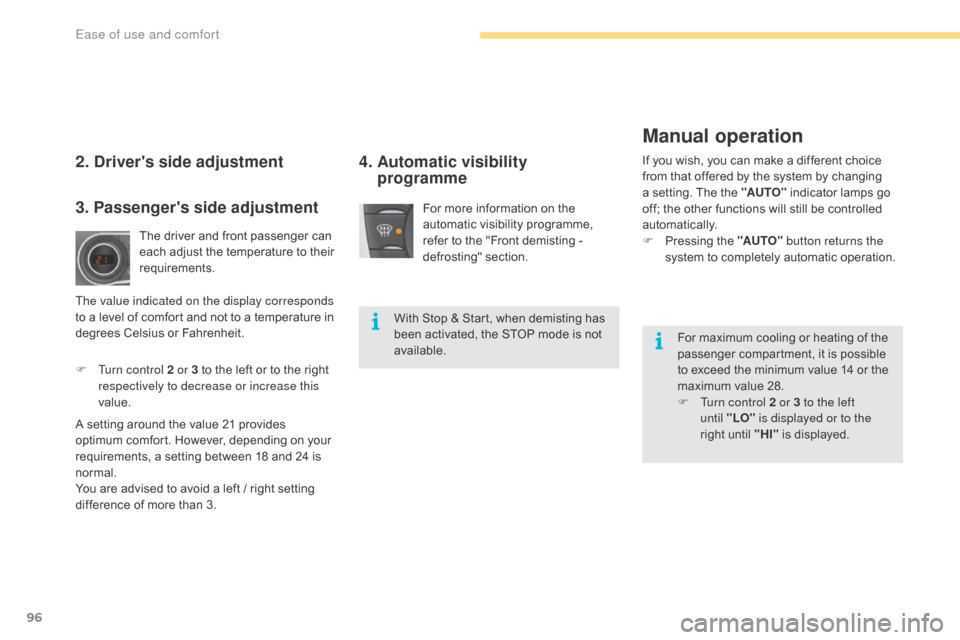
For more information on the automatic visibility programme,
r
efer to the "Front demisting -
d
efrosting"
s
ection.
4. Automatic visibility programmeIf you wish, you can make a different choice f
rom that offered by the system by changing
a
setting. The the "AUTO"
indicator lamps go
o
ff; the other functions will still be controlled
au
tomatically.
F
P
ressing the "AUTO" button returns the
system
to completely automatic operation.2. Driver's side adjustment
The driver and front passenger can each adjust the temperature to their
r
equirements.
F
T
urn control 2 or 3 to the left or to the right
r
espectively to decrease or increase this
value.
A
setting
around the value 21 provides
o
ptimum
comfort. However, depending on your
r
equirements, a setting between 18 and 24 is
n
ormal.
You
are
advised to avoid a left / right setting
d
ifference
of more than 3.
3. Passenger's side adjustment
The value indicated on the display corresponds
to a level of comfort and not to a temperature in
d
egrees Celsius or Fahrenheit. With
Stop & Start, when demisting has
b
een activated, the STOP mode is not
a
vailable.For
maximum cooling or heating of the
p
assenger compartment, it is possible
t
o exceed the minimum value 14 or the
m
aximum value 28.
F
T
urn control 2 or 3 to the left
until
"LO" is displayed or to the
right
until "HI"
is displayed.
Manual operation
Ease of use and comfort
Page 106 of 396
104
C4-2_en_Chap03_ergonomie-et-confort_ed02-2015
USB Player
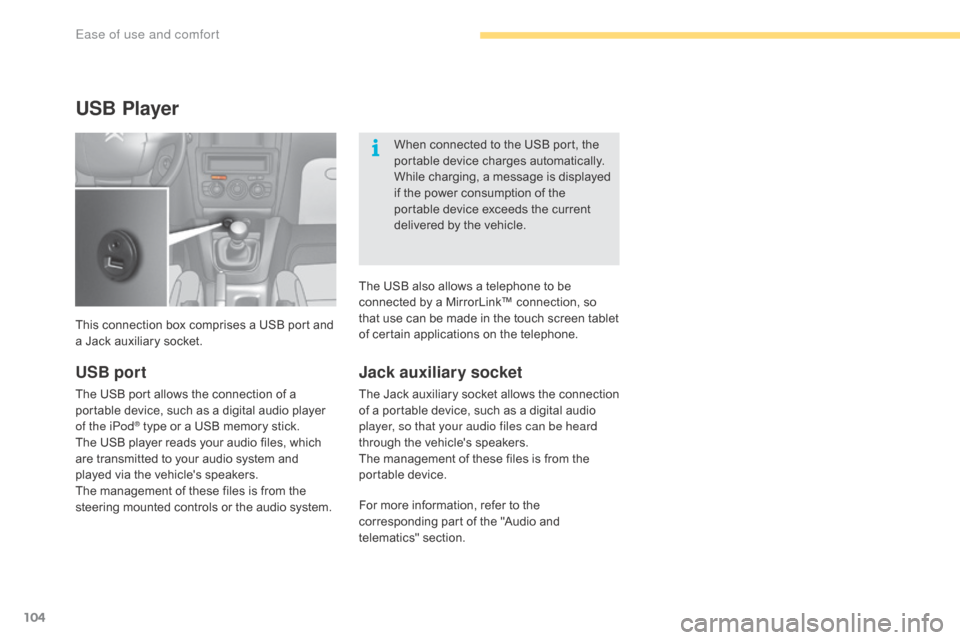
This connection box comprises a USB port and a Jack auxiliary socket. When
connected to the USB port, the
p
ortable device charges automatically.
While charging, a message is displayed
i
f the power consumption of the
p
ortable device exceeds the current
d
elivered by the vehicle.
Jack auxiliary socket
The Jack auxiliary socket allows the connection o
f a portable device, such as a digital audio
p
layer, so that your audio files can be heard
through
the vehicle's speakers.
The
management of these files is from the
p
ortable
d
evice.
USB port
The USB port allows the connection of a portable device, such as a digital audio player
o
f the iPod
® type or a USB memory stick.
T
he
USB
player reads your audio files, which
a
re
transmitted to your audio system and
p
layed
via
the vehicle's speakers.
The
management of these files is from the
s
teering
mounted controls or the audio system.For
more information, refer to the
c
orresponding part of the "Audio and
t
elematics"
se
ction.
The
USB also allows a telephone to be
c
onnected by a MirrorLink™ connection, so
t
hat use can be made in the touch screen tablet
o
f certain applications on the telephone.
Ease of use and comfort
Page 107 of 396
105
C4-2_en_Chap03_ergonomie-et-confort_ed02-2015
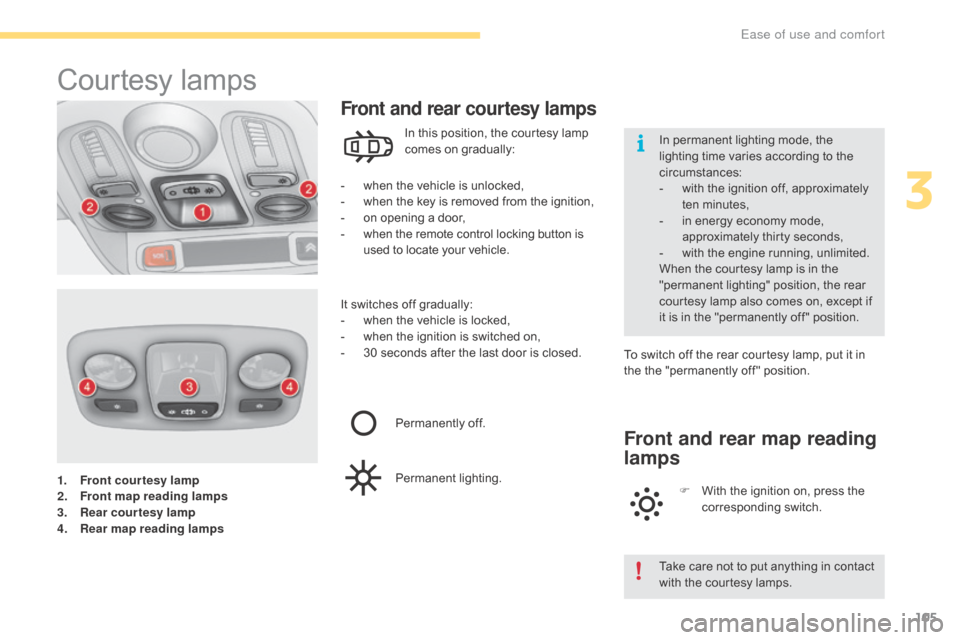
1. Front courtesy lamp
2. Front map reading lamps
3.
R
ear courtesy lamp
4.
R
ear map reading lamps
Courtesy lam ps
- when the vehicle is unlocked,
- w hen the key is removed from the ignition,
-
o
n opening a door,
-
w
hen the remote control locking button is
u
sed to locate your vehicle.
Front and rear courtesy lamps
In this position, the courtesy lamp comes on gradually:
It
switches
off gradually:
-
w
hen
the vehicle is locked,
-
w
hen
the ignition is switched on,
-
3
0
seconds after the last door is closed.To
switch off the rear courtesy lamp, put it in
t
he the "permanently off " position.
Permanently
off.
Permanent
l
ighting.
Front and rear map reading
lamps
F With the ignition on, press the c
orresponding s witch.
Take
care not to put anything in contact
w
ith the courtesy lamps.
In
permanent lighting mode, the
l
ighting time varies according to the
c
ircumstances:
-
w
ith the ignition off, approximately
t
en
m
inutes,
-
i
n energy economy mode,
a
pproximately thirty seconds,
-
w
ith the engine running, unlimited.
When the courtesy lamp is in the
"
permanent lighting" position, the rear
c
ourtesy lamp also comes on, except if
i
t
is
in the "permanently off " position.
3
Ease of use and comfort
Page 117 of 396
115
C4-2_en_Chap03_ergonomie-et-confort_ed02-2015
Rear seats
Rear head restraints
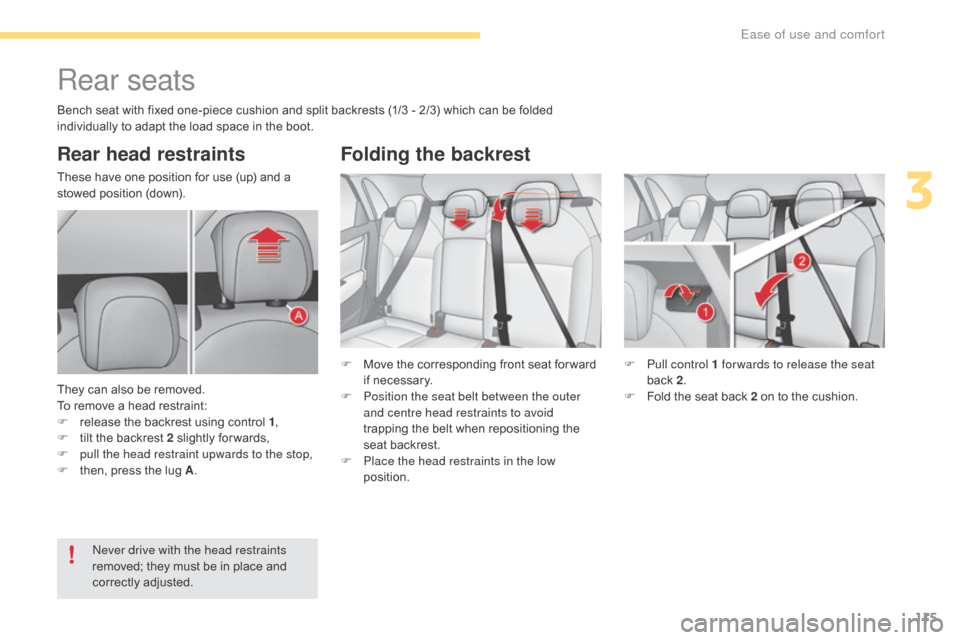
These have one position for use (up) and a stowed position (down).
They
can also be removed.
To
remove a head restraint:
F
r
elease the backrest using control 1,
F
t
ilt the backrest 2 slightly for wards,
F
p
ull the head restraint upwards to the stop,
F
t
hen, press the lug A. F
M
ove the corresponding front seat for ward
i
f necessary.
F
P
osition the seat belt between the outer
and centre head restraints to avoid
trapping
the belt when repositioning the
s
eat backrest.
F
P
lace the head restraints in the low
position. F
P
ull control 1 for wards to release the seat
back
2.
F
F
old the seat back 2 on to the cushion.
Never drive with the head restraints
removed;
they must be in place and
c
orrectly
adj
usted.
Folding the backrest
Bench seat with fixed one-piece cushion and split backrests (1/3 - 2/3) which can be folded individually to adapt the load space in the boot.
3
Ease of use and comfort
Page 122 of 396
120
C4-2_en_Chap03_ergonomie-et-confort_ed02-2015
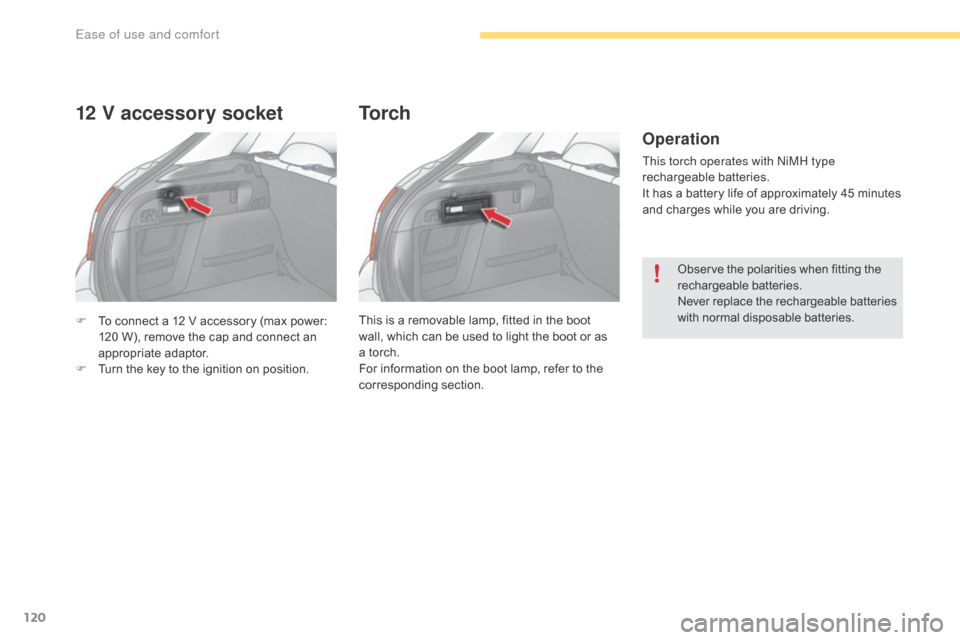
F To connect a 12 V accessory (max power: 1
20 W), remove the cap and connect an
a
ppropriate
a
daptor.
F
T
urn the key to the ignition on position.
12 V accessory socket
This is a removable lamp, fitted in the boot wall, which can be used to light the boot or as
a
torch.
For
information on the boot lamp, refer to the
c
orresponding
s
ection.
To r c h
Operation
This torch operates with NiMH type
rechargeable batteries.
It
has a battery life of approximately 45 minutes
a
nd charges while you are driving.
Observe
the polarities when fitting the
r
echargeable
b
atteries.
Never
r
eplace
t
he
r
echargeable
b
atteries
w
ith normal disposable batteries.
Ease of use and comfort
Page 127 of 396
125
C4-2_en_Chap04_eclairage-et-visibilite_ed02-2015
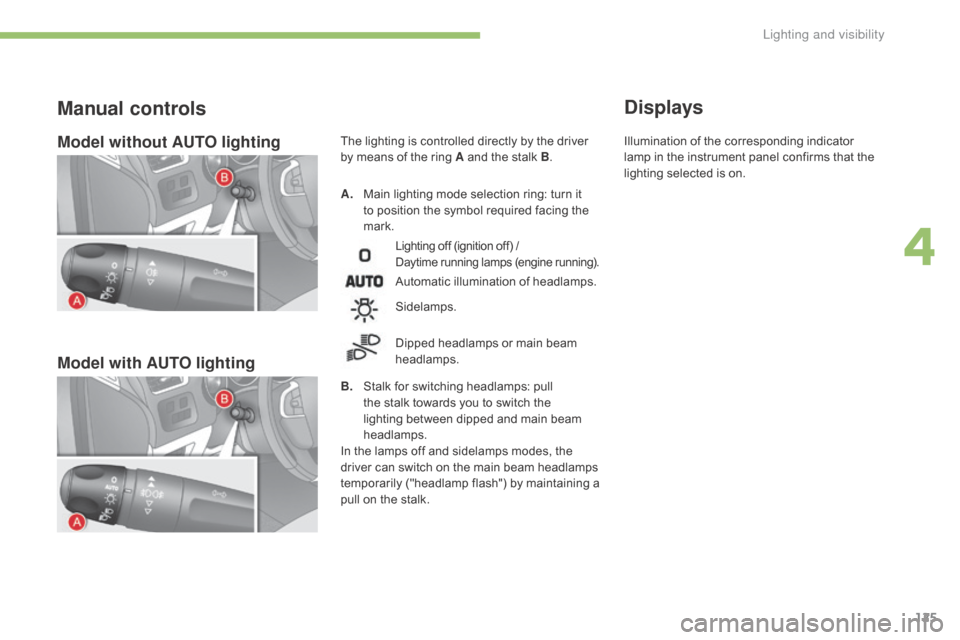
Model without AUTO lighting
Model with AUTO lighting
A. Main lighting mode selection ring: turn it t
o position the symbol required facing the
ma
rk.
Manual controls
Lighting off (ignition off) /
D aytime running lamps (engine running).
Automatic illumination of headlamps.
B.
S
talk
for switching headlamps: pull
t
he
stalk towards you to switch the
l
ighting between dipped and main beam
h
eadlamps.
In
the
lamps off and sidelamps modes, the
d
river
can
switch on the main beam headlamps
t
emporarily ("headlamp flash") by maintaining a
p
ull
on
the stalk.
Sidelamps.
Dipped
headlamps or main beam
h
eadlamps.
Displays
The lighting is controlled directly by the driver by means of the ring A and the stalk B. Illumination
of the corresponding indicator l
amp in the instrument panel confirms that the
l
ighting selected is on.
4
Lighting and visibility