Screen CITROEN C4 PICASSO 2019 User Guide
[x] Cancel search | Manufacturer: CITROEN, Model Year: 2019, Model line: C4 PICASSO, Model: CITROEN C4 PICASSO 2019Pages: 316, PDF Size: 10.36 MB
Page 27 of 316
25
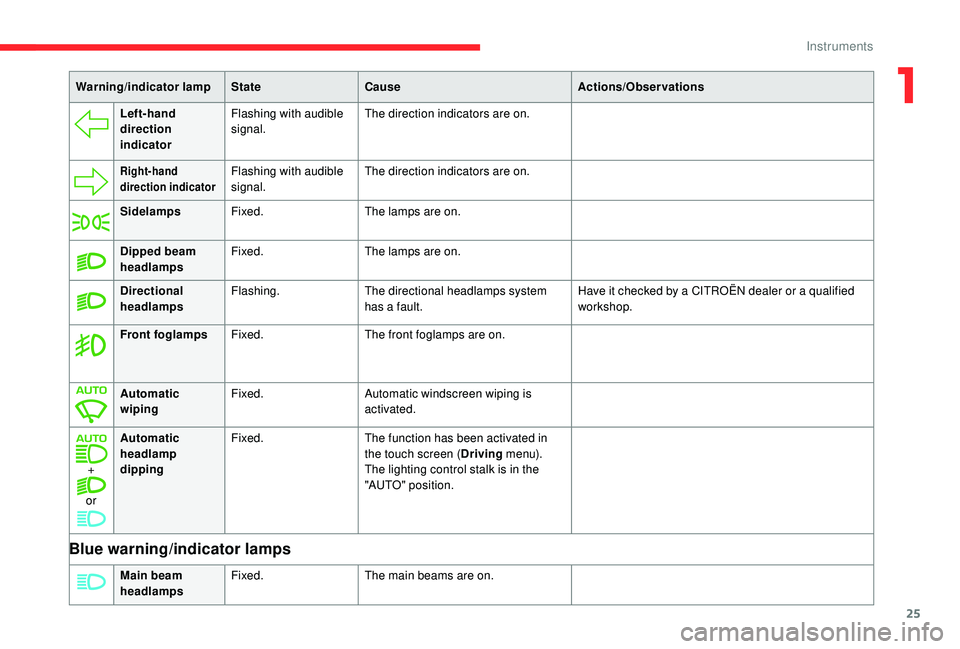
Left-hand
direction
indicatorFlashing with audible
signal.
The direction indicators are on.
Right-hand
direction indicatorFlashing with audible
signal.The direction indicators are on.
Sidelamps Fixed. The lamps are on.
Dipped beam
headlamps Fixed.
The lamps are on.
Directional
headlamps Flashing.
The directional headlamps system
has a
fault. Have it checked by a
CITROËN dealer or a qualified
workshop.
Front foglamps Fixed. The front foglamps are on.
Automatic
wiping Fixed.
Automatic windscreen wiping is
activated.
+
or Automatic
headlamp
dipping
Fixed.
The function has been activated in
the touch screen (Driving m e n u).
The lighting control stalk is in the
"AUTO" position.
Blue warning/indicator lamps
Main beam
headlamps Fixed.
The main beams are on.
Warning/indicator lamp
StateCause Actions/Observations
1
Instruments
Page 29 of 316
27
You can access the ser vice information at any
time.
F
P
ress the trip distance recorder reset
button.
The ser vice information is displayed for
a
few seconds, then disappears.
Engine coolant temperature
gauge
(Only with the 12" colour instrument panel.)
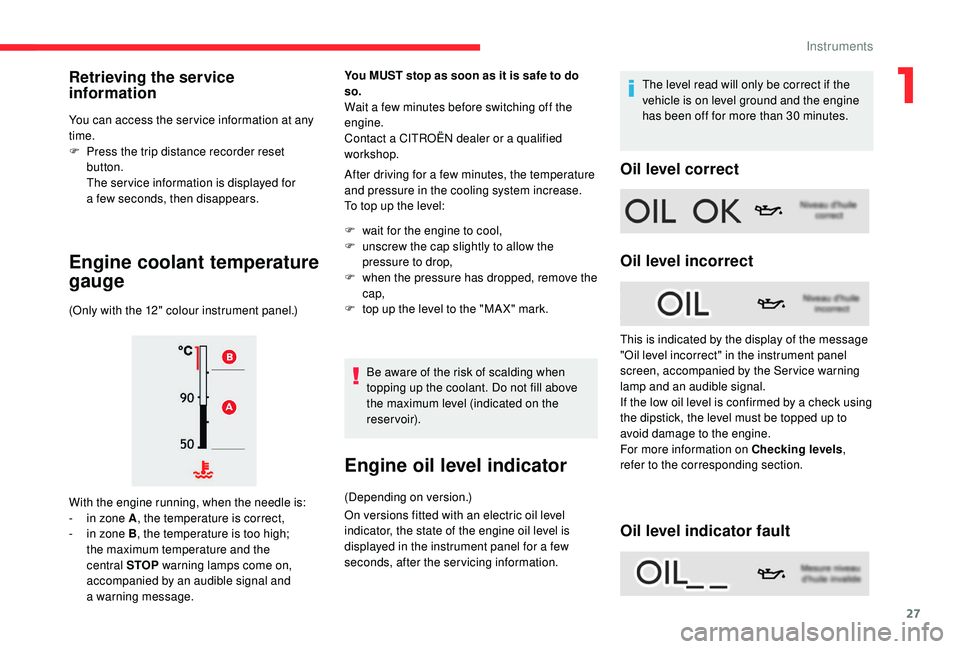
With the engine running, when the needle is:
-
i
n zone A , the temperature is correct,
-
i
n zone B , the temperature is too high;
the maximum temperature and the
central STOP warning lamps come on,
accompanied by an audible signal and
a
warning message.
You MUST stop as soon as it is safe to do
so.
Wait a few minutes before switching off the
e ngine.
Contact a
CITROËN dealer or a qualified
workshop.
After driving for a
few minutes, the temperature
and pressure in the cooling system increase.
To top up the level:
F
w
ait for the engine to cool,
F
u
nscrew the cap slightly to allow the
pressure to drop,
F
w
hen the pressure has dropped, remove the
cap,
F
t
op up the level to the "MA X" mark.Be aware of the risk of scalding when
topping up the coolant. Do not fill above
the maximum level (indicated on the
reservoir).
Engine oil level indicator
(Depending on version.)
On versions fitted with an electric oil level
indicator, the state of the engine oil level is
displayed in the instrument panel for a few
seconds, after the servicing information. The level read will only be correct if the
vehicle is on level ground and the engine
has been off for more than 30
minutes.
Oil level correct
Oil level incorrect
Oil level indicator fault
Retrieving the service
information
This is indicated by the display of the message
"Oil level incorrect" in the instrument panel
screen, accompanied by the Ser vice warning
lamp and an audible signal.
If the low oil level is confirmed by a
check using
the dipstick, the level must be topped up to
avoid damage to the engine.
For more information on Checking levels ,
refer to the corresponding section.
1
Instruments
Page 32 of 316
30
In the event of a fault with the
S CR emissions control system
A system that prevents engine starting is
activated automatically from 685
miles
(1,100
km) after confirmation of a fault with
the SCR emissions control system.
Have the system checked by a
CITROËN
dealer or a
qualified workshop as soon as
possible.
In the event of the detection of a
fault
If it is a
temporary fault, the alert
disappears during the next journey, after
self-diagnosis of the SCR system. During the permitted driving phase
(between 685
and 0 miles (1,100 and 0 km))
While driving, the message is displayed every
30
seconds while the fault with the SCR system
persists.
The alert is repeated when switching on the
ignition.
You should go to a
CITROËN dealer or a qualified
workshop as soon as possible.
Other wise you will not be able to restart the vehicle.
Starting prevented You have exceeded the authorised driving
limit: the starting prevention system does
not allow the engine to be started.
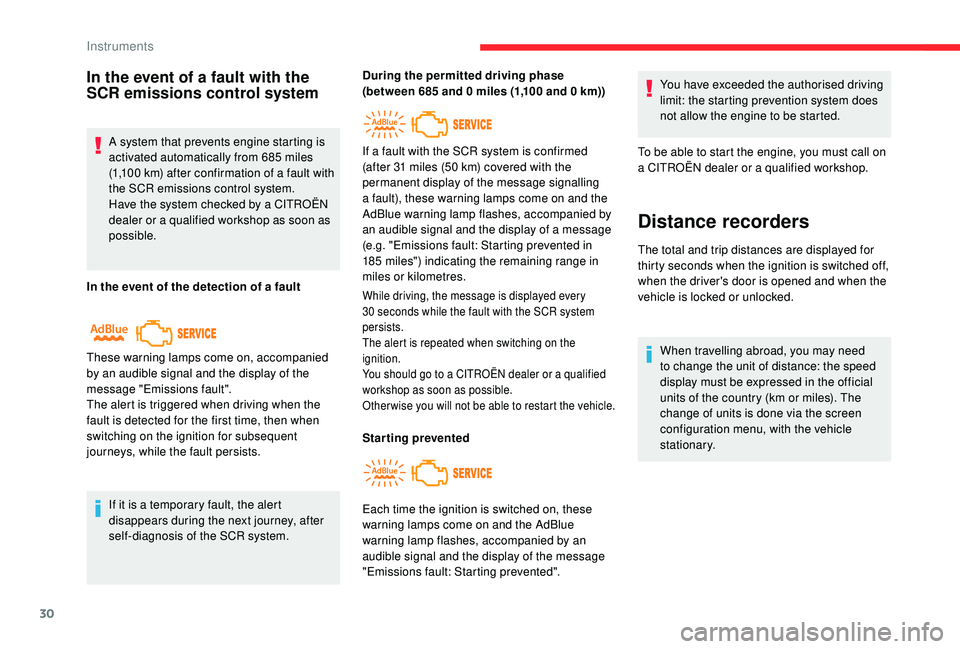
These warning lamps come on, accompanied
by an audible signal and the display of the
message "Emissions fault".
The alert is triggered when driving when the
fault is detected for the first time, then when
switching on the ignition for subsequent
journeys, while the fault persists. If a
fault with the SCR system is confirmed
(after 31 miles (50 km) covered with the
permanent display of the message signalling
a fault), these warning lamps come on and the
AdBlue warning lamp flashes, accompanied by
an audible signal and the display of a message
(e.g. "Emissions fault: Starting prevented in
185 miles") indicating the remaining range in
miles or kilometres.
Each time the ignition is switched on, these
warning lamps come on and the AdBlue
warning lamp flashes, accompanied by an
audible signal and the display of the message
"Emissions fault: Starting prevented". To be able to start the engine, you must call on
a
CITROËN dealer or a qualified workshop.
Distance recorders
The total and trip distances are displayed for
thirty seconds when the ignition is switched off,
when the driver's door is opened and when the
vehicle is locked or unlocked.
When travelling abroad, you may need
to change the unit of distance: the speed
display must be expressed in the official
units of the country (km or miles). The
change of units is done via the screen
configuration menu, with the vehicle
stationary.
Instruments
Page 33 of 316
31
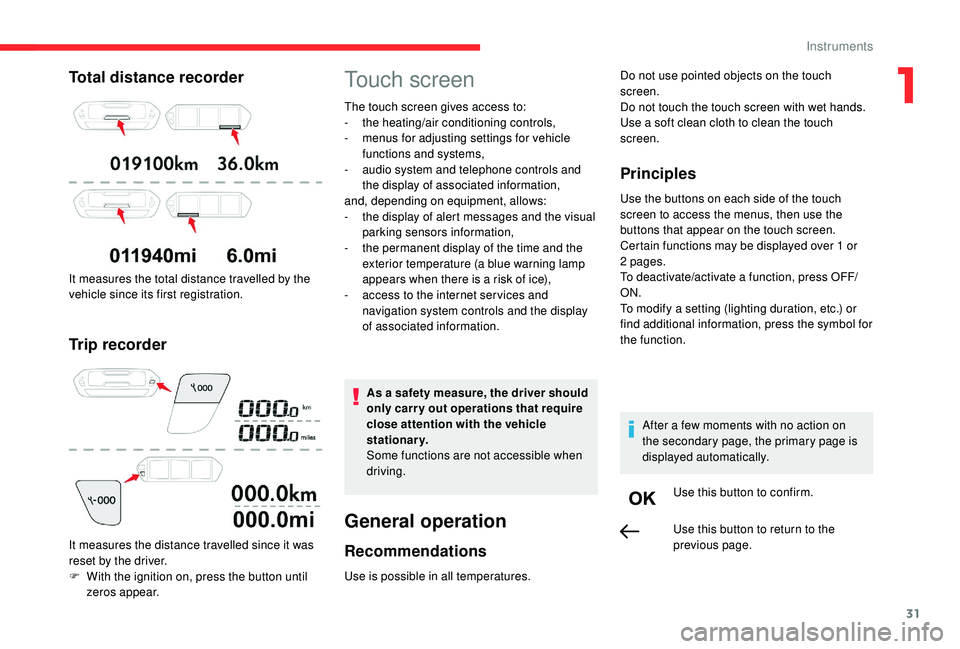
Total distance recorder
It measures the total distance travelled by the
vehicle since its first registration.
Trip recorder
It measures the distance travelled since it was
reset by the driver.
F
W
ith the ignition on, press the button until
zeros appear.
Touch screen
The touch screen gives access to:
- t he heating/air conditioning controls,
-
m
enus for adjusting settings for vehicle
functions and systems,
-
a
udio system and telephone controls and
the display of associated information,
and, depending on equipment, allows:
-
t
he display of alert messages and the visual
parking sensors information,
-
t
he permanent display of the time and the
exterior temperature (a blue warning lamp
appears when there is a
risk of ice),
-
a
ccess to the internet ser vices and
navigation system controls and the display
of associated information.
As a
safety measure, the driver should
only carry out operations that require
close attention with the vehicle
stationary.
Some functions are not accessible when
driving.
General operation
Recommendations
Use is possible in all temperatures.
Principles
Use the buttons on each side of the touch
screen to access the menus, then use the
buttons that appear on the touch screen.
Certain functions may be displayed over 1
or
2
pages.
To deactivate/activate a
function, press OFF/
ON.
To modify a
setting (lighting duration, etc.) or
find additional information, press the symbol for
the function.
After a
few moments with no action on
the secondary page, the primary page is
displayed automatically.
Use this button to confirm.
Do not use pointed objects on the touch
screen.
Do not touch the touch screen with wet hands.
Use a
soft clean cloth to clean the touch
screen.
Use this button to return to the
previous page.
1
Instruments
Page 34 of 316
32
Menus
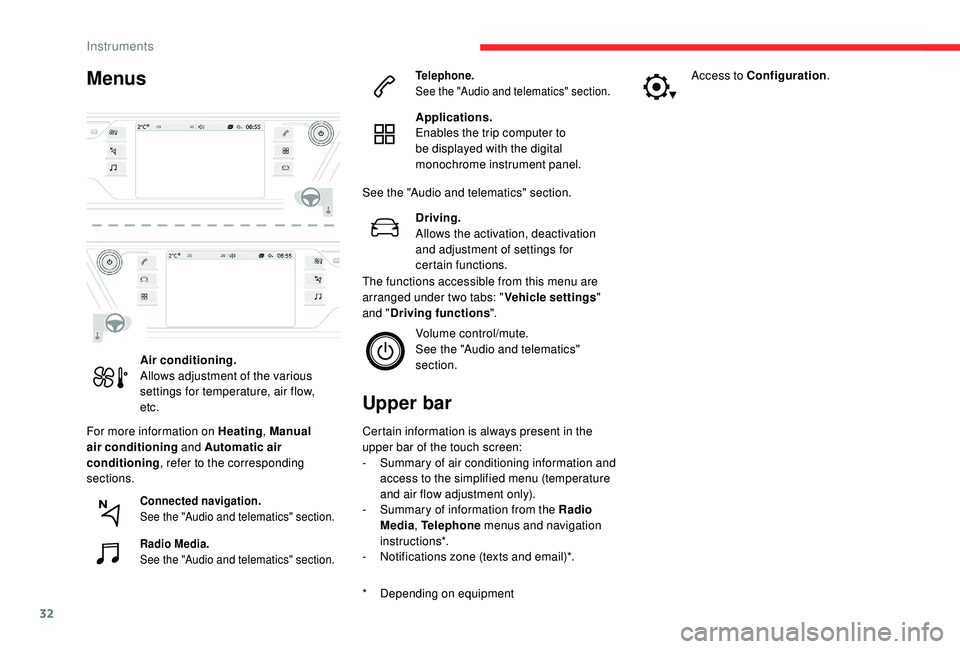
For more information on Heating, Manual
air conditioning and Automatic air
conditioning , refer to the corresponding
sections.
Upper bar
* Depending on equipment Certain information is always present in the
upper bar of the touch screen:
-
S
ummary of air conditioning information and
access to the simplified menu (temperature
and air flow adjustment only).
-
S
ummary of information from the Radio
Media , Telephone menus and navigation
instructions*.
-
N
otifications zone (texts and email)*.
Air conditioning.
Allows adjustment of the various
settings for temperature, air flow,
etc.
Connected navigation.
See the "Audio and telematics" section.
Radio Media.
See the "Audio and telematics" section. Telephone.
See the "Audio and telematics" section.
Applications.
Enables the trip computer to
be displayed with the digital
monochrome instrument panel.
See the "Audio and telematics" section. Driving.
Allows the activation, deactivation
and adjustment of settings for
certain functions.
The functions accessible from this menu are
arranged under two tabs: " Vehicle settings"
and " Driving functions ".
Volume control/mute.
See the "Audio and telematics"
section. Access to Configuration
.
Instruments
Page 38 of 316
36
The functions available through the
upper menu bar are detailed in the
table below. Certain settings can be
accessed on the second page.
Configuration
ButtonComments
Switch off the screen.
Brightness adjustment.
Choice and configuration of
three personalised profiles and
a
common profile.
Touch screen and instrument
panel settings, etc.
Activation and adjustment of the
Wi-Fi settings. Button
Comments
Adjustment of the display
parameters (text scrolling,
animations, etc.) and
brightness.
Choose an ambience for the 12-
inch colour instrument panel.
Choice of the type of
information displayed in the 12-
inch colour instrument panel.
Choice of units:
- t
emperature (°Celsius or
°Fahrenheit)
-
d
istances and fuel consumption
(l/100
km, mpg or km/l).
Choice of language for the
touch screen and 12-inch colour
instrument panel.
Setting the date and time.
Trip computer
System that gives you information on
the current journey (range, current fuel
consumption, average fuel consumption, etc.).
Digital monochrome
instrument panel
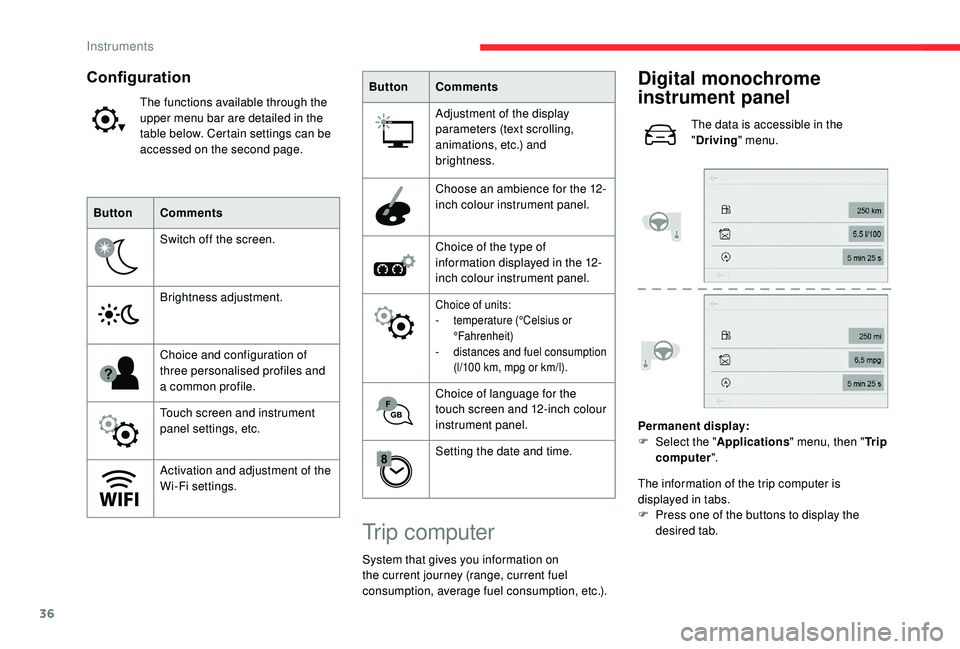
The data is accessible in the
"Driving " menu.
Permanent display:
F
Sel
ect the " Applications " menu, then " Tr i p
computer ".
The information of the trip computer is
displayed in tabs.
F
P
ress one of the buttons to display the
desired tab.
Instruments
Page 50 of 316
48
The tailgate is not designed to support
a bicycle carrier.
Closing the tailgate
F Lower the tailgate using the interior grips.
F R elease the grips and press down on the
outside of the tailgate to close it.
If the tailgate is not properly closed: F
W
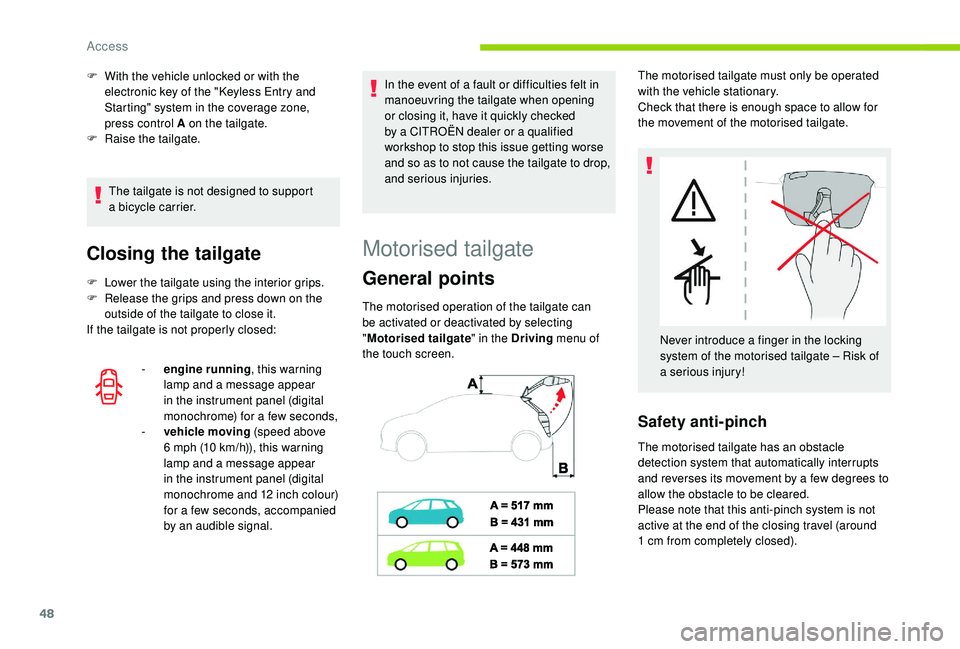
ith the vehicle unlocked or with the
electronic key of the "
K
eyless Entry and
Starting" system in the coverage zone,
press control A on the tailgate.
F
Ra
ise the tailgate.
-
e
ngine running, this warning
lamp and a
message appear
in the instrument panel (digital
monochrome) for a
few seconds,
-
v
ehicle moving (speed above
6
mph (10 km/h)), this warning
lamp and a
message appear
in the instrument panel (digital
monochrome and 12
inch colour)
for a
few seconds, accompanied
by an audible signal. In the event of a
fault or difficulties felt in
manoeuvring the tailgate when opening
or closing it, have it quickly checked
by a CITROËN dealer or a qualified
workshop to stop this issue getting worse
and so as to not cause the tailgate to drop,
and serious injuries.
The motorised operation of the tailgate can
be activated or deactivated by selecting
" Motorised tailgate " in the Driving menu of
the touch screen.
Motorised tailgate
General points
The motorised tailgate must only be operated
with the vehicle stationary.
Check that there is enough space to allow for
the movement of the motorised tailgate.
Never introduce a
finger in the locking
system of the motorised tailgate – Risk of
a
serious injury!
Safety anti-pinch
The motorised tailgate has an obstacle
detection system that automatically interrupts
and reverses its movement by a few degrees to
allow the obstacle to be cleared.
Please note that this anti-pinch system is not
active at the end of the closing travel (around
1
cm from completely closed).
Access
Page 54 of 316
52
Ensure that you are steady on your feet
before making the kicking movement
below the rear bumper.
Take care not to touch the exhaust
system, which may be hot – Risk of burns!
"Hands-free " closing
F If your hands are full, with the remote
control on you in the recognition zone A ,
make a
kicking movement with your foot
below the rear bumper.
Flashing of the direction indicator lamps and
a
beeping sound confirm the request.
Making another kicking movement with your
foot below the bumper while the tailgate is
closing interrupts the movement. A third kicking
movement reverses the direction of movement.
Deactivation
By default, hands-free access is activated.
This function can be activated or deactivated
by selecting " Hands-Free Tailgate Access " in
the Driving menu of the touch screen.
Automatic locking
To lock the vehicle when the tailgate closes
using a kicking movement, activate " Hands-
free tailgate access self-locking " in the
Driving menu of the touch screen.
Recommendations related
to the Hands-Free Tailgate
Access function
If several kicking movements to operate the
tailgate have no effect, wait a
few seconds
before trying again.
If it does not work, check that the electronic key
is not exposed to a
source of electromagnetic
interference (e.g. smartphone).
The function may be deactivated or affected if
there is rain or snow.
The function may not work correctly with
a
prosthetic leg. -
y
ou are washing your vehicle,
-
y
our vehicle is being serviced,
-
y
ou are accessing the spare wheel
(depending on version).
To avoid such operating problems, keep the
electronic key away from the recognition zone
or deactivate the Hands-Free Tailgate Access
function.
After installing a towing device, it is
essential to contact a CITROËN dealer
or a qualified workshop so that it is taken
into account by the detection system.
Other wise, there is a
risk of malfunction of
the Hands-Free Tailgate Access function.
Ensure that no object or person might
prevent the correct opening or closing of
the tailgate.
Be particularly aware of children when
operating the tailgate.
In some circumstances, the tailgate may open
or close by itself, particularly if:
-
y
ou hitch or unhitch a trailer,
-
y
ou fit or remove a bicycle carrier,
-
y
ou load or unload bicycles from a bicycle
c a r r i e r,
-
y
ou place or lift something behind the
vehicle,
-
an
animal approaches the rear bumper,
Access
Page 70 of 316
68
In order to easily adapt your interior
space, you can fold all of the rear seats
individually and fold them onto the second
row floor, and beneath the floor on the
third row. This gives you a continuous load
floor up to the back of the front seats.
Folding or unfolding the seats must only
be done with the vehicle stationary.
Steering wheel adjustment
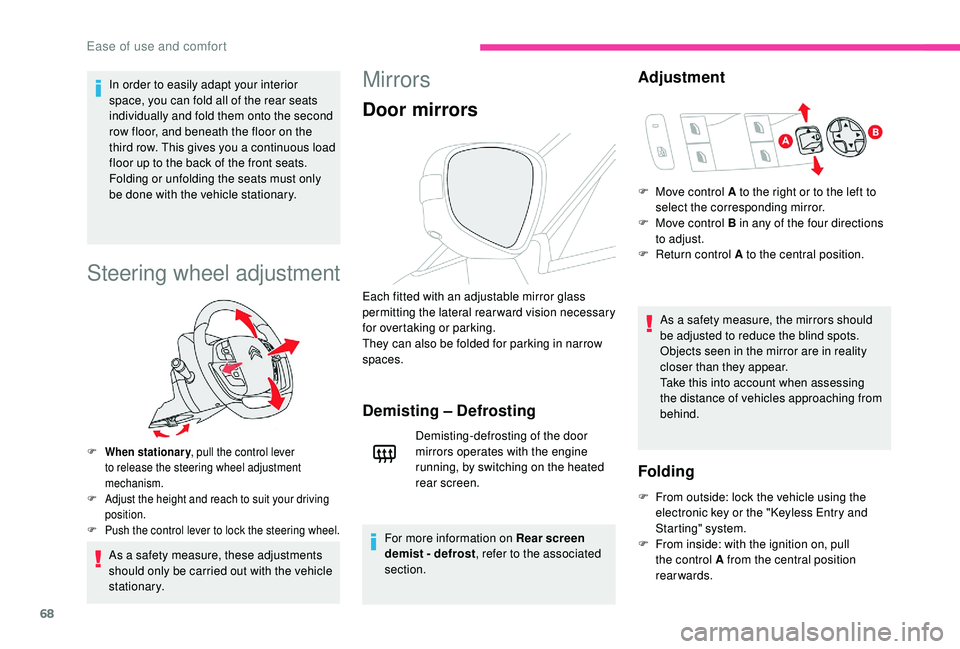
F When stationary , pull the control lever
to release the steering wheel adjustment
mechanism.
F
A
djust the height and reach to suit your driving
position.
F
P
ush the control lever to lock the steering wheel.
As a safety measure, these adjustments
s hould only be carried out with the vehicle
stationary.
Mirrors
Door mirrors
Each fitted with an adjustable mirror glass
permitting the lateral rearward vision necessary
for overtaking or parking.
They can also be folded for parking in narrow
spaces.
Demisting – Defrosting
Demisting-defrosting of the door
mirrors operates with the engine
running, by switching on the heated
rear screen.
For more information on Rear screen
demist - defrost , refer to the associated
section.
Adjustment
As a safety measure, the mirrors should
b e adjusted to reduce the blind spots.
Objects seen in the mirror are in reality
closer than they appear.
Take this into account when assessing
the distance of vehicles approaching from
behind.
F
M
ove control A to the right or to the left to
select the corresponding mirror.
F
M
ove control B in any of the four directions
to adjust.
F
R
eturn control A to the central position.
Folding
F From outside: lock the vehicle using the
electronic key or the " K eyless Entry and
Starting" system.
F
F
rom inside: with the ignition on, pull
the control A from the central position
rearwards.
Ease of use and comfort
Page 71 of 316
69
Automatic tilting in reverse gear
System which provides a view of the ground
d uring parking manoeuvres in reverse gear.
They return to their initial position:
- a f ew seconds after coming out of reverse gear,
-
o
nce the speed of the vehicle exceeds 6 mph
(10
km/h),
-
o
n switching off the engine.
This function can be activated/deactivated in
the Driving menu of the touch screen.
F
Sel
ect the " Vehicle settings " tab, then
" Comfort " and "Mirror adaptation in
reverse ".
Rear view mirror
Equipped with an anti-dazzle system, which
darkens the mirror glass and reduces the
nuisance to the driver caused by the sun,
headlamps from other vehicles, etc.
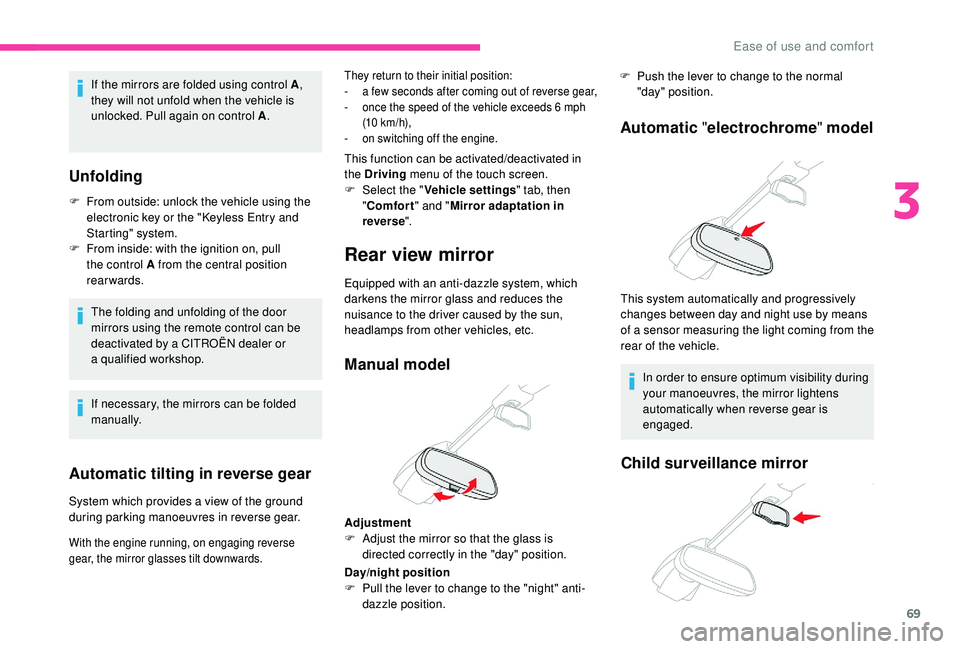
Manual model
Adjustment
F
A djust the mirror so that the glass is
directed correctly in the "day" position. F
P
ush the lever to change to the normal
"day" position.
Automatic "electrochrome " model
This system automatically and progressively
changes between day and night use by means
of a
s
ensor measuring the light coming from the
rear of the vehicle.
In order to ensure optimum visibility during
your manoeuvres, the mirror lightens
automatically when reverse gear is
engaged.
Child surveillance mirror
If the mirrors are folded using control A ,
they will not unfold when the vehicle is
unlocked. Pull again on control A .
Unfolding
F From outside: unlock the vehicle using the
electronic key or the " K eyless Entry and
Starting" system.
F
F
rom inside: with the ignition on, pull
the control A from the central position
rearwards.
The folding and unfolding of the door
mirrors using the remote control can be
deactivated by a
CITROËN dealer or
a
qualified workshop.
If necessary, the mirrors can be folded
manually.
With the engine running, on engaging reverse
gear, the mirror glasses tilt downwards.
Day/night position
F P ull the lever to change to the "night" anti-
dazzle position.
3
Ease of use and comfort