Screen CITROEN C4 PICASSO 2019 Workshop Manual
[x] Cancel search | Manufacturer: CITROEN, Model Year: 2019, Model line: C4 PICASSO, Model: CITROEN C4 PICASSO 2019Pages: 316, PDF Size: 10.36 MB
Page 177 of 316
175
Active Blind Spot
Monitoring System
(depending on version)
In addition to the fixed warning lamp in the door
mirror on the side in question, a correction of
trajectory will be felt if you cross a lane marking
with the direction indicators on, to help you
avoid a
collision.
Conditions for operation
The following systems must be activated:
- B lind Spot Detection,
-
L
ane Departure Warning System.
The speed of the vehicle must be between
40
and 87 mph (65 and 140 km/h) inclusive.
Fatigue detection system
Take a break as soon as you feel tired or at
l east every two hours.
Depending on version, the function relies either
on the "Driver Attention Warning" system alone
or combined with the "Driver Attention Alert"
system.
These systems cannot in any circumstances
replace the need for vigilance on the part
of the driver who must remain in control
of their decisions. In no case can these
systems keep the driver awake or prevent
them from falling asleep at the wheel.
It is the driver's responsibility to stop if they
feel tired.
Activation/Deactivation
These functions are activated and
deactivated in the Driving menu of
the touch screen.
The state of the system stays in the memory
when the ignition is switched off.
Driver Attention Warning
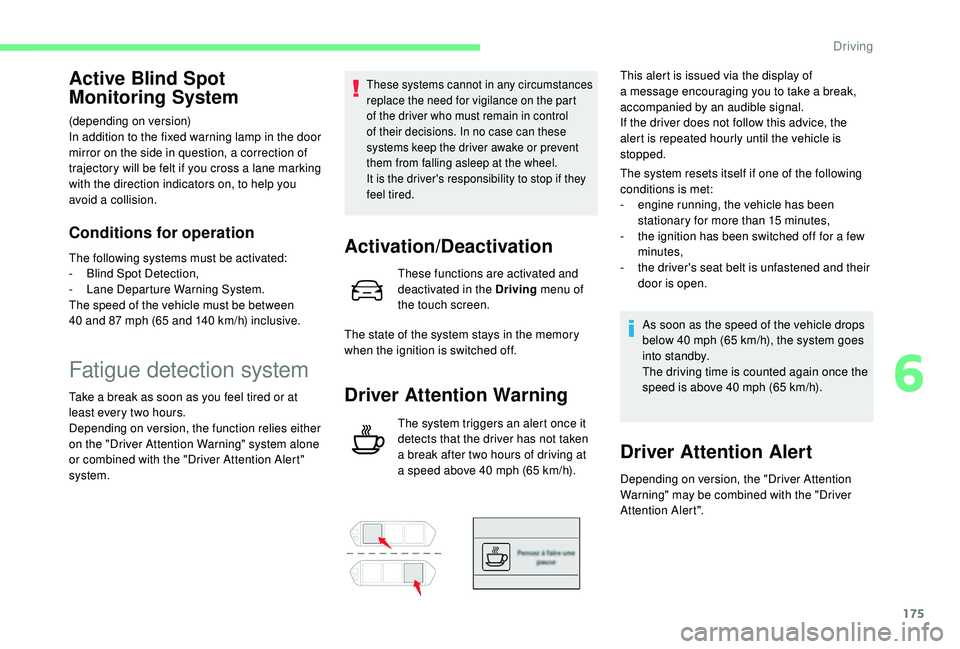
The system triggers an alert once it
detects that the driver has not taken
a
break after two hours of driving at
a
speed above 40 mph (65 km/h).This alert is issued via the display of
a
message encouraging you to take a break,
accompanied by an audible signal.
If the driver does not follow this advice, the
alert is repeated hourly until the vehicle is
stopped.
The system resets itself if one of the following
conditions is met:
-
e
ngine running, the vehicle has been
stationary for more than 15
minutes,
-
t
he ignition has been switched off for a few
minutes,
-
t
he driver's seat belt is unfastened and their
door is open.
As soon as the speed of the vehicle drops
below 40 mph (65 km/h), the system goes
into standby.
The driving time is counted again once the
speed is above 40 mph (65 km/h).
Driver Attention Alert
Depending on version, the "Driver Attention
Warning" may be combined with the "Driver
Attention Alert".
6
Driving
Page 178 of 316

176
Using a camera placed at the top
o f the windscreen, the system
assesses the driver's level of
vigilance by identifying variations
in trajectory compared to the lane
markings.
This system is particularly suited to fast roads
(speed higher than 40
mph (65 km/h)).
When the system interprets the behaviour of
the vehicle as indicating a
certain fatigue or
inattention threshold on the part of the driver, it
triggers the first level of alert.
The driver is then alerted by the message
" Ta k e c a r e ! ", accompanied by an audible
signal. After three first level alerts, the system triggers
a
new alert with the message "
Take a break!
",
accompanied by a more pronounced audible
signal.
In certain driving conditions (poor road
sur face or strong winds), the system may
give alerts independent of the driver's
level of vigilance.
The following situations may interfere with
the operation of the system or prevent it
working:
-
p
oor visibility (inadequate lighting of
the roadway, falling snow, heavy rain,
dense fog, etc.),
-
d
azzle (headlamps of an oncoming
vehicle, low sun, reflections on a
damp
road, leaving a
tunnel, alternating
shade and light, etc.),
-
w
indscreen area located in front of the
camera dirty, misted up, frost-covered,
snow-covered, damaged or covered by
a
s t i c ke r,
-
l
ane markings absent, worn, hidden
(snow, mud) or multiple (roadworks,
e t c .),
-
c
lose to the vehicle ahead (lane
markings not detected),
-
r
oads that are narrow, winding, etc.Clean the windscreen regularly,
particularly the area in front of the camera.
The internal sur face of the windscreen can
also become misted around the camera.
In humid and cold weather, demist the
windscreen regularly.
Do not allow snow to accumulate on the
bonnet or roof of the vehicle as this could
conceal the detection camera.
Clean the front bumper, especially around
the radar, removing mud, snow, etc.
Parking sensors
Using sensors located in the bumper, this
function warns of the proximity of obstacles
(e.g. pedestrian, vehicle, tree, barrier) entering
their field of detection.
Driving
Page 179 of 316

177
This function is a manoeuvring aid which
c annot, in any circumstances, replace the
need for vigilance on the part of the driver.
The driver must remain attentive and stay
in control of their vehicle.
They must always check the vehicle's
surroundings before undertaking
a
manoeuvre.
During the entire manoeuvre, the driver
must ensure that the space remains clear.
Rear parking sensors
The system is switched on by engaging reverse
g e a r.
This is confirmed by an audible signal.
The system is switched off when you come out
of reverse gear.
Audible assistance
The information on proximity is given by an
intermittent sound signal, the succession of
which becomes more rapid as the vehicle
approaches the obstacle.
The sound emitted by the speaker (right or left)
indicates which side the obstacle is on.
When the distance between the vehicle and
the obstacle becomes less than approximately
thirty centimetres, the audible signal becomes
continuous.
Visual assistance
It supplements the audible signal by displaying
bars on the screen that move progressively
nearer to the vehicle (white: more distant
obstacles; orange: close obstacles; red: very
close obstacles).
When the obstacle is very close, the "Danger"
symbol is displayed on the screen.
Front parking sensors
In addition to the rear parking sensors, the
front parking sensors are triggered when an
obstacle is detected in front and the speed of
the vehicle remains below 6
mph (10 km/h).
The front parking sensors are interrupted if
the vehicle stops for more than three seconds
in for ward gear, if no further obstacles are
detected or when the speed of the vehicle
exceeds 6
mph (10 km/h).
The sound emitted by the speaker (front or
rear) indicates whether the obstacle is in
front or behind.
Deactivation/Activation
The function is deactivated and
activated in the Driving menu of the
touch screen.
This warning lamp comes on in the
instrument panel when the function
is deactivated.
A new selection reactivates the
function.
The state of the function stays in the memory
when the ignition is switched off.
6
Driving
Page 181 of 316
179
The reversing camera function may be
supplemented with parking sensors.
The reversing camera cannot, in any circumstances,
replace the need for vigilance on the part of the driver.
They are represented by lines marked
"on the ground" and do not allow you to
determine the position of tall obstacles (for
example: other vehicles, etc.) relative to
the vehicle.
Some distortion of the image is normal.
It is normal to have a part of the number
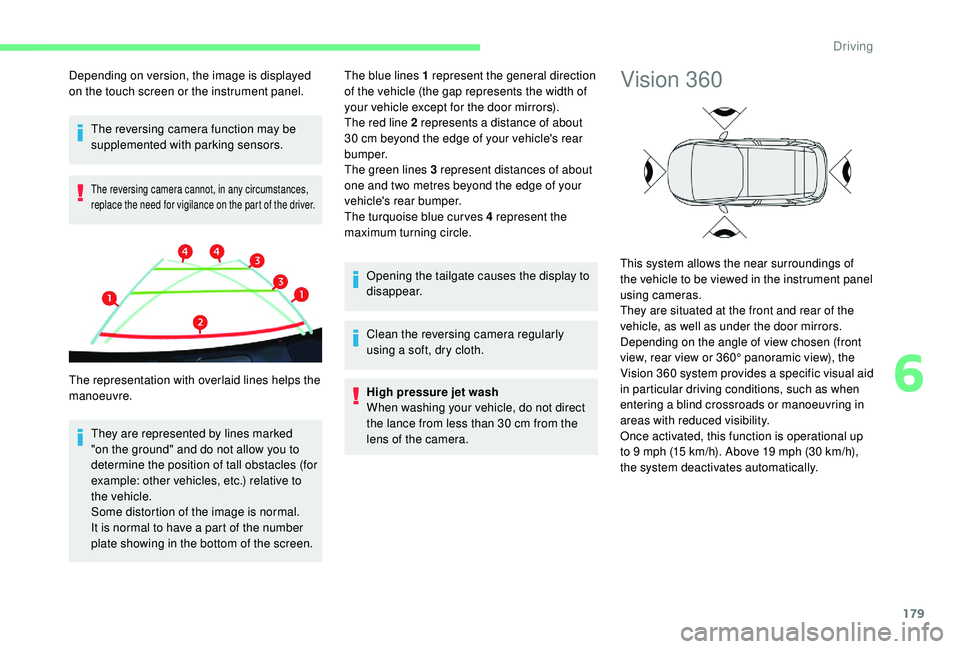
plate showing in the bottom of the screen. The blue lines 1
represent the general direction
of the vehicle (the gap represents the width of
your vehicle except for the door mirrors).
The red line 2 represents a distance of about
30 cm beyond the edge of your vehicle's rear
b u m p e r.
The green lines 3 represent distances of about
one and two metres beyond the edge of your
vehicle's rear bumper.
The turquoise blue curves 4 represent the
maximum turning circle.
Opening the tailgate causes the display to
disappear.
Clean the reversing camera regularly
using a soft, dry cloth.
High pressure jet wash
When washing your vehicle, do not direct
the lance from less than 30 cm from the
lens of the camera.
Depending on version, the image is displayed
on the touch screen or the instrument panel.
The representation with overlaid lines helps the
manoeuvre.
Vision 360
This system allows the near surroundings of
the vehicle to be viewed in the instrument panel
using cameras.
They are situated at the front and rear of the
vehicle, as well as under the door mirrors.
Depending on the angle of view chosen (front
view, rear view or 360° panoramic view), the
Vision 360
system provides a specific visual aid
in particular driving conditions, such as when
entering a
blind crossroads or manoeuvring in
areas with reduced visibility.
Once activated, this function is operational up
to 9
mph (15 km/h). Above 19 mph (30 km/h),
the system deactivates automatically.
6
Driving
Page 182 of 316

180
This system is a visual aid that cannot in
a ny circumstances replace the need for
vigilance on the part of the driver.
The images provided by the camera(s)
may be distorted by the relief. The
presence of areas in shadow, bright
sunlight, or poor lighting conditions may
make the image dark and reduce contrast.
Forward vision
The camera situated on the front bumper is
activated and the views of the area to the
front left and the area to the front right of your
vehicle appear simultaneously in the instrument
panel.
Rear vision
The camera situated on the tailgate is activated
and the view of the area behind your vehicle is
displayed in the instrument panel and behaves
as a
reversing camera, regardless of the
position of the gear selector.
The blue outline represents the width of
your vehicle (without mirrors): its orientation
depends on the position of the steering wheel.
The red line represents the distance of 30 cm)
from the rear bumper and the two green lines
the distances of 1 m and 2 m respectively from
the rear bumper.
The rear vision is displayed automatically
when reverse gear is engaged, regardless
of the state of the system.
Vision 360
The cameras situated on the front and rear
bumpers as well as those below the door
mirrors activate and a view from above of your
vehicle in its close environment is generated
and is displayed in the instrument panel.
Opening a door or the tailgate will disrupt the
3 60 and rear views.
Installation of the very cold climate screen will
alter the image transmitted by the front camera.
Driving
Page 185 of 316
183
This indicator lamp comes on in
the instrument panel to confirm the
activation of the system.
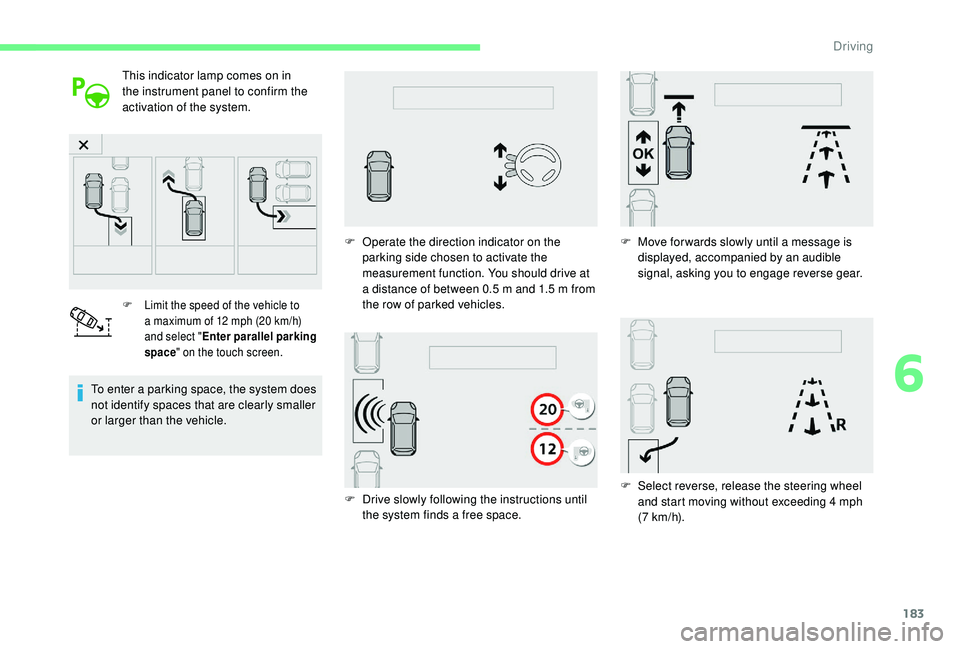
F Limit the speed of the vehicle to a maximum of 12 mph (20 km/h)
and select " Enter parallel parking
space " on the touch screen.
To enter a parking space, the system does
n ot identify spaces that are clearly smaller
or larger than the vehicle. F
O
perate the direction indicator on the
parking side chosen to activate the
measurement function. You should drive at
a distance of between 0.5 m and 1.5 m from
the row of parked vehicles.
F
D
rive slowly following the instructions until
the system finds a
free space.F
M
ove for wards slowly until a message is
displayed, accompanied by an audible
signal, asking you to engage reverse gear.
F
S
elect reverse, release the steering wheel
and start moving without exceeding 4
mph
(7
km/h).
6
Driving
Page 186 of 316

184
F The assisted parking manoeuvre is in progress.
Without exceeding 4
mph (7 km/h), move
for wards and backwards, aided by the
warnings from the "Parking sensors"
system, until the end of the manoeuvre is
indicated.
Assistance in exiting a parallel
p arking space
F When you want to leave a parallel parking
space, start the engine.
F
W
ith the vehicle stationary,
press this button.
This indicator lamp comes on in
the instrument panel to confirm the
activation of the system.
F
P
ress "Exit parking space " on
the touch screen.
F
A
t the end of the manoeuvre, the indicator
lamp in the instrument panel goes off,
accompanied by a
message and an audible
signal.
The assistance is deactivated: you can take
over control. F
T
he assisted parking manoeuvre is in
progress. Without exceeding 3
mph
(5
km/h), move for wards and backwards,
aided by the warnings from the "Parking
sensors" system, until the indication of the
end of the manoeuvre.
F
O
perate the direction indicator for the exit
side chosen. F
E
ngage reverse or forward gear and release
the steering wheel.
The manoeuvre is complete when the vehicle's
front wheels are clear of the parking space.
Driving
Page 187 of 316
185
Assistance with bay parking
manoeuvres
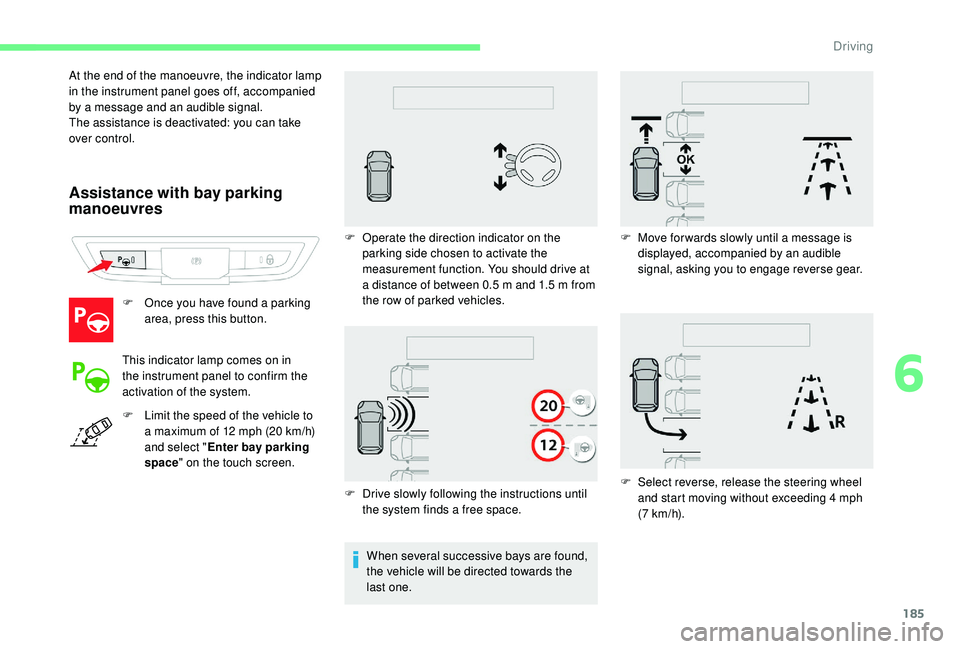
F Once you have found a parking
area, press this button.
This indicator lamp comes on in
the instrument panel to confirm the
activation of the system.
F
L
imit the speed of the vehicle to
a
maximum of 12 mph (20 km/h)
and select " Enter bay parking
space " on the touch screen.
F
D
rive slowly following the instructions until
the system finds a
free space.
At the end of the manoeuvre, the indicator lamp
in the instrument panel goes off, accompanied
by a
message and an audible signal.
The assistance is deactivated: you can take
over control.
F
O
perate the direction indicator on the
parking side chosen to activate the
measurement function. You should drive at
a distance of between 0.5 m and 1.5 m from
the row of parked vehicles.
When several successive bays are found,
the vehicle will be directed towards the
last one. F
M
ove for wards slowly until a message is
displayed, accompanied by an audible
signal, asking you to engage reverse gear.
F
S
elect reverse, release the steering wheel
and start moving without exceeding 4
mph
(7
km/h).
6
Driving
Page 197 of 316
195
Energy economy mode
System which manages the duration of use of
certain functions to conser ve a sufficient level
of charge in the battery.
After the engine has stopped, you can
still use functions such as the audio and
telematics system, windscreen wipers, dipped
beam headlamps, courtesy lamps, etc. for
a
maximum combined duration of about forty
minutes.
Switching to this mode
A message appears in the instrument panel
screen indicating that the vehicle has switched
to economy mode and the active functions are
put on standby. If a
telephone call is being made at this
time, it will be maintained for around
10 minutes with the Bluetooth hands-free
system of your audio system.
Exiting the mode
These functions will be automatically restored
the next time the vehicle is used.
In order to restore the use of these functions
immediately, start the engine and let it run:
-
f
or less than ten minutes, to use the
equipment for approximately five minutes,
-
f
or more than ten minutes, to use the
equipment for up to approximately thirty
minutes.
Let the engine run for the duration specified to
ensure that the battery charge is sufficient.
Do not repeatedly and continuously restart the
engine in order to charge the battery.
A flat battery prevents the engine from
starting.
For more information on the 12
V batter y,
refer to the corresponding section.
Changing a wiper blade
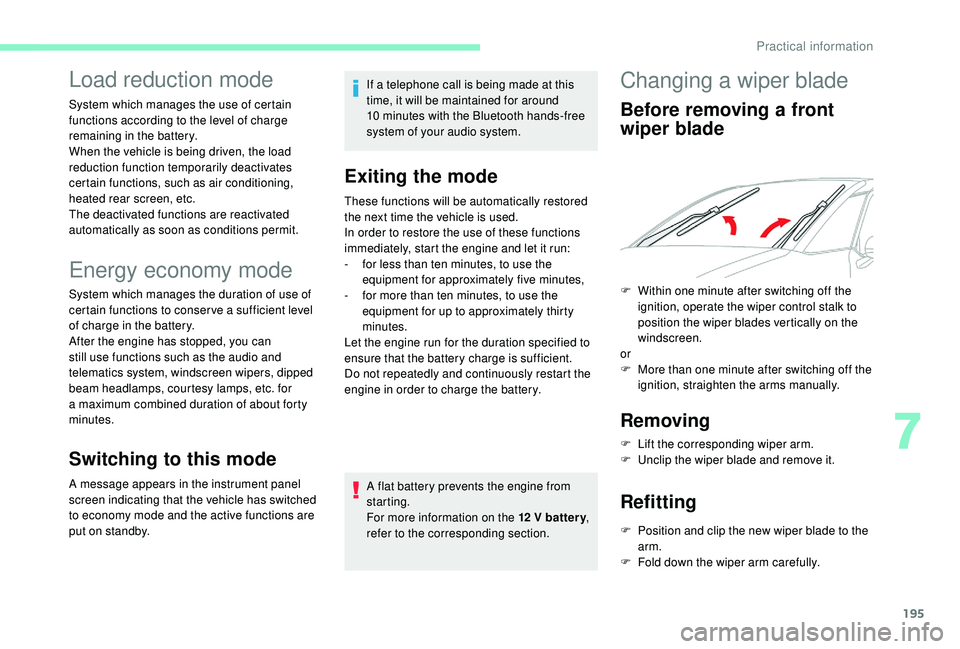
Before removing a front
w iper blade
Removing
F Lift the corresponding wiper arm.
F U nclip the wiper blade and remove it.
Refitting
F Position and clip the new wiper blade to the arm.
F
F
old down the wiper arm carefully.
Load reduction mode
System which manages the use of certain
functions according to the level of charge
remaining in the battery.
When the vehicle is being driven, the load
reduction function temporarily deactivates
certain functions, such as air conditioning,
heated rear screen, etc.
The deactivated functions are reactivated
automatically as soon as conditions permit.
F
W
ithin one minute after switching off the
ignition, operate the wiper control stalk to
position the wiper blades vertically on the
windscreen.
or
F
M
ore than one minute after switching off the
ignition, straighten the arms manually.
7
Practical information
Page 199 of 316

197
Maximum load, distributed over the roof
bars, for a loading height not exceeding
40
cm: 80 kg.
As this value may be changed, please
verify the maximum load quoted in the
user guide supplied with the roof bars.
If the height exceeds 40
cm, adapt the
speed of the vehicle to the profile of the
road to avoid damaging the roof bars and
the fixings on the vehicle.
Be sure to refer to national legislation in
order to comply with the regulations for
transporting objects which are longer than
the vehicle.
When carrying long objects, it is
recommended that the motorised tailgate
function is deactivated.
Very cold climate screen(s)
(Depending on the country where the product
is sold.)
Removable screen(s) which prevent snow
accumulating at the radiator cooling fan.
Depending on the version, you have one or two
screens. Before fitting or removing a
screen,
ensure that the engine is off and the
cooling fan has stopped.
Fitting Removing
F Use a
screwdriver as a lever to release each
of the fixings of each screen in turn.
It is essential to remove the very cold
climate screen (or screens):
-
w
hen the exterior temperature exceeds
10°C,
-
w
hen towing,
-
a
t speeds above 75 mph (120 km/h).
Vision 360
system
The pre-cut section must be removed
before fitting the screen on the front
bumper, in order to be able to release the
camera.
When the very cold climate screen is
present, the camera image is slightly
altered.
F
O
ffer up the corresponding very cold
climate screen to the lower or upper section
of the front bumper.
F
P
ress around its edge to engage the fixing
clips of each screen one by one.
7
Practical information