Screen CITROEN C4 PICASSO 2019 Repair Manual
[x] Cancel search | Manufacturer: CITROEN, Model Year: 2019, Model line: C4 PICASSO, Model: CITROEN C4 PICASSO 2019Pages: 316, PDF Size: 10.36 MB
Page 201 of 316

199
Engine compartment
This engine is shown as an example.
The positions of the following elements may
change:
-
A
ir filter.
-
E
ngine oil dipstick.
-
E
ngine oil filler cap.
-
P
riming pump.
Petrol
Diesel
5.Fusebox.
6. A i r f i l t e r.
7. Engine oil dipstick.
8. Engine oil filler cap.
9. Remote earth point.
10. Priming pump*
The Diesel fuel system operates under
very high pressure.
All work on this circuit must be carried out
only by a
CITROËN dealer or a qualified
workshop.
Checking levels
Check all of these levels regularly, in line with
the manufacturer's service schedule. Top them
up if necessary, unless other wise indicated.
If a
level drops significantly, have the
corresponding system checked by a
CITROËN
dealer or a
qualified workshop.
The liquid must comply with the
manufacturer's recommendations and with
the vehicle's engine. Take care when working under the bonnet,
as certain areas of the engine may be
extremely hot (risk of burns) and the
cooling fan could start at any time (even
with the ignition off).
Used products
Avoid prolonged contact of used oil or
fluids with the skin.
Most of these fluids are harmful to health
or indeed very corrosive.
Do not discard used oil or fluids into
sewers or onto the ground.
Take used oil to a
CITROËN dealer or
a
qualified workshop and dispose of
it in the containers reser ved for this
purpose.
Engine oil level
The check is carried out either when
the ignition is switched in using the
oil level indicator in the instrument
panel for vehicles equipped with an
electric gauge, or using the dipstick.
*
D
epending on engine.
1. Screenwash and headlamp wash
reservoir.
2. Engine coolant reservoir.
3. Brake fluid reser voir.
4. Battery/Fuses.
7
Practical information
Page 203 of 316

201
Brake fluid level
The fluid level should be close to the
"MA X" mark. If it is not, check the
brake pad wear.
Fluid specification
The fluid must conform to the manufacturer's
recommendations.
Coolant level
Check the coolant level regularly.
It is normal to top up the fluid
between two services.
The check and top-up must only be done with
the engine cold.
A low coolant level presents a
risk of serious
damage to your engine.
The coolant level should be close to the "MA X"
mark but should never exceed it.
If the level is close to or below the "MIN" mark,
it is essential to top up. To avoid the risk of scalding when you need to
top up in an emergency, wrap a
cloth around
the cap and unscrew the cap by two turns to
allow the pressure to drop.
Once the pressure has dropped, remove the
cap and top up to the required level.
The cooling fan may star t after
switching off the engine: take care
with articles and clothing that might be
caught by the fan blades.
Fluid specification
This fluid must conform to the manufacturer's
recommendations.
Screenwash/headlamp
wash level low
In the case of vehicles fitted with
headlamp washers, when the fluid
reser voir low level is reached this
warning lamp comes on in the
instrument panel, accompanied by
an audible signal and a
message.
The warning lamp comes on when the ignition
is switched on, or every time the stalk is
operated, until the reser voir is refilled.
The next time you stop, have the screenwash/
headlamp wash reser voir topped up.
Diesel fuel additive level
(Diesel with particle filter)
The additive reser voir low level is
indicated by fixed illumination of this
warning lamp, accompanied by an
audible signal and a
message that
the particle filter additive level is
too low.
To p p i n g u p
This additive must be topped up without delay
by a CITROËN dealer or a qualified workshop.
Level of AdBlue
An alert is triggered once the reser ve level is
reached.
To avoid the vehicle being immobilised as per
regulations, you must top up with AdBlue.
For more information on AdBlue and the SCR
system, and, in particular, topping up the tank,
refer to the corresponding section.
When the engine is hot, the temperature of the
coolant is regulated by the fan.
In addition, as the cooling system is
pressurised, wait at least one hour after
switching off the engine before carrying out any
work.
7
Practical information
Page 230 of 316

228
Fuse tables
Fuse N°Rating Functions
F1 40
AHeated rear screen.
F2 20
AElectric door mirrors.
F5 30
APanoramic glass sunroof blind.
F6 20
A12 V, rear multimedia sockets.
F7 20
A230
V socket.
F9 25
AHeated seats.
F10 20
ATrailer inter face unit.
F11 20
AAir conditioning blower.
F12 30
AElectric window motor.
Fusebox 1
In the event of a breakdown
Page 231 of 316
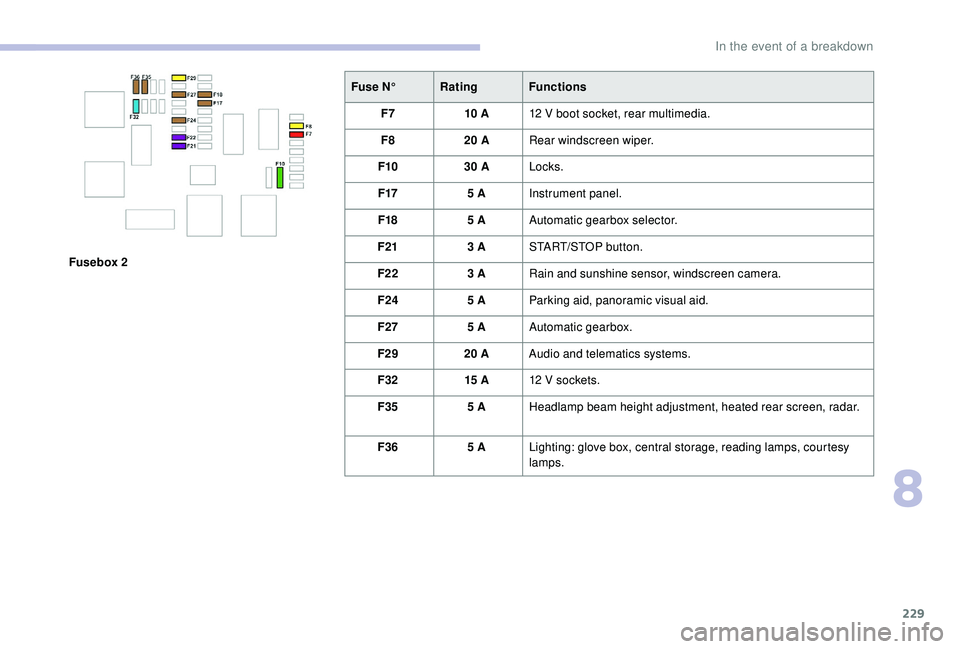
229
Fusebox 2Fuse N°
Rating Functions
F7 10
A
12 V boot socket, rear multimedia.
F8 20 A
Rear windscreen wiper.
F10 30 A
Locks.
F17 5 A
Instrument panel.
F18 5 A
Automatic gearbox selector.
F21 3 A
START/STOP button.
F22 3
ARain and sunshine sensor, windscreen camera.
F24 5
AParking aid, panoramic visual aid.
F27 5
AAutomatic gearbox.
F29 20
AAudio and telematics systems.
F32 15
A12
V sockets.
F35 5
AHeadlamp beam height adjustment, heated rear screen, radar.
F36 5
ALighting: glove box, central storage, reading lamps, courtesy
lamps.
8
In the event of a breakdown
Page 246 of 316

244
Identification markings
Different visible markings for the identification
and research of your vehicle.
A. Vehicle Identification Number (VIN),
under the bonnet.
This number is engraved on the chassis near
the right-hand front wheel arch.
B. Vehicle Identification Number (VIN), on
the windscreen lower cross member.
The number is on a label, visible through the
windscreen. -
the European Whole Vehicle Type Approval number,
-
t he Vehicle Identification Number (VIN),
-
t
he maximum authorised weight (gross vehicle
weight),
-
t
he maximum authorised weight with trailer (gross
train weight),
-
t
he maximum weight on the front axle,
-
t
he maximum weight on the rear axle.
D. Tyre/paint label.
This label on the middle door pillar, driver's
side, contains the following information:
-
t
he tyre inflation pressures with and without
load,
-
t
he tyre sizes (including the load index and
speed rating),
-
t
he spare tyre inflation pressure,
-
t
he paint colour code. The vehicle may be originally equipped
with tyres with higher load and speed
indices than those indicated on the label,
without affecting inflation pressure.
C. Manufacturer's label.
This tamperproof label on the middle door
pillar, right or left-hand side, contains the
following information:
-
t
he name of the manufacturer, Checking tyre pressures
The tyre pressures should be checked when
cold at least monthly.
The pressures given on the label are valid for
cold tyres. If you have driven for more than
10
minutes or more than 6 miles (10 kilometres)
at more than 31 mph (50 km/h), the tyres will be
warm; in this case 0.3 bar (30 kPa) should be
added to the pressures given on the label.
Never reduce the pressure of a warm tyre.
Low tyre pressures increase fuel
consumption.
Technical data
Page 248 of 316
2
First steps
With the engine running, a press
mutes the sound.
With the ignition off, a press turns
the system on.
Adjustment of the volume.
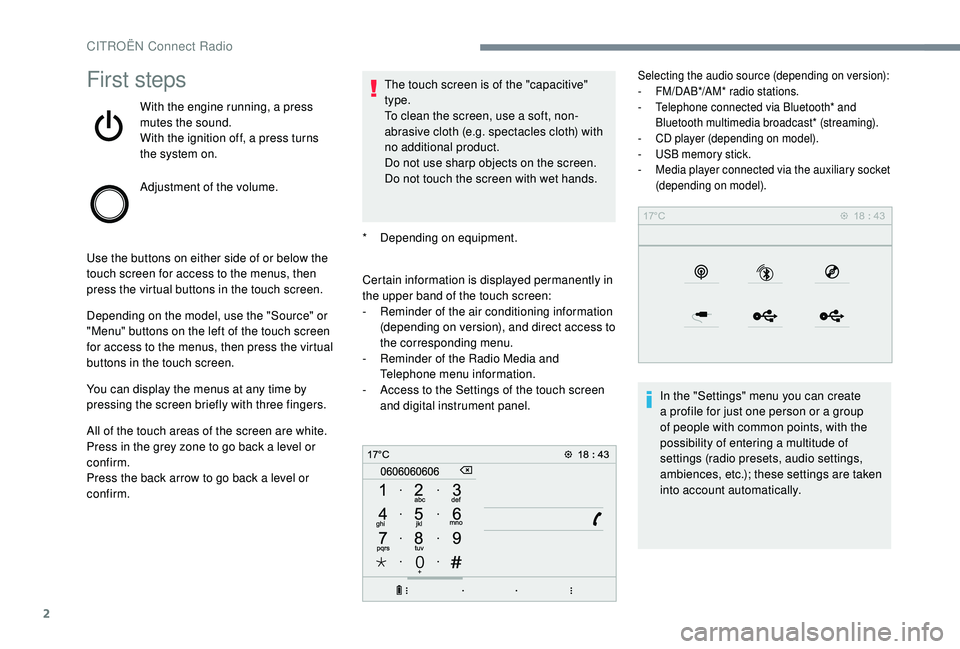
Use the buttons on either side of or below the
touch screen for access to the menus, then
press the virtual buttons in the touch screen.
Depending on the model, use the "Source" or
"Menu" buttons on the left of the touch screen
for access to the menus, then press the virtual
buttons in the touch screen.
You can display the menus at any time by
pressing the screen briefly with three fingers.
All of the touch areas of the screen are white.
Press in the grey zone to go back a
level or
confirm.
Press the back arrow to go back a
level or
confirm. The touch screen is of the "capacitive"
type.
To clean the screen, use a
soft, non-
abrasive cloth (e.g. spectacles cloth) with
no additional product.
Do not use sharp objects on the screen.
Do not touch the screen with wet hands.
*
D
epending on equipment.
Certain information is displayed permanently in
the upper band of the touch screen:
-
R
eminder of the air conditioning information
(depending on version), and direct access to
the corresponding menu.
-
R
eminder of the Radio Media and
Telephone menu information.
-
A
ccess to the Settings of the touch screen
and digital instrument panel.
Selecting the audio source (depending on version):
- F M/DAB*/AM* radio stations.
-
T
elephone connected via Bluetooth* and
Bluetooth multimedia broadcast* (streaming).
-
C
D player (depending on model).
-
U
SB memory stick.
-
M
edia player connected via the auxiliary socket
(depending on model).
In the "Settings" menu you can create
a profile for just one person or a group
of people with common points, with the
possibility of entering a
multitude of
settings (radio presets, audio settings,
ambiences, etc.); these settings are taken
into account automatically.
CITROËN Connect Radio
Page 249 of 316

3
In very hot conditions, the volume may
be limited to protect the system. It may go
into standby (screen and sound off) for at
least 5 minutes
The return to normal takes place when
the temperature in the passenger
compartment has dropped.
Steering mounted controls
Steering mounted controls –
Ty p e 1
Radio:
Select the previous/next preset radio
station.
Select the previous/next item in
a
menu or a list.
Media:
Select the previous/next track.
Select the previous/next item in
a
menu or a list. Radio:
Short press: display the list of radio
stations.
Long press: update the list.
Media:
Short press: display the list of
folders.
Long press: display the available
sorting options.
Change audio source (radio; USB;
AUX if equipment connected; CD;
streaming).
Confirm a
selection.
Increase volume.
Decrease volume.
Mute/Restore sound by
simultaneously pressing the
increase and decrease volume
buttons.
Steering mounted controls
– Type 2
Depending on model. Voice commands :
This control is located on the
steering wheel or at the end of the
lighting control stalk (depending on
model).
Short press, smartphone voice
commands via the system.
or Increase volume.
or Mute/Restore the sound.
Or
Mute by pressing the volume
increase and decrease buttons
simultaneously.
Restore the sound by pressing one
of the two volume buttons.
.
CITROËN Connect Radio
Page 257 of 316

11
Telephone
MirrorLinkTM smartphone
connection
As a safety measure and because it
r equires sustained attention by the driver,
using a
smartphone when driving is
prohibited.
All operations must be done with the
vehicle stationary .
The synchronisation of a
personal
smartphone allows users to display
applications adapted for the smartphone's
MirrorLink
TM technology on the vehicle
screen.
The processes and standards
are constantly changing. For the
communication process between the
smartphone and the system to operate,
it is essential that the smartphone be
unlocked; update the operating system
of the smar tphone as well as the date
and time of the smar tphone and the
system .
For the list of eligible smartphones, go
to the Brand's internet website in your
c o u nt r y. As a
safety measure, applications can
only be viewed with the vehicle stationary;
display is interrupted once the vehicle is
moving.
The "MirrorLink
TM" function requires
a
compatible smartphone and
applications.
Telephone not connected by
Bluetooth®
Connect a USB cable. The
sm artphone charges when
connected by a
USB cable.
From the system, press
" Telephone " to display the primary
page.
Press " MirrorLink
TM" to start the
application in the system.
Depending on the smartphone, it may be
necessary to activate the " MirrorLink"
TM
function.
During the procedure, several
screen pages relating to certain
functions are displayed.
Accept to start and complete the
connection. When connecting a
smartphone
to the system, it is recommended
that Bluetooth
® be started on the
smartphone.
Telephone connected by
Bluetooth®
From the system, press
" Telephone " to display the primary
page.
Press the " PHONE" button to display the
secondary page.
Press "MirrorLink
TM" to start the
application in the system.
Once the connection is established, a page
is displayed with the applications already
downloaded to your smartphone and adapted
to MirrorLink
TM technology.
Access to the different audio sources remains
accessible in the margin of the MirrorLink
TM
display, using touch buttons in the upper bar.
Access to the menus for the system is possible
at any time using the dedicated buttons.
There may be a
wait for the availability of
applications, depending on the quality of
your network.
.
CITROËN Connect Radio
Page 258 of 316
12
CarPlay® smartphone
connection
As a safety measure and because it
r equires sustained attention by the driver,
using a
smartphone when driving is
prohibited.
All operations must be done with the
vehicle stationary .
The synchronisation of a
personal
smartphone allows users to display
applications compatible with the
smartphone's CarPlay
® technology on the
vehicle screen when the smartphone's
CarPlay
® function has been previously
activated.
As the processes and standards are
constantly changing, it is recommended
that you keep your smar tphone's
operating system updated .
For the list of eligible smartphones, go
to the Brand's internet website in your
c o u nt r y.
Connect a
USB cable. The
smartphone charges when
connected by a
USB cable.
From the system, press Telephone
to display the CarPlay
® inter face. Or
If the smartphone is already
connected by Bluetooth
®.
Connect a
USB cable. The
smartphone charges when
connected by a
USB cable.
From the system, press
" Telephone " to display the primary
page.
Press the " PHONE" button to go to the
secondary page.
Press "CarPlay " to display the
CarPlay
® inter face.
On connecting the USB cable, the
CarPlay
® function deactivates the
system's Bluetooth® mode.
You can go to the CarPlay
®
navigation at any time by pressing
the system's Navigation button.
Android Auto smartphone
connection
As a safety measure and because it
r equires sustained attention by the driver,
using a
smartphone when driving is
prohibited.
All operations must be done with the
vehicle stationary .
On your smartphone, download the
Android Auto application.
The synchronisation of a
personal
smartphone allows users to display
applications adapted for the smartphone's
Android Auto technology on the vehicle
screen.
The processes and standards
are constantly changing. For the
communication process between the
smartphone and the system to operate,
it is essential that the smartphone be
unlocked; update the operating system
of the smar tphone as well as the date
and time of the smar tphone and the
system .
For the list of eligible smartphones, go
to the Brand's internet website in your
c o u nt r y.
CITROËN Connect Radio
Page 259 of 316

13
As a safety measure, applications can
o nly be viewed with the vehicle stationary;
display is interrupted once the vehicle is
moving.
The "Android Auto" function requires the
use of a
compatible smartphone and
applications.
Telephone not connected by
Bluetooth®
Connect a USB cable. The
sm artphone charges when
connected by a
USB cable.
From the system, press
" Telephone " to display the primary
page.
Press " Android Auto " to start the
application in the system.
Depending on the smartphone, it may be
necessary to activate the " Android Auto"
function.
During the procedure, several
screen pages relating to certain
functions are displayed.
Accept to start and complete the
connection. When connecting a
smartphone
to the system, it is recommended
that Bluetooth
® is started on the
smartphone
Telephone connected by
Bluetooth®
From the system, press
" Telephone " to display the primary
page.
Press the " PHONE" button to display the
secondary page.
Press "Android Auto " to start the
application in the system.
Different audio sources remain accessible in
the margin of the Android Auto display, using
touch buttons in the upper bar.
Access to the menus for the system is possible
at any time using the dedicated buttons.
There may be a
wait for the availability of
applications, depending on the quality of
your network.
Pairing a Bluetooth®
telephone
As a safety measure and because it
r equires sustained attention by the
driver, the pairing of a
Bluetooth mobile
telephone with the Bluetooth hands-free
system of your audio system must be
done with the vehicle stationary and the
ignition on.
Activate the Bluetooth function on the
telephone and ensure that it is "visible to
all" (telephone configuration).
Procedure from the telephone
Select the name of the system in the
list of devices detected.
In the system, accept the connection request
from the telephone. To complete the pairing, whichever
procedure is used (from the telephone or
from the system), ensure that the code
is the same in the system and in the
telephone.
.
CITROËN Connect Radio