battery CITROEN C6 2012 Handbook (in English)
[x] Cancel search | Manufacturer: CITROEN, Model Year: 2012, Model line: C6, Model: CITROEN C6 2012Pages: 216, PDF Size: 10.23 MB
Page 120 of 216
118
III
A
SUN ROOF
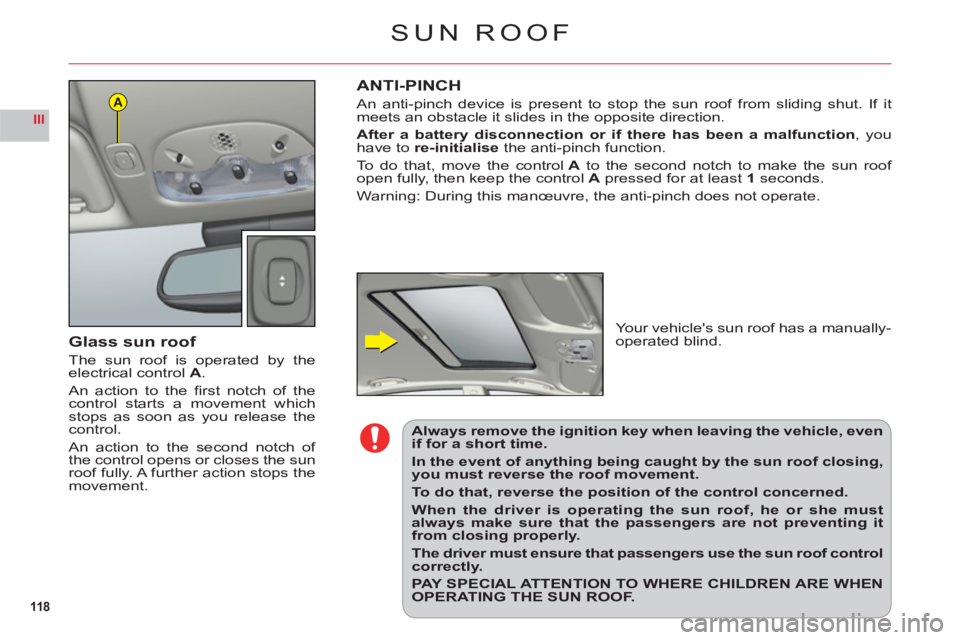
Glass sun roof
The sun roof is operated by theelectrical controlA.
An action to the fi rst notch of thecontrol starts a movement whichstops as soon as you release thecontrol.
An action to the second notch of
the control opens or closes the sun
roof fully. A further action stops themovement.
ANTI-PINCH
An anti-pinch device is present to stop the sun roof from sliding shut. If it
meets an obstacle it slides in the opposite direction.
After a battery disconnection or if there has been a malfunction, youhave to re-initialisethe anti-pinch function.
To do that, move the control Ato the second notch to make the sun roof open fully, then keep the control A pressed for at least1seconds.
Warnin
g: During this manœuvre, the anti-pinch does not operate.
Your vehicle's sun roof has a manually-
operated blind.
Always remove the ignition key when leaving the vehicle, even if for a short time.
In the event of anything being caught by the sun roof closing, you must reverse the roof movement.
To do that, reverse the position of the control concerned.
When the driver is operating the sun roof, he or she must always make sure that the passengers are not preventing it from closing properly.
The driver must ensure that passengers use the sun roof control correctly.
PAY SPECIAL ATTENTION TO WHERE CHILDREN ARE WHEN OPERATING THE SUN ROOF.
Page 123 of 216
121
IVA
B
C
D
LEVELS
Air fi lter
Follow the requirements set out in the Maintenance and Warranty Guide.
REFER TO THE CHAPTER: USER PRECAUTIONS.
Screen wash and
headlamp wash fl uid
Use CITROËN-approved products wherever possible.
Capacity: See "Capacity".
Engine coolant
The fl uid level should be between the marks MIN.and
MAX. on the header tank.
Engine hot, wait at least
15 minutes.
Qualit
y: See "Maintenance and
Warranty Guide".
Never do anything relating to
the cooling system of an engine
that is hot.
Poles "+" and "-" for
starting with a slave battery
See "Starting the engine with an assisting battery".
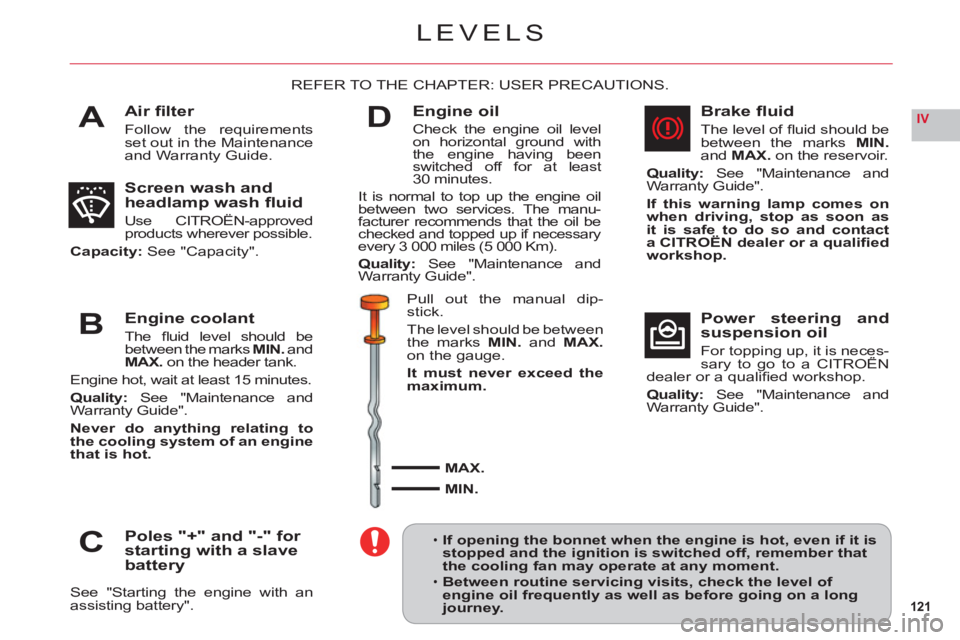
Engine oil
Check the engine oil level
on horizontal ground withthe engine having beenswitched off for at least30 minutes.
It is normal to top up the engine oilbetween two services. The manu-
facturer recommends that the oil bechecked and topped up if necessaryevery 3 000 miles (5 000 Km).
Qualit
y:See "Maintenance and
Warranty Guide".
Pull out the manual dip-
stick.
Th
e level should be between
the marks MIN.and MAX.on the gauge.
It must never exceed the maximum.
MAX.
MIN.
Brake fl uid
The level of fl uid should be between the marks MIN.andMAX. on the reservoir.
Quality: See "Maintenance and
Warranty Guide".
If this warning lamp comes on
when driving, stop as soon as it is safe to do so and contact a CITROËN dealer or a qualifi ed
workshop.
Power steering and
suspension oil
For topping up, it is neces-sary to go to a CITROËN pp g p,
dealer or a qualifi ed workshop.
Quality: See "Maintenance and
Warranty Guide".
If opening the bonnet when the engine is hot, even if it is stopped and the ignition is switched off, remember thatthe cooling fan may operate at any moment.
Between routine servicing visits, check the level of engine oil frequently as well as before going on a longjourney.
•
•
Page 126 of 216

124
IV
A
D
C
B
BATTERY LOCATION AND
ACCESS
The battery is located in the bootunder the left hand wing trim. To
access the battery, rotate the pin
on the fl ap by a 1/4.
CHANGING THE BATTERY (Contact a CITROËN dealer or a qualifi ed
workshop).
1. Release the two pins on each side at the back of the boot, and remove
the boot fl oor.2. On each side trim, release the two fi xing pinsA.3. Undo the two screws Bon each side and remove the sill embellisher.4. On the side trim close to the battery, release the pin D.5. Separate the side trim close to the battery, pulling hard to free the other fi xing points.
6. Unclip the boot lamp C.7.Disconnect both battery terminals.8. Release the battery from its support.9. Remove the battery.
Before changing or repairing the battery, open all four windows.
If you have to unlock your vehicle with the key because of a problem with the battery, any opening/closingof a door with the window closed may seriously damage the glass to the point of breaking it.
12 V BATTERY
Page 127 of 216
125
IV
STARTING THE ENGINE AFTER DISCONNECTING AND RECONNECTING THE BATTERY1. Turn the ignition key.2. Wait approximately 1 minute before operating the starter in order to allow the electronic systems to re-initialise.
After the battery has been disconnected for a lengthy period of time, it may be necessary to re-initialise the followingfunctions:The anti-pinch on the windows.
The anti-pinch on the sun roof.
The multifunction displa
y parameters (date, time, language, units of distance and of temperature).
The Radio stations.
The NaviDrive.
See NaviDrive chapter.
IMPORTANT
In the event of a battery failure, and if the boot is closed, it is then necessary to feed an electrical supply to your
vehicle. See following page.
•
•
••
•
12 V BATTERY
Page 128 of 216

126
IV
BC
A
i
12 V BATTERY
STARTING THE ENGINE WITH AN ASSISTING BATTERY
If the battery is discharged, it is possible to use either
a separate emergency battery or a battery on another
vehicle.
If you use the battery on another vehicle, stop the engine on the latter. The two vehicles must not come
into direct contact with each other.
Check that the assisting battery has suffi cient voltage (12 V).
Connect the cables according to the orderindicated in rthe diagram.
A Pole "+" on the vehicle being assisted (under the
red cover).
B Assisting battery.C Pole"–" on the assisted vehicle (under the bonnet).
Check that the leads are well secured (risk of sparks).
Start the engine of the assisting vehicle. Let the engine
run for around 1 minute at a slightly accelerated idle.
Operate the starter on the vehicle being assisted.
It is essential to follow the indicated sequencecorrectly.
Never approach with a fl ame or create sparks in the vicinity of the battery (explosive gas).
The battery contains dilute sulphuric acid which is highly corrosive.
When handling batteries, always protect your face and especially your eyes.
In the event of any contact with the skin, rinse immediately with copious amounts of fresh water.
ADVICE
Do not touch the leads during the operation.
Do not lean over the batteries.
Disconnect the cables in reverse order, making sure
they do not touch together.
Page 133 of 216

131
IV
53412
G36G37G38G39G40
FUSES IN THE BOOT
FUSEBOX
To access the fusebox locatedunder the left hand wing trim:1. Move aside the trim on theLH side. See "12 V battery:Changing the battery".2. Move aside the electricalcables connecting to the
fusebox.3. Open the fusebox.
RatingFunction
F 115 AFuel fl ap
F 2––
F 3––
F 415 ASpeed-sensitive rear spoiler (defl ector)
F 540 AHeated rear screen
G 3615 A/25 ARear LH electric heated seat (Pack Lounge)/Benchseat
G 3715 A/25 ARear RH electric heated seat (Pack Lounge)/Benchseat
G 3830 ARear electric seat adjustments (Pack Lounge)
G 3930 ACigar-lighter – Rear accessory socket
G 4025 AElectric parking brake
Page 151 of 216
7.1
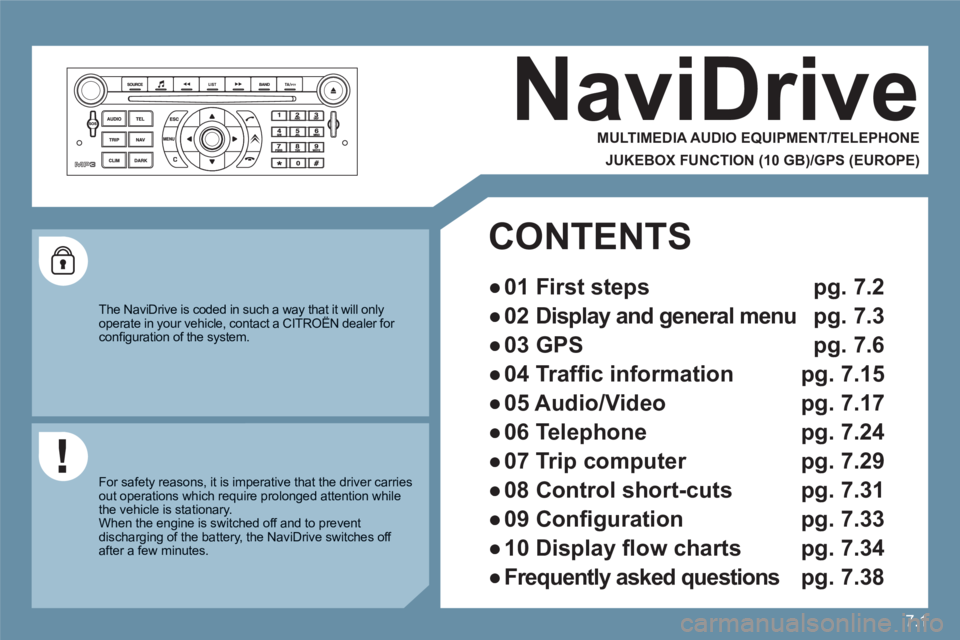
NaviDrive
MULTIMEDIA AUDIO EQUIPMENT/TELEPHONE
JUKEBOX FUNCTION (10 GB)/GPS (EUROPE)
The NaviDrive is coded in such a way that it will onlyoperate in your vehicle, contact a CITROËN dealer for yy
confi guration of the system.
For safety reasons, it is imperative that the driver carriesout operations which require prolonged attention while the vehicle is stationary.
When the engine is switched off and to prevent discharging of the battery, the NaviDrive switches off after a few minutes.
CONTENTS
●
01 First steps pg. 7.2
●
02 Display and general menu pg. 7.3
●
03 GPS pg. 7.6
●
04 Traffi c information pg. 7.15
●
05 Audio/Video pg. 7.17
●
06 Telephone pg. 7.24
●
07 Trip computer pg. 7.29
●
08 Control short-cuts pg. 7.31
●
09 Confi guration pg. 7.33
●
10 Display fl ow charts pg. 7.34
●
Frequently asked questions pg. 7.38
Page 189 of 216
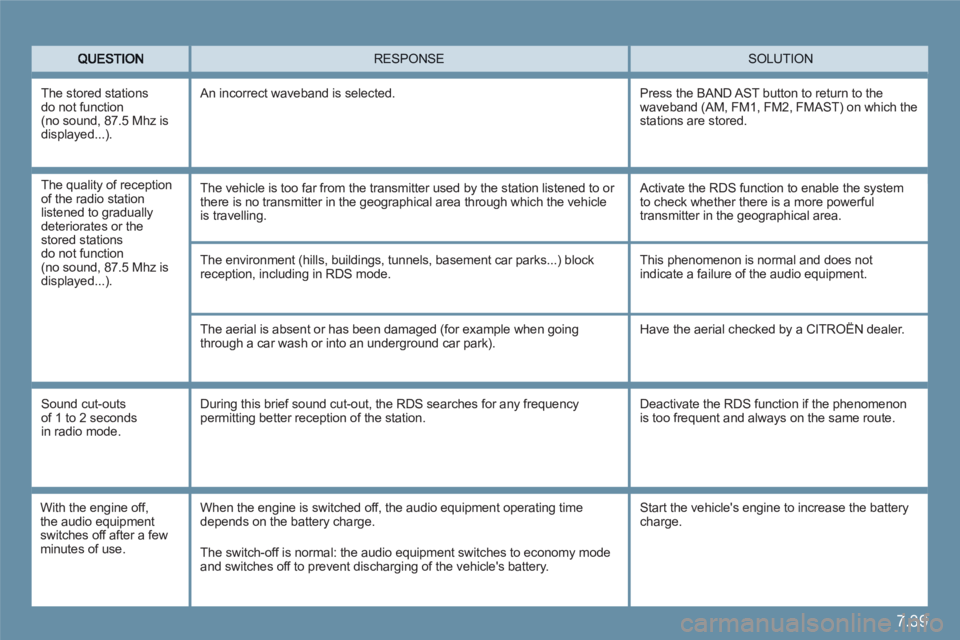
7.39
SOLUTION RESPONSE
The environment (hills, buildings, tunnels, basement car parks...) blockreception, including in RDS mode.
The aerial is absent or has been damaged (for example when going through a car wash or into an underground car park).
This phenomenon is normal and does notindicate a failure of the audio equipment.
Have the aerial checked by a CITROËN dealer.
Sound cut-outs of 1 to 2 seconds in radio mode.
During this brief sound cut-out, the RDS searches for any frequency permitting better reception of the station.
Deactivate the RDS function if the phenomenon is too frequent and always on the same route.
With the engine off,the audio equipment switches off after a fewminutes of use.
When the engine is switched off, the audio equipment operating timedepends on the battery charge.
The switch-off is normal: the audio equipment switches to economy mode and switches off to prevent discharging of the vehicle's battery.
The stored stations do not function(no sound, 87.5 Mhz isdisplayed...)
.
An incorrect waveband is selected.
Press the BAND AST button to return to the waveband (AM, FM1, FM2, FMAST) on which the stations are stored.
Start the vehicle's engine to increase the battery charge.
The quality of reception of the radio station listened to gradually deteriorates or thestored stations do not function(no sound, 87.5 Mhz isdisplayed...).
The vehicle is too far from the transmitter used by the station listened to or there is no transmitter in the geographical area through which the vehicle is travelling.
Activate the RDS function to enable the system to check whether there is a more powerfultransmitter in the geographical area.
Page 192 of 216

7.42
Audio system
CONTENTS
●
01 First steps p 7.43
●
02 General menu p 7.44
●
03 Audio p 7.45
●
04 Hands-free kit p 7.48
●
05 USB Player p 7.49
●
06 Bluetooth functions p 7.51
●
07 Control short-cuts p 7.53
●
08 Confi guration p 7.54
●
09 Screen menu map p 7.55
●
Frequently asked questions p 7.57
Your Audio system is coded in such a way that it will only operate in your vehicle. If it is to be installed in another vehicle, contact a CITROËN dealer for confi guration of y
the system.
For safety reasons, the driver must carry out operations which require prolonged attention while the vehicle is stationary.
When the engine is switched off and to prevent discharging of the battery, your Audio system may switch off after a few minutes.
Page 199 of 216

7.49
11
05
11
22
33
USB Player
The system puts together playlists (temporary memory) created over a period which depends on the capacity of the USB equipment.
The other sources are available during this time.
The playlists are updated each time the ignition is switched off or each time a USB stick is connected.
When connecting for the fi rst time, the tracks are classifi ed by folder.When you reconnect, the classifi cation system selected previously is retained.
Connect the stick to the port, directly or using a lead. If the audio equipment is switched on, the USB source is detected as soon as it is connected. Play begins automatically after a delay which depends on the capacityof the USB stick. The fi le formats recognised are .mp3 (mpeg1 layer 3 only),.wma (standard 9 only), .wav and .ogg.
This unit consists of a USB port and aJack socket *
. It reads audio fi le formats (.mp3, .ogg, .wma, .wav...) which aretransmitted from portable equipmentsuch as a digital player or a USB stick to your Audio system to be listened to via the vehicle's speakers.
USB stick (1.1, 1.2 and 2.0) or IpodÆ
of Æ
generation 5 or later: - the playlists accepted are of the typem3u, .pls, .wpl.,- the Ipod
Æ
lead is essential, Æ
- navigation through the fi le base is by means of the steering wheel controls, - the battery of the portable equipment can charge automatically.
Other Ipod®players of earlier generations®
and players using the MTP protocol *
:- play via Jack-Jack lead only(not supplied),- navigation through the fi le base is fromthe portable equipment.
The list of compatible equipment is available from CITROÀN dealers. USING THE USB
CONNECTING A USB STICK
*
According to vehicle.