radio CITROEN C6 2012 Handbook (in English)
[x] Cancel search | Manufacturer: CITROEN, Model Year: 2012, Model line: C6, Model: CITROEN C6 2012Pages: 216, PDF Size: 10.23 MB
Page 195 of 216
7.45
11
22
33
44
22
44
33
11
03AUDIO
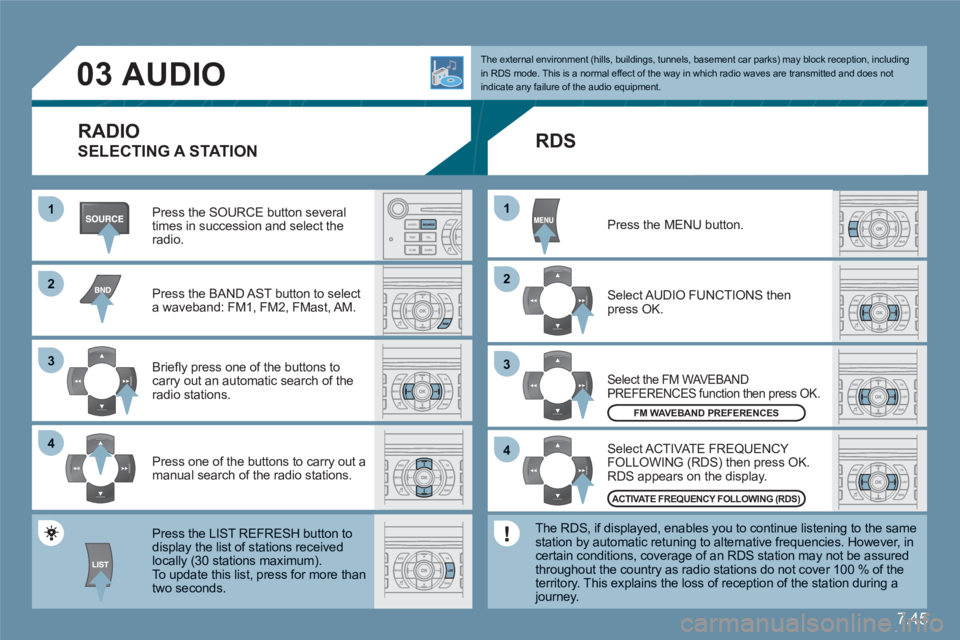
Press the SOURCE button several times in succession and select theradio.
Press the BAND AST button to select a waveband: FM1, FM2, FMast, AM.
Briefl y press one of the buttons to carry out an automatic search of theradio stations.
Press one of the buttons to carry out a manual search of the radio stations.
Press the LIST REFRESH button todisplay the list of stations receivedlocally (30 stations maximum).
To update this list, press for more than two seconds.
Select ACTIVATE FREQUENCY FOLLOWING (RDS) then press OK. RDS appears on the display.
Select the FM WAVEBAND PREFERENCES function then press OK.
Select AUDIO FUNCTIONS then press OK.
Press the MENU button.
FM WAVEBAND PREFERENCES
ACTIVATE FREQUENCY FOLLOWING (RDS)
The external environment (hills, buildings, tunnels, basement car parks) may block reception, including in RDS mode. This is a normal effect of the way in which radio waves are transmitted and does notindicate any failure of the audio equipment.
RDS
The RDS, if displayed, enables you to continue listening to the samestation by automatic retuning to alternative frequencies. However, in certain conditions, coverage of an RDS station may not be assuredthroughout the country as radio stations do not cover 100 % of the territory. This explains the loss of reception of the station during a journey.
RADIO
SELECTING A STATION
Page 202 of 216

7.52
11
22
11
11
22
33
22
YES
RECEIVING A CALL
An incoming call is announced by a ring and a superimposed display on the multifunction screen. Initiate the pairing between the telephone and the vehicle. This pairing can be initiated fromthe vehicle's telephone function menu or via the telephone's keypad. See steps 1 to 10 on theprevious pages. During the pairing phase, the vehiclemust be stationary with the key in the ignition.
Select the telephone to be connected from the telephone function menu.The audio system connects to a newly paired telephone automatically.
Select the YES tab on the display using the buttons and confi rm bypressing OK.
Press the steering wheel control OK to accept the call.
From the Bluetooth telephone function Audio menu, select Manage the telephone call then Call, Call list or Directory.
Press the end of the steering wheel control for more than two seconds to gain access to your directory. Or To dial a number, use your telephone's keypad, withthe vehicle stationary.
MAKING A CALL
BLUETOOTH AUDIO STREAMING
(AVAILABLE DURING THE YEAR)
Wireless transmission of the telephone's music fi les via the audio equipment. The telephone must be able to manage the appropriatebluetooth profi les (Profi les A2DP/AVRCP).
*
In certain cases, playing of the Audio fi les must be initiated from thekeypad. **
If the telephone supports the function.
Activate the streaming source bypressing the SOURCE button * . Thetracks to be played can be controlled as usual via the buttons on the Radio control panel and the steering wheel controls
** . The contextual information can be displayed on the screen.
Page 203 of 216

7.53
07CONTROL SHORT-CUTS
STEERING WHEEL CONTROLS
RADIO: selection of the next stored station. CD CHANGER: selection of the next CD.Selection of the next item on a menu.
RADIO: selection of the previous stored station.CD CHANGER: selection of the previous CD.Selection of the previous item on a menu.
RADIO: automatic search for a higher frequency. CD/CD CHANGER/MP3: selection of the next track. CD/CD CHANGER: continuous press: fast forward play.
Selection of the previous item.
RADIO: automatic search for a lower frequency.CD/CD CHANGER/MP3: selection of the previous track.CD/CD CHANGER: continuous press: backward play.Selection of the next item.
Volume increase.
Volume decrease.
Mute: by pressingthe volume increaseand decrease buttonssimultaneously.
Restore the sound bypressing one of the two volume buttons.
- Change of sound source. - Confi rmation of a selection. - Pick up/Hang up the telephone. - Press for more than 2 seconds: access to the telephone menu.
Page 205 of 216

7.55
123
23
1
2
3
4
3
4
3
4
2
3
4
3
4
3
3
3
2
1
2
2
1
2
3
2
3
4
4
4
4
4
4
09
3
3
3
2
3
3
3
3
3
date and time adjustment
day/month/year adjustment
hour/minute adjustment
choice of 12 h/24 h mode
py
DISPLAY FLOW CHART display C
TRIP COMPUTER
MAIN FUNCTION
*
The parameters vary according to vehicle (refer to the "Multifunction displays" section).
CHOICE A
choice A1
choice A2
CHOICE B...
track random play (RDM)
activate/deactivate
FM BAND PREFERENCES
alternative frequencies (RDS)
activate/deactivate
regional mode (REG)
activate/deactivate
radio-text information (RDTXT)
activate/deactivate
AUDIO CD PREFERENCES
CDchanger repeat (RPT)
activate/deactivate
ENTER DISTANCE TO DESTINATION
distance: x km
WARNING LOG
diagnostics
video brightness adjustment
normal video
inverse video
brightness (- +) adjustment
STATUS OF FUNCTIONS *
functions activated or deactivated
PERSONALISATION-CONFIGURATION
DEFINE THE VEHICLE PARAMETERS
*
DISPLAY CONFIGURATION
CHOICE OF LANGUAGE
Deutsch
English
Espanol
Français
Italiano
Nederlands
Portugues
Portugues-brasil
Page 207 of 216
7.57
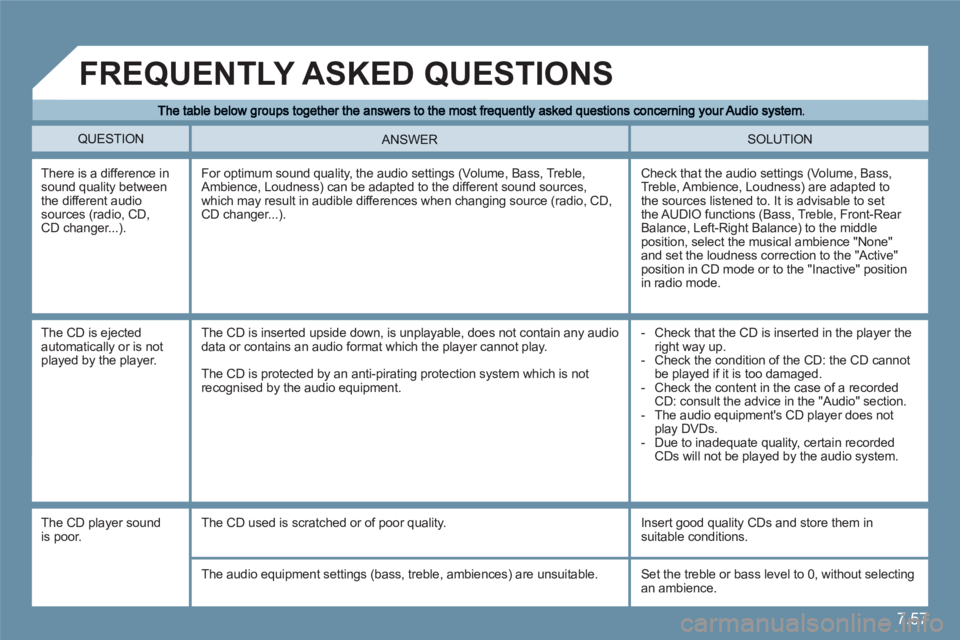
QUESTION SOLUTION ANSWER
There is a difference in sound quality between the different audio sources (radio, CD,CD changer...).
Check that the audio settings (Volume, Bass, Treble, Ambience, Loudness) are adapted to the sources listened to. It is advisable to set the AUDIO functions (Bass, Treble, Front-Rear Balance, Left-Right Balance) to the middle position, select the musical ambience "None"and set the loudness correction to the "Active" position in CD mode or to the "Inactive" position in radio mode.
For optimum sound quality, the audio settings (Volume, Bass, Treble, Ambience, Loudness) can be adapted to the different sound sources, which may result in audible differences when changing source (radio, CD,CD changer...).
The CD is ejectedautomatically or is notplayed by the player.
- Check that the CD is inserted in the player the right way up.
- Check the condition of the CD: the CD cannot be played if it is too damaged.
- Check the content in the case of a recordedCD: consult the advice in the "Audio" section.
- The audio equipment's CD player does not play DVDs.
- Due to inadequate quality, certain recordedCDs will not be played by the audio system.
The CD is inserted upside down, is unplayable, does not contain any audiodata or contains an audio format which the player cannot play.
The CD is protected by an anti-pirating protection system which is notrecognised by the audio equipment.
FREQUENTLY ASKED QUESTIONS
The CD player sound is poor.
The CD used is scratched or of poor quality.
Insert good quality CDs and store them in suitable conditions.
The audio equipment settings (bass, treble, ambiences) are unsuitable. Set the treble or bass level to 0, without selectingan ambience.
Page 208 of 216

7.58
QUESTION SOLUTION ANSWER
The stored stations donot function (no sound,87.5 Mhz is displayed...)
An incorrect waveband is selected.
Press the BAND AST button to return to the waveband (AM, FM1, FM2, FMAST) on which thestations are stored.
The traffi c announcement (TA) is displayed. I do not receive any traffi c information.
Tune to a radio station which broadcasts traffi cinformation. The radio station is not part of the regional traffi c information network.
The quality of receptionof the radio stationlistened to graduallydeteriorates or the stored stations donot function (no sound, 87.5 Mhz isdisplayed...).
The vehicle is too far from the transmitter used by the station listened to or there is no transmitter in the geographical area through which the vehicleis travelling.
The environment (hills, buildings, tunnels, basement car parks...) block reception, including in RDS mode.
The aerial is absent or has been damaged (for example when goingthrough a car wash or into an underground car park).
Activate the RDS function to enable the systemto check whether there is a more powerful transmitter in the geographical area.
This phenomenon is normal and does notindicate a failure of the audio equipment.
Have the aerial checked by a CITROÀN dealer.
Sound cut-outs of 1to 2 seconds in radio mode.
During this brief sound cut-out, the RDS searches for any frequencypermitting better reception of the station.
Deactivate the RDS function if the phenomenonis too frequent and always on the same route.
With the engine off, the audio equipmentswitches off after a few minutes of use.
When the engine is switched off, the audio equipment operating time depends on the battery charge.The switch-off is normal: the audio equipment switches to economy modeand switches off to prevent discharging of the vehicle's battery.
Start the vehicle's engine to increase the batterycharge.
The message "the audiosystem is overheated"appears on the display.
Switch the audio system off for a few minutes to allow the system to cool.In order to protect the installation if the surrounding temperature is too high,the audio equipment switches to an automatic thermal protection modeleading to a reduction of the volume or stopping of the playing of the CD.
Page 210 of 216

150
INDEX
E
Engine oil ...........................121 - 123
Engine oil level indicator...............r33
Ensure passenger safety .............. 17
Exterior...........................................r4
F
Flap for transportof long objects ............................98
Floor lighting................................110
Foglamp........................................52
Fold-back of door mirrors.............63
Folding rear benchseat.................98
Front armrest ...............................11 5
Front central oddments tray.........11 2
Front demisting - deicing..............90
Front foglamps..............................52
Front passenger’s airbag deactivation .......................15 - 101
Front seats.............................58 - 59
Fuel......................................35 - 133
Fuel gauge....................................35
Fuel tank..............................32 - 133
Fuses ...............................127 → 131
G
General.......................................145
General radio functions ..............122
Getting started.....................10 → 12
Glovebox.....................................111
Grab handles ...............................11 6
Ground clearance adjustment.......................107 - 108
Guide-me-home lighting........24 - 51
H
Half-moon storage pockets..........11 4
HDi engine .................................. 121
Head restraints.............58 - 97 - 100
Headlamp fl ash.............................50
Head-up display.....................37 - 38
Heated seats.........................58 - 97
Horn ..............................................50
I
Ignition..........................................28
Indexed position for the rear viewmirrors........................................64
Indicators......................................50
Instrument panel ..................30 → 36
Instrument panel warninglamps .....................................31-32
Interior............................................r7
Interior comfort................111 → 116
IInterior lighting..................109 - 11 0
Interior rear view mirror................r62
ISOFIX child seats.............104 - 105
ISOFIX fi xings.................... 104 - 105
K
Keys.............................................. 25
L
Lane Departure Warning System ...80
Levels
(engine)...........................121
Levels (temperature) ..................123
Lighting..................................51 - 52
Lighting control stalk.....................51
Lighting rheostat ...........................36
L
Loads and towing........................XVI
Locating of the vehicle..................24
Log of alerts ..................................40
M
Main beams..................................51
Main Menu.............................39 - 43
Maintenance....................120 → 132
Maintenance....................XX→XXII
Maintenance indicator...........r34 - 35
Maintenance intervals...................35
Maintenance position....................55
Manual steering column adjustment..................................57
Maximum speed....................71-72
Memorisation................................60
Mileage recorder...........................35
Monitoring..............................15 - 16
Multifunction displays..........39 → 43
N
NaviDrive/Audio system ..........43, 7.01 - 7.57
NaviDrive colour display ...............43
Night driving..................................36
O
Oil gauge....................................136
Oil temperature .............................46
P
Pack lounge seats ......................100
Paint colour code ........................148
Parking assistance ................78 - 79
Page 211 of 216
151
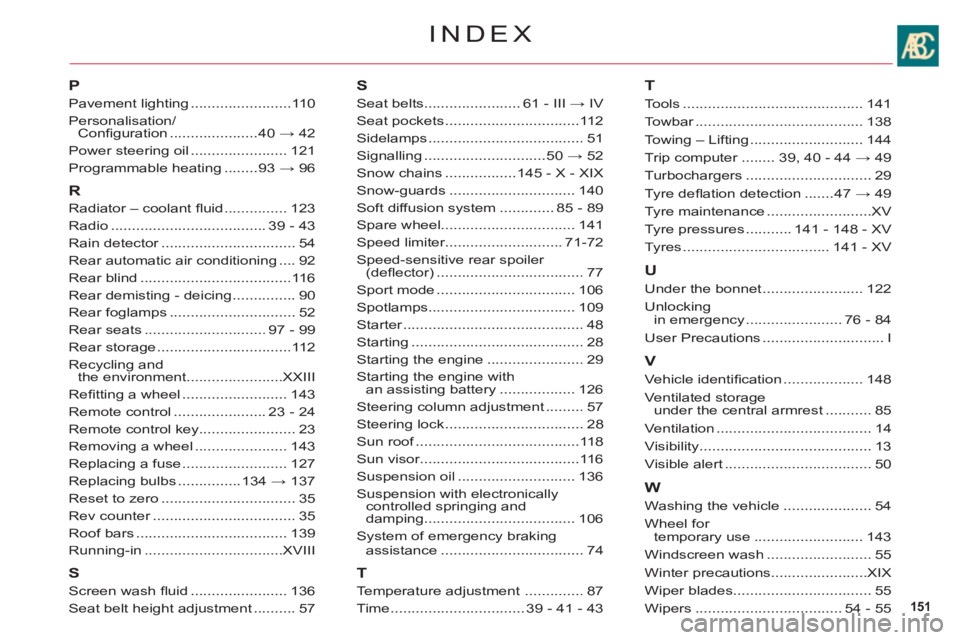
INDEX
P
Pavement lighting........................110
Personalisation/Confi guration .....................40 → 42
Power steering oil.......................121
Programmable heating........93 → 96
R
Radiator – coolant fl uid...............123
Radio .....................................39 - 43
Rain detector................................r54
Rear automatic air conditioning ....92
Rear blind....................................116
Rear demisting - deicing...............90
Rear foglamps ..............................52
Rear seats .............................97 - 99
Rear storage................................11 2
Recycling andthe environment.......................XXIII
Refi tting a wheel.........................143
Remote control ......................23 - 24
Remote control key.......................23
Removing a wheel......................143
Replacing a fuse.........................127
Replacing bulbs...............134 → 137
Reset to zero ................................35
Rev counter..................................r35
Roof bars....................................139
Running-in.................................XVIII
S
Screen wash fl uid .......................136
Seat belt height adjustment..........57
S
Seat belts.......................61 - III → IV
Seat pockets................................11 2
Sidelamps .....................................51
Signalling.............................50 → 52
Snow chains .................145 - X - XIX
Snow-guards..............................140
Soft diffusion system .............85 - 89
Spare wheel................................141
Speed limiter............................71-72
Speed-sensitive rear spoiler (defl ector)...................................77
Sport mode.................................106
Spotlamps...................................109
Starter...........................................r48
Starting.........................................28
Starting the engine.......................29
Starting the engine withan assisting battery.................. 126
Steering column adjustment.........57
Steering lock................................. 28
Sun roof.......................................f118
Sun visor......................................116
Suspension oil ............................136
Suspension with electronicallycontrolled springing and
damping....................................106
System of emergency brakingassistance .................................. 74
T
Temperature adjustment..............87
Time ................................39 - 41 - 43
T
Tools...........................................141
Towbar........................................r138
Towing – Lifting...........................144
Trip computer........r39, 40 - 44 → 49
Turbochargers ..............................29
Tyre defl ation detection .......47 → 49
Tyre maintenance.........................XV
Tyre pressures...........141 - 148 - XV
Tyres...................................141-XV
U
Under the bonnet ........................122
Unlockingin emergency.......................76 - 84
User Precautions .............................I
V
Vehicle identifi cation...................148
Ventilated storage under the central armrest...........85
Ventilation ..................................... 14
Visibilit
y......................................... 13
Visible alert...................................50
W
Washing the vehicle.....................54
Wh
eel for
temporary use..........................143
Windscreen wash.........................55
Winter precautions.......................XIX
Wiper blades.................................55
Wipers ...................................54 - 55