weight DATSUN 210 1979 User Guide
[x] Cancel search | Manufacturer: DATSUN, Model Year: 1979, Model line: 210, Model: DATSUN 210 1979Pages: 548, PDF Size: 28.66 MB
Page 181 of 548

CHECKING
AND
ADJUSTMENT
CAP
AND
ROTOR
HEAD
Cap
and
rotor
head
should
be
in
spected
periodically
as
specified
in
the
Main
teoanee
Schedule
Remove
cap
and
clean
all
dust
and
carbon
deposits
from
cap
and
rotor
from
time
to
time
If
cap
is
cracked
or
is
leaking
replace
wi
th
a
new
one
ADVANCE
MECHANISMS
SpecHlcatlons
Refer
to
Service
Data
and
Specifica
tions
for
distributor
Vacuum
advance
mechanism
mechanical
parts
If
vacuum
advance
mechanism
fails
to
operate
properly
check
for
the
followin
B
items
and
correct
the
mal
function
as
required
I
Check
vacuum
inlet
for
signs
of
leakage
at
its
connection
If
necessary
retighten
or
replace
with
a
new
one
2
Check
vacuum
diaphragm
for
air
leak
If
leak
is
found
replace
vacuum
controUer
assembly
3
Inspect
breaker
plate
for
smooth
moving
If
plate
does
not
move
smoothly
this
condition
could
be
due
to
sticky
steel
balls
or
pivot
Apply
grease
to
steel
halls
or
if
necessary
replace
breaker
plate
as
an
assembly
Centrifugal
advance
mechanical
parts
When
cause
of
engine
malfunction
is
traced
to
centrifugal
advance
mecha
nical
parts
use
distributor
tester
to
check
its
characteristics
If
nothing
is
wrong
with
its
charac
teristics
conceivable
causes
are
faulty
or
abnormal
wear
of
driving
part
or
others
So
do
not
disassemble
it
In
the
event
of
improper
character
istics
check
closely
rotor
shaft
assem
bly
governor
weight
and
shaft
If
any
of
the
above
parts
are
mal
functioning
replace
the
parts
Engine
Electrical
System
DISASSEMBLY
AND
ASSEMBLY
DISASSEMBLY
I
Take
off
cap
and
remove
rotor
head
2
Remove
Ie
ignition
unit
Refer
to
IC
Ignition
Unit
for
removal
and
in
stallation
3
Remove
stator
and
magnet
by
removing
stator
securing
screws
4
Remove
vacuum
controller
by
removing
securing
screws
EE746
Fig
EE
59
Removing
Vacuum
Controller
5
Using
two
pry
bars
or
suitable
puller
pry
reluctor
from
shaft
CAUTION
When
removing
reluctor
be
careful
not
10
distort
or
damage
the
teeth
6
Remove
roll
pin
7
Remove
pick
up
coil
assembly
8
Remove
breaker
plate
setscrews
and
remove
breaker
plate
assembly
EE703
Fig
EE
60
Removing
Breaker
Plate
Setscrews
9
Punch
knock
pin
out
and
remove
pinion
EE
23
EE704
Fig
EE
61
Removing
Knock
Pin
10
Remove
rotor
shaft
and
drive
shaft
assembly
EE705
Fig
EE
62
Removing
Rotor
Shaft
and
Drive
Shaft
Assembly
11
Mark
rotor
shaft
and
drive
shaft
Remove
packing
from
the
top
of
rotor
shaft
and
unscrew
rotor
shaft
setscrew
Remove
rotor
shaft
EE706
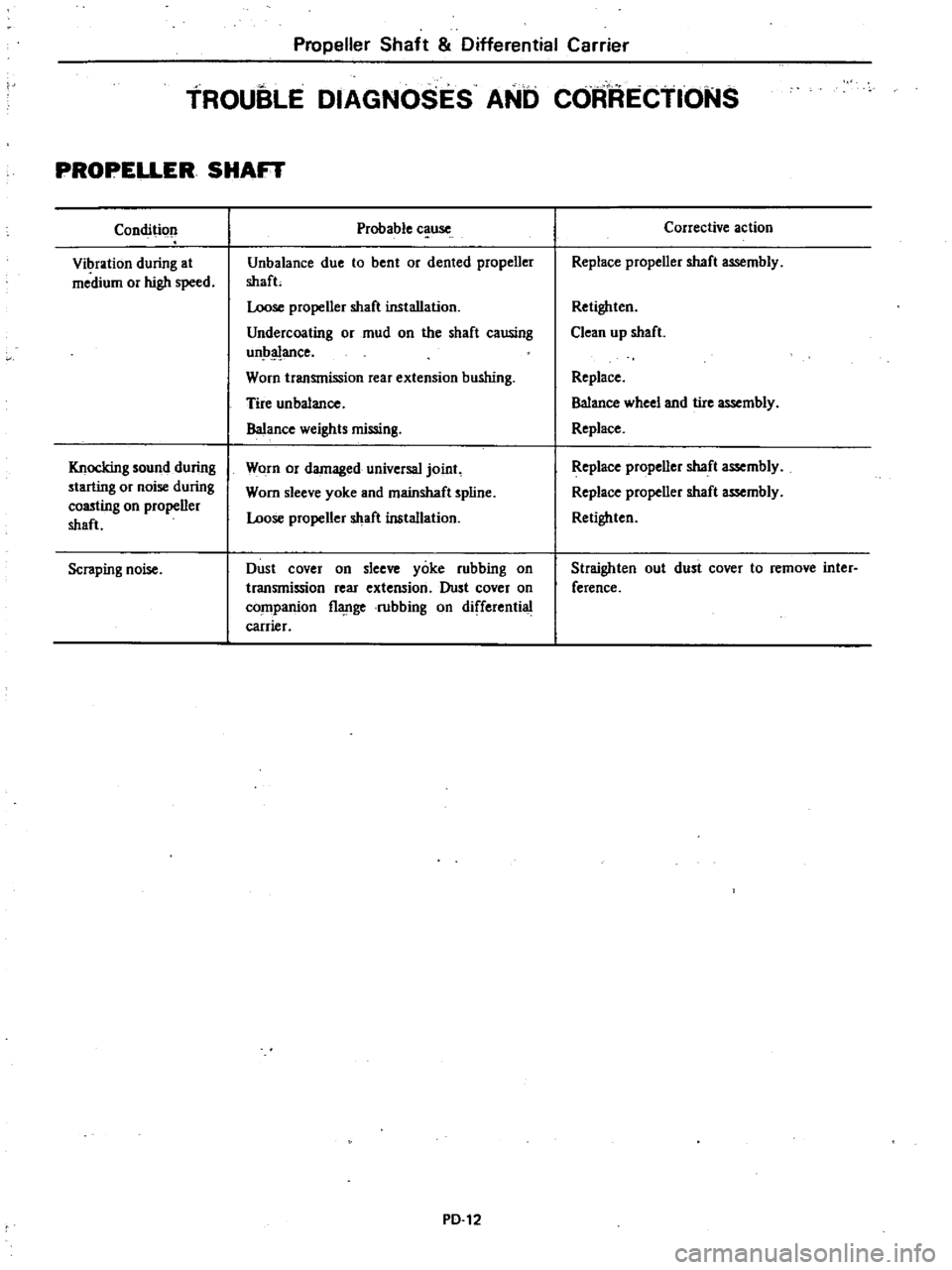
Fig
EE
63
Removing
Rotor
Shaft
12
Mark
one
of
the
governor
springs
and
its
bracket
Also
mark
one
of
the
governor
weights
and
its
pivot
pins
13
Carerully
unhook
and
remove
governor
springs
14
Remove
governor
weights
A
r
ply
grease
to
guvernor
weights
after
disassembling
Page 200 of 548
12
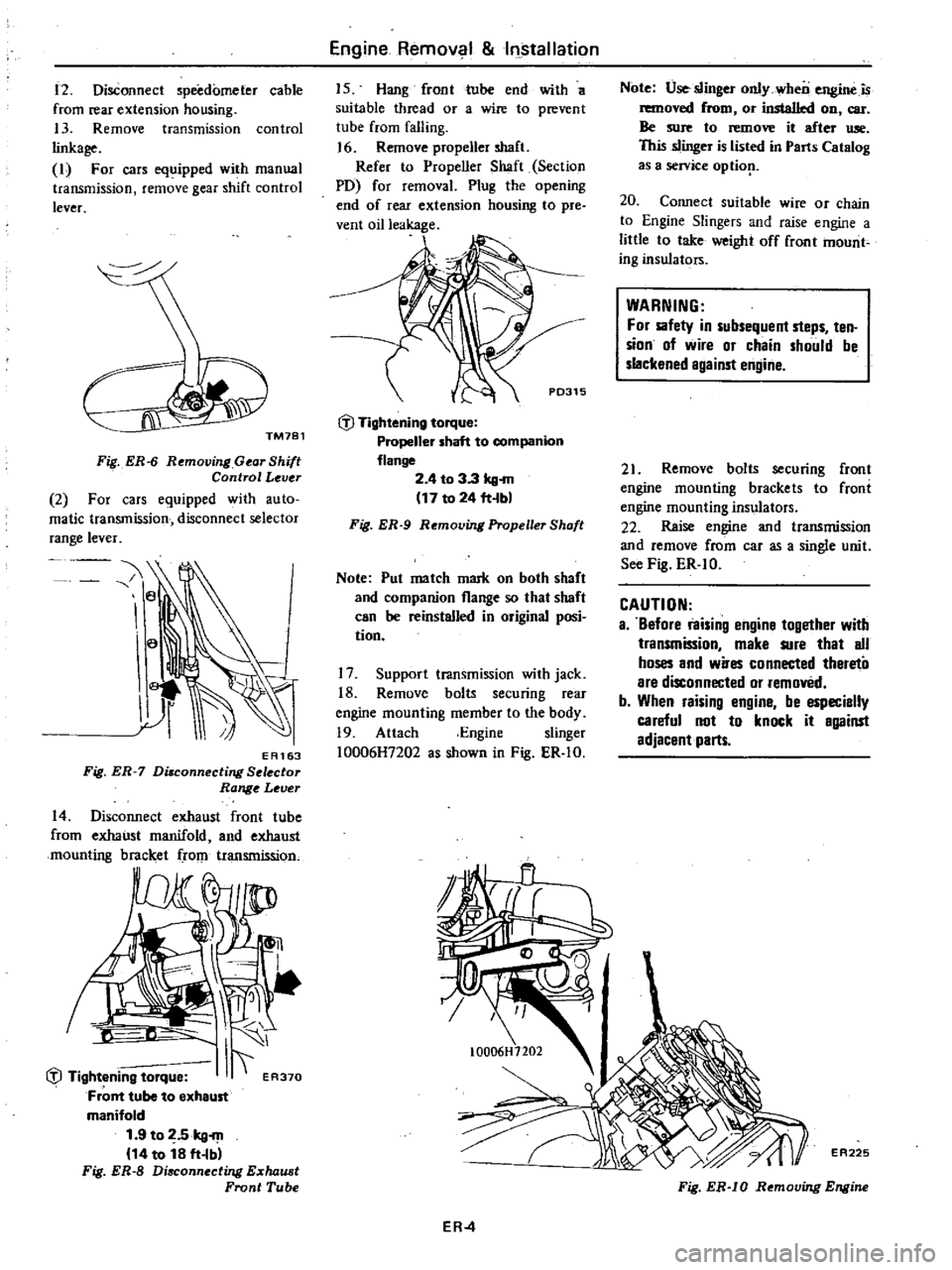
Disconnect
speedometer
cable
from
rear
extension
housing
13
Remove
transmission
control
linkage
I
For
cars
equipped
with
manual
transmission
remove
gear
shift
control
lever
Fig
ER
6
Removing
Gear
Shift
Control
Lever
2
For
cars
equipped
with
auto
matic
transmission
disconnect
selector
range
lever
e
a
EA163
Fig
ER
7
Di8connecting
Selector
Range
Lever
14
Disconnect
exhaust
front
tube
from
exhaust
manifold
and
exhaust
mounting
bracket
rom
transmission
I
liJ
Tightening
torque
I
ER370
Front
tube
to
exheust
manifold
1
9
to
2
5kg
m
14
to
18
ft
Ibl
Fig
ER
S
Disconnecting
E
chaust
Front
Tube
Engine
Remov
1
Installation
15
Hang
front
tube
end
with
a
suitable
thread
or
a
wire
to
prevent
tube
from
falling
J
6
Remove
propeller
shaft
Refer
to
Propeller
Shaft
Section
PO
for
removal
Plug
the
opening
end
of
rear
extension
housing
to
pre
vent
oil
leakage
P0315
liJ
Tightening
torque
Propeller
shaft
to
companion
flange
2
4
to
3
3
kg
m
17
to
24
ft
bl
Fig
ER
9
Removing
Propeller
Shaft
Note
Pul
me
tch
mark
on
both
shaft
and
companion
flange
so
that
shoft
can
be
reinstalled
in
original
posi
tion
17
Support
transmission
with
jack
18
Remove
bolts
securing
rear
engine
mounting
member
to
the
body
19
Attach
Engine
slinger
10006H7202
as
shown
in
Fig
ER
IO
Note
Use
slinger
only
wheo
engine
is
removed
from
or
installed
on
car
Be
sure
to
remove
it
efter
Ulle
This
slinger
is
listed
in
Parts
Cet
log
as
a
service
optiop
20
Connect
suitable
wire
or
chain
to
Engine
Slingers
and
raise
engine
a
little
to
take
weight
off
front
mount
ing
insulators
WARNING
For
sofety
in
subsequent
steps
ten
sion
of
wire
or
chain
should
be
slackened
against
engine
21
Remove
bolts
securing
front
engine
mounting
brackets
to
froni
engine
mounting
insulators
22
Reise
engine
and
transmission
and
remove
from
car
as
a
single
unit
See
Fig
ER
IO
CAUTION
a
Before
raising
engine
10gether
with
transmission
make
sure
that
all
hoses
and
wires
connected
thereto
are
disconnected
or
removed
b
When
raising
engine
be
especially
careful
not
to
knock
it
against
adjacent
parts
ER
4
EA225
Fig
ER
IO
Removing
Engine
Page 201 of 548
INSTALLATION
Install
in
the
reverse
order
of
re
moval
observing
the
following
Note
When
inslal1ing
be
sure
to
check
thaI
electrical
harnesses
are
connected
ly
1
When
installing
first
secure
rear
engine
mounting
member
to
body
2
Refer
to
applicable
section
when
installing
and
adjusting
any
parts
Adjust
clutch
pedal
free
travel
Re
fer
to
Clutch
Pedal
Free
Travel
Section
CL
for
installation
and
adjustment
Adjust
accelerator
control
system
Refer
to
Engine
Control
System
Section
FE
for
adjustment
For
installation
of
air
conditioner
compressor
and
belt
adjustment
Refer
to
Idler
Pulley
and
Com
pressor
Drive
Belt
for
adjustment
of
belt
tension
3
When
installing
exhaust
front
tube
on
exhaust
manifold
be
sure
to
use
new
gasket
4
When
installing
hood
following
engine
installation
be
sure
that
it
is
properly
centered
and
that
hood
lock
operates
securely
Refer
to
Hood
See
tion
BF
for
adjustment
Engine
Removal
Installation
ENGINE
MOUNTING
INSULATOR
FRONT
INSULATOR
Removal
Disconnect
battery
ground
cable
2
Suspend
engine
with
wire
or
chain
3
Remove
front
engine
mounting
insulator
lower
and
upper
nuts
on
both
sides
4
Make
sure
that
wire
or
chain
used
to
suspend
engine
is
positioned
prqper
ly
so
that
no
load
is
applied
to
insulators
and
remove
nuts
complete
ly
5
Lift
up
engine
and
separate
in
sulators
from
engine
mounting
rack
ets
Inspection
If
there
is
damage
deterioration
or
separation
of
bounded
surface
re
place
Installation
Install
front
insulators
in
reverse
sequence
of
removal
noting
the
fol
lowing
1
Do
not
confuse
right
and
left
insulators
R
right
side
or
L
left
side
identification
mark
is
stamp
ed
on
each
insulator
2
Install
front
insulator
so
that
ER
5
position
pin
is
projected
upward
3
Tighten
the
bolts
and
nut
correct
ly
and
securely
See
Fig
ER
I
REAR
INSULATOR
Removal
l
Support
transmission
weight
with
ajack
2
Remove
nuts
securing
rear
engine
mounting
insulator
to
mounting
mem
ber
3
Remove
bolts
connecting
rear
en
gine
mounting
insulator
to
transmis
sion
reaf
extension
housing
4
Jack
up
the
transmission
a
little
and
remove
insulator
Inspection
If
there
is
damage
deterioration
or
separation
of
mating
surface
replace
Installation
Install
rear
engine
mounting
mem
ber
and
insulator
in
reverse
order
of
removal
noting
the
following
I
Install
insulator
in
place
so
that
direction
of
mounted
insulator
is
same
as
that
in
Fig
ER
2
Tighten
nuts
and
bolts
correctly
and
securely
As
for
tightening
torque
see
Fig
ER
l
Page 209 of 548
CLUTCH
DISC
AND
COVER
REMOVAL
1
Remove
transmission
from
en
gine
Refer
to
Removal
Section
MT
2
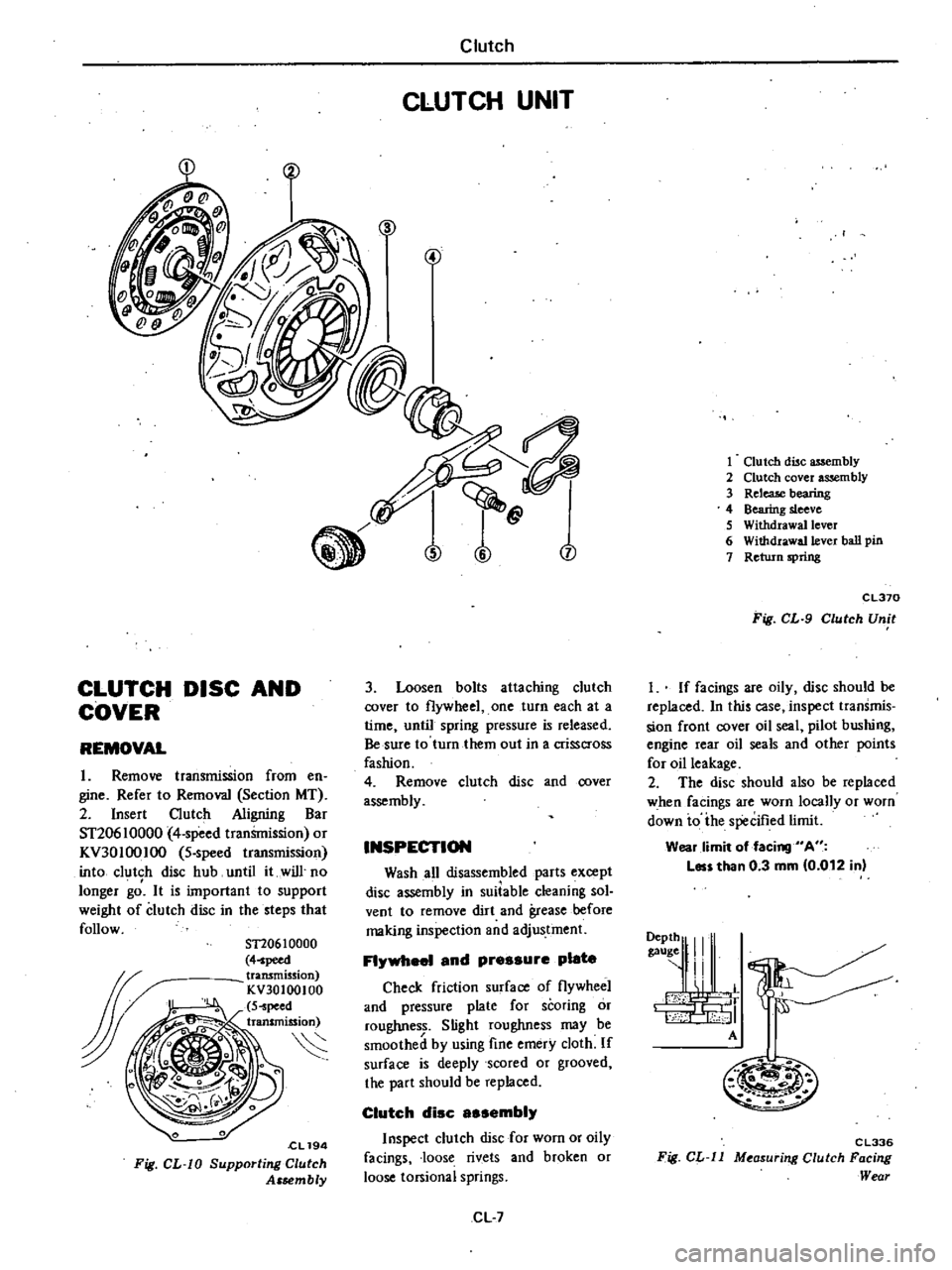
Insert
Clutch
Aligning
Bar
ST20610000
4
speed
tranSmission
or
KV30100IOO
5
speed
transmission
into
clutch
disc
hub
until
it
will
no
longer
gd
It
is
important
to
support
weight
of
clutch
disc
in
the
steps
that
follow
ST20610000
4
peed
transmission
KV30100100
S
peed
transmission
S
cL194
Fig
CL
W
Supporting
Clutch
Assembly
Clutch
CLUTCH
UNIT
n
j
3
Loosen
bolts
attaching
clutch
cover
to
flywheel
one
turn
each
at
a
time
until
spring
pressure
is
released
Be
sure
to
turn
them
out
in
a
crisscross
fashion
4
Remove
clutch
disc
and
cover
assembly
INSPECTION
Wash
all
disassembled
parts
except
disc
assembly
in
suiiable
cleaning
sol
vent
to
remove
dirt
and
grease
before
making
inspection
and
adjustment
FI
1
and
pressure
plate
Check
friction
surface
of
flywheel
and
pressure
plate
for
scoring
or
roughness
Slight
roughness
may
be
smoothed
by
using
fine
emery
cloth
If
surface
is
deeply
scored
or
grooved
the
part
should
be
replaced
Clutch
disc
sembi
Inspect
clutch
disc
for
worn
or
oily
facings
loose
rivets
and
broken
or
loose
torsional
springs
CL
7
1
Clutch
disc
assembly
2
Clutch
cover
assembly
3
ReleaJe
bearing
4
Bearing
sleeve
S
Withdrawal
lever
6
Withdrawa11ever
ball
pin
7
Return
spring
CL370
Fig
CL
9
Clutch
Unit
I
If
facings
are
oily
disc
should
be
replaced
In
this
case
inspect
transmis
sion
front
cover
oil
seal
pilot
bushing
engine
rear
oil
seals
and
other
points
for
oil
leakage
2
The
disc
should
also
be
replaced
when
facings
are
worn
locally
or
worn
down
io
ihe
specified
limit
Wear
limit
of
facing
A
Les
than
0
3
mm
0
012
in
9111
I
A
M
m
C
L336
Fig
CL
ll
M
asur
ng
Clutch
Facing
Wear
Page 219 of 548
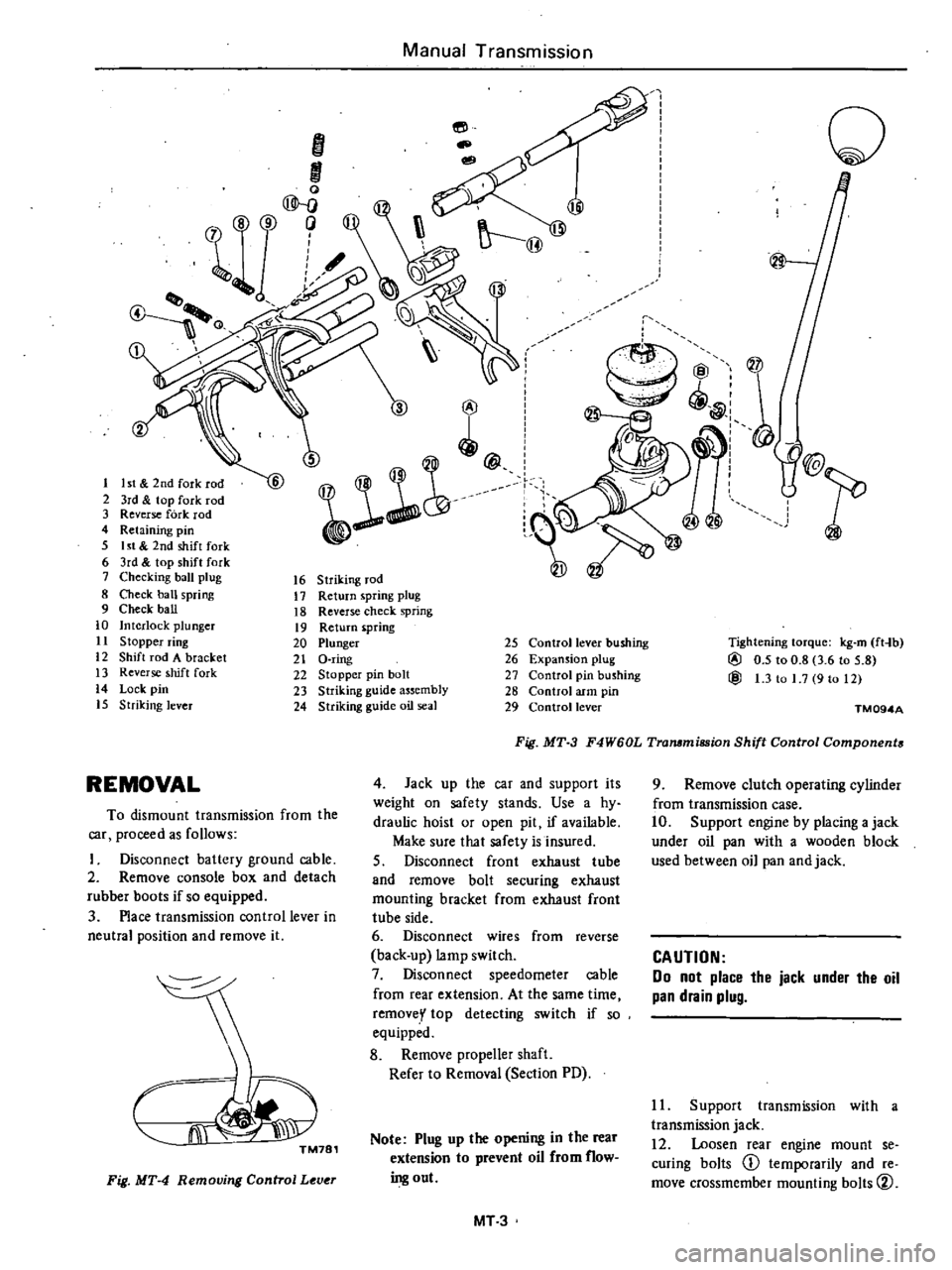
I
ht
2nd
fork
r
2
3rd
top
fork
rod
3
Reverse
fork
rod
4
Retaining
pin
5
I
t
2nd
shift
fork
6
3rd
top
shift
fork
7
Checking
ball
plug
8
Check
ban
spring
9
Check
ball
10
Interlock
plunger
11
S
topper
ring
12
Shift
rod
A
bracket
13
Reverse
shift
fork
14
Lock
pin
15
Striking
lever
Manual
Transmission
16
Striking
rod
17
Return
spring
plug
18
Reverse
check
spring
19
Return
pring
20
Plunger
21
D
ring
22
Stopper
pin
bolt
23
Striking
guide
assembly
24
Striking
guide
oil
seal
REMOVAL
To
dismount
transmission
from
the
car
proceed
as
follows
Disconnect
battery
ground
cable
2
Remove
console
box
and
detach
rubber
boots
if
so
equipped
3
Place
transmission
control
lever
in
neutral
position
and
remove
it
m
TM781
Fig
MT
4
Removing
Control
Lever
@
@
25
Control
lever
bushing
26
Expansion
plug
27
Control
pin
bushing
28
Control
arm
pin
29
Control
lever
o
Tightening
torque
kg
m
ft
lb
@
0
5
to
0
8
3
6
tn
5
8
@
1
3
to
1
7
9
to
12
Fig
MT
3
F4W60L
Tra11lmiBSion
Shift
Control
Components
TM094A
4
Jack
up
the
car
and
support
its
weight
on
safety
stands
Use
a
hy
draulic
hoist
or
open
pit
if
available
Make
sure
that
safety
is
insured
5
Disconnect
front
exhaust
tube
and
remove
bolt
securing
exhaust
mounting
bracket
from
exhaust
front
tube
side
6
Disconnect
wires
from
reverse
back
up
lamp
switch
7
Disconnect
speedometer
cable
from
rear
extension
At
the
same
time
removey
top
detecting
switch
if
so
equipped
8
Remove
propeller
shaft
Refer
to
Removal
Section
PO
Note
Plug
up
the
opening
in
the
rear
extension
to
prevent
oil
from
flow
ing
out
MT
3
9
Remove
clutch
operating
cylinder
from
transmission
case
10
Support
engine
by
placing
a
jack
under
oil
pan
with
a
wooden
block
used
between
oil
pan
and
jack
CAUTION
00
not
place
the
jack
under
the
oil
pan
drain
plug
11
Support
transmission
with
a
transmission
jack
12
Loosen
rear
engine
mount
se
curing
bolts
CD
temporarily
and
re
move
crossmember
mounting
bolts
V
Page 233 of 548
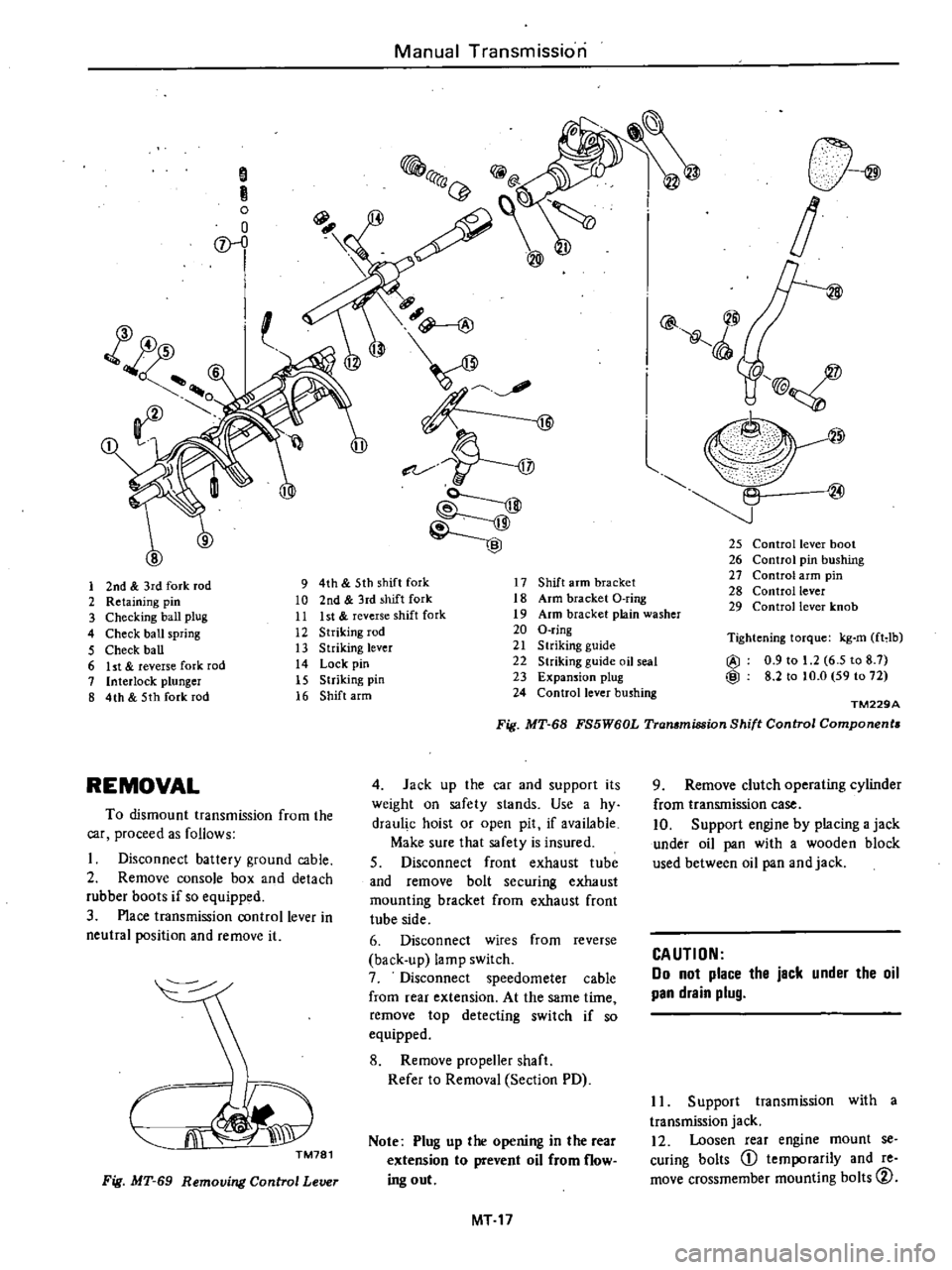
Manual
Transmission
S
R
o
o
D
l
@
@
l
@
l
25
Control
lever
boot
26
Control
pin
bushing
27
Control
arm
pin
28
Control
lever
29
Control
lever
knob
1
2nd
3rd
fork
rod
9
4th
5th
shift
fork
17
Shift
arm
bracket
2
Retaining
pin
10
2nd
3rd
shift
fork
18
Arm
bracket
O
ring
3
Checking
ball
plug
11
Ist
reverse
shift
fork
19
Arm
bracket
plain
washer
4
Check
ball
spring
12
Striking
rod
20
O
ring
5
Check
ball
13
Striking
lever
21
S
lriking
guide
6
ht
reverse
fork
rod
14
Lock
pin
22
Striking
guide
oil
seal
7
Interlock
plunger
15
Striking
pin
23
Expansion
plug
8
4th
5th
fork
rod
16
Shift
arm
24
Control
lever
bushing
Tightening
torque
kg
m
fHb
@
0
9
to
1
2
6
5
to
8
7
@
8
2
to
to
O
59
to
72
TM229A
Fig
MT
68
FS5W60L
Transmission
Shift
Control
Components
REMOVAL
4
Jack
up
the
car
and
supporl
its
weight
on
safety
slands
Use
a
hy
draul
c
hoist
or
open
pit
if
available
Make
sure
that
safety
is
insured
S
Disconnect
front
exhaust
tube
and
remove
bolt
securing
exhaust
mounting
bracket
from
exhaust
front
tube
side
6
Disconnect
wires
from
reverse
back
up
lamp
switch
7
Disconnect
speedometer
cable
from
rear
extension
At
the
same
time
remove
top
detecting
switch
if
so
equipped
8
Remove
propeller
shaft
Refer
to
Removal
Section
PD
To
dismount
transmission
from
the
car
proceed
as
follows
Disconnect
battery
ground
cable
2
Remove
console
box
and
detach
rubber
boots
if
so
equipped
3
Place
transmission
control
lever
in
neutral
position
and
remove
it
CJi
J
TM781
Note
Plug
up
the
opening
in
the
rear
extension
to
prevent
oil
from
flow
ing
out
Fig
MT
69
Removing
Control
Lever
MT
17
9
Remove
clutch
operating
cylinder
from
transmission
case
10
Support
engine
by
placing
a
jack
under
oil
pan
with
a
wooden
block
used
between
oil
pan
and
jack
CAUTION
Do
not
place
the
jack
under
the
oil
pan
drain
plug
II
Support
transmission
with
a
transmission
jack
12
Loosen
rear
engine
mount
se
curing
bolts
CD
temporarily
and
re
move
crossmember
mounting
bolts
CV
Page 277 of 548
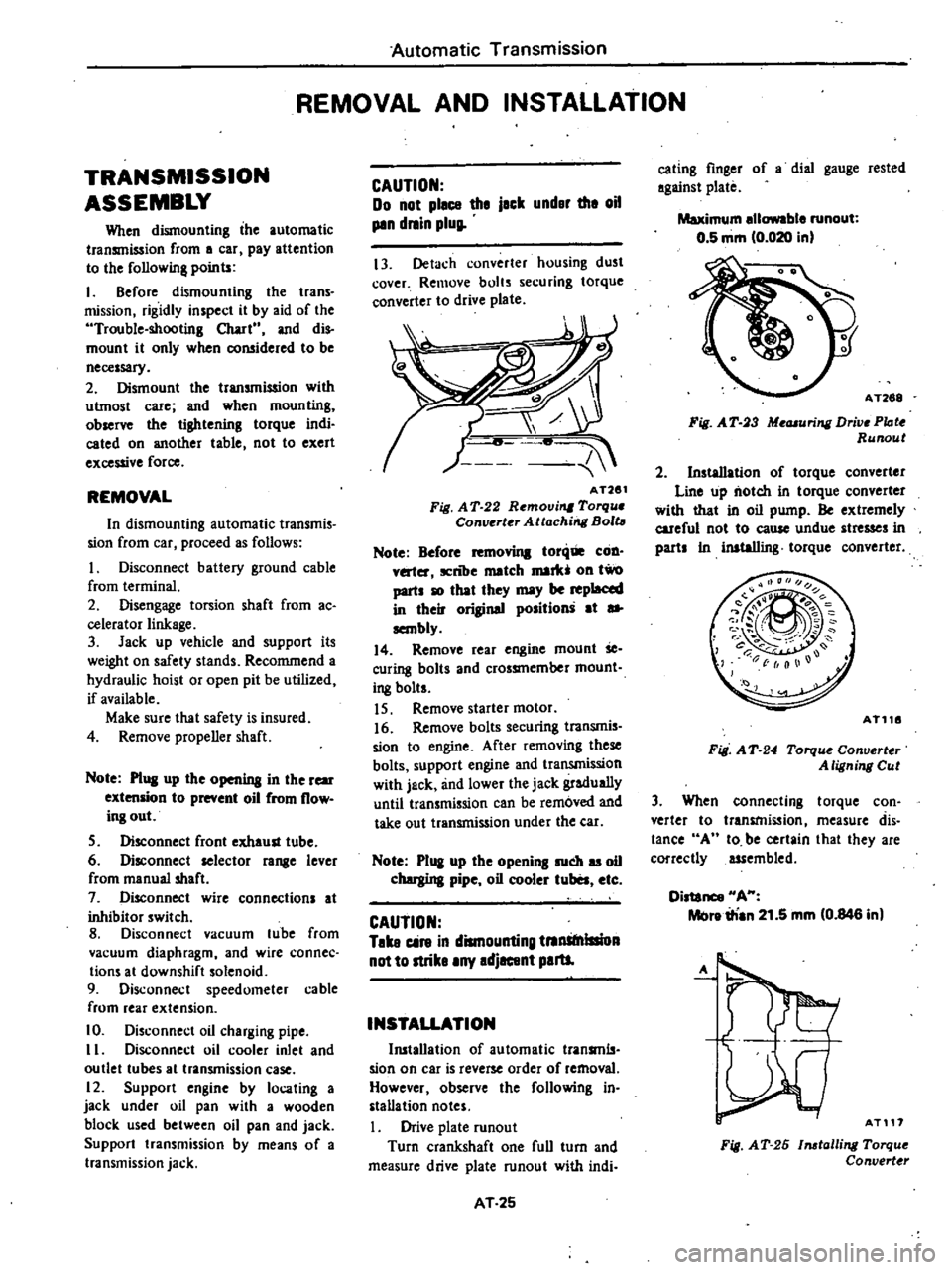
Automatic
Transmission
REMOVAL
AND
INSTALLATION
TRANSMISSION
ASSEMBLY
When
dismounting
the
automatic
transmission
from
a
car
pay
attention
to
the
following
points
I
Before
dismounting
the
trans
mission
rigidly
inspect
it
by
aid
of
the
Trouble
shooting
Chart
and
dis
mount
it
only
when
coll5idered
to
be
necessary
2
Dismount
the
transmission
with
utmost
care
and
when
mounting
observe
the
tightening
torque
indi
cated
on
another
table
not
to
exert
excessive
force
REMOVAL
In
dismounting
automatic
transmis
sion
from
car
proceed
as
follows
I
Disconnect
battery
ground
cable
from
terminal
2
Disengage
torsion
shaft
from
ac
eelerator
linkage
3
Jack
up
vehicle
and
support
its
weight
on
safety
stands
Recommend
a
hydraulic
hoist
or
open
pit
be
utilized
if
available
Make
sure
that
safety
is
insured
4
Remove
propeller
shaft
Note
Pl
ll
up
the
openina
in
the
rear
extension
to
prevent
oil
from
flow
ing
out
S
Disconnect
front
exhaust
tube
6
Disconnect
selector
ra
8e
lever
from
manual
shaft
7
Disconnect
wire
connections
at
inhibitor
switch
8
Disconnect
vacuum
lube
from
vacuum
diaphragm
and
wire
connee
tions
at
downshift
solenoid
9
Disconnect
speedometer
cable
from
rear
exlension
10
Disconnect
oil
charging
pipe
II
Disconnect
oil
cooler
inlet
and
outlet
tubes
al
transmission
case
12
Support
engine
by
locating
a
jack
under
oil
pan
with
a
wooden
block
used
between
oil
pan
and
jack
Support
transmission
by
means
of
a
transmission
jack
CAUTION
Do
not
plecs
the
jack
under
the
oil
pin
dnin
plug
13
Detach
converter
housing
dust
cover
Remove
bolts
securing
torque
converter
to
drive
plate
AT261
Fig
A
T
22
Removi
Torqu
Converter
Attachirrg
Bolt
Note
Before
toni
COD
v
ter
ICnlJe
match
mark
011
two
parts
10
that
they
may
be
replaced
in
their
original
position
at
sa
sembly
14
Remove
rear
engine
mount
Se
curing
bolts
and
crossmember
mount
i
8
bolts
IS
Remove
starter
motor
16
Remove
bolts
securing
transmis
sion
to
engine
After
removing
these
bolts
support
engine
and
transmission
with
jack
and
lower
the
jack
gradually
until
transmission
can
be
removed
and
take
out
transmission
under
the
ear
Note
P1
I
up
the
opening
such
u
oil
chergina
pipe
oil
cooler
tuba
etc
CAUTION
Take
cin
in
dismounting
tnnStnlllioA
not
to
strike
any
adjacent
paru
INSTALLATION
Ill5tallation
of
automatic
transmls
sian
on
car
is
reverse
order
of
removal
However
observe
the
following
in
stallation
notes
Drive
plate
runout
Turn
crankshaft
one
full
turn
and
measure
drive
plate
runout
with
indi
AT
25
eating
finger
of
a
dial
gauge
rested
against
plate
Maximum
ellowable
runout
0
5
mm
0
020
in
AT268
Fig
A
T
3
Me
uring
Drive
PIote
Runout
2
Installation
of
torque
converter
Line
up
notch
in
torque
converter
with
that
in
oil
pump
Be
extremely
careful
not
to
eause
undue
stresses
in
parts
In
inataIIing
torque
converter
AT116
Fig
A
T
24
Torqu
Converter
A
ligning
Cut
3
When
connecting
torque
con
verter
to
transmission
measure
dis
tance
A
10
be
certain
that
they
are
correctly
assembled
Distance
HA
Melre
irian
21
5
mm
0
846
in
A
AT117
Fig
AT
26
1116talling
Torque
Convert
r
Page 311 of 548
they
are
worn
damaged
or
otherwise
faulty
and
how
they
are
affected
Re
pair
or
replace
all
faulty
parts
which
ever
is
necessary
1
Check
gear
teeth
for
scoring
cracking
or
chipping
and
make
sure
that
tooth
contact
pattern
indicates
correct
meshing
depth
If
any
fault
is
evident
replace
parts
as
required
Note
Drive
pinion
and
ring
gear
are
supplied
for
replacement
as
a
set
therefore
should
either
part
be
damaged
replece
as
a
set
2
Check
pinion
shaft
and
pinion
mates
for
scores
and
signs
of
wear
and
replace
as
required
F
oUow
the
same
procedure
for
side
gear
and
their
seats
on
differential
case
3
Inspect
all
bearing
races
and
roU
ers
for
scoring
chipping
or
evidence
of
excessive
wear
They
should
be
in
tiptop
condition
such
as
not
worn
and
with
mirror
like
surfaces
Replace
if
there
is
a
shadow
of
doubt
on
their
efficiency
as
an
incorrect
bearing
op
eration
may
result
in
noises
and
gear
seizure
4
Inspect
thrust
washer
faces
SmaU
faults
can
be
corrected
with
sand
paper
If
pinion
mate
to
de
gear
backlash
exceeds
specified
value
re
place
thrust
washers
Pinion
mate
to
side
gear
backlash
0
10
to
0
20
mm
0
0039
to
0
0079
in
5
Inspect
gear
carrier
and
differ
ential
case
for
cracks
or
distortion
If
either
condition
is
evident
replace
Jaulty
parts
6
As
a
general
rule
oil
seal
should
be
replaced
at
each
disassembly
ASSEMBLY
AND
ADJUSTMENT
Assembly
can
be
done
in
the
reverse
order
of
disassembly
The
foUowing
directions
for
adjustment
and
usage
of
special
tools
enable
to
obtain
a
perfect
differential
operation
Propeller
Shaft
Differential
Carrier
PRECAUTIONS
IN
REASSEMBLY
I
Arrange
shims
washers
and
the
like
to
install
them
correctly
2
Thoroughly
clean
the
surfaces
on
which
shims
washers
bearings
and
bearing
caps
are
installed
3
Apply
gear
oil
when
installing
bearings
4
Pack
grease
cavity
between
lips
when
fitting
oil
seal
ASSEMBLY
OF
DIFFERENTIAL
CASE
1
Assemble
pinion
mates
side
gears
and
thrust
washers
in
differential
case
2
Fit
pinion
shaft
to
differential
case
so
that
it
meets
lock
pin
hole
3
Adjust
pinion
mate
to
ide
gear
backlash
or
the
clearance
between
the
rear
face
of
side
gear
and
thrust
washer
to
the
specified
value
by
selecting
side
gear
thrust
washer
Pinion
mate
to
side
gear
backlash
0
10
to
0
20
mm
10
0039
to
0
0079
in
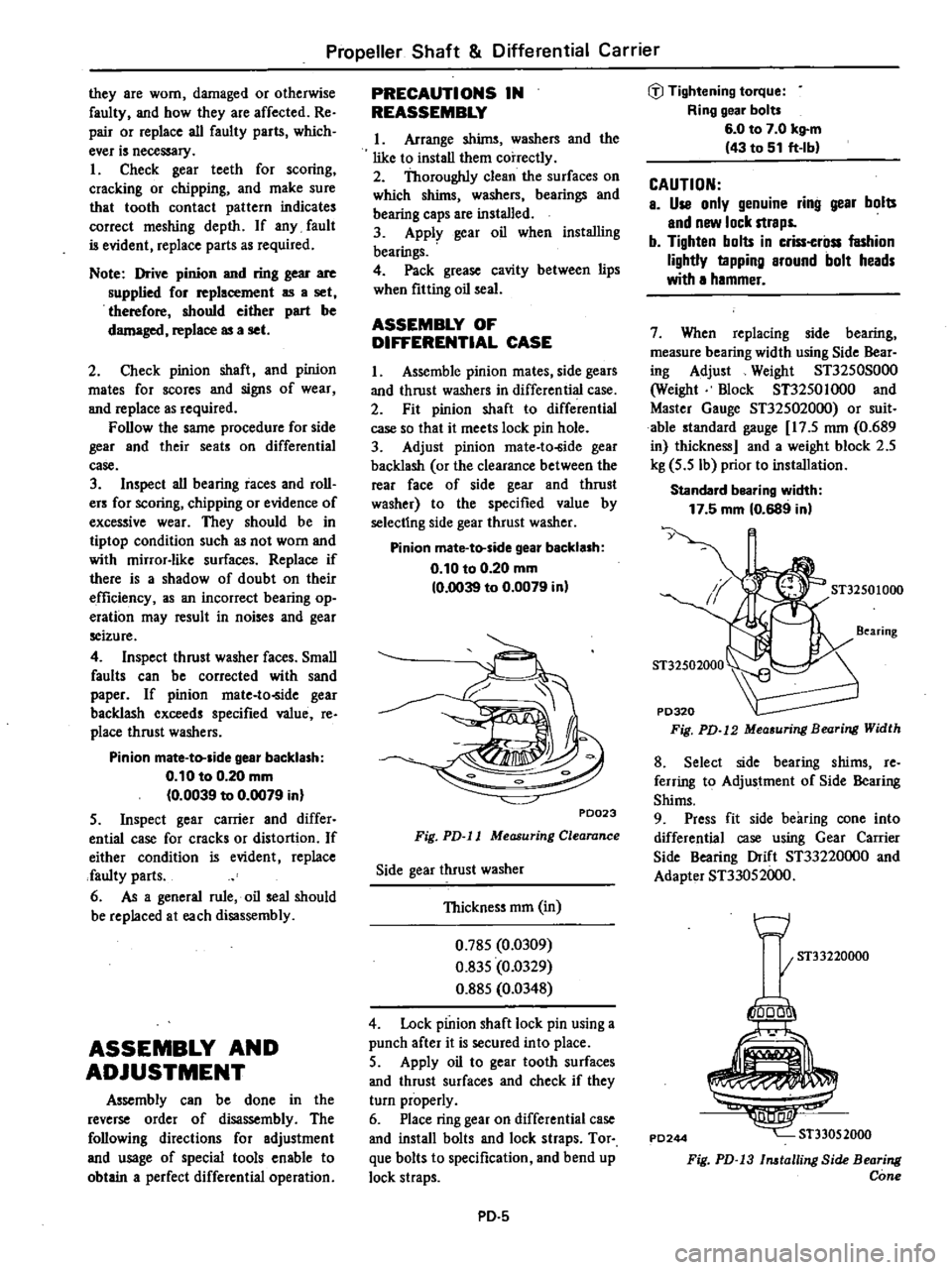
PD023
Fig
PD
l1
Measuring
Clearance
Side
gear
thrust
washer
Thickness
mm
in
0
785
0
0309
0
835
0
0329
0
885
0
0348
4
Lock
pinion
shaft
lock
pin
using
a
punch
after
it
is
secured
into
place
5
Apply
oil
to
gear
tooth
surfaces
and
thrust
surfaces
and
check
if
they
turn
properly
6
Place
ring
gear
on
differential
case
and
install
bolts
and
lock
straps
Tor
que
bolts
to
specification
and
bend
up
lock
straps
PO
5
tiJ
Tightening
torque
Ring
gear
bolt
6
0
to
7
0
kg
m
43
to
51
ft
Ib
CAUTION
e
Use
only
genuine
ring
gear
bolts
end
new
lock
straps
b
Tighten
bolts
in
criss
crilss
fashion
lightly
tapping
around
bolt
heads
with
a
hammer
7
When
replacing
side
bearing
measure
bearing
width
using
Side
Bear
ing
Adjust
Weight
ST3250S000
Weight
mock
ST3250
I
000
and
Master
Gauge
ST325020oo
or
suit
able
standard
gauge
17
5
nun
0
689
in
thickness
and
a
weight
block
2
5
kg
5
5
Ib
prior
to
installation
Standald
bearing
width
17
5
mm
10
689
in
y
ST32501000
8
Select
side
bearing
shims
re
ferring
to
Adjustment
of
Side
Bearing
Shims
9
Press
fit
side
bearing
cone
into
differential
case
using
Gear
Carrier
Side
Bearing
Drift
ST33220oo0
and
Adapter
ST33052000
w
I
ST33220000
PD244
1000
ST33052000
Fig
PD
13
lnatalling
Side
Bearing
Cone
Page 318 of 548
Propeller
Shaft
Differential
Carrier
TROUBLE
DIAGNOSES
AND
CORRECTIONS
PROPELLER
SHAFT
Condition
Vibration
during
at
medium
or
high
speed
Knocking
sound
during
starting
or
noise
during
coasting
on
propeller
shaft
Scraping
noise
Probable
cause
Unbalance
due
to
bent
or
dented
propeller
shafL
Loose
propeller
shaft
installation
Undercoating
or
mud
on
the
shaft
causing
unb
ance
Worn
transmission
rear
extension
bushing
Tire
unbalance
Balance
weights
missing
Worn
or
damaged
universal
joint
Worn
sleeve
yoke
and
meinshaft
spline
Loose
propeller
shaft
installation
Dust
cover
on
sleeve
yoke
rubbing
on
transmission
rear
extension
Dust
cover
on
companion
flange
rubbing
on
differential
carrier
PD
12
Corrective
action
Replace
propener
shaft
assembly
Retighten
Clean
up
shaft
Replace
Balance
wheel
and
tire
assembly
Replace
Replace
propeller
shaft
assembly
Replace
propeller
shaft
assembly
Retighten
Straighten
out
dust
cover
to
remove
inter
ference
Page 321 of 548

Propeller
Shaft
Differential
Carrier
SPECIAL
SERVICE
TOOLS
Tool
number
tool
name
IKent
Moore
No
I
Reference
page
or
Fig
No
Unit
application
Drive
pinion
flange
wrench
J
25774
Fig
PD
6
Page
PD
7
ST31530000
ST0632001i0
Differential
carrier
attachment
ST3003S000
Drive
pinion
rear
inner
race
puller
set
Puller
Base
CD
ST30031000
00
ST30032000
ST33051001
Differential
sIde
bearing
puller
oiij
9
J
25601
Fig
PD4
Page
PD
9
J
25733
CD
J
25733
1
00
J
25733
2
Fig
PD
7
Fig
PD
9
Tool
number
tool
name
ST33052000
Adapter
@
KV38101800
Solid
punch
ST3250SOO0
CD
ST32501000
00
ST32502000
Side
bearing
adjust
weight
Weight
block
Master
gauge
Er
ST33220000
Differential
side
bearing
drift
ST30611000
Drive
pinion
outer
race
drift
bar
i
IM
I
UI
r
l
JM
M
Md
Kent
Moore
No
Reference
or
Fig
No
Unit
application
J
25797
1
Fig
PD
9
Page
PD
g
FiJi
PD
IO
J
25407
3
CD
J
25407
3
00
J
25407
1
Fig
PD
12
J
25804
D1
Fig
PD
13
Page
PD
g
J
25742
1
Page
PD
6
PD
15
Applicable
to
all
B310
series
models