display DODGE CHARGER SRT 2015 7.G Owners Manual
[x] Cancel search | Manufacturer: DODGE, Model Year: 2015, Model line: CHARGER SRT, Model: DODGE CHARGER SRT 2015 7.GPages: 595, PDF Size: 16.43 MB
Page 415 of 595
Full Off
This mode is intended for off-highway or off-road use
only and should not be used on any public roadways. In
this mode, all TCS and ESC stability features are turned
OFF. To enter the “Full Off” mode, press and hold the
“ESC Off” switch for five seconds while the vehicle is
stopped with the engine running. After five seconds, a
chime will sound, the#ESC OFF Indicator Light#will
illuminate, and the “ESC off” message will appear in the
Driver Information Display (DID). Refer to “Driver In-
formation Display (DID)” in “Understanding Your In-
strument Panel” for further information. To turn ESC ON
again, momentarily press the “ESC Off” switch.
NOTE:The#ESC off#message will display and the
audible chime will sound when the shift lever is moved
into the PARK position from any position other than
PARK and then moved out of the PARK position. This
will occur when the message was previously cleared.
WARNING!
In the ESC “Full Off” mode, the engine torque
reduction and stability features are disabled. There-
fore, the enhanced vehicle stability offered by ESC is
unavailable. In an emergency evasive maneuver, the
ESC system will not engage to assist in maintaining
stability.$ESC Off$mode is intended for off-highway
or off-road use only.
NOTE:When the ESC is switched SPORT, the BLD system
remains active. This feature controls wheel spin across an
axle quite similarly to a limited slip differential. If one
wheel on an axle is spinning faster than the other, the
system will apply the brake of the spinning wheel and
allow more engine torque to be applied to the wheel that is
not spinning. To improve the vehicle’s traction when
driving with tire chains, or when starting off in deep snow,
sand, or gravel, it may be desirable to switch to the “Sport
Mode” by momentarily pressing the “ESC Off” switch.
5
STARTING AND OPERATING 413
Page 449 of 595
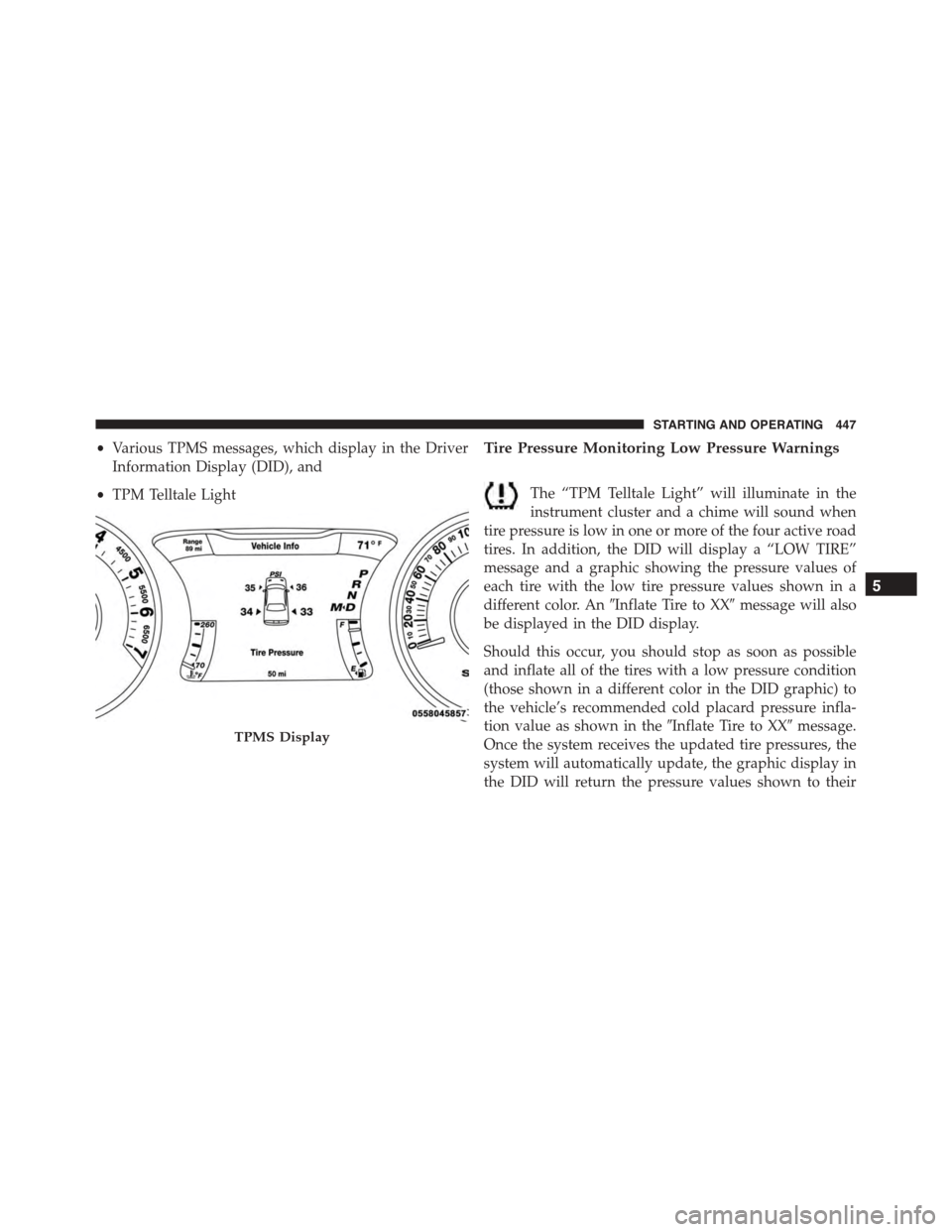
•Various TPMS messages, which display in the Driver
Information Display (DID), and
•TPM Telltale Light
Tire Pressure Monitoring Low Pressure Warnings
The “TPM Telltale Light” will illuminate in the
instrument cluster and a chime will sound when
tire pressure is low in one or more of the four active road
tires. In addition, the DID will display a “LOW TIRE”
message and a graphic showing the pressure values of
each tire with the low tire pressure values shown in a
different color. An#Inflate Tire to XX#message will also
be displayed in the DID display.
Should this occur, you should stop as soon as possible
and inflate all of the tires with a low pressure condition
(those shown in a different color in the DID graphic) to
the vehicle’s recommended cold placard pressure infla-
tion value as shown in the#Inflate Tire to XX#message.
Once the system receives the updated tire pressures, the
system will automatically update, the graphic display in
the DID will return the pressure values shown to their
TPMS Display
5
STARTING AND OPERATING 447
Page 450 of 595
original color, and the “TPM Telltale Light” will turn off.
The vehicle may need to be driven for up to 20 minutes
above 15 mph (24 km/h) in order for the TPMS to receive
this information.
Service TPMS Warning
If a system fault is detected, the “TPM Telltale Light” will
flash on and off for 75 seconds and then remain on solid.
The system fault will also sound a chime. In addition, the
DID will display a#SERVICE TPM SYSTEM#message for
a minimum of five seconds and then display dashes (- -)
in place of the pressure value to indicate which sensor is
not being received.
If the ignition switch is cycled, this sequence will repeat,
providing the system fault still exists. If the system fault
no longer exists, the “TPM Telltale Light” will no longer
flash, and the#SERVICE TPM SYSTEM#message will no
longer display, and a pressure value will display in place
of the dashes. A system fault can occur due to any of the
following:
1. Signal interference due to electronic devices or driving
next to facilities emitting the same radio frequencies as
the TPM sensors.
2. Installing aftermarket window tinting that contains
materials that may block radio wave signals.
3. Accumulation of snow or ice around the wheels or
wheel housings.
4. Using tire chains on the vehicle.
5. Using wheels/tires not equipped with TPM sensors.
The DID will also display a#SERVICE TPM SYSTEM#
message for a minimum of five seconds when a system
fault related to an incorrect sensor location fault is
detected. In this case, the#SERVICE TPM SYSTEM#
448 STARTING AND OPERATING
Page 451 of 595
message is then followed with a graphic display with
pressure values still shown. This indicates that the pres-
sure values are still being received from the TPM sensors
but they may not be located in the correct vehicle
position. The system still needs to be serviced as long as
the#SERVICE TPM SYSTEM#message is displayed.
Vehicles With Compact Spare
1. The compact spare tire does not have a TPM sensor.
Therefore, the TPMS will not monitor the pressure in
the compact spare tire.
2. If you install the compact spare tire in place of a road
tire that has a pressure below the low-pressure warn-
ing limit, upon the next ignition switch cycle, the
“TPM Telltale Light” will remain ON and a chime will
sound. In addition, the graphic in the DID will still
display the low pressure values in a different color and
the#Inflate Tire to XX#message.
3. After driving the vehicle for up to 20 minutes above
15 mph (24 km/h), the “TPM Telltale Light” will flash
on and off for 75 seconds and then remain on solid. In
addition, the DID will display a#SERVICE TPM
SYSTEM#message for a minimum of five seconds and
then display dashes (- -) in place of the pressure value.
4. For each subsequent ignition switch cycle, a chime will
sound, the “TPM Telltale Light” will flash on and off
for 75 seconds and then remain on solid, and the DID
will display a#SERVICE TPM SYSTEM#message for a
minimum of five seconds and then display dashes (- -)
in place of the pressure value.
5. Once you repair or replace the original road tire and
reinstall it on the vehicle in place of the compact spare,
the TPMS will update automatically. In addition, the
“TPM Telltale Light” will turn OFF and the graphic in
the DID will display a new pressure value instead of
dashes (- -), as long as no tire pressure is below the
5
STARTING AND OPERATING 449
Page 509 of 595
The fluid reservoir will hold nearly 1 gal (4 L) of washer
fluid when the message “Low Washer Fluid” appears in
the Driver Information Display (DID).
WARNING!
Commercially available windshield washer solvents
are flammable. They could ignite and burn you. Care
must be exercised when filling or working around
the washer solution.
Exhaust System
The best protection against carbon monoxide entry into
the vehicle body is a properly maintained engine exhaust
system.
If you notice a change in the sound of the exhaust system;
or if the exhaust fumes can be detected inside the vehicle;
or when the underside or rear of the vehicle is damaged;
have an authorized technician inspect the complete ex-
haust system and adjacent body areas for broken, dam-
aged, deteriorated, or mispositioned parts. Open seams
or loose connections could permit exhaust fumes to seep
into the passenger compartment. In addition, have the
exhaust system inspected each time the vehicle is raised
for lubrication or oil change. Replace as required.
WARNING!
•Exhaust gases can injure or kill. They contain
carbon monoxide (CO), which is colorless and
odorless. Breathing it can make you unconscious
and can eventually poison you. To avoid breathing
CO, refer to “Safety Tips/Exhaust Gas” in “Things
To Know Before Starting Your Vehicle” for further
information.
(Continued)
7
MAINTAINING YOUR VEHICLE 507
Page 554 of 595
MAINTENANCE SCHEDULE
The Scheduled Maintenance services listed in this
manual must be done at the times or mileages specified
to protect your vehicle warranty and ensure the best
vehicle performance and reliability. More frequent main-
tenance may be needed for vehicles in severe operating
conditions, such as dusty areas and very short trip
driving. Inspection and service should also be done
anytime a malfunction is suspected.
The oil change indicator system will remind you that it is
time to take your vehicle in for scheduled maintenance.
A “Oil Change Required” message will be displayed in
the DID and a single chime will sound, indicating that an
oil change is necessary.
Based on engine operation conditions, the oil change
indicator message will illuminate. This means that ser-
vice is required for your vehicle. Have your vehicle
serviced as soon as possible, within the next 500 miles
(805 km).
NOTE:
•The oil change indicator message will not monitor the
time since the last oil change. Change your vehicle’s oil
if it has been six months since your last oil change,
even if the oil change indicator message is NOT
illuminated.
•Change your engine oil more often if you drive your
vehicle off-road/track usage for an extended period of
time.
•Under no circumstances should oil change intervals
exceed 6,000 miles (10,000 km) or six months, which-
ever comes first.
552 MAINTENANCE SCHEDULES
Page 555 of 595
Your authorized dealer will reset the oil change indicator
message after completing the scheduled oil change. If a
scheduled oil change is performed by someone other
than your authorized dealer, the message can be reset by
referring to the steps described under “Driver Informa-
tion Display (DID)” in “Understanding Your Instrument
Panel” for further information.
At Each Stop For Fuel
•Check the engine oil level. Refer to “Maintenance
Procedures/Engine Oil” in “Maintaining Your Ve-
hicle” for further information.
•Check the windshield washer solvent and add if
required.
Once A Month
•Check tire pressure and look for unusual wear or
damage.
•Inspect the battery, and clean and tighten the terminals
as required.
•Check the fluid levels of the coolant reservoir, brake
master cylinder, and power steering (6.2L Only), and
add as needed.
•Check all lights and other electrical items for correct
operation.
At Each Oil Change
•Change the engine oil filter.
•Inspect the brake hoses and lines.
CAUTION!
Failure to perform the required maintenance items
may result in damage to the vehicle.
8
MAINTENANCE SCHEDULES 553
Page 578 of 595
Dealer Service............................495
Deck Lid, Emergency Release.................44
Deck Lid, Power Release.....................42
Defroster, Rear Window.....................243
Defroster, Windshield.......................98
Delay (Intermittent) Wipers..................156
Diagnostic System, Onboard.................493
Dimmer Switch, Headlight...................151
Dipsticks
Oil (Engine)...........................497
Disposal
Antifreeze (Engine Coolant)................514
Door Locks
Child-Protection Door Lock — Rear Doors......32
Door Locks............................22
Key Fob . . . . . . . . . . . . . . . . . . . . . . . . . . . . . . .29
Remote...............................29
Remote Keyless Entry (RKE)................29
Door Locks, Automatic......................31
Driver Information Display
DID . . . . . . . . . . . . . . . . . . . . . . . . . . . . . . . ..263
Instrument Cluster Display................263
Driving
Through Flowing, Rising, or Shallow Standing
Water................................398
Electrical Power Outlets.....................233
Electric Rear Window Defrost.................243
Electric Remote Mirrors.....................117
Electronic Brake Control System...............406
Brake Assist System.....................409
Traction Control System...................409
Electronic Power Distribution Center (Fuses)......529
Electronic Speed Control (Cruise Control)........165
Electronic Stability Control (ESC)..............410
Emergency Deck Lid Release..................44
Emergency, In Case of
Freeing Vehicle When Stuck................482
576 INDEX