display DODGE CHARGER SRT 2015 7.G Service Manual
[x] Cancel search | Manufacturer: DODGE, Model Year: 2015, Model line: CHARGER SRT, Model: DODGE CHARGER SRT 2015 7.GPages: 595, PDF Size: 16.43 MB
Page 255 of 595
4. Air Bag Warning Light
This light will turn on for four to eight seconds
as a bulb check when the ignition is first cycled
to the ON/RUN position. If the light is either
not on during starting, stays on, or turns on
while driving, have the system inspected at an autho-
rized dealer as soon as possible. Refer to “Occupant
Restraints” in “Things To Know Before Starting Your
Vehicle” for further information.
5. Driver Information Display (DID) Area
The odometer display shows the total distance the ve-
hicle has been driven. The trip odometer shows indi-
vidual trip mileage.
NOTE:U.S. Federal regulations require that upon trans-
fer of vehicle ownership, the seller certify to the pur-
chaser the correct mileage that the vehicle has been
driven. If your odometer needs to be repaired or serviced,
the repair technician should leave the odometer reading
the same as it was before the repair or service. If he/she
cannot do so, then the odometer must be set at zero, and
a sticker must be placed in the door jamb stating what the
mileage was before the repair or service. It is a good idea
for you to make a record of the odometer reading before
the repair/service, so that you can be sure that it is
properly reset, or that the door jamb sticker is accurate if
the odometer must be reset at zero.
The DID features an interactive display. For further
information, refer to “Driver Information Display (DID).”
4
UNDERSTANDING YOUR INSTRUMENT PANEL 253
Page 262 of 595
WARNING!
A malfunctioning catalytic converter, as referenced
above, can reach higher temperatures than in normal
operating conditions. This can cause a fire if you
drive slowly or park over flammable substances such
as dry plants, wood, cardboard, etc. This could result
in death or serious injury to the driver, occupants or
others.
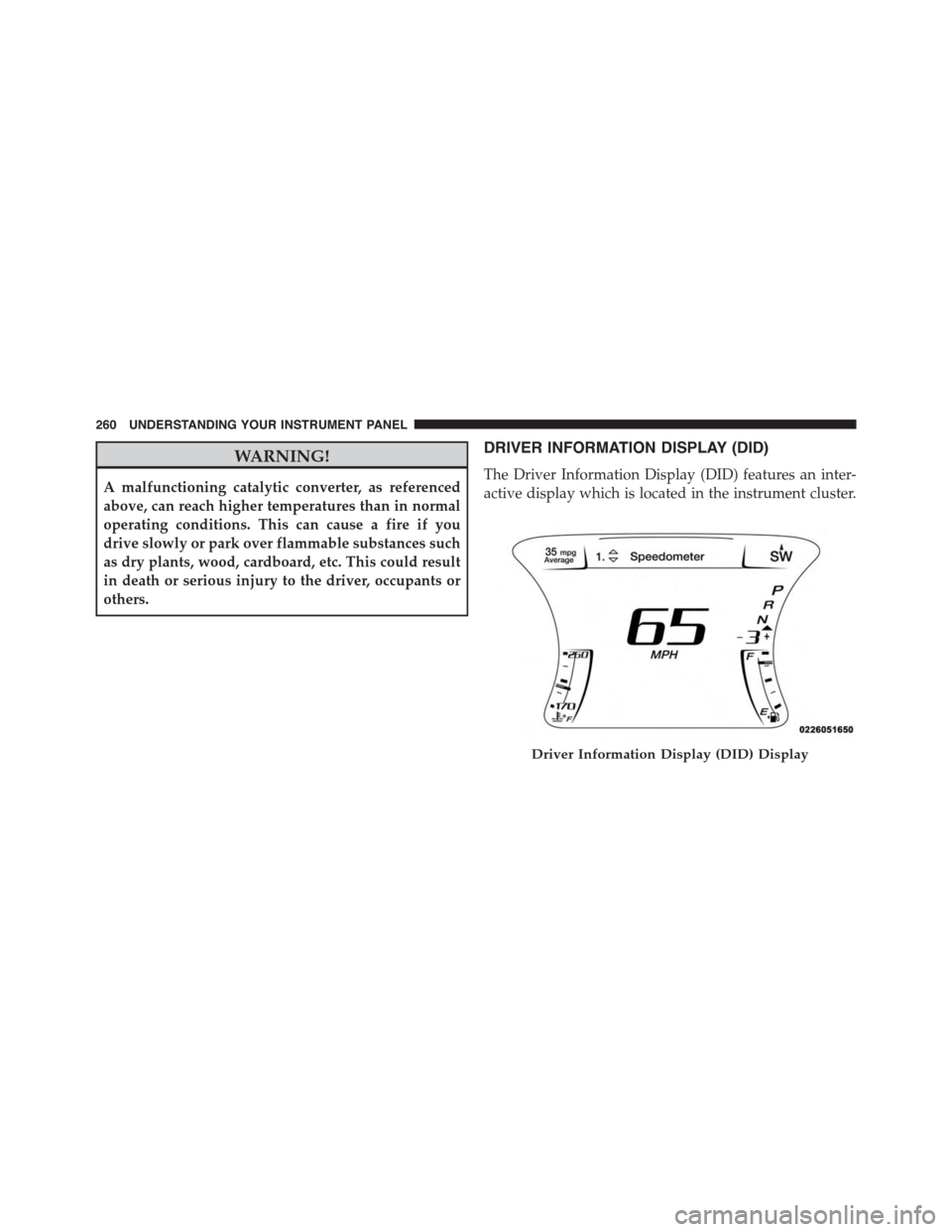
DRIVER INFORMATION DISPLAY (DID)
The Driver Information Display (DID) features an inter-
active display which is located in the instrument cluster.
Driver Information Display (DID) Display
260 UNDERSTANDING YOUR INSTRUMENT PANEL
Page 265 of 595
•Pushing the left arrow button will exit each submenu
layer and return to the main menu.
For the Trip and Fuel Economy menus (and new Perfor-
mance Timers):
•Information is reset by pushing and holding the OK
button.
Engine Oil Life Reset
Oil Change Required
Your vehicle is equipped with an engine oil change
indicator system. The “Oil Change Required” message
will display in the DID for five seconds after a single
chime has sounded, to indicate the next scheduled oil
change interval. The engine oil change indicator system
is duty cycle based, which means the engine oil change
interval may fluctuate, dependent upon your personal
driving style.
Unless reset, this message will continue to display each
time you place the ignition in the ON/RUN position. To
turn off the message temporarily, push and release the
OK button. To reset the oil change indicator system (after
performing the scheduled maintenance), refer to the
following procedure.
Vehicles Equipped With Keyless Enter-N-Go™
1. Without pushing the brake pedal, push the ENGINE
START/STOP button and place the ignition to the
ON/RUN position (do not start the engine).
2. Fully push the accelerator pedal, slowly, three times
within 10 seconds.
3. Without pushing the brake pedal, push the ENGINE
START/STOP button once to return the ignition to the
OFF/LOCK position.
4
UNDERSTANDING YOUR INSTRUMENT PANEL 263
Page 266 of 595
NOTE:If the indicator message illuminates when you
start the vehicle, the oil change indicator system did not
reset. If necessary, repeat this procedure.
Secondary Method Of Navigating To The Oil Life
Screen In The DID And Holding Ok
Your vehicle is equipped with an engine oil change
indicator system. The “Oil Change Required” message
will flash in the DID display for approximately 10
seconds after a single chime has sounded to indicate the
next scheduled oil change interval. The engine oil change
indicator system is duty cycle based, which means the
engine oil change interval may fluctuate, dependent
upon your personal driving style.
Use the steering wheel DID controls for the following
procedure(s):
1. Without pushing the brake pedal, place the ignition in
the ON/RUN position (do not start the engine).
2. Push and release theDOWNarrow button to scroll
downward through the main menu to “Vehicle Info.”
3. Push and release theRIGHTarrow button to access
the ”Oil Life” screen.
4. Push and hold theOKbutton until the “Oil Life”
screen displays.
5. Push and release theDOWNarrow button to select “
Ye s,” then push and release theOKbutton to select
reset of the Oil Life.
6. Push and release theUparrow button to exit the
submenu screen.
NOTE:If the indicator message illuminates when you
start the vehicle, the oil change indicator system did not
reset. If necessary, repeat this procedure.
264 UNDERSTANDING YOUR INSTRUMENT PANEL
Page 268 of 595
•LaneSense Failure Telltale
This telltale will turn on to indicate that the
LaneSense Departure has detected a failure.
•Service AWD Indicator
This telltale will turn on to indicate the All
Wheel Drive (AWD) system is not functioning
properly and that service is required.
DID Red Telltales
This area will show reconfigurable red caution telltales.
These telltales include:
•Power Steering System Over Temperature — If
Equipped
If the “SERVICE POWER STEERING” message
and a steering wheel icon are displayed on the
DID screen, it indicates that the vehicle needs
to be taken to the dealer for service. It is likely the vehicle
has lost power steering assistance. Refer to “Power
Steering” in “Starting And Operating” for further
information.
NOTE:
•Even if power steering assistance is no longer opera-
tional, it is still possible to steer the vehicle. Under
these conditions there will be a substantial increase in
steering effort, especially at very low vehicle speeds
and during parking maneuvers.
•If the condition persists, see your authorized dealer for
service.
•Door Ajar
This light will turn on to indicate that one or
more doors may be ajar.
266 UNDERSTANDING YOUR INSTRUMENT PANEL
Page 271 of 595
•Speed Limit Warning Light
Push and release the UP or DOWN arrow
button until the Speed Limit Warning Menu
icon/title is highlighted in the DID. Push and
release OK to enter speed warning. Use UP or
DOWN arrow to select a desired speed, then push and
release OK to set the speed. The Manual Speed Assist
(MSA) Speed Warning telltale will display in the DID,
and a chime will sound with a pop up warning message
when the set speed is exceeded.
•Transmission Temperature Warning Light
This light indicates that there is excessive trans-
mission fluid temperature that might occur
with severe usage such as trailer towing. It may
also occur when operating the vehicle in a high
torque converter slip condition. If this light comes on,
stop the vehicle and run the engine at idle or faster with
the transmission in NEUTRAL until the light goes off.
CAUTION!
Continuous driving with the Transmission Tempera-
ture Warning Light illuminated will eventually cause
severe transmission damage or transmission failure.
WARNING!
If you continue operating the vehicle when the
Transmission Temperature Warning Light is illumi-
nated you could cause the fluid to boil over, come in
contact with hot engine or exhaust components and
cause a fire.
4
UNDERSTANDING YOUR INSTRUMENT PANEL 269
Page 272 of 595
DID Selectable Menu Items
Push and release the UP or DOWN arrow buttons until
the desired Selectable Menu item is displayed in the DID.
Follow the Menu or submenu prompts as desired.
Speedometer
Push and release the UP or DOWN arrow button until
the Speedometer menu is displayed in the DID. Push and
release the OK button to toggle units (km/h or mph) of
digital speedometer.
Vehicle Info
Push and release the UP or DOWN arrow button until
the Vehicle Info menu is highlighted in the DID. Push and
release the RIGHT arrow buttons to enter the submenu
items of Vehicle Info. Follow the directional prompts to
access or reset any of the following Vehicle Info submenu
items:
Tire Pressure Monitor
Coolant Temp
Trans Temp
Oil Temp
Oil Pressure
Oil Life
Battery Voltage
Intake Air Temp
Engine Torque
Engine Power
Air-Fuel Ratio — 6.2L Supercharged
Boost Pressure — 6.2L Supercharged
Intercooler Water Temp — 6.2L Supercharged
270 UNDERSTANDING YOUR INSTRUMENT PANEL
Page 273 of 595
Performance Features
WARNING!
Measurement of vehicle statistics with the Perfor-
mance Features is intended for off-highway or off-
road use only and should not be done on any public
roadways. It is recommended that these features be
used in a controlled environment and within the
limits of the law. The capabilities of the vehicle as
measured by the performance pages must never be
exploited in a reckless or dangerous manner, which
can jeopardize the user ’s safety or the safety of
others. Only a safe, attentive, and skillful driver can
prevent accidents.
Refer to “Driver Information Display (DID)” in “ Under-
standing Your Instrument Panel” for Main Menu/Sub-
Menu selectable items and navigation.
The Performance Features include the following:
•0-60 mph (0-100 km/h) Timer
– Best
– Last
– Current
– Reaction Timer
•0-100 mph (0-161 km/h) Timer
– Best
– Last
– Current
– Reaction Timer
•1/8 Mile (200 meters) Timer
– Best
– Last
– Current
– Reaction Timer
4
UNDERSTANDING YOUR INSTRUMENT PANEL 271
Page 274 of 595
•1/4 Mile (400 meters) Timer
– Best
– Last
– Current
– Reaction Timer
•Braking Distance
– Distance
– From Speed
•Current G-Forces
•Peak G-Forces
•Lap Timer
•Lap History
– Will list the last 5 lap with the best lap highlighted
in green.
•Top Speed
The following describes each feature and its operation:
0-60 mph (0-100 km/h)
When selected, this screen displays the time it takes for
the vehicle to go from 0 to 60 mph (0 to 100 km/h) within
10 seconds.
•The feature will “ready” when the vehicle speed is at
0 mph (0 km/h). The word “READY” will flash when
conditions are met for the event to begin.
•Dashes will display if the vehicle fails to reach 60 mph
(100 km/h) in less then 10 seconds.
•To clear the vehicle’s best, last, and current 0-60 mph
(0-100 km/h) time, push and hold theOKbutton for
two seconds.
272 UNDERSTANDING YOUR INSTRUMENT PANEL
Page 275 of 595
0 to 100 mph (0 to 161 km/h)
When selected, this screen displays the time it takes for
the vehicle to go from 0 to 100 mph (0 to 161 km/h)
within 20 seconds.
•The feature will “ready” when the vehicle speed is at
0 mph (0 km/h). The word “READY” will flash when
conditions are met for the event to begin.
•Dashes will display if the vehicle fails to reach 0 to
100 mph (0 to 161 km/h) in less then 20 seconds.
•To clear the vehicle’s best, last and current 0 to
100 mph (0 to 161 km/h) time, push and hold theOK
button for two seconds.
1/8 Mile (200 Meters)
When selected, this screen displays the time it takes the
vehicle to travel 1/8 mile within 15 seconds and the
vehicle’s speed when it reaches 1/8 mile.
•The feature will “ready” when the vehicle is at 0 mph
(0 km/h). The word “READY” will flash when condi-
tions are met for the event to begin.
•Dashes will display if the vehicle fails to reach 1/8
mile (200 meters) in less then 15 seconds.
•To clear the vehicle’s best 1/8 mile (200 meters) run,
push and hold theOKbutton for five seconds.
1/4 Mile (400 Meters)
When selected, this screen displays the time it takes the
vehicle to travel 1/4 mile within 25 seconds and the
vehicle’s speed when it reaches 1/4 mile (200 meters).
•The feature will “ready” when the vehicle is at 0 mph
(0 km/h). The word “READY” will flash when condi-
tions are met for the event to begin.
•Dashes will display if the vehicle fails to reach 1/4
mile (400 meters) in less then 25 seconds.
4
UNDERSTANDING YOUR INSTRUMENT PANEL 273