lock DODGE JOURNEY 2020 Owners Manual
[x] Cancel search | Manufacturer: DODGE, Model Year: 2020, Model line: JOURNEY, Model: DODGE JOURNEY 2020Pages: 396, PDF Size: 25.53 MB
Page 281 of 396

MULTIMEDIA 279
Doors & Locks
After pressing the Doors & Locks button on the touchscreen, the following settings will be available:NOTE:
When the “Auto Dim High Beams” feature is selected, the high beam headlights activate/deactivate automatically under certain conditions.
Daytime Running Lights OnOff
NOTE:
When the “Daytime Running Lights” feature is selected, the daytime running lights can be turned On or Off. This feature is only available if allowed by
l a
w in the country of the vehicle purchase.
Steering Directed Headlights — If Equipped OnOff
NOTE:
The “Steering Directed Headlights” feature causes the headlights to turn relative to a change in direction of the steering wheel.
Flash Headlights With Lock OnOff
Setting Name Selectable Options
Setting NameSelectable Options
Auto Door Locks — If EquippedOnOff
NOTE:
When the “Auto Door Locks” feature is selected, all doors will lock automatically when the vehicle reaches a speed of 12 mph (20 km/h).
Auto Unlock On Exit OnOff
NOTE:
When this feature is selected, all doors will unlock when the vehicle is stopped, the transmission is in the PARK or NEUTRAL position and the driver's
d o
or is opened.
Flash Lamps With Lock OnOff
9
Page 282 of 396
280 MULTIMEDIA
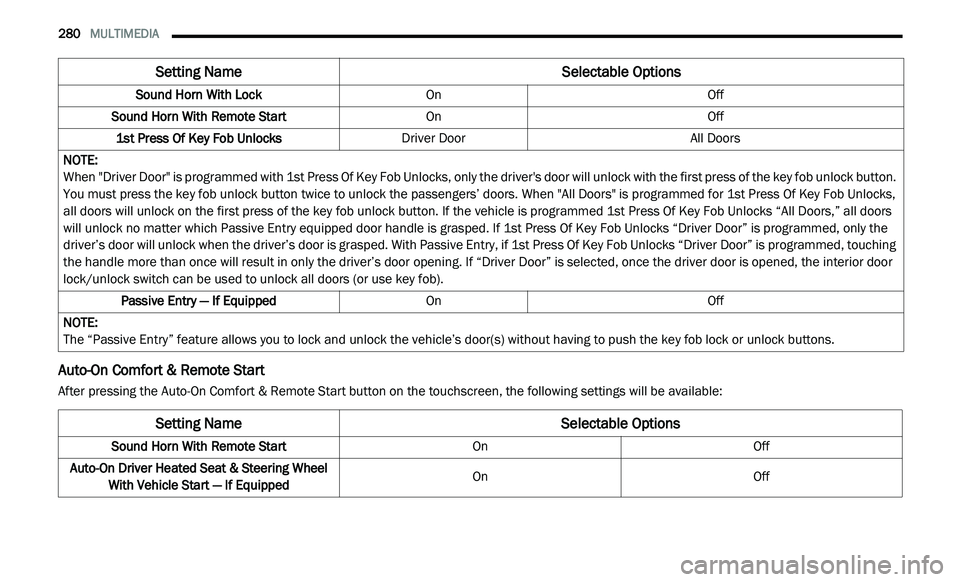
Auto-On Comfort & Remote Start
After pressing the Auto-On Comfort & Remote Start button on the touchscreen, the following settings will be available:Sound Horn With Lock
OnOff
Sound Horn With Remote Start OnOff
1st Press Of Key Fob Unlocks Driver Door All Doors
NOTE:
When "Driver Door" is programmed with 1st Press Of Key Fob Unlocks, only the driver's door will unlock with the first press of the key fob unlock button.
Y o
u must press the key fob unlock button twice to unlock the passengers’ doors. When "All Doors" is programmed for 1st Press Of Key Fob Unlocks,
all doors will unlock on the first press of the key fob unlock button. If the vehicle is programmed 1st Press Of Key Fob Unlocks “All Doors,” all doors
will unlock no matter which Passive Entry equipped door handle is grasped. If 1st Press Of Key Fob Unlocks “Driver Door” is programmed, only the
driver’s door will unlock when the driver’s door is grasped. With Passive Entry, if 1st Press Of Key Fob Unlocks “Driver Door” is programmed, touching
the handle more than once will result in only the driver’s door opening. If “Driver Door” is selected, once the driver door is opened, the interior door
lock/unlock switch can be used to unlock all doors (or use key fob).
Passive Entry — If Equipped OnOff
NOTE:
The “Passive Entry” feature allows you to lock and unlock the vehicle’s door(s) without having to push the key fob lock or unlock buttons.
Setting Name Selectable Options
Setting NameSelectable Options
Sound Horn With Remote StartOnOff
Auto-On Driver Heated Seat & Steering Wheel Wi
th Vehicle Start — If Equipped On
Off
Page 288 of 396
286 MULTIMEDIA
Care And Maintenance
Touchscreen
Do not press the touchscreen with any hard
or sharp objects (pen, USB stick, jewelry,
etc.), which could scratch the touchscreen
surface!
Do not spray any liquid or caustic chemicals
directly on the screen! Use a clean and dry
microfiber lens cleaning cloth in order to
clean the touchscreen.
If necessary, use a lint-free cloth dampened
with a cleaning solution, such as isopropyl
alcohol or an isopropyl alcohol and water
solution ratio of 50:50. Be sure to follow the
solvent manufacturer's precautions and
directions.
RADIO 4.3
INTRODUCTION
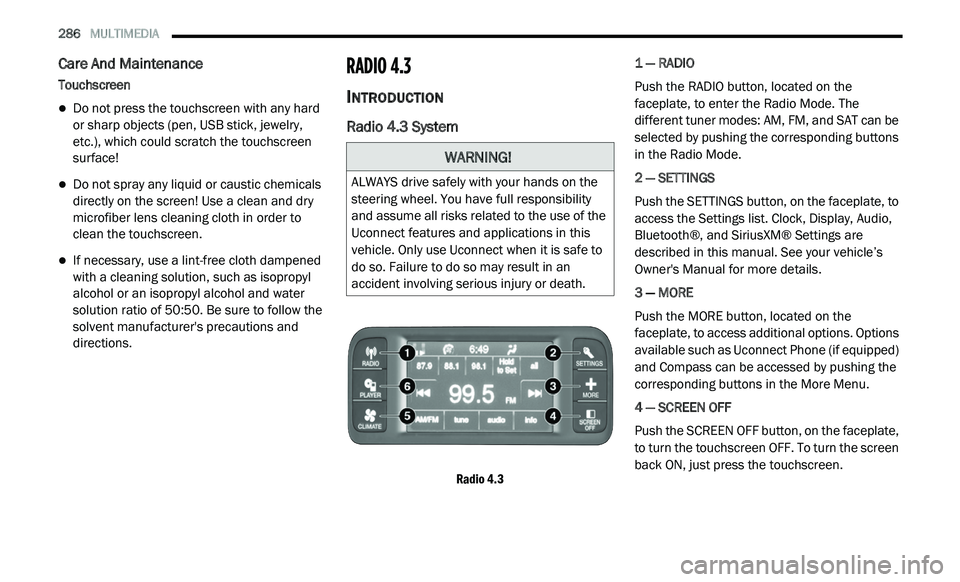
Radio 4.3 System
Radio 4.3
1 — RADIO
Push the RADIO button, located on the
f
a
ceplate, to enter the Radio Mode. The
different tuner modes: AM, FM, and SAT can be
selected by pushing the corresponding buttons
in the Radio Mode.
2 — SETTINGS
Push the SETTINGS button, on the faceplate, to
a c
cess the Settings list. Clock, Display, Audio,
Bluetooth®, and SiriusXM® Settings are
described in this manual. See your vehicle’s
Owner's Manual for more details.
3 — MORE
Push the MORE button, located on the
f a
ceplate, to access additional options. Options
available such as Uconnect Phone (if equipped)
and Compass can be accessed by pushing the
corresponding buttons in the More Menu.
4 — SCREEN OFF
Push the SCREEN OFF button, on the faceplate,
t o
turn the touchscreen OFF. To turn the screen
back ON, just press the touchscreen.
WARNING!
ALWAYS drive safely with your hands on the
steering wheel. You have full responsibility
and assume all risks related to the use of the
Uconnect features and applications in this
vehicle. Only use Uconnect when it is safe to
do so. Failure to do so may result in an
accident involving serious injury or death.
Page 289 of 396
MULTIMEDIA 287
5 — CLIMATE
Push the CLIMATE Control button on the
fa
ceplate to access climate controls. Refer to
“Climate Controls” in “Getting To Know Your
Vehicle” for more information.
6 — PLAYER
Push the PLAYER button, located on the
f a
ceplate, to access media sources such as
Disc, USB Device, and AUX as long as the
requested media is present.
RADIO MODE
Overview
The radio is equipped with the following modes:
FM
AM
SAT SiriusXM® Satellite Radio (if equipped)
Press the RADIO button, upper left corner, to
e n
ter the Radio Mode. The different tuner
modes; AM, FM, and SAT, can then be selected
by pressing the corresponding buttons on the
touchscreen.
ON/OFF & Volume Control
Push the ON/OFF Volume Control
knob to turn on the radio. Push the
O N
/OFF Volume Control knob a
second time to turn off the radio.
The Volume control turns continuously
(360 degrees) in either direction, without
s t
opping. Turning the ON/OFF Volume Control
knob clockwise increases the Volume and
counterclockwise decreases it.
When the audio system is turned on, the sound
w i
ll be set at the same Volume level as last
played.
ENTER/BROWSE & TUNE/SCROLL Control
Turn the TUNE/SCROLL control
knob clockwise to increase or
c o
unterclockwise to decrease the
radio station frequency. Push the
ENTER/BROWSE button to choose a selection.
Info
Press the Info button to display channel
number/frequency, song title, genre, and artist.
This feature is only available in FM and SAT
modes.
Exit
The Exit button provides a means to close the
Direct Tune Screen.
Go
Press the green GO button on the touchscreen
to allow you to commit an entry, at which time,
the radio will tune to the entered Channel, and
close the Direct Tune Screen. The GO button on
the touchscreen is only for SiriusXM® Satellite
radio mode.
Seek Up
Press and release the Seek Up button on the
touchscreen to tune the radio to the next
l i
stenable station or channel.
During a Seek Up function, if the radio reaches
t h
e starting station after passing through the
entire band two times, the radio will stop at the
station where it began.
9
Page 307 of 396
MULTIMEDIA 305
Phonebook (Downloaded and Uconnect
Phone Local) name recognition rate is opti -
mized when the entries are not similar.
Numbers must be spoken in single digits.
“800” must be spoken “eight-zero-zero” not
“eight hundred.”
You can say “O” (letter “O”) for “0” (zero).
Even though international dialing for most
number combinations is supported, some
shortcut dialing number combinations may
not be supported.
Far End Audio Performance
Audio quality is maximized under:
Low-to-medium blower setting
Low-to-medium vehicle speed
Low road noise
Smooth road surface
Fully closed windows
Dry weather conditions
Operation from the driver's seat
Performance, such as audio clarity, echo,
and loudness to a large degree, relies on the
phone and network, and not the Uconnect
Phone
Echo at the phone far end can sometimes be
reduced by lowering the in-vehicle audio
volume
Bluetooth® Communication Link
Mobile phones have been found to lose
c o
nnection to the Uconnect Phone. When this
happens, the connection can generally be
reestablished by switching the phone off/on.
Your mobile phone is recommended to remain
in Bluetooth® ON mode.
Power-Up
After switching the ignition key from OFF to
e i
ther the ON/RUN or ACC position, or after a
language change, you must wait at least
15 seconds prior to using the system.
MORE MODE
More Button
Push the MORE button to display the More Main
Menu. The More Main Menu contains the
following options:
Economy — If Equipped
Phone
Outlet — If Equipped
Time
Compass
Clock Setting
1. P ush the MORE button on the right side of
t
he display, then press the Time button.
Next, press the Set button.
Or,
Push the SETTINGS button on the right side
of
the display, then press the Clock button.
The Time setting screen is displayed and
t h
e clock can be adjusted as described in
the following procedure.
9
Page 308 of 396
306 MULTIMEDIA
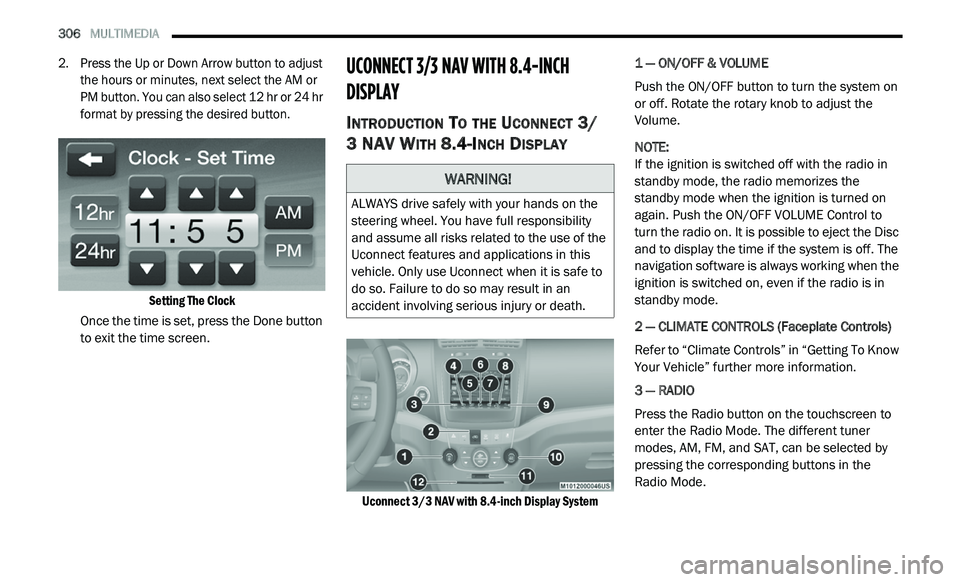
2. Press the Up or Down Arrow button to adjust
the hours or minutes, next select the AM or
PM button. You can also select 12 hr or 24 hr
format by pressing the desired button.
Setting The Clock
Once the time is set, press the Done button
t o
exit the time screen.
UCONNECT 3/3 NAV WITH 8.4-INCH
DI
SPLAY
INTRODUCTION TO THE UCONNECT 3/
3 NAV W
ITH 8.4-INCH DISPLAY
Uconnect 3/3 NAV with 8.4-inch Display System
1 — ON/OFF & VOLUME
Push the ON/OFF button to turn the system on
o
r
off. Rotate the rotary knob to adjust the
Volume.
NOTE:
If the ignition is switched off with the radio in
st
andby mode, the radio memorizes the
standby mode when the ignition is turned on
again. Push the ON/OFF VOLUME Control to
turn the radio on. It is possible to eject the Disc
and to display the time if the system is off. The
navigation software is always working when the
ignition is switched on, even if the radio is in
standby mode.
2 — CLIMATE CONTROLS (Faceplate Controls)
Refer to “Climate Controls” in “Getting To Know
Y o
ur Vehicle” further more information.
3 — RADIO
Press the Radio button on the touchscreen to
en
ter the Radio Mode. The different tuner
modes, AM, FM, and SAT, can be selected by
pressing the corresponding buttons in the
Radio Mode.
WARNING!
ALWAYS drive safely with your hands on the
steering wheel. You have full responsibility
and assume all risks related to the use of the
Uconnect features and applications in this
vehicle. Only use Uconnect when it is safe to
do so. Failure to do so may result in an
accident involving serious injury or death.
Page 310 of 396
308 MULTIMEDIA
Common Radio Functions
The following operations offer the same
functionality across all Radio Modes, and
further instructions are provided where
differences exist.
ON/OFF & Volume Control
Push the ON/OFF Volume Control
knob to turn on the radio. Push the
ON
/OFF Volume Control knob a
second time to turn off the radio.
The electronic Volume control turns
c o
ntinuously (360 degrees) in either direction,
without stopping. Turning the ON/OFF Volume
Control knob clockwise increases the Volume
and counterclockwise decreases it.
When the audio system is turned on, the sound
wi
ll be set at the same Volume level as last
played.
Tune/Scroll Control
Turn the rotary TUNE/SCROLL control
knob clockwise to increase or
co
unterclockwise to decrease the
radio station frequency. Push the
ENTER/BROWSE button to choose a selection.
Seek And Direct Tune Functions
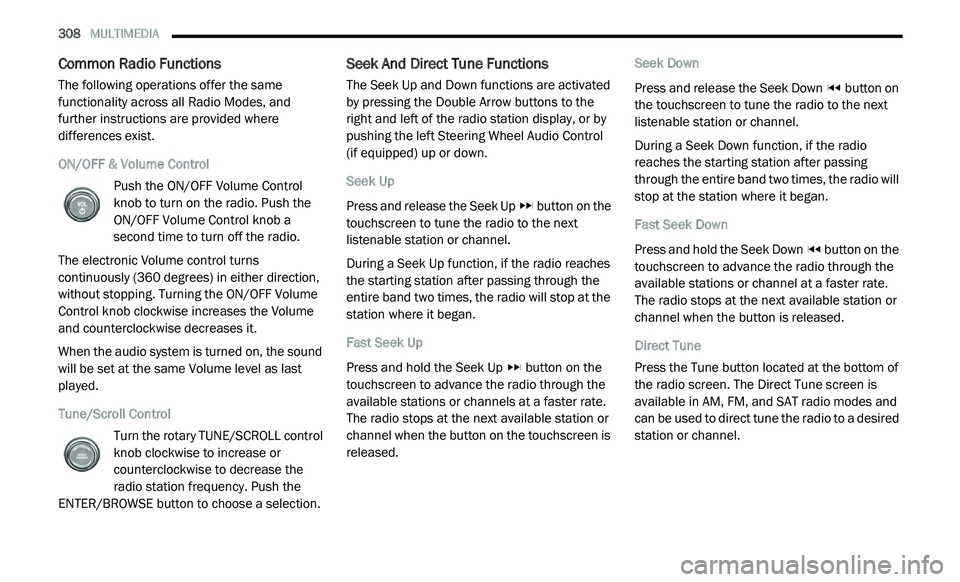
The Seek Up and Down functions are activated
by pressing the Double Arrow buttons to the
right and left of the radio station display, or by
pushing the left Steering Wheel Audio Control
(if equipped) up or down.
Seek Up
Press and release the Seek Up button on the
touchscreen to tune the radio to the next
l i
stenable station or channel.
During a Seek Up function, if the radio reaches
t h
e starting station after passing through the
entire band two times, the radio will stop at the
station where it began.
Fast Seek Up
Press and hold the Seek Up button on the
touchscreen to advance the radio through the
a v
ailable stations or channels at a faster rate.
The radio stops at the next available station or
channel when the button on the touchscreen is
released. Seek Down
Press and release the Seek Down
button on
the touchscreen to tune the radio to the next
l i
stenable station or channel.
During a Seek Down function, if the radio
r e
aches the starting station after passing
through the entire band two times, the radio will
stop at the station where it began.
Fast Seek Down
Press and hold the Seek Down button on the
touchscreen to advance the radio through the
a v
ailable stations or channel at a faster rate.
The radio stops at the next available station or
channel when the button is released.
Direct Tune
Press the Tune button located at the bottom of
t h
e radio screen. The Direct Tune screen is
available in AM, FM, and SAT radio modes and
can be used to direct tune the radio to a desired
station or channel.
Page 351 of 396
MULTIMEDIA 349
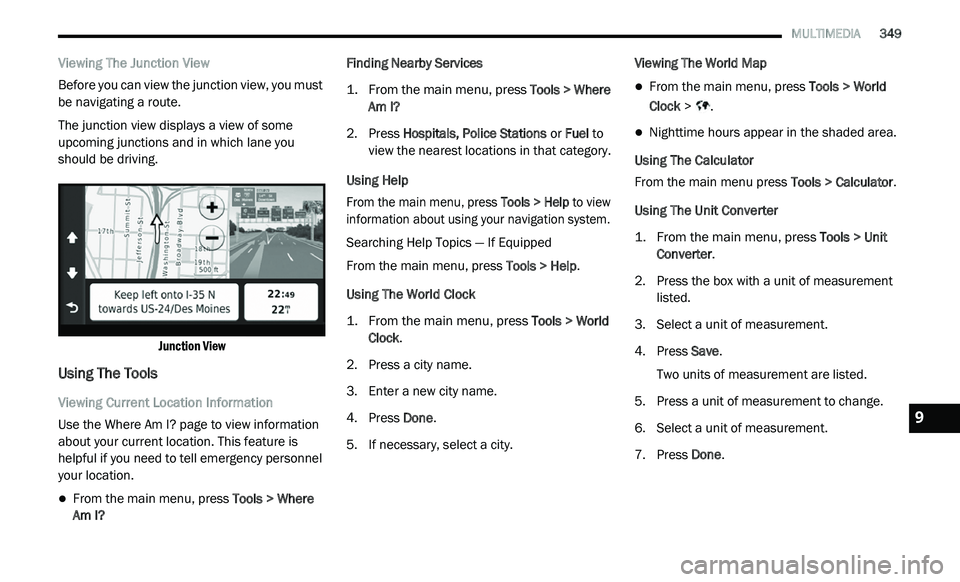
Viewing The Junction View
Before you can view the junction view, you must
be
navigating a route.
The junction view displays a view of some
u p
coming junctions and in which lane you
should be driving.
Junction View
Using The Tools
Viewing Current Location Information
Use the Where Am I? page to view information
ab
out your current location. This feature is
helpful if you need to tell emergency personnel
your location.
From the main menu, press Tools > Where
Am I? Finding Nearby Services
1. Fr
om the main menu, press
T
ools > Where
Am I?
2. P ress Hospitals, Police Stations
or Fuel to
view the nearest locations in that category.
Using Help
From the main menu, press To
ols > Help to view
information about using your navigation system.
Searching Help Topics — If Equipped
From the main menu, press To
ols > Help.
Using The World Clock
1. From the main menu, press
T
ools > World
Clock
.
2. P ress a city name.
3
. E nter a new city name.
4
. P ress Done .
5
. I f necessary, select a city. V
iewing The World Map
From the main menu, press
Tools > World
Clock > .
Nighttime hours appear in the shaded area.
Using The Calculator
From the main menu press T
o
ols > Calculator.
Using The Unit Converter
1. From the main menu, press
T
ools > Unit
Converter
.
2. P ress the box with a unit of measurement
l
isted.
3. S elect a unit of measurement.
4
. P ress Save .
T
wo units of measurement are listed.
5. Press a unit of measurement to change.
6
. S elect a unit of measurement.
7
. P ress Done .9
Page 371 of 396
MULTIMEDIA 369
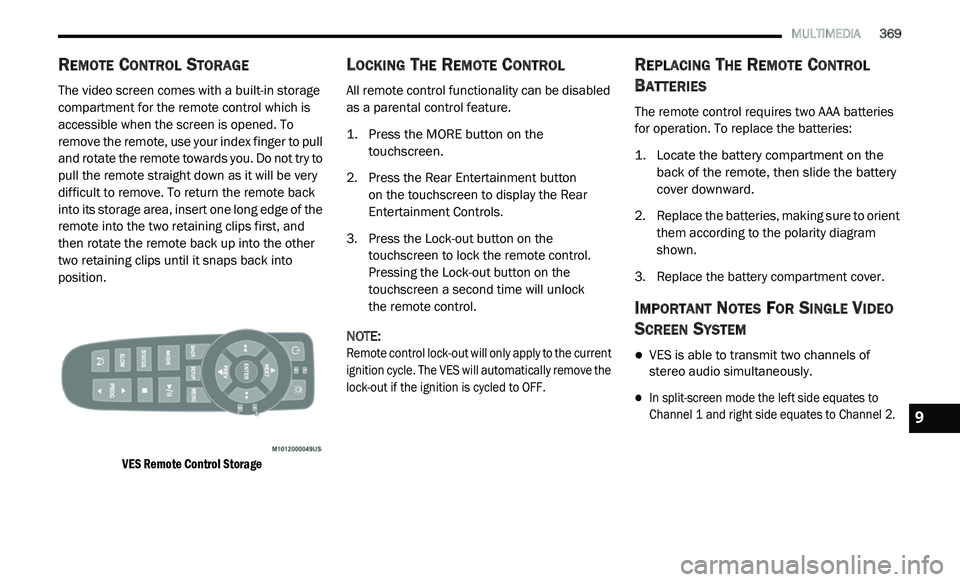
REMOTE CONTROL STORAGE
The video screen comes with a built-in storage
compartment for the remote control which is
accessible when the screen is opened. To
remove the remote, use your index finger to pull
and rotate the remote towards you. Do not try to
pull the remote straight down as it will be very
difficult to remove. To return the remote back
into its storage area, insert one long edge of the
remote into the two retaining clips first, and
then rotate the remote back up into the other
two retaining clips until it snaps back into
position.
VES Remote Control Storage
LOCKING THE REMOTE CONTROL
All remote control functionality can be disabled
as a parental control feature.
1. Press the MORE button on the
t
ouchscreen.
2. P ress the Rear Entertainment button
o
n the touchscreen to display the Rear
E n
tertainment Controls.
3. P ress the Lock-out button on the
t
ouchscreen to lock the remote control.
Pressing the Lock-out button on the
touchscreen a second time will unlock
the remote control.
NOTE:
Remote control lock-out will only apply to the current
i g
nition cycle. The VES will automatically remove the
lock-out if the ignition is cycled to OFF.
REPLACING THE REMOTE CONTROL
B
ATTERIES
The remote control requires two AAA batteries
for operation. To replace the batteries:
1. L ocate the battery compartment on the
b
ack of the remote, then slide the battery
cover downward.
2. R eplace the batteries, making sure to orient
t
hem according to the polarity diagram
shown.
3. R eplace the battery compartment cover.
IMPORTANT NOTES FOR SINGLE VIDEO
S
CREEN SYSTEM
VES is able to transmit two channels of
stereo audio simultaneously.
In split-screen mode the left side equates to
Channel 1 and right side equates to Channel 2.
9
Page 375 of 396
MULTIMEDIA 373
3. Channel 2 Audio Only/Mute — Audio: Only in
a single screen system: The Audio Only icon
is displayed on Channel 2 when Channel 1
is in a video mode. Mute: when the Mute
icon is displayed, the audio for Channel 2
has been muted using the remote control’s
MUTE button.
4. C hannel 2 Mode — Displays the current
s
ource for Channel 2.
5. R emote Locked Out — When the icon is
d
isplayed, the remote control functions are
disabled.
6. C lock — Displays the time.
7
. C hannel 1 Shared Status — When the icon is
d
isplayed, the audio for Channel 1 is also
shared with the radio and playing through
the cabin speakers.
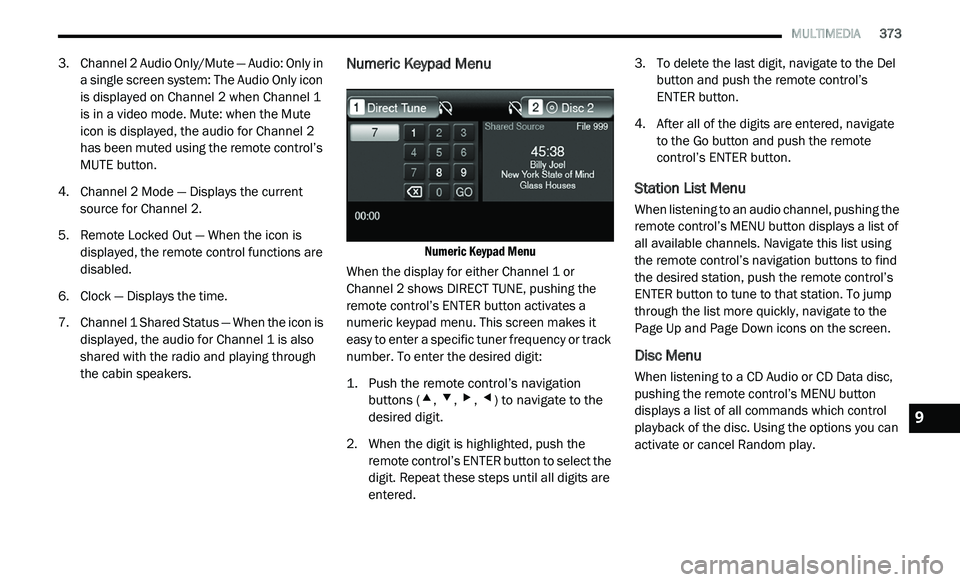
Numeric Keypad Menu
Numeric Keypad Menu
When the display for either Channel 1 or
C h
annel 2 shows DIRECT TUNE, pushing the
remote control’s ENTER button activates a
numeric keypad menu. This screen makes it
easy to enter a specific tuner frequency or track
number. To enter the desired digit:
1. P ush the remote control’s navigation
b
uttons (
▴, ▾, ▸, ◂) to navigate to the
desired digit.
2. W hen the digit is highlighted, push the
r
emote control’s ENTER button to select the
digit. Repeat these steps until all digits are
entered. 3. T
o delete the last digit, navigate to the Del
b
utton and push the remote control’s
ENTER button.
4. A fter all of the digits are entered, navigate
t
o the Go button and push the remote
control’s ENTER button.
Station List Menu
When listening to an audio channel, pushing the
remote control’s MENU button displays a list of
all available channels. Navigate this list using
the remote control’s navigation buttons to find
the desired station, push the remote control’s
ENTER button to tune to that station. To jump
through the list more quickly, navigate to the
Page Up and Page Down icons on the screen.
Disc Menu
When listening to a CD Audio or CD Data disc,
pushing the remote control’s MENU button
displays a list of all commands which control
playback of the disc. Using the options you can
activate or cancel Random play.
9