diagram DODGE NEON 1999 Service Service Manual
[x] Cancel search | Manufacturer: DODGE, Model Year: 1999, Model line: NEON, Model: DODGE NEON 1999Pages: 1200, PDF Size: 35.29 MB
Page 397 of 1200
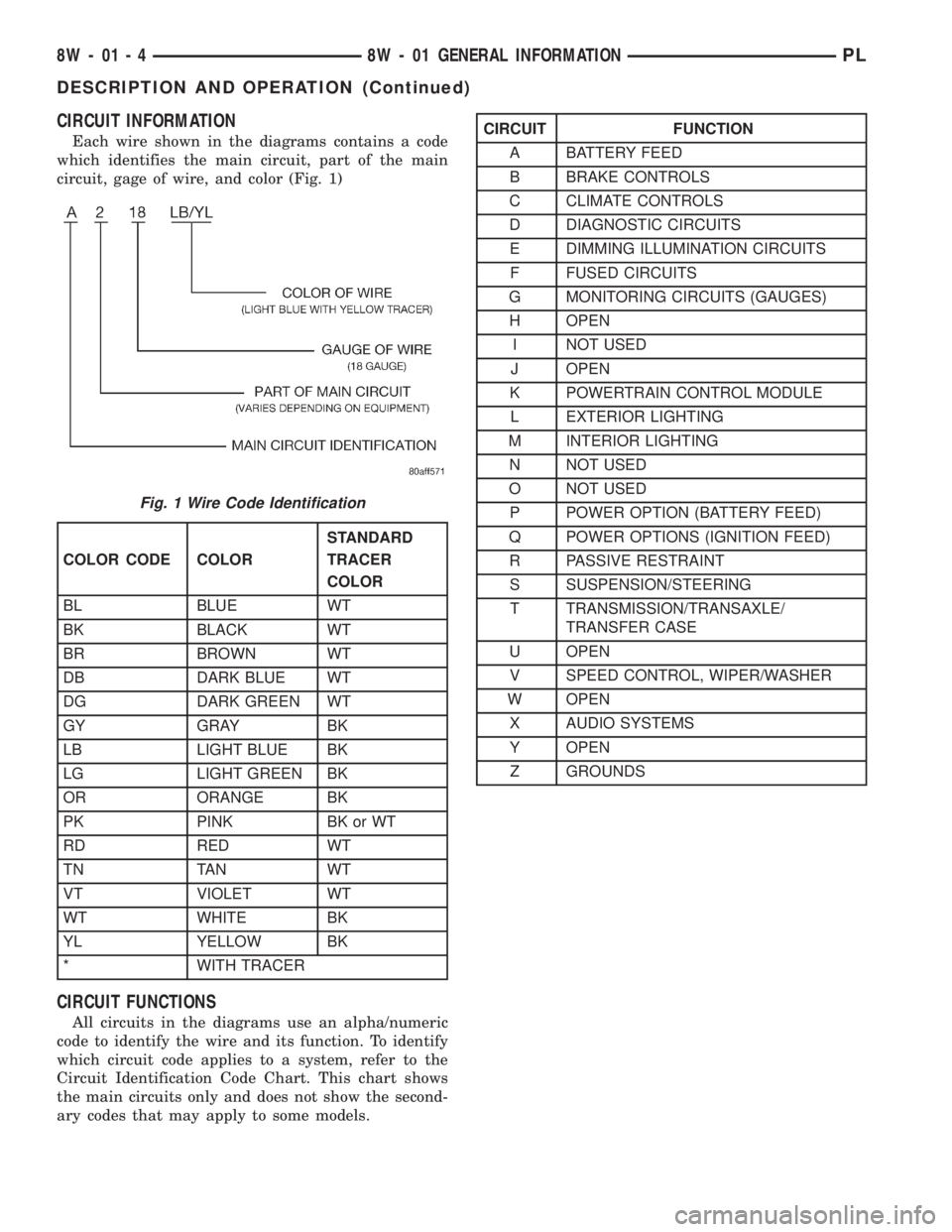
CIRCUIT INFORMATION
Each wire shown in the diagrams contains a code
which identifies the main circuit, part of the main
circuit, gage of wire, and color (Fig. 1)
CIRCUIT FUNCTIONS
All circuits in the diagrams use an alpha/numeric
code to identify the wire and its function. To identify
which circuit code applies to a system, refer to the
Circuit Identification Code Chart. This chart shows
the main circuits only and does not show the second-
ary codes that may apply to some models.
Fig. 1 Wire Code Identification
COLOR CODE COLORSTANDARD
TRACER
COLOR
BL BLUE WT
BK BLACK WT
BR BROWN WT
DB DARK BLUE WT
DG DARK GREEN WT
GY GRAY BK
LB LIGHT BLUE BK
LG LIGHT GREEN BK
OR ORANGE BK
PK PINK BK or WT
RD RED WT
TN TAN WT
VT VIOLET WT
WT WHITE BK
YL YELLOW BK
* WITH TRACER
CIRCUIT FUNCTION
A BATTERY FEED
B BRAKE CONTROLS
C CLIMATE CONTROLS
D DIAGNOSTIC CIRCUITS
E DIMMING ILLUMINATION CIRCUITS
F FUSED CIRCUITS
G MONITORING CIRCUITS (GAUGES)
H OPEN
I NOT USED
J OPEN
K POWERTRAIN CONTROL MODULE
L EXTERIOR LIGHTING
M INTERIOR LIGHTING
N NOT USED
O NOT USED
P POWER OPTION (BATTERY FEED)
Q POWER OPTIONS (IGNITION FEED)
R PASSIVE RESTRAINT
S SUSPENSION/STEERING
T TRANSMISSION/TRANSAXLE/
TRANSFER CASE
U OPEN
V SPEED CONTROL, WIPER/WASHER
W OPEN
X AUDIO SYSTEMS
Y OPEN
Z GROUNDS
8W - 01 - 4 8W - 01 GENERAL INFORMATIONPL
DESCRIPTION AND OPERATION (Continued)
Page 398 of 1200
SECTION IDENTIFICATION
The wiring diagrams are grouped into individual
sections. If a component is most likely found in a par-
ticular group, it will be shown complete (all wires,
connectors, and pins) within that group. For exam-
ple, the Auto Shutdown Relay is most likely to be
found in Group 30, so it is shown there complete. It
can, however, be shown partially in another group if
it contains some associated wiring.
SYMBOLS
International symbols are used throughout the wir-
ing diagrams. These symbols are consistent with
those being used around the world.
GROUP TOPIC
8W-01 thru 8W-09 General Information and
Diagram Overview
8W-10 thru 8W-19 Main Sources of Power and
Vehicle Grounding
8W-20 thru 8W-29 Starting and Charging
8W-30 thru 8W-39 Powertrain/Drivetrain Systems
8W-40 thru 8W-49 Body Electrical items and A/C
8W-50 thru 8W-59 Exterior Lighting, Wipers, and
Trailer Tow
8W-60 thru 8W-69 Power Accessories
8W-70 Splice Information
8W-80 Connector Pin Outs
8W-90 Connector Locations (including
grounds)
8W-95 Splice Locations
PL8W - 01 GENERAL INFORMATION 8W - 01 - 5
DESCRIPTION AND OPERATION (Continued)
Page 399 of 1200
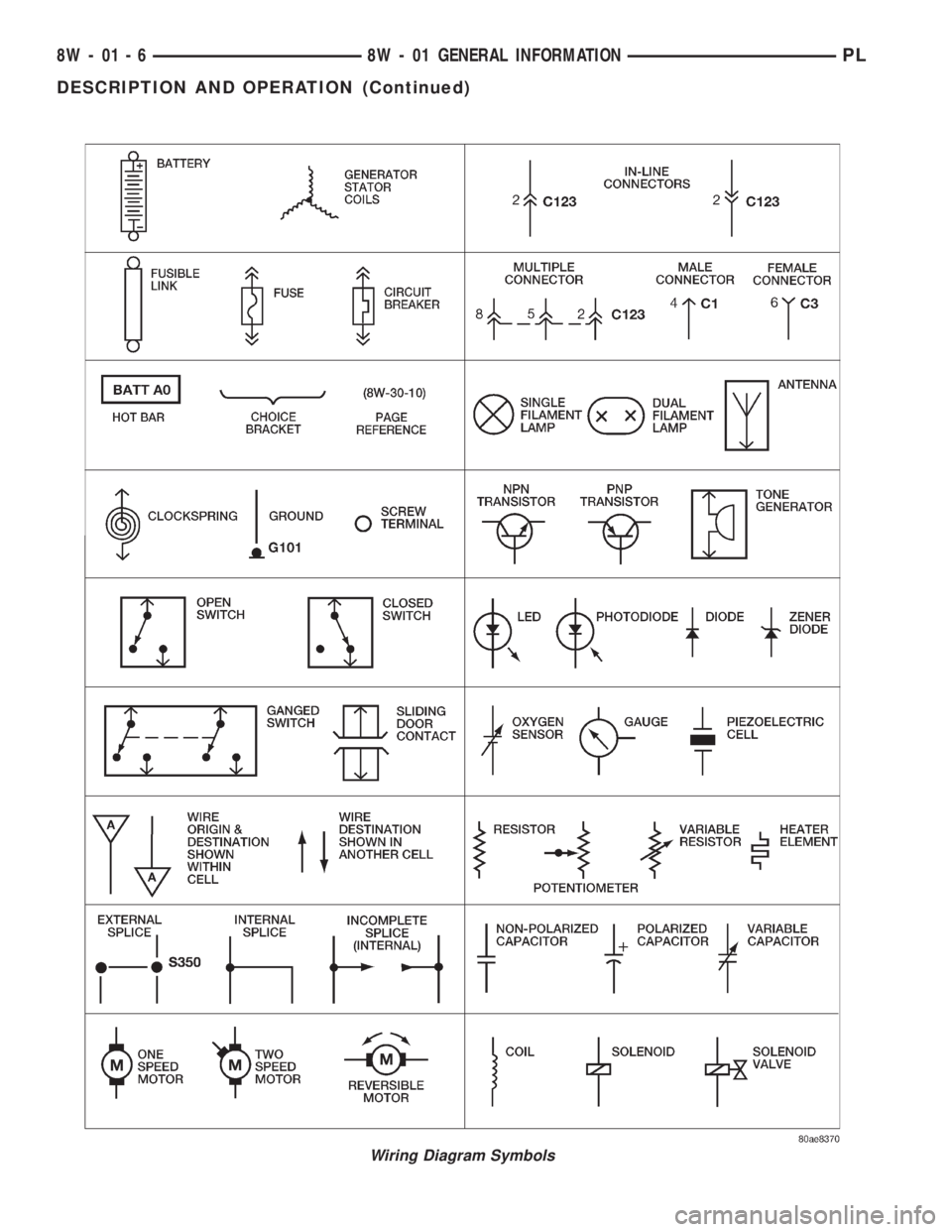
Wiring Diagram Symbols
8W - 01 - 6 8W - 01 GENERAL INFORMATIONPL
DESCRIPTION AND OPERATION (Continued)
Page 400 of 1200
TERMINOLOGY
This a list of terms with there definitions used in
the wiring diagrams.
Built-Up-Export...........Vehicles Built For Sale
In Markets Other Than North America
Except-Built-Up-Export.....Vehicles Built For Sale
In North America
LHD..................Left Hand Drive Vehicles
RHD.................Right Hand Drive Vehicles
ATX . . . .Automatic Transmission-Front Wheel Drive
MTX .....Manual Transmission-Front Wheel Drive
AT......Automatic Transmission-Rear Wheel Drive
MT .......Manual Transmission-Rear Wheel Drive
SOHC............Single Over Head Cam Engine
DOHC.............Dual Over Head Cam Engine
CONNECTOR INFORMATION
CAUTION: Not all connectors are serviced. Some
connectors are serviced only with a harness. A typ-
ical example might be the Supplemental Restraint
System connectors. Always check parts availability
before attempting a repair.
IDENTIFICATION
In-line connectors are identified by a number, as
follows:
²In-line connectors located on theengine com-
partment harnessareC100series numbers.
²Connectors located on theinstrument panel
harnessareC200series numbers.
²Connectors located on thebody harnessare
C300series numbers.
²Jumper harness connectorsareC400series
numbers.
²Grounds and ground connectorsare identi-
fied with aªGºand follow the same series number-
ing as the in-line connector.
Component connectors are identified by the compo-
nent name instead of a number (Fig. 2). Multiple
connectors on a component use a C1, C2, etc. identi-
fier (Fig. 3).
LOCATIONS
Section 8W-90 contains connector/ground location
illustrations. The illustrations contain the connector
name (or number)/ground number and component
identification. Connector/ground location charts in
Section 8W-90 reference the illustration number for
components and connectors.
Section 8W-80 shows each connector and the cir-
cuits involved with that connector. The connectors
are identified using the name/number on the Dia-
gram pages.
SPLICE LOCATIONS
Splice Location charts in Section 8W-70 show the
entire splice, and provide references to other sections
the splice serves.
Section 8W-95 contains illustrations that show the
general location of the splices in each harness. The
illustrations show the splice by number, and provide
a written location.
NOTES, CAUTIONS, and WARNINGS
Throughout this group additional important infor-
mation is presented in three ways; Notes, Cautions,
and Warnings.
NOTESare used to help describe how switches or
components operate to complete a particular circuit.
They are also used to indicate different conditions
that may appear on the vehicle. For example, an
up-to and after condition.
CAUTIONSare used to indicate information that
could prevent making an error that may damage the
vehicle.
WARNINGSprovide information to prevent per-
sonal injury and vehicle damage. Below is a list of
general warnings that should be followed any time a
vehicle is being serviced.
WARNING: ALWAYS WEAR SAFETY GLASSES FOR
EYE PROTECTION.
WARNING: USE SAFETY STANDS ANYTIME A PRO-
CEDURE REQUIRES BEING UNDER A VEHICLE.
Fig. 2 Component Identification
Fig. 3 Connector Identification
PL8W - 01 GENERAL INFORMATION 8W - 01 - 7
DESCRIPTION AND OPERATION (Continued)
Page 402 of 1200
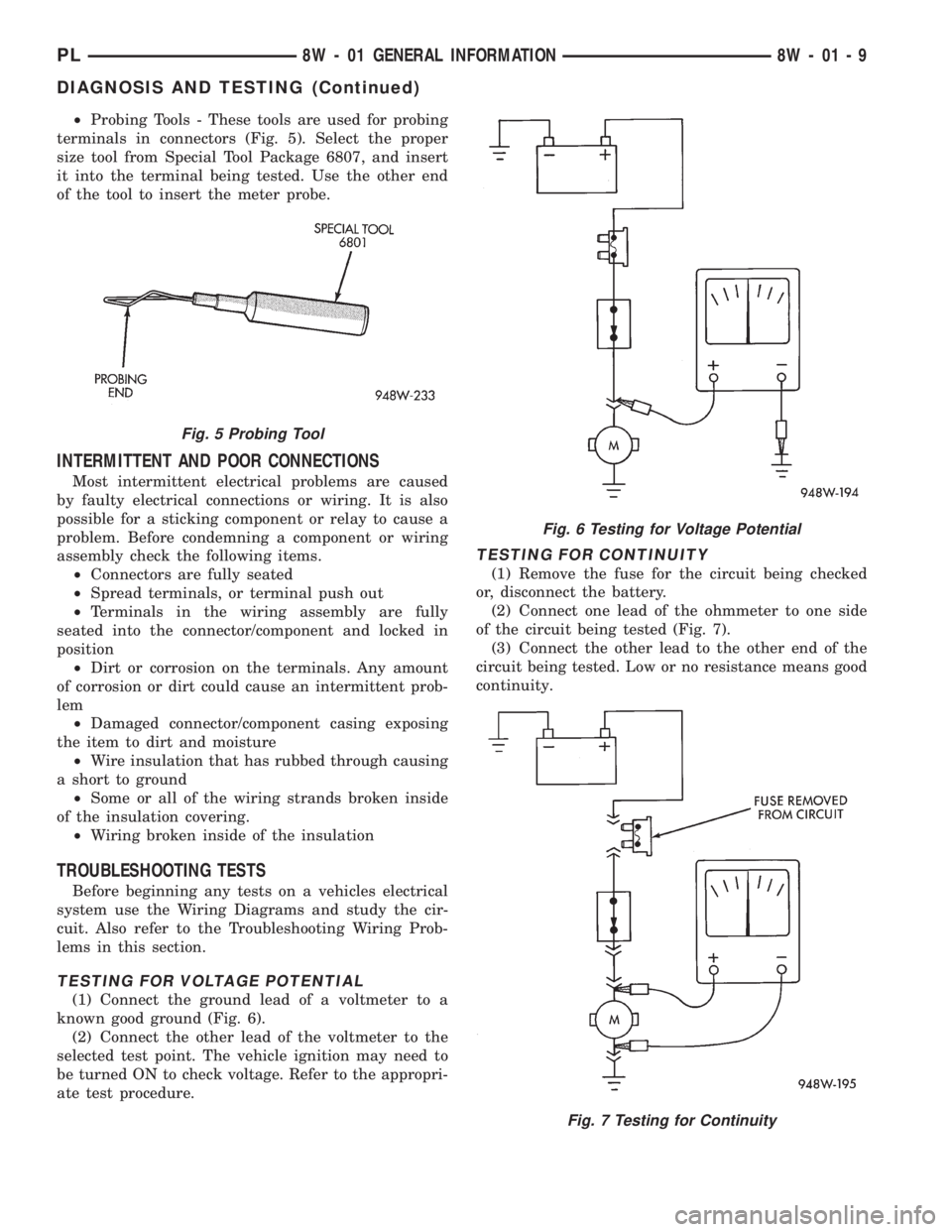
²Probing Tools - These tools are used for probing
terminals in connectors (Fig. 5). Select the proper
size tool from Special Tool Package 6807, and insert
it into the terminal being tested. Use the other end
of the tool to insert the meter probe.
INTERMITTENT AND POOR CONNECTIONS
Most intermittent electrical problems are caused
by faulty electrical connections or wiring. It is also
possible for a sticking component or relay to cause a
problem. Before condemning a component or wiring
assembly check the following items.
²Connectors are fully seated
²Spread terminals, or terminal push out
²Terminals in the wiring assembly are fully
seated into the connector/component and locked in
position
²Dirt or corrosion on the terminals. Any amount
of corrosion or dirt could cause an intermittent prob-
lem
²Damaged connector/component casing exposing
the item to dirt and moisture
²Wire insulation that has rubbed through causing
a short to ground
²Some or all of the wiring strands broken inside
of the insulation covering.
²Wiring broken inside of the insulation
TROUBLESHOOTING TESTS
Before beginning any tests on a vehicles electrical
system use the Wiring Diagrams and study the cir-
cuit. Also refer to the Troubleshooting Wiring Prob-
lems in this section.
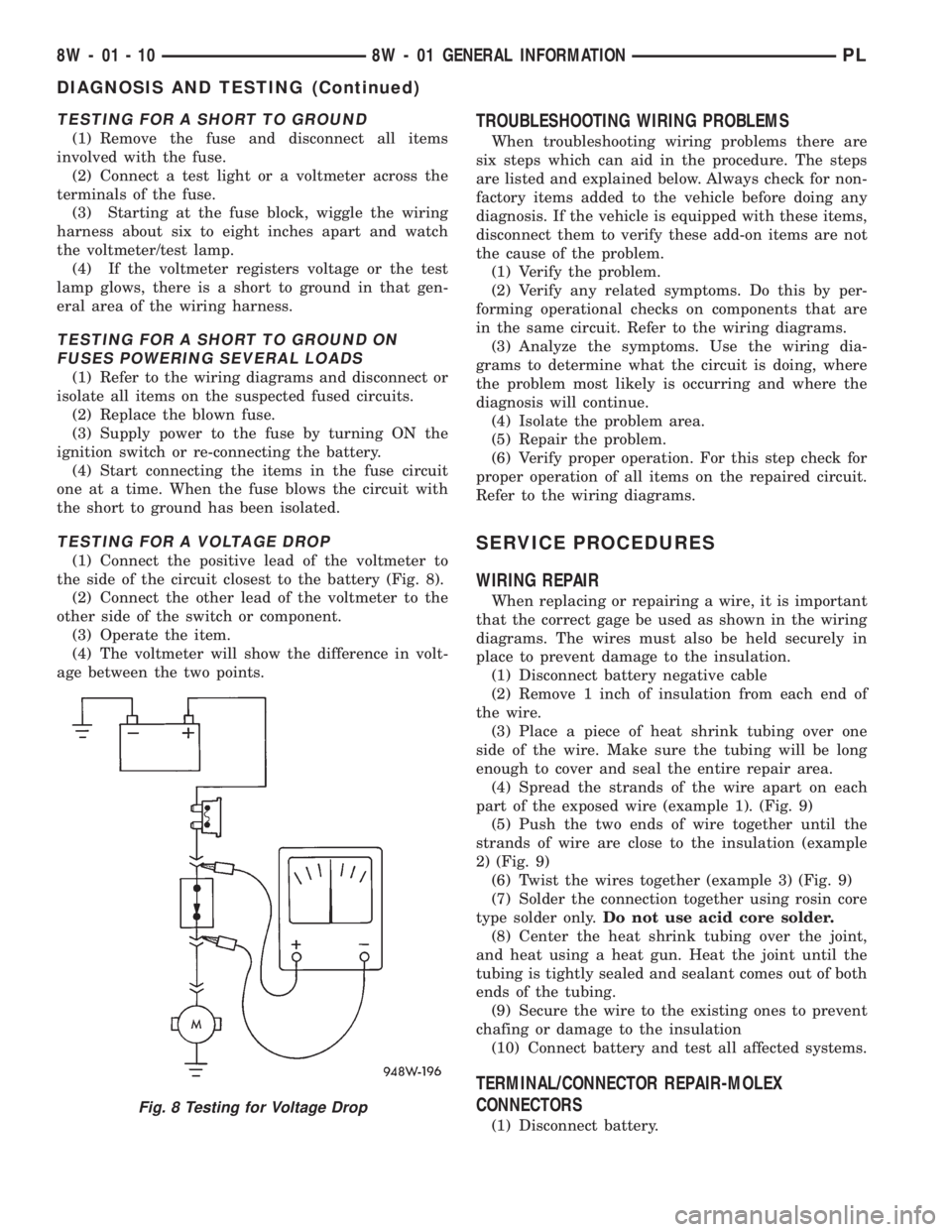
TESTING FOR VOLTAGE POTENTIAL
(1) Connect the ground lead of a voltmeter to a
known good ground (Fig. 6).
(2) Connect the other lead of the voltmeter to the
selected test point. The vehicle ignition may need to
be turned ON to check voltage. Refer to the appropri-
ate test procedure.
TESTING FOR CONTINUITY
(1) Remove the fuse for the circuit being checked
or, disconnect the battery.
(2) Connect one lead of the ohmmeter to one side
of the circuit being tested (Fig. 7).
(3) Connect the other lead to the other end of the
circuit being tested. Low or no resistance means good
continuity.
Fig. 5 Probing Tool
Fig. 6 Testing for Voltage Potential
Fig. 7 Testing for Continuity
PL8W - 01 GENERAL INFORMATION 8W - 01 - 9
DIAGNOSIS AND TESTING (Continued)
Page 403 of 1200
TESTING FOR A SHORT TO GROUND
(1) Remove the fuse and disconnect all items
involved with the fuse.
(2) Connect a test light or a voltmeter across the
terminals of the fuse.
(3) Starting at the fuse block, wiggle the wiring
harness about six to eight inches apart and watch
the voltmeter/test lamp.
(4) If the voltmeter registers voltage or the test
lamp glows, there is a short to ground in that gen-
eral area of the wiring harness.
TESTING FOR A SHORT TO GROUND ON
FUSES POWERING SEVERAL LOADS
(1) Refer to the wiring diagrams and disconnect or
isolate all items on the suspected fused circuits.
(2) Replace the blown fuse.
(3) Supply power to the fuse by turning ON the
ignition switch or re-connecting the battery.
(4) Start connecting the items in the fuse circuit
one at a time. When the fuse blows the circuit with
the short to ground has been isolated.
TESTING FOR A VOLTAGE DROP
(1) Connect the positive lead of the voltmeter to
the side of the circuit closest to the battery (Fig. 8).
(2) Connect the other lead of the voltmeter to the
other side of the switch or component.
(3) Operate the item.
(4) The voltmeter will show the difference in volt-
age between the two points.
TROUBLESHOOTING WIRING PROBLEMS
When troubleshooting wiring problems there are
six steps which can aid in the procedure. The steps
are listed and explained below. Always check for non-
factory items added to the vehicle before doing any
diagnosis. If the vehicle is equipped with these items,
disconnect them to verify these add-on items are not
the cause of the problem.
(1) Verify the problem.
(2) Verify any related symptoms. Do this by per-
forming operational checks on components that are
in the same circuit. Refer to the wiring diagrams.
(3) Analyze the symptoms. Use the wiring dia-
grams to determine what the circuit is doing, where
the problem most likely is occurring and where the
diagnosis will continue.
(4) Isolate the problem area.
(5) Repair the problem.
(6) Verify proper operation. For this step check for
proper operation of all items on the repaired circuit.
Refer to the wiring diagrams.
SERVICE PROCEDURES
WIRING REPAIR
When replacing or repairing a wire, it is important
that the correct gage be used as shown in the wiring
diagrams. The wires must also be held securely in
place to prevent damage to the insulation.
(1) Disconnect battery negative cable
(2) Remove 1 inch of insulation from each end of
the wire.
(3) Place a piece of heat shrink tubing over one
side of the wire. Make sure the tubing will be long
enough to cover and seal the entire repair area.
(4) Spread the strands of the wire apart on each
part of the exposed wire (example 1). (Fig. 9)
(5) Push the two ends of wire together until the
strands of wire are close to the insulation (example
2) (Fig. 9)
(6) Twist the wires together (example 3) (Fig. 9)
(7) Solder the connection together using rosin core
type solder only.Do not use acid core solder.
(8) Center the heat shrink tubing over the joint,
and heat using a heat gun. Heat the joint until the
tubing is tightly sealed and sealant comes out of both
ends of the tubing.
(9) Secure the wire to the existing ones to prevent
chafing or damage to the insulation
(10) Connect battery and test all affected systems.
TERMINAL/CONNECTOR REPAIR-MOLEX
CONNECTORS
(1) Disconnect battery.
Fig. 8 Testing for Voltage Drop
8W - 01 - 10 8W - 01 GENERAL INFORMATIONPL
DIAGNOSIS AND TESTING (Continued)
Page 405 of 1200
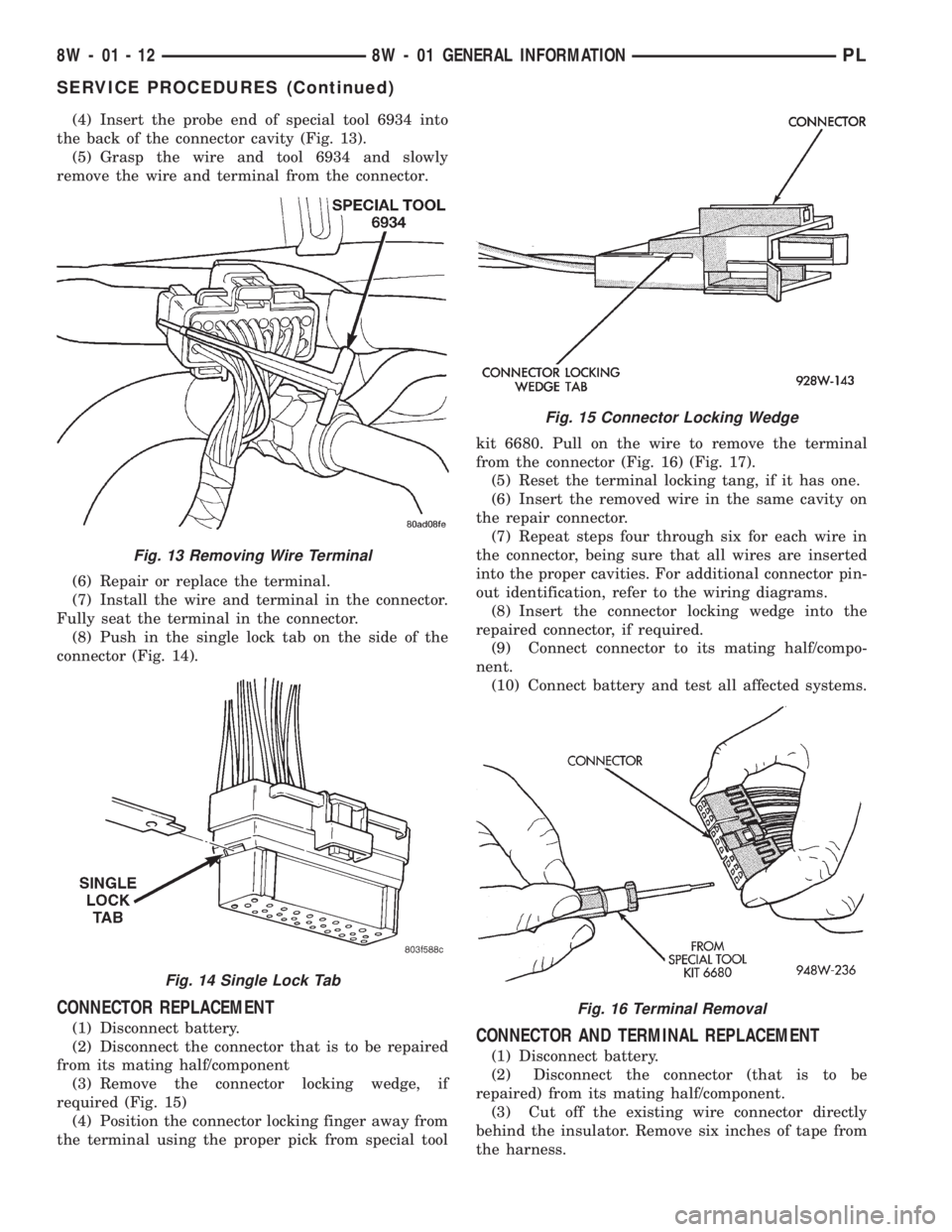
(4) Insert the probe end of special tool 6934 into
the back of the connector cavity (Fig. 13).
(5) Grasp the wire and tool 6934 and slowly
remove the wire and terminal from the connector.
(6) Repair or replace the terminal.
(7) Install the wire and terminal in the connector.
Fully seat the terminal in the connector.
(8) Push in the single lock tab on the side of the
connector (Fig. 14).
CONNECTOR REPLACEMENT
(1) Disconnect battery.
(2) Disconnect the connector that is to be repaired
from its mating half/component
(3) Remove the connector locking wedge, if
required (Fig. 15)
(4) Position the connector locking finger away from
the terminal using the proper pick from special toolkit 6680. Pull on the wire to remove the terminal
from the connector (Fig. 16) (Fig. 17).
(5) Reset the terminal locking tang, if it has one.
(6) Insert the removed wire in the same cavity on
the repair connector.
(7) Repeat steps four through six for each wire in
the connector, being sure that all wires are inserted
into the proper cavities. For additional connector pin-
out identification, refer to the wiring diagrams.
(8) Insert the connector locking wedge into the
repaired connector, if required.
(9) Connect connector to its mating half/compo-
nent.
(10) Connect battery and test all affected systems.CONNECTOR AND TERMINAL REPLACEMENT
(1) Disconnect battery.
(2) Disconnect the connector (that is to be
repaired) from its mating half/component.
(3) Cut off the existing wire connector directly
behind the insulator. Remove six inches of tape from
the harness.
Fig. 13 Removing Wire Terminal
Fig. 14 Single Lock Tab
Fig. 15 Connector Locking Wedge
Fig. 16 Terminal Removal
8W - 01 - 12 8W - 01 GENERAL INFORMATIONPL
SERVICE PROCEDURES (Continued)
Page 407 of 1200
(5) Cut the wire 6 inches from the back of the
connector.
(6) Remove 1 inch of insulation from the wire on
the harness side.
(7) Select a wire from the terminal repair assem-
bly that best matches the color wire being repaired.
(8) Cut the repair wire to the proper length and
remove 1 inch of insulation.
(9) Place a piece of heat shrink tubing over one
side of the wire. Make sure the tubing will be long
enough to cover and seal the entire repair area.
(10) Spread the strands of the wire apart on each
part of the exposed wires.
(11) Push the two ends of wire together until the
strands of wire are close to the insulation.
(12) Twist the wires together.
(13) Solder the connection together using rosin
core type solder only.Do not use acid core solder.
(14) Center the heat shrink tubing over the joint
and heat using a heat gun. Heat the joint until the
tubing is tightly sealed and sealant comes out of both
ends of the tubing.
(15) Insert the repaired wire into the connector.
(16) Install the connector locking wedge, if
required, and reconnect the connector to its mating
half/component.(17) Re-tape the wire harness starting 1-1/2 inches
behind the connector and 2 inches past the repair.
(18) Connect battery, and test all affected systems.
DIODE REPLACEMENT
(1) Disconnect the battery.
(2) Locate the diode in the harness, and remove
the protective covering.
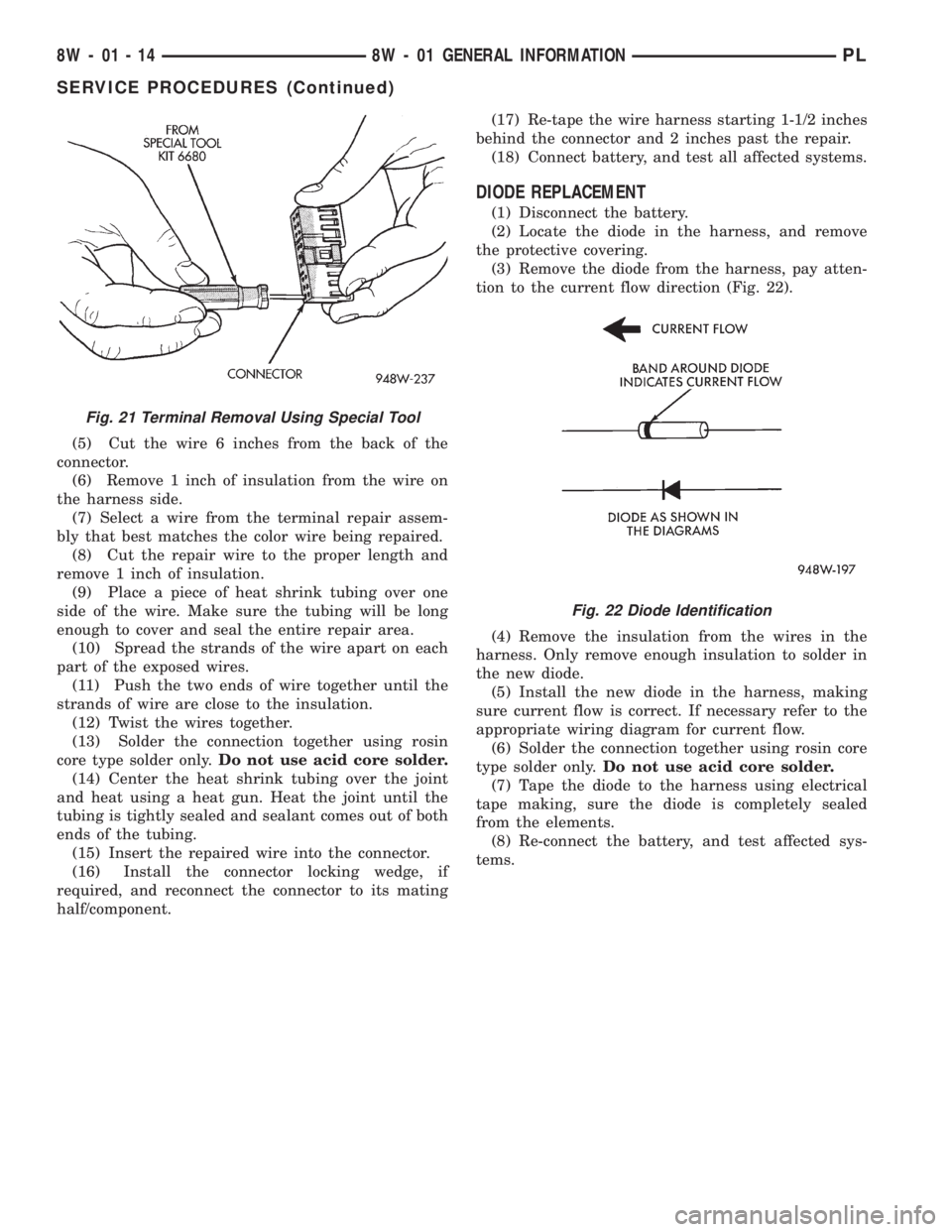
(3) Remove the diode from the harness, pay atten-
tion to the current flow direction (Fig. 22).
(4) Remove the insulation from the wires in the
harness. Only remove enough insulation to solder in
the new diode.
(5) Install the new diode in the harness, making
sure current flow is correct. If necessary refer to the
appropriate wiring diagram for current flow.
(6) Solder the connection together using rosin core
type solder only.Do not use acid core solder.
(7) Tape the diode to the harness using electrical
tape making, sure the diode is completely sealed
from the elements.
(8) Re-connect the battery, and test affected sys-
tems.
Fig. 21 Terminal Removal Using Special Tool
Fig. 22 Diode Identification
8W - 01 - 14 8W - 01 GENERAL INFORMATIONPL
SERVICE PROCEDURES (Continued)
Page 654 of 1200
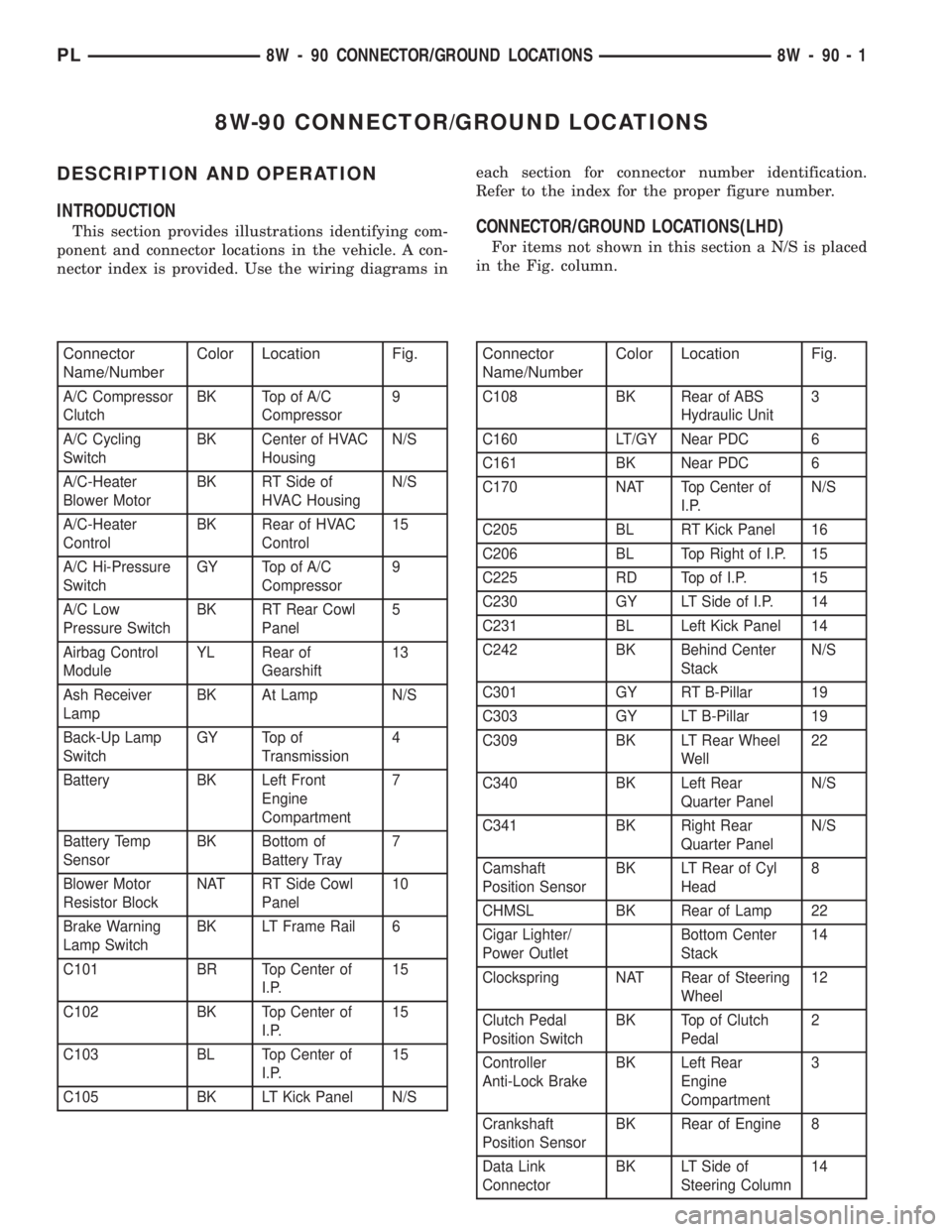
8W-90 CONNECTOR/GROUND LOCATIONS
DESCRIPTION AND OPERATION
INTRODUCTION
This section provides illustrations identifying com-
ponent and connector locations in the vehicle. A con-
nector index is provided. Use the wiring diagrams ineach section for connector number identification.
Refer to the index for the proper figure number.CONNECTOR/GROUND LOCATIONS(LHD)
For items not shown in this section a N/S is placed
in the Fig. column.
Connector
Name/NumberColor Location Fig.
A/C Compressor
ClutchBK Top of A/C
Compressor9
A/C Cycling
SwitchBK Center of HVAC
HousingN/S
A/C-Heater
Blower MotorBK RT Side of
HVAC HousingN/S
A/C-Heater
ControlBK Rear of HVAC
Control15
A/C Hi-Pressure
SwitchGY Top of A/C
Compressor9
A/C Low
Pressure SwitchBK RT Rear Cowl
Panel5
Airbag Control
ModuleYL Rear of
Gearshift13
Ash Receiver
LampBK At Lamp N/S
Back-Up Lamp
SwitchGY Top of
Transmission4
Battery BK Left Front
Engine
Compartment7
Battery Temp
SensorBK Bottom of
Battery Tray7
Blower Motor
Resistor BlockNAT RT Side Cowl
Panel10
Brake Warning
Lamp SwitchBK LT Frame Rail 6
C101 BR Top Center of
I.P.15
C102 BK Top Center of
I.P.15
C103 BL Top Center of
I.P.15
C105 BK LT Kick Panel N/S
Connector
Name/NumberColor Location Fig.
C108 BK Rear of ABS
Hydraulic Unit3
C160 LT/GY Near PDC 6
C161 BK Near PDC 6
C170 NAT Top Center of
I.P.N/S
C205 BL RT Kick Panel 16
C206 BL Top Right of I.P. 15
C225 RD Top of I.P. 15
C230 GY LT Side of I.P. 14
C231 BL Left Kick Panel 14
C242 BK Behind Center
StackN/S
C301 GY RT B-Pillar 19
C303 GY LT B-Pillar 19
C309 BK LT Rear Wheel
Well22
C340 BK Left Rear
Quarter PanelN/S
C341 BK Right Rear
Quarter PanelN/S
Camshaft
Position SensorBK LT Rear of Cyl
Head8
CHMSL BK Rear of Lamp 22
Cigar Lighter/
Power OutletBottom Center
Stack14
Clockspring NAT Rear of Steering
Wheel12
Clutch Pedal
Position SwitchBK Top of Clutch
Pedal2
Controller
Anti-Lock BrakeBK Left Rear
Engine
Compartment3
Crankshaft
Position SensorBK Rear of Engine 8
Data Link
ConnectorBK LT Side of
Steering Column14
PL8W - 90 CONNECTOR/GROUND LOCATIONS 8W - 90 - 1
Page 694 of 1200
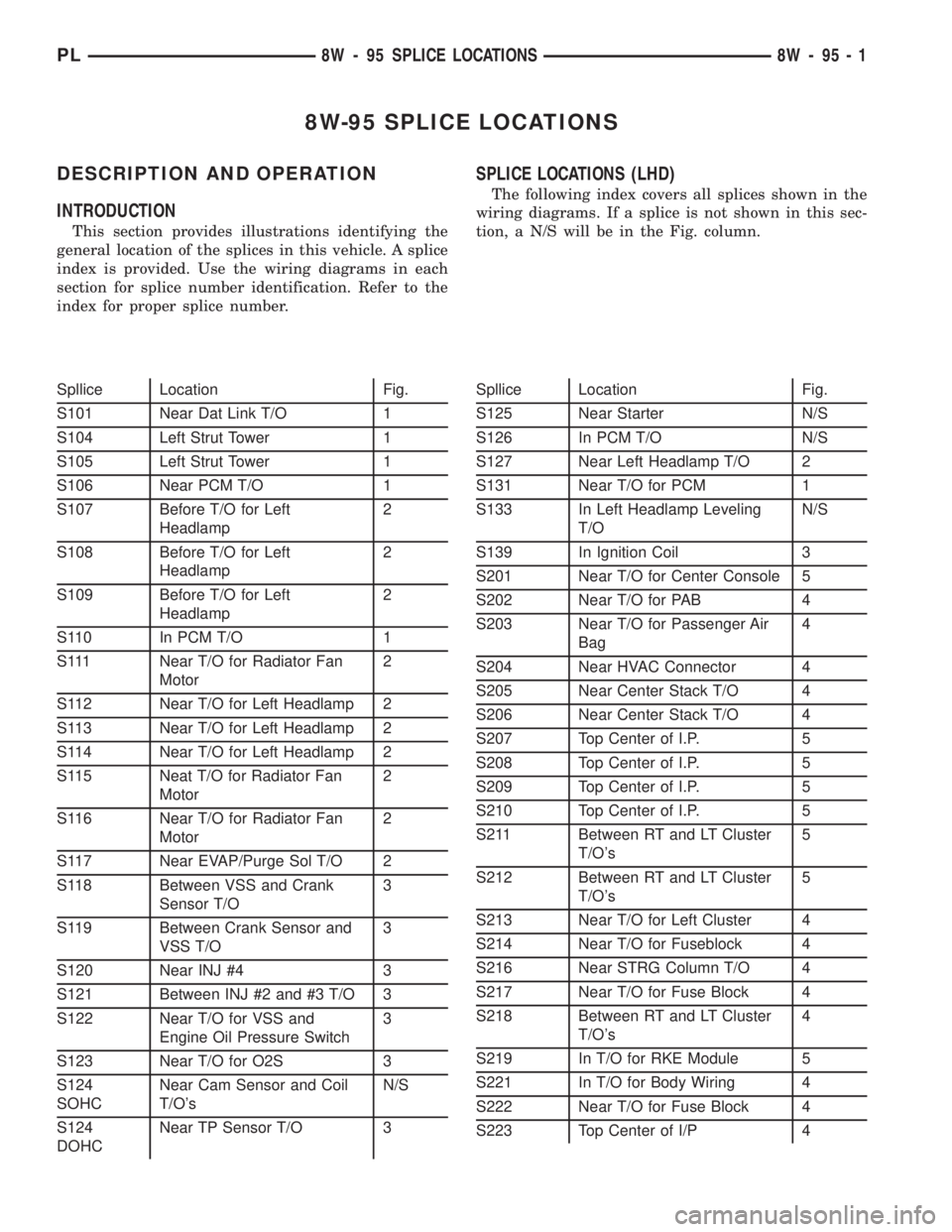
8W-95 SPLICE LOCATIONS
DESCRIPTION AND OPERATION
INTRODUCTION
This section provides illustrations identifying the
general location of the splices in this vehicle. A splice
index is provided. Use the wiring diagrams in each
section for splice number identification. Refer to the
index for proper splice number.
SPLICE LOCATIONS (LHD)
The following index covers all splices shown in the
wiring diagrams. If a splice is not shown in this sec-
tion, a N/S will be in the Fig. column.
Spllice Location Fig.
S101 Near Dat Link T/O 1
S104 Left Strut Tower 1
S105 Left Strut Tower 1
S106 Near PCM T/O 1
S107 Before T/O for Left
Headlamp2
S108 Before T/O for Left
Headlamp2
S109 Before T/O for Left
Headlamp2
S110 In PCM T/O 1
S111 Near T/O for Radiator Fan
Motor2
S112 Near T/O for Left Headlamp 2
S113 Near T/O for Left Headlamp 2
S114 Near T/O for Left Headlamp 2
S115 Neat T/O for Radiator Fan
Motor2
S116 Near T/O for Radiator Fan
Motor2
S117 Near EVAP/Purge Sol T/O 2
S118 Between VSS and Crank
Sensor T/O3
S119 Between Crank Sensor and
VSS T/O3
S120 Near INJ #4 3
S121 Between INJ #2 and #3 T/O 3
S122 Near T/O for VSS and
Engine Oil Pressure Switch3
S123 Near T/O for O2S 3
S124
SOHCNear Cam Sensor and Coil
T/O'sN/S
S124
DOHCNear TP Sensor T/O 3Spllice Location Fig.
S125 Near Starter N/S
S126 In PCM T/O N/S
S127 Near Left Headlamp T/O 2
S131 Near T/O for PCM 1
S133 In Left Headlamp Leveling
T/ON/S
S139 In Ignition Coil 3
S201 Near T/O for Center Console 5
S202 Near T/O for PAB 4
S203 Near T/O for Passenger Air
Bag4
S204 Near HVAC Connector 4
S205 Near Center Stack T/O 4
S206 Near Center Stack T/O 4
S207 Top Center of I.P. 5
S208 Top Center of I.P. 5
S209 Top Center of I.P. 5
S210 Top Center of I.P. 5
S211 Between RT and LT Cluster
T/O's5
S212 Between RT and LT Cluster
T/O's5
S213 Near T/O for Left Cluster 4
S214 Near T/O for Fuseblock 4
S216 Near STRG Column T/O 4
S217 Near T/O for Fuse Block 4
S218 Between RT and LT Cluster
T/O's4
S219 In T/O for RKE Module 5
S221 In T/O for Body Wiring 4
S222 Near T/O for Fuse Block 4
S223 Top Center of I/P 4
PL8W - 95 SPLICE LOCATIONS 8W - 95 - 1