battery DODGE NEON 2000 Service Repair Manual
[x] Cancel search | Manufacturer: DODGE, Model Year: 2000, Model line: NEON, Model: DODGE NEON 2000Pages: 1285, PDF Size: 29.42 MB
Page 367 of 1285
REMOTE KEYLESS ENTRY (RKE)
TABLE OF CONTENTS
page page
DESCRIPTION AND OPERATION
INTRODUCTION..........................4
REMOTE KEYLESS ENTRY SYSTEM..........5
REMOTE KEYLESS ENTRY TRANSMITTER.....5
HORN CHIRP TOGGLE.....................5
DIAGNOSIS AND TESTING
REMOTE KEYLESS ENTRY MODULE..........5
DECKLID RELEASE SOLENOID...............5
SERVICE PROCEDURES
HORN CHIRP TOGGLE.....................5SWITCHING OPERATING MODES/
CONFIGURING A NEW MODULE............6
TRANSMITTER PROGRAMMING..............6
REMOVAL AND INSTALLATION
DECK LID RELEASE SOLENOID..............6
REMOTE KEYLESS ENTRY MODULE..........6
SPECIFICATIONS
TRANSMITTER BATTERY...................7
TRANSMITTER RANGE.....................7
DESCRIPTION AND OPERATION
INTRODUCTION
The system allows locking and unlocking of vehicle
door(s), deck lid release, and panic by remote control
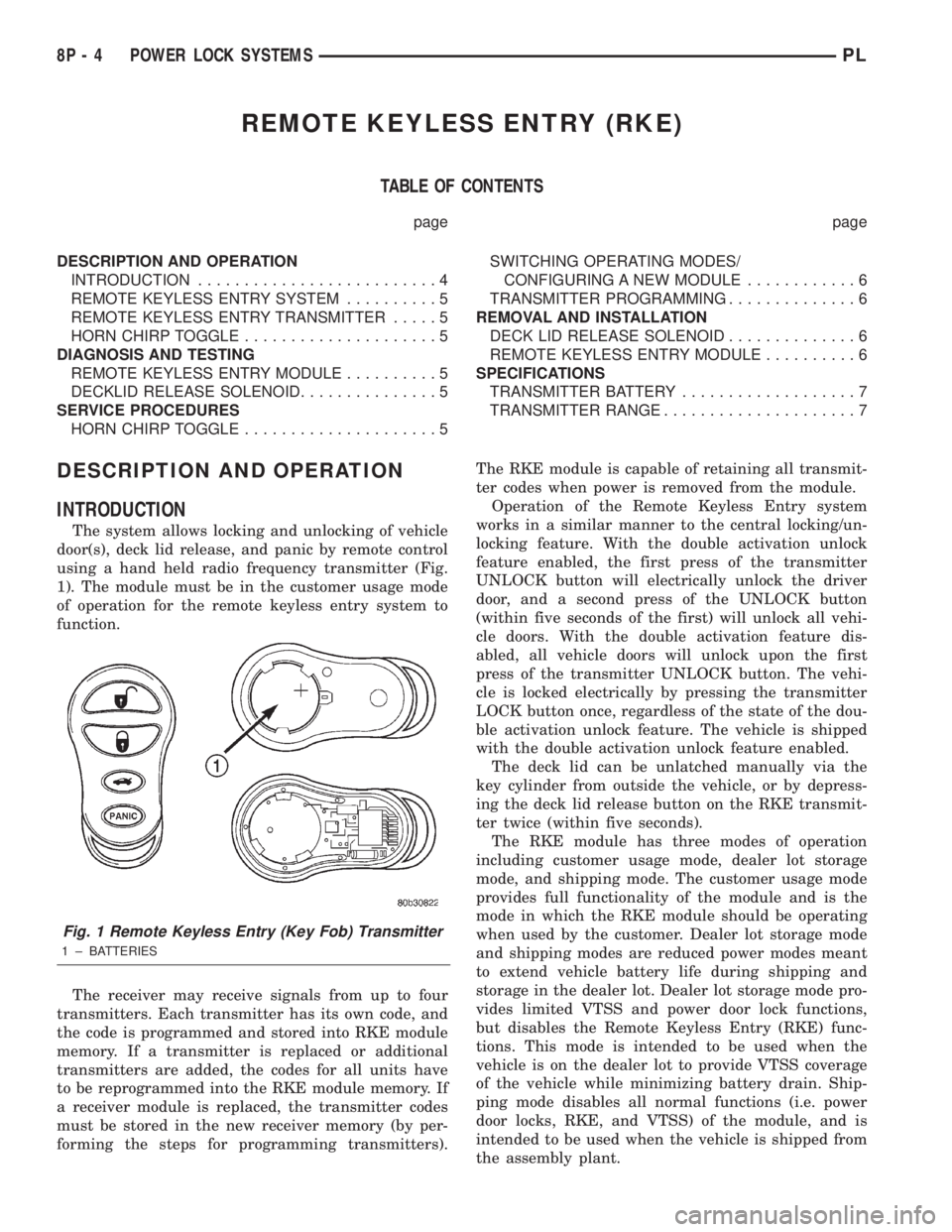
using a hand held radio frequency transmitter (Fig.
1). The module must be in the customer usage mode
of operation for the remote keyless entry system to
function.
The receiver may receive signals from up to four
transmitters. Each transmitter has its own code, and
the code is programmed and stored into RKE module
memory. If a transmitter is replaced or additional
transmitters are added, the codes for all units have
to be reprogrammed into the RKE module memory. If
a receiver module is replaced, the transmitter codes
must be stored in the new receiver memory (by per-
forming the steps for programming transmitters).The RKE module is capable of retaining all transmit-
ter codes when power is removed from the module.
Operation of the Remote Keyless Entry system
works in a similar manner to the central locking/un-
locking feature. With the double activation unlock
feature enabled, the first press of the transmitter
UNLOCK button will electrically unlock the driver
door, and a second press of the UNLOCK button
(within five seconds of the first) will unlock all vehi-
cle doors. With the double activation feature dis-
abled, all vehicle doors will unlock upon the first
press of the transmitter UNLOCK button. The vehi-
cle is locked electrically by pressing the transmitter
LOCK button once, regardless of the state of the dou-
ble activation unlock feature. The vehicle is shipped
with the double activation unlock feature enabled.
The deck lid can be unlatched manually via the
key cylinder from outside the vehicle, or by depress-
ing the deck lid release button on the RKE transmit-
ter twice (within five seconds).
The RKE module has three modes of operation
including customer usage mode, dealer lot storage
mode, and shipping mode. The customer usage mode
provides full functionality of the module and is the
mode in which the RKE module should be operating
when used by the customer. Dealer lot storage mode
and shipping modes are reduced power modes meant
to extend vehicle battery life during shipping and
storage in the dealer lot. Dealer lot storage mode pro-
vides limited VTSS and power door lock functions,
but disables the Remote Keyless Entry (RKE) func-
tions. This mode is intended to be used when the
vehicle is on the dealer lot to provide VTSS coverage
of the vehicle while minimizing battery drain. Ship-
ping mode disables all normal functions (i.e. power
door locks, RKE, and VTSS) of the module, and is
intended to be used when the vehicle is shipped from
the assembly plant.
Fig. 1 Remote Keyless Entry (Key Fob) Transmitter
1 ± BATTERIES
8P - 4 POWER LOCK SYSTEMSPL
Page 369 of 1285
(1) With the ignition switch in RUN position, press
and hold the transmitter Unlock button (Fig. 1) for a
minimum of 4 seconds to a maximum of 10 seconds.
(2) Within the 4-10 second range, depress the
transmitter Lock button (Fig. 1). A chime will be
heard to indicate a successful toggle, at which time
the buttons may be released.
SWITCHING OPERATING MODES/
CONFIGURING A NEW MODULE
Refer to Group 8Q-Vehicle Theft/Security Systems,
Switching Operating Modes/Configuring A New Mod-
ule under Service Procedures.
TRANSMITTER PROGRAMMING
The Remote Keyless Entry transmitters can be
programmed with the use of the DRB IIItscan tool
or by the customer.
DRB lllTPROGRAMMING
When using the DRB IIItscan tool, select:
(1) ªTheft Alarmº
(2) ªVTSSº
(3) ªMiscellaneousº
and then the desired function.
CUSTOMER PROGRAMMING
For a customer to be able to program RKE trans-
mitters themselves, at least one RKE transmitter
must be programmed already. This procedure is to
add additional transmitters. If all transmitters are
lost, the DRB IIItscan tool must be used to program
the new transmitters.
(1) With the ignition switch in RUN position, press
and hold the transmitter Unlock button (Fig. 1) for a
minimum of 4 seconds to a maximum of 10 seconds.
(2) Within the 4-10 second range, depress the
transmitter Lock button (Fig. 1). A chime will be
heard to indicate successful toggle, at which time the
buttons may be released.
(3) Turn the ignition switch off to exist transmitter
programming mode.
REMOVAL AND INSTALLATION
DECK LID RELEASE SOLENOID
REMOVAL
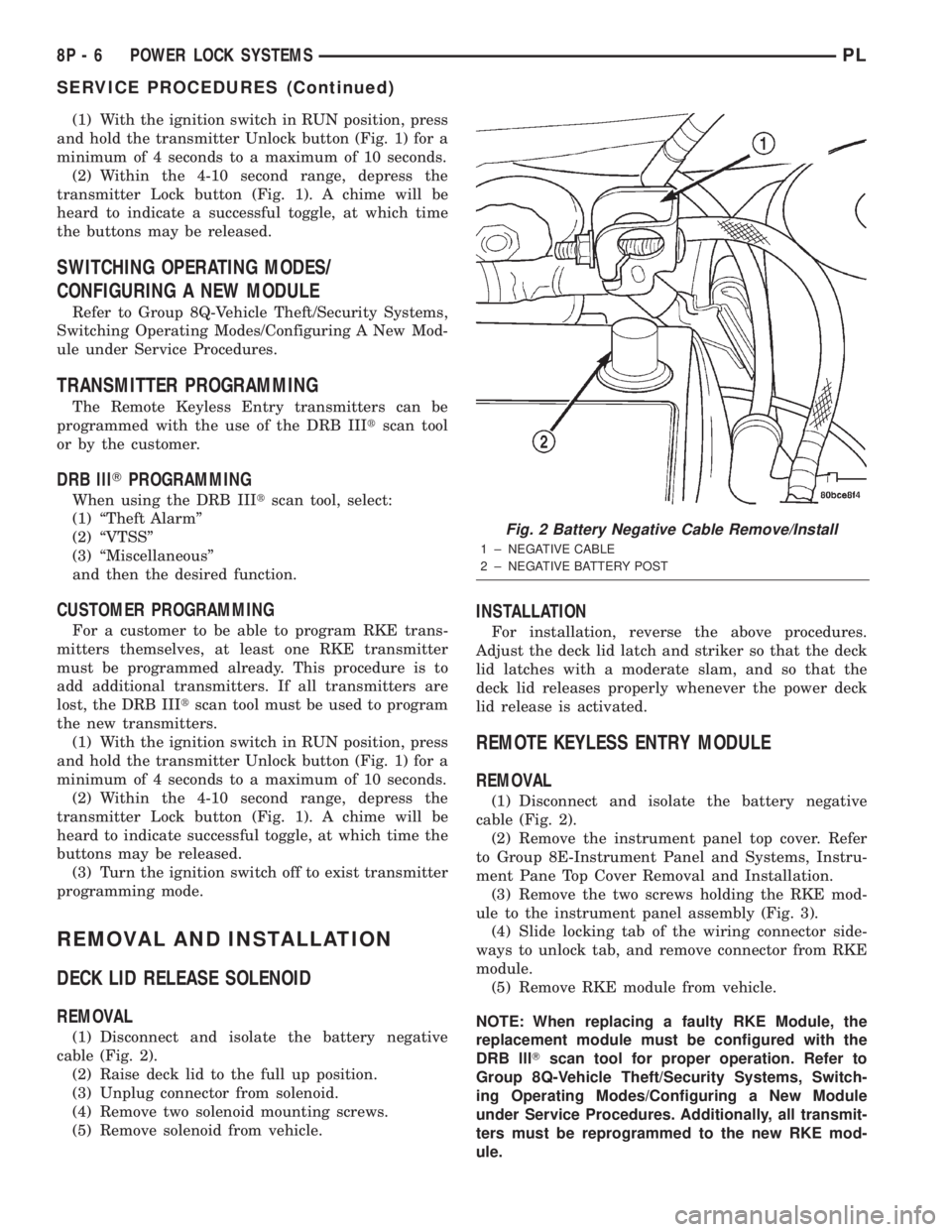
(1) Disconnect and isolate the battery negative
cable (Fig. 2).
(2) Raise deck lid to the full up position.
(3) Unplug connector from solenoid.
(4) Remove two solenoid mounting screws.
(5) Remove solenoid from vehicle.
INSTALLATION
For installation, reverse the above procedures.
Adjust the deck lid latch and striker so that the deck
lid latches with a moderate slam, and so that the
deck lid releases properly whenever the power deck
lid release is activated.
REMOTE KEYLESS ENTRY MODULE
REMOVAL
(1) Disconnect and isolate the battery negative
cable (Fig. 2).
(2) Remove the instrument panel top cover. Refer
to Group 8E-Instrument Panel and Systems, Instru-
ment Pane Top Cover Removal and Installation.
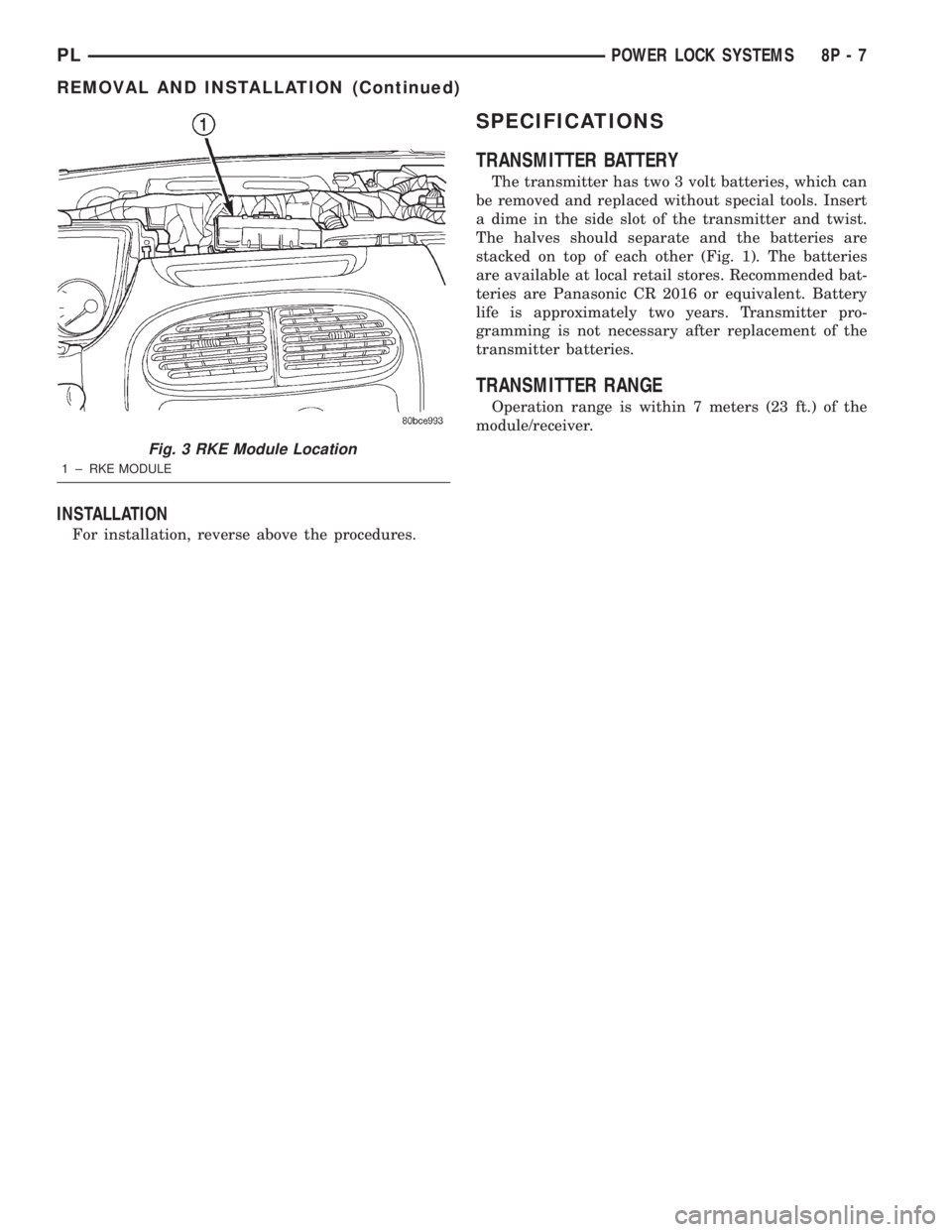
(3) Remove the two screws holding the RKE mod-
ule to the instrument panel assembly (Fig. 3).
(4) Slide locking tab of the wiring connector side-
ways to unlock tab, and remove connector from RKE
module.
(5) Remove RKE module from vehicle.
NOTE: When replacing a faulty RKE Module, the
replacement module must be configured with the
DRB lllTscan tool for proper operation. Refer to
Group 8Q-Vehicle Theft/Security Systems, Switch-
ing Operating Modes/Configuring a New Module
under Service Procedures. Additionally, all transmit-
ters must be reprogrammed to the new RKE mod-
ule.
Fig. 2 Battery Negative Cable Remove/Install
1 ± NEGATIVE CABLE
2 ± NEGATIVE BATTERY POST
8P - 6 POWER LOCK SYSTEMSPL
SERVICE PROCEDURES (Continued)
Page 370 of 1285
INSTALLATION
For installation, reverse above the procedures.
SPECIFICATIONS
TRANSMITTER BATTERY
The transmitter has two 3 volt batteries, which can
be removed and replaced without special tools. Insert
a dime in the side slot of the transmitter and twist.
The halves should separate and the batteries are
stacked on top of each other (Fig. 1). The batteries
are available at local retail stores. Recommended bat-
teries are Panasonic CR 2016 or equivalent. Battery
life is approximately two years. Transmitter pro-
gramming is not necessary after replacement of the
transmitter batteries.
TRANSMITTER RANGE
Operation range is within 7 meters (23 ft.) of the
module/receiver.
Fig. 3 RKE Module Location
1 ± RKE MODULE
PLPOWER LOCK SYSTEMS 8P - 7
REMOVAL AND INSTALLATION (Continued)
Page 372 of 1285
VEHICLE THEFT/SECURITY SYSTEM
TABLE OF CONTENTS
page page
DESCRIPTION AND OPERATION
INTRODUCTION..........................1
VEHICLE THEFT/SECURITY SYSTEM (VTSS)...1
SENTRY KEY IMMOBILIZER SYSTEM (SKIS)...2
SENTRY KEY IMMOBILIZER MODULE
(SKIM)................................2
SENTRY KEY IMMOBILIZER SYSTEM
TRANSPONDER.........................3
SENTRY KEY IMMOBILIZER SYSTEM
INDICATOR LAMP.......................4
TRIGGERING THE VTSS....................4
DIAGNOSIS AND TESTING
SENTRY KEY IMMOBILIZER SYSTEM.........4
VEHICLE THEFT/SECURITY SYSTEM (VTSS)...5SERVICE PROCEDURES
SENTRY KEY IMMOBILIZER SYSTEM
INITIALIZATION.........................5
SENTRY KEY IMMOBILIZER SYSTEM
TRANSPONDER PROGRAMMING...........5
SWITCHING OPERATING MODES/
CONFIGURING A NEW MODULE............6
REMOVAL AND INSTALLATION
DOOR CYLINDER LOCK SWITCH.............7
HOOD AJAR SWITCH......................7
SENTRY KEY IMMOBILIZER MODULE
(SKIM)................................7
VEHICLE THEFT/SECURITY SYSTEM DECK
LID SECURITY (KNOCK OUT) SWITCH.......8
DESCRIPTION AND OPERATION
INTRODUCTION
The Vehicle Theft/Security System (VTSS) is
designed to protect against whole vehicle theft. The
system monitors vehicle doors, hood, trunk key cylin-
der, and ignition for unauthorized operation.
The VTSS activates:
²Sounding of the horn.
²Flashing of the park lamps.
²Flashing of the headlamps.
The RKE Module has three modes of operation
including customer usage mode, dealer lot storage
mode, and shipping mode. The customer usage mode
provides full functionality of the module and is the
mode in which the RKE Module should be operating
when used by the customer. Dealer lot storage mode
and shipping mode are reduced power modes meant
to extend vehicle battery life during shipping and
storage in the dealer lot. Dealer lot storage mode pro-
vides limited VTSS and power door lock functions,
and disables the Remote Keyless Entry (RKE) func-
tions. This mode is intended to be used when the
vehicle is on the dealer lot to provide VTSS coverage
of the vehicle while minimizing battery drain. Ship-
ping mode disables all normal functions of the mod-
ule with the exception of communications over the
vehicle's PCI bus, and is intended to be used when
the vehicle is shipped from the assembly plant. The
dealer must remove the module from shipping modeand place it into either the dealer lot storage or cus-
tomer usage modes of operation.
NOTE: The dealer must remove the module from
ªShip Modeº and place the RKE Module into either
the ªDealer Lotº storage or ªCustomer Usageº
modes of operation after receiving the vehicle from
the assembly plant. Refer to Switching Operating
Modes/Configuring a New Module under Service
Procedures in this section.
VEHICLE THEFT/SECURITY SYSTEM (VTSS)
In the customer usage mode of operation, the sys-
tem is armed when the vehicle is locked using the:
²Power door lock switches.
²Remote Keyless Entry (RKE) transmitter.
After the vehicle is locked and the last door is
closed, the circular red VTSS indicator in the instru-
ment cluster will flash quickly for 16 seconds, indi-
cating that arming is in progress. If no monitored
systems are activated during this period (excluding
the hood and trunk key cylinder), the system will
arm. After 16 seconds, the LED will continue to flash
at a slower rate indicating the system is armed.
If the hood ajar switch and/or trunk key cylinder
switch(s) are not sensed by the system, the indicator
LED will remain lit during the arming process,
although the system will still arm. If the VTSS indi-
cator does not illuminate at all upon door closing it
indicates that the system is not arming.
PLVEHICLE THEFT/SECURITY SYSTEM 8Q - 1
Page 375 of 1285
memory to determine whether a valid key is in the
ignition lock cylinder.
The Sentry Key transponder cannot be repaired
and, if faulty or damaged, it must be replaced.
SENTRY KEY IMMOBILIZER SYSTEM
INDICATOR LAMP
The Sentry Key Immobilizer System (SKIS) uses
the Vehicle Theft Security System (VTSS) indicator
LED to give an indication when the SKIS is faulty or
when the vehicle has been immobilized due to the
use of an invalid ignition key. The LED is controlled
by the instrument cluster circuitry based upon mes-
sages received from the Sentry Key Immobilizer
Module (SKIM) through the Body Control Module
(BCM) on the Programmable Communication Inter-
face (PCI) bus.
The SKIM sends messages to the instrument clus-
ter, via the BCM, to turn the LED on for about three
seconds when the ignition switch is turned to the ON
position as a bulb test. After completion of the bulb
test, the SKIM sends PCI bus messages to keep the
LED off for a duration of about one second. Then the
SKIM sends messages to the instrument cluster cir-
cuitry to turn the LED on or off based upon the
results of the SKIS self-tests. If the VTSS indicator
LED comes on and stays on after the bulb test, it
indicates that the SKIM has detected a system mal-
function and/or that the SKIS has become inopera-
tive. If the SKIM detects an invalid key when the
ignition switch is turned to the ON position, it sends
messages to the instrument cluster to flash the VTSS
indicator LED.
The SKIM can also send messages to the instru-
ment cluster to flash the LED and to generate a sin-
gle audible chime tone. These functions serve as an
indication to the customer that the SKIS has been
placed in its ªCustomer Learnº programming mode.
See Sentry Key Immobilizer System Transponder
Programming in this group for more information on
the ªCustomer Learnº programming mode.
The VTSS indicator LED uses a replaceable Light
Emitting Diode (LED) on the instrument cluster elec-
tronic circuit board. Refer to Group 8E - Instrument
Panel Systems for Cluster Lamp Removal and Instal-
lation. If the VTSS indicator LED comes on and
stays on after the bulb test function, diagnosis of the
SKIS should be performed with a DRB IIItscan tool
and the proper Body Diagnostic Procedures Manual.
TRIGGERING THE VTSS
After the VTSS is armed, any of the following will
trigger the system:
²Opening any door.
²Opening the hood.
²Removing the trunk lock cylinder.²Turning the ignition to the RUN/START position
with an invalid Sentry Key.
NOTE: The ignition switch can be turned to the
accessory position without triggering the alarm sys-
tem.
DIAGNOSIS AND TESTING
SENTRY KEY IMMOBILIZER SYSTEM
WARNING: ON VEHICLES EQUIPPED WITH AIR-
BAGS, REFER TO GROUP 8M - PASSIVE
RESTRAINT SYSTEMS BEFORE ATTEMPTING ANY
STEERING WHEEL, STEERING COLUMN, OR
INSTRUMENT PANEL COMPONENT DIAGNOSIS OR
SERVICE. FAILURE TO TAKE THE PROPER PRE-
CAUTIONS COULD RESULT IN ACCIDENTAL AIR-
BAG DEPLOYMENT AND POSSIBLE PERSONAL
INJURY.
NOTE: The following tests may not prove conclu-
sive in the diagnosis of this system. The most reli-
able, efficient, and accurate means to diagnose the
Sentry Key Immobilizer System (SKIS) involves the
use of a DRB lllTscan tool and the proper Body
Diagnostic Procedures Manual.
The Sentry Key Immobilizer System (SKIS) and
the Programmable Communication Interface (PCI)
bus network should be diagnosed using a DRB lllt
scan tool. The DRB IIItwill allow confirmation that
the PCI bus is functional, that the Sentry Key Immo-
bilizer Module (SKIM) is placing the proper messages
on the PCI bus, and that the Powertrain Control
Module (PCM) and the instrument cluster are receiv-
ing the PCI bus messages. Refer to the proper Body
Diagnostic Procedures Manual. Refer to Group
8W-Wiring Diagrams for complete circuit descriptions
and diagrams.
(1) Check the fuses in the fuse block. If OK, go to
Step 2. If not OK, repair the shorted circuit or com-
ponent as required and replace the faulty fuse.
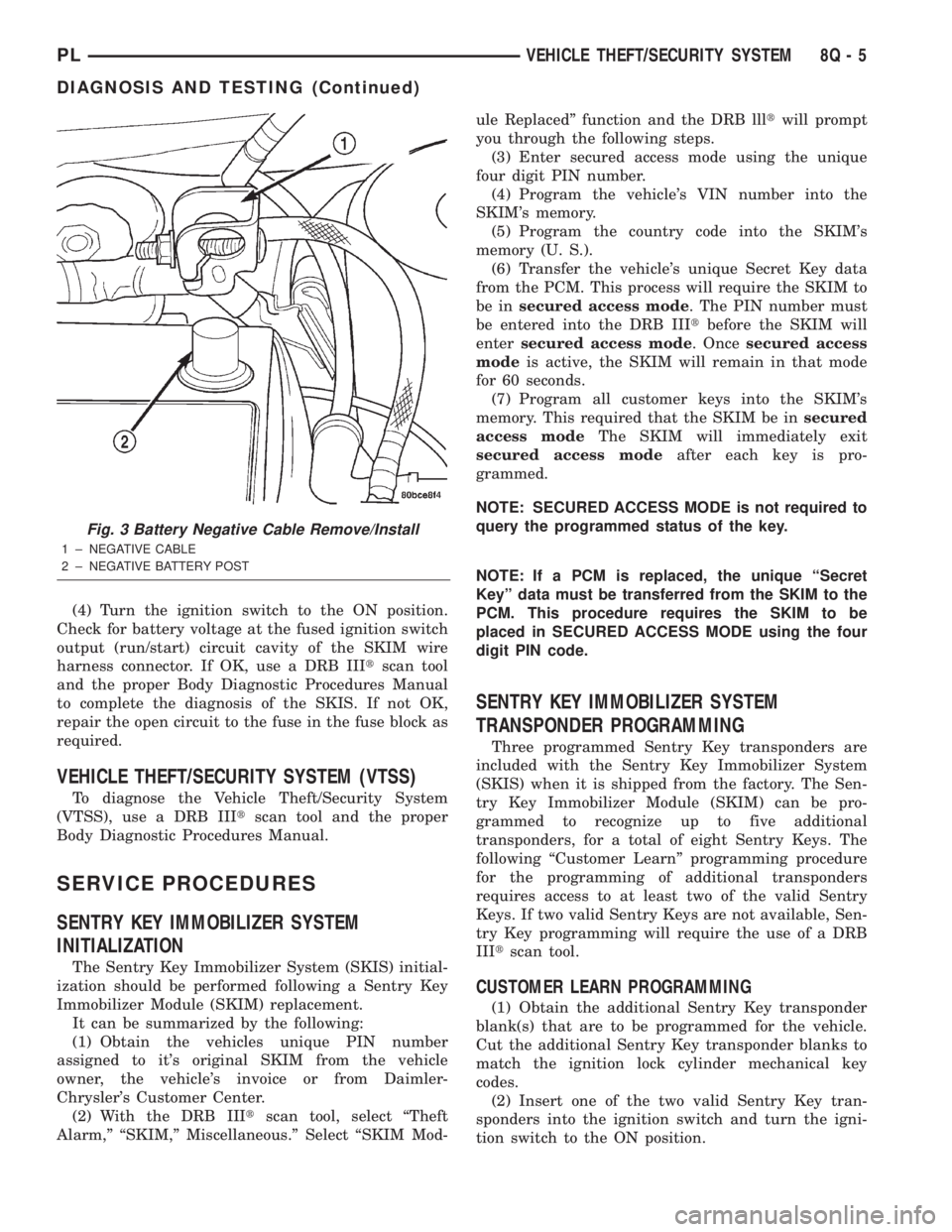
(2) Disconnect and isolate the battery negative
cable (Fig. 3). Unplug the wire harness connector at
the SKIM. Check for continuity between the ground
circuit cavity of the SKIM wire harness connector
and a good ground. There should be continuity. If
OK, go to Step 3. If not OK, repair the open circuit to
ground as required.
(3) Connect the battery negative cable. Check for
battery voltage at the fused B(+) circuit cavity of the
SKIM wire harness connector. If OK, go to Step 4. If
not OK, repair the open circuit to the fuse in the fuse
block as required.
8Q - 4 VEHICLE THEFT/SECURITY SYSTEMPL
DESCRIPTION AND OPERATION (Continued)
Page 376 of 1285
(4) Turn the ignition switch to the ON position.
Check for battery voltage at the fused ignition switch
output (run/start) circuit cavity of the SKIM wire
harness connector. If OK, use a DRB IIItscan tool
and the proper Body Diagnostic Procedures Manual
to complete the diagnosis of the SKIS. If not OK,
repair the open circuit to the fuse in the fuse block as
required.
VEHICLE THEFT/SECURITY SYSTEM (VTSS)
To diagnose the Vehicle Theft/Security System
(VTSS), use a DRB IIItscan tool and the proper
Body Diagnostic Procedures Manual.
SERVICE PROCEDURES
SENTRY KEY IMMOBILIZER SYSTEM
INITIALIZATION
The Sentry Key Immobilizer System (SKIS) initial-
ization should be performed following a Sentry Key
Immobilizer Module (SKIM) replacement.
It can be summarized by the following:
(1) Obtain the vehicles unique PIN number
assigned to it's original SKIM from the vehicle
owner, the vehicle's invoice or from Daimler-
Chrysler's Customer Center.
(2) With the DRB IIItscan tool, select ªTheft
Alarm,º ªSKIM,º Miscellaneous.º Select ªSKIM Mod-ule Replacedº function and the DRB llltwill prompt
you through the following steps.
(3) Enter secured access mode using the unique
four digit PIN number.
(4) Program the vehicle's VIN number into the
SKIM's memory.
(5) Program the country code into the SKIM's
memory (U. S.).
(6) Transfer the vehicle's unique Secret Key data
from the PCM. This process will require the SKIM to
be insecured access mode. The PIN number must
be entered into the DRB IIItbefore the SKIM will
entersecured access mode. Oncesecured access
modeis active, the SKIM will remain in that mode
for 60 seconds.
(7) Program all customer keys into the SKIM's
memory. This required that the SKIM be insecured
access modeThe SKIM will immediately exit
secured access modeafter each key is pro-
grammed.
NOTE: SECURED ACCESS MODE is not required to
query the programmed status of the key.
NOTE: If a PCM is replaced, the unique ªSecret
Keyº data must be transferred from the SKIM to the
PCM. This procedure requires the SKIM to be
placed in SECURED ACCESS MODE using the four
digit PIN code.
SENTRY KEY IMMOBILIZER SYSTEM
TRANSPONDER PROGRAMMING
Three programmed Sentry Key transponders are
included with the Sentry Key Immobilizer System
(SKIS) when it is shipped from the factory. The Sen-
try Key Immobilizer Module (SKIM) can be pro-
grammed to recognize up to five additional
transponders, for a total of eight Sentry Keys. The
following ªCustomer Learnº programming procedure
for the programming of additional transponders
requires access to at least two of the valid Sentry
Keys. If two valid Sentry Keys are not available, Sen-
try Key programming will require the use of a DRB
IIItscan tool.
CUSTOMER LEARN PROGRAMMING
(1) Obtain the additional Sentry Key transponder
blank(s) that are to be programmed for the vehicle.
Cut the additional Sentry Key transponder blanks to
match the ignition lock cylinder mechanical key
codes.
(2) Insert one of the two valid Sentry Key tran-
sponders into the ignition switch and turn the igni-
tion switch to the ON position.
Fig. 3 Battery Negative Cable Remove/Install
1 ± NEGATIVE CABLE
2 ± NEGATIVE BATTERY POST
PLVEHICLE THEFT/SECURITY SYSTEM 8Q - 5
DIAGNOSIS AND TESTING (Continued)
Page 378 of 1285
REMOVAL AND INSTALLATION
DOOR CYLINDER LOCK SWITCH
REMOVAL
(1) Refer to Group 23, Body for door trim and
water shield Removal and Installation.
(2) Remove illuminated entry switch wiring clip
and disconnect connector.
(3) Remove door cylinder lock switch from door
handle.
INSTALLATION
For installation reverse the above procedures.
HOOD AJAR SWITCH
REMOVAL
(1) Open hood.
(2) Disconnect and isolate the battery negative
remote cable (Fig. 3).
(3) Using a trim stick (special tool #C-4755) or
equivalent, gently pry switch up and out of mounting
bracket.
(4) Disconnect wire harness connector from hood
ajar switch.
(5) Remove switch from vehicle.
INSTALLATION
For installation reverse above procedures.
SENTRY KEY IMMOBILIZER MODULE (SKIM)
WARNING: ON VEHICLES EQUIPPED WITH AIR-
BAGS, REFER TO GROUP 8M - PASSIVE
RESTRAINT SYSTEMS BEFORE ATTEMPTING ANY
STEERING WHEEL, STEERING COLUMN, OR
INSTRUMENT PANEL COMPONENT DIAGNOSIS OR
SERVICE. FAILURE TO TAKE THE PROPER PRE-
CAUTIONS COULD RESULT IN ACCIDENTAL AIR-
BAG DEPLOYMENT AND POSSIBLE PERSONAL
INJURY.
REMOVAL
(1) Disconnect and isolate the battery negative
remote cable (Fig. 3).
(2) Remove Lower Instrument Panel Cover. Refer
to Group 8E-Instrument Panel and Systems, Lower
Instrument Panel Cover Removal and Installation.
(3) Remove the steering column upper and lower
shrouds. Refer to Group 8E-Inatrument Panel and
Systems, Steering Column Shroud Removal and
Installation.
(4) Disengage the steering column wire harness
from the Sentry Key Immobilizer Module (SKIM).
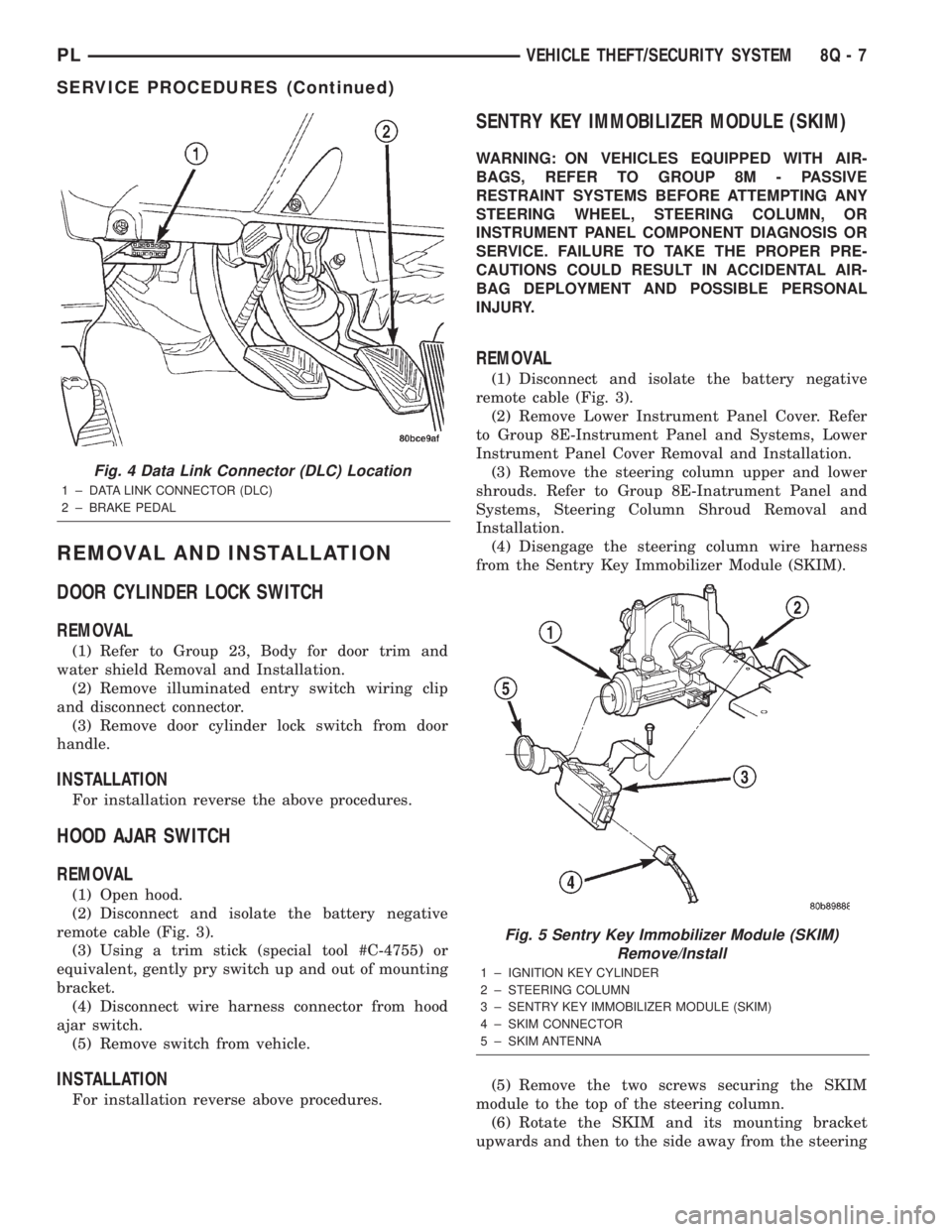
(5) Remove the two screws securing the SKIM
module to the top of the steering column.
(6) Rotate the SKIM and its mounting bracket
upwards and then to the side away from the steering
Fig. 4 Data Link Connector (DLC) Location
1 ± DATA LINK CONNECTOR (DLC)
2 ± BRAKE PEDAL
Fig. 5 Sentry Key Immobilizer Module (SKIM)
Remove/Install
1 ± IGNITION KEY CYLINDER
2 ± STEERING COLUMN
3 ± SENTRY KEY IMMOBILIZER MODULE (SKIM)
4 ± SKIM CONNECTOR
5 ± SKIM ANTENNA
PLVEHICLE THEFT/SECURITY SYSTEM 8Q - 7
SERVICE PROCEDURES (Continued)
Page 380 of 1285
POWER WINDOWS
TABLE OF CONTENTS
page page
DESCRIPTION AND OPERATION
INTRODUCTION..........................1
DIAGNOSIS AND TESTING
WIRING TEST............................1
WINDOW SWITCH........................1WINDOW MOTOR.........................1
REMOVAL AND INSTALLATION
WINDOW SWITCH........................2
WINDOW MOTOR.........................2
DESCRIPTION AND OPERATION
INTRODUCTION
The window lift motors are of the permanent mag-
net type. A battery positive and negative connection
to either of the two motor terminals will cause the
motor to rotate in one direction. Reversing current
through these same two connections will cause the
motor to rotate in the opposite direction.
Each individual motor is grounded through the
master switch.
DIAGNOSIS AND TESTING
WIRING TEST
The following wiring test determines whether or
not voltage is continuous through the body harness
to the power window switches.
Remove switch for testing. Connect a voltmeter
positive lead to Pin 4 and negative lead to Pin 3 of
the switch harness connector. Turn ignition switch to
the ON position. Voltmeter should read battery volt-
age. If OK, go to Window Switch Diagnosis and Test-
ing. If not OK, check the 30 amp circuit breaker in
the fuse block or for a broken wire. Refer to Group
8W-Wiring Diagrams, for Connector Pin-Outs and
circuit descriptions.
WINDOW SWITCH
Remove the switch from its mounting, refer to Win-
dow Switch Removal and Installation in this section.
Using an ohmmeter, test the window switch for con-
tinuity in all positions Refer to Power Window
Switch Continuity table to determine if continuity is
correct. If the results are not obtained, replace the
switch.
WINDOW MOTOR
(1) Remove door trim panel. Refer to Group
23-Body, Front Door Trim Panel Removal and Instal-
lation.
(2) Connect positive (+) lead from a test battery to
either of the two motor terminals.
(3) Connect negative (-) lead from test battery to
remaining motor terminal.
(4) The motor should now rotate in one direction to
either move window up or down.
(a) If window happens to already be in full UP
position and motor is connected so as to move it in
UP direction no movement will be observed.
(b) Likewise, motor connected to move window
in DOWN direction no movement will be observed
if window is already in full DOWN position.
(c) Reverse battery leads in Step 2 and Step 3
and window should now move. If window does not
move, remove motor. Refer to Window Motor
Removal and Installation in this section.
(5) If window moved completely up or down, the
test leads should be reversed one more time to com-
plete a full window travel inspection.
POWER WINDOW SWITCH CONTINUITY
SWITCH POSITION CONTINUITY BETWEEN
OFF PIN 1 AND 4
PIN 2 AND 5
PIN 3 AND 8
UP PIN 1 AND 4
PIN 1 AND 8
PIN 2 AND 5
DOWN PIN 1 AND 4
PIN 1 AND 5
PIN 3 AND 8
PLPOWER WINDOWS 8S - 1
Page 381 of 1285
(6) If window does not move, check to make sure
that it is free to move.
(7) It is necessary that the window be free to slide
up and down in the glass channels. If the window is
not free to move up and down, the window lift motor
will not be able to move the glass.
(8) To determine if the glass is free, disconnect the
regulator from the glass lift plate and slide the win-
dow up and down by hand.
REMOVAL AND INSTALLATION
WINDOW SWITCH
REMOVAL
(1) Disconnect and isolate the battery negative
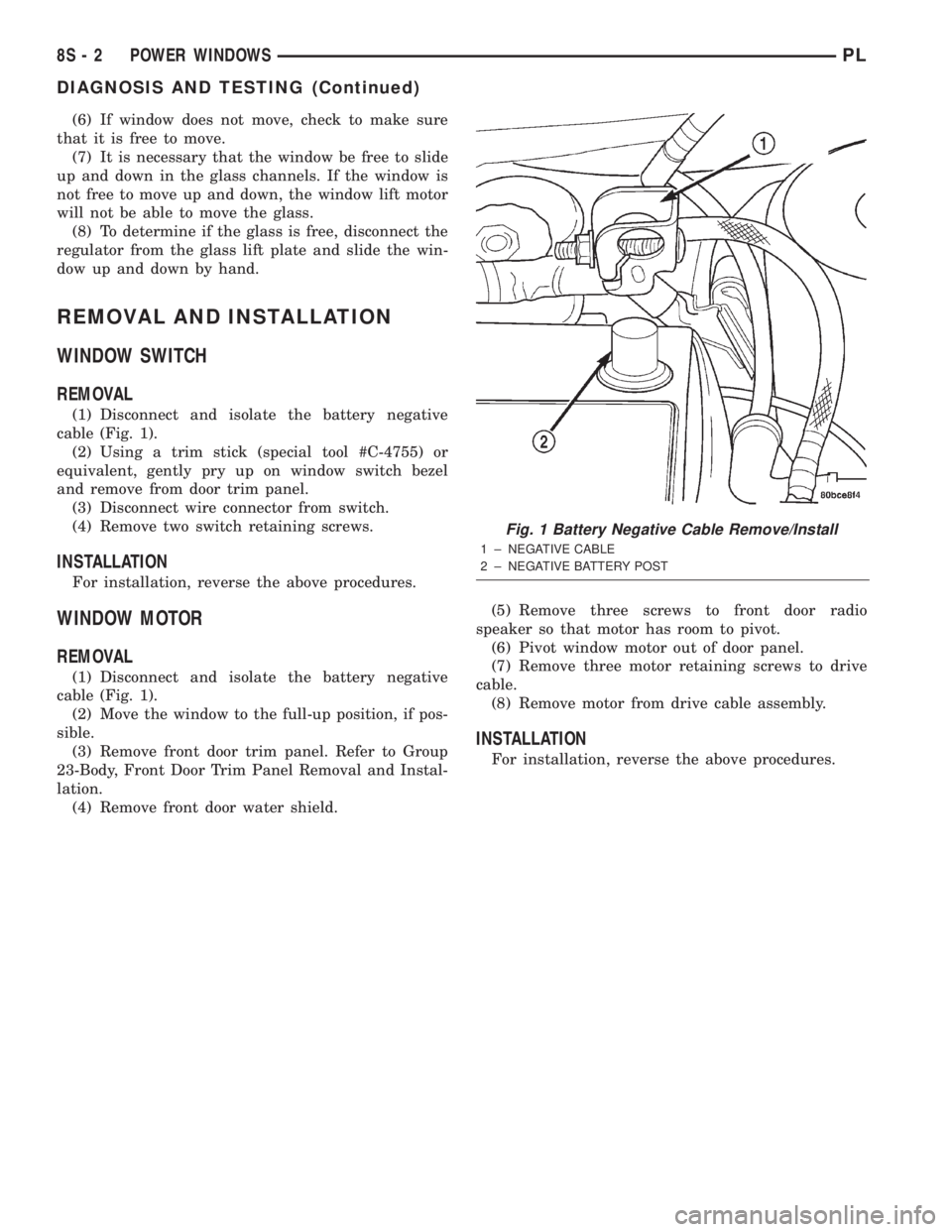
cable (Fig. 1).
(2) Using a trim stick (special tool #C-4755) or
equivalent, gently pry up on window switch bezel
and remove from door trim panel.
(3) Disconnect wire connector from switch.
(4) Remove two switch retaining screws.
INSTALLATION
For installation, reverse the above procedures.
WINDOW MOTOR
REMOVAL
(1) Disconnect and isolate the battery negative
cable (Fig. 1).
(2) Move the window to the full-up position, if pos-
sible.
(3) Remove front door trim panel. Refer to Group
23-Body, Front Door Trim Panel Removal and Instal-
lation.
(4) Remove front door water shield.(5) Remove three screws to front door radio
speaker so that motor has room to pivot.
(6) Pivot window motor out of door panel.
(7) Remove three motor retaining screws to drive
cable.
(8) Remove motor from drive cable assembly.
INSTALLATION
For installation, reverse the above procedures.
Fig. 1 Battery Negative Cable Remove/Install
1 ± NEGATIVE CABLE
2 ± NEGATIVE BATTERY POST
8S - 2 POWER WINDOWSPL
DIAGNOSIS AND TESTING (Continued)
Page 383 of 1285
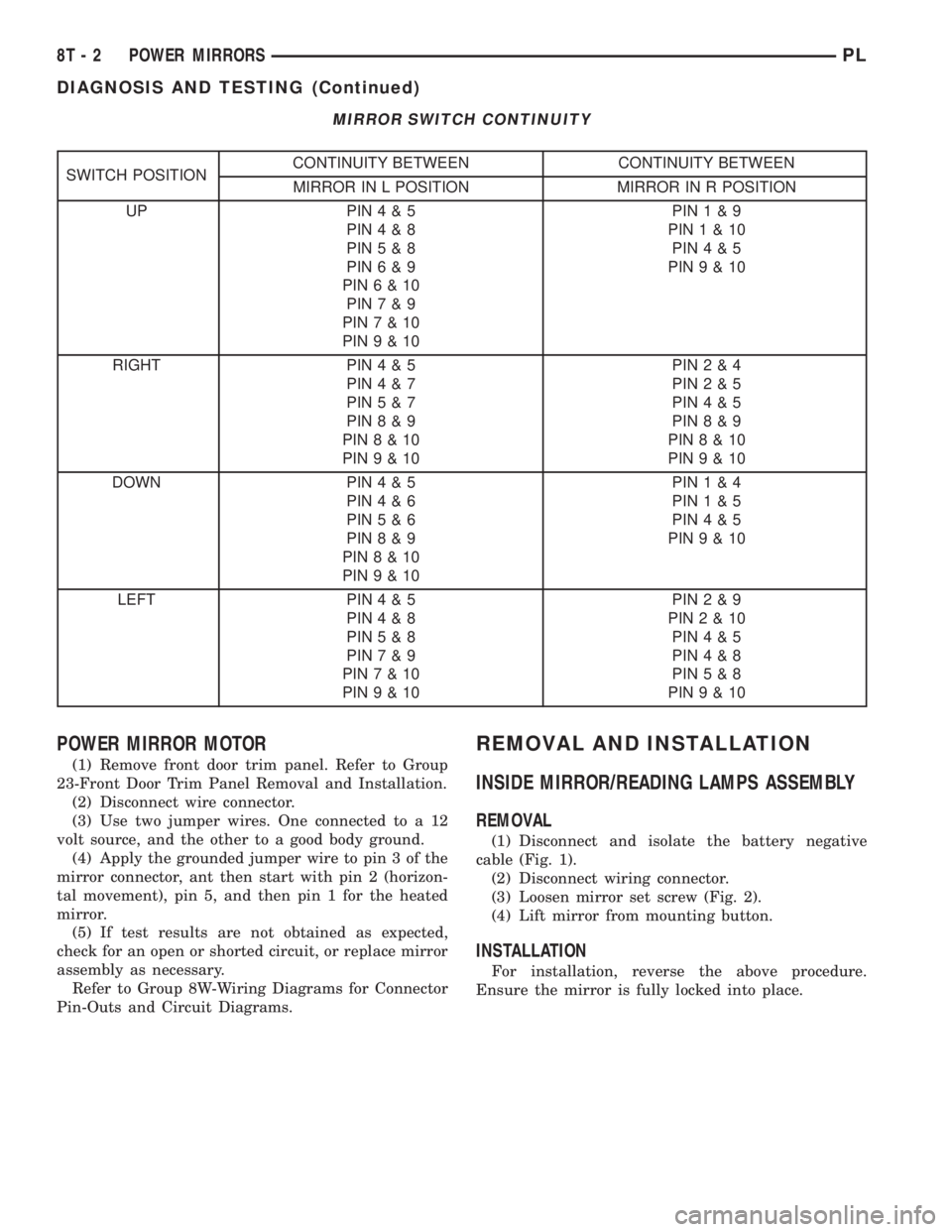
MIRROR SWITCH CONTINUITY
SWITCH POSITIONCONTINUITY BETWEEN CONTINUITY BETWEEN
MIRROR IN L POSITION MIRROR IN R POSITION
UP PIN4&5
PIN4&8
PIN5&8
PIN6&9
PIN6&10
PIN7&9
PIN7&10
PIN9&10PIN1&9
PIN1&10
PIN4&5
PIN9&10
RIGHT PIN4&5
PIN4&7
PIN5&7
PIN8&9
PIN8&10
PIN9&10PIN2&4
PIN2&5
PIN4&5
PIN8&9
PIN8&10
PIN9&10
DOWN PIN4&5
PIN4&6
PIN5&6
PIN8&9
PIN8&10
PIN9&10PIN1&4
PIN1&5
PIN4&5
PIN9&10
LEFT PIN4&5
PIN4&8
PIN5&8
PIN7&9
PIN7&10
PIN9&10PIN2&9
PIN2&10
PIN4&5
PIN4&8
PIN5&8
PIN9&10
POWER MIRROR MOTOR
(1) Remove front door trim panel. Refer to Group
23-Front Door Trim Panel Removal and Installation.
(2) Disconnect wire connector.
(3) Use two jumper wires. One connected to a 12
volt source, and the other to a good body ground.
(4) Apply the grounded jumper wire to pin 3 of the
mirror connector, ant then start with pin 2 (horizon-
tal movement), pin 5, and then pin 1 for the heated
mirror.
(5) If test results are not obtained as expected,
check for an open or shorted circuit, or replace mirror
assembly as necessary.
Refer to Group 8W-Wiring Diagrams for Connector
Pin-Outs and Circuit Diagrams.
REMOVAL AND INSTALLATION
INSIDE MIRROR/READING LAMPS ASSEMBLY
REMOVAL
(1) Disconnect and isolate the battery negative
cable (Fig. 1).
(2) Disconnect wiring connector.
(3) Loosen mirror set screw (Fig. 2).
(4) Lift mirror from mounting button.
INSTALLATION
For installation, reverse the above procedure.
Ensure the mirror is fully locked into place.
8T - 2 POWER MIRRORSPL
DIAGNOSIS AND TESTING (Continued)