battery DODGE NEON 2000 Service Manual PDF
[x] Cancel search | Manufacturer: DODGE, Model Year: 2000, Model line: NEON, Model: DODGE NEON 2000Pages: 1285, PDF Size: 29.42 MB
Page 260 of 1285
INSTRUMENT PANEL AND SYSTEMS
TABLE OF CONTENTS
page page
DIAGNOSIS AND TESTING
HEADLAMP LEVELING SWITCH..............1
INSTRUMENT PANEL AND COMPONENTS.....1
REMOVAL AND INSTALLATION
HEADLAMP LEVELING SWITCH..............2INSTRUMENT PANEL ± R. H. D..............3
SPECIFICATIONS
TORQUE SPECIFICATIONS..................9
DIAGNOSIS AND TESTING
HEADLAMP LEVELING SWITCH
(1) Remove the headlamp leveling switch from the
instrument panel and disconnect the wire harness
connector from the switch. Refer to Wiring Diagrams
for the proper wire circuits and the wire connector
connections.
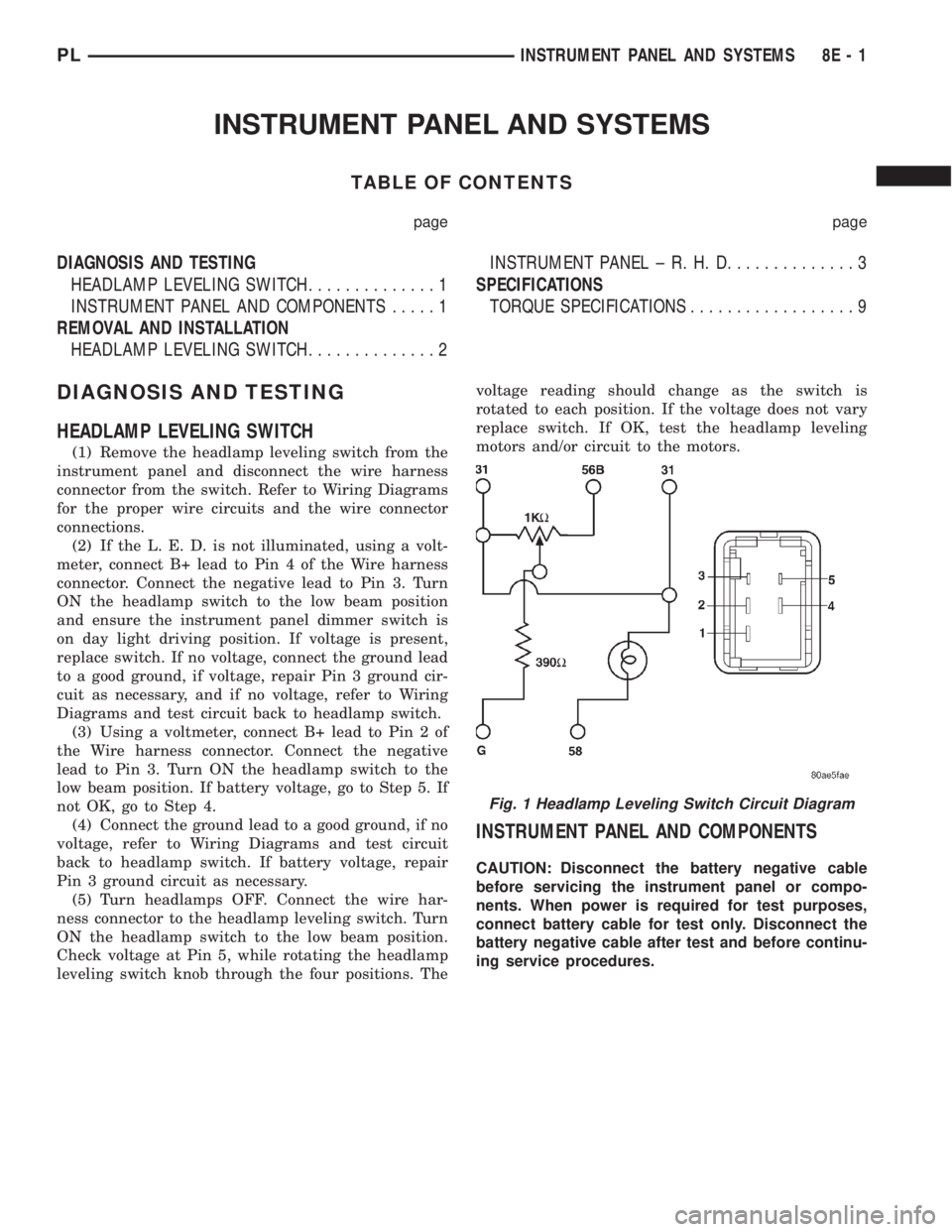
(2) If the L. E. D. is not illuminated, using a volt-
meter, connect B+ lead to Pin 4 of the Wire harness
connector. Connect the negative lead to Pin 3. Turn
ON the headlamp switch to the low beam position
and ensure the instrument panel dimmer switch is
on day light driving position. If voltage is present,
replace switch. If no voltage, connect the ground lead
to a good ground, if voltage, repair Pin 3 ground cir-
cuit as necessary, and if no voltage, refer to Wiring
Diagrams and test circuit back to headlamp switch.
(3) Using a voltmeter, connect B+ lead to Pin 2 of
the Wire harness connector. Connect the negative
lead to Pin 3. Turn ON the headlamp switch to the
low beam position. If battery voltage, go to Step 5. If
not OK, go to Step 4.
(4) Connect the ground lead to a good ground, if no
voltage, refer to Wiring Diagrams and test circuit
back to headlamp switch. If battery voltage, repair
Pin 3 ground circuit as necessary.
(5) Turn headlamps OFF. Connect the wire har-
ness connector to the headlamp leveling switch. Turn
ON the headlamp switch to the low beam position.
Check voltage at Pin 5, while rotating the headlamp
leveling switch knob through the four positions. Thevoltage reading should change as the switch is
rotated to each position. If the voltage does not vary
replace switch. If OK, test the headlamp leveling
motors and/or circuit to the motors.
INSTRUMENT PANEL AND COMPONENTS
CAUTION: Disconnect the battery negative cable
before servicing the instrument panel or compo-
nents. When power is required for test purposes,
connect battery cable for test only. Disconnect the
battery negative cable after test and before continu-
ing service procedures.
Fig. 1 Headlamp Leveling Switch Circuit Diagram
PLINSTRUMENT PANEL AND SYSTEMS 8E - 1
Page 263 of 1285
(1) Disconnect the negative battery cable.
(2) Remove the floor console. Refer to Group 23,
Body for the procedure.
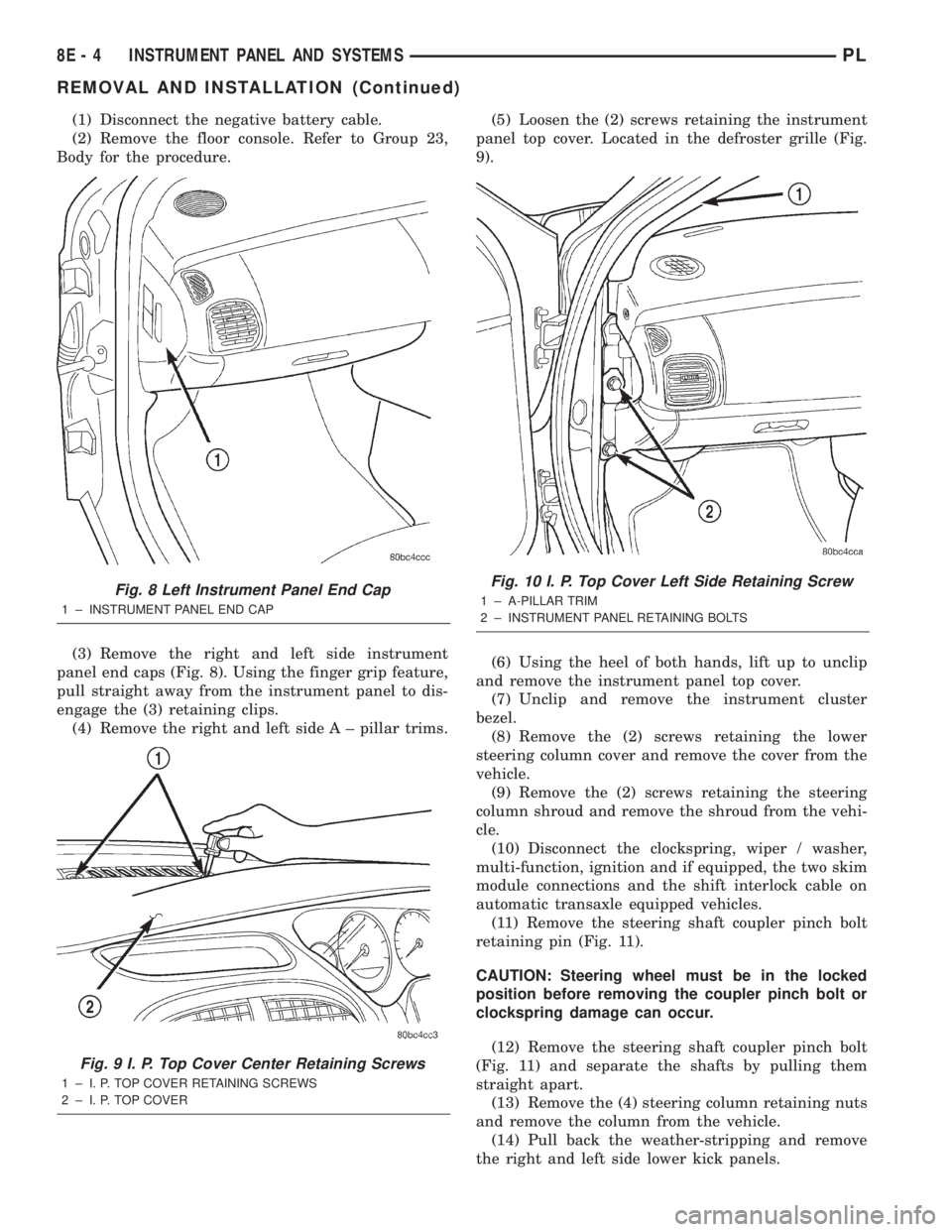
(3) Remove the right and left side instrument
panel end caps (Fig. 8). Using the finger grip feature,
pull straight away from the instrument panel to dis-
engage the (3) retaining clips.
(4) Remove the right and left side A ± pillar trims.(5) Loosen the (2) screws retaining the instrument
panel top cover. Located in the defroster grille (Fig.
9).
(6) Using the heel of both hands, lift up to unclip
and remove the instrument panel top cover.
(7) Unclip and remove the instrument cluster
bezel.
(8) Remove the (2) screws retaining the lower
steering column cover and remove the cover from the
vehicle.
(9) Remove the (2) screws retaining the steering
column shroud and remove the shroud from the vehi-
cle.
(10) Disconnect the clockspring, wiper / washer,
multi-function, ignition and if equipped, the two skim
module connections and the shift interlock cable on
automatic transaxle equipped vehicles.
(11) Remove the steering shaft coupler pinch bolt
retaining pin (Fig. 11).
CAUTION: Steering wheel must be in the locked
position before removing the coupler pinch bolt or
clockspring damage can occur.
(12) Remove the steering shaft coupler pinch bolt
(Fig. 11) and separate the shafts by pulling them
straight apart.
(13) Remove the (4) steering column retaining nuts
and remove the column from the vehicle.
(14) Pull back the weather-stripping and remove
the right and left side lower kick panels.
Fig. 8 Left Instrument Panel End Cap
1 ± INSTRUMENT PANEL END CAP
Fig. 9 I. P. Top Cover Center Retaining Screws
1 ± I. P. TOP COVER RETAINING SCREWS
2 ± I. P. TOP COVER
Fig. 10 I. P. Top Cover Left Side Retaining Screw
1 ± A-PILLAR TRIM
2 ± INSTRUMENT PANEL RETAINING BOLTS
8E - 4 INSTRUMENT PANEL AND SYSTEMSPL
REMOVAL AND INSTALLATION (Continued)
Page 267 of 1285
(17) Install the A/C outlet registers in the center
instrument bezel.
(18) Install the right and left side lower kick pan-
els. Reposition the weather-strip in its original posi-
tion.
(19) Install the steering column. Torque the retain-
ing nuts to 17 N´m (150 in. lbs.).
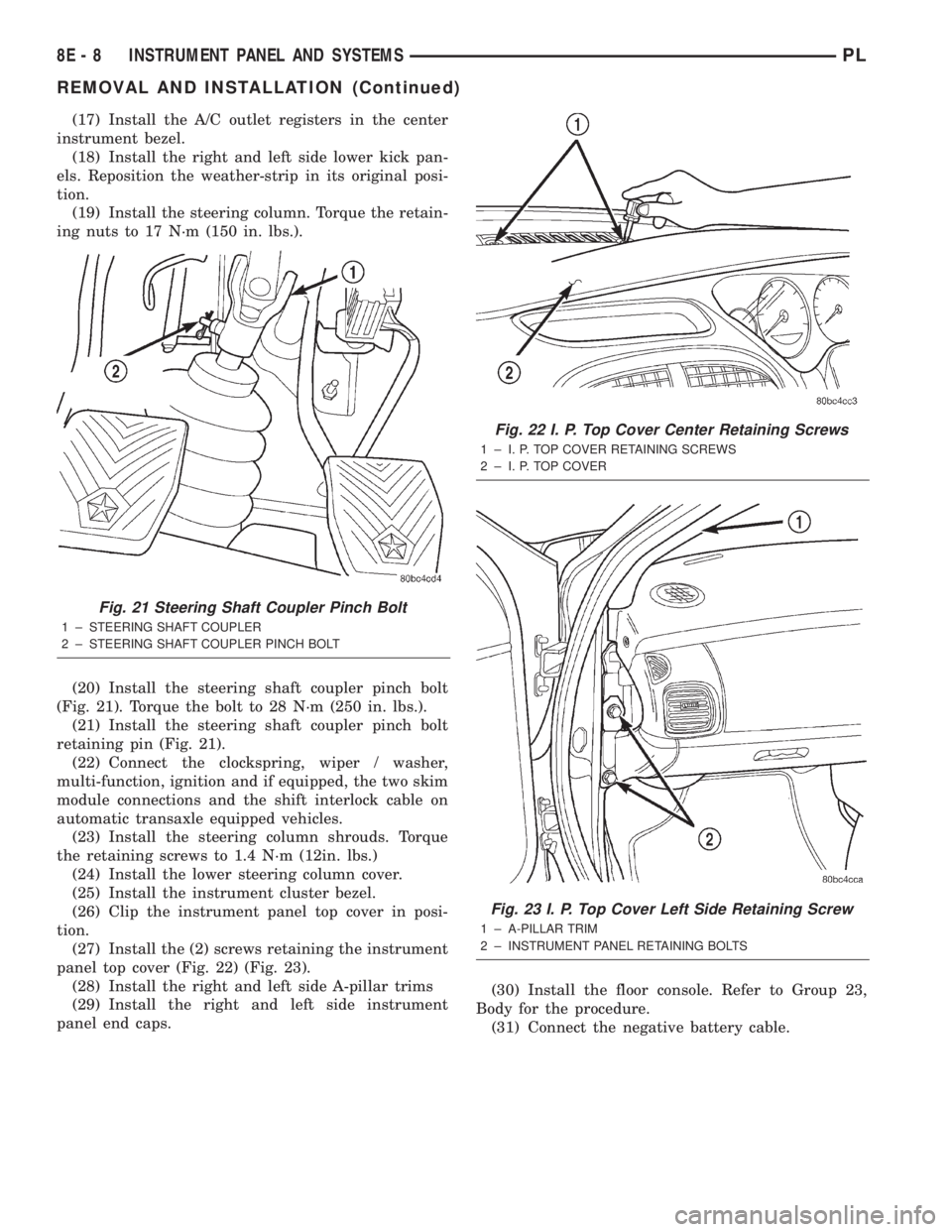
(20) Install the steering shaft coupler pinch bolt
(Fig. 21). Torque the bolt to 28 N´m (250 in. lbs.).
(21) Install the steering shaft coupler pinch bolt
retaining pin (Fig. 21).
(22) Connect the clockspring, wiper / washer,
multi-function, ignition and if equipped, the two skim
module connections and the shift interlock cable on
automatic transaxle equipped vehicles.
(23) Install the steering column shrouds. Torque
the retaining screws to 1.4 N´m (12in. lbs.)
(24) Install the lower steering column cover.
(25) Install the instrument cluster bezel.
(26) Clip the instrument panel top cover in posi-
tion.
(27) Install the (2) screws retaining the instrument
panel top cover (Fig. 22) (Fig. 23).
(28) Install the right and left side A-pillar trims
(29) Install the right and left side instrument
panel end caps.(30) Install the floor console. Refer to Group 23,
Body for the procedure.
(31) Connect the negative battery cable.
Fig. 21 Steering Shaft Coupler Pinch Bolt
1 ± STEERING SHAFT COUPLER
2 ± STEERING SHAFT COUPLER PINCH BOLT
Fig. 22 I. P. Top Cover Center Retaining Screws
1 ± I. P. TOP COVER RETAINING SCREWS
2 ± I. P. TOP COVER
Fig. 23 I. P. Top Cover Left Side Retaining Screw
1 ± A-PILLAR TRIM
2 ± INSTRUMENT PANEL RETAINING BOLTS
8E - 8 INSTRUMENT PANEL AND SYSTEMSPL
REMOVAL AND INSTALLATION (Continued)
Page 270 of 1285
AUDIO SYSTEM
TABLE OF CONTENTS
page page
GENERAL INFORMATION
INTRODUCTION..........................1
DESCRIPTION AND OPERATION
INTERFERENCE ELIMINATION...............1
DIAGNOSIS AND TESTING
AUDIO DIAGNOSTIC TEST PROCEDURES......1
TESTING................................1
BENCH TEST FOR ANTENNA MALFUNCTION...7REMOVAL AND INSTALLATION
CD CHANGER............................7
FRONT DOOR SPEAKER....................8
INSTRUMENT PANEL SPEAKER(S)...........8
MAST and ANTENNA ASSEMBLY.............8
RADIO..................................9
REAR SHELF SPEAKER(S).................10
GENERAL INFORMATION
INTRODUCTION
Operating instructions for the factory installed
audio systems can be found in the Owner's Manual
provided with the vehicle.
The vehicles are equipped with an Interior (Igni-
tion Off Draw) fuse in the Power Distribution Center
located in the engine compartment. After the Interior
(IOD) fuse or battery has been disconnected the clock
will require resetting. The radio station presets have
a nonvolatile memory and will retain the preset sta-
tions after a battery disconnect.
The available radio options are:
²AM/FM Stereo Cassette w/Clock
²AM/FM/CD
²AM/FM Cassette w/CD Changer Controls and
Display
²CD/4 Disc Changer - In-Dash (used w/Radio CD
Changer Controls)
DESCRIPTION AND OPERATION
INTERFERENCE ELIMINATION
The radio utilizes a ground wire plugged on to a
blade terminal and is bolted to the radio chassis.
Both connector and terminal should be securely
attached. The engine has two separate ground straps
to suppress ignition noise which may interfere with
radio reception.
²Left engine mount clip on strap
²Engine to shock tower reinforcement
Inductive type spark plug cables in the high ten-
sion circuit of the ignition system complete the inter-
ference suppression. Faulty or deteriorated spark
plug wires should be replaced.
DIAGNOSIS AND TESTING
AUDIO DIAGNOSTIC TEST PROCEDURES
CAUTION: The CD player will only operate between
approximate temperatures of -23ÉC and +65ÉC (-10ÉF
and +145ÉF).
Whenever a radio malfunction occurs;
(1) First check FUSES:
(a) Power Distribution Center (PDC), Interior
lamp fuse, M1 - Radio Memory Feed
(b) Fuse Block:
(I) Fuse 12, Illumination in the fuse block
(II) Fuse 16, Ignition feed in the fuse block
NOTE: The vehicles are shipped with the INTERIOR
LAMP fuse disconnected.
(2) Verify, the radio wire harness are properly con-
nected before starting normal diagnosis and repair
procedures. Refer to Audio Diagnostic Charts and/or
Group 8W, Wiring Diagrams, Radio Section.
TESTING
The antenna has a short cable which connects into
the instrument panel harness. The connection is
made on the right side of the instrument panel.
Antenna performance may be tested by substitut-
ing a known good antenna. It is also possible to
check short or open circuits with an ohmmeter or
continuity light once the antenna cable is discon-
nected from the radio as follows:
(1) Continuity should be present between the
antenna mast and radio end pin of antenna cable
plug (Fig. 1).
(2) No continuity should be observed or a very
high resistance of several megohms between the
ground shell of the connector and radio end pin.
PLAUDIO SYSTEM 8F - 1
Page 276 of 1285
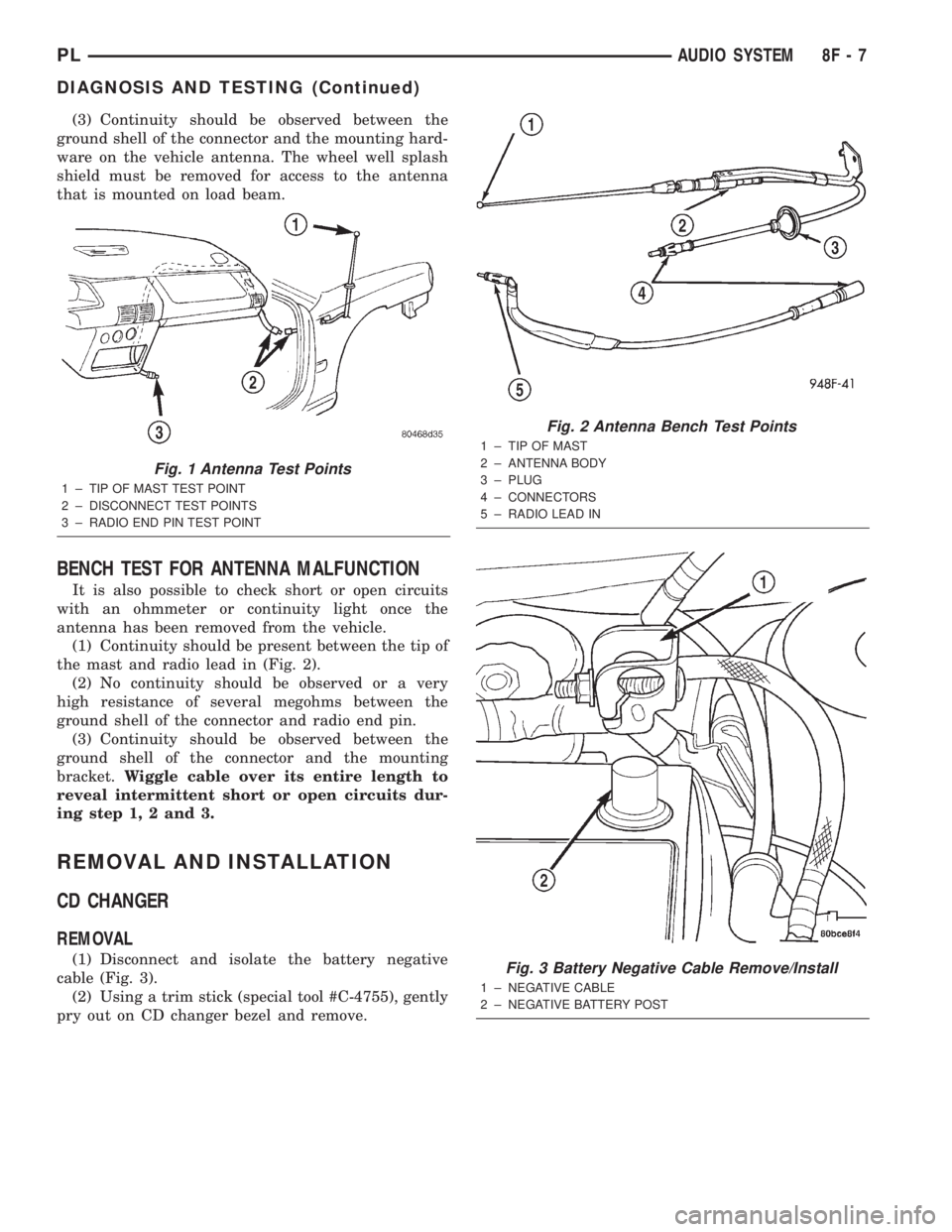
(3) Continuity should be observed between the
ground shell of the connector and the mounting hard-
ware on the vehicle antenna. The wheel well splash
shield must be removed for access to the antenna
that is mounted on load beam.
BENCH TEST FOR ANTENNA MALFUNCTION
It is also possible to check short or open circuits
with an ohmmeter or continuity light once the
antenna has been removed from the vehicle.
(1) Continuity should be present between the tip of
the mast and radio lead in (Fig. 2).
(2) No continuity should be observed or a very
high resistance of several megohms between the
ground shell of the connector and radio end pin.
(3) Continuity should be observed between the
ground shell of the connector and the mounting
bracket.Wiggle cable over its entire length to
reveal intermittent short or open circuits dur-
ing step 1, 2 and 3.
REMOVAL AND INSTALLATION
CD CHANGER
REMOVAL
(1) Disconnect and isolate the battery negative
cable (Fig. 3).
(2) Using a trim stick (special tool #C-4755), gently
pry out on CD changer bezel and remove.
Fig. 1 Antenna Test Points
1 ± TIP OF MAST TEST POINT
2 ± DISCONNECT TEST POINTS
3 ± RADIO END PIN TEST POINT
Fig. 2 Antenna Bench Test Points
1 ± TIP OF MAST
2 ± ANTENNA BODY
3 ± PLUG
4 ± CONNECTORS
5 ± RADIO LEAD IN
Fig. 3 Battery Negative Cable Remove/Install
1 ± NEGATIVE CABLE
2 ± NEGATIVE BATTERY POST
PLAUDIO SYSTEM 8F - 7
DIAGNOSIS AND TESTING (Continued)
Page 277 of 1285
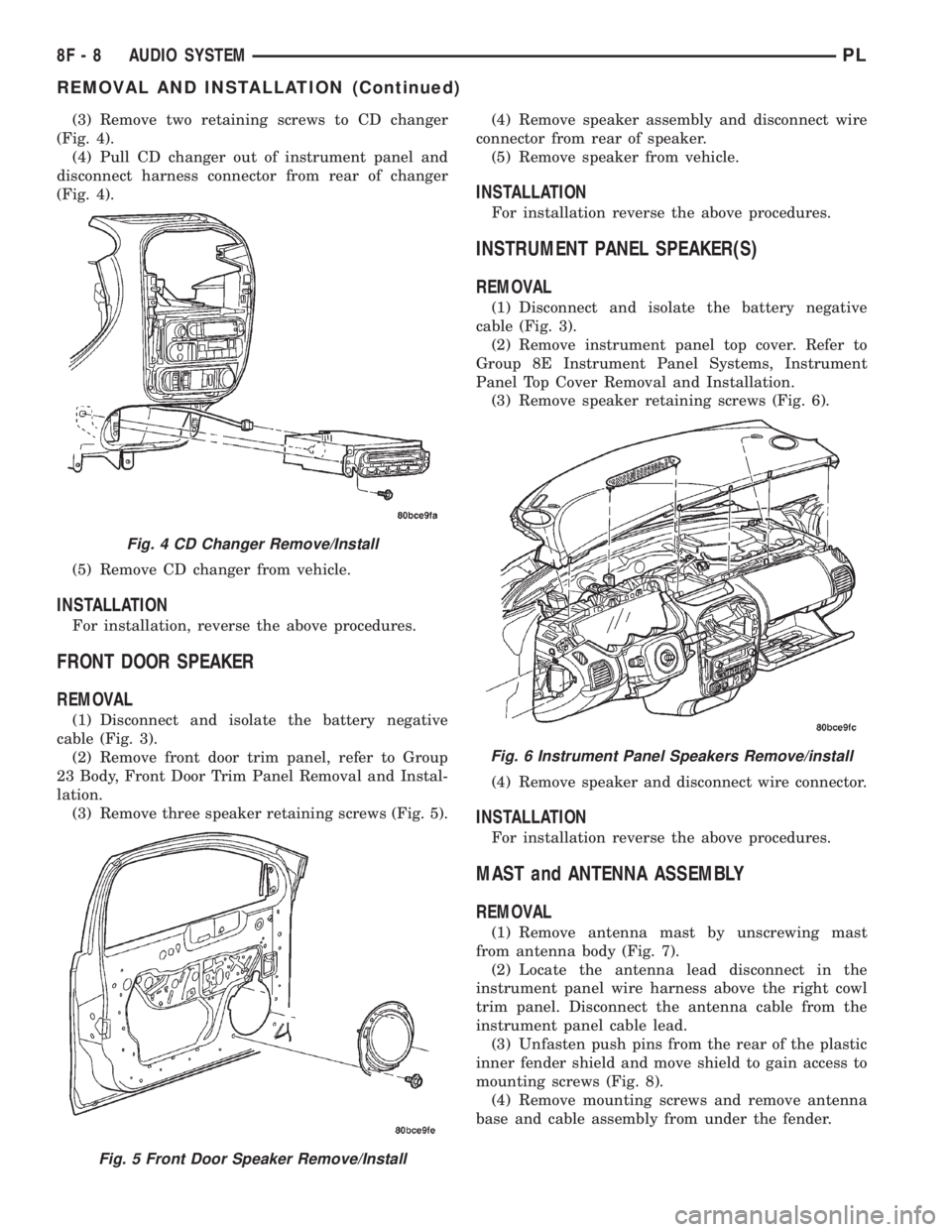
(3) Remove two retaining screws to CD changer
(Fig. 4).
(4) Pull CD changer out of instrument panel and
disconnect harness connector from rear of changer
(Fig. 4).
(5) Remove CD changer from vehicle.
INSTALLATION
For installation, reverse the above procedures.
FRONT DOOR SPEAKER
REMOVAL
(1) Disconnect and isolate the battery negative
cable (Fig. 3).
(2) Remove front door trim panel, refer to Group
23 Body, Front Door Trim Panel Removal and Instal-
lation.
(3) Remove three speaker retaining screws (Fig. 5).(4) Remove speaker assembly and disconnect wire
connector from rear of speaker.
(5) Remove speaker from vehicle.
INSTALLATION
For installation reverse the above procedures.
INSTRUMENT PANEL SPEAKER(S)
REMOVAL
(1) Disconnect and isolate the battery negative
cable (Fig. 3).
(2) Remove instrument panel top cover. Refer to
Group 8E Instrument Panel Systems, Instrument
Panel Top Cover Removal and Installation.
(3) Remove speaker retaining screws (Fig. 6).
(4) Remove speaker and disconnect wire connector.
INSTALLATION
For installation reverse the above procedures.
MAST and ANTENNA ASSEMBLY
REMOVAL
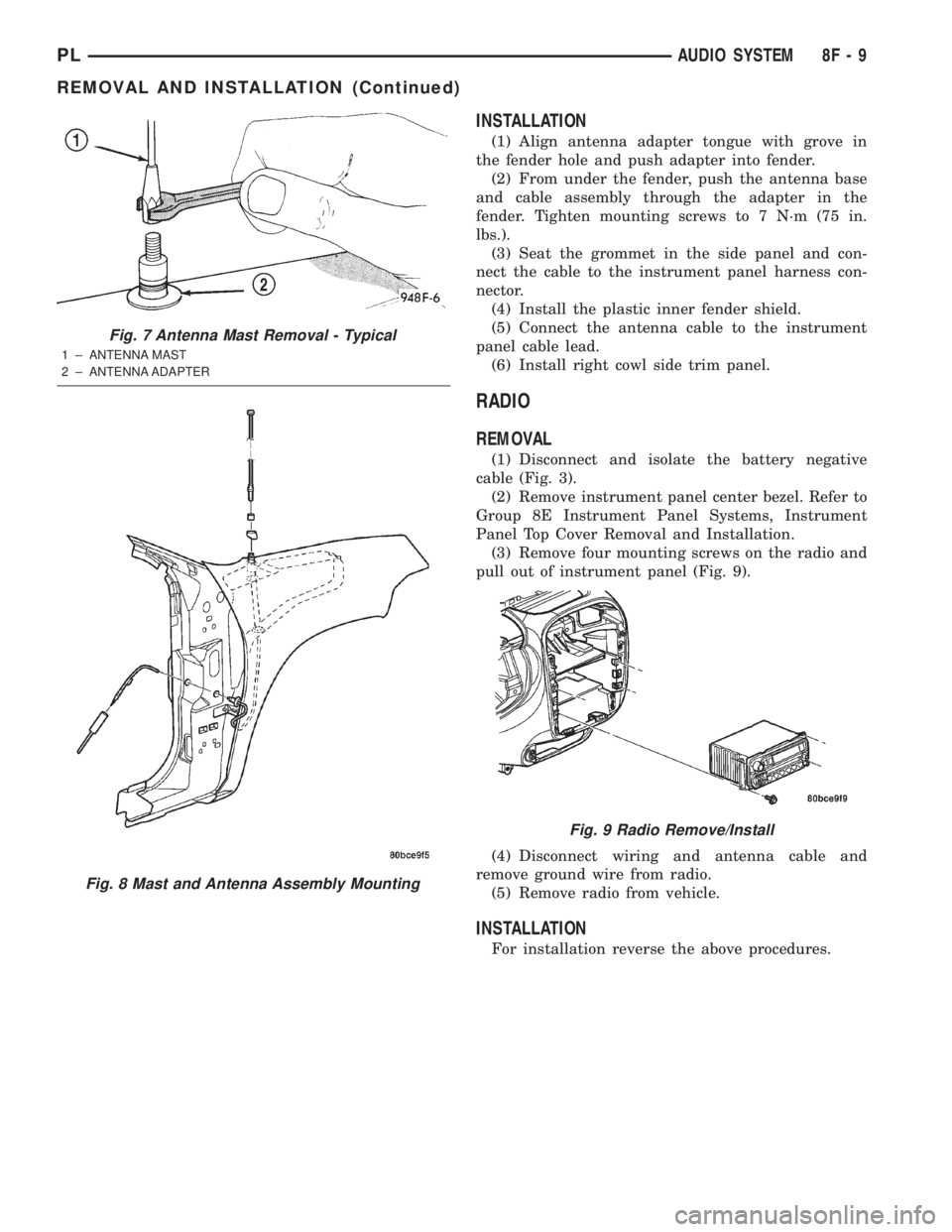
(1) Remove antenna mast by unscrewing mast
from antenna body (Fig. 7).
(2) Locate the antenna lead disconnect in the
instrument panel wire harness above the right cowl
trim panel. Disconnect the antenna cable from the
instrument panel cable lead.
(3) Unfasten push pins from the rear of the plastic
inner fender shield and move shield to gain access to
mounting screws (Fig. 8).
(4) Remove mounting screws and remove antenna
base and cable assembly from under the fender.
Fig. 4 CD Changer Remove/Install
Fig. 5 Front Door Speaker Remove/Install
Fig. 6 Instrument Panel Speakers Remove/install
8F - 8 AUDIO SYSTEMPL
REMOVAL AND INSTALLATION (Continued)
Page 278 of 1285
INSTALLATION
(1) Align antenna adapter tongue with grove in
the fender hole and push adapter into fender.
(2) From under the fender, push the antenna base
and cable assembly through the adapter in the
fender. Tighten mounting screws to 7 N´m (75 in.
lbs.).
(3) Seat the grommet in the side panel and con-
nect the cable to the instrument panel harness con-
nector.
(4) Install the plastic inner fender shield.
(5) Connect the antenna cable to the instrument
panel cable lead.
(6) Install right cowl side trim panel.
RADIO
REMOVAL
(1) Disconnect and isolate the battery negative
cable (Fig. 3).
(2) Remove instrument panel center bezel. Refer to
Group 8E Instrument Panel Systems, Instrument
Panel Top Cover Removal and Installation.
(3) Remove four mounting screws on the radio and
pull out of instrument panel (Fig. 9).
(4) Disconnect wiring and antenna cable and
remove ground wire from radio.
(5) Remove radio from vehicle.
INSTALLATION
For installation reverse the above procedures.
Fig. 7 Antenna Mast Removal - Typical
1 ± ANTENNA MAST
2 ± ANTENNA ADAPTER
Fig. 8 Mast and Antenna Assembly Mounting
Fig. 9 Radio Remove/Install
PLAUDIO SYSTEM 8F - 9
REMOVAL AND INSTALLATION (Continued)
Page 279 of 1285
REAR SHELF SPEAKER(S)
REMOVAL
(1) Disconnect and isolate the battery negative
cable (Fig. 3).
(2) Remove Rear Seat Cushion, Seat Back, and
Rear Shelf Panel. Refer to Group 23 Body, for
Removal and Installation.
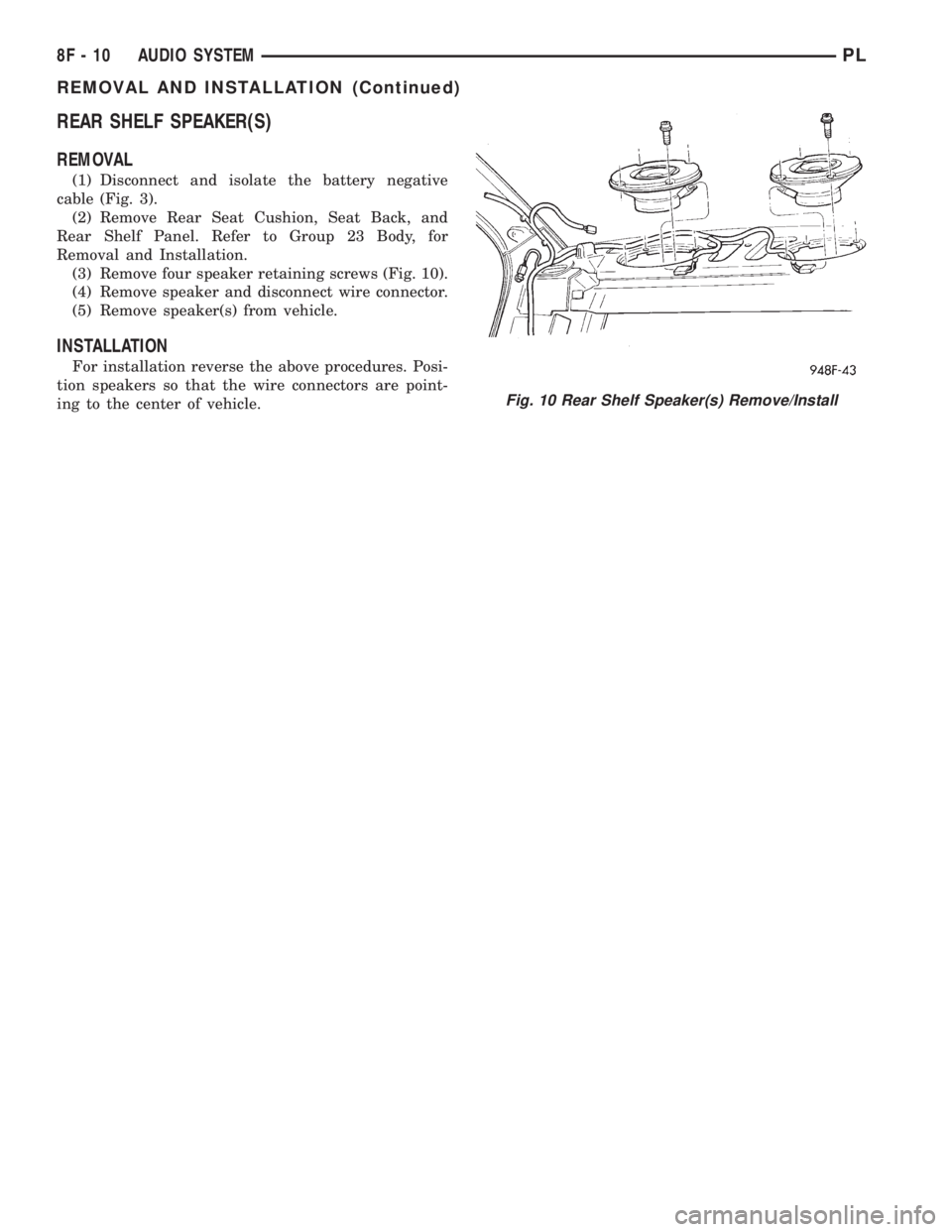
(3) Remove four speaker retaining screws (Fig. 10).
(4) Remove speaker and disconnect wire connector.
(5) Remove speaker(s) from vehicle.
INSTALLATION
For installation reverse the above procedures. Posi-
tion speakers so that the wire connectors are point-
ing to the center of vehicle.
Fig. 10 Rear Shelf Speaker(s) Remove/Install
8F - 10 AUDIO SYSTEMPL
REMOVAL AND INSTALLATION (Continued)
Page 280 of 1285
HORNS
TABLE OF CONTENTS
page page
DESCRIPTION AND OPERATION
INTRODUCTION..........................1
DIAGNOSIS AND TESTING
HORN..................................2
HORN RELAY............................2
HORN SWITCH...........................2HORN SYSTEM TEST......................2
REMOVAL AND INSTALLATION
HORN..................................4
HORN RELAY............................4
HORN SWITCH...........................5
DESCRIPTION AND OPERATION
INTRODUCTION
WARNING: ON VEHICLES EQUIPPED WITH AIR-
BAG, SEE GROUP 8M, PASSIVE RESTRAINT SYS-
TEMS FOR STEERING WHEEL REMOVAL.
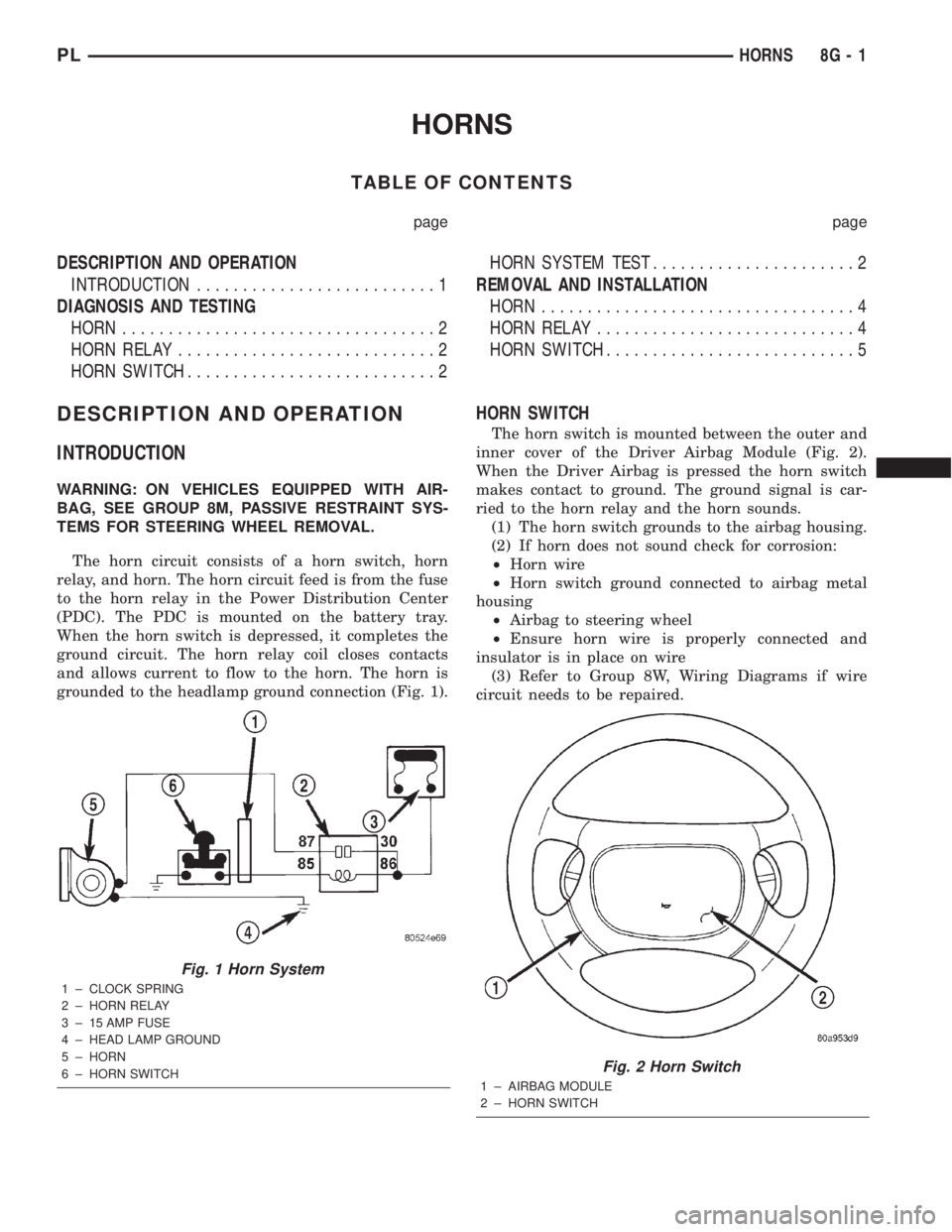
The horn circuit consists of a horn switch, horn
relay, and horn. The horn circuit feed is from the fuse
to the horn relay in the Power Distribution Center
(PDC). The PDC is mounted on the battery tray.
When the horn switch is depressed, it completes the
ground circuit. The horn relay coil closes contacts
and allows current to flow to the horn. The horn is
grounded to the headlamp ground connection (Fig. 1).
HORN SWITCH
The horn switch is mounted between the outer and
inner cover of the Driver Airbag Module (Fig. 2).
When the Driver Airbag is pressed the horn switch
makes contact to ground. The ground signal is car-
ried to the horn relay and the horn sounds.
(1) The horn switch grounds to the airbag housing.
(2) If horn does not sound check for corrosion:
²Horn wire
²Horn switch ground connected to airbag metal
housing
²Airbag to steering wheel
²Ensure horn wire is properly connected and
insulator is in place on wire
(3) Refer to Group 8W, Wiring Diagrams if wire
circuit needs to be repaired.
Fig. 1 Horn System
1 ± CLOCK SPRING
2 ± HORN RELAY
3 ± 15 AMP FUSE
4 ± HEAD LAMP GROUND
5 ± HORN
6 ± HORN SWITCH
Fig. 2 Horn Switch
1 ± AIRBAG MODULE
2 ± HORN SWITCH
PLHORNS 8G - 1
Page 281 of 1285
DIAGNOSIS AND TESTING
HORN
(1) Disconnect wire connector at horn.
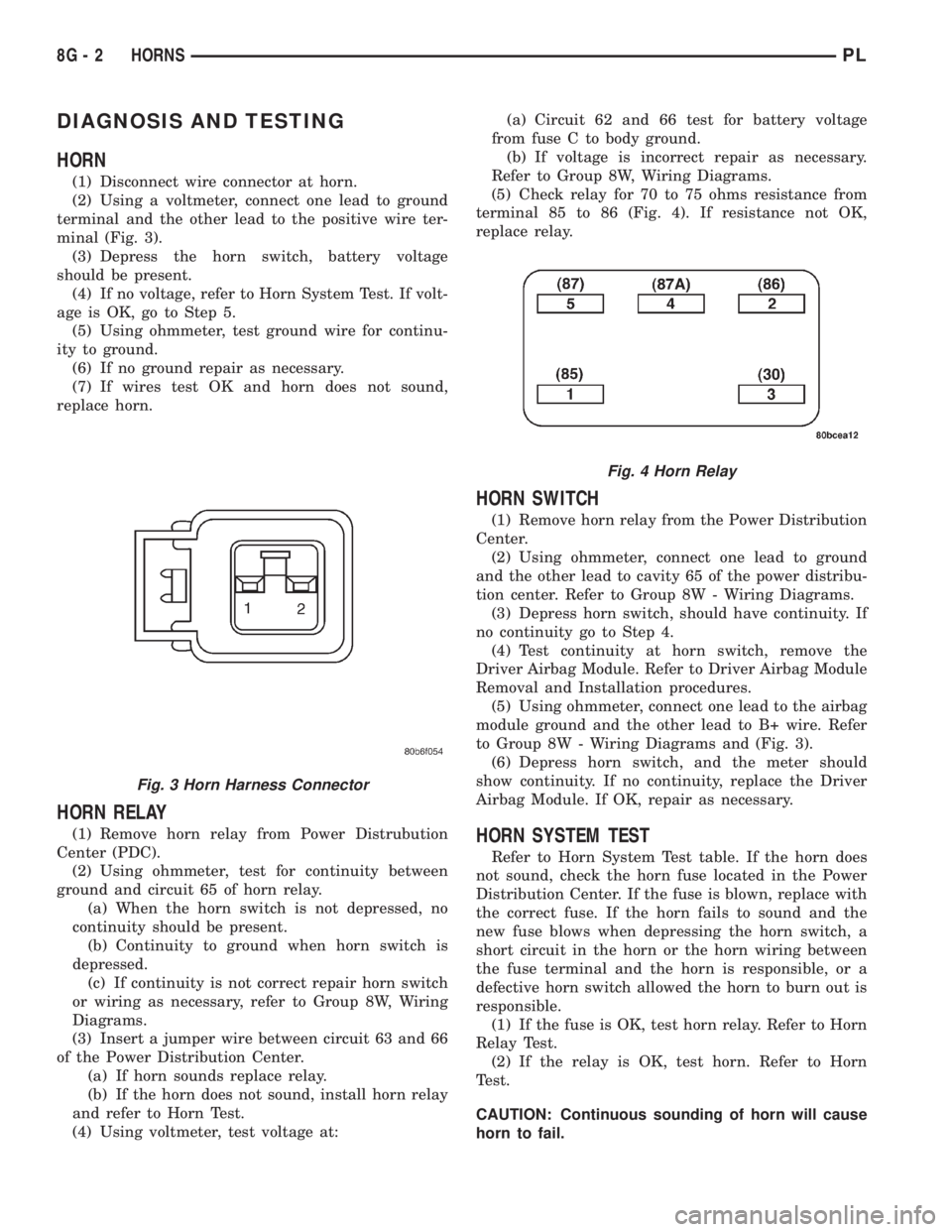
(2) Using a voltmeter, connect one lead to ground
terminal and the other lead to the positive wire ter-
minal (Fig. 3).
(3) Depress the horn switch, battery voltage
should be present.
(4) If no voltage, refer to Horn System Test. If volt-
age is OK, go to Step 5.
(5) Using ohmmeter, test ground wire for continu-
ity to ground.
(6) If no ground repair as necessary.
(7) If wires test OK and horn does not sound,
replace horn.
HORN RELAY
(1) Remove horn relay from Power Distrubution
Center (PDC).
(2) Using ohmmeter, test for continuity between
ground and circuit 65 of horn relay.
(a) When the horn switch is not depressed, no
continuity should be present.
(b) Continuity to ground when horn switch is
depressed.
(c) If continuity is not correct repair horn switch
or wiring as necessary, refer to Group 8W, Wiring
Diagrams.
(3) Insert a jumper wire between circuit 63 and 66
of the Power Distribution Center.
(a) If horn sounds replace relay.
(b) If the horn does not sound, install horn relay
and refer to Horn Test.
(4) Using voltmeter, test voltage at:(a) Circuit 62 and 66 test for battery voltage
from fuse C to body ground.
(b) If voltage is incorrect repair as necessary.
Refer to Group 8W, Wiring Diagrams.
(5) Check relay for 70 to 75 ohms resistance from
terminal 85 to 86 (Fig. 4). If resistance not OK,
replace relay.
HORN SWITCH
(1) Remove horn relay from the Power Distribution
Center.
(2) Using ohmmeter, connect one lead to ground
and the other lead to cavity 65 of the power distribu-
tion center. Refer to Group 8W - Wiring Diagrams.
(3) Depress horn switch, should have continuity. If
no continuity go to Step 4.
(4) Test continuity at horn switch, remove the
Driver Airbag Module. Refer to Driver Airbag Module
Removal and Installation procedures.
(5) Using ohmmeter, connect one lead to the airbag
module ground and the other lead to B+ wire. Refer
to Group 8W - Wiring Diagrams and (Fig. 3).
(6) Depress horn switch, and the meter should
show continuity. If no continuity, replace the Driver
Airbag Module. If OK, repair as necessary.
HORN SYSTEM TEST
Refer to Horn System Test table. If the horn does
not sound, check the horn fuse located in the Power
Distribution Center. If the fuse is blown, replace with
the correct fuse. If the horn fails to sound and the
new fuse blows when depressing the horn switch, a
short circuit in the horn or the horn wiring between
the fuse terminal and the horn is responsible, or a
defective horn switch allowed the horn to burn out is
responsible.
(1) If the fuse is OK, test horn relay. Refer to Horn
Relay Test.
(2) If the relay is OK, test horn. Refer to Horn
Test.
CAUTION: Continuous sounding of horn will cause
horn to fail.
Fig. 3 Horn Harness Connector
Fig. 4 Horn Relay
8G - 2 HORNSPL