Electronic Control Modules DODGE RAM 2002 Service Service Manual
[x] Cancel search | Manufacturer: DODGE, Model Year: 2002, Model line: RAM, Model: DODGE RAM 2002Pages: 2255, PDF Size: 62.07 MB
Page 562 of 2255
(3) Engage the two mounting hooks on the rear of
the overhead console housing in the mounting holes
in the inner roof panel.
(4) Slide the overhead console forward far enough
to align the two latches on the front of the housing
with their receptacles in the inner roof panel.
(5) Push upward firmly and evenly on the front of
the overhead console until each of the two latches is
fully engaged in its receptacle in the inner roof panel.
(6) Close the garage door opener storage bin door.
(7) Reconnect the battery negative cable.
SPECIAL TOOLS
OVERHEAD CONSOLE SPECIAL TOOL
COMPASS/MINI-TRIP
COMPUTER
DESCRIPTION
The compass mini-trip computer is located in the
premium overhead console on models equipped with
this option. Two compass mini-trip computer units
are available. One unit is used on vehicles not
equipped with the Vehicle Theft Security System
(VTSS) option, and the other is used on vehicles with
the VTSS option. Both compass mini-trip computer
units include the electronic control module, a Vacu-
um-Fluorescent Display (VFD), a compass flux-gate
unit and two push button function switches.
Compass mini-trip computer units for vehicles
equipped with the VTSS include a red Light-Emit-
ting Diode (LED) on their electronic circuit board.
This LED protrudes through the bottom of the lens
on the front of the overhead console unit, and serves
as the security indicator lamp. Refer toSecurity
Indicator Lampin Vehicle Theft/Security Systems
for more information on this feature.
The compass mini-trip computer module contains a
central processing unit and interfaces with other
electronic modules in the vehicle on the Chrysler Col-
lision Detection (CCD) data bus network. The CCD
data bus network allows the sharing of sensor infor-
mation. This helps to reduce wire harness complexity,
reduce internal controller hardware, and reduce com-
ponent sensor current loads. At the same time, thissystem provides increased reliability, enhanced diag-
nostics, and allows the addition of many new feature
capabilities.
The compass mini-trip computer provides several
electronic functions and features. Some of the func-
tions and features that the compass mini-trip com-
puter module supports and/or controls, include the
following display options:
²Compass and temperature- provides the out-
side temperature and one of eight compass readings
to indicate the direction the vehicle is facing.
²Compass and compass in degrees- provides
one of eight compass readings to indicate the direc-
tion the vehicle is facing and provides the compass
direction in degrees.
²Trip odometer (ODO)- shows the distance
travelled since the last trip computer reset.
²Average fuel economy (AVG ECO)- shows
the average fuel economy since the last trip computer
reset.
²Instant fuel economy (ECO)- shows the
present fuel economy based upon the current vehicle
distance and fuel used information.
²Distance to empty (DTE)- shows the esti-
mated distance that can be travelled with the fuel
remaining in the fuel tank. This estimated distance
is computed using the average miles-per-gallon from
the last 30 gallons of fuel used.
²Elapsed time (ET)- shows the accumulated
ignition-on time since the last trip computer reset.
²Blank screen- the compass mini-trip VFD is
turned off.
The ambient temperature sensor is hard wired to
the compass mini-trip computer module. Data input
for all other compass mini-trip computer functions,
including VFD dimming level, is received through
CCD data bus messages. The compass mini-trip com-
puter uses its internal programming and all of these
inputs to calculate and display the requested data. If
the data displayed is incorrect, perform the self-diag-
nostic tests as described in this group. If these tests
prove inconclusive, the use of a DRBIIItscan tool
and the proper Diagnostic Procedures manual are
recommended for further testing of the compass
mini-trip computer module and the CCD data bus.
The compass mini-trip computer module cannot be
repaired, and is available for service only as a unit. If
faulty or damaged, the complete module must be
replaced.
OPERATION
The compass mini-trip computer only operates with
the ignition switch in the On position. When the igni-
tion switch is turned to the On position, all of the
segments in the compass mini-trip computer VFD
will be turned on for one second, then the display
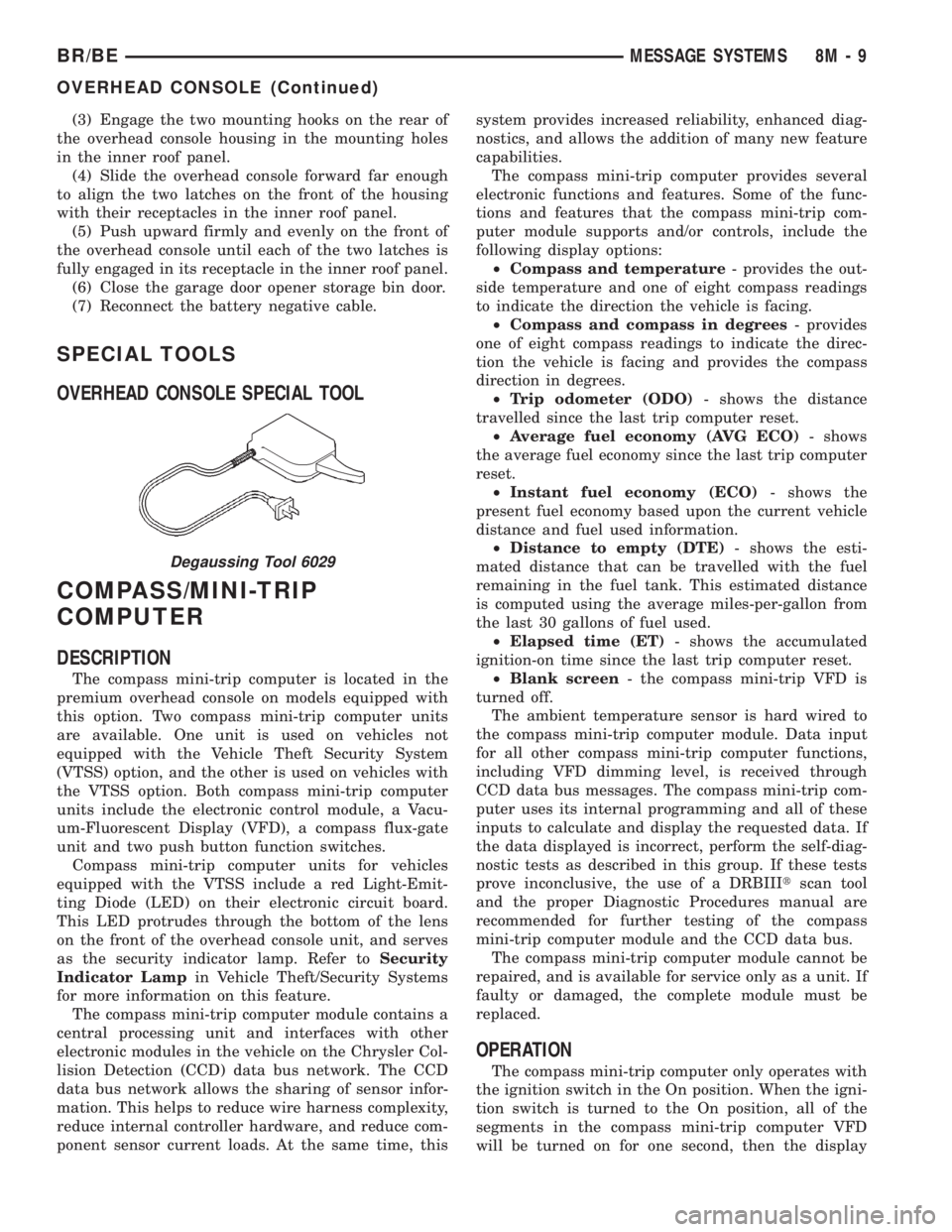
Degaussing Tool 6029
BR/BEMESSAGE SYSTEMS 8M - 9
OVERHEAD CONSOLE (Continued)
Page 568 of 2255
POWER SYSTEMS
TABLE OF CONTENTS
page page
POWER LOCKS............................ 1
POWER MIRRORS........................ 11POWER SEAT SYSTEM..................... 16
POWER WINDOWS........................ 23
POWER LOCKS
TABLE OF CONTENTS
page page
POWER LOCKS
DESCRIPTION
DESCRIPTION - POWER LOCKS..........1
DESCRIPTION - REMOTE KEYLESS ENTRY
SYSTEM.............................2
OPERATION
OPERATION - POWER LOCKS............3
OPERATION - REMOTE KEYLESS ENTRY
SYSTEM.............................4
DIAGNOSIS AND TESTING
DIAGNOSIS AND TESTING - POWER
LOCKS..............................4
DIAGNOSIS AND TESTING - POWER LOCK
& REMOTE KEYLESS ENTRY SYSTEM.....5
DOOR CYLINDER LOCK SWITCH
DESCRIPTION..........................5
OPERATION............................5
DIAGNOSIS AND TESTING - DOOR
CYLINDER LOCK SWITCH...............6
REMOVAL.............................6
INSTALLATION..........................6POWER LOCK MOTOR
DESCRIPTION..........................7
OPERATION............................7
DIAGNOSIS AND TESTING - POWER LOCK
MOTOR ..............................7
REMOTE KEYLESS ENTRY TRANSMITTER
DESCRIPTION..........................7
OPERATION............................8
DIAGNOSIS AND TESTING - REMOTE
KEYLESS ENTRY TRANSMITTER..........8
STANDARD PROCEDURE
STANDARD PROCEDURE - RKE
TRANSMITTER PROGRAMMING...........8
STANDARD PROCEDURE - REMOTE
KEYLESS ENTRY TRANSMITTER
BATTERIES...........................8
POWER LOCK SWITCH
DESCRIPTION..........................8
OPERATION............................8
DIAGNOSIS AND TESTING - POWER LOCK
SWITCH.............................9
POWER LOCKS
DESCRIPTION
DESCRIPTION - POWER LOCKS
Two different power lock systems are offered as
optional factory-installed equipment on this model.
Both power lock systems are offered only on models
that are also equipped with power windows. On mod-
els without the optional Remote Keyless Entry (RKE)
system, a base version of the Central Timer Module
(CTM) is used. In this version of the power lock sys-
tem, the power lock switches provide the only controlover the operation of the power lock motors. On mod-
els with the optional RKE system, a high-line or pre-
mium version of the CTM is used to provide many
electronic features and conveniences that are not pos-
sible with the base version CTM. In this power lock
system, the power lock motors are controlled by the
microprocessor-based high-line or premium version of
the CTM based upon the CTM programming and
electronic message inputs received from other elec-
tronic modules in the vehicle over the Chrysler Col-
lision Detection (CCD) data bus network, Radio
Frequency (RF) inputs received from the RKE trans-
mitters, as well as many hard wired inputs.
BR/BEPOWER SYSTEMS 8N - 1
Page 595 of 2255
²Airbag Control Module- The Airbag Control
Module (ACM) is located in a stamped mounting
bracket on the floor panel transmission tunnel, below
the center of the instrument panel.
²Airbag Indicator- The airbag indicator is inte-
gral to the ElectroMechanical Instrument Cluster
(EMIC), which is located on the instrument panel in
front of the driver.
²Clockspring- The clockspring is located near
the top of the steering column, directly beneath the
steering wheel.
²Driver Airbag- The driver airbag is located in
the center of the steering wheel, beneath the driver
airbag trim cover.
²Driver Knee Blocker- The driver knee blocker
is a molded plastic structural unit secured to the
back side of and integral to the instrument panel
steering column opening cover.
²Passenger Airbag- The passenger airbag is
located on the instrument panel, beneath the passen-
ger airbag door on the instrument panel above the
glove box on the passenger side of the vehicle.
²Passenger Airbag On/Off Switch- The pas-
senger airbag on/off switch is located in a dedicated
opening in the upper right corner of the instrument
panel cluster bezel, to the right of the center panel
outlets of the climate control system.
²Passenger Knee Blocker- The passenger knee
blocker is a structural reinforcement that is integral
to and concealed within the glove box door.
The ACM and the EMIC each contain a central
processing unit and programming that allow them to
communicate with each other using the Chrysler Col-
lision Detection (CCD) data bus network. This
method of communication is used for control of the
airbag indicator on all models. (Refer to 8 - ELEC-
TRICAL/ELECTRONIC CONTROL MODULES/
COMMUNICATION - DESCRIPTION).Hard wired circuitry connects the airbag system
components to each other through the electrical sys-
tem of the vehicle. These hard wired circuits are
integral to several wire harnesses, which are routed
throughout the vehicle and retained by many differ-
ent methods. These circuits may be connected to each
other, to the vehicle electrical system, and to the air-
bag system components through the use of a combi-
nation of soldered splices, splice block connectors,
and many different types of wire harness terminal
connectors and insulators. Refer to the appropriate
wiring information. The wiring information includes
wiring diagrams, proper wire and connector repair
procedures, further details on wire harness routing
and retention, as well as pin-out and location views
for the various wire harness connectors, splices and
grounds.OPERATION
The airbag system is referred to as a supplemental
restraint system because it was designed and is
intended to enhance the protection for the front seat
occupants of the vehicleonlywhen used in conjunc-
tion with the seat belts. It is referred to as a passive
system because the vehicle occupants are not
required to do anything to make it work. The pri-
mary passenger restraints in this or any other vehi-
cle are the standard equipment factory-installed seat
belts. Seat belts are referred to as an active restraint
because the vehicle occupants are required to physi-
cally fasten and properly adjust these restraints in
order to benefit from them. The vehicle occupants
must be wearing their seat belts in order to obtain
the maximum safety benefit from the factory-in-
stalled airbag system.
The airbag system electrical circuits are continu-
ously monitored and controlled by a microprocessor
and software contained within the Airbag Control
Module (ACM). An airbag indicator in the ElectroMe-
chanical Instrument Cluster (EMIC) lights for about
seven seconds as a bulb test each time the ignition
switch is turned to the On or Start positions. Follow-
ing the bulb test, the airbag indicator is turned on or
off by the ACM to indicate the status of the airbag
system. If the airbag indicator comes on at any time
other than during the bulb test, it indicates that
there is a problem in the airbag system electrical cir-
cuits. Such a problem may cause the airbags not to
deploy when required, or to deploy when not
required.
The clockspring on the top of the steering column
allows a continuous electrical circuit to be main-
tained between the stationary steering column and
the driver airbag inflator, which rotates with the
steering wheel. The passenger airbag on/off switch
allows the passenger side airbag to be disabled when
Fig. 1 SRS Logo
8O - 2 RESTRAINTSBR/BE
RESTRAINTS (Continued)
Page 599 of 2255
fault or malfunction. Refer to the appropriate diag-
nostic information to diagnose the problem.
SPECIAL TOOLS - AIRBAG SYSTEM
AIRBAG CONTROL MODULE
DESCRIPTION
The Airbag Control Module (ACM) is concealed
underneath the plastic ACM trim cover (automatic
transmission) or center console (manual transmis-
sion), directly below the instrument panel in the pas-
senger compartment of the vehicle. The ACM is
secured with screws to a stamped steel mounting
bracket located under the instrument panel center
support bracket on the floor panel transmission tun-
nel. The ACM contains an electronic microprocessor,
an electronic impact sensor, an electromechanical saf-
ing sensor, and an energy storage capacitor. TheACM is connected to the vehicle electrical system
through a take out and connector of the instrument
panel wire harness.
The ACM cannot be repaired or adjusted and, if
damaged or faulty, it must be replaced.
OPERATION
The microprocessor in the ACM contains the airbag
system logic circuits, and it monitors and controls all
of the airbag system components. The ACM also uses
On-Board Diagnostics (OBD) and can communicate
with other electronic modules in the vehicle as well
as with the DRBIIItscan tool using the Chrysler
Collision Detection (CCD) data bus network. This
method of communication is used for control of the
airbag indicator in the ElectroMechanical Instrument
Cluster (EMIC) and for airbag system diagnosis and
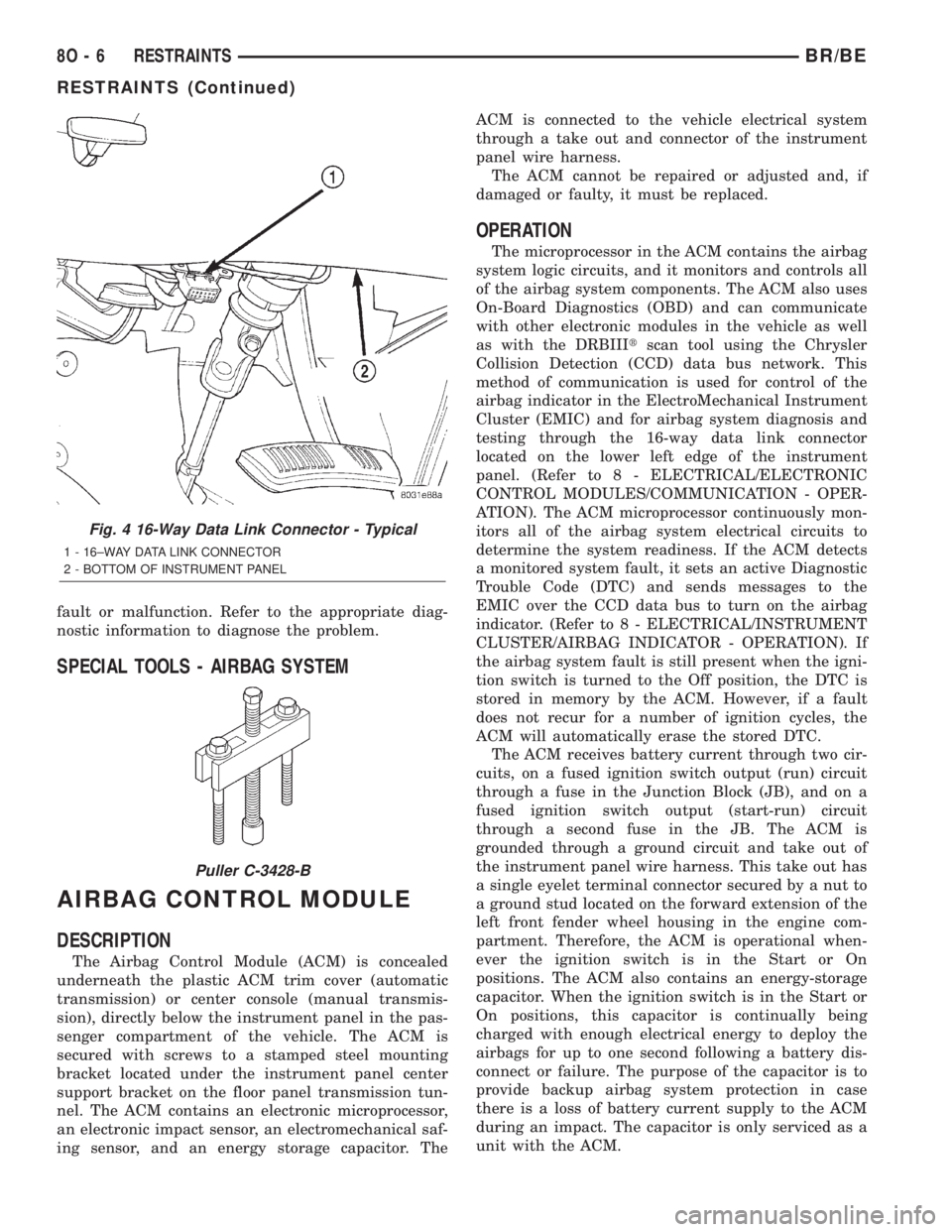
testing through the 16-way data link connector
located on the lower left edge of the instrument
panel. (Refer to 8 - ELECTRICAL/ELECTRONIC
CONTROL MODULES/COMMUNICATION - OPER-
ATION). The ACM microprocessor continuously mon-
itors all of the airbag system electrical circuits to
determine the system readiness. If the ACM detects
a monitored system fault, it sets an active Diagnostic
Trouble Code (DTC) and sends messages to the
EMIC over the CCD data bus to turn on the airbag
indicator. (Refer to 8 - ELECTRICAL/INSTRUMENT
CLUSTER/AIRBAG INDICATOR - OPERATION). If
the airbag system fault is still present when the igni-
tion switch is turned to the Off position, the DTC is
stored in memory by the ACM. However, if a fault
does not recur for a number of ignition cycles, the
ACM will automatically erase the stored DTC.
The ACM receives battery current through two cir-
cuits, on a fused ignition switch output (run) circuit
through a fuse in the Junction Block (JB), and on a
fused ignition switch output (start-run) circuit
through a second fuse in the JB. The ACM is
grounded through a ground circuit and take out of
the instrument panel wire harness. This take out has
a single eyelet terminal connector secured by a nut to
a ground stud located on the forward extension of the
left front fender wheel housing in the engine com-
partment. Therefore, the ACM is operational when-
ever the ignition switch is in the Start or On
positions. The ACM also contains an energy-storage
capacitor. When the ignition switch is in the Start or
On positions, this capacitor is continually being
charged with enough electrical energy to deploy the
airbags for up to one second following a battery dis-
connect or failure. The purpose of the capacitor is to
provide backup airbag system protection in case
there is a loss of battery current supply to the ACM
during an impact. The capacitor is only serviced as a
unit with the ACM.
Fig. 4 16-Way Data Link Connector - Typical
1 - 16±WAY DATA LINK CONNECTOR
2 - BOTTOM OF INSTRUMENT PANEL
Puller C-3428-B
8O - 6 RESTRAINTSBR/BE
RESTRAINTS (Continued)
Page 640 of 2255
VEHICLE THEFT SECURITY
TABLE OF CONTENTS
page page
VEHICLE THEFT SECURITY
DESCRIPTION..........................1
OPERATION............................2
DIAGNOSIS AND TESTING - VEHICLE THEFT
SECURITY SYSTEM....................3VTSS INDICATOR
DESCRIPTION..........................3
OPERATION............................3
DIAGNOSIS AND TESTING - VTSS
INDICATOR...........................4
VEHICLE THEFT SECURITY
DESCRIPTION
The Vehicle Theft Security System (VTSS) is an
available factory-installed option on this model when
it is also equipped with the high-line or premium
Central Timer Module (CTM). The VTSS is designed
to provide perimeter protection against unauthorized
use or tampering by monitoring the vehicle doors and
the ignition system. If unauthorized vehicle use or
tampering is detected, the system responds by puls-
ing the horn, flashing the headlamps, and preventing
the engine from operating.
The VTSS includes the following major compo-
nents, which are described in further detail else-
where in this service manual:
²Central Timer Module- The high-line or pre-
mium Central Timer Module (CTM) is located under
the driver side end of the instrument panel, inboard
of the instrument panel steering column opening.
The high-line or premium CTM contains a micropro-
cessor and software that allow it to provide many
electronic functions and features not available with
base version of the CTM, including the VTSS. The
CTM provides all of the proper VTSS features and
outputs based upon the monitored inputs. The CTM
circuitry monitors hard wired switch inputs, as well
as message inputs received from other vehicle elec-
tronic modules over the Chrysler Collision Detection
(CCD) data bus network. (Refer to 8 - ELECTRICAL/
ELECTRONIC CONTROL MODULES/BODY CON-
TROL/CENTRAL TIMER MODULE -
DESCRIPTION).
²Door Ajar Switch- A door ajar switch is
located on the hinge pillar of each front door in the
vehicle. These switches provide an input to the VTSS
indicating whether the door is opened or closed.
(Refer to 8 - ELECTRICAL/LAMPS/LIGHTING -
INTERIOR/DOOR AJAR SWITCH - DESCRIPTION).
²Door Cylinder Lock Switch- A door cylinder
lock switch is located on the back of each front door
lock cylinder. This switch provides an input to theVTSS indicating whether the system should remain
armed or be disarmed. (Refer to 8 - ELECTRICAL/
POWER LOCKS/DOOR CYLINDER LOCK SWITCH
- DESCRIPTION).
²Horn Relay- The horn relay is located in the
Power Distribution Center (PDC) in the engine com-
partment near the battery. The horn relay is nor-
mally activated by the horn switch to control the
sounding of the vehicle horn or horns. However, it
can also be activated by an output of the Central
Timer Module (CTM) to provide an audible indication
that unauthorized vehicle use or tampering has been
detected. (Refer to 8 - ELECTRICAL/HORN/HORN
RELAY - DESCRIPTION).
²Headlamp Relay- The headlamp relay (also
known as the security relay) is located in the Power
Distribution Center (PDC) in the engine compart-
ment near the battery. The headlamp relay is nor-
mally activated by the Central Timer Module (CTM)
based upon inputs from the Remote Keyless Entry
(RKE) panic mode feature. However, it can also be
activated by an output of the CTM to flash the head-
lamp low beams to provide a highly visible indication
that unauthorized vehicle use or tampering has been
detected. (Refer to 8 - ELECTRICAL/LAMPS/LIGHT-
ING - EXTERIOR/HEADLAMP RELAY - DESCRIP-
TION).
²VTSS Indicator- A red Light Emitting Diode
(LED) located on the lower surface of the overhead
console near the windshield is illuminated by an out-
put of the Central Timer Module (CTM) to indicate
the status of the VTSS. This LED is integral to the
electronic circuit board for the Compass Mini-Trip
Computer (CMTC). (Refer to 8 - ELECTRICAL/
OVERHEAD CONSOLE/COMPASS/MINI-TRIP
COMPUTER - DESCRIPTION).
The engine no-run feature of the VTSS relies upon
communication between the high-line or premium
CTM and the Powertrain Control Module (PCM) over
the Chrysler Collision Detection (CCD) data bus net-
work.
BR/BEVEHICLE THEFT SECURITY 8Q - 1
Page 642 of 2255
POWER-UP MODE
When the armed VTSS senses that the battery has
been disconnected and reconnected, it enters its pow-
er-up mode. In the power-up mode the alarm system
remains armed following a battery failure or discon-
nect. If the VTSS was armed prior to a battery dis-
connect or failure, the technician or vehicle operator
will have to actively or passively disarm the alarm
system after the battery is reconnected. The pow-
er-up mode will also apply if the battery goes dead
while the system is armed, and battery jump-starting
is attempted. The engine no-run feature will prevent
the engine from starting until the alarm system has
been actively or passively disarmed. The VTSS will
be armed until the technician or vehicle operator has
actively or passively disarmed the alarm system. If
the VTSS is in the disarmed mode prior to a battery
disconnect or failure, it will remain disarmed after
the battery is reconnected or replaced, or if jump-
starting is attempted.
TAMPER ALERT
The VTSS tamper alert feature will sound the horn
three times upon disarming, if the alarm was trig-
gered and has since timed-out (about fifteen min-
utes). This feature alerts the vehicle operator that
the VTSS alarm was activated while the vehicle was
unattended.
DIAGNOSIS AND TESTING - VEHICLE THEFT
SECURITY SYSTEM
The VTSS-related hard wired inputs to and out-
puts from the high-line or premium Central Timer
Module (CTM) may be diagnosed and tested using
conventional diagnostic tools and procedures. Refer
to the appropriate wiring information. The wiring
information includes wiring diagrams, proper wire
and connector repair procedures, further details on
wire harness routing and retention, as well as pin-
out and location views for the various wire harness
connectors, splices and grounds.
However, conventional diagnostic methods may not
prove conclusive in the diagnosis of the CTM, the
Powertrain Control Module (PCM), or the Chrysler
Collision Detection (CCD) data bus network. In order
to obtain conclusive testing of the VTSS, the CTM,
the PCM, and the CCD data bus network must also
be checked. The most reliable, efficient, and accurate
means to diagnose the VTSS requires the use of a
DRBIIItscan tool. Refer to the appropriate diagnos-
tic information. The DRBIIItscan tool can provide
confirmation that the CCD data bus network is func-
tional, that all of the electronic modules are sending
and receiving the proper messages over the CCD
data bus, and that these modules are receiving the
proper hard wired inputs and responding with theproper hard wired outputs needed to perform their
functions. See the ªVehicle Theft Security Systemº
menu item on the DRBIIItscan tool.
WARNING: ON VEHICLES EQUIPPED WITH AIR-
BAGS, DISABLE THE AIRBAG SYSTEM BEFORE
ATTEMPTING ANY STEERING WHEEL, STEERING
COLUMN, OR INSTRUMENT PANEL COMPONENT
DIAGNOSIS OR SERVICE. DISCONNECT AND ISO-
LATE THE BATTERY NEGATIVE (GROUND) CABLE,
THEN WAIT TWO MINUTES FOR THE AIRBAG SYS-
TEM CAPACITOR TO DISCHARGE BEFORE PER-
FORMING FURTHER DIAGNOSIS OR SERVICE. THIS
IS THE ONLY SURE WAY TO DISABLE THE AIRBAG
SYSTEM. FAILURE TO TAKE THE PROPER PRE-
CAUTIONS COULD RESULT IN ACCIDENTAL AIR-
BAG DEPLOYMENT AND POSSIBLE PERSONAL
INJURY.
VTSS INDICATOR
DESCRIPTION
The Vehicle Theft Security System (VTSS) indica-
tor consists of a red Light-Emitting Diode (LED)
located on the electronic circuit board of the Compass
Mini-Trip Computer (CMTC) within the overhead
console. The LED extends through a hole in the
CMTC lens located near the forward end of the over-
head console housing near the windshield.
The VTSS indicator cannot be adjusted or repaired
and, if faulty or damaged, the entire CMTC unit
must be replaced. (Refer to 8 - ELECTRICAL/OVER-
HEAD CONSOLE/COMPASS/MINI-TRIP COM-
PUTER - DESCRIPTION).
OPERATION
The Vehicle Theft Security System (VTSS) indica-
tor gives a visible indication of the VTSS arming sta-
tus. One side of Light-Emitting Diode (LED) in the
VTSS indicator is connected to battery current
through a fused B(+) circuit and a fuse in the Junc-
tion Block (JB), so the indicator remains functional
regardless of the ignition switch position. The other
side of the LED is hard wired to the Central Timer
Module (CTM), which controls the operation of the
VTSS indicator by pulling this side of the LED cir-
cuit to ground. When the VTSS arming is in
progress, the CTM will flash the LED rapidly on and
off for about fifteen seconds. When the VTSS has
been successfully armed, the CTM will flash the LED
on and off continually at a much slower rate until
the VTSS has been disarmed. The VTSS indicator
can be diagnosed using conventional diagnostic tools
and methods.
BR/BEVEHICLE THEFT SECURITY 8Q - 3
VEHICLE THEFT SECURITY (Continued)
Page 644 of 2255
WIPERS/WASHERS
TABLE OF CONTENTS
page page
WIPERS/WASHERS
DESCRIPTION..........................1
OPERATION............................2
DIAGNOSIS AND TESTING - WIPER &
WASHER SYSTEM.....................3
CLEANING - WIPER & WASHER SYSTEM.....6
INSPECTION - WIPER & WASHER SYSTEM . . . 6
WASHER FLUID LEVEL SWITCH
DESCRIPTION..........................7
OPERATION............................7
REMOVAL.............................8
INSTALLATION..........................8
WASHER HOSES/TUBES
DESCRIPTION..........................8
OPERATION............................8
WASHER NOZZLE
DESCRIPTION..........................9
OPERATION............................9
REMOVAL.............................9
INSTALLATION..........................9
WASHER PUMP/MOTOR
DESCRIPTION..........................9
OPERATION............................9
REMOVAL.............................10
INSTALLATION.........................10
WASHER RESERVOIR
DESCRIPTION.........................10OPERATION...........................10
REMOVAL.............................10
INSTALLATION.........................11
WIPER ARM
DESCRIPTION.........................11
OPERATION...........................11
REMOVAL.............................12
INSTALLATION.........................12
WIPER BLADE
DESCRIPTION.........................12
OPERATION...........................13
REMOVAL.............................13
INSTALLATION.........................13
WIPER MODULE
DESCRIPTION.........................13
OPERATION...........................14
REMOVAL.............................14
INSTALLATION.........................14
WIPER RELAY
DESCRIPTION.........................15
OPERATION...........................15
DIAGNOSIS AND TESTING - WIPER RELAY . . . 16
REMOVAL.............................17
INSTALLATION.........................17
WIPERS/WASHERS
DESCRIPTION
An electrically operated intermittent wiper and
washer system is standard factory-installed safety
equipment on this model. The wiper and washer sys-
tem includes the following major components, which
are described in further detail elsewhere in this ser-
vice information:
²Central Timer Module- The Central Timer
Module (CTM) is located under the driver side end of
the instrument panel, inboard of the instrument
panel steering column opening. A base version of the
CTM is used on base models of this vehicle. The base
version of the CTM combines the functions of a
chime module and an intermittent wipe module in a
single unit. The high-line version of the CTM is used
on high-line vehicles. The high-line CTM provides all
of the functions of the base version of the CTM, but
also is used to control and integrate many additionalelectronic functions and features included on high-
line models. The premium version of the CTM is the
same as the high-line version, but is used only on
models equipped with the heated seat option. The
high-line and premium versions of the CTM contain
integrated circuitry, a central processing unit and the
programming to provide all of the proper wiper and
washer system features based upon the monitored
inputs. The high-line and premium CTM circuitry
monitors hard wired switch inputs, as well as mes-
sage inputs received from other vehicle electronic
modules on the Chrysler Collision Detection (CCD)
data bus network. (Refer to 8 - ELECTRICAL/ELEC-
TRONIC CONTROL MODULES/BODY CONTROL/
CENTRAL TIMER MODULE - DESCRIPTION).
²Multi-Function Switch- The multi-function
switch is secured to the left side of the steering col-
umn, just below the steering wheel. Only the control
stalk for the multi-function switch is visible, the
remainder of the switch is concealed beneath the
steering column shrouds. The multi-function switch
BR/BEWIPERS/WASHERS 8R - 1
Page 1354 of 2255
FUEL DELIVERY - DIESEL
DESCRIPTION
DESCRIPTION - DIESEL FUEL DELIVERY
SYSTEM
The fuel system on the Cummins 24 valveÐTurbo
Diesel Engine uses anelectronically controlled
fuel injection pump with three control modules.
Also refer to the Powertrain Control Module (PCM)
or Engine Control Module sections.
Some fuel system components are shown in (Fig.
1).
The fuel delivery system consists of the:
²Accelerator pedal
²Air cleaner housing/element
²Fuel drain manifold (passage)
²Fuel filter/water separator
²Fuel heater
²Fuel heater relay
²Fuel transfer (lift) pump
²Fuel injection pump
²Fuel injectors
²Fuel heater temperature sensor
²Fuel tank
²Fuel tank filler/vent tube assembly²Fuel tank filler tube cap
²Fuel tank module containing the rollover valve,
fuel gauge sending unit (fuel level sensor) and a sep-
arate fuel filter located at bottom of tank module
²Fuel tubes/lines/hoses
²High-pressure fuel injector lines
²In-tank fuel filter (at bottom of fuel tank mod-
ule)
²Low-pressure fuel supply lines
²Low-pressure fuel return line
²Overflow valve
²Quick-connect fittings
²Throttle cable
²Water draining
OPERATION
WARNING: HIGH-PRESSURE FUEL LINES DELIVER
DIESEL FUEL UNDER EXTREME PRESSURE FROM
THE INJECTION PUMP TO THE FUEL INJECTORS.
THIS MAY BE AS HIGH AS 120,000 KPA (17,405
PSI). USE EXTREME CAUTION WHEN INSPECTING
FOR HIGH-PRESSURE FUEL LEAKS. INSPECT FOR
HIGH-PRESSURE FUEL LEAKS WITH A SHEET OF
CARDBOARD. HIGH FUEL INJECTION PRESSURE
CAN CAUSE PERSONAL INJURY IF CONTACT IS
MADE WITH THE SKIN.
BR/BEFUEL DELIVERY - DIESEL 14 - 55
Page 2156 of 2255
(1) Disconnect and isolate the battery negative
cable.
(2) If the vehicle is not equipped with air condi-
tioning, go to Step 6. If the vehicle is equipped with
air conditioning, recover the refrigerant from the sys-
tem. (Refer to 24 - HEATING & AIR CONDITION-
ING/PLUMBING - STANDARD PROCEDURE -
REFRIGERANT RECOVERY)
(3) Remove the instrument panel from the vehicle.
Refer to Instrument Panel System for the procedures.
(4) Disconnect the liquid line refrigerant line fit-
ting from the evaporator inlet tube. (Refer to 24 -
HEATING & AIR CONDITIONING/PLUMBING -
STANDARD PROCEDURE - A/C LINE COUPLERS)
Install plugs in, or tape over all of the opened refrig-
erant line fittings.
(5) Remove the accumulator. (Refer to 24 - HEAT-
ING & AIR CONDITIONING/PLUMBING/ACCU-
MULATOR - REMOVAL) Install plugs in, or tape
over all of the opened refrigerant line fittings.
(6) Drain the engine cooling system(Refer to 7 -
COOLING - STANDARD PROCEDURE) and (Refer
to 7 - COOLING - STANDARD PROCEDURE).
(7) Disconnect the heater hoses from the heater
core tubes. Refer to Cooling for the procedures.
Install plugs in, or tape over the opened heater core
tubes.
(8) Remove the Powertrain Control Module (PCM)
from the dash panel and set it aside, but do not
unplug the PCM wire harness connectors. Refer to
Electronic Control Modules for the procedures.
(9) Remove the nuts from the HVAC housing
mounting studs on the engine compartment side of
the dash panel.
(10) Remove the nuts that secure the HVAC hous-
ing to the mounting studs on the passenger compart-
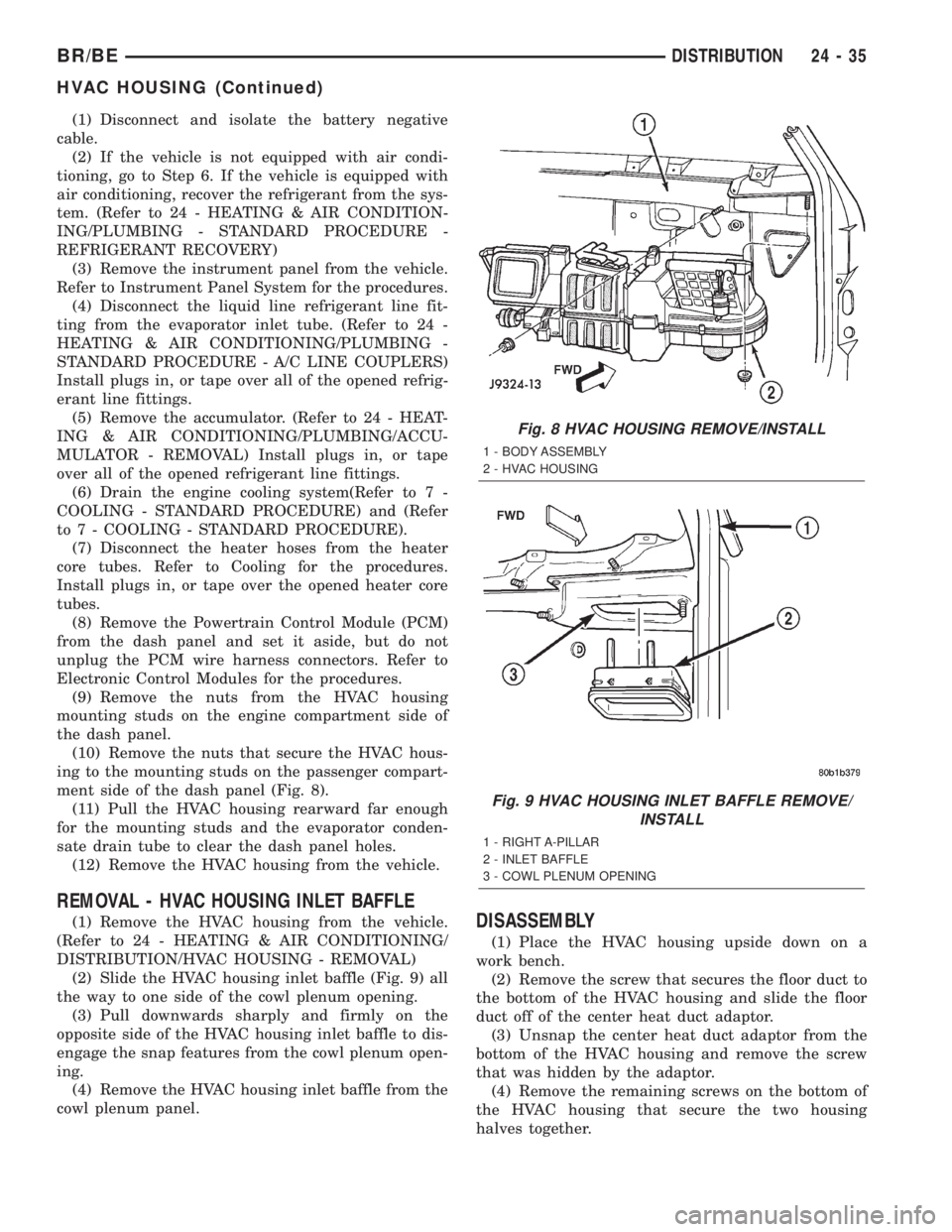
ment side of the dash panel (Fig. 8).
(11) Pull the HVAC housing rearward far enough
for the mounting studs and the evaporator conden-
sate drain tube to clear the dash panel holes.
(12) Remove the HVAC housing from the vehicle.
REMOVAL - HVAC HOUSING INLET BAFFLE
(1) Remove the HVAC housing from the vehicle.
(Refer to 24 - HEATING & AIR CONDITIONING/
DISTRIBUTION/HVAC HOUSING - REMOVAL)
(2) Slide the HVAC housing inlet baffle (Fig. 9) all
the way to one side of the cowl plenum opening.
(3) Pull downwards sharply and firmly on the
opposite side of the HVAC housing inlet baffle to dis-
engage the snap features from the cowl plenum open-
ing.
(4) Remove the HVAC housing inlet baffle from the
cowl plenum panel.DISASSEMBLY
(1) Place the HVAC housing upside down on a
work bench.
(2) Remove the screw that secures the floor duct to
the bottom of the HVAC housing and slide the floor
duct off of the center heat duct adaptor.
(3) Unsnap the center heat duct adaptor from the
bottom of the HVAC housing and remove the screw
that was hidden by the adaptor.
(4) Remove the remaining screws on the bottom of
the HVAC housing that secure the two housing
halves together.
Fig. 8 HVAC HOUSING REMOVE/INSTALL
1 - BODY ASSEMBLY
2 - HVAC HOUSING
Fig. 9 HVAC HOUSING INLET BAFFLE REMOVE/
INSTALL
1 - RIGHT A-PILLAR
2 - INLET BAFFLE
3 - COWL PLENUM OPENING
BR/BEDISTRIBUTION 24 - 35
HVAC HOUSING (Continued)
Page 2157 of 2255
(5) Place the HVAC housing right side up on the
work bench.
(6) Separate the top half of the HVAC housing
from the bottom half and set it aside.
ASSEMBLY
(1) Position the top half of the HVAC housing over
the bottom half. Be certain that the mode door pivot
pins are properly inserted in their pivot holes.
(2) Place the HVAC housing upside down on the
work bench.
(3) Install and tighten the screws on the bottom of
the HVAC housing that secure the two housing
halves together. Tighten the screws to 2.2 N´m (20 in.
lbs.).
(4) Snap the center heat duct adaptor onto the bot-
tom of the HVAC housing.
(5) Slide the floor duct onto the center heat duct
adaptor and secure it with a screw to the bottom of
the HVAC housing. Tighten the mounting screw to
2.2 N´m (20 in. lbs.).
INSTALLATION
(1) Position the HVAC housing to the dash panel.
Be certain that the evaporator condensate drain tube
and the housing mounting studs are inserted into
their correct mounting holes.
(2) Install the nuts that secure the HVAC housing
to the mounting studs on the passenger compartment
side of the dash panel. Tighten the nuts to 4.5 N´m
(40 in. lbs.).
(3) Install and tighten the nuts onto the HVAC
housing mounting studs on the engine compartment
side of the dash panel. Tighten the nuts to 7 N´m (60
in. lbs.).
(4) Unplug or remove the tape from the heater
core tubes. Connect the heater hoses to the heater
core tubes and fill the engine cooling system(Refer to
7 - COOLING - STANDARD PROCEDURE) and
(Refer to 7 - COOLING - STANDARD PROCE-
DURE).
(5) If the vehicle is not equipped with air condi-
tioning, go to Step 10. If the vehicle is equipped with
air conditioning, install the accumulator. (Refer to 24
- HEATING & AIR CONDITIONING/PLUMBING/
ACCUMULATOR - INSTALLATION) Connect the
accumulator inlet tube coupler to the evaporator out-
let tube. (Refer to 24 - HEATING & AIR CONDI-
TIONING/PLUMBING - STANDARD PROCEDURE -
A/C LINE COUPLERS)
(6) Unplug or remove the tape from the liquid line
and the evaporator inlet tube fittings. Connect the
liquid line coupler to the evaporator inlet tube. (Refer
to 24 - HEATING & AIR CONDITIONING/PLUMB-
ING - STANDARD PROCEDURE - A/C LINE COU-
PLERS)(7) Evacuate the refrigerant system. (Refer to 24 -
HEATING & AIR CONDITIONING/PLUMBING -
STANDARD PROCEDURE - REFRIGERANT SYS-
TEM EVACUATE)
(8) Charge the refrigerant system. (Refer to 24 -
HEATING & AIR CONDITIONING/PLUMBING -
STANDARD PROCEDURE - REFRIGERANT SYS-
TEM CHARGE)
(9) Reinstall the PCM to the dash panel. Refer to
Electronic Control Modules for the procedures.
(10) Reinstall the instrument panel in the vehi-
cle(Refer to 23 - BODY/INSTRUMENT PANEL/IN-
STRUMENT PANEL ASSEMBLY -
INSTALLATION).
(11) Connect the battery negative cable.
(12) Start the engine and check for proper opera-
tion of the heating and air conditioning systems.
INSTALLATION - HVAC HOUSING INLET
BAFFLE
(1) Install the HVAC housing inlet baffle in the
cowl plenum panel.
(2) Slide the HVAC housing inlet baffle to engage
the snap features.
(3) Make certain that the snap features on each
side of the adapter are fully engaged with the sides
of the plenum panel opening. This must be a water
tight connection to prevent leaks.
(4) Install the HVAC housing in the vehicle. (Refer
to 24 - HEATING & AIR CONDITIONING/DISTRI-
BUTION/HVAC HOUSING - INSTALLATION)
INSTRUMENT PANEL
DEMISTER DUCTS
REMOVAL
The defroster duct and the main demister duct are
a single molded plastic unit. The defroster outlet
grilles are heat-staked to the defroster outlets and
cannot be serviced separately. The demister tubes on
each end of the main demister duct are only serviced
in the instrument panel assembly. (Refer to 24 -
HEATING & AIR CONDITIONING/DISTRIBUTION/
DEFROSTER DUCTS - REMOVAL)
INSTALLATION
The defroster duct and the main demister duct are
a single molded plastic unit. The defroster outlet
grilles are heat-staked to the defroster outlets and
cannot be serviced separately. The demister tubes on
each end of the mail demister duct are only serviced
in the instrument panel assembly(Refer to 24 -
HEATING & AIR CONDITIONING/DISTRIBUTION/
DEFROSTER DUCTS - INSTALLATION).
24 - 36 DISTRIBUTIONBR/BE
HVAC HOUSING (Continued)