engine wiring DODGE RAM 2003 Service User Guide
[x] Cancel search | Manufacturer: DODGE, Model Year: 2003, Model line: RAM, Model: DODGE RAM 2003Pages: 2895, PDF Size: 83.15 MB
Page 355 of 2895
INSPECTION
Visually inspect the water pump and replace if it
has any of the following conditions:
²The body is cracked or damaged
²Water leaks from the shaft seal. This is evident
by traces of coolant below the vent hole
²Loose or rough turning bearing.
²Impeller rubbing the pump body
INSTALLATION
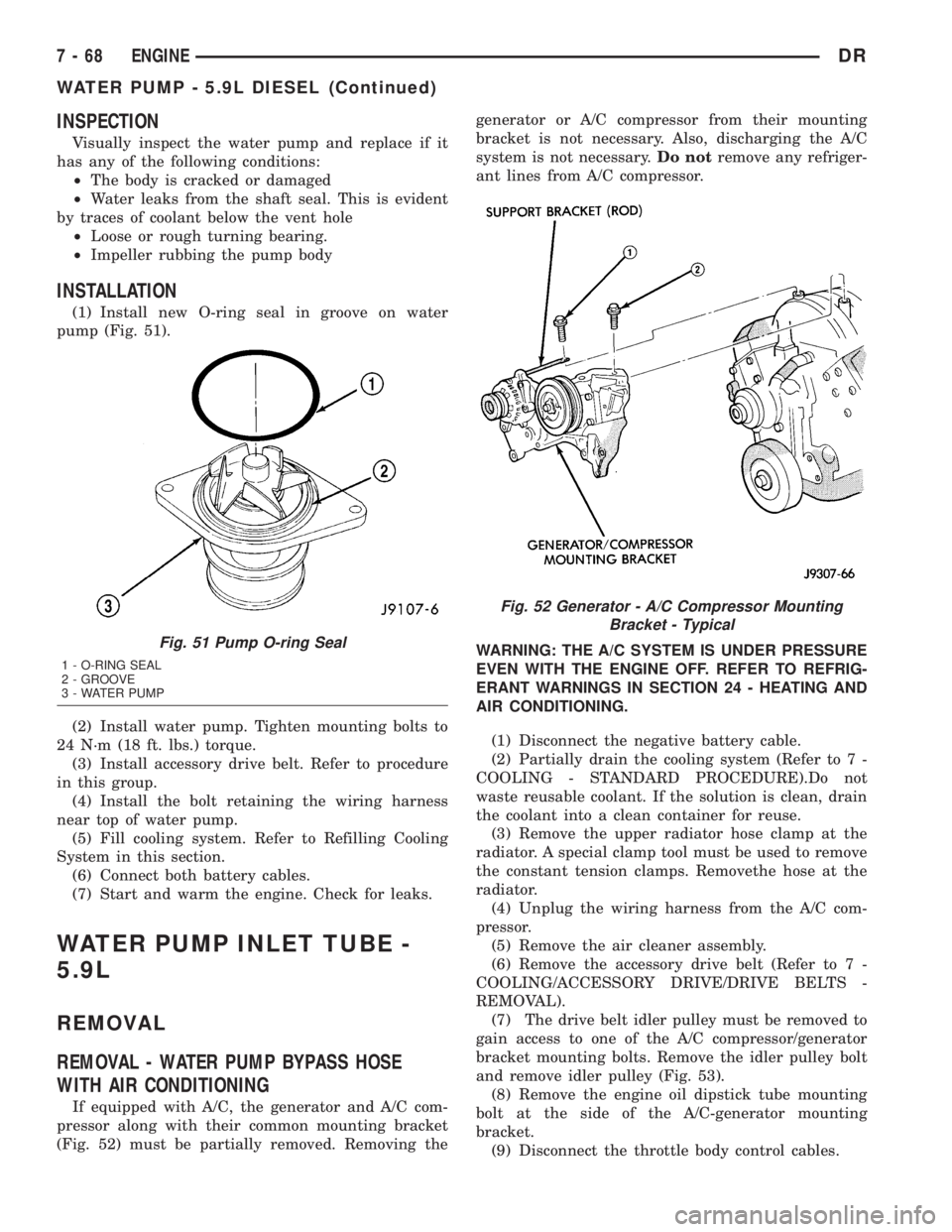
(1) Install new O-ring seal in groove on water
pump (Fig. 51).
(2) Install water pump. Tighten mounting bolts to
24 N´m (18 ft. lbs.) torque.
(3) Install accessory drive belt. Refer to procedure
in this group.
(4) Install the bolt retaining the wiring harness
near top of water pump.
(5) Fill cooling system. Refer to Refilling Cooling
System in this section.
(6) Connect both battery cables.
(7) Start and warm the engine. Check for leaks.
WATER PUMP INLET TUBE -
5.9L
REMOVAL
REMOVAL - WATER PUMP BYPASS HOSE
WITH AIR CONDITIONING
If equipped with A/C, the generator and A/C com-
pressor along with their common mounting bracket
(Fig. 52) must be partially removed. Removing thegenerator or A/C compressor from their mounting
bracket is not necessary. Also, discharging the A/C
system is not necessary.Do notremove any refriger-
ant lines from A/C compressor.
WARNING: THE A/C SYSTEM IS UNDER PRESSURE
EVEN WITH THE ENGINE OFF. REFER TO REFRIG-
ERANT WARNINGS IN SECTION 24 - HEATING AND
AIR CONDITIONING.
(1) Disconnect the negative battery cable.
(2) Partially drain the cooling system (Refer to 7 -
COOLING - STANDARD PROCEDURE).Do not
waste reusable coolant. If the solution is clean, drain
the coolant into a clean container for reuse.
(3) Remove the upper radiator hose clamp at the
radiator. A special clamp tool must be used to remove
the constant tension clamps. Removethe hose at the
radiator.
(4) Unplug the wiring harness from the A/C com-
pressor.
(5) Remove the air cleaner assembly.
(6) Remove the accessory drive belt (Refer to 7 -
COOLING/ACCESSORY DRIVE/DRIVE BELTS -
REMOVAL).
(7) The drive belt idler pulley must be removed to
gain access to one of the A/C compressor/generator
bracket mounting bolts. Remove the idler pulley bolt
and remove idler pulley (Fig. 53).
(8) Remove the engine oil dipstick tube mounting
bolt at the side of the A/C-generator mounting
bracket.
(9) Disconnect the throttle body control cables.
Fig. 51 Pump O-ring Seal
1 - O-RING SEAL
2 - GROOVE
3 - WATER PUMP
Fig. 52 Generator - A/C Compressor Mounting
Bracket - Typical
7 - 68 ENGINEDR
WATER PUMP - 5.9L DIESEL (Continued)
Page 357 of 2895
CAUTION: A number or letter is stamped into the
tongue of the constant tension clamps. If replace-
ment is necessary, use only an original equipment
clamp with a matching number or letter and width.
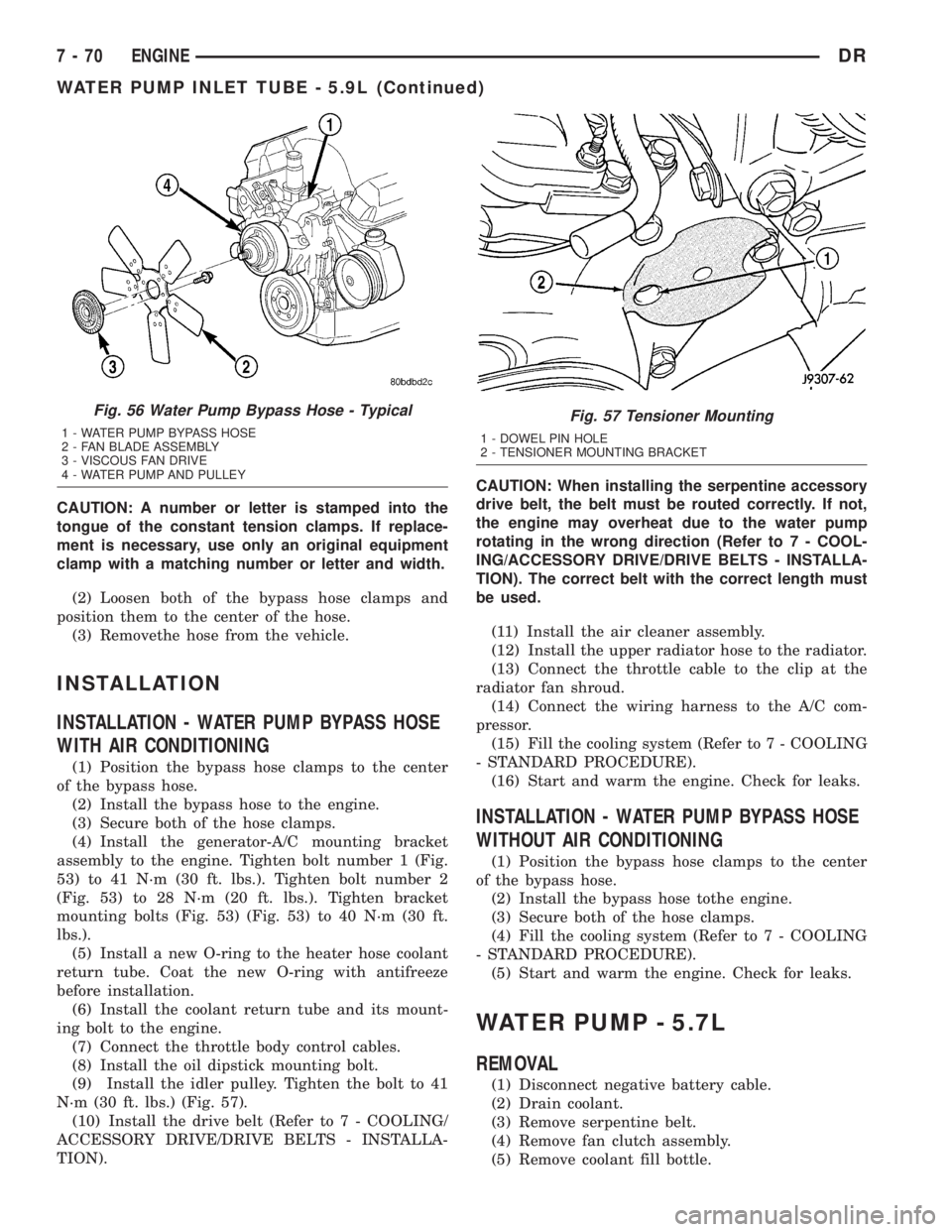
(2) Loosen both of the bypass hose clamps and
position them to the center of the hose.
(3) Removethe hose from the vehicle.
INSTALLATION
INSTALLATION - WATER PUMP BYPASS HOSE
WITH AIR CONDITIONING
(1) Position the bypass hose clamps to the center
of the bypass hose.
(2) Install the bypass hose to the engine.
(3) Secure both of the hose clamps.
(4) Install the generator-A/C mounting bracket
assembly to the engine. Tighten bolt number 1 (Fig.
53) to 41 N´m (30 ft. lbs.). Tighten bolt number 2
(Fig. 53) to 28 N´m (20 ft. lbs.). Tighten bracket
mounting bolts (Fig. 53) (Fig. 53) to 40 N´m (30 ft.
lbs.).
(5) Install a new O-ring to the heater hose coolant
return tube. Coat the new O-ring with antifreeze
before installation.
(6) Install the coolant return tube and its mount-
ing bolt to the engine.
(7) Connect the throttle body control cables.
(8) Install the oil dipstick mounting bolt.
(9) Install the idler pulley. Tighten the bolt to 41
N´m (30 ft. lbs.) (Fig. 57).
(10) Install the drive belt (Refer to 7 - COOLING/
ACCESSORY DRIVE/DRIVE BELTS - INSTALLA-
TION).CAUTION: When installing the serpentine accessory
drive belt, the belt must be routed correctly. If not,
the engine may overheat due to the water pump
rotating in the wrong direction (Refer to 7 - COOL-
ING/ACCESSORY DRIVE/DRIVE BELTS - INSTALLA-
TION). The correct belt with the correct length must
be used.
(11) Install the air cleaner assembly.
(12) Install the upper radiator hose to the radiator.
(13) Connect the throttle cable to the clip at the
radiator fan shroud.
(14) Connect the wiring harness to the A/C com-
pressor.
(15) Fill the cooling system (Refer to 7 - COOLING
- STANDARD PROCEDURE).
(16) Start and warm the engine. Check for leaks.
INSTALLATION - WATER PUMP BYPASS HOSE
WITHOUT AIR CONDITIONING
(1) Position the bypass hose clamps to the center
of the bypass hose.
(2) Install the bypass hose tothe engine.
(3) Secure both of the hose clamps.
(4) Fill the cooling system (Refer to 7 - COOLING
- STANDARD PROCEDURE).
(5) Start and warm the engine. Check for leaks.
WATER PUMP - 5.7L
REMOVAL
(1) Disconnect negative battery cable.
(2) Drain coolant.
(3) Remove serpentine belt.
(4) Remove fan clutch assembly.
(5) Remove coolant fill bottle.
Fig. 56 Water Pump Bypass Hose - Typical
1 - WATER PUMP BYPASS HOSE
2 - FAN BLADE ASSEMBLY
3 - VISCOUS FAN DRIVE
4 - WATER PUMP AND PULLEY
Fig. 57 Tensioner Mounting
1 - DOWEL PIN HOLE
2 - TENSIONER MOUNTING BRACKET
7 - 70 ENGINEDR
WATER PUMP INLET TUBE - 5.9L (Continued)
Page 358 of 2895
(6) Disconnect washer bottle wiring and hose.
(7) Remove fan shroud assembly.
(8) Remove A/C compressor and genterator brace.
(9) Remove idler pulleys.
(10) Remove belt tensioner assembly.
(11) Remove upper and lower radiator hoses.
(12) Remove heater hoses.
(13) Remove water pump mounting bolts and
remove pump.INSTALLATION
(1) Install water pump and mounting bolts.
Tighten moubting bolts to 24 N´m (18 ft. lbs.).
(2) Install heater hoses.
(3) Install upper and lower radiator hoses.
(4) Install belt tensioner assembly.
(5) Install idler pulleys.
(6) Install A/C compressor and alternator brace.
Tighten bolt and nuts to 28 N´m (21 ft. lbs.).
(7) Install fan shroud assembly.
(8) Connect washer bottle wiring and hose.
(9) Install coolant fill bottle.
(10) Install fan clutch assembly.
(11) Install serpentine belt.
(12) Connect negative battery cable.
(13) Fill coolant.
(14) Pressure test coolant system
DRENGINE 7 - 71
WATER PUMP - 5.7L (Continued)
Page 371 of 2895
INSTALLATION
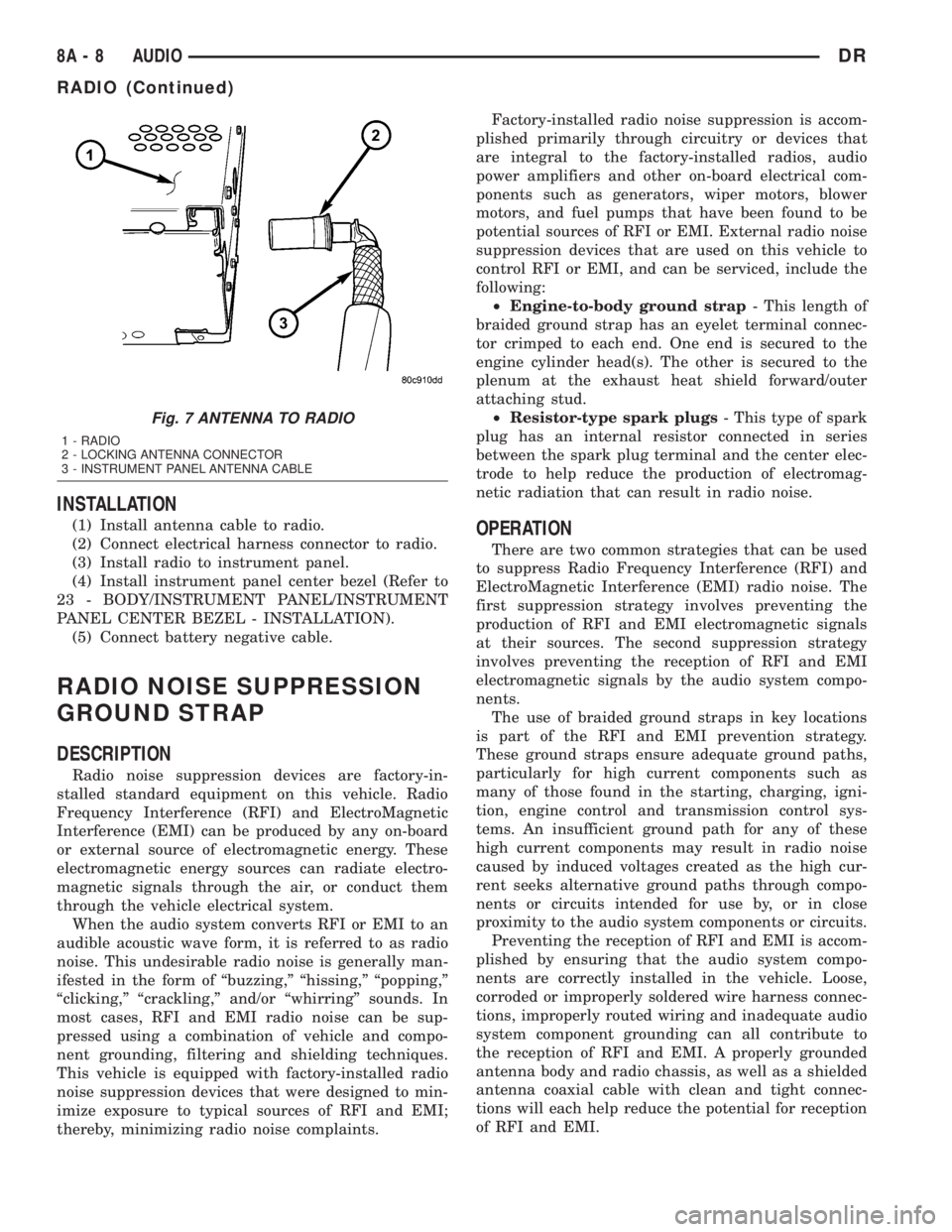
(1) Install antenna cable to radio.
(2) Connect electrical harness connector to radio.
(3) Install radio to instrument panel.
(4) Install instrument panel center bezel (Refer to
23 - BODY/INSTRUMENT PANEL/INSTRUMENT
PANEL CENTER BEZEL - INSTALLATION).
(5) Connect battery negative cable.
RADIO NOISE SUPPRESSION
GROUND STRAP
DESCRIPTION
Radio noise suppression devices are factory-in-
stalled standard equipment on this vehicle. Radio
Frequency Interference (RFI) and ElectroMagnetic
Interference (EMI) can be produced by any on-board
or external source of electromagnetic energy. These
electromagnetic energy sources can radiate electro-
magnetic signals through the air, or conduct them
through the vehicle electrical system.
When the audio system converts RFI or EMI to an
audible acoustic wave form, it is referred to as radio
noise. This undesirable radio noise is generally man-
ifested in the form of ªbuzzing,º ªhissing,º ªpopping,º
ªclicking,º ªcrackling,º and/or ªwhirringº sounds. In
most cases, RFI and EMI radio noise can be sup-
pressed using a combination of vehicle and compo-
nent grounding, filtering and shielding techniques.
This vehicle is equipped with factory-installed radio
noise suppression devices that were designed to min-
imize exposure to typical sources of RFI and EMI;
thereby, minimizing radio noise complaints.Factory-installed radio noise suppression is accom-
plished primarily through circuitry or devices that
are integral to the factory-installed radios, audio
power amplifiers and other on-board electrical com-
ponents such as generators, wiper motors, blower
motors, and fuel pumps that have been found to be
potential sources of RFI or EMI. External radio noise
suppression devices that are used on this vehicle to
control RFI or EMI, and can be serviced, include the
following:
²Engine-to-body ground strap- This length of
braided ground strap has an eyelet terminal connec-
tor crimped to each end. One end is secured to the
engine cylinder head(s). The other is secured to the
plenum at the exhaust heat shield forward/outer
attaching stud.
²Resistor-type spark plugs- This type of spark
plug has an internal resistor connected in series
between the spark plug terminal and the center elec-
trode to help reduce the production of electromag-
netic radiation that can result in radio noise.
OPERATION
There are two common strategies that can be used
to suppress Radio Frequency Interference (RFI) and
ElectroMagnetic Interference (EMI) radio noise. The
first suppression strategy involves preventing the
production of RFI and EMI electromagnetic signals
at their sources. The second suppression strategy
involves preventing the reception of RFI and EMI
electromagnetic signals by the audio system compo-
nents.
The use of braided ground straps in key locations
is part of the RFI and EMI prevention strategy.
These ground straps ensure adequate ground paths,
particularly for high current components such as
many of those found in the starting, charging, igni-
tion, engine control and transmission control sys-
tems. An insufficient ground path for any of these
high current components may result in radio noise
caused by induced voltages created as the high cur-
rent seeks alternative ground paths through compo-
nents or circuits intended for use by, or in close
proximity to the audio system components or circuits.
Preventing the reception of RFI and EMI is accom-
plished by ensuring that the audio system compo-
nents are correctly installed in the vehicle. Loose,
corroded or improperly soldered wire harness connec-
tions, improperly routed wiring and inadequate audio
system component grounding can all contribute to
the reception of RFI and EMI. A properly grounded
antenna body and radio chassis, as well as a shielded
antenna coaxial cable with clean and tight connec-
tions will each help reduce the potential for reception
of RFI and EMI.
Fig. 7 ANTENNA TO RADIO
1 - RADIO
2 - LOCKING ANTENNA CONNECTOR
3 - INSTRUMENT PANEL ANTENNA CABLE
8A - 8 AUDIODR
RADIO (Continued)
Page 396 of 2895
NOTE: A maximum of eight keys can be learned to
each SKIM. Once a key is learned to a SKIM, it (the
key) cannot be transferred to another vehicle.
(5) If ignition key programming is unsuccessful,
the DRBIIItscan tool will display one of the follow-
ing messages:
(a) Programming Not Attempted - The DRBIIIt
scan tool attempts to read the programmed key
status and there are no keys programmed into
SKIM memory.
(b) Programming Key Failed (Possible Used Key
From Wrong Vehicle) - SKIM is unable to program
key due to one of the following:
²Faulty ignition key transponder.
²Ignition key is programmed to another vehicle.
(c) 8 Keys Already Learned, Programming Not
Done - SKIM transponder ID memory is full.
(6) Obtain ignition keys to be programmed from
customer (8 keys maximum).
(7) Using the DRBIIItscan tool, erase all ignition
keys by selecting MISCELLANEOUS and ERASE
ALL CURRENT IGN. KEYS.
(8) Program all ignition keys.
Learned Key In Ignition - Ignition key transponder
ID is currently programmed in SKIM memory.
REMOVAL
(1) Disconnect and isolate the battery negative
cable.
(2) Remove the steering column upper and lower
shrouds. Refer to Steering, Column, Shroud,
Removal.
(3) Disconnect the steering column wire harness
connector from the Sentry Key Immobilizer Module
(SKIM)
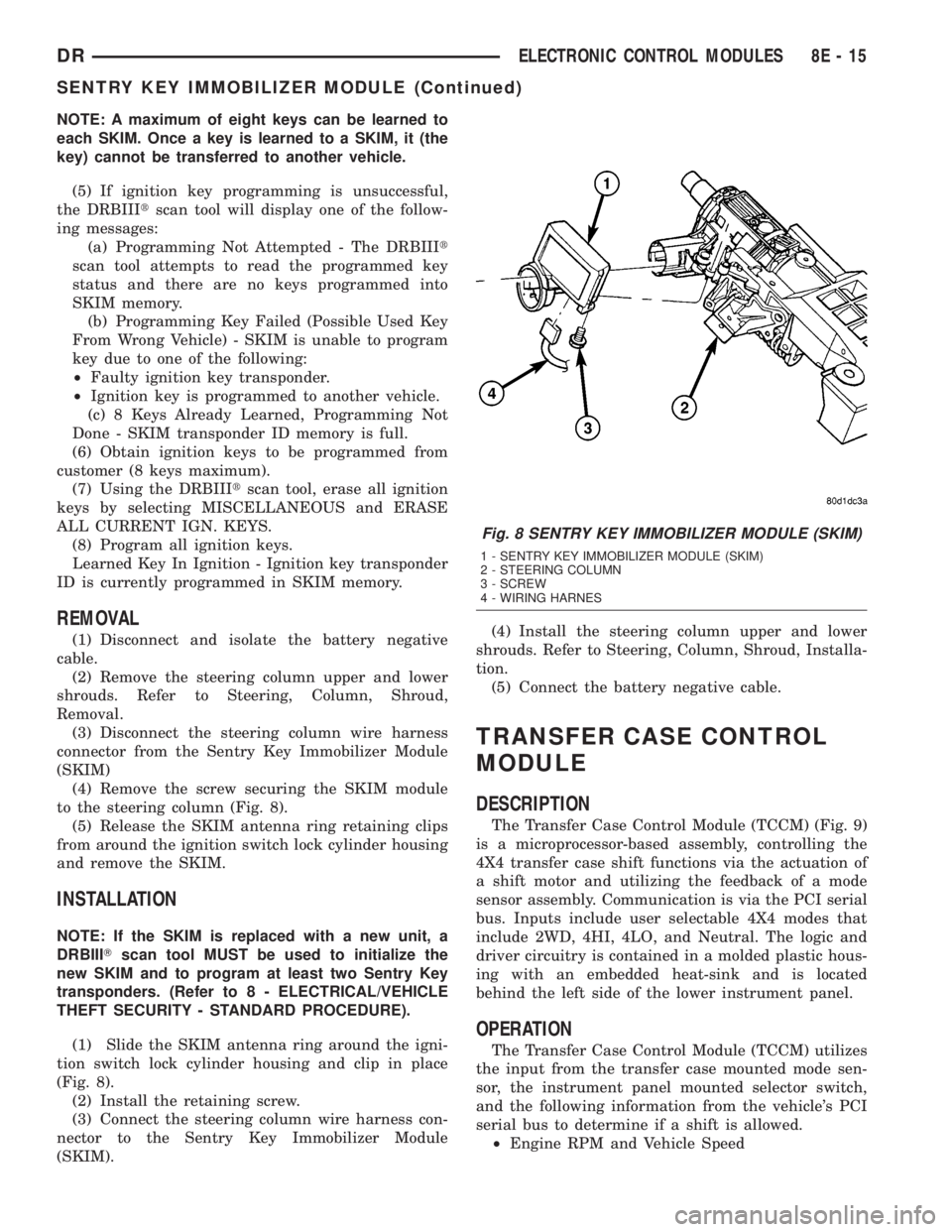
(4) Remove the screw securing the SKIM module
to the steering column (Fig. 8).
(5) Release the SKIM antenna ring retaining clips
from around the ignition switch lock cylinder housing
and remove the SKIM.
INSTALLATION
NOTE: If the SKIM is replaced with a new unit, a
DRBIIITscan tool MUST be used to initialize the
new SKIM and to program at least two Sentry Key
transponders. (Refer to 8 - ELECTRICAL/VEHICLE
THEFT SECURITY - STANDARD PROCEDURE).
(1) Slide the SKIM antenna ring around the igni-
tion switch lock cylinder housing and clip in place
(Fig. 8).
(2) Install the retaining screw.
(3) Connect the steering column wire harness con-
nector to the Sentry Key Immobilizer Module
(SKIM).(4) Install the steering column upper and lower
shrouds. Refer to Steering, Column, Shroud, Installa-
tion.
(5) Connect the battery negative cable.
TRANSFER CASE CONTROL
MODULE
DESCRIPTION
The Transfer Case Control Module (TCCM) (Fig. 9)
is a microprocessor-based assembly, controlling the
4X4 transfer case shift functions via the actuation of
a shift motor and utilizing the feedback of a mode
sensor assembly. Communication is via the PCI serial
bus. Inputs include user selectable 4X4 modes that
include 2WD, 4HI, 4LO, and Neutral. The logic and
driver circuitry is contained in a molded plastic hous-
ing with an embedded heat-sink and is located
behind the left side of the lower instrument panel.
OPERATION
The Transfer Case Control Module (TCCM) utilizes
the input from the transfer case mounted mode sen-
sor, the instrument panel mounted selector switch,
and the following information from the vehicle's PCI
serial bus to determine if a shift is allowed.
²Engine RPM and Vehicle Speed
Fig. 8 SENTRY KEY IMMOBILIZER MODULE (SKIM)
1 - SENTRY KEY IMMOBILIZER MODULE (SKIM)
2 - STEERING COLUMN
3 - SCREW
4 - WIRING HARNES
DRELECTRONIC CONTROL MODULES 8E - 15
SENTRY KEY IMMOBILIZER MODULE (Continued)
Page 401 of 2895
NOTE: If the TCM has been replaced, the ªQuick Learn
Procedureº must be performed. (Refer to 8 - ELECTRI-
CAL/ELECTRONIC CONTROL MODULES/TRANSMIS-
SION CONTROL MODULE - STANDARD PROCEDURE)
BATTERY FEED
A fused, direct battery feed to the TCM is used for
continuous power. This battery voltage is necessary
to retain memory in the TCM. When the battery (B+)
is disconnected, this memory is lost. When the bat-
tery (B+) is restored, this memory loss is detected by
the TCM and a Diagnostic Trouble Code (DTC) is set.
CLUTCH VOLUME INDEXES (CVI)
An important function of the TCM is to monitor
Clutch Volume Indexes (CVI). CVIs represent the vol-
ume of fluid needed to compress a clutch pack.
The TCM monitors gear ratio changes by monitor-
ing the Input and Output Speed Sensors. The Input,
or Turbine Speed Sensor sends an electrical signal to
the TCM that represents input shaft rpm. The Out-
put Speed Sensor provides the TCM with output
shaft speed information.
By comparing the two inputs, the TCM can deter-
mine transmission gear position. This is important to
the CVI calculation because the TCM determines
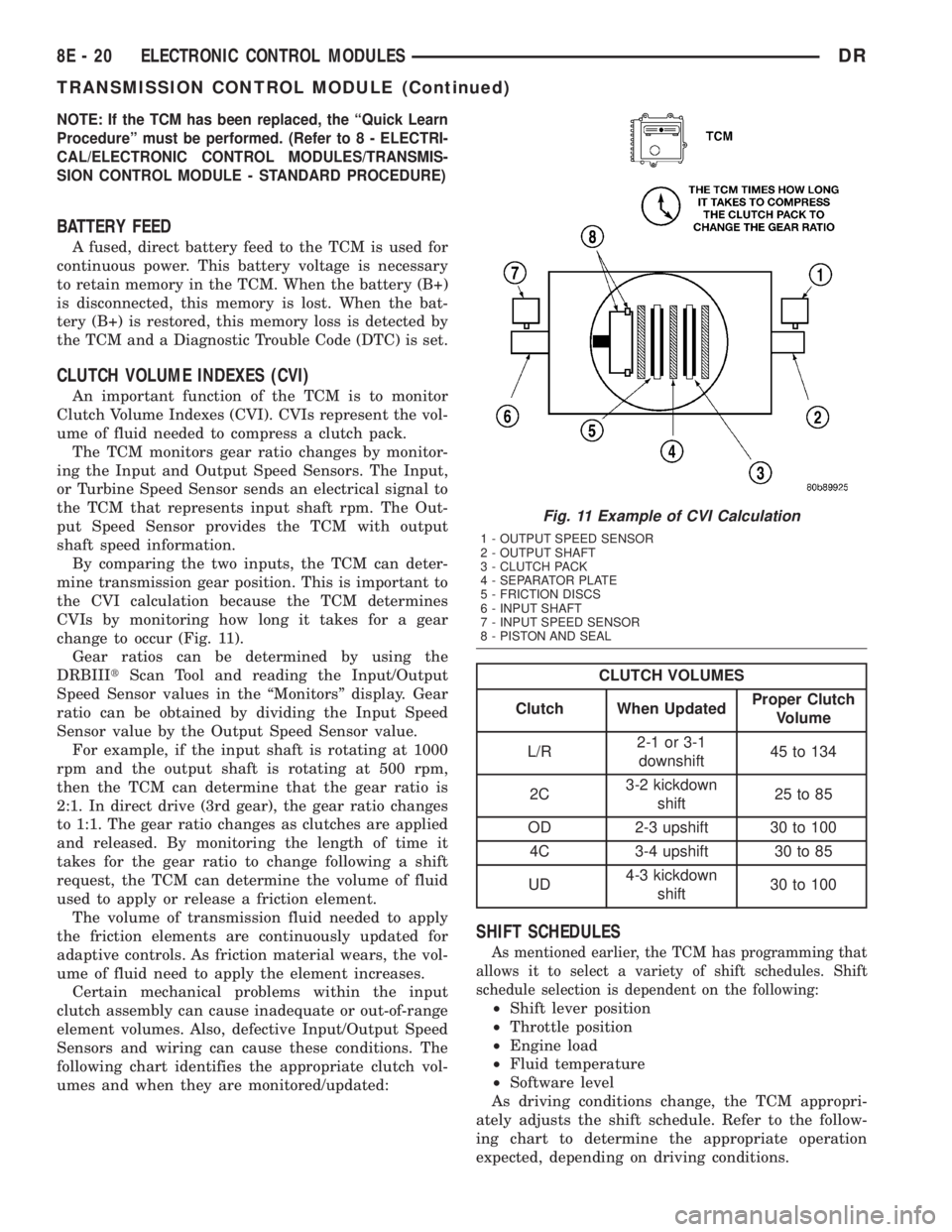
CVIs by monitoring how long it takes for a gear
change to occur (Fig. 11).
Gear ratios can be determined by using the
DRBIIItScan Tool and reading the Input/Output
Speed Sensor values in the ªMonitorsº display. Gear
ratio can be obtained by dividing the Input Speed
Sensor value by the Output Speed Sensor value.
For example, if the input shaft is rotating at 1000
rpm and the output shaft is rotating at 500 rpm,
then the TCM can determine that the gear ratio is
2:1. In direct drive (3rd gear), the gear ratio changes
to 1:1. The gear ratio changes as clutches are applied
and released. By monitoring the length of time it
takes for the gear ratio to change following a shift
request, the TCM can determine the volume of fluid
used to apply or release a friction element.
The volume of transmission fluid needed to apply
the friction elements are continuously updated for
adaptive controls. As friction material wears, the vol-
ume of fluid need to apply the element increases.
Certain mechanical problems within the input
clutch assembly can cause inadequate or out-of-range
element volumes. Also, defective Input/Output Speed
Sensors and wiring can cause these conditions. The
following chart identifies the appropriate clutch vol-
umes and when they are monitored/updated:
CLUTCH VOLUMES
Clutch When UpdatedProper Clutch
Volume
L/R2-1 or 3-1
downshift45 to 134
2C3-2 kickdown
shift25 to 85
OD 2-3 upshift 30 to 100
4C 3-4 upshift 30 to 85
UD4-3 kickdown
shift30 to 100
SHIFT SCHEDULES
As mentioned earlier, the TCM has programming that
allows it to select a variety of shift schedules. Shift
schedule selection is dependent on the following:
²Shift lever position
²Throttle position
²Engine load
²Fluid temperature
²Software level
As driving conditions change, the TCM appropri-
ately adjusts the shift schedule. Refer to the follow-
ing chart to determine the appropriate operation
expected, depending on driving conditions.
Fig. 11 Example of CVI Calculation
1 - OUTPUT SPEED SENSOR
2 - OUTPUT SHAFT
3 - CLUTCH PACK
4 - SEPARATOR PLATE
5 - FRICTION DISCS
6 - INPUT SHAFT
7 - INPUT SPEED SENSOR
8 - PISTON AND SEAL
8E - 20 ELECTRONIC CONTROL MODULESDR
TRANSMISSION CONTROL MODULE (Continued)
Page 422 of 2895
INSTALLATION
(1) Position the battery cable in the engine com-
partment.
(2) One at a time, install the battery cable retain-
ing pushpins, fasteners and routing clips until the
cable is installed exactly where it was in the vehicle.
Refer to Wiring for illustrations.
(3) Install the battery in the vehicle. Refer to the
procedure in this group.
(4) Connect the battery negative cable terminal.
BATTERY TRAY
DESCRIPTION
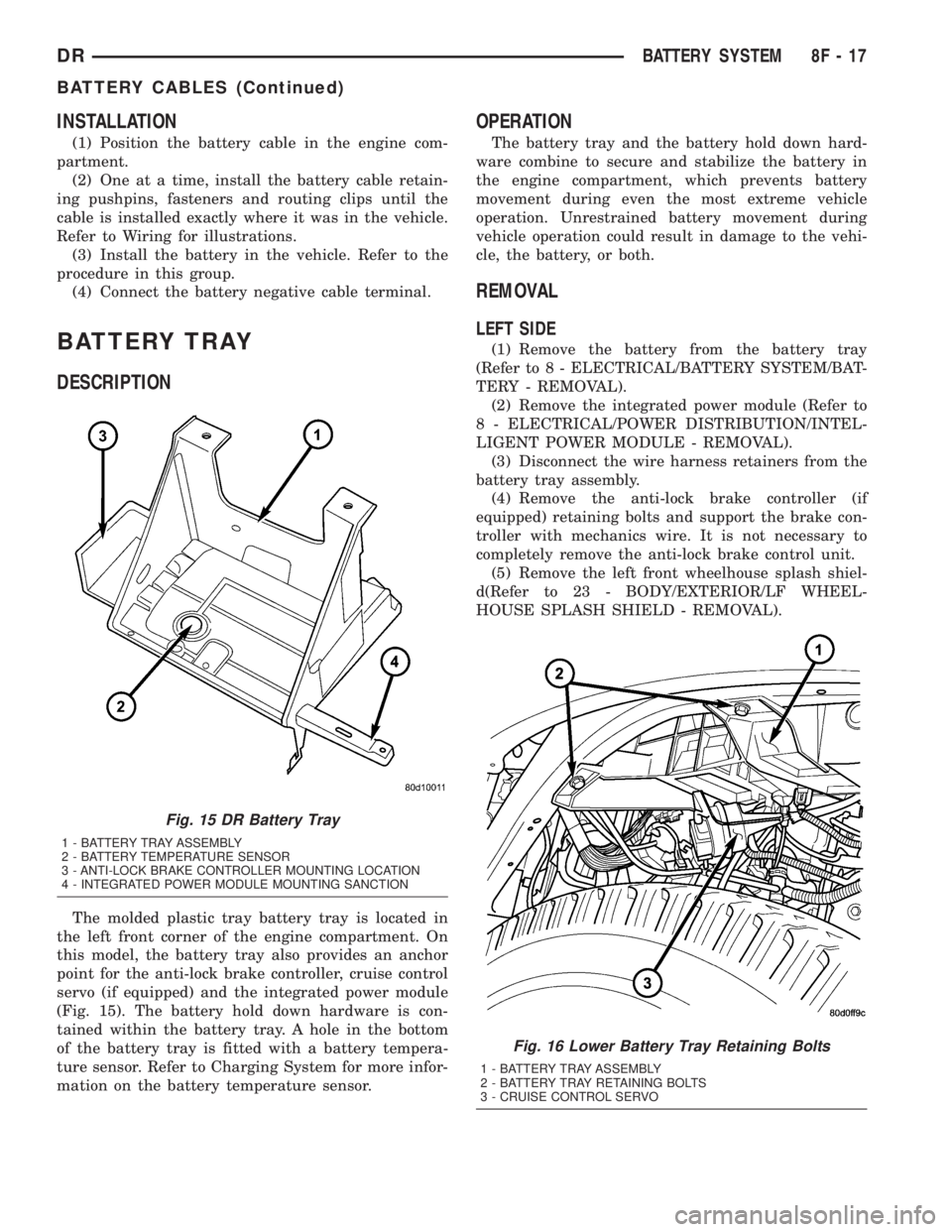
The molded plastic tray battery tray is located in
the left front corner of the engine compartment. On
this model, the battery tray also provides an anchor
point for the anti-lock brake controller, cruise control
servo (if equipped) and the integrated power module
(Fig. 15). The battery hold down hardware is con-
tained within the battery tray. A hole in the bottom
of the battery tray is fitted with a battery tempera-
ture sensor. Refer to Charging System for more infor-
mation on the battery temperature sensor.
OPERATION
The battery tray and the battery hold down hard-
ware combine to secure and stabilize the battery in
the engine compartment, which prevents battery
movement during even the most extreme vehicle
operation. Unrestrained battery movement during
vehicle operation could result in damage to the vehi-
cle, the battery, or both.
REMOVAL
LEFT SIDE
(1) Remove the battery from the battery tray
(Refer to 8 - ELECTRICAL/BATTERY SYSTEM/BAT-
TERY - REMOVAL).
(2) Remove the integrated power module (Refer to
8 - ELECTRICAL/POWER DISTRIBUTION/INTEL-
LIGENT POWER MODULE - REMOVAL).
(3) Disconnect the wire harness retainers from the
battery tray assembly.
(4) Remove the anti-lock brake controller (if
equipped) retaining bolts and support the brake con-
troller with mechanics wire. It is not necessary to
completely remove the anti-lock brake control unit.
(5) Remove the left front wheelhouse splash shiel-
d(Refer to 23 - BODY/EXTERIOR/LF WHEEL-
HOUSE SPLASH SHIELD - REMOVAL).
Fig. 15 DR Battery Tray
1 - BATTERY TRAY ASSEMBLY
2 - BATTERY TEMPERATURE SENSOR
3 - ANTI-LOCK BRAKE CONTROLLER MOUNTING LOCATION
4 - INTEGRATED POWER MODULE MOUNTING SANCTION
Fig. 16 Lower Battery Tray Retaining Bolts
1 - BATTERY TRAY ASSEMBLY
2 - BATTERY TRAY RETAINING BOLTS
3 - CRUISE CONTROL SERVO
DRBATTERY SYSTEM 8F - 17
BATTERY CABLES (Continued)
Page 424 of 2895
CHARGING
TABLE OF CONTENTS
page page
CHARGING
DESCRIPTION.........................19
OPERATION...........................19
DIAGNOSIS AND TESTING - CHARGING
SYSTEM............................19
SPECIFICATIONS
GENERATOR RATINGS.................20
SPECIFICATIONS - TORQUE - GENERATOR
/ CHARGING SYSTEM..................20
BATTERY TEMPERATURE SENSOR
DESCRIPTION.........................21OPERATION...........................21
REMOVAL.............................21
INSTALLATION.........................21
GENERATOR
DESCRIPTION.........................22
OPERATION...........................22
REMOVAL.............................22
INSTALLATION.........................25
VOLTAGE REGULATOR
DESCRIPTION.........................27
OPERATION...........................27
CHARGING
DESCRIPTION
The charging system consists of:
²Generator
²Electronic Voltage Regulator (EVR) circuitry
within the Powertrain Control Module (PCM). Elec-
tronic Control Module (ECM) for diesel engines.
²Ignition switch
²Battery (refer to 8, Battery for information)
²Battery temperature sensor
²Check Gauges Lamp (if equipped)
²Voltmeter (refer to 8, Instrument Panel and
Gauges for information)
²Wiring harness and connections (refer to 8, Wir-
ing Diagrams for information)
OPERATION
The charging system is turned on and off with the
ignition switch. The system is on when the engine is
running and the ASD relay is energized. When the
ASD relay is on, voltage is supplied to the ASD relay
sense circuit at the PCM (ECM Diesel). This voltage
is connected through the PCM (ECM Diesel) and sup-
plied to one of the generator field terminals (Gen.
Source +) at the back of the generator.
The amount of direct current produced by the gen-
erator is controlled by the EVR (field control) cir-
cuitry contained within the PCM (ECM Diesel). This
circuitry is connected in series with the second rotor
field terminal and ground.
A battery temperature sensor, located in the bat-
tery tray housing, is used to sense battery tempera-
ture. This temperature data, along with data from
monitored line voltage, is used by the PCM (ECM
Diesel) to vary the battery charging rate. This isdone by cycling the ground path to control the
strength of the rotor magnetic field. The PCM then
compensates and regulates generator current output
accordingly.
All vehicles are equipped with On-Board Diagnos-
tics (OBD). All OBD-sensed systems, including EVR
(field control) circuitry, are monitored by the PCM
(ECM Diesel). Each monitored circuit is assigned a
Diagnostic Trouble Code (DTC). The PCM will store a
DTC in electronic memory for certain failures it
detects.
The Check Gauges Lamp (if equipped) monitors:
charging system voltage,engine coolant tempera-
ture and engine oil pressure. If an extreme condition
is indicated, the lamp will be illuminated. This is
done as reminder to check the three gauges. The sig-
nal to activate the lamp is sent via the CCD bus cir-
cuits. The lamp is located on the instrument panel.
Refer to 8, Instrument Panel and Gauges for addi-
tional information.
DIAGNOSIS AND TESTING - CHARGING
SYSTEM
The following procedures may be used to diagnose
the charging system if:
²the check gauges lamp (if equipped) is illumi-
nated with the engine running
²the voltmeter (if equipped) does not register
properly
²an undercharged or overcharged battery condi-
tion occurs.
Remember that an undercharged battery is often
caused by:
²accessories being left on with the engine not
running
DRCHARGING 8F - 19
Page 434 of 2895
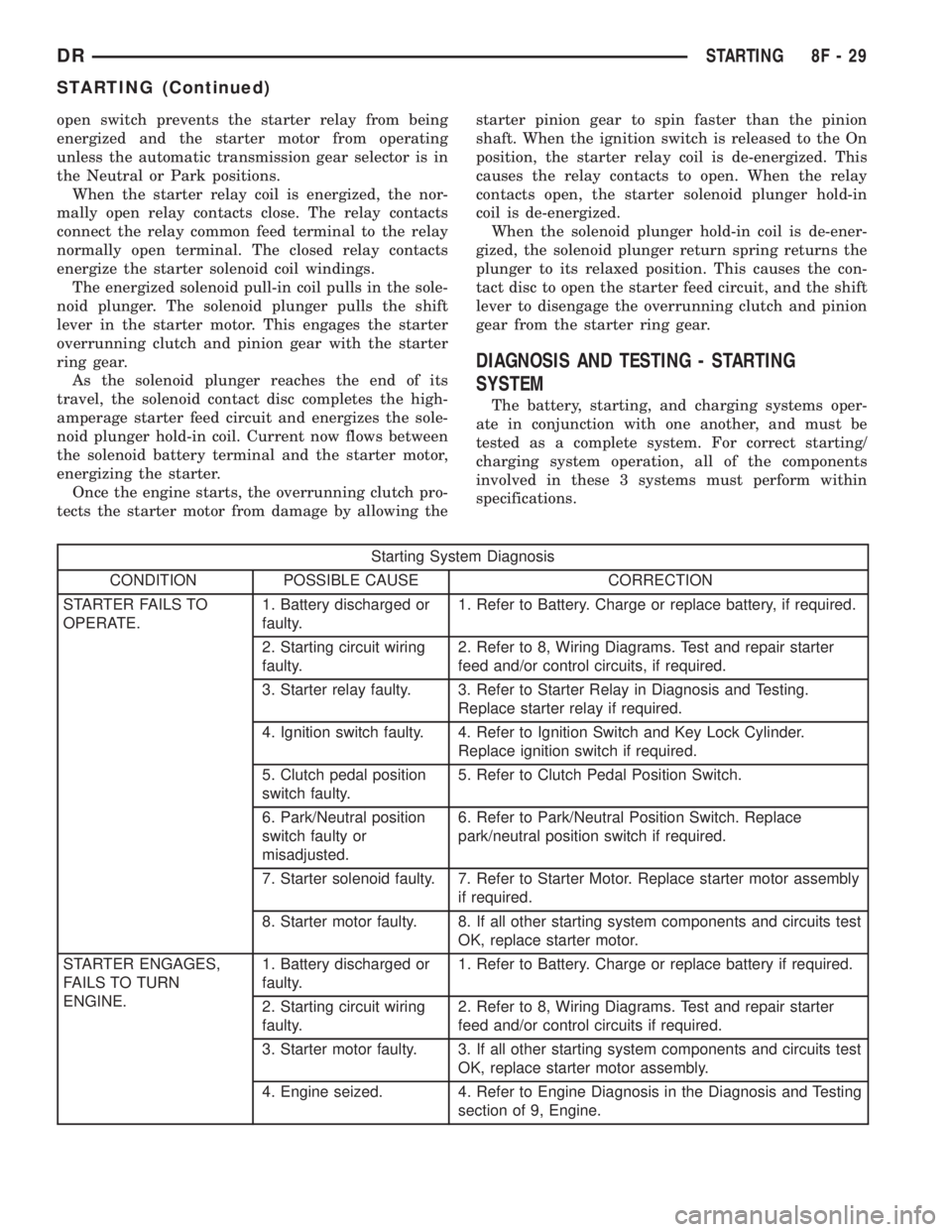
open switch prevents the starter relay from being
energized and the starter motor from operating
unless the automatic transmission gear selector is in
the Neutral or Park positions.
When the starter relay coil is energized, the nor-
mally open relay contacts close. The relay contacts
connect the relay common feed terminal to the relay
normally open terminal. The closed relay contacts
energize the starter solenoid coil windings.
The energized solenoid pull-in coil pulls in the sole-
noid plunger. The solenoid plunger pulls the shift
lever in the starter motor. This engages the starter
overrunning clutch and pinion gear with the starter
ring gear.
As the solenoid plunger reaches the end of its
travel, the solenoid contact disc completes the high-
amperage starter feed circuit and energizes the sole-
noid plunger hold-in coil. Current now flows between
the solenoid battery terminal and the starter motor,
energizing the starter.
Once the engine starts, the overrunning clutch pro-
tects the starter motor from damage by allowing thestarter pinion gear to spin faster than the pinion
shaft. When the ignition switch is released to the On
position, the starter relay coil is de-energized. This
causes the relay contacts to open. When the relay
contacts open, the starter solenoid plunger hold-in
coil is de-energized.
When the solenoid plunger hold-in coil is de-ener-
gized, the solenoid plunger return spring returns the
plunger to its relaxed position. This causes the con-
tact disc to open the starter feed circuit, and the shift
lever to disengage the overrunning clutch and pinion
gear from the starter ring gear.
DIAGNOSIS AND TESTING - STARTING
SYSTEM
The battery, starting, and charging systems oper-
ate in conjunction with one another, and must be
tested as a complete system. For correct starting/
charging system operation, all of the components
involved in these 3 systems must perform within
specifications.
Starting System Diagnosis
CONDITION POSSIBLE CAUSE CORRECTION
STARTER FAILS TO
OPERATE.1. Battery discharged or
faulty.1. Refer to Battery. Charge or replace battery, if required.
2. Starting circuit wiring
faulty.2. Refer to 8, Wiring Diagrams. Test and repair starter
feed and/or control circuits, if required.
3. Starter relay faulty. 3. Refer to Starter Relay in Diagnosis and Testing.
Replace starter relay if required.
4. Ignition switch faulty. 4. Refer to Ignition Switch and Key Lock Cylinder.
Replace ignition switch if required.
5. Clutch pedal position
switch faulty.5. Refer to Clutch Pedal Position Switch.
6. Park/Neutral position
switch faulty or
misadjusted.6. Refer to Park/Neutral Position Switch. Replace
park/neutral position switch if required.
7. Starter solenoid faulty. 7. Refer to Starter Motor. Replace starter motor assembly
if required.
8. Starter motor faulty. 8. If all other starting system components and circuits test
OK, replace starter motor.
STARTER ENGAGES,
FAILS TO TURN
ENGINE.1. Battery discharged or
faulty.1. Refer to Battery. Charge or replace battery if required.
2. Starting circuit wiring
faulty.2. Refer to 8, Wiring Diagrams. Test and repair starter
feed and/or control circuits if required.
3. Starter motor faulty. 3. If all other starting system components and circuits test
OK, replace starter motor assembly.
4. Engine seized. 4. Refer to Engine Diagnosis in the Diagnosis and Testing
section of 9, Engine.
DRSTARTING 8F - 29
STARTING (Continued)
Page 435 of 2895
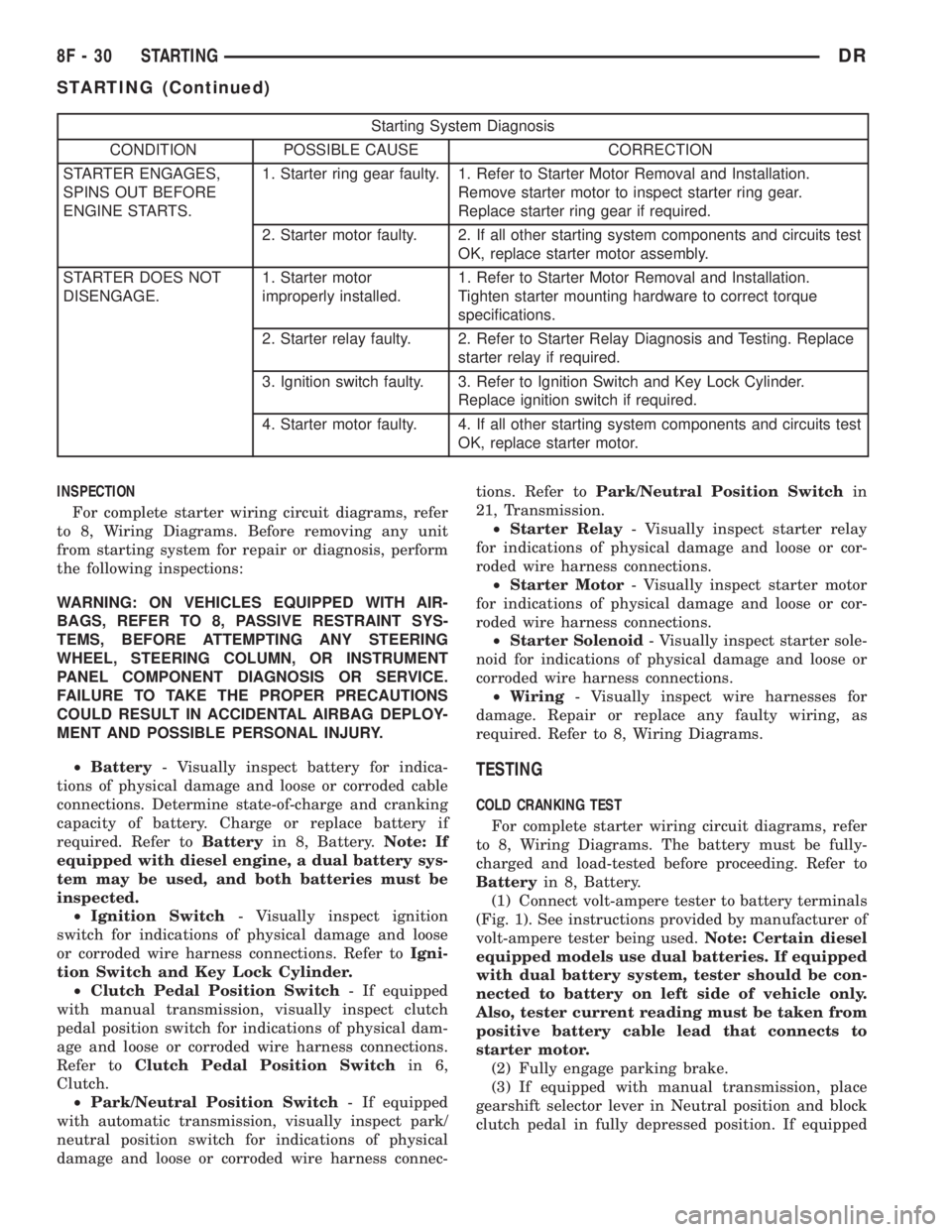
Starting System Diagnosis
CONDITION POSSIBLE CAUSE CORRECTION
STARTER ENGAGES,
SPINS OUT BEFORE
ENGINE STARTS.1. Starter ring gear faulty. 1. Refer to Starter Motor Removal and Installation.
Remove starter motor to inspect starter ring gear.
Replace starter ring gear if required.
2. Starter motor faulty. 2. If all other starting system components and circuits test
OK, replace starter motor assembly.
STARTER DOES NOT
DISENGAGE.1. Starter motor
improperly installed.1. Refer to Starter Motor Removal and Installation.
Tighten starter mounting hardware to correct torque
specifications.
2. Starter relay faulty. 2. Refer to Starter Relay Diagnosis and Testing. Replace
starter relay if required.
3. Ignition switch faulty. 3. Refer to Ignition Switch and Key Lock Cylinder.
Replace ignition switch if required.
4. Starter motor faulty. 4. If all other starting system components and circuits test
OK, replace starter motor.
INSPECTION
For complete starter wiring circuit diagrams, refer
to 8, Wiring Diagrams. Before removing any unit
from starting system for repair or diagnosis, perform
the following inspections:
WARNING: ON VEHICLES EQUIPPED WITH AIR-
BAGS, REFER TO 8, PASSIVE RESTRAINT SYS-
TEMS, BEFORE ATTEMPTING ANY STEERING
WHEEL, STEERING COLUMN, OR INSTRUMENT
PANEL COMPONENT DIAGNOSIS OR SERVICE.
FAILURE TO TAKE THE PROPER PRECAUTIONS
COULD RESULT IN ACCIDENTAL AIRBAG DEPLOY-
MENT AND POSSIBLE PERSONAL INJURY.
²Battery- Visually inspect battery for indica-
tions of physical damage and loose or corroded cable
connections. Determine state-of-charge and cranking
capacity of battery. Charge or replace battery if
required. Refer toBatteryin 8, Battery.Note: If
equipped with diesel engine, a dual battery sys-
tem may be used, and both batteries must be
inspected.
²Ignition Switch- Visually inspect ignition
switch for indications of physical damage and loose
or corroded wire harness connections. Refer toIgni-
tion Switch and Key Lock Cylinder.
²Clutch Pedal Position Switch- If equipped
with manual transmission, visually inspect clutch
pedal position switch for indications of physical dam-
age and loose or corroded wire harness connections.
Refer toClutch Pedal Position Switchin 6,
Clutch.
²Park/Neutral Position Switch- If equipped
with automatic transmission, visually inspect park/
neutral position switch for indications of physical
damage and loose or corroded wire harness connec-tions. Refer toPark/Neutral Position Switchin
21, Transmission.
²Starter Relay- Visually inspect starter relay
for indications of physical damage and loose or cor-
roded wire harness connections.
²Starter Motor- Visually inspect starter motor
for indications of physical damage and loose or cor-
roded wire harness connections.
²Starter Solenoid- Visually inspect starter sole-
noid for indications of physical damage and loose or
corroded wire harness connections.
²Wiring- Visually inspect wire harnesses for
damage. Repair or replace any faulty wiring, as
required. Refer to 8, Wiring Diagrams.
TESTING
COLD CRANKING TEST
For complete starter wiring circuit diagrams, refer
to 8, Wiring Diagrams. The battery must be fully-
charged and load-tested before proceeding. Refer to
Batteryin 8, Battery.
(1) Connect volt-ampere tester to battery terminals
(Fig. 1). See instructions provided by manufacturer of
volt-ampere tester being used.Note: Certain diesel
equipped models use dual batteries. If equipped
with dual battery system, tester should be con-
nected to battery on left side of vehicle only.
Also, tester current reading must be taken from
positive battery cable lead that connects to
starter motor.
(2) Fully engage parking brake.
(3) If equipped with manual transmission, place
gearshift selector lever in Neutral position and block
clutch pedal in fully depressed position. If equipped
8F - 30 STARTINGDR
STARTING (Continued)