fuse DODGE RAM 2003 Service Workshop Manual
[x] Cancel search | Manufacturer: DODGE, Model Year: 2003, Model line: RAM, Model: DODGE RAM 2003Pages: 2895, PDF Size: 83.15 MB
Page 544 of 2895
STANDARD PROCEDURE
SAFETY PRECAUTIONS
WARNING: EYE PROTECTION SHOULD BE USED
WHEN SERVICING GLASS COMPONENTS. PER-
SONAL INJURY CAN RESULT.
CAUTION: Do not touch the glass of halogen bulbs
with fingers or other possibly oily surface, reduced
bulb life will result.Do not use bulbs with higher
candle power than indicated in the Bulb Application
table . Damage to lamp and/or Daytime Running
Lamp Module can result.Do not use fuses, circuit
breakers or relays having greater amperage value
than indicated on the fuse panel or in the Owners
Manual.
When it is necessary to remove components to ser-
vice another, it should not be necessary to apply
excessive force or bend a component to remove it.
Before damaging a trim component, verify hidden
fasteners or captured edges are not holding the com-
ponent in place.
SPECIFICATIONS
EXTERIOR LAMPS
CAUTION: Do not use bulbs that have a higher can-
dle power than the bulb listed in the Bulb Applica-
tion Table. Damage to lamp can result. Do not touch
halogen bulbs with fingers or other oily surfaces.
Bulb life will be reduced.
The following Bulb Application Table lists the lamp
title on the left side of the column and trade number
or part number on the right.
BULB APPLICATION TABLE
LAMP BULB
Back-up 3157
Center High Mounted
Stop lamp912
Fog lamp 9006LL
Front Park/Turn Signal 4157NAK
Head lamp 9007
License Plate 7F69
Tail, Brake, Turn Signal 3157
Side Marker, Tail Gate,
Cab Clearance168
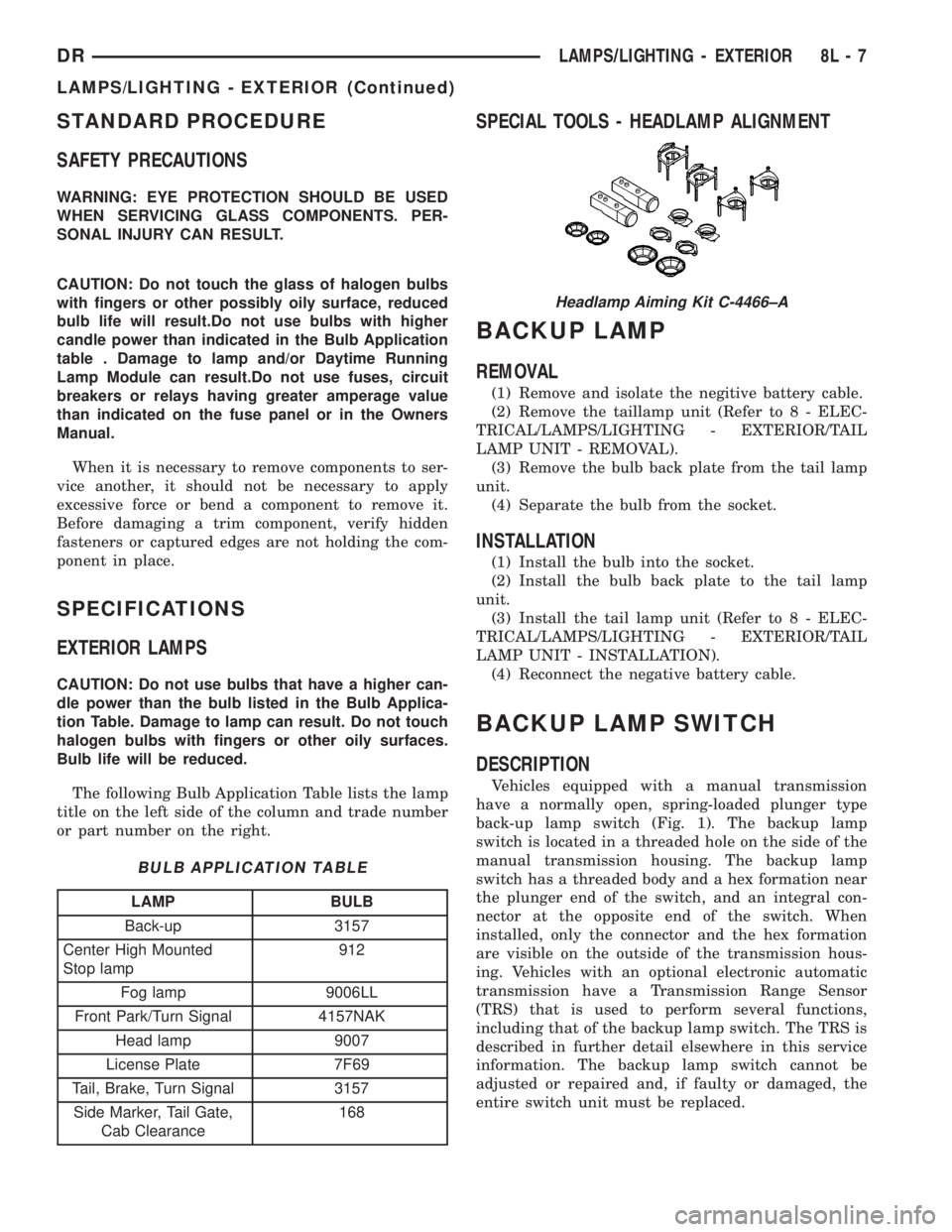
SPECIAL TOOLS - HEADLAMP ALIGNMENT
BACKUP LAMP
REMOVAL
(1) Remove and isolate the negitive battery cable.
(2) Remove the taillamp unit (Refer to 8 - ELEC-
TRICAL/LAMPS/LIGHTING - EXTERIOR/TAIL
LAMP UNIT - REMOVAL).
(3) Remove the bulb back plate from the tail lamp
unit.
(4) Separate the bulb from the socket.
INSTALLATION
(1) Install the bulb into the socket.
(2) Install the bulb back plate to the tail lamp
unit.
(3) Install the tail lamp unit (Refer to 8 - ELEC-
TRICAL/LAMPS/LIGHTING - EXTERIOR/TAIL
LAMP UNIT - INSTALLATION).
(4) Reconnect the negative battery cable.
BACKUP LAMP SWITCH
DESCRIPTION
Vehicles equipped with a manual transmission
have a normally open, spring-loaded plunger type
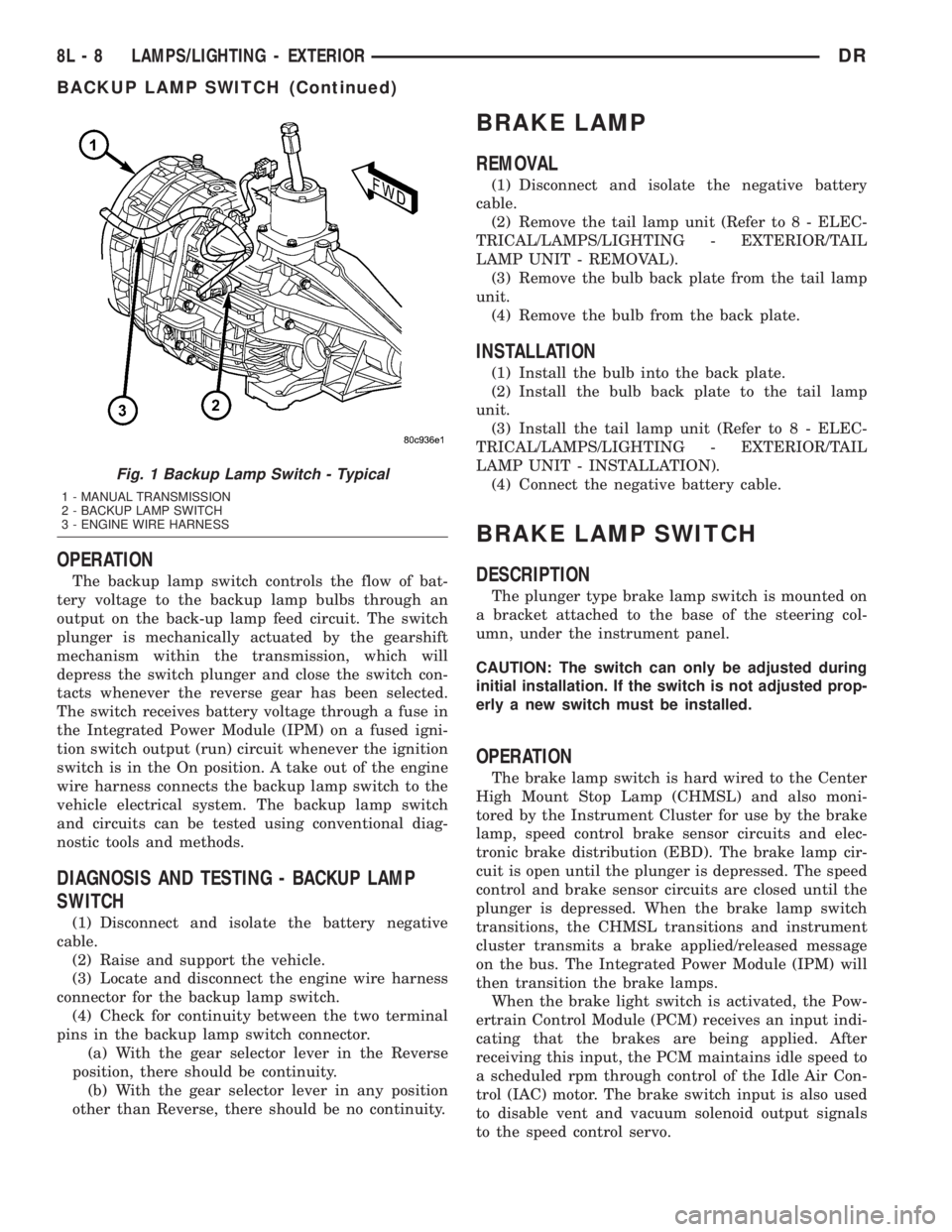
back-up lamp switch (Fig. 1). The backup lamp
switch is located in a threaded hole on the side of the
manual transmission housing. The backup lamp
switch has a threaded body and a hex formation near
the plunger end of the switch, and an integral con-
nector at the opposite end of the switch. When
installed, only the connector and the hex formation
are visible on the outside of the transmission hous-
ing. Vehicles with an optional electronic automatic
transmission have a Transmission Range Sensor
(TRS) that is used to perform several functions,
including that of the backup lamp switch. The TRS is
described in further detail elsewhere in this service
information. The backup lamp switch cannot be
adjusted or repaired and, if faulty or damaged, the
entire switch unit must be replaced.
Headlamp Aiming Kit C-4466±A
DRLAMPS/LIGHTING - EXTERIOR 8L - 7
LAMPS/LIGHTING - EXTERIOR (Continued)
Page 545 of 2895
OPERATION
The backup lamp switch controls the flow of bat-
tery voltage to the backup lamp bulbs through an
output on the back-up lamp feed circuit. The switch
plunger is mechanically actuated by the gearshift
mechanism within the transmission, which will
depress the switch plunger and close the switch con-
tacts whenever the reverse gear has been selected.
The switch receives battery voltage through a fuse in
the Integrated Power Module (IPM) on a fused igni-
tion switch output (run) circuit whenever the ignition
switch is in the On position. A take out of the engine
wire harness connects the backup lamp switch to the
vehicle electrical system. The backup lamp switch
and circuits can be tested using conventional diag-
nostic tools and methods.
DIAGNOSIS AND TESTING - BACKUP LAMP
SWITCH
(1) Disconnect and isolate the battery negative
cable.
(2) Raise and support the vehicle.
(3) Locate and disconnect the engine wire harness
connector for the backup lamp switch.
(4) Check for continuity between the two terminal
pins in the backup lamp switch connector.
(a) With the gear selector lever in the Reverse
position, there should be continuity.
(b) With the gear selector lever in any position
other than Reverse, there should be no continuity.
BRAKE LAMP
REMOVAL
(1) Disconnect and isolate the negative battery
cable.
(2) Remove the tail lamp unit (Refer to 8 - ELEC-
TRICAL/LAMPS/LIGHTING - EXTERIOR/TAIL
LAMP UNIT - REMOVAL).
(3) Remove the bulb back plate from the tail lamp
unit.
(4) Remove the bulb from the back plate.
INSTALLATION
(1) Install the bulb into the back plate.
(2) Install the bulb back plate to the tail lamp
unit.
(3) Install the tail lamp unit (Refer to 8 - ELEC-
TRICAL/LAMPS/LIGHTING - EXTERIOR/TAIL
LAMP UNIT - INSTALLATION).
(4) Connect the negative battery cable.
BRAKE LAMP SWITCH
DESCRIPTION
The plunger type brake lamp switch is mounted on
a bracket attached to the base of the steering col-
umn, under the instrument panel.
CAUTION: The switch can only be adjusted during
initial installation. If the switch is not adjusted prop-
erly a new switch must be installed.
OPERATION
The brake lamp switch is hard wired to the Center
High Mount Stop Lamp (CHMSL) and also moni-
tored by the Instrument Cluster for use by the brake
lamp, speed control brake sensor circuits and elec-
tronic brake distribution (EBD). The brake lamp cir-
cuit is open until the plunger is depressed. The speed
control and brake sensor circuits are closed until the
plunger is depressed. When the brake lamp switch
transitions, the CHMSL transitions and instrument
cluster transmits a brake applied/released message
on the bus. The Integrated Power Module (IPM) will
then transition the brake lamps.
When the brake light switch is activated, the Pow-
ertrain Control Module (PCM) receives an input indi-
cating that the brakes are being applied. After
receiving this input, the PCM maintains idle speed to
a scheduled rpm through control of the Idle Air Con-
trol (IAC) motor. The brake switch input is also used
to disable vent and vacuum solenoid output signals
to the speed control servo.
Fig. 1 Backup Lamp Switch - Typical
1 - MANUAL TRANSMISSION
2 - BACKUP LAMP SWITCH
3 - ENGINE WIRE HARNESS
8L - 8 LAMPS/LIGHTING - EXTERIORDR
BACKUP LAMP SWITCH (Continued)
Page 549 of 2895
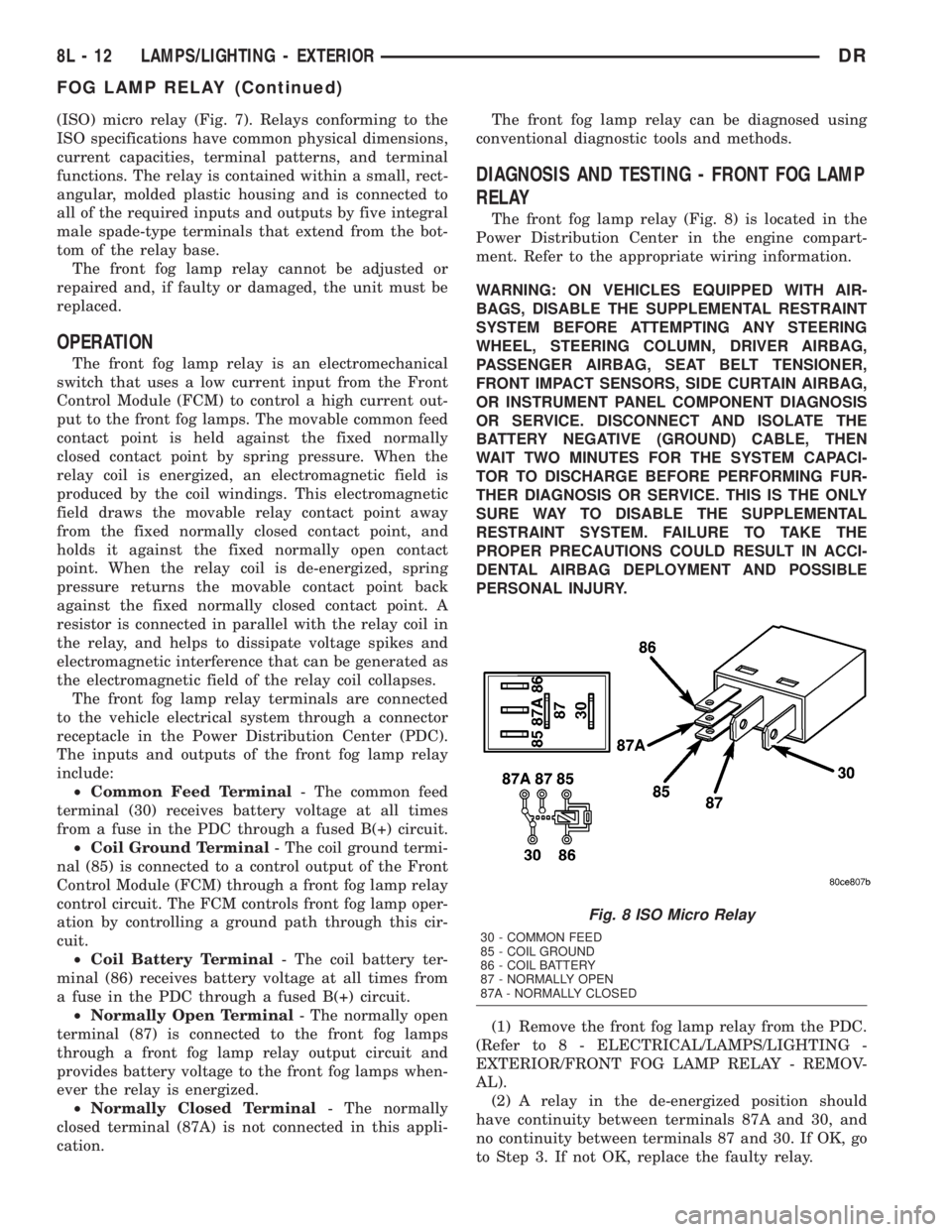
(ISO) micro relay (Fig. 7). Relays conforming to the
ISO specifications have common physical dimensions,
current capacities, terminal patterns, and terminal
functions. The relay is contained within a small, rect-
angular, molded plastic housing and is connected to
all of the required inputs and outputs by five integral
male spade-type terminals that extend from the bot-
tom of the relay base.
The front fog lamp relay cannot be adjusted or
repaired and, if faulty or damaged, the unit must be
replaced.
OPERATION
The front fog lamp relay is an electromechanical
switch that uses a low current input from the Front
Control Module (FCM) to control a high current out-
put to the front fog lamps. The movable common feed
contact point is held against the fixed normally
closed contact point by spring pressure. When the
relay coil is energized, an electromagnetic field is
produced by the coil windings. This electromagnetic
field draws the movable relay contact point away
from the fixed normally closed contact point, and
holds it against the fixed normally open contact
point. When the relay coil is de-energized, spring
pressure returns the movable contact point back
against the fixed normally closed contact point. A
resistor is connected in parallel with the relay coil in
the relay, and helps to dissipate voltage spikes and
electromagnetic interference that can be generated as
the electromagnetic field of the relay coil collapses.
The front fog lamp relay terminals are connected
to the vehicle electrical system through a connector
receptacle in the Power Distribution Center (PDC).
The inputs and outputs of the front fog lamp relay
include:
²Common Feed Terminal- The common feed
terminal (30) receives battery voltage at all times
from a fuse in the PDC through a fused B(+) circuit.
²Coil Ground Terminal- The coil ground termi-
nal (85) is connected to a control output of the Front
Control Module (FCM) through a front fog lamp relay
control circuit. The FCM controls front fog lamp oper-
ation by controlling a ground path through this cir-
cuit.
²Coil Battery Terminal- The coil battery ter-
minal (86) receives battery voltage at all times from
a fuse in the PDC through a fused B(+) circuit.
²Normally Open Terminal- The normally open
terminal (87) is connected to the front fog lamps
through a front fog lamp relay output circuit and
provides battery voltage to the front fog lamps when-
ever the relay is energized.
²Normally Closed Terminal- The normally
closed terminal (87A) is not connected in this appli-
cation.The front fog lamp relay can be diagnosed using
conventional diagnostic tools and methods.
DIAGNOSIS AND TESTING - FRONT FOG LAMP
RELAY
The front fog lamp relay (Fig. 8) is located in the
Power Distribution Center in the engine compart-
ment. Refer to the appropriate wiring information.
WARNING: ON VEHICLES EQUIPPED WITH AIR-
BAGS, DISABLE THE SUPPLEMENTAL RESTRAINT
SYSTEM BEFORE ATTEMPTING ANY STEERING
WHEEL, STEERING COLUMN, DRIVER AIRBAG,
PASSENGER AIRBAG, SEAT BELT TENSIONER,
FRONT IMPACT SENSORS, SIDE CURTAIN AIRBAG,
OR INSTRUMENT PANEL COMPONENT DIAGNOSIS
OR SERVICE. DISCONNECT AND ISOLATE THE
BATTERY NEGATIVE (GROUND) CABLE, THEN
WAIT TWO MINUTES FOR THE SYSTEM CAPACI-
TOR TO DISCHARGE BEFORE PERFORMING FUR-
THER DIAGNOSIS OR SERVICE. THIS IS THE ONLY
SURE WAY TO DISABLE THE SUPPLEMENTAL
RESTRAINT SYSTEM. FAILURE TO TAKE THE
PROPER PRECAUTIONS COULD RESULT IN ACCI-
DENTAL AIRBAG DEPLOYMENT AND POSSIBLE
PERSONAL INJURY.
(1) Remove the front fog lamp relay from the PDC.
(Refer to 8 - ELECTRICAL/LAMPS/LIGHTING -
EXTERIOR/FRONT FOG LAMP RELAY - REMOV-
AL).
(2) A relay in the de-energized position should
have continuity between terminals 87A and 30, and
no continuity between terminals 87 and 30. If OK, go
to Step 3. If not OK, replace the faulty relay.
Fig. 8 ISO Micro Relay
30 - COMMON FEED
85 - COIL GROUND
86 - COIL BATTERY
87 - NORMALLY OPEN
87A - NORMALLY CLOSED
8L - 12 LAMPS/LIGHTING - EXTERIORDR
FOG LAMP RELAY (Continued)
Page 557 of 2895
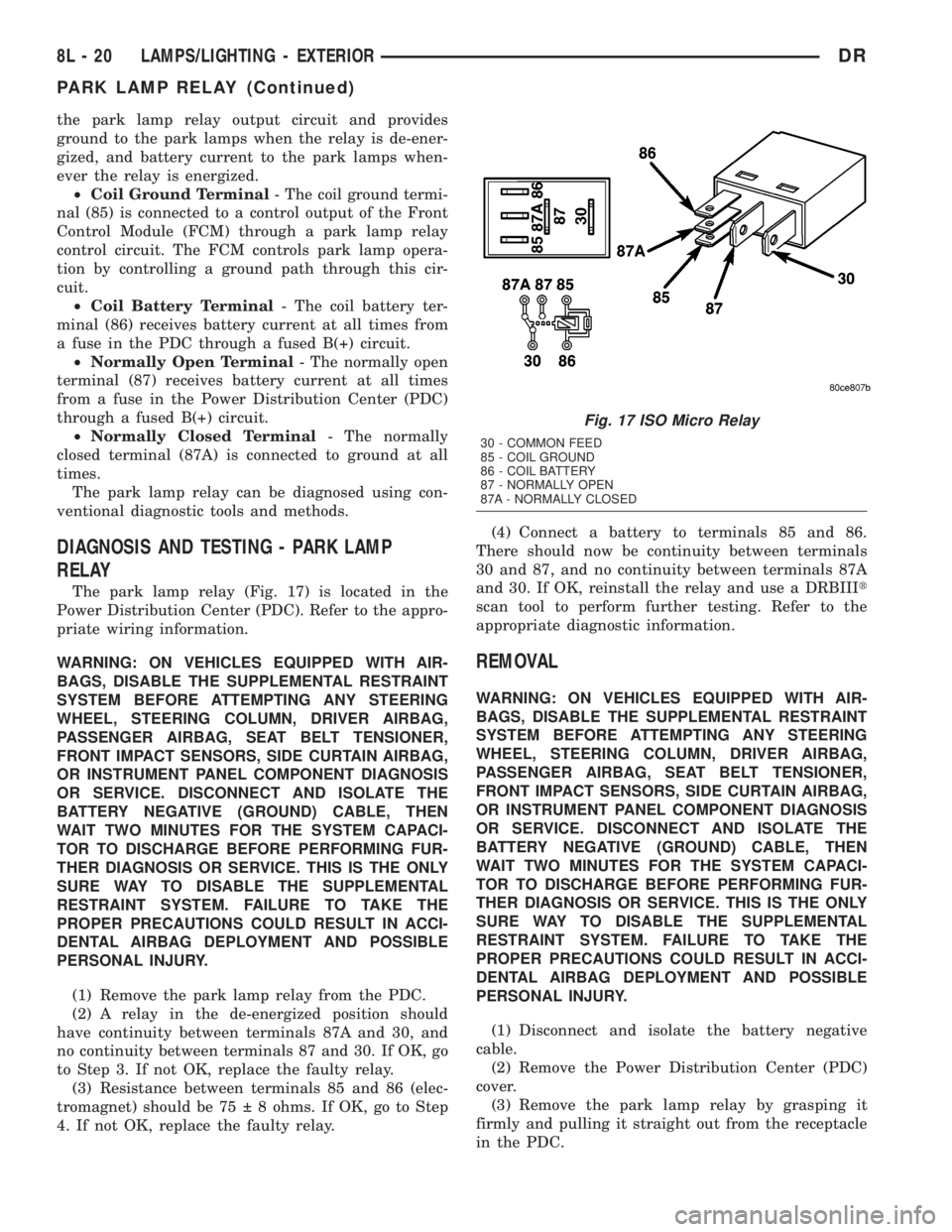
the park lamp relay output circuit and provides
ground to the park lamps when the relay is de-ener-
gized, and battery current to the park lamps when-
ever the relay is energized.
²Coil Ground Terminal- The coil ground termi-
nal (85) is connected to a control output of the Front
Control Module (FCM) through a park lamp relay
control circuit. The FCM controls park lamp opera-
tion by controlling a ground path through this cir-
cuit.
²Coil Battery Terminal- The coil battery ter-
minal (86) receives battery current at all times from
a fuse in the PDC through a fused B(+) circuit.
²Normally Open Terminal- The normally open
terminal (87) receives battery current at all times
from a fuse in the Power Distribution Center (PDC)
through a fused B(+) circuit.
²Normally Closed Terminal- The normally
closed terminal (87A) is connected to ground at all
times.
The park lamp relay can be diagnosed using con-
ventional diagnostic tools and methods.
DIAGNOSIS AND TESTING - PARK LAMP
RELAY
The park lamp relay (Fig. 17) is located in the
Power Distribution Center (PDC). Refer to the appro-
priate wiring information.
WARNING: ON VEHICLES EQUIPPED WITH AIR-
BAGS, DISABLE THE SUPPLEMENTAL RESTRAINT
SYSTEM BEFORE ATTEMPTING ANY STEERING
WHEEL, STEERING COLUMN, DRIVER AIRBAG,
PASSENGER AIRBAG, SEAT BELT TENSIONER,
FRONT IMPACT SENSORS, SIDE CURTAIN AIRBAG,
OR INSTRUMENT PANEL COMPONENT DIAGNOSIS
OR SERVICE. DISCONNECT AND ISOLATE THE
BATTERY NEGATIVE (GROUND) CABLE, THEN
WAIT TWO MINUTES FOR THE SYSTEM CAPACI-
TOR TO DISCHARGE BEFORE PERFORMING FUR-
THER DIAGNOSIS OR SERVICE. THIS IS THE ONLY
SURE WAY TO DISABLE THE SUPPLEMENTAL
RESTRAINT SYSTEM. FAILURE TO TAKE THE
PROPER PRECAUTIONS COULD RESULT IN ACCI-
DENTAL AIRBAG DEPLOYMENT AND POSSIBLE
PERSONAL INJURY.
(1) Remove the park lamp relay from the PDC.
(2) A relay in the de-energized position should
have continuity between terminals 87A and 30, and
no continuity between terminals 87 and 30. If OK, go
to Step 3. If not OK, replace the faulty relay.
(3) Resistance between terminals 85 and 86 (elec-
tromagnet) should be 75 8 ohms. If OK, go to Step
4. If not OK, replace the faulty relay.(4) Connect a battery to terminals 85 and 86.
There should now be continuity between terminals
30 and 87, and no continuity between terminals 87A
and 30. If OK, reinstall the relay and use a DRBIIIt
scan tool to perform further testing. Refer to the
appropriate diagnostic information.
REMOVAL
WARNING: ON VEHICLES EQUIPPED WITH AIR-
BAGS, DISABLE THE SUPPLEMENTAL RESTRAINT
SYSTEM BEFORE ATTEMPTING ANY STEERING
WHEEL, STEERING COLUMN, DRIVER AIRBAG,
PASSENGER AIRBAG, SEAT BELT TENSIONER,
FRONT IMPACT SENSORS, SIDE CURTAIN AIRBAG,
OR INSTRUMENT PANEL COMPONENT DIAGNOSIS
OR SERVICE. DISCONNECT AND ISOLATE THE
BATTERY NEGATIVE (GROUND) CABLE, THEN
WAIT TWO MINUTES FOR THE SYSTEM CAPACI-
TOR TO DISCHARGE BEFORE PERFORMING FUR-
THER DIAGNOSIS OR SERVICE. THIS IS THE ONLY
SURE WAY TO DISABLE THE SUPPLEMENTAL
RESTRAINT SYSTEM. FAILURE TO TAKE THE
PROPER PRECAUTIONS COULD RESULT IN ACCI-
DENTAL AIRBAG DEPLOYMENT AND POSSIBLE
PERSONAL INJURY.
(1) Disconnect and isolate the battery negative
cable.
(2) Remove the Power Distribution Center (PDC)
cover.
(3) Remove the park lamp relay by grasping it
firmly and pulling it straight out from the receptacle
in the PDC.
Fig. 17 ISO Micro Relay
30 - COMMON FEED
85 - COIL GROUND
86 - COIL BATTERY
87 - NORMALLY OPEN
87A - NORMALLY CLOSED
8L - 20 LAMPS/LIGHTING - EXTERIORDR
PARK LAMP RELAY (Continued)
Page 565 of 2895
overhead console assembly to the roof header can
also affect compass operation. If the vehicle roof
should become magnetized, the demagnetizing and
calibration procedures found in this section may be
required to restore proper compass operation.
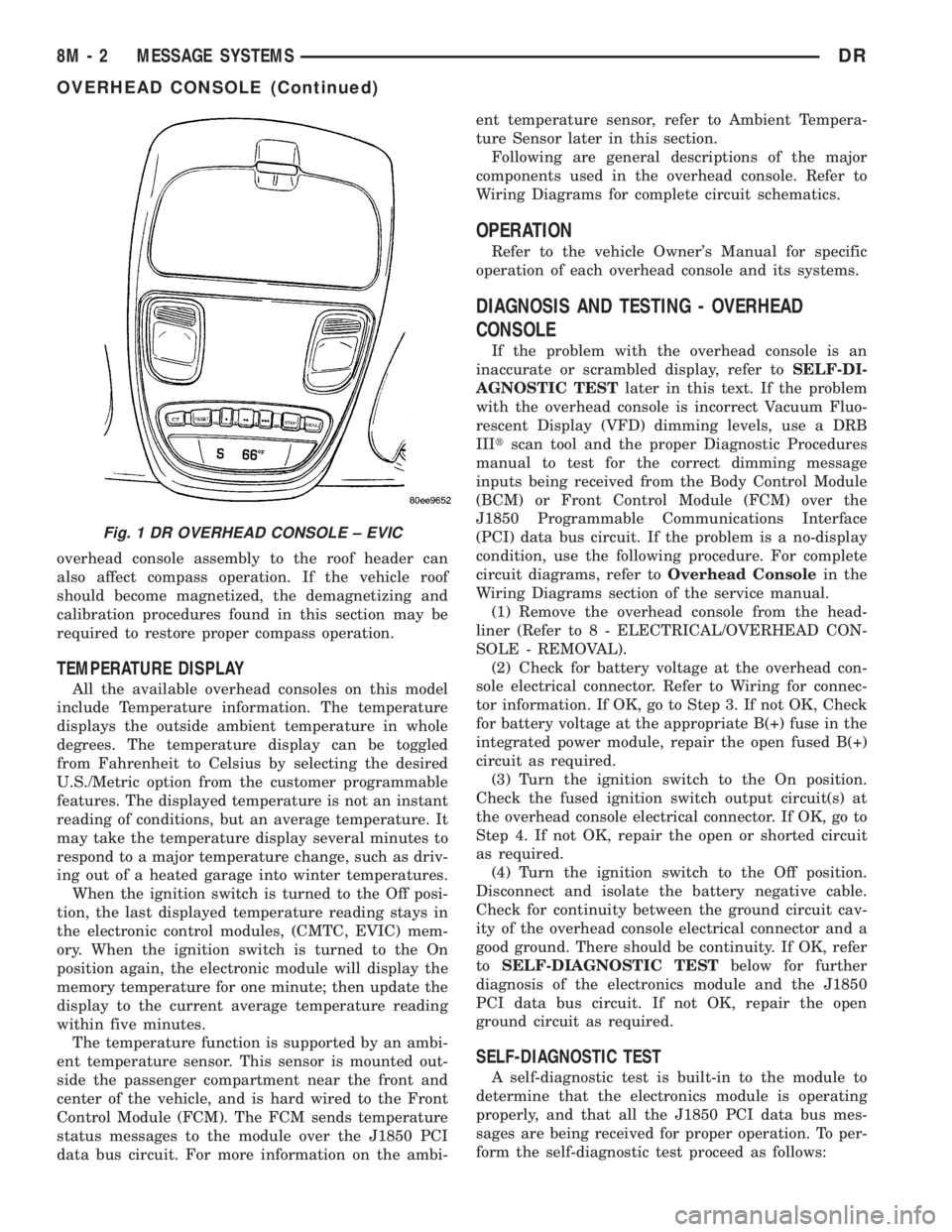
TEMPERATURE DISPLAY
All the available overhead consoles on this model
include Temperature information. The temperature
displays the outside ambient temperature in whole
degrees. The temperature display can be toggled
from Fahrenheit to Celsius by selecting the desired
U.S./Metric option from the customer programmable
features. The displayed temperature is not an instant
reading of conditions, but an average temperature. It
may take the temperature display several minutes to
respond to a major temperature change, such as driv-
ing out of a heated garage into winter temperatures.
When the ignition switch is turned to the Off posi-
tion, the last displayed temperature reading stays in
the electronic control modules, (CMTC, EVIC) mem-
ory. When the ignition switch is turned to the On
position again, the electronic module will display the
memory temperature for one minute; then update the
display to the current average temperature reading
within five minutes.
The temperature function is supported by an ambi-
ent temperature sensor. This sensor is mounted out-
side the passenger compartment near the front and
center of the vehicle, and is hard wired to the Front
Control Module (FCM). The FCM sends temperature
status messages to the module over the J1850 PCI
data bus circuit. For more information on the ambi-ent temperature sensor, refer to Ambient Tempera-
ture Sensor later in this section.
Following are general descriptions of the major
components used in the overhead console. Refer to
Wiring Diagrams for complete circuit schematics.
OPERATION
Refer to the vehicle Owner's Manual for specific
operation of each overhead console and its systems.
DIAGNOSIS AND TESTING - OVERHEAD
CONSOLE
If the problem with the overhead console is an
inaccurate or scrambled display, refer toSELF-DI-
AGNOSTIC TESTlater in this text. If the problem
with the overhead console is incorrect Vacuum Fluo-
rescent Display (VFD) dimming levels, use a DRB
IIItscan tool and the proper Diagnostic Procedures
manual to test for the correct dimming message
inputs being received from the Body Control Module
(BCM) or Front Control Module (FCM) over the
J1850 Programmable Communications Interface
(PCI) data bus circuit. If the problem is a no-display
condition, use the following procedure. For complete
circuit diagrams, refer toOverhead Consolein the
Wiring Diagrams section of the service manual.
(1) Remove the overhead console from the head-
liner (Refer to 8 - ELECTRICAL/OVERHEAD CON-
SOLE - REMOVAL).
(2) Check for battery voltage at the overhead con-
sole electrical connector. Refer to Wiring for connec-
tor information. If OK, go to Step 3. If not OK, Check
for battery voltage at the appropriate B(+) fuse in the
integrated power module, repair the open fused B(+)
circuit as required.
(3) Turn the ignition switch to the On position.
Check the fused ignition switch output circuit(s) at
the overhead console electrical connector. If OK, go to
Step 4. If not OK, repair the open or shorted circuit
as required.
(4) Turn the ignition switch to the Off position.
Disconnect and isolate the battery negative cable.
Check for continuity between the ground circuit cav-
ity of the overhead console electrical connector and a
good ground. There should be continuity. If OK, refer
toSELF-DIAGNOSTIC TESTbelow for further
diagnosis of the electronics module and the J1850
PCI data bus circuit. If not OK, repair the open
ground circuit as required.
SELF-DIAGNOSTIC TEST
A self-diagnostic test is built-in to the module to
determine that the electronics module is operating
properly, and that all the J1850 PCI data bus mes-
sages are being received for proper operation. To per-
form the self-diagnostic test proceed as follows:
Fig. 1 DR OVERHEAD CONSOLE ± EVIC
8M - 2 MESSAGE SYSTEMSDR
OVERHEAD CONSOLE (Continued)
Page 578 of 2895
POWER SYSTEMS
TABLE OF CONTENTS
page page
POWER LOCKS............................ 1
POWER MIRRORS........................ 11POWER SEATS........................... 14
POWER WINDOWS........................ 21
POWER LOCKS
TABLE OF CONTENTS
page page
POWER LOCKS
DESCRIPTION..........................1
OPERATION............................2
DIAGNOSIS AND TESTING - POWER LOCKS . . 3
POWER LOCK SWITCH
DIAGNOSIS AND TESTING - POWER LOCK
SWITCH.............................4
REMOVAL.............................4
INSTALLATION..........................4
DOOR LOCK MOTOR
DESCRIPTION..........................5
OPERATION............................5
DIAGNOSIS AND TESTING - DOOR LOCK
MOTOR ..............................5
DRIVER DOOR MODULE
DESCRIPTION..........................5
OPERATION............................5
DIAGNOSIS AND TESTING - DRIVER DOOR
MODULE.............................6
REMOVAL.............................7
INSTALLATION..........................7REMOTE KEYLESS ENTRY MODULE
DESCRIPTION..........................7
OPERATION............................8
DIAGNOSIS AND TESTING - REMOTE
KEYLESS ENTRY MODULE...............8
REMOVAL.............................8
INSTALLATION..........................8
REMOTE KEYLESS ENTRY TRANSMITTER
DIAGNOSIS AND TESTING - REMOTE
KEYLESS ENTRY TRANSMITTER..........8
STANDARD PROCEDURE
STANDARD PROCEDURE - RKE
TRANSMITTER BATTERIES..............9
STANDARD PROCEDURE - RKE
TRANSMITTER CUSTOMER
PREFERENCES.......................9
STANDARD PROCEDURE - RKE
TRANSMITTER PROGRAMING...........10
SPECIFICATIONS - REMOTE KEYLESS
ENTRY TRANSMITTER.................10
POWER LOCKS
DESCRIPTION
POWER LOCKS
A power operated door lock system is available fac-
tory-installed equipment on this model. The power
lock system allows all of the doors to be locked or
unlocked electrically by operating a switch on either
front door trim panel. The power lock system receives
non-switched battery current through a fuse in the
Integrated Power Module (IPM), so that the powerlocks remain operational, regardless of the ignition
switch position.
The instrument cluster locks the doors automati-
cally when the vehicle is driven beyond the speed of
25.7 Km/h (15 mph), all doors are closed and the
accelerator pedal is depressed. The rolling door lock
feature can be disabled if desired.
This vehicle also offers several customer program-
mable features, which allows the selection of several
optional electronic features to suit individual prefer-
ences.
The power lock system for this vehicle can also be
operated remotely using the available Remote Key-
DRPOWER SYSTEMS 8N - 1
Page 579 of 2895
less Entry (RKE) system radio frequency transmit-
ters, if equipped.
Certain functions and features of the power lock
system rely upon resources shared with other elec-
tronic modules in the vehicle over the Programmable
Communications Interface (PCI) data bus network.
For proper diagnosis of these electronic modules or of
the PCI data bus network, the use of a DRB IIIt
scan tool and the appropriate diagnostic information
are required.
CENTRAL LOCKING/UNLOCKING
The instrument cluster will lock all doors when a
cylinder lock switch is activated in the ªlockº posi-
tion. When the instrument cluster receives an unlock
command from one of the cylinder lock switches, it
will unlock only that door. If the instrument cluster
receives a second command within a 5 second period,
it will unlock all the remaining doors. The illumi-
nated entry will activate during door unlock.
ENHANCED ACCIDENT RESPONSE
Upon detection of an airbag deployment by way of
the PCI bus, the instrument cluster will:
²Immediately disable the power door lock output.
²Unlock all doors by activating the door unlock
output for approximately 300 milliseconds.
²After actuating the door unlock output, allow
the door lock motors to be activated if the door lock
input has been inactive (not erratic) for 2 seconds
since the reception of the airbag deployment mes-
sage.
REMOTE KEYLESS ENTRY
A Radio Frequency (RF) type Remote Keyless
Entry (RKE) system is an available factory-installed
option on this model. The RKE system allows the use
of a remote battery-powered radio transmitter to sig-
nal the instrument cluster to actuate the power lock
system. The RKE receiver operates on non-switched
battery current through a fuse in the Integrated
Power Module (IPM), so that the system remains
operational, regardless of the ignition switch position.
The RKE transmitters are also equipped with a
Panic button. If the Panic button on the RKE trans-
mitter is depressed, the horn will sound and the
exterior lights will flash on the vehicle for about
three minutes, or until the Panic button is depressed
a second time. A vehicle speed of about 25.7 kilome-
ters-per-hour (15 miles-per-hour) will also cancel the
panic event.
The RKE system can also perform other functions
on this vehicle. If the vehicle is equipped with the
optional Vehicle Theft Security System (VTSS), the
RKE transmitter will arm the VTSS when the Lockbutton is depressed, and disarm the VTSS when the
Unlock button is depressed.
The RKE system includes two transmitters when
the vehicle is shipped from the factory, but the sys-
tem can retain the vehicle access codes of up to a
total of four transmitters. The transmitter codes are
retained in the RKE module memory, even if the bat-
tery is disconnected. If an RKE transmitter is faulty
or lost, new transmitter vehicle access codes can be
programmed into the system using a DRB IIItscan
tool.
This vehicle also offers several customer program-
mable features, which allows the selection of several
optional electronic features to suit individual prefer-
ences. Customer programmable feature options
affecting the RKE system include:
²Remote Unlock Sequence- Allows the option
of having only the driver side front door unlock when
the RKE transmitter Unlock button is depressed the
first time. The remaining doors unlock when the but-
ton is depressed a second time within 5 seconds of
the first unlock press. Another option is having all
doors unlock upon the first depression of the RKE
transmitter Unlock button.
²Sound Horn on Lock- Allows the option of
having the horn sound a short chirp as an audible
verification that the RKE system received a valid
Lock request from the RKE transmitter, or having no
audible verification.
²Flash Lights with Lock and Unlock- Allows
the option of having the park lamps flash as an opti-
cal verification that the RKE system received a valid
Lock request or Unlock request from the RKE trans-
mitter, or having no optical verification.
²Programming Additional Transmitters-
Allows up to a total of four transmitter vehicle access
codes to be stored in the receiver memory.
Certain functions and features of the RKE system
rely upon resources shared with other electronic
modules in the vehicle over the Programmable Com-
munications Interface (PCI) data bus network. The
PCI data bus network allows the sharing of sensor
information. This helps to reduce wire harness com-
plexity, internal controller hardware, and component
sensor current loads. For diagnosis of these electronic
modules or of the PCI data bus network, the use of a
DRB IIItscan tool and the appropriate diagnostic
information are required.
OPERATION
POWER LOCKS
The instrument cluster locks or unlocks the doors
when an actuation input signal from a door lock
switch or Remote Keyless Entry Module (RKE) is
received. The instrument cluster turns on the output
8N - 2 POWER LOCKSDR
POWER LOCKS (Continued)
Page 580 of 2895
drivers and provides a voltage level to the door lock
motor for a specified time. All passenger doors can be
locked or unlocked using a mechanical button
mounted on the door trim panel. The front passenger
doors can be locked or unlocked by using the key cyl-
inder.
AUTOMATIC DOOR LOCKS
When the automatic door locks are ENABLED the
door locks will lock when the vehicle is moving at
about 25.7 Km/h (15 mph), all doors are closed and
the accelerator pedal is depressed. This feature can
be switched ON or OFF as desired. When the system
is DISABLED the door locks will operate normally,
but will not lock automatically when the vehicle is
rolling. Once the automatic door locks have been
actuated, they will not try to lock the doors again
until a door is opened.
DOOR LOCK INHIBIT
If the key is in the ignition, in any position, and
either front door is ajar, the doors can not be locked,
but the unlock function still operates. Pressing the
RKE lock/unlock button under these conditions will
result in a normal lock/unlock activation.
After the key is removed from the ignition switch,
or the doors are closed, the power door locks will
operate normally.
DOOR LOCK CIRCUIT PROTECTION
If the door lock switch is actuated continuously for
more than five seconds the instrument cluster will
turn the output driver OFF (the instrument cluster
would consider the switch stuck). Each lock motor is
protected with a Positive Temperature Coefficient
device that prevents motor burn out.
REMOTE KEYLESS ENTRY
²LOCK: Pressing the LOCK button locks all
doors, sounds horn (chirp) once if enabled, flashes the
park lamps once if enabled, and arms the Vehicle
Theft Security System (VTSS), if enabled. The chirp
verifies that the RKE module has sent a message to
the instrument cluster for door lock operation. If a
door has not been closed before pressing the LOCK
button, the vehicle may not be secured and the VTSS
(if equipped) will not arm until the door is closed.
²UNLOCK: Pressing the UNLOCK button once
will unlock the driver's door first if enabled, flashes
the park lamps twice if enabled, activates the illumi-
nated entry system, and disarms the Vehicle Theft
Security System (VTSS), if equipped. Pressing the
UNLOCK button twice within five seconds will
unlock all doors, if driver's door first is enabled.
²PANIC: Pressing the PANIC button sounds the
horns at half second intervals, flashes the exteriorlamps, and turns ON the interior lamps. The panic
alarm will remain on for three minutes, or until the
PANIC button is actuated again or the vehicle speed
exceeds 25.7 Km/h (15 mph) will cancel the panic
event.
The Remote Keyless Entry Module is capable of
retaining the transmitter Vehicle Access Code(s) in
its memory even after vehicle power has been inter-
rupted.
DIAGNOSIS AND TESTING - POWER LOCKS
The most reliable, efficient, and accurate
means to diagnose the power lock system
requires the use of a DRBIIItscan tool and the
proper Diagnostic Procedures manual. The
DRBIIItscan tool can provide confirmation
that the PCI data bus is functional, that all of
the electronic modules are sending and receiv-
ing the proper messages on the PCI data bus,
and that the power lock motors are being sent
the proper hard wired outputs by the relays for
them to perform their power lock system func-
tions.
Following are tests that will help to diagnose the
hard wired components and circuits of the power lock
system. However, these tests may not prove conclu-
sive in the diagnosis of this system. In order to
obtain conclusive testing of the power lock system,
the Programmable Communications Interface (PCI)
data bus network and all of the electronic modules
that provide inputs to, or receive outputs from the
power lock system components must be checked.
The instrument cluster will set Diagnostic Trouble
Codes (DTC) for the power lock system.
Refer to the appropriate wiring information. The
wiring information includes wiring diagrams, proper
wire and connector repair procedures, details of wire
harness routing and retention, connector pin-out
information and location views for the various wire
harness connectors, splices and grounds.
PRELIMINARY DIAGNOSIS
As a preliminary diagnosis for the power lock sys-
tem, note the system operation while you actuate
both the Lock and Unlock functions with the power
lock switches and with the Remote Keyless Entry
(RKE) transmitter. Then, proceed as follows:
²If the entire power lock system fails to function
with either the power lock switches or the RKE
transmitter, check the fused B(+) fuse in the Inte-
grated Power Module (IPM).
²If the power lock system functions with both
power lock switches, but not with the RKE transmit-
ter, proceed to diagnosis of the Remote Keyless Entry
(RKE) system. (Refer to 8 - ELECTRICAL/POWER
LOCKS/KEYLESS ENTRY TRANSMITTER - DIAG-
DRPOWER LOCKS 8N - 3
POWER LOCKS (Continued)
Page 581 of 2895
NOSIS AND TESTING) or (Refer to 8 - ELECTRI-
CAL/POWER LOCKS/REMOTE KEYLESS ENTRY
MODULE - DIAGNOSIS AND TESTING).
²If the power lock system functions with the RKE
transmitter, but not with one or both power lock
switches, proceed to diagnosis of the door lock
switches. (Refer to 8 - ELECTRICAL/POWER
LOCKS/POWER LOCK SWITCH - DIAGNOSIS AND
TESTING).
²If the driver side power lock switch operates
only the driver side front door power lock motor, but
all other power lock motors operate with the passen-
ger side power lock switch or the RKE transmitter,
use a DRBIIItscan tool and the appropriate diagnos-
tic information to diagnose the Programmable Com-
munications Interface (PCI) data bus.
²If only one power lock motor fails to operate
with both power lock switches and the RKE trans-
mitter, proceed to diagnosis of the power lock motor.
(Refer to 8 - ELECTRICAL/POWER LOCKS/POWER
LOCK MOTOR - DIAGNOSIS AND TESTING).
POWER LOCK SWITCH
DIAGNOSIS AND TESTING - POWER LOCK
SWITCH
The Light-Emitting Diode (LED) illumination lamp
of the power lock switch receives battery current
through a fuse in the Integrated Power Module (IPM)
on a fused ignition switch output (run) circuit. The
power lock switch on the driver side front door trim
panel is integral to the driver door module. (Refer to
8 - ELECTRICAL/POWER LOCKS/DOOR MODULE
- DIAGNOSIS AND TESTING). If the power lock
switch operates, but the LED is inoperative, check
for battery current at the switch with the ignition
switch in the On position. If OK, replace the faulty
switch. Refer to the appropriate wiring information.
The wiring information includes wiring diagrams,
proper wire and connector repair procedures, details
of wire harness routing and retention, connector pin-
out information and location views for the various
wire harness connectors, splices and grounds.
(1) Disconnect and isolate the battery negative
cable. Remove the power lock switch from the door
trim panel. Disconnect the door wire harness connec-
tor for the power lock switch from the switch connec-
tor receptacle.
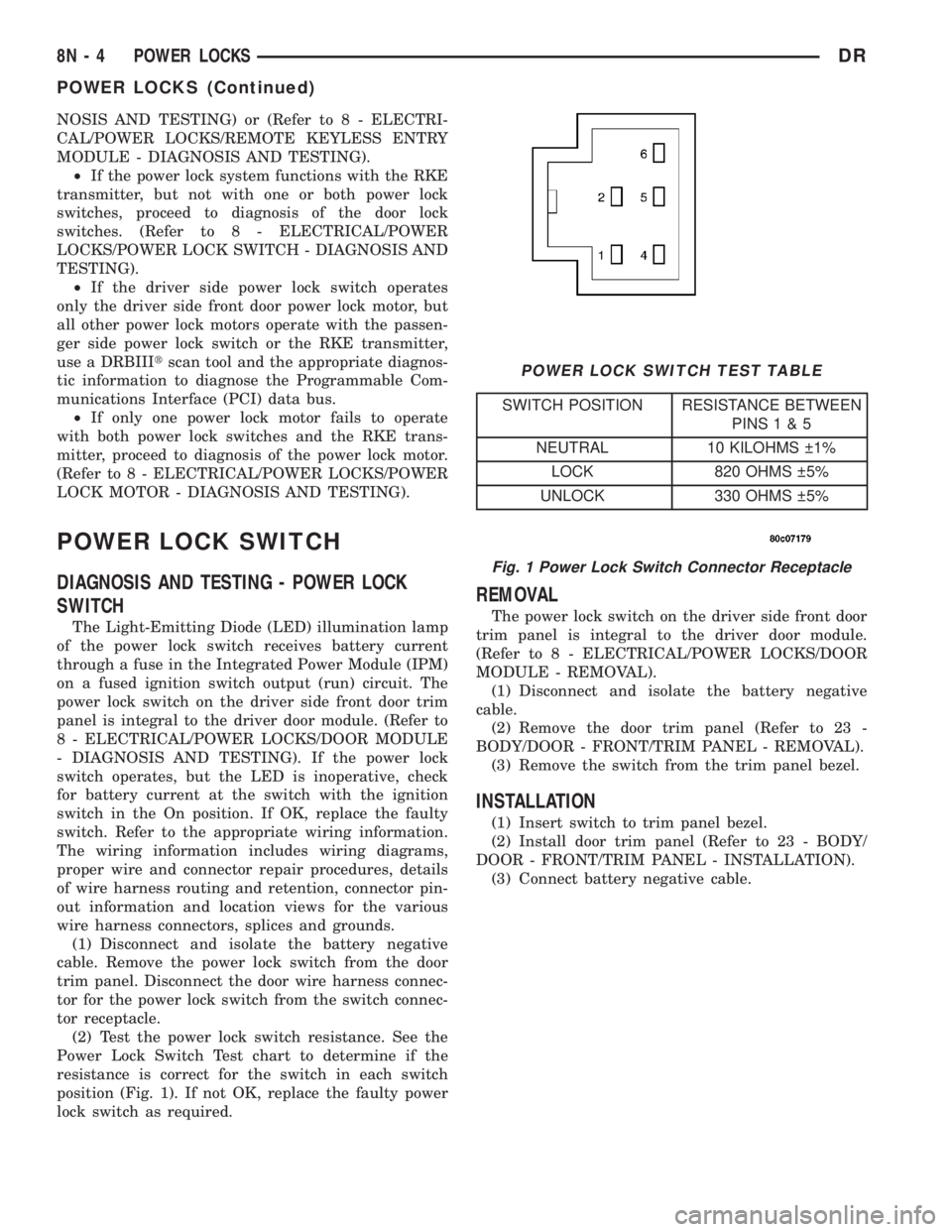
(2) Test the power lock switch resistance. See the
Power Lock Switch Test chart to determine if the
resistance is correct for the switch in each switch
position (Fig. 1). If not OK, replace the faulty power
lock switch as required.
REMOVAL
The power lock switch on the driver side front door
trim panel is integral to the driver door module.
(Refer to 8 - ELECTRICAL/POWER LOCKS/DOOR
MODULE - REMOVAL).
(1) Disconnect and isolate the battery negative
cable.
(2) Remove the door trim panel (Refer to 23 -
BODY/DOOR - FRONT/TRIM PANEL - REMOVAL).
(3) Remove the switch from the trim panel bezel.
INSTALLATION
(1) Insert switch to trim panel bezel.
(2) Install door trim panel (Refer to 23 - BODY/
DOOR - FRONT/TRIM PANEL - INSTALLATION).
(3) Connect battery negative cable.
Fig. 1 Power Lock Switch Connector Receptacle
POWER LOCK SWITCH TEST TABLE
SWITCH POSITION RESISTANCE BETWEEN
PINS1&5
NEUTRAL 10 KILOHMS 1%
LOCK 820 OHMS 5%
UNLOCK 330 OHMS 5%
8N - 4 POWER LOCKSDR
POWER LOCKS (Continued)
Page 582 of 2895
DOOR LOCK MOTOR
DESCRIPTION
The lock mechanisms are actuated by a reversible
electric motor mounted within each door. The power
lock motors are integral to the door latch units.
The power lock motors cannot be adjusted or
repaired and, if faulty or damaged, the door latch
unit must be replaced.
OPERATION
The door lock motors are controlled by the instru-
ment cluster. A positive and negative battery connec-
tion to the two motor terminals will cause the motor
to move in one direction. Reversing the current will
cause the motor to move in the opposite direction.
DIAGNOSIS AND TESTING - DOOR LOCK
MOTOR
The most reliable, efficient, and accurate means to
diagnose the power lock system requires the use of a
DRBIIItscan tool and the proper Diagnostic Proce-
dures manual. The DRBIIItscan tool can provide
confirmation that the PCI data bus is functional, that
all of the electronic modules are sending and receiv-
ing the proper messages on the PCI data bus, and
that the power lock motors are being sent the proper
hard wired outputs by the door modules for them to
perform their power lock system functions.
Refer to the appropriate wiring information. The
wiring information includes wiring diagrams, proper
wire and connector repair procedures, details of wire
harness routing and retention, connector pin-out
information and location views for the various wire
harness connectors, splices and grounds.
DRIVER DOOR MODULE
DESCRIPTION
A Driver Door Module (DDM) is used on all models
equipped with power locks, power windows, and
power mirrors. The DDM houses the following
switches:
²Power Lock Switch- The DDM includes a
two-way, momentary, resistor multiplexed switch to
control the power lock system.
²Power Mirror Selector Switch- A three-posi-
tion rocker switch in the DDM selects the right or
left power mirror for adjustment, or turns the power
mirror system Off.
²Power Mirror Adjustment Switches- Four
momentary, arrowhead shaped, directional switches
allow the driver to adjust the selected power mirror
in the Up, Down, Right, or Left directions.²Power Window Lockout Switch- A two-way,
latching, push-button switch in the DDM allows the
vehicle operator to lock out the power window
switches on each passenger door so that the passen-
ger door power windows may be operated only from
the master switches in the DDM.
²Power Window Switches- The DDM houses a
two-way, momentary power window switch for the
driver side front door. This switch also has a second
detent in the Down direction and internal circuitry to
provide an Auto-Down feature for the driver side
front door power window. In addition to the power
window switch for its own door, the DDM houses
individual master switches for each passenger door
power window.
The DDM also incorporates several green Light-
Emitting Diodes (LEDs) that illuminate the power
lock and power window switch paddles, and the
power mirror switch directional buttons to improve
switch visibility in dark ambient lighting conditions.
The DDM cannot be adjusted or repaired and, if
faulty or damaged, the entire DDM unit must be
replaced.
OPERATION
The Driver Door Module (DDM) combines a power
lock switch, a driver power window switch with an
Auto-down feature, master switches for each passen-
ger door power window, a power window lockout
switch, a power mirror selector switch, and four
power mirror adjustment switches in a single unit.
The switches in the DDM can be diagnosed using
conventional diagnostic tools and methods.
Power Lock Switch
The DDM power lock switch circuitry is connected
in series between ground and the driver door switch
mux input of the instrument cluster. Each power lock
switch position (Lock, Unlock, and Neutral) provides
a different resistance value to the instrument cluster
input, which allows the instrument cluster to sense
the switch position. Based upon the power lock
switch input, the instrument cluster controls the bat-
tery and ground feed outputs to the individual power
lock motors to lock or unlock the door latches. The
Light-Emitting Diode (LED) in the DDM power lock
switch is connected to battery current through the
power window circuit breaker in the Integrated
Power Module (IPM) on a fused ignition switch out-
put (run-acc) circuit so that the switch will be illumi-
nated whenever the ignition switch is in the On or
Accessory positions.
Power Window Switches
The DDM power window switch circuitry is con-
nected to battery current through a circuit breaker in
DRPOWER LOCKS 8N - 5