ignition DODGE SPRINTER 2007 2.G User Guide
[x] Cancel search | Manufacturer: DODGE, Model Year: 2007, Model line: SPRINTER, Model: DODGE SPRINTER 2007 2.GPages: 393, PDF Size: 7.61 MB
Page 60 of 393
59 Controls in detail
Opening and closing
3
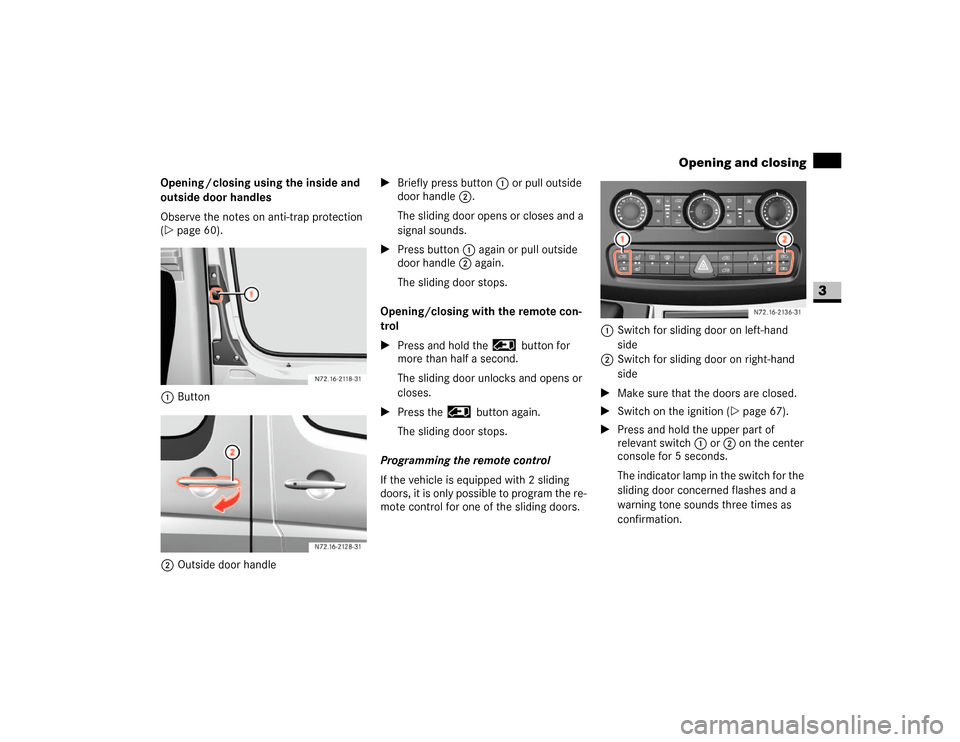
Opening / closing using the inside and
outside door handles
Observe the notes on anti-trap protection
(\2page 60).
1Button
2Outside door handle\1Briefly press button1 or pull outside
door handle 2.
The sliding door opens or closes and a
signal sounds.
\1Press button1 again or pull outside
door handle 2 again.
The sliding door stops.
Opening/closing with the remote con-
trol
\1Press and hold the button for
more than half a second.
The sliding door unlocks and opens or
closes.
\1Press the button again.
The sliding door stops.
Programming the remote control
If the vehicle is equipped with 2 sliding
doors, it is only possible to program the re-
mote control for one of the sliding doors.1Switch for sliding door on left-hand
side
2Switch for sliding door on right-hand
side
\1Make sure that the doors are closed.
\1Switch on the ignition (\2page 67).
\1Press and hold the upper part of
relevant switch1 or 2 on the center
console for 5 seconds.
The indicator lamp in the switch for the
sliding door concerned flashes and a
warning tone sounds three times as
confirmation. N72.16-2118-31
N72.16-2136-31
Page 64 of 393
63 Controls in detail
Opening and closing
3
\1To close: make sure that the left-hand
rear door is closed.
\1Pull the right-hand rear door firmly
closed by the door handle.
\1To lock: slide catch2 to the right.
Only the rear door is locked.
The white marking is no longer visible.Using the central locking switch, you can
centrally lock or unlock from the inside ei-
ther the entire vehicle or the sliding doors
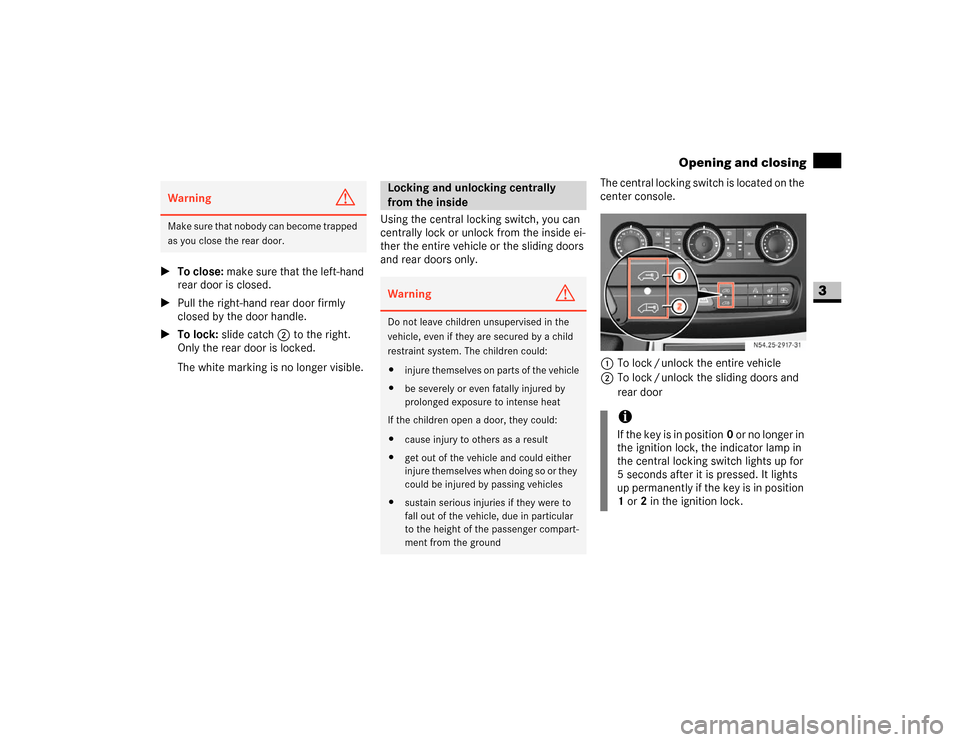
and rear doors only.The central locking switch is located on the
center console.
1To lock / unlock the entire vehicle
2To lock / unlock the sliding doors and
rear doorWarning
G
M a k e s u r e t h a t n o b o d y c a n b e c o m e t r a p p e d
as you close the rear door.
Locking and unlocking centrally
from the insideWarning
G
Do not leave children unsupervised in the
vehicle, even if they are secured by a child
restraint system. The children could:
\4injure themselves on parts of the vehicle
\4be severely or even fatally injured by
prolonged exposure to intense heat
If the children open a door, they could:
\4cause injury to others as a result
\4get out of the vehicle and could either
injure themselves when doing so or they
could be injured by passing vehicles
\4sustain serious injuries if they were to
fall out of the vehicle, due in particular
to the height of the passenger compart-
ment from the ground
iIf the key is in position0 or no longer in
the ignition lock, the indicator lamp in
the central locking switch lights up for
5 seconds after it is pressed. It lights
up permanently if the key is in position
1 or2 in the ignition lock.
N54.25-2917-31
Page 66 of 393
65 Controls in detail
Opening and closing
3
Activating the automatic locking when
driving function for the entire vehicle
\1Close all the doors.
\1Turn the key to position1 or2 in the ig-
nition lock (\2page 67).
\1Press upper part 1 of the switch. Keep
it pressed for approximately
5seconds.
The indicator lamp in the switch flashes
four times.Deactivating the automatic locking
when driving function for the entire
vehicle
\1Close all the doors.
\1Turn the key to position1 or2 in the ig-
nition lock (\2page 67).
\1Press upper part 1 of the switch. Keep
it pressed for approximately
5seconds.
The indicator lamp in the switch flashes
twice.
Activating the automatic locking when
driving function for the sliding doors
and the rear door
\1Close all the doors.
\1Turn the key to position1 or2 in the ig-
nition lock (\2page 67).
\1Press lower part 2 of the switch. Keep
it pressed for approximately
5seconds.
The indicator lamp in the switch flashes
four times.
!
CAUTION
If your vehicle is centrally locked, this
could hinder rescue operations from
the outside in the event of an accident.
When the automatic locking when driv-
ing function is activated, there is a risk
of being locked out if the vehicle is
pushed or towed.
For this reason, always deactivate the
automatic locking when driving func-
tion:
\4before pushing the vehicle
\4before having the vehicle towed
\4if you are only leaving the vehicle
for a brief period
iThe vehicle is locked automatically if
the ignition is switched on and the ve-
hicle is moving (default setting). For in-
formation about different settings,
please ask your authorized Sprinter
Dealer.
iIf activated, automatic locking is deac-
tivated if the vehicle is unlocked or
locked using the central locking switch.
Automatic locking is reactivated after
the ignition is switched off or a door is
opened with the vehicle stationary.
Page 68 of 393
67 Controls in detail
Key positions
3
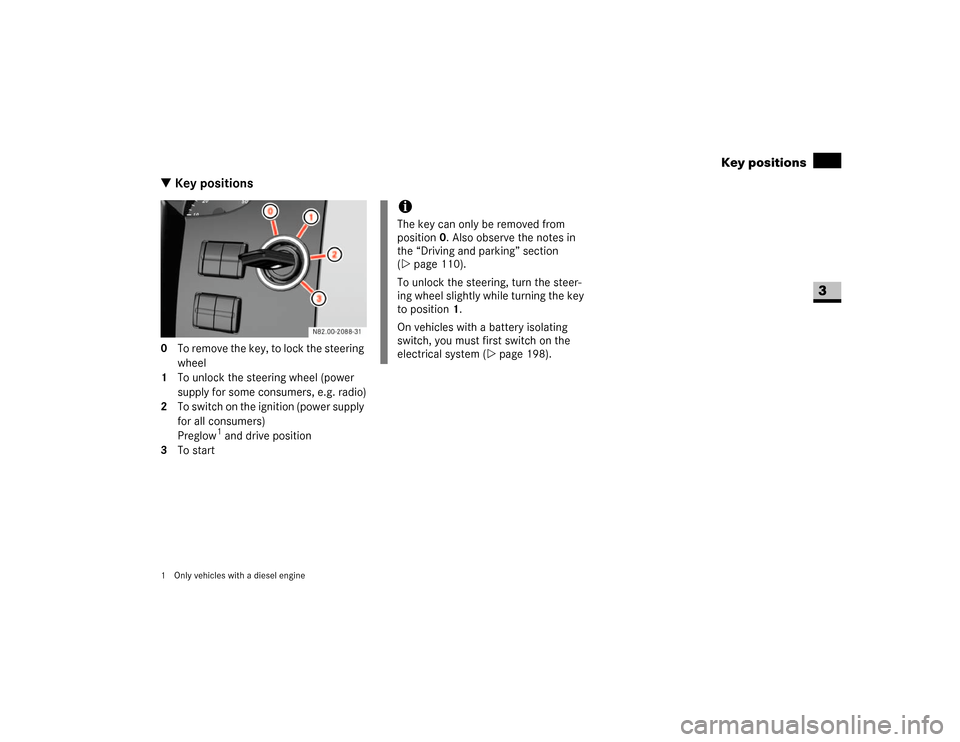
\3 Key positions0 To remove the key, to lock the steering
wheel
1 To unlock the steering wheel (power
supply for some consumers, e.g. radio)
2 To switch on the ignition (power supply
for all consumers)
Preglow
1 and drive position
3 To start
1 Only vehicles with a diesel engine
iThe key can only be removed from
position0. Also observe the notes in
the “Driving and parking” section
(\2page 110).
To unlock the steering, turn the steer-
ing wheel slightly while turning the key
to position 1.
On vehicles with a battery isolating
switch, you must first switch on the
electrical system (\2page 198).
Page 74 of 393
73 Controls in detail
Seats
3
Removing the head restraints
\1Pull the head restraint up as far as it
will go.
\1Press release button1 and pull the
head restraint out.
Installing the head restraints
\1Insert the head restraint so that the rod
with the notches is in the direction of
travel on the left.
\1Push the head restraint down until it
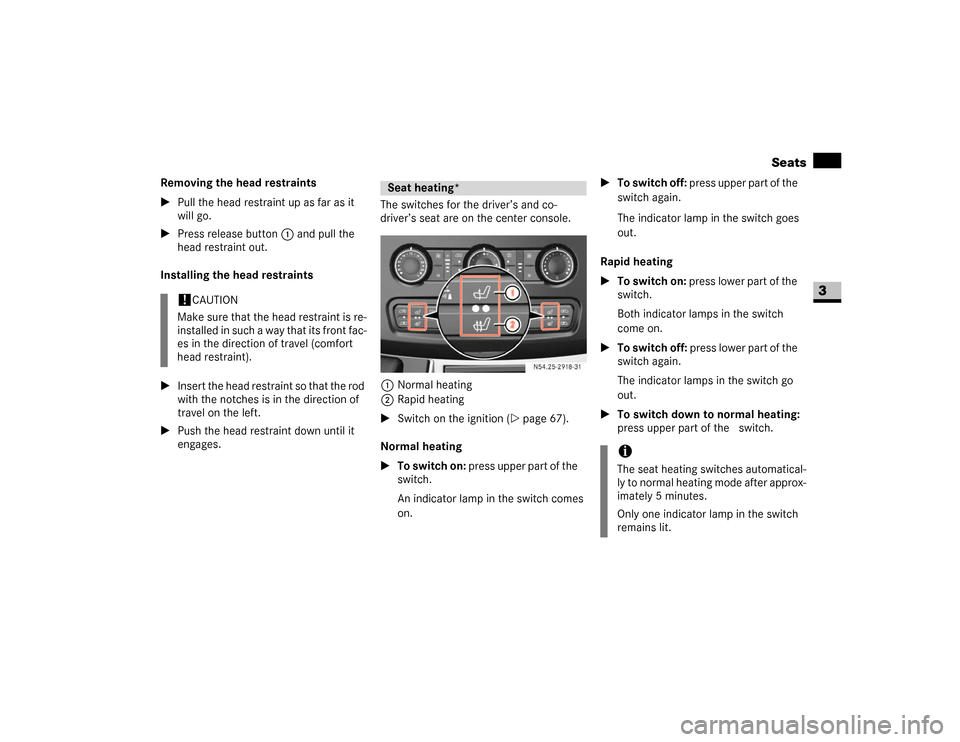
engages.The switches for the driver’s and co-
driver’s seat are on the center console.
1Normal heating
2Rapid heating
\1Switch on the ignition (\2page 67).
Normal heating
\1To switch on: press upper part of the&
switch.
An indicator lamp in the switch comes
on.\1To switch off: press upper part of the&
switch again.
The indicator lamp in the switch goes
out.
Rapid heating
\1To switch on: press lower part of the
switch.
Both indicator lamps in the switch
come on.
\1To switch off: press lower part of the
switch again.
The indicator lamps in the switch go
out.
\1To switch down to normal heating:
press upper part of the& switch.
!
CAUTION
Make sure that the head restraint is re-
installed in such a way that its front fac-
es in the direction of travel (comfort
head restraint).
Seat heating*
N54.25-2918-31
iThe seat heating switches automatical-
ly to normal heating mode after approx-
imately 5 minutes.
Only one indicator lamp in the switch
remains lit.
Page 79 of 393
78 Controls in detailLighting
3
\1Turn key to position1 in ignition lock
(\2page 67).
\1Turn light switch to B.
\1Press combination switch forward 1.
The indicator lampA in the instru-
ment cluster lights up.
Headlamp flasher
\1Turn key to position1 in ignition lock
(\2page 67).
\1Pull combination switch briefly in
direction2.
Constant headlamp mode*
On vehicles with steering wheel buttons,
you can set constant headlamp mode
(\2page 102). This does not apply to coun-
tries in which there is a legal requirement
to use constant headlamp mode.\1Turn light switch to M.
The low-beam headlamps, parking
lamps and license plate lamp are
switched on when the engine is
running.
TheB indicator lamp in the instru-
ment cluster lights up.
Automatic headlamp control*
The parking lamps, low-beam headlamps
and license plate lamp are switched on au-
tomatically when the brightness of ambi-
ent light falls below a predetermined level.\1Turn light switch toU.
The parking lamps are switched on / off
automatically when the key is in posi-
tion 1 (\2page 67) in the ignition lock.
The parking lamps, low-beam head-
lamps and license plate lamp are
switched on / off automatically when
the engine is running, depending on the
ambient light conditions.
Only use manual headlamp mode when
you are driving in countries where driving
with the low-beam headlamps switched on
is required by law.
\1In this case, turn the light switch to
B.
Warning
G
If the light switch is atU:
\4the headlamps could switch off tempo-
rarily due to extreme glare, e.g. from on-
coming traffic
\4the lights do not switch on automatically
in foggy conditions
Set the light switch to B. Otherwise you
are endangering yourself and others.
If it is dark, only turn the light switch from
U toB when the vehicle is stationary.
You could otherwise cause an accident if the
headlamps were to switch off briefly.
Automatic headlamp mode is only a driving
aid. You are responsible for the vehicle’s
lighting at all times.
Page 81 of 393
80 Controls in detailLighting
3
\1Push combination switch up1 or
down 2 until it engages.
The combination switch moves back
automatically if the steering wheel is
turned sufficiently.The hazard warning lamps still operate if
the ignition is switched off and the key is
removed.
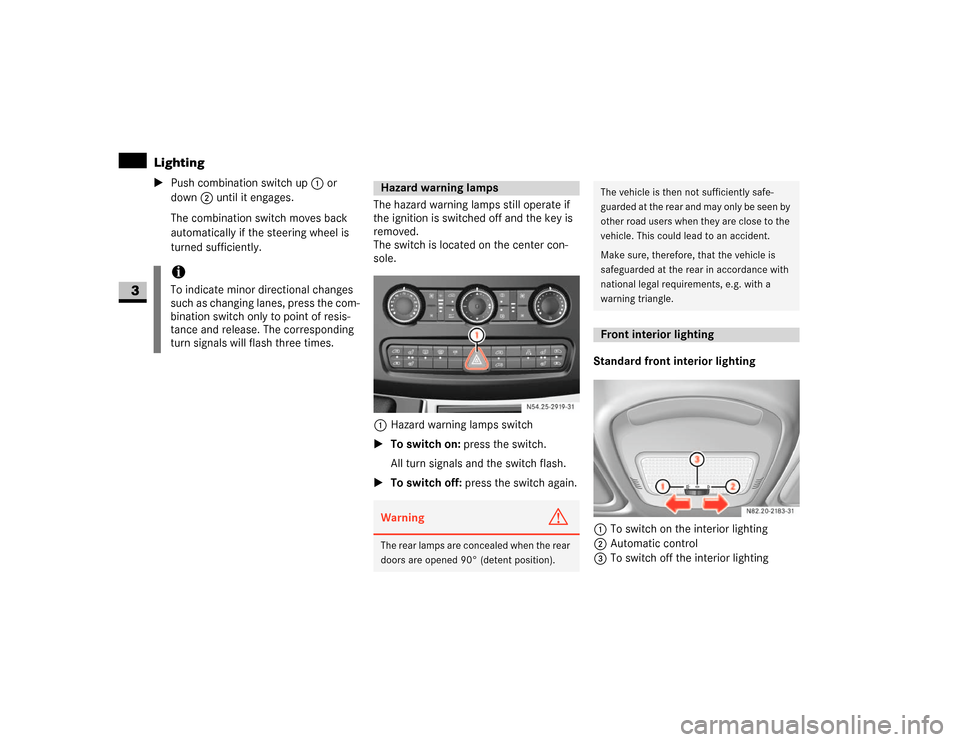
The switch is located on the center con-
sole.
1Hazard warning lamps switch
\1To switch on: press the switch.
All turn signals and the switch flash.
\1To switch off: press the switch again.Standard front interior lighting
1To switch on the interior lighting
2Automatic control
3To switch off the interior lighting
iTo indicate minor directional changes
such as changing lanes, press the com-
bination switch only to point of resis-
tance and release. The corresponding
turn signals will flash three times.
Hazard warning lampsWarning
G
The rear lamps are concealed when the rear
doors are opened 90° (detent position).
N54.25-2919-31
The vehicle is then not sufficiently safe-
guarded at the rear and may only be seen by
other road users when they are close to the
vehicle. This could lead to an accident.
Make sure, therefore, that the vehicle is
safeguarded at the rear in accordance with
national legal requirements, e.g. with a
warning triangle.Front interior lighting
Page 82 of 393
81 Controls in detail
Lighting
3
Front interior lighting with overhead
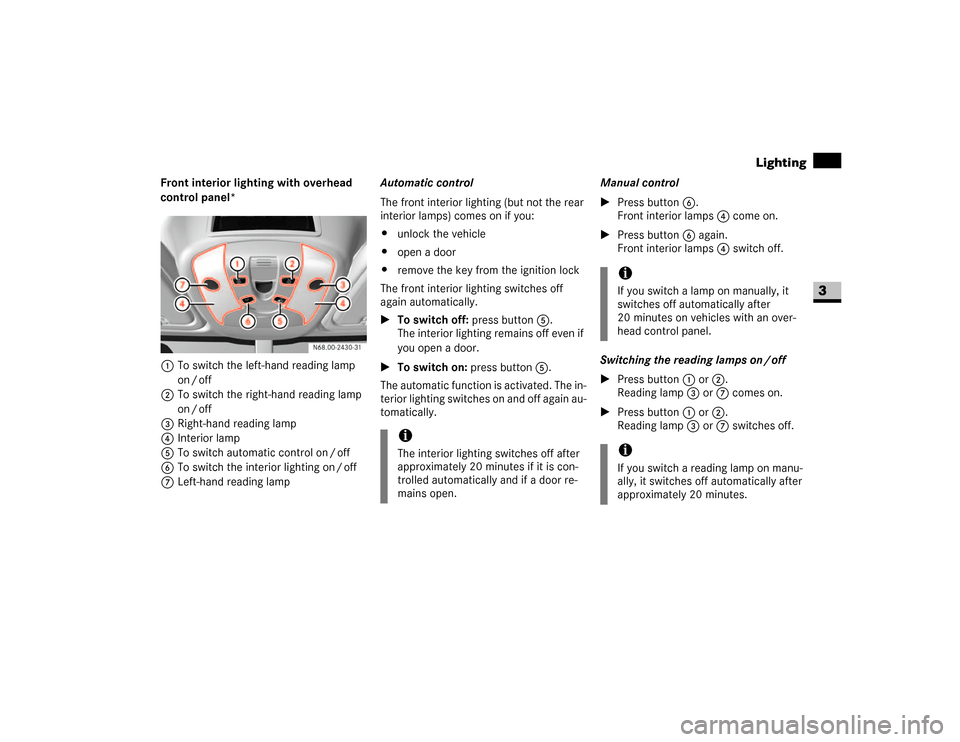
control panel*
1To switch the left-hand reading lamp
on / off
2To switch the right-hand reading lamp
on / off
3Right-hand reading lamp
4Interior lamp
5To switch automatic control on / off
6To switch the interior lighting on / off
7Left-hand reading lampAutomatic control
The front interior lighting (but not the rear
interior lamps) comes on if you:
\4unlock the vehicle
\4open a door
\4remove the key from the ignition lock
The front interior lighting switches off
again automatically.
\1To switch off: press button5.
The interior lighting remains off even if
you open a door.
\1To switch on: press button5.
The automatic function is activated. The in-
terior lighting switches on and off again au-
tomatically.Manual control
\1Press button6.
Front interior lamps 4 come on.
\1Press button6 again.
Front interior lamps 4 switch off.
Switching the reading lamps on / off
\1Press button1 or2.
Reading lamp3 or7 comes on.
\1Press button1 or2.
Reading lamp3 or7 switches off.
iThe interior lighting switches off after
approximately 20 minutes if it is con-
trolled automatically and if a door re-
mains open.
iIf you switch a lamp on manually, it
switches off automatically after
20 minutes on vehicles with an over-
head control panel.iIf you switch a reading lamp on manu-
ally, it switches off automatically after
approximately 20 minutes.
Page 84 of 393
83 Controls in detail
Lighting
3
Load compartment motion detector*
On panel vans equipped with a motion de-
tector in the load compartment, the rear
interior lighting may also switch on if mo-
tion is detected.The rear interior lighting can be switched
on by the motion detector with a delay of
no more than 4 seconds if:
\4the switch on the rear interior lamp
(\2page 82) is set to “automatic con-
trol”
\4the vehicle is stationary, the handbrake
is applied and the service brake is not
applied
or
\4the selector lever is in position P and
the service brake is not applied
\4the vehicle has not been locked from
the outside using the key
iThe rear interior lamps switch off auto-
matically after 20 minutes, even if the
switches on the rear interior lamps
(\2page 82) are in the On position 1.
If you wish to reactivate the rear interi-
or lamps, you must:
\4open a door
\4switch on the ignition again
\4set the rear interior lighting master
control switch to position2 again.
Warning
G
Motion detectors work with invisible infra-
red beams emitted by LEDs (Light Emitting
Diodes).
Do not view invisible infrared radiation, laser
class 1M, directly using optical instruments.
Your eyes could otherwise be injured.iIf the motion detector detects move-
ment in the load compartment when
the vehicle is stationary, the rear interi-
or lighting switches on for approxi-
mately 2 minutes. If new movements
are detected, the duration resumes
from the beginning and the rear interior
lighting remains switched on.
iThe motion detector switches off auto-
matically if no change is detected in the
vehicle for several hours, e.g. door
opened, ignition key turned, etc.
This prevents the battery from dis-
charging.
Page 85 of 393
84 Controls in detailLighting
3
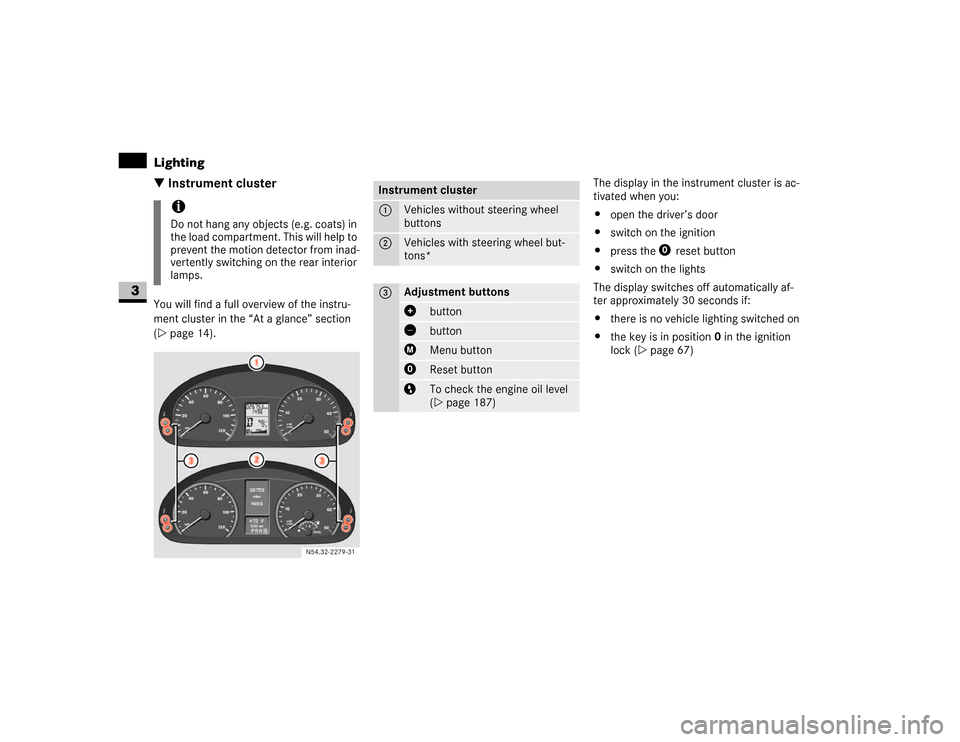
\3 Instrument clusterYou will find a full overview of the instru-
ment cluster in the “At a glance” section
(\2page 14).The display in the instrument cluster is ac-
tivated when you:
\4open the driver’s door
\4switch on the ignition
\4press the reset button
\4switch on the lights
The display switches off automatically af-
ter approximately 30 seconds if:
\4there is no vehicle lighting switched on
\4the key is in position 0 in the ignition
lock (\2page 67)
iDo not hang any objects (e.g. coats) in
the load compartment. This will help to
prevent the motion detector from inad-
vertently switching on the rear interior
lamps.
N54.32-2279-31
Instrument cluster1
Vehicles without steering wheel
buttons
2
Vehicles with steering wheel but-
tons*
3
Adjustment buttons
button buttonMenu buttonReset buttonTo check the engine oil level
(\2page 187)