ignition DODGE SPRINTER 2007 2.G Owner's Manual
[x] Cancel search | Manufacturer: DODGE, Model Year: 2007, Model line: SPRINTER, Model: DODGE SPRINTER 2007 2.GPages: 393, PDF Size: 7.61 MB
Page 88 of 393
87 Controls in detail
Operating system without steering wheel buttons
3
\3 Operating system without steering wheel buttonsThe operating system is activated as soon
as you switch on the ignition. You may per-
form the following using the operating sys-
tem:
\4Call up vehicle information
\4Make settingsThe operating system shows the informa-
tion in the display.
You can control the display and the set-
tings in the operating system using the
adjustment buttons on the instrument
cluster.Changing the standard display
\1Switch on the ignition (\2page 67).
\1Press and hold the menu button for
more than 1 second.
The information shown in the display
changes from the outside temperature
to the digital speedometer.
Outside temperature display*Warning
G
Only use adjustment buttons , ,
or
when traffic conditions permit. You will oth-
erwise be unable to observe road and traffic
conditions and could cause an accident.
Do not reach through the steering wheel to
press the adjustment buttons. This will
make the steering wheel much more difficult
to control. Your attention will also be divert-
ed from the road and traffic conditions. This
could cause you to lose control of the vehi-
cle and could lead to an accident.
Do not rest your head or chest on the steer-
ing wheel or dashboard when operating the
adjustment buttons.
See the safety precautions for airbags
(\2page 31).
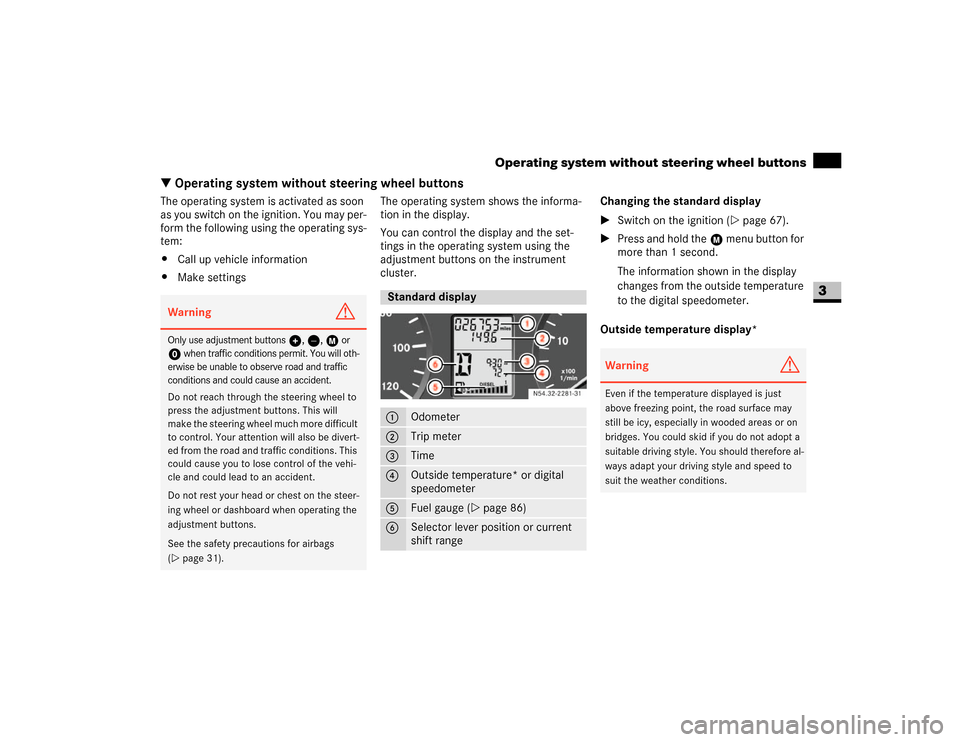
Standard display1
Odometer
2
Trip meter
3
Time
4
Outside temperature* or digital
speedometer
5
Fuel gauge (\2page 86)
6
Selector lever position or current
shift rangeN54.32-2281-31
Warning
G
Even if the temperature displayed is just
above freezing point, the road surface may
still be icy, especially in wooded areas or on
bridges. You could skid if you do not adopt a
suitable driving style. You should therefore al-
ways adapt your driving style and speed to
suit the weather conditions.
Page 89 of 393
88 Controls in detailOperating system without steering wheel buttons
3
There may be a short delay before a lower
outside temperature is displayed, for ex-
ample after leaving a garage. There may
also be a short delay before a rise in the
outside temperature is displayed. This
prevents you from seeing a temperature
display influenced by heat from the engine
when the vehicle is stationary or moving
slowly.
Setting the time
\1Switch on the ignition (\2page 67).
\1Press menu button repeatedly until
the hours figure flashes.
\1Set the hour using the or button.
\1Press the reset button .
The minute display flashes.
\1Set the minutes using the or
button.Setting the date
\1Switch on the ignition (\2page 67).
\1Press menu button repeatedly until
the day flashes.
\1Set the day using the or button.
\1Press reset button.
The month display flashes.
\1Set the month using the or but-
ton.
\1Press reset button.
The year display flashes.
\1Set the year using the or button.MenusFunction
Page
Calling up the service due date*
238
Checking the engine oil level
187
Selecting/setting the auxiliary
heating switch-on time*
142
Tire pressure monitor
213
Setting the time
88
Setting the date
88
iTo return to the standard display:
\4press and hold menu button for
more than 1 second
\4do not press a button for
10 seconds
The display accepts the changed set-
tings.iIf you keep the button pressed, the val-
ues will change continuously.
iIf you keep the button pressed, the val-
ues will change continuously.
Page 90 of 393
89 Controls in detail
Operating system with steering wheel buttons*
3
\3 Operating system with steering wheel buttons*The operating system is activated as soon
as you switch on the ignition. You may per-
form the following using the operating sys-
tem:
\4Call up vehicle information
\4Make settings
You can use this not only to find out when
the next service is due, but also to set the
language for messages in the instrument
cluster, for example, and much more.
The operating system shows the informa-
tion in the display.You can control the display and the set-
tings in the operating system with the but-
tons on the steering wheel.Warning
G
Only use the operating system when road
and traffic conditions permit. You will other-
wise be unable to observe road and traffic
conditions and could cause an accident.
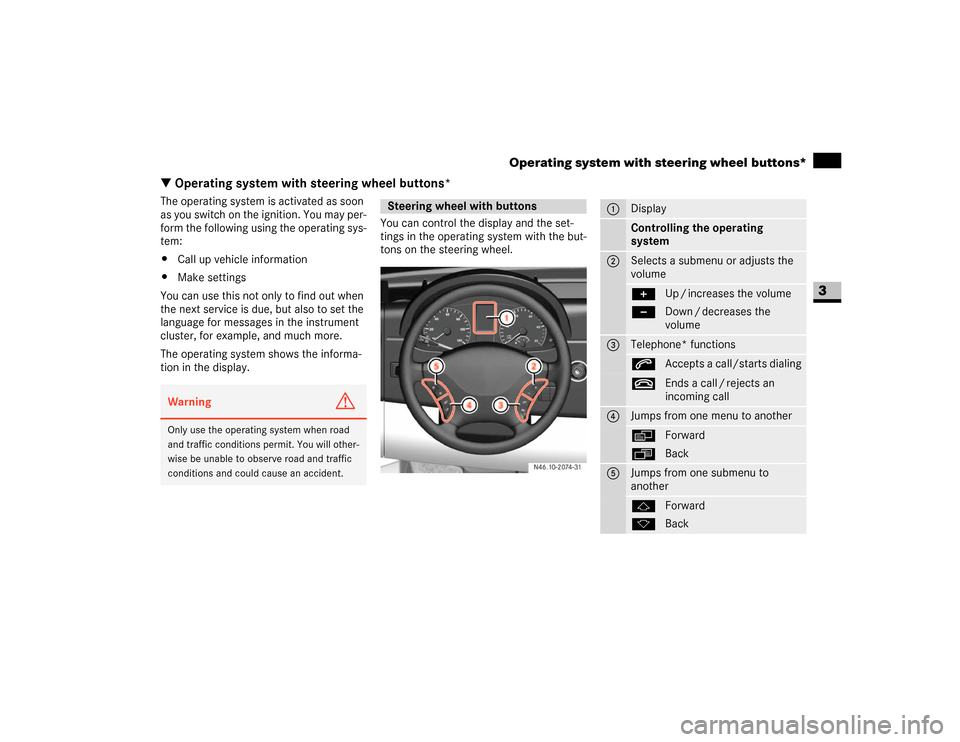
Steering wheel with buttons
N46.10-2074-31
1
DisplayControlling the operating
system
2
Selects a submenu or adjusts the
volume+
-
Up / increases the volume
Down / decreases the
volume
3
Telephone* functionss
Accepts a call/starts dialing
t
Ends a call / rejects an
incoming call
4
Jumps from one menu to anotherè
·
Forward
Back
5
Jumps from one submenu to
anotherj
k
Forward
Back
Page 96 of 393
95 Controls in detail
Operating system with steering wheel buttons*
3
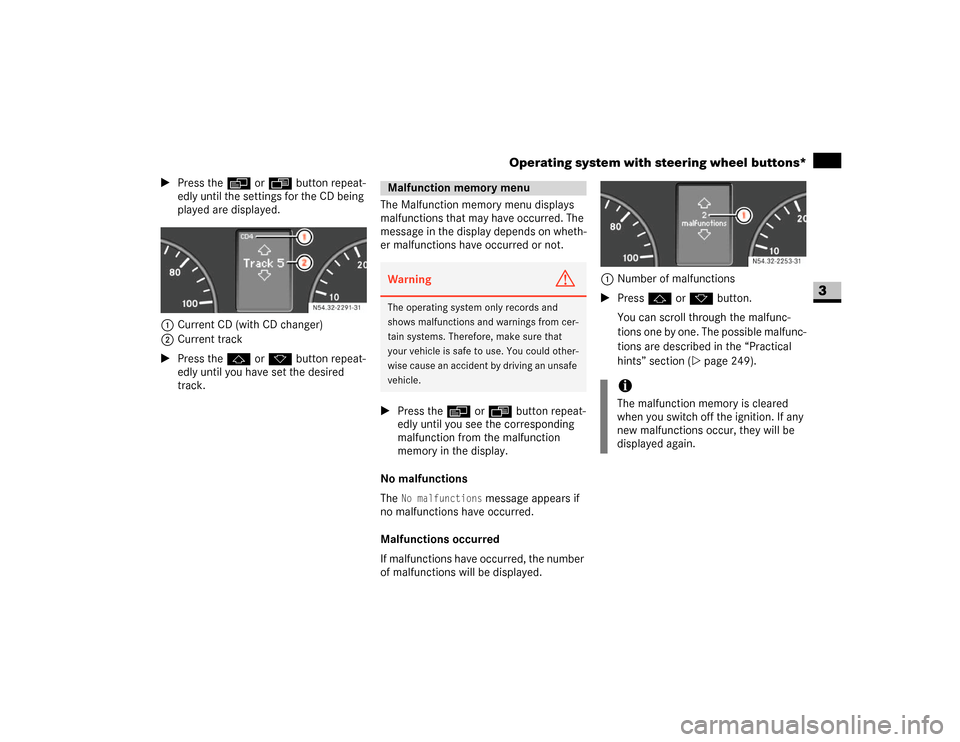
\1Press theè or ÿ button repeat-
edly until the settings for the CD being
played are displayed.
1Current CD (with CD changer)
2Current track
\1Press the j or k button repeat-
edly until you have set the desired
track.The Malfunction memory menu displays
malfunctions that may have occurred. The
message in the display depends on wheth-
er malfunctions have occurred or not.
\1Press theè or ÿ button repeat-
edly until you see the corresponding
malfunction from the malfunction
memory in the display.
No malfunctions
The
No malfunctions
message appears if
no malfunctions have occurred.
Malfunctions occurred
If malfunctions have occurred, the number
of malfunctions will be displayed.1Number of malfunctions
\1Press j or k button.
You can scroll through the malfunc-
tions one by one. The possible malfunc-
tions are described in the “Practical
hints” section (\2page 249).
Malfunction memory menuWarning
G
The operating system only records and
shows malfunctions and warnings from cer-
tain systems. Therefore, make sure that
your vehicle is safe to use. You could other-
wise cause an accident by driving an unsafe
vehicle.
iThe malfunction memory is cleared
when you switch off the ignition. If any
new malfunctions occur, they will be
displayed again.
N54.32-2253-31
Page 104 of 393
103 Controls in detail
Operating system with steering wheel buttons*
3
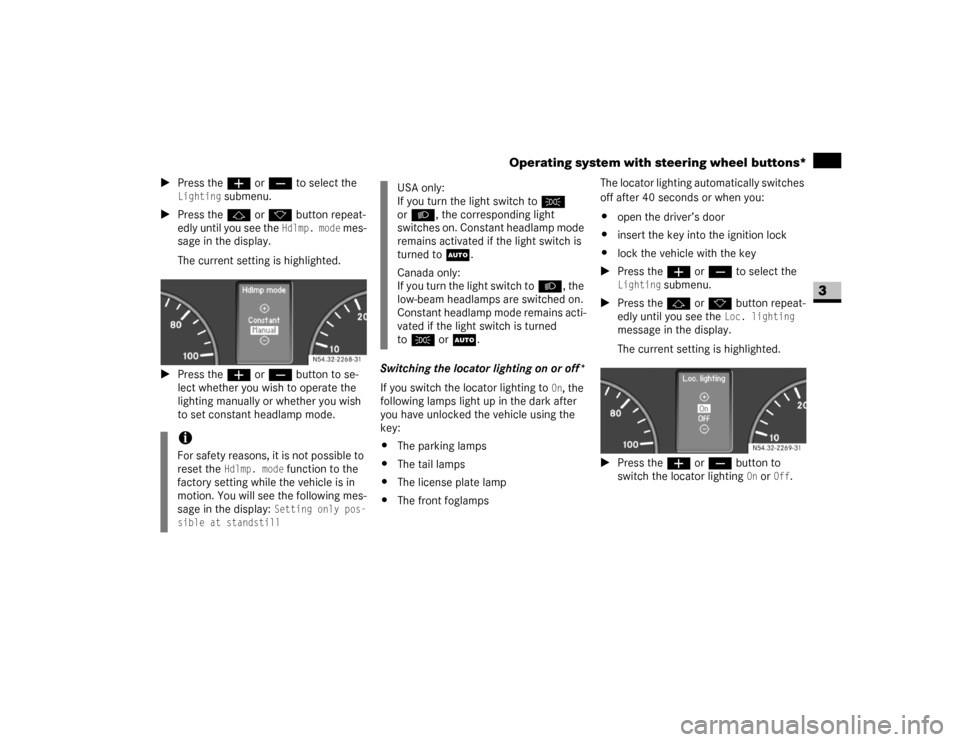
\1Press theæ or ç to select the
Lighting
submenu.
\1Press thej or k button repeat-
edly until you see the
Hdlmp. mode
mes-
sage in the display.
The current setting is highlighted.
\1Press theæ or ç button to se-
lect whether you wish to operate the
lighting manually or whether you wish
to set constant headlamp mode.Switching the locator lighting on or off*
If you switch the locator lighting to
On, the
following lamps light up in the dark after
you have unlocked the vehicle using the
key:
\4The parking lamps
\4The tail lamps
\4The license plate lamp
\4The front foglampsThe locator lighting automatically switches
off after 40 seconds or when you:
\4open the driver’s door
\4insert the key into the ignition lock
\4lock the vehicle with the key
\1Press theæ or ç to select the
Lighting
submenu.
\1Press thej or k button repeat-
edly until you see the
Loc. lighting
message in the display.
The current setting is highlighted.
\1Press the æ or ç button to
switch the locator lighting
On or
Off
.
iFor safety reasons, it is not possible to
reset the
Hdlmp. mode
function to the
factory setting while the vehicle is in
motion. You will see the following mes-
sage in the display: Setting only pos-
sible at standstill
N54.32-2268-31
USA only:
If you turn the light switch toC
orB, the corresponding light
switches on. Constant headlamp mode
remains activated if the light switch is
turned toU.
Canada only:
If you turn the light switch toB, the
low-beam headlamps are switched on.
Constant headlamp mode remains acti-
vated if the light switch is turned
toC orU.
N54.32-2269-31
Page 107 of 393
106 Controls in detailOperating system with steering wheel buttons*
3
\1Press the æ or ç button to
switch key dependence
On or
Off
.
The Trip computer menu displays statisti-
cal data for your vehicle.Consumption statistics after start
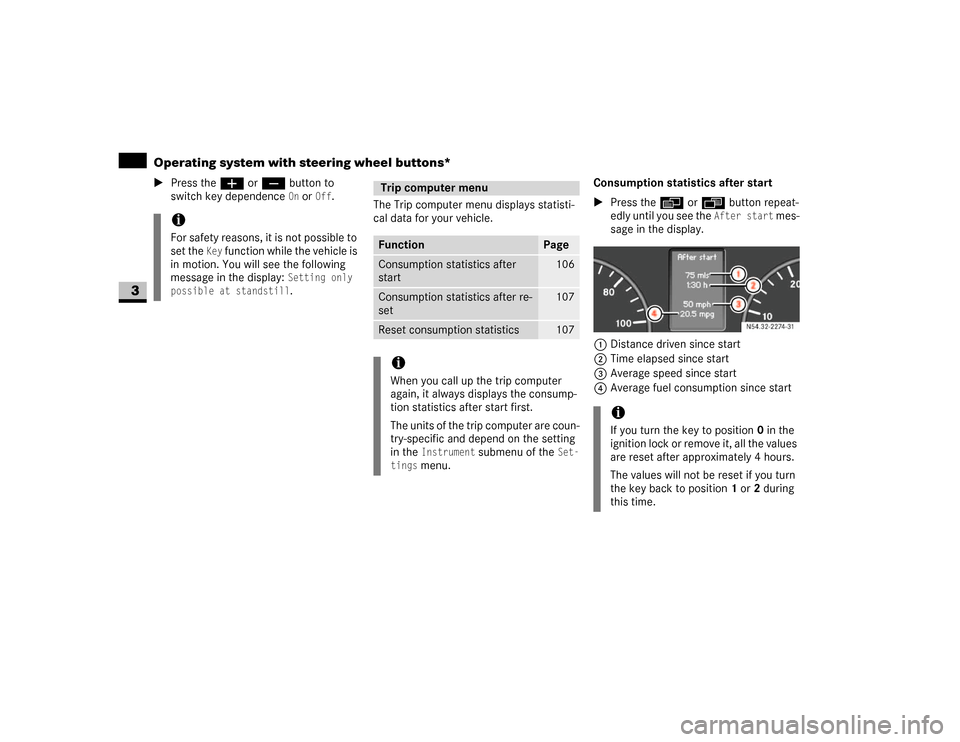
\1Press the è or ÿ button repeat-
edly until you see the
After start
mes-
sage in the display.
1Distance driven since start
2Time elapsed since start
3Average speed since start
4Average fuel consumption since start
iFor safety reasons, it is not possible to
set the
Key
function while the vehicle is
in motion. You will see the following
message in the display:
Setting only
possible at standstill.
Trip computer menuFunction
Page
Consumption statistics after
start
106
Consumption statistics after re-
set
107
Reset consumption statistics
107
iWhen you call up the trip computer
again, it always displays the consump-
tion statistics after start first.
The units of the trip computer are coun-
try-specific and depend on the setting
in the
Instrument
submenu of the
Set-
tings
menu.
iIf you turn the key to position 0 in the
ignition lock or remove it, all the values
are reset after approximately 4 hours.
The values will not be reset if you turn
the key back to position1 or2 during
this time.
N54.32-2274-31
Page 112 of 393
111 Controls in detail
Driving and parking
3
\1Before starting the engine, make sure
that all vehicle occupants are wearing
their seat belt correctly (\2page 27)
and the handbrake (\2page 115) is ap-
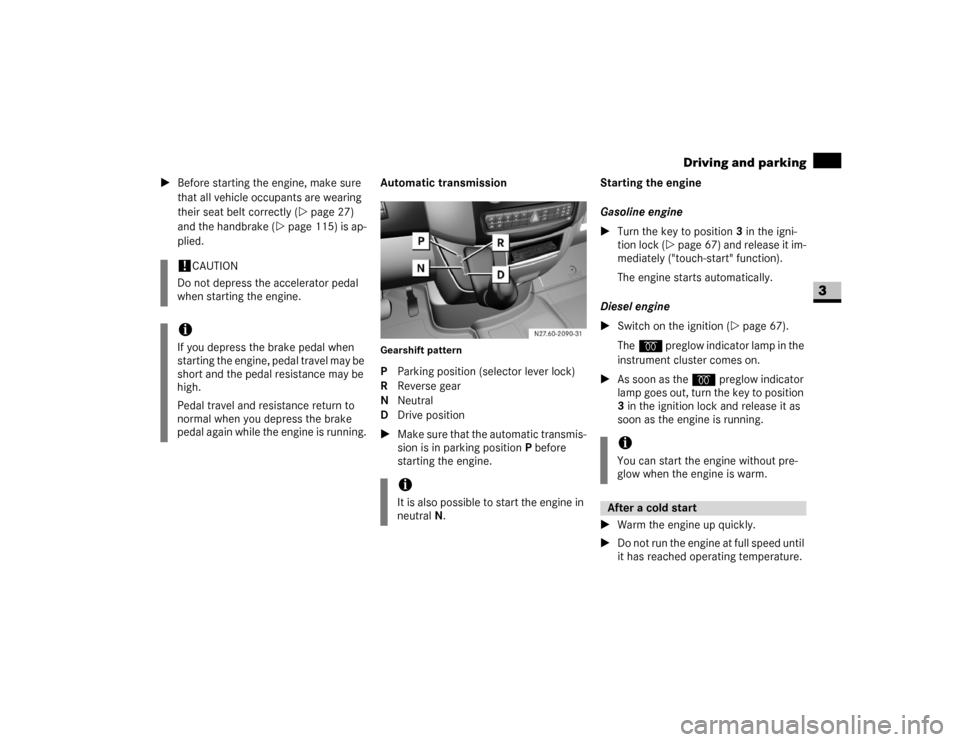
plied.Automatic transmission
Gearshift patternP Parking position (selector lever lock)
R Reverse gear
N Neutral
D Drive position
\1Make sure that the automatic transmis-
sion is in parking position P before
starting the engine.Starting the engine
Gasoline engine
\1Turn the key to position3 in the igni-
tion lock (\2page 67) and release it im-
mediately ("touch-start" function).
The engine starts automatically.
Diesel engine
\1Switch on the ignition (\2page 67).
Theq preglow indicator lamp in the
instrument cluster comes on.
\1As soon as the q preglow indicator
lamp goes out, turn the key to position
3 in the ignition lock and release it as
soon as the engine is running.
\1Warm the engine up quickly.
\1Do not run the engine at full speed until
it has reached operating temperature.
!
CAUTION
Do not depress the accelerator pedal
when starting the engine.
iIf you depress the brake pedal when
starting the engine, pedal travel may be
short and the pedal resistance may be
high.
Pedal travel and resistance return to
normal when you depress the brake
pedal again while the engine is running.
iIt is also possible to start the engine in
neutral N.
iYou can start the engine without pre-
glow when the engine is warm.After a cold start
Page 115 of 393
114 Controls in detailDriving and parking
3
ParkingWarning
G
Only remove the key from the ignition lock
when the vehicle is stationary, since it is not
possible to steer the vehicle with the key re-
moved.
Always apply the handbrake after parking
the vehicle.
Never leave children unsupervised in the ve-
hicle. They could release the handbrake.
This could lead to a serious or fatal accident.
Warning
G
Always switch off the engine and apply the
handbrake before leaving the vehicle.
The vehicle could roll away if it is not
secured.
On uphill or downhill gradients steeper than
15%:
\4apply the handbrake
\4secure an unloaded vehicle by chocking
the front axle (\2page 303)
\4secure a loaded vehicle by, for example,
chocking the rear axle (\2page 303)!
CAUTION
Whenever you park the vehicle, always
remove the key to prevent the battery
from excessively discharging.
For vehicles which are out of use for ex-
tended periods and have a battery iso-
lating switch*, switch off the electrical
system (\2page 197).
Warning
G
Make sure that the exhaust system does not
come into contact with highly flammable
materials, e.g. dry grass or gasoline. The
flammable material could otherwise ignite
and set vehicle components on fire.Warning
G
Regulations in some countries require the
parking lamps to be switched on to illumi-
nate the vehicle for other road users if
parked on a public road at night. In built-up
areas, night reflectors can also be used.
Observe legal requirements.
Page 117 of 393
116 Controls in detailDriving and parking
3
Stopping the engine
\1Apply handbrake (\2page 115).
\1Move selector lever to P.
\1Turn key to position 0 (\2page 67) in
the ignition lock and remove it.
The immobilizer is activated.\1Secure the vehicle at the front axle if
unloaded and at the rear axle if loaded,
e.g. using a chock (\2page 303).
Drinking and drivingSteering
!
CAUTION
If the coolant temperature is raised,
e.g. following driving in mountainous
terrain, run the engine at idling speed
for a further 1 or 2 minutes before you
switch off the engine. This allows the
coolant temperature to return to nor-
mal again.
iWhen parking on steep uphill or down-
hill gradients, turn the front wheels to-
wards the curb.iYou can only remove the key from the
ignition lock when the selector lever is
in positionP.
General driving tipsWarning
G
Drinking and driving and/or taking drugs
and driving are very dangerous combina-
tions. Even a small amount of alcohol or
drugs can affect your reflexes, perceptions
and judgment. The possibility of a serious or
even fatal accident is sharply increased
when you drink or take drugs and drive.
Never drink or take drugs and drive or allow
anyone to drive after drinking or taking
drugs.
Warning
G
There is no power-steering assistance when
the engine is not running.
You will need to use significantly more force
to steer and could therefore lose control of
the vehicle and cause an accident.
Never switch off the engine while driving.!
CAUTION
Do not hold the steering wheel in its
end positions for longer than neces-
sary (e.g. when turning or maneuver-
ing).
The hydraulic pump can be damaged
by the increased temperature of the
hydraulic fluid.
Page 126 of 393
125 Controls in detail
Good visibility
3
\3 Good visibilityBefore starting off, adjust the rear-view
mirror and the exterior mirrors in such a
way that you can get a good overview of
road and traffic conditions.
Rear-view mirror*
\1Adjust the rear-view mirror manually.
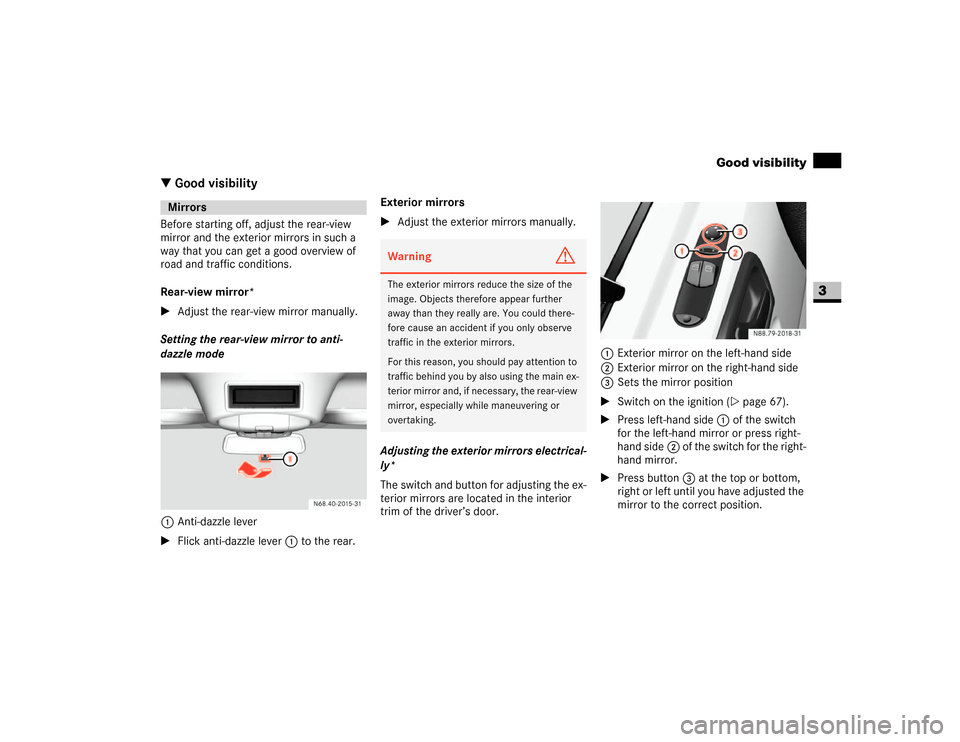
Setting the rear-view mirror to anti-
dazzle mode
1Anti-dazzle lever
\1Flick anti-dazzle lever1 to the rear.Exterior mirrors
\1Adjust the exterior mirrors manually.
Adjusting the exterior mirrors electrical-
ly*
The switch and button for adjusting the ex-
terior mirrors are located in the interior
trim of the driver’s door.1Exterior mirror on the left-hand side
2Exterior mirror on the right-hand side
3Sets the mirror position
\1Switch on the ignition (\2page 67).
\1Press left-hand side 1 of the switch
for the left-hand mirror or press right-
hand side2 of the switch for the right-
hand mirror.
\1Press button3 at the top or bottom,
right or left until you have adjusted the
mirror to the correct position.Mirrors
Warning
G
The exterior mirrors reduce the size of the
image. Objects therefore appear further
away than they really are. You could there-
fore cause an accident if you only observe
traffic in the exterior mirrors.
For this reason, you should pay attention to
traffic behind you by also using the main ex-
terior mirror and, if necessary, the rear-view
mirror, especially while maneuvering or
overtaking.