brake DODGE SPRINTER 2007 2.G Owner's Manual
[x] Cancel search | Manufacturer: DODGE, Model Year: 2007, Model line: SPRINTER, Model: DODGE SPRINTER 2007 2.GPages: 393, PDF Size: 7.61 MB
Page 118 of 393
117 Controls in detail
Driving and parking
3
Overrun cut-off
The gasoline/diesel supply is cut off if the
driver's foot is completely removed from
the accelerator pedal when the engine is
overrunning at engine speeds outside of
the idling control range.
Driving in wet conditionsDriving on flooded roads
If you are forced to drive on stretches of
road on which water has collected, please
note that:
\4the water level must not reach above
the lower edge of the front bumper
\4the maximum speed at which you may
drive is walking speed
Tires
The tires are particularly important for the
operating and road safety of the vehicle.
You should therefore check the pressure,
tread and condition of the tires on a regular
basis.A tire dealer, a qualified specialist work-
shop or any authorized Sprinter Dealer will
be able to provide further information re-
garding the:
\4list of recommended makes of tire
\4tire load-bearing capacity (LI Load
Index)
\4maximum tire speed (SI Speed Index)
\4tire age
\4causes and consequences of tire wear
\4measures to be taken in the event of
tire damage
\4tire types for certain regions, areas of
operation or conditions of vehicle use
\4interchangeability of tires, etc.
Modifications to the brake system or
wheels are not permissible, nor is the use
of spacer plates or brake dust shields. Any
such modifications will invalidate the vehi-
cle’s general operating permit.Warning
G
The vehicle may hydroplane despite having
adequate tire tread depth and being driven
at low speeds, depending on the depth of
water on the road surface.
For this reason, avoid tire ruts and brake
carefully.
!
CAUTION
Note that vehicles in front or oncoming
vehicles create waves.
This may mean that the maximum per-
mitted water depth is exceeded.
These notes must be observed to avoid
the risk of engine damage.
Page 119 of 393
118 Controls in detailDriving and parking
3
Treadwear indicators (TWI) are required by
law. These indicators are located in six
places on the tread circumference and be-
come visible at a tread depth of approxi-
mately 1/16 in (1.6 mm), at which point
the tire is considered worn and should be
replaced.
The Treadwear Indicator appears as a solid
band across the tread.Specified tire inflation pressures must be
maintained. This applies particularly if the
tires are subject to extreme operating con-
ditions (e.g. high speeds, heavy loads, high
ambient temperatures).For detailed information on tires, see "Tires
and wheels" (\2page 199).
Hydroplaning
Depending on the depth of the water layer
on the road, hydroplaning may occur, even
at low speeds and with new tires. Reduce
vehicle speed, avoid track grooves in the
road and apply brakes cautiously in the
rain.Warning
G
If you feel a sudden significant vibration or
ride disturbance, or you suspect that possi-
ble damage to your vehicle has occurred,
you should turn on the hazard warning flash-
ers, carefully slow down, and drive with cau-
tion to an area which is a safe distance from
the road.
Inspect the tires and the vehicle undercar-
riage for possible damage. If the vehicle or
tires appear unsafe, have the vehicle towed
to the nearest authorized Sprinter Dealer or
tire dealer for repairs.
Warning
G
Although the applicable federal motor vehi-
cle safety laws consider a tire to be worn
when the Treadwear Indicators (TWI) be-
come visible at approximately 1/16 in
(1.6 mm), do not allow your tires to wear
down to that level. As tread depth approach-
es 1/8 in (3 mm) for summer tires or 1/6 in
(4 mm) for winter tires, the adhesion proper-
ties on a wet road are sharply reduced.
Depending upon the weather and/or road
surface (conditions), the tire traction varies
widely.
Warning
G
Do not drive with a flat tire. A flat tire affects
the ability to steer or brake the vehicle. You
may lose control of the vehicle. Continued
driving with a flat tire or driving at high
speed with a flat tire will cause excessive
heat buildup and possibly a fire.
Page 120 of 393
119 Controls in detail
Driving and parking
3
Tire traction
Tire grip is greatly reduced on a wet, snow
covered or icy road. Speed and driving
style must therefore be adapted to suit
road conditions. The safe speed on a wet,
snow covered or icy road is always lower
than on a dry road.
Below a tread depth of 1/8 in (3 mm), tire
grip begins to decrease rapidly on wet
roads.
Pay particular attention to the condition of
the road whenever the outside tempera-
tures is close to the freezing point.In winter, install M+S radial tires with a
minimum tread depth of approximately 1/
6 in (4 mm) on all wheels to ensure normal
balanced handling characteristics. On
packed snow, they can reduce your stop-
ping distance compared to summer tires.
Stopping distance, however, is still consid-
erably greater than when the road is not
covered with snow or ice. Exercise appro-
priate caution.
For information on winter tires, see "Winter
tires" (\2page 234).
Tire speed rating
Regardless of the tire speed rating, local
speed limits should be obeyed. Use pru-
dent driving speeds appropriate to prevail-
ing conditions.The vehicles are factory equipped with "L"
(vehicles type 2500 only) or "N"-rated
tires, which have a speed rating of 74 mph
(120 km / h) or 87 mph (140 km / h) re-
spectively.
For information on speed ratings or for ad-
ditional general information on tire speed
markings on the tire side wall, see "Tire
speed rating" (\2page 224).Warning
G
If ice has formed on the road, tire traction
will be substantially reduced. Under such
weather conditions, drive, steer and brake
with extreme caution.
!
CAUTION
Avoid spinning a drive wheel. This may
cause serious damage to the drive train
which is not covered by the Sprinter
warranty.
Warning
G
Even when permitted by law, never operate
a vehicle at speeds greater than the maxi-
mum speed rating of the tires.
Exceeding the maximum speed for which
tires are rated can lead to sudden tire fail-
ure, causing loss of vehicle control and pos-
sibly resulting in an accident and / or serious
injury and possible death, for you and for
others.
Page 123 of 393
122 Controls in detailAutomatic transmission
3
When the selector lever is in position D,
you can perform gearshifts yourself, even
on vehicles with automatic transmission.
Downshifting
\1Press the selector lever to the left to-
wards D–.
The automatic transmission restricts
the shift range (\2page 123) by one
gear. The automatic transmission shifts
to the next gear down, depending on
the gear currently engaged.Upshifting
\1Press the selector lever to the right to-
wards D+.
The automatic transmission extends
the shift range by one gear. The auto-
matic transmission shifts to the next
gear up, depending on the current
gearshift program.
Derestricting the shift range
\1Press and hold the selector lever to-
wards D+ until
D is shown once more in
the display.
The automatic transmission shifts from
the current shift range directly to D.
ë
Neutral
No power is transmitted from
the engine to the drive wheels.
Releasing the brakes will allow
you to move the vehicle freely,
e.g. by pushing or towing.
Do not move the selector lever
to N while the vehicle is in mo-
tion. The automatic transmis-
sion could otherwise be
damaged.
If ASR is deactivated or ESP
®
has malfunctioned: only move
the selector lever to N if the ve-
hicle is in danger of skidding,
e.g. on icy roads.
ê
Drive
The automatic transmission
changes gear automatically. All
5 forward gears are available.
One-touch gearshifting Warning
G
Do not downshift for additional engine brak-
ing on a slippery surface. The drive wheels
may lose their grip and the vehicle could
skid.
iThe automatic transmission does not
shift down if you press the selector le-
ver towards D– and the speed of the
vehicle is too high. The engine could
otherwise overrev.
Page 125 of 393
124 Controls in detailAutomatic transmission
3
Stopping
If you are only stopping briefly:
\1leave the selector lever in the drive po-
sition
\1secure the vehicle against rolling away
using the brake pedal
Maneuvering
Maneuvering in a tight space:
\1Control the speed by braking carefully.
\1Accelerate only slightly and avoid jolt-
ing.Trailer towing
\1Run the engine in the moderate engine
speed range on steep uphill gradients.
\1Depending on the uphill or downhill
gradient, shift down to shift range3 or
2 (\2page 123), even if cruise control*
is switched on.
Working on the vehicle
iFor rapid maneuvering (e.g. to rock the
vehicle out of snow or slush), you can
shift back and forth between drive
positionD and reverse gearR at low
speeds without applying the brakes.
Warning
G
Apply the handbrake before working on the
vehicle and shift the automatic transmission
into parking positionP.
The vehicle could otherwise roll away.
Page 149 of 393
148 Controls in detailDriving systems
3
Cruise control lever
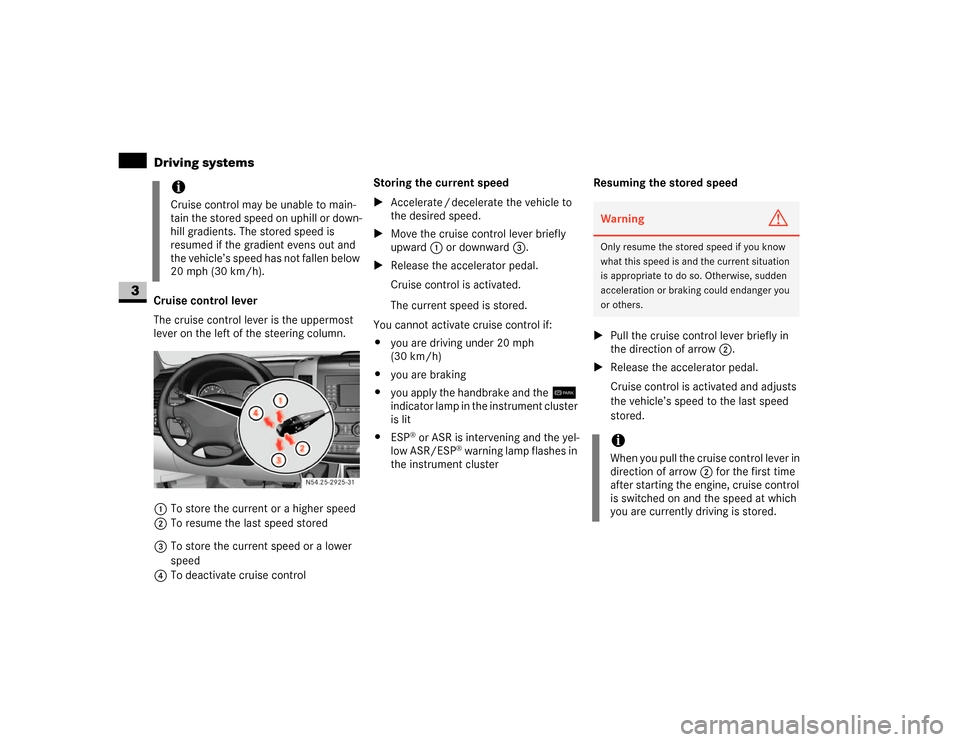
The cruise control lever is the uppermost
lever on the left of the steering column.
1To store the current or a higher speed
2To resume the last speed stored
3To store the current speed or a lower
speed
4To deactivate cruise controlStoring the current speed
\1Accelerate / decelerate the vehicle to
the desired speed.
\1Move the cruise control lever briefly
upward 1 or downward 3.
\1Release the accelerator pedal.
Cruise control is activated.
The current speed is stored.
You cannot activate cruise control if:
\4you are driving under 20 mph
(30 km/h)
\4you are braking
\4you apply the handbrake and the7
indicator lamp in the instrument cluster
is lit
\4ESP
® or ASR is intervening and the yel-
low ASR/ESP
® warning lamp flashes in
the instrument clusterResuming the stored speed
\1Pull the cruise control lever briefly in
the direction of arrow2.
\1Release the accelerator pedal.
Cruise control is activated and adjusts
the vehicle’s speed to the last speed
stored.
iCruise control may be unable to main-
tain the stored speed on uphill or down-
hill gradients. The stored speed is
resumed if the gradient evens out and
the vehicle’s speed has not fallen below
20 mph (30 km/h).
N54.25-2925-31
Warning
G
Only resume the stored speed if you know
what this speed is and the current situation
is appropriate to do so. Otherwise, sudden
acceleration or braking could endanger you
or others.iWhen you pull the cruise control lever in
direction of arrow 2 for the first time
after starting the engine, cruise control
is switched on and the speed at which
you are currently driving is stored.
Page 150 of 393
149 Controls in detail
Driving systems
3
Setting the speed
\1Briefly press the cruise control lever
upward1 to increase the speed or
downward3 to reduce the speed.
The last speed stored is increased or
decreased in 1 mph increments
(1 km/h increments).
or
\1Press and hold the cruise control lever
up1 or down3 until the desired
speed has been reached.\1Release the cruise control lever.
The current speed is stored.
Deactivating cruise control
There are various ways of deactivating
cruise control:
\1Briefly press cruise control lever
forward4.
or
\1Apply the brakes.
The last speed set remains stored.Warning
G
The rate at which you increase the speed in
1 mph increments (1 km/h increments) may
be faster than your vehicle is able to accel-
erate. Your vehicle may then continue to ac-
celerate up to the newly set speed even
after you have released the cruise control le-
ver.
Only increase the speed if the current situa-
tion is appropriate to do so. Sudden acceler-
ation could otherwise endanger you and
others.
iCruise control is not deactivated if you
depress the accelerator pedal. If you ac-
celerate briefly to overtake, for exam-
ple, cruise control adjusts the vehicle’s
speed to the last speed stored after you
have finished overtaking.iThe last speed stored is cleared when
you switch off the engine.
iCruise control is automatically deacti-
vated if:
\4you are braking
\4you apply the handbrake and
the7 indicator lamp in the in-
strument cluster is lit
\4you are driving under 20 mph
(30 km/h)
\4ESP
® or ASR is intervening and the
yellow ASR/ESP
® warning lamp
flashes in the instrument cluster
\4you move the selector lever to posi-
tion N while driving
\4ESP
®, ASR or ABS has malfunc-
tioned
Page 151 of 393
150 Controls in detailDriving systems
3
Parktronic is an electronic parking aid and
informs you visually and audibly of the dis-
tance between the vehicle and an obsta-
cle.
Parktronic is automatically switched on
when you switch on the ignition and re-
lease the handbrake. You must also move
the selector lever to position D, N or R.
Parktronic switches off at speeds of over
11 mph (18 km/h). Parktronic switches on
again as soon as the vehicle’s speed falls
below this limit speed.
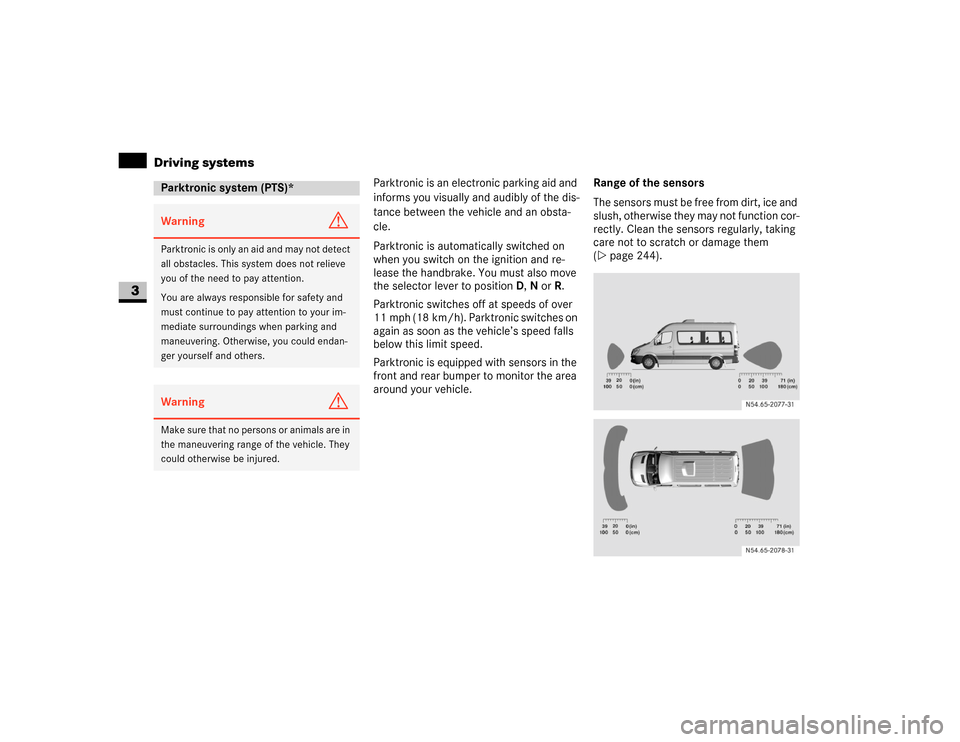
Parktronic is equipped with sensors in the
front and rear bumper to monitor the area
around your vehicle.Range of the sensors
The sensors must be free from dirt, ice and
slush, otherwise they may not function cor-
rectly. Clean the sensors regularly, taking
care not to scratch or damage them
(\2page 244).
Parktronic system (PTS)*Warning
G
Parktronic is only an aid and may not detect
all obstacles. This system does not relieve
you of the need to pay attention.
You are always responsible for safety and
must continue to pay attention to your im-
mediate surroundings when parking and
maneuvering. Otherwise, you could endan-
ger yourself and others.Warning
G
Make sure that no persons or animals are in
the maneuvering range of the vehicle. They
could otherwise be injured.
Page 152 of 393
151 Controls in detail
Driving systems
3
Front sensors
Rear sensors
Minimum distance
If an obstacle is within this range, all seg-
ments of the warning displays light up and
you will hear an audible warning tone. The
distance may no longer be displayed if you
drive the vehicle closer to the obstacle
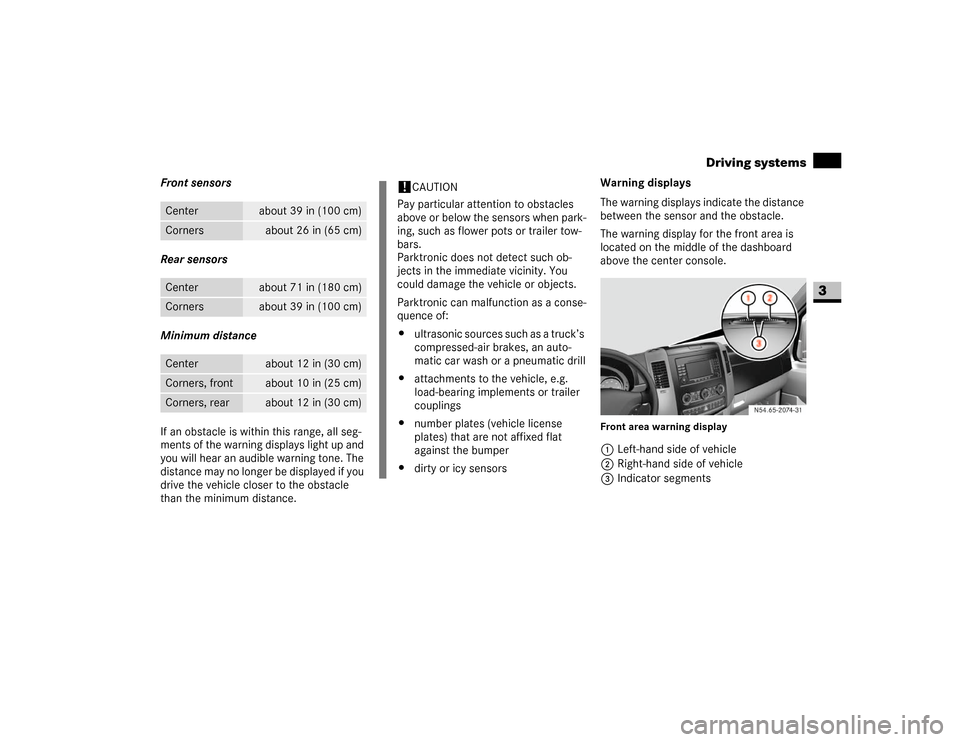
than the minimum distance.Warning displays
The warning displays indicate the distance
between the sensor and the obstacle.
The warning display for the front area is
located on the middle of the dashboard
above the center console.
Front area warning display1Left-hand side of vehicle
2Right-hand side of vehicle
3Indicator segments
Center
about 39 in (100 cm)
Corners
about 26 in (65 cm)
Center
about 71 in (180 cm)
Corners
about 39 in (100 cm)
Center
about 12 in (30 cm)
Corners, front
about 10 in (25 cm)
Corners, rear
about 12 in (30 cm)
!
CAUTION
Pay particular attention to obstacles
above or below the sensors when park-
ing, such as flower pots or trailer tow-
bars.
Parktronic does not detect such ob-
jects in the immediate vicinity. You
could damage the vehicle or objects.
Parktronic can malfunction as a conse-
quence of:
\4ultrasonic sources such as a truck’s
compressed-air brakes, an auto-
matic car wash or a pneumatic drill
\4attachments to the vehicle, e.g.
load-bearing implements or trailer
couplings
\4number plates (vehicle license
plates) that are not affixed flat
against the bumper
\4dirty or icy sensors
N54.65-2074-31
Page 155 of 393
154 Controls in detailOperating the vehicle
3
\3 Operating the vehicleWhen activated, the operating speed gov-
ernor (ADR) automatically increases the
engine speed to a preset or adjustable
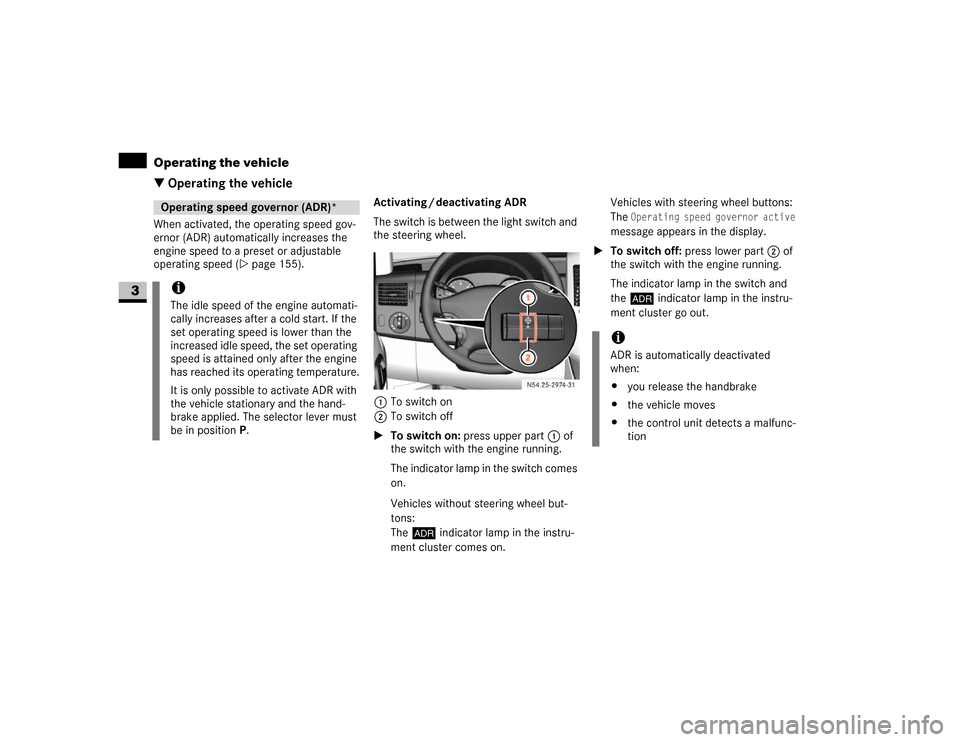
operating speed (\2page 155).Activating / deactivating ADR
The switch is between the light switch and
the steering wheel.
1To switch on
2To switch off
\1To switch on: press upper part 1 of
the switch with the engine running.
The indicator lamp in the switch comes
on.
Vehicles without steering wheel but-
tons:
The™ indicator lamp in the instru-
ment cluster comes on.Vehicles with steering wheel buttons:
The
Operating speed governor active
message appears in the display.
\1To switch off: press lower part 2 of
the switch with the engine running.
The indicator lamp in the switch and
the™ indicator lamp in the instru-
ment cluster go out.
Operating speed governor (ADR)*iThe idle speed of the engine automati-
cally increases after a cold start. If the
set operating speed is lower than the
increased idle speed, the set operating
speed is attained only after the engine
has reached its operating temperature.
It is only possible to activate ADR with
the vehicle stationary and the hand-
brake applied. The selector lever must
be in position P.
N54.25-2932-31
iADR is automatically deactivated
when:
\4you release the handbrake
\4the vehicle moves
\4the control unit detects a malfunc-
tion