lock DODGE SPRINTER 2007 2.G Workshop Manual
[x] Cancel search | Manufacturer: DODGE, Model Year: 2007, Model line: SPRINTER, Model: DODGE SPRINTER 2007 2.GPages: 393, PDF Size: 7.61 MB
Page 117 of 393
116 Controls in detailDriving and parking
3
Stopping the engine
\1Apply handbrake (\2page 115).
\1Move selector lever to P.
\1Turn key to position 0 (\2page 67) in
the ignition lock and remove it.
The immobilizer is activated.\1Secure the vehicle at the front axle if
unloaded and at the rear axle if loaded,
e.g. using a chock (\2page 303).
Drinking and drivingSteering
!
CAUTION
If the coolant temperature is raised,
e.g. following driving in mountainous
terrain, run the engine at idling speed
for a further 1 or 2 minutes before you
switch off the engine. This allows the
coolant temperature to return to nor-
mal again.
iWhen parking on steep uphill or down-
hill gradients, turn the front wheels to-
wards the curb.iYou can only remove the key from the
ignition lock when the selector lever is
in positionP.
General driving tipsWarning
G
Drinking and driving and/or taking drugs
and driving are very dangerous combina-
tions. Even a small amount of alcohol or
drugs can affect your reflexes, perceptions
and judgment. The possibility of a serious or
even fatal accident is sharply increased
when you drink or take drugs and drive.
Never drink or take drugs and drive or allow
anyone to drive after drinking or taking
drugs.
Warning
G
There is no power-steering assistance when
the engine is not running.
You will need to use significantly more force
to steer and could therefore lose control of
the vehicle and cause an accident.
Never switch off the engine while driving.!
CAUTION
Do not hold the steering wheel in its
end positions for longer than neces-
sary (e.g. when turning or maneuver-
ing).
The hydraulic pump can be damaged
by the increased temperature of the
hydraulic fluid.
Page 122 of 393
121 Controls in detail
Automatic transmission
3
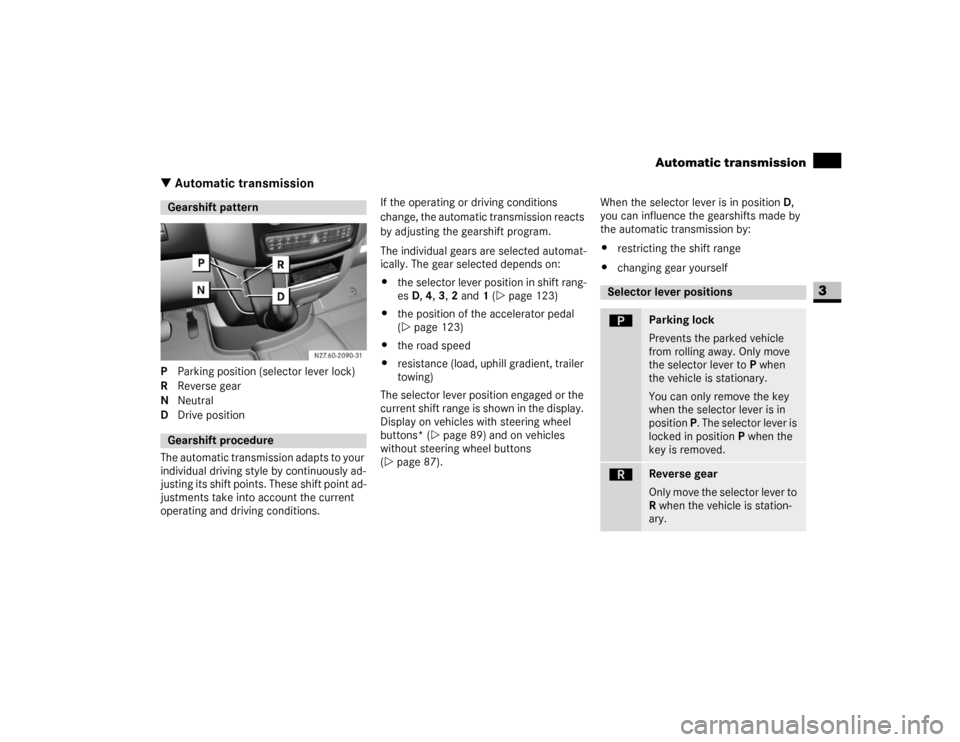
\3 Automatic transmissionP Parking position (selector lever lock)
R Reverse gear
N Neutral
D Drive position
The automatic transmission adapts to your
individual driving style by continuously ad-
justing its shift points. These shift point ad-
justments take into account the current
operating and driving conditions.If the operating or driving conditions
change, the automatic transmission reacts
by adjusting the gearshift program.
The individual gears are selected automat-
ically. The gear selected depends on:
\4the selector lever position in shift rang-
es D, 4, 3, 2 and 1 (\2page 123)
\4the position of the accelerator pedal
(\2page 123)
\4the road speed
\4resistance (load, uphill gradient, trailer
towing)
The selector lever position engaged or the
current shift range is shown in the display.
Display on vehicles with steering wheel
buttons* (\2page 89) and on vehicles
without steering wheel buttons
(\2page 87).When the selector lever is in position D,
you can influence the gearshifts made by
the automatic transmission by:
\4restricting the shift range
\4changing gear yourselfGearshift patternGearshift procedure
Selector lever positionsì
Parking lock
Prevents the parked vehicle
from rolling away. Only move
the selector lever to P when
the vehicle is stationary.
You can only remove the key
when the selector lever is in
position P. The selector lever is
locked in position P when the
key is removed.
í
Reverse gear
Only move the selector lever to
R when the vehicle is station-
ary.
Page 127 of 393
126 Controls in detailGood visibility
3
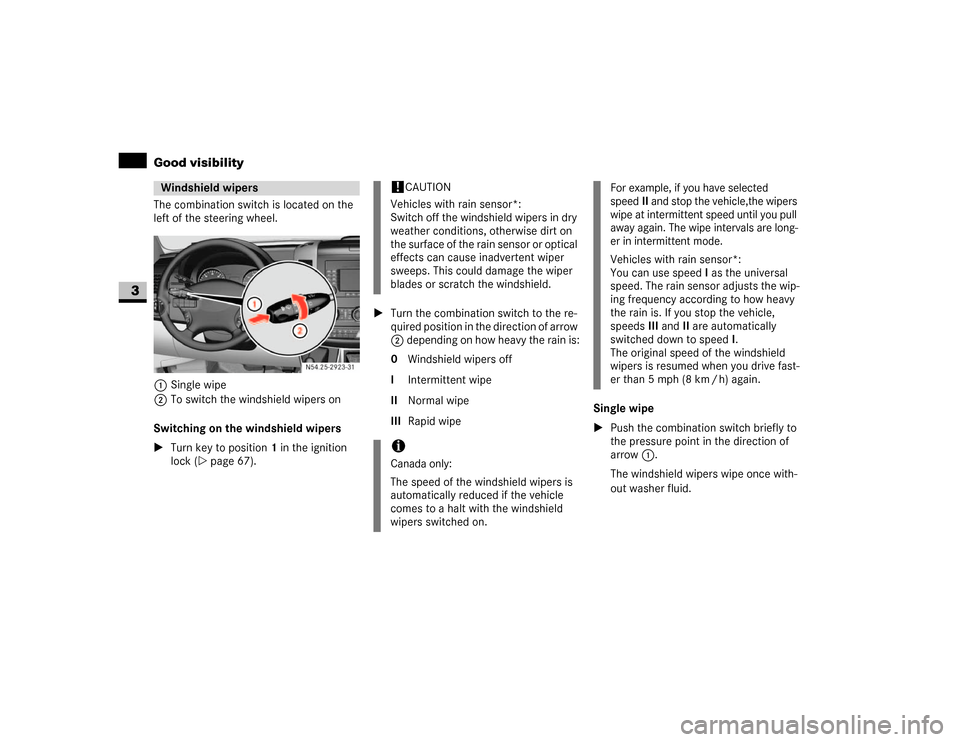
The combination switch is located on the
left of the steering wheel.
1Single wipe
2To switch the windshield wipers on
Switching on the windshield wipers
\1Turn key to position1 in the ignition
lock (\2page 67).\1Turn the combination switch to the re-
quired position in the direction of arrow
2 depending on how heavy the rain is:
0 Windshield wipers off
I Intermittent wipe
II Normal wipe
III Rapid wipeSingle wipe
\1Push the combination switch briefly to
the pressure point in the direction of
arrow1.
The windshield wipers wipe once with-
out washer fluid.Windshield wipers
N54.25-2923-31
!
CAUTION
Vehicles with rain sensor*:
Switch off the windshield wipers in dry
weather conditions, otherwise dirt on
the surface of the rain sensor or optical
effects can cause inadvertent wiper
sweeps. This could damage the wiper
blades or scratch the windshield.
iCanada only:
The speed of the windshield wipers is
automatically reduced if the vehicle
comes to a halt with the windshield
wipers switched on.
For example, if you have selected
speedII and stop the vehicle,the wipers
wipe at intermittent speed until you pull
away again. The wipe intervals are long-
er in intermittent mode.
Vehicles with rain sensor*:
You can use speedI as the universal
speed. The rain sensor adjusts the wip-
ing frequency according to how heavy
the rain is. If you stop the vehicle,
speedsIII andII are automatically
switched down to speedI.
The original speed of the windshield
wipers is resumed when you drive fast-
er than 5 mph (8 km / h) again.
Page 128 of 393
127 Controls in detail
Good visibility
3
Wiping with washer fluid
\1Press the combination switch beyond
the pressure point in the direction of
arrow1.
The windshield wiper will wipe with
windshield washer fluid.
Vehicles with headlamp cleaning sys-
tem*:
If the low-beam headlamps have been
switched on, a high-pressure water jet
also cleans the headlamps.
Intermittent wipe
Only switch on intermittent wipe in damp
weather conditions or when it is raining.
Vehicles with rain sensor*:
The a rain sensor is activated when you
switch on intermittent wipe. The appropri-
ate wiping frequency is set automatically
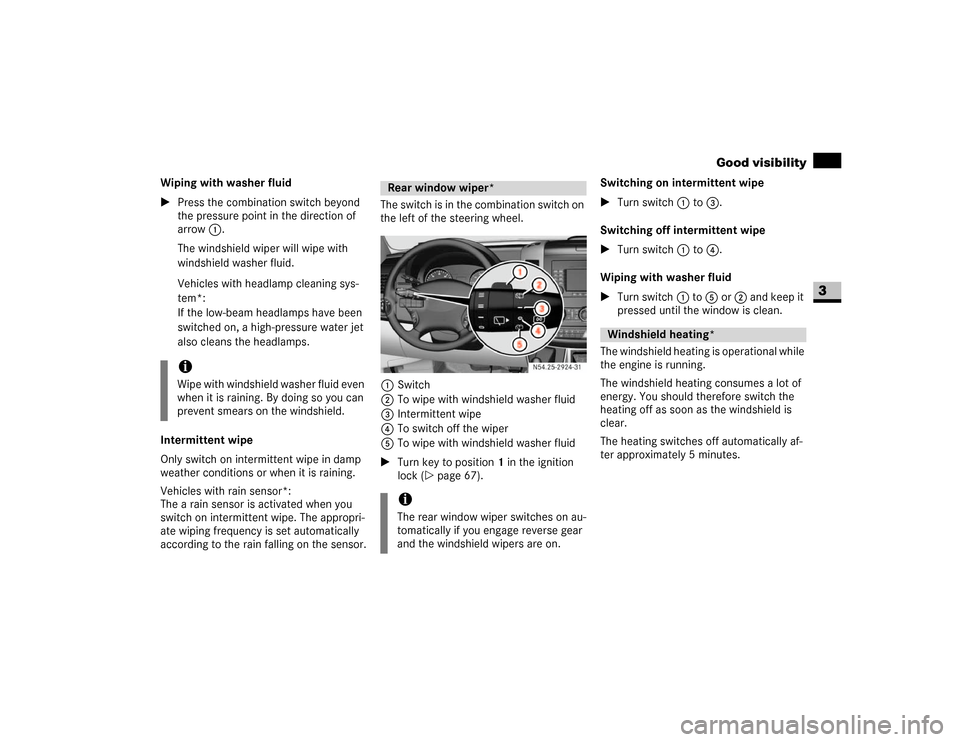
according to the rain falling on the sensor.The switch is in the combination switch on
the left of the steering wheel.
1Switch
2To wipe with windshield washer fluid
3Intermittent wipe
4To switch off the wiper
5To wipe with windshield washer fluid
\1Turn key to position1 in the ignition
lock (\2page 67).Switching on intermittent wipe
\1Turn switch1 to 3.
Switching off intermittent wipe
\1Turn switch1 to 4.
Wiping with washer fluid
\1Turn switch1 to 5or 2 and keep it
pressed until the window is clean.
The windshield heating is operational while
the engine is running.
The windshield heating consumes a lot of
energy. You should therefore switch the
heating off as soon as the windshield is
clear.
The heating switches off automatically af-
ter approximately 5 minutes.
iWipe with windshield washer fluid even
when it is raining. By doing so you can
prevent smears on the windshield.
Rear window wiper*iThe rear window wiper switches on au-
tomatically if you engage reverse gear
and the windshield wipers are on.
N54.25-2924-31
Windshield heating*
Page 133 of 393
132 Controls in detailTempmatic
3
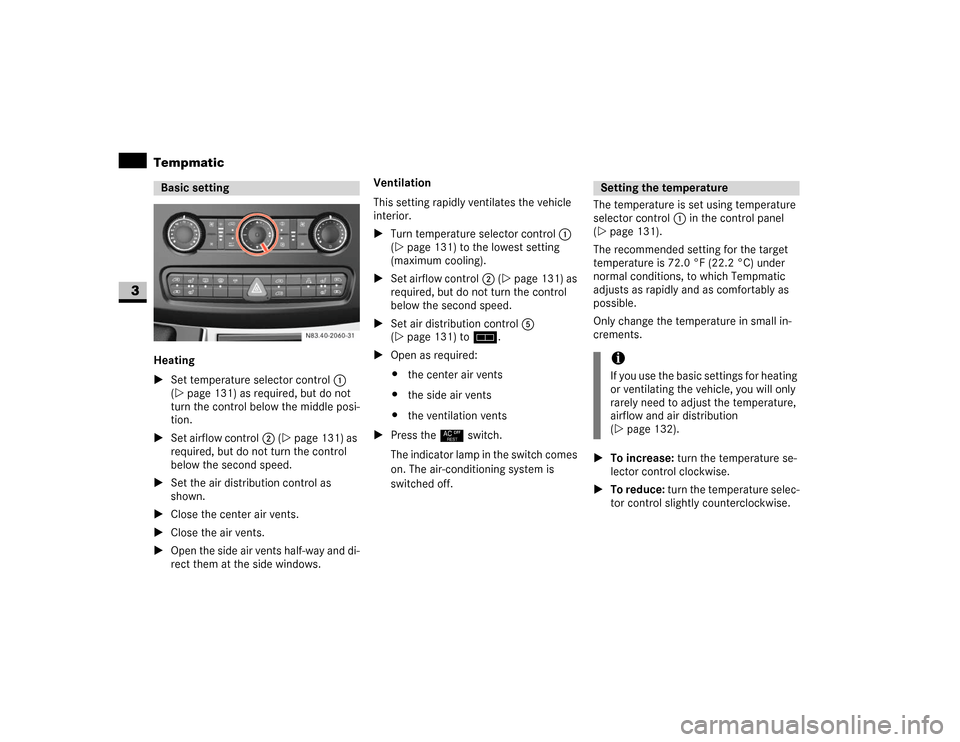
Heating
\1Set temperature selector control 1
(\2page 131) as required, but do not
turn the control below the middle posi-
tion.
\1Set airflow control2 (\2page 131) as
required, but do not turn the control
below the second speed.
\1Set the air distribution control as
shown.
\1Close the center air vents.
\1Close the air vents.
\1Open the side air vents half-way and di-
rect them at the side windows.Ventilation
This setting rapidly ventilates the vehicle
interior.
\1Turn temperature selector control 1
(\2page 131) to the lowest setting
(maximum cooling).
\1Set airflow control2 (\2page 131) as
required, but do not turn the control
below the second speed.
\1Set air distribution control5
(\2page 131) to h.
\1Open as required:
\4the center air vents
\4the side air vents
\4the ventilation vents
\1Press the° switch.
The indicator lamp in the switch comes
on. The air-conditioning system is
switched off.The temperature is set using temperature
selector control1 in the control panel
(\2page 131).
The recommended setting for the target
temperature is 72.0 °F (22.2 °C) under
normal conditions, to which Tempmatic
adjusts as rapidly and as comfortably as
possible.
Only change the temperature in small in-
crements.
\1To increase: turn the temperature se-
lector control clockwise.
\1To reduce: turn the temperature selec-
tor control slightly counterclockwise.Basic setting
N83.40-2060-31
Setting the temperatureiIf you use the basic settings for heating
or ventilating the vehicle, you will only
rarely need to adjust the temperature,
airflow and air distribution
(\2page 132).
Page 135 of 393
134 Controls in detailTempmatic
3
\1To switch off: press theÄ switch
again.
The indicator lamp in the switch goes
out.
The engine stores residual heat after long
periods of driving. You can use the residual
heat of the engine to heat the stationary
vehicle for a further 30 minutes.\1To switch on: turn key to position 0 in
the ignition lock (\2page 67) or re-
move it.
\1Set as required:
\4temperature (\2page 132)
\4air distribution (\2page 133)
\4the air vents (\2page 129)
\1Press the° switch (\2page 131).
The indicator lamp in the switch comes
on.
\1To switch off: press ° switch
again (\2page 131).
The indicator lamp in the switch goes
out.The reheat function quickly ensures de-
frosted windows and dehumidification in
the vehicle interior.
\1To switch on: press theÅ switch
(\2page 131).
The indicator lamp in the switch comes
on.
\1To switch on: press theÅ switch
(\2page 131).
\1The indicator lamp in the switch goes
out.
Fogged-up windows
\1If necessary, switch off air-recirculation
mode by pressing theÄ switch
(\2page 131).
The indicator lamp in the switch goes
out. Fresh air is supplied to the interior.
\1Switch on the reheat function using
theÅ switch (\2page 131).
iAir-recirculation mode is automatically
switched off after about 10 to 30 min-
utes, depending on the outside temper-
ature.Residual heat mode iThe heating period depends on:
\4the coolant temperature
\4the interior temperature selected
\4the on-board voltage
The blower runs at speed1 regardless
of the position of the airflow control.
iResidual heat switches off automati-
cally:
\4after about 30 minutes
\4when you switch on the ignition
\4if the battery’s voltage drops
Reheat function (dehumidification)Special settingsiOnly use special settings briefly.
\2\2
Page 137 of 393
136 Controls in detailTempmatic
3
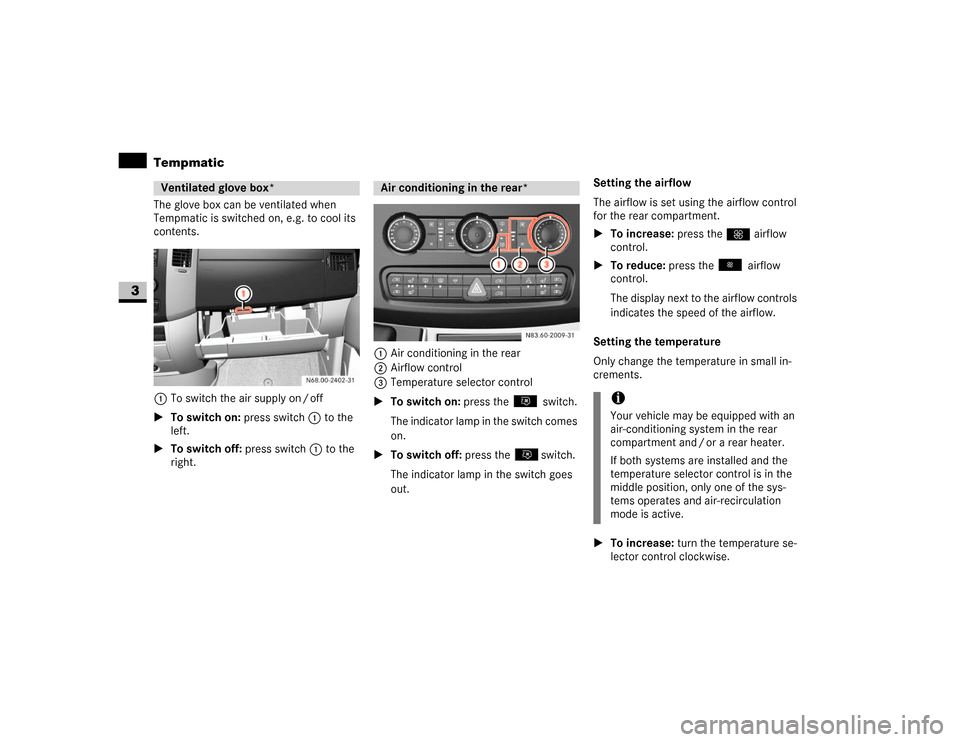
The glove box can be ventilated when
Tempmatic is switched on, e.g. to cool its
contents.
1To switch the air supply on / off
\1To switch on: press switch1 to the
left.
\1To switch off: press switch1 to the
right.1Air conditioning in the rear
2Airflow control
3Temperature selector control
\1To switch on: press the switch.
The indicator lamp in the switch comes
on.
\1To switch off: press the switch.
The indicator lamp in the switch goes
out.Setting the airflow
The airflow is set using the airflow control
for the rear compartment.
\1To increase: press theQ airflow
control.
\1To reduce: press the airflow
control.
The display next to the airflow controls
indicates the speed of the airflow.
Setting the temperature
Only change the temperature in small in-
crements.
\1To increase: turn the temperature se-
lector control clockwise.Ventilated glove box*
Air conditioning in the rear*
N83.60-2009-31
iYour vehicle may be equipped with an
air-conditioning system in the rear
compartment and / or a rear heater.
If both systems are installed and the
temperature selector control is in the
middle position, only one of the sys-
tems operates and air-recirculation
mode is active.
Page 138 of 393
137 Controls in detail
Tempmatic
3
\1To reduce: turn the temperature selec-
tor control counterclockwise.
Air vents in the roof air duct
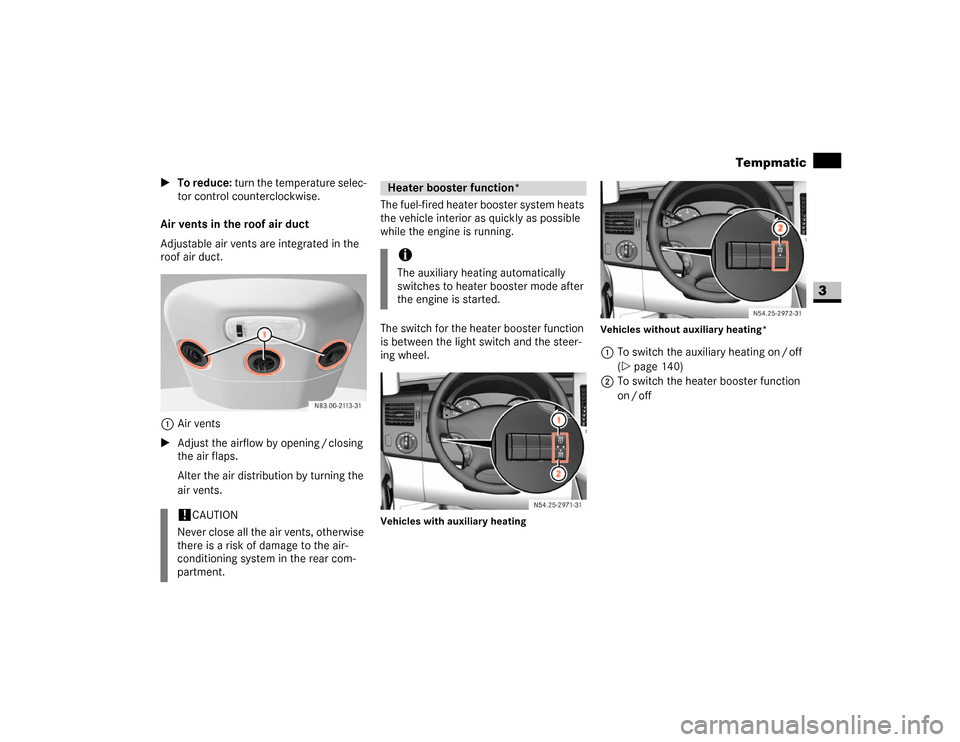
Adjustable air vents are integrated in the
roof air duct.
1Air vents
\1Adjust the airflow by opening / closing
the air flaps.
Alter the air distribution by turning the
air vents.The fuel-fired heater booster system heats
the vehicle interior as quickly as possible
while the engine is running.
The switch for the heater booster function
is between the light switch and the steer-
ing wheel.
Vehicles with auxiliary heatingVehicles without auxiliary heating*
1To switch the auxiliary heating on / off
(\2page 140)
2To switch the heater booster function
on / off
!
CAUTION
Never close all the air vents, otherwise
there is a risk of damage to the air-
conditioning system in the rear com-
partment.
Heater booster function*iThe auxiliary heating automatically
switches to heater booster mode after
the engine is started.
N54.25-2926-31
N54.25-2927-31
Page 141 of 393
140 Controls in detailAuxiliary heating/ventilation*
3
You can switch the auxiliary heating / ven-
tilation on and off immediately using:
\4the auxiliary heating / heater booster
switch (\2page 140)
\4the auxiliary heating remote control*
(\2page 141)
Before switching on
\1Adjust the heat output to the desired
temperature using the temperature
control (\2page 131).
\1Set the air distribution as required.Operation using the switch
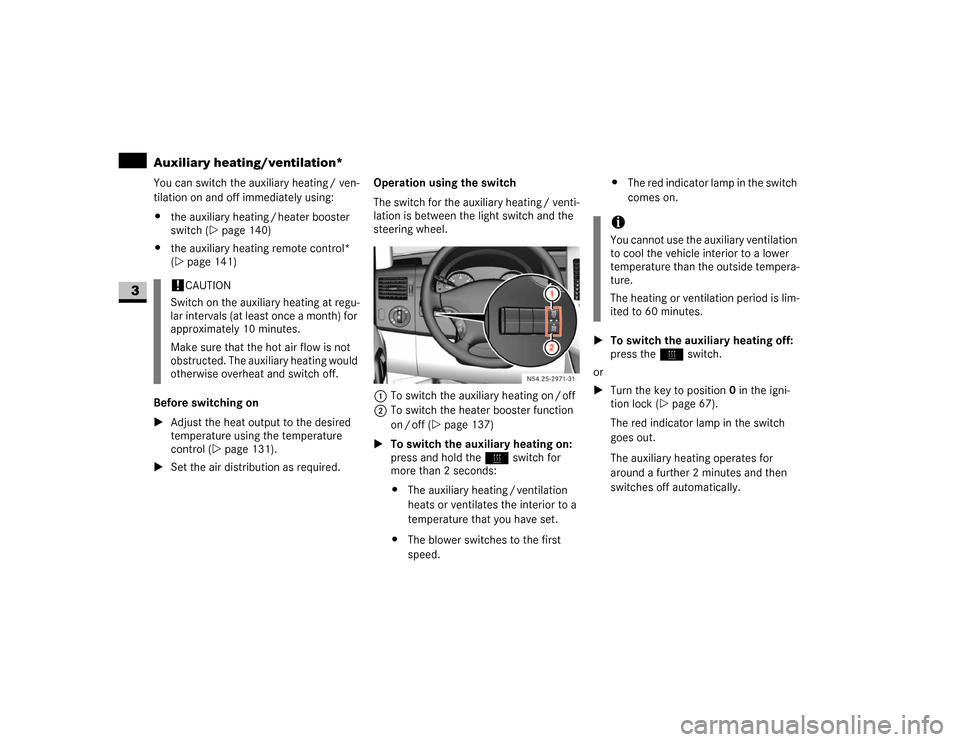
The switch for the auxiliary heating / venti-
lation is between the light switch and the
steering wheel.
1To switch the auxiliary heating on / off
2To switch the heater booster function
on / off (\2page 137)
\1To switch the auxiliary heating on:
press and hold theö switch for
more than 2 seconds:
\4The auxiliary heating / ventilation
heats or ventilates the interior to a
temperature that you have set.
\4The blower switches to the first
speed.\4The red indicator lamp in the switch
comes on.
\1To switch the auxiliary heating off:
press theö switch.
or
\1Turn the key to position0 in the igni-
tion lock (\2page 67).
The red indicator lamp in the switch
goes out.
The auxiliary heating operates for
around a further 2 minutes and then
switches off automatically.
!
CAUTION
Switch on the auxiliary heating at regu-
lar intervals (at least once a month) for
approximately 10 minutes.
Make sure that the hot air flow is not
obstructed. The auxiliary heating would
otherwise overheat and switch off.
N54.25-2928-31
iYou cannot use the auxiliary ventilation
to cool the vehicle interior to a lower
temperature than the outside tempera-
ture.
The heating or ventilation period is lim-
ited to 60 minutes.
Page 142 of 393
141 Controls in detail
Auxiliary heating/ventilation*
3
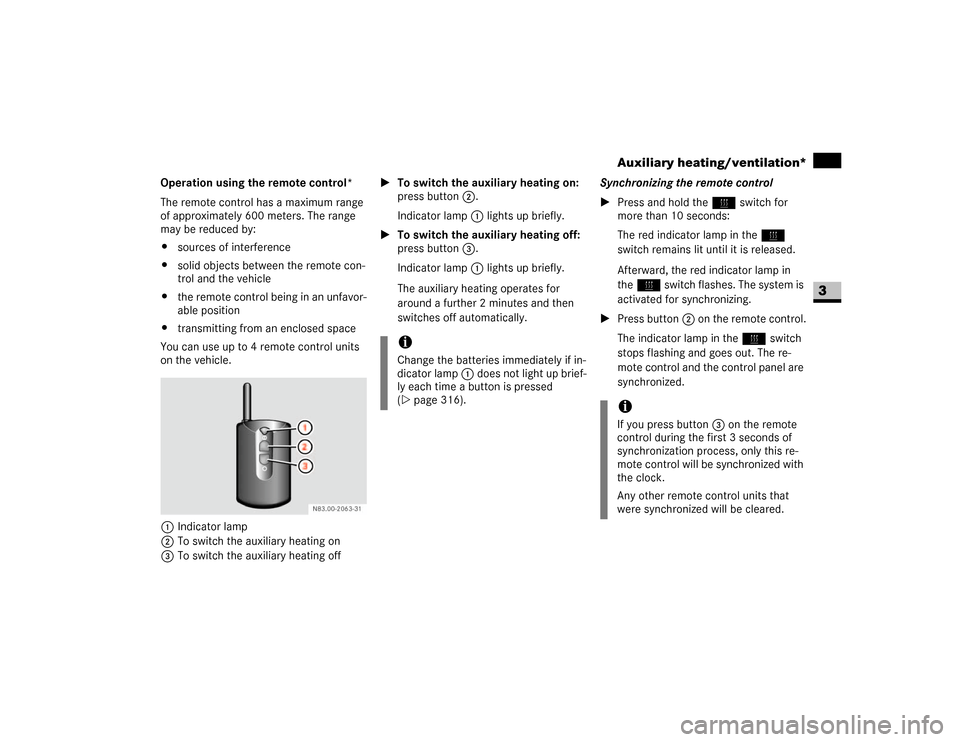
Operation using the remote control*
The remote control has a maximum range
of approximately 600 meters. The range
may be reduced by:
\4sources of interference
\4solid objects between the remote con-
trol and the vehicle
\4the remote control being in an unfavor-
able position
\4transmitting from an enclosed space
You can use up to 4 remote control units
on the vehicle.
1Indicator lamp
2To switch the auxiliary heating on
3To switch the auxiliary heating off\1To switch the auxiliary heating on:
press button2.
Indicator lamp1 lights up briefly.
\1To switch the auxiliary heating off:
press button3.
Indicator lamp1 lights up briefly.
The auxiliary heating operates for
around a further 2 minutes and then
switches off automatically.Synchronizing the remote control
\1Press and hold theö switch for
more than 10 seconds:
The red indicator lamp in theö
switch remains lit until it is released.
Afterward, the red indicator lamp in
theö switch flashes. The system is
activated for synchronizing.
\1Press button2 on the remote control.
The indicator lamp in theö switch
stops flashing and goes out. The re-
mote control and the control panel are
synchronized.
iChange the batteries immediately if in-
dicator lamp 1 does not light up brief-
ly each time a button is pressed
(\2page 316).
iIf you press button3 on the remote
control during the first 3 seconds of
synchronization process, only this re-
mote control will be synchronized with
the clock.
Any other remote control units that
were synchronized will be cleared.