lock DODGE SPRINTER 2007 2.G Service Manual
[x] Cancel search | Manufacturer: DODGE, Model Year: 2007, Model line: SPRINTER, Model: DODGE SPRINTER 2007 2.GPages: 393, PDF Size: 7.61 MB
Page 99 of 393
98 Controls in detailOperating system with steering wheel buttons*
3
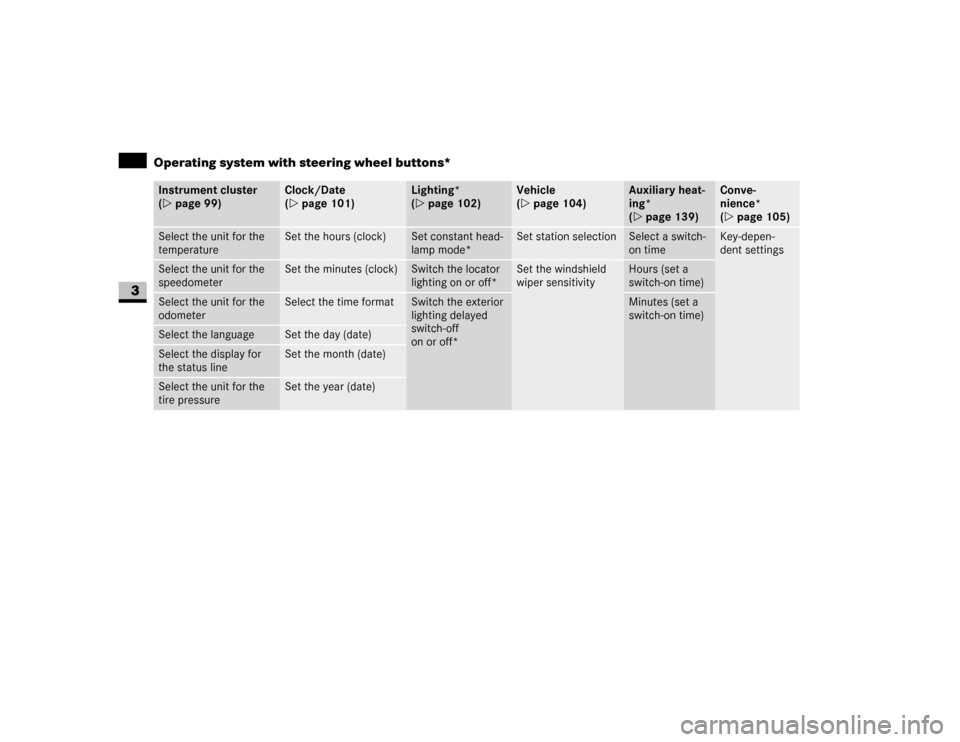
Instrument cluster
(\2page 99)
Clock/Date
(\2page 101)
Lighting*
(\2page 102)
Vehicle
(\2page 104)
Auxiliary heat-
ing*
(\2page 139)
Conve-
nience*
(\2page 105)
Select the unit for the
temperature
Set the hours (clock)
Set constant head-
lamp mode*
Set station selection
Select a switch-
on time
Key-depen-
dent settings
Select the unit for the
speedometer
Set the minutes (clock)
Switch the locator
lighting on or off*
Set the windshield
wiper sensitivity
Hours (set a
switch-on time)
Select the unit for the
odometer
Select the time format
Switch the exterior
lighting delayed
switch-off
on or off*
Minutes (set a
switch-on time)
Select the language
Set the day (date)
Select the display for
the status line
Set the month (date)
Select the unit for the
tire pressure
Set the year (date)
Page 102 of 393
101 Controls in detail
Operating system with steering wheel buttons*
3
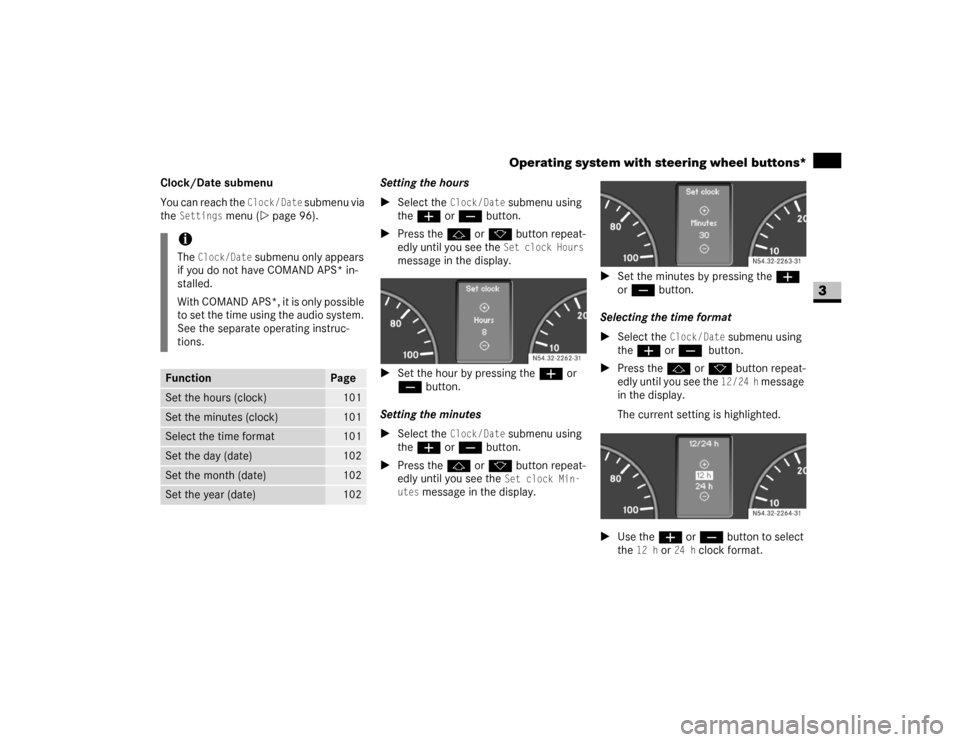
Clock/Date submenu
You can reach the
Clock/Date
submenu via
the
Settings
menu (\2page 96).Setting the hours
\1Select the
Clock/Date
submenu using
theæ or ç button.
\1Press thej or k button repeat-
edly until you see the Set clock Hours
message in the display.
\1Set the hour by pressing theæ or
ç button.
Setting the minutes
\1Select the
Clock/Date
submenu using
theæ or ç button.
\1Press thej or k button repeat-
edly until you see the Set clock Min-
utes
message in the display.\1Set the minutes by pressing the æ
or ç button.
Selecting the time format
\1Select the
Clock/Date
submenu using
theæ or ç
button.
\1Press thej or k button repeat-
edly until you see the
12/24 h
message
in the display.
The current setting is highlighted.
\1Use theæ or ç button to select
the
12 h
or
24 h
clock format.
iThe
Clock/Date
submenu only appears
if you do not have COMAND APS* in-
stalled.
With COMAND APS*, it is only possible
to set the time using the audio system.
See the separate operating instruc-
tions.
Function
Page
Set the hours (clock)
101
Set the minutes (clock)
101
Select the time format
101
Set the day (date)
102
Set the month (date)
102
Set the year (date)
102
N54.32-2262-31
N54.32-2263-31N54.32-2264-31
Page 103 of 393
102 Controls in detailOperating system with steering wheel buttons*
3
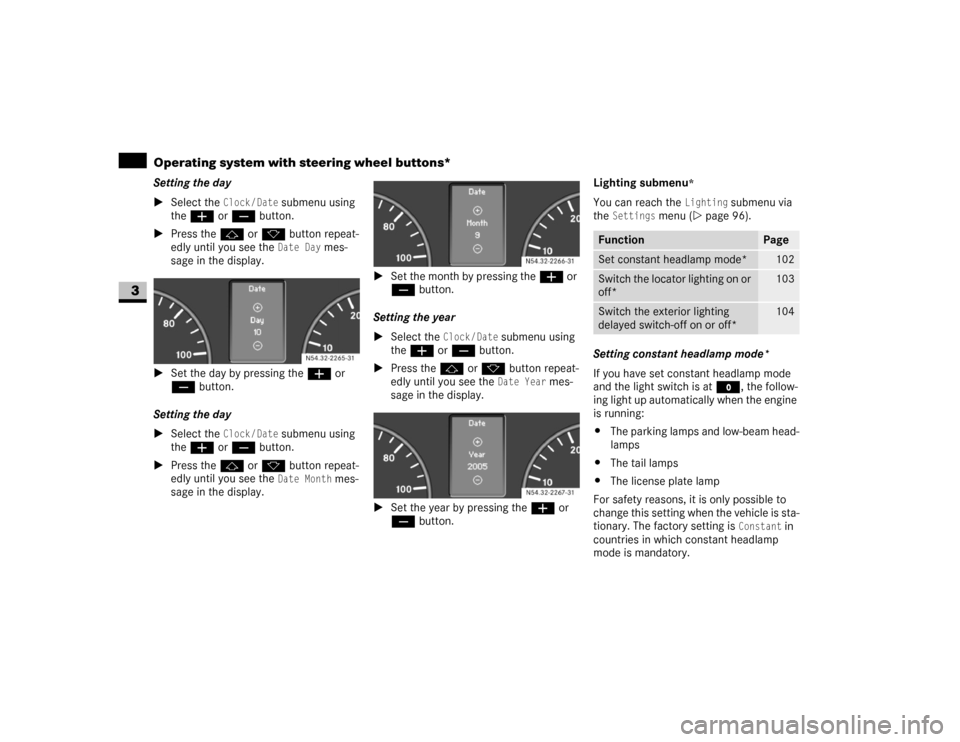
Setting the day
\1Select the
Clock/Date
submenu using
theæ or ç button.
\1Press thej or k button repeat-
edly until you see the Date Day
mes-
sage in the display.
\1Set the day by pressing theæ or
ç button.
Setting the day
\1Select the
Clock/Date
submenu using
theæ or ç button.
\1Press thej or k button repeat-
edly until you see the Date Month
mes-
sage in the display.\1Set the month by pressing theæ or
ç button.
Setting the year
\1Select the
Clock / Date
submenu using
theæ or ç button.
\1Press thej or k button repeat-
edly until you see the Date Year
mes-
sage in the display.
\1Set the year by pressing theæ or
ç button.Lighting submenu
*
You can reach the
Lighting
submenu via
the
Settings
menu (\2page 96).
Setting constant headlamp mode*
If you have set constant headlamp mode
and the light switch is at M, the follow-
ing light up automatically when the engine
is running:
\4The parking lamps and low-beam head-
lamps
\4The tail lamps
\4The license plate lamp
For safety reasons, it is only possible to
change this setting when the vehicle is sta-
tionary. The factory setting is
Constant
in
countries in which constant headlamp
mode is mandatory. N54.32-2265-31
N54.32-2266-31N54.32-2267-31
Function
Page
Set constant headlamp mode*
102
Switch the locator lighting on or
off*
103
Switch the exterior lighting
delayed switch-off on or off*
104
Page 104 of 393
103 Controls in detail
Operating system with steering wheel buttons*
3
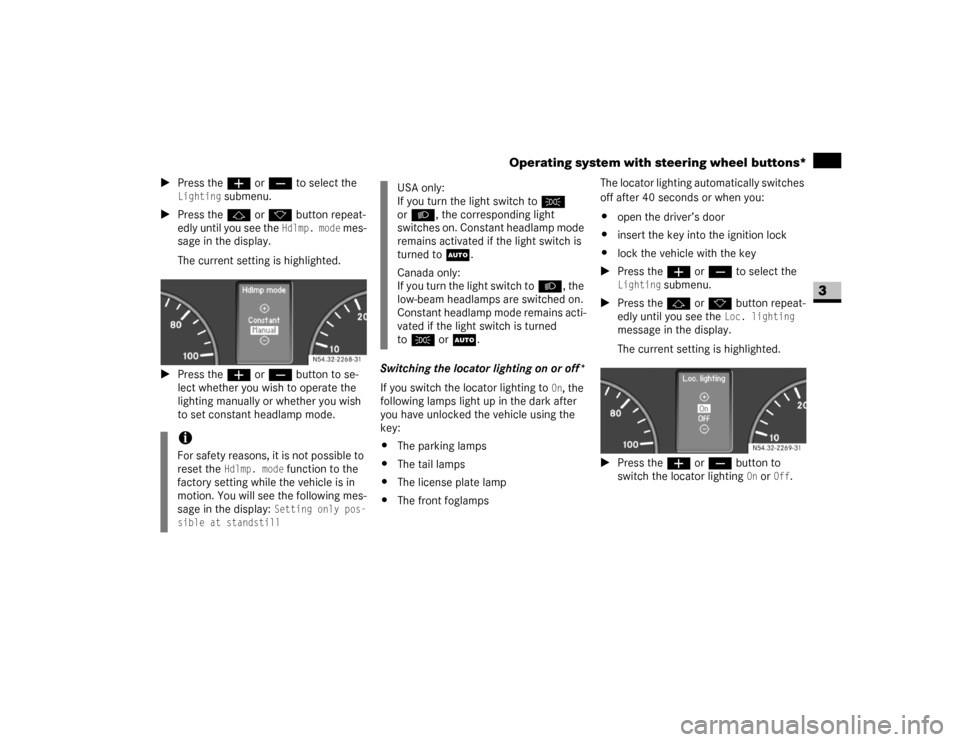
\1Press theæ or ç to select the
Lighting
submenu.
\1Press thej or k button repeat-
edly until you see the
Hdlmp. mode
mes-
sage in the display.
The current setting is highlighted.
\1Press theæ or ç button to se-
lect whether you wish to operate the
lighting manually or whether you wish
to set constant headlamp mode.Switching the locator lighting on or off*
If you switch the locator lighting to
On, the
following lamps light up in the dark after
you have unlocked the vehicle using the
key:
\4The parking lamps
\4The tail lamps
\4The license plate lamp
\4The front foglampsThe locator lighting automatically switches
off after 40 seconds or when you:
\4open the driver’s door
\4insert the key into the ignition lock
\4lock the vehicle with the key
\1Press theæ or ç to select the
Lighting
submenu.
\1Press thej or k button repeat-
edly until you see the
Loc. lighting
message in the display.
The current setting is highlighted.
\1Press the æ or ç button to
switch the locator lighting
On or
Off
.
iFor safety reasons, it is not possible to
reset the
Hdlmp. mode
function to the
factory setting while the vehicle is in
motion. You will see the following mes-
sage in the display: Setting only pos-
sible at standstill
N54.32-2268-31
USA only:
If you turn the light switch toC
orB, the corresponding light
switches on. Constant headlamp mode
remains activated if the light switch is
turned toU.
Canada only:
If you turn the light switch toB, the
low-beam headlamps are switched on.
Constant headlamp mode remains acti-
vated if the light switch is turned
toC orU.
N54.32-2269-31
Page 107 of 393
106 Controls in detailOperating system with steering wheel buttons*
3
\1Press the æ or ç button to
switch key dependence
On or
Off
.
The Trip computer menu displays statisti-
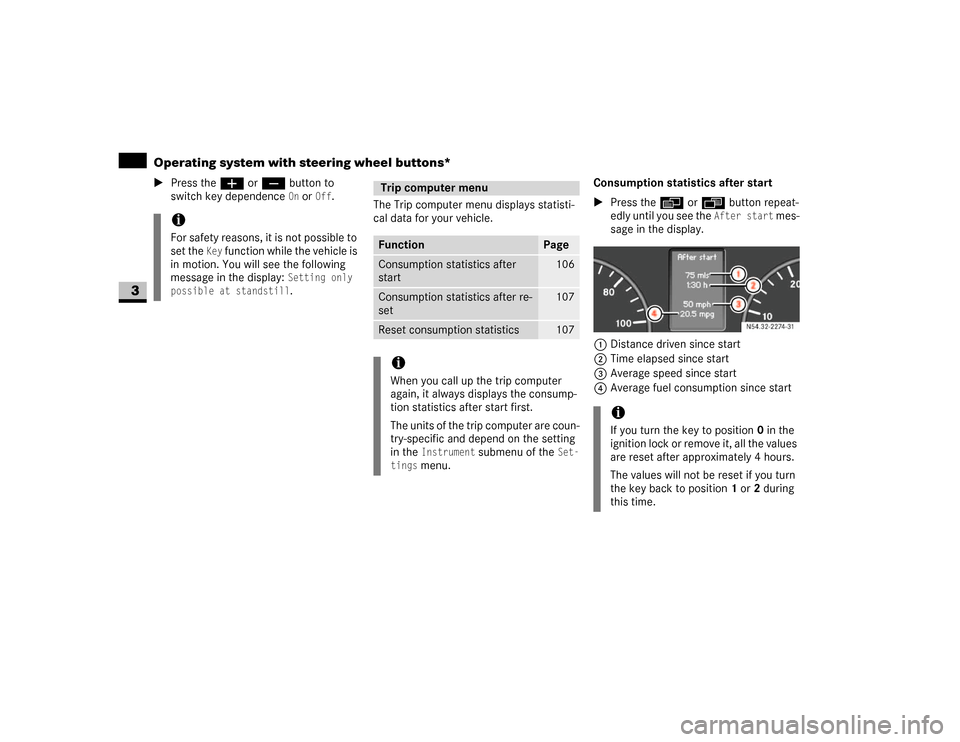
cal data for your vehicle.Consumption statistics after start
\1Press the è or ÿ button repeat-
edly until you see the
After start
mes-
sage in the display.
1Distance driven since start
2Time elapsed since start
3Average speed since start
4Average fuel consumption since start
iFor safety reasons, it is not possible to
set the
Key
function while the vehicle is
in motion. You will see the following
message in the display:
Setting only
possible at standstill.
Trip computer menuFunction
Page
Consumption statistics after
start
106
Consumption statistics after re-
set
107
Reset consumption statistics
107
iWhen you call up the trip computer
again, it always displays the consump-
tion statistics after start first.
The units of the trip computer are coun-
try-specific and depend on the setting
in the
Instrument
submenu of the
Set-
tings
menu.
iIf you turn the key to position 0 in the
ignition lock or remove it, all the values
are reset after approximately 4 hours.
The values will not be reset if you turn
the key back to position1 or2 during
this time.
N54.32-2274-31
Page 111 of 393
110 Controls in detailDriving and parking
3
\3 Driving and parking
\1Before each journey, check the vehicle
lighting and the general condition of
the vehicle.
\1Observe the general driving tips at the
end of this section (\2page 116).
You will find information on:
\4regular checks (\2page 181)
\4driving in winter (\2page 235)
\4driving when towing a trailer
(\2page 175)
\4and other driving tips
in the “Operation” section (\2page 173).
Warning
G
T h e m o v e m e n t o f t h e p e d a l s m u s t n o t b e o b -
structed. The vehicle’s operating and road
safety are otherwise jeopardized.
Objects could fall and get caught between
the pedals if you accelerate or brake sud-
denly. You will no longer be able to brake or
accelerate. You could cause an accident,
which could result in injury to yourself and
others.
\4If floor mats and carpets are used, make
sure that these are secured correctly
and cannot slip and that there is suffi-
cient pedal clearance.
\4Do not place any objects in the driver’s
footwell.
\4Store and secure all loose objects so
they cannot get into the driver’s footwell
while the vehicle is in motion.
Warning
G
The doors could open of their own accord
while the vehicle is in motion if they are not
fully closed. For this reason, please make
sure that all the doors are properly closed
and locked before driving off (\2page 52).
Starting the engineWarning
G
Never run the engine in an enclosed space.
The exhaust fumes contain poisonous car-
bon monoxide. Breathing in exhaust fumes
constitutes a health hazard and can lead to
loss of consciousness and death.Warning
G
A seat belt that is worn incorrectly or not at
all, or that is not correctly engaged in the
seat belt buckle, cannot perform its intend-
ed protective function. In certain circum-
stances, you could then be seriously or even
fatally injured. Make sure, therefore, that all
occupants – in particular, expectant moth-
ers – wear their seat belt correctly at all
times.
Page 112 of 393
111 Controls in detail
Driving and parking
3
\1Before starting the engine, make sure
that all vehicle occupants are wearing
their seat belt correctly (\2page 27)
and the handbrake (\2page 115) is ap-
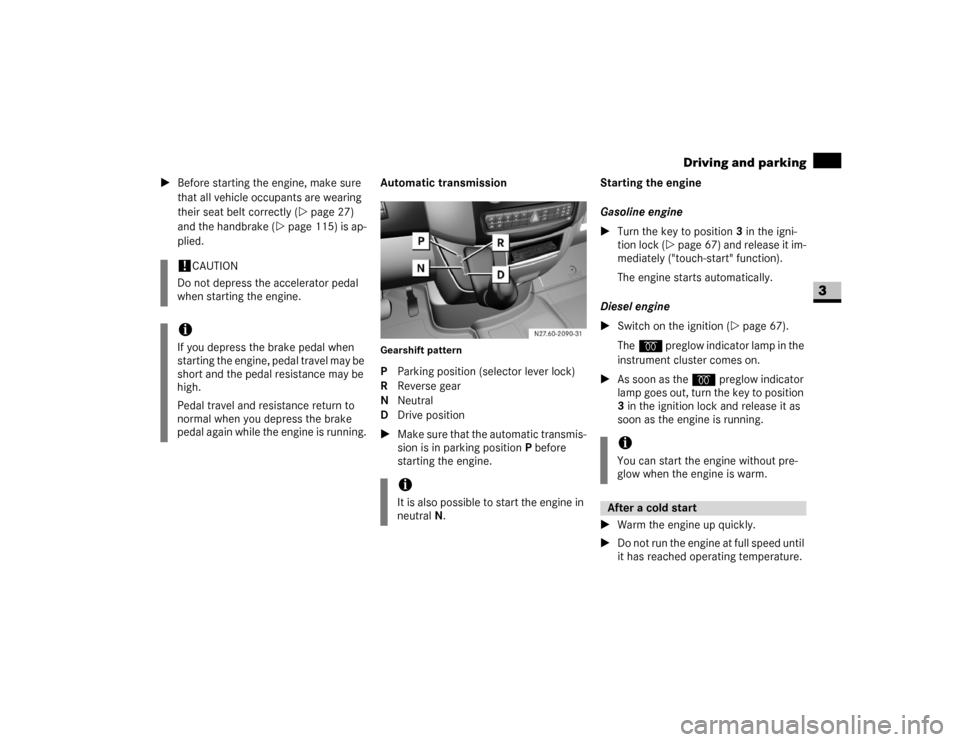
plied.Automatic transmission
Gearshift patternP Parking position (selector lever lock)
R Reverse gear
N Neutral
D Drive position
\1Make sure that the automatic transmis-
sion is in parking position P before
starting the engine.Starting the engine
Gasoline engine
\1Turn the key to position3 in the igni-
tion lock (\2page 67) and release it im-
mediately ("touch-start" function).
The engine starts automatically.
Diesel engine
\1Switch on the ignition (\2page 67).
Theq preglow indicator lamp in the
instrument cluster comes on.
\1As soon as the q preglow indicator
lamp goes out, turn the key to position
3 in the ignition lock and release it as
soon as the engine is running.
\1Warm the engine up quickly.
\1Do not run the engine at full speed until
it has reached operating temperature.
!
CAUTION
Do not depress the accelerator pedal
when starting the engine.
iIf you depress the brake pedal when
starting the engine, pedal travel may be
short and the pedal resistance may be
high.
Pedal travel and resistance return to
normal when you depress the brake
pedal again while the engine is running.
iIt is also possible to start the engine in
neutral N.
iYou can start the engine without pre-
glow when the engine is warm.After a cold start
Page 113 of 393
112 Controls in detailDriving and parking
3
\1Depress the brake pedal and keep it
depressed.
The selector lever lock is released.
\1Release the handbrake (\2page 115).
The7 indicator lamp in the instru-
ment cluster goes out.
\1Move the selector lever to position D or
R.\1Release the brake pedal.
\1Carefully depress the accelerator ped-
al.
You will find more information about selec-
tor lever positions, shift ranges and driving
tips in the “Automatic transmission” sec-
tion (\2page 121).
Pulling awayWarning
G
Do not downshift for additional engine brak-
ing on a slippery surface. The drive wheels
may lose their grip and the vehicle could
skid.!
CAUTION
Only drive at high speeds once the en-
gine has warmed up. This protects the
engine.
When driving on slippery surfaces,
avoid spinning the drive wheels where
possible as this could damage the drive
train.
iOn vehicles with a reverse warning fea-
ture*, an audible warning sounds for
other road users when reverse gear is
engaged (\2page 153).
iDepending on the vehicle's settings,
the vehicle automatically locks itself
centrally after it has driven off, at the
latest (\2page 64). The locking knobs
on the front doors and the sliding door
drop down.
You can open the doors from the inside
at any time.
You can also switch off the automatic
door lock (\2page 64). !
CAUTION
Only select reverse gear when the vehi-
cle is stationary, otherwise you could
damage the automatic transmission.
iWait until the gear selection has com-
pleted before pulling away.iAutomatic transmission upshifts are
made at higher engine speeds after a
cold start. This helps the catalytic con-
verter to reach its operating tempera-
ture more quickly.
Page 115 of 393
114 Controls in detailDriving and parking
3
ParkingWarning
G
Only remove the key from the ignition lock
when the vehicle is stationary, since it is not
possible to steer the vehicle with the key re-
moved.
Always apply the handbrake after parking
the vehicle.
Never leave children unsupervised in the ve-
hicle. They could release the handbrake.
This could lead to a serious or fatal accident.
Warning
G
Always switch off the engine and apply the
handbrake before leaving the vehicle.
The vehicle could roll away if it is not
secured.
On uphill or downhill gradients steeper than
15%:
\4apply the handbrake
\4secure an unloaded vehicle by chocking
the front axle (\2page 303)
\4secure a loaded vehicle by, for example,
chocking the rear axle (\2page 303)!
CAUTION
Whenever you park the vehicle, always
remove the key to prevent the battery
from excessively discharging.
For vehicles which are out of use for ex-
tended periods and have a battery iso-
lating switch*, switch off the electrical
system (\2page 197).
Warning
G
Make sure that the exhaust system does not
come into contact with highly flammable
materials, e.g. dry grass or gasoline. The
flammable material could otherwise ignite
and set vehicle components on fire.Warning
G
Regulations in some countries require the
parking lamps to be switched on to illumi-
nate the vehicle for other road users if
parked on a public road at night. In built-up
areas, night reflectors can also be used.
Observe legal requirements.
Page 116 of 393
115 Controls in detail
Driving and parking
3
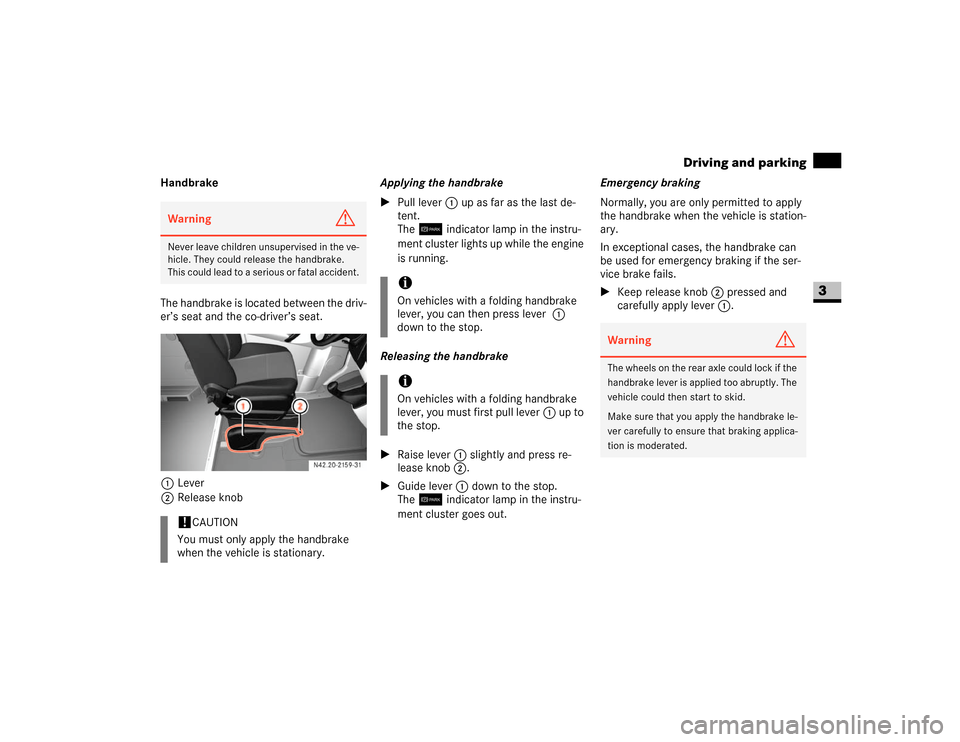
Handbrake
The handbrake is located between the driv-
er’s seat and the co-driver’s seat.
1Lever
2Release knobApplying the handbrake
\1Pull lever1 up as far as the last de-
tent.
The7 indicator lamp in the instru-
ment cluster lights up while the engine
is running.
Releasing the handbrake
\1Raise lever1 slightly and press re-
lease knob2.
\1Guide lever1 down to the stop.
The7 indicator lamp in the instru-
ment cluster goes out.Emergency braking
Normally, you are only permitted to apply
the handbrake when the vehicle is station-
ary.
In exceptional cases, the handbrake can
be used for emergency braking if the ser-
vice brake fails.
\1Keep release knob2 pressed and
carefully apply lever1.Warning
G
Never leave children unsupervised in the ve-
hicle. They could release the handbrake.
This could lead to a serious or fatal accident.!
CAUTION
You must only apply the handbrake
when the vehicle is stationary.
iOn vehicles with a folding handbrake
lever, you can then press lever1
down to the stop.iOn vehicles with a folding handbrake
lever, you must first pull lever1 up to
the stop.
Warning
G
The wheels on the rear axle could lock if the
handbrake lever is applied too abruptly. The
vehicle could then start to skid.
Make sure that you apply the handbrake le-
ver carefully to ensure that braking applica-
tion is moderated.