door lock FIAT DUCATO 2006 Owner handbook (in English)
[x] Cancel search | Manufacturer: FIAT, Model Year: 2006, Model line: DUCATO, Model: FIAT DUCATO 2006Pages: 238, PDF Size: 3.29 MB
Page 9 of 238
8
SAFETY
DEVICES
CORRECT USE
OF THE
VEHICLE
WARNING
LIGHTS AND
MESSAGES
IN AN
EMERGENCY
VEHICLE
MAINTENANCE
TECHNICAL
SPECIFICATIONS
INDEX
DASHBOARD
AND CONTROLS
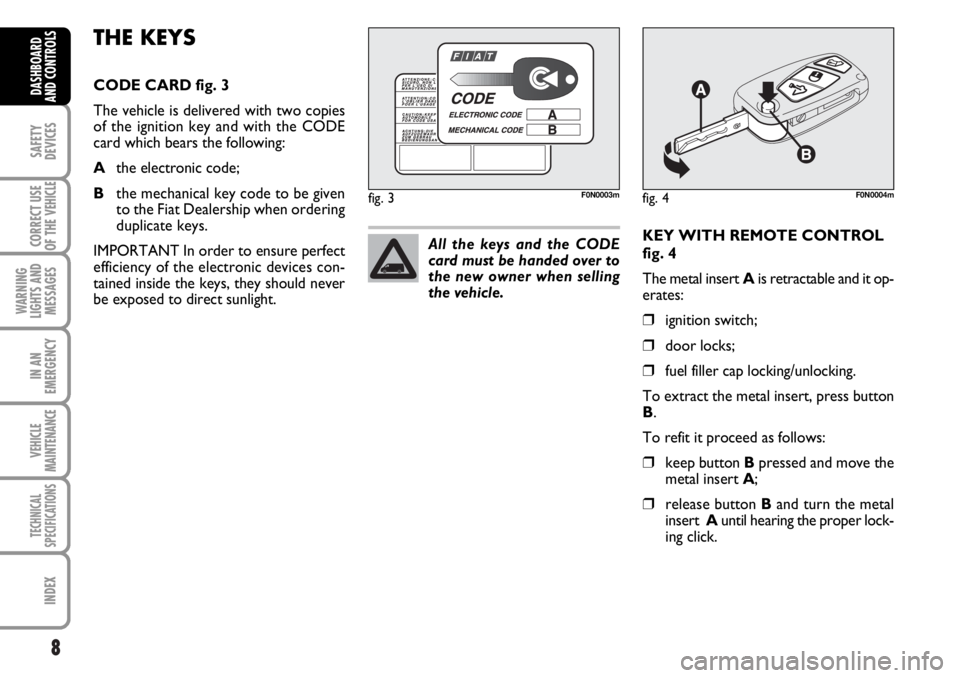
KEY WITH REMOTE CONTROL
fig. 4
The metal insert Ais retractable and it op-
erates:
❒ignition switch;
❒door locks;
❒fuel filler cap locking/unlocking.
To extract the metal insert, press button
B.
To refit it proceed as follows:
❒keep button Bpressed and move the
metal insert A;
❒release button Band turn the metal
insert Auntil hearing the proper lock-
ing click.
THE KEYS
CODE CARD fig. 3
The vehicle is delivered with two copies
of the ignition key and with the CODE
card which bears the following:
Athe electronic code;
Bthe mechanical key code to be given
to the Fiat Dealership when ordering
duplicate keys.
IMPORTANT In order to ensure perfect
efficiency of the electronic devices con-
tained inside the keys, they should never
be exposed to direct sunlight.All the keys and the CODE
card must be handed over to
the new owner when selling
the vehicle.
fig. 3F0N0003mfig. 4F0N0004m
Page 10 of 238
9
SAFETY
DEVICES
CORRECT USE
OF THE
VEHICLE
WARNING
LIGHTS AND
MESSAGES
IN AN
EMERGENCY
VEHICLE
MAINTENANCE
TECHNICAL
SPECIFICATIONS
INDEX
DASHBOARD
AND CONTROLS
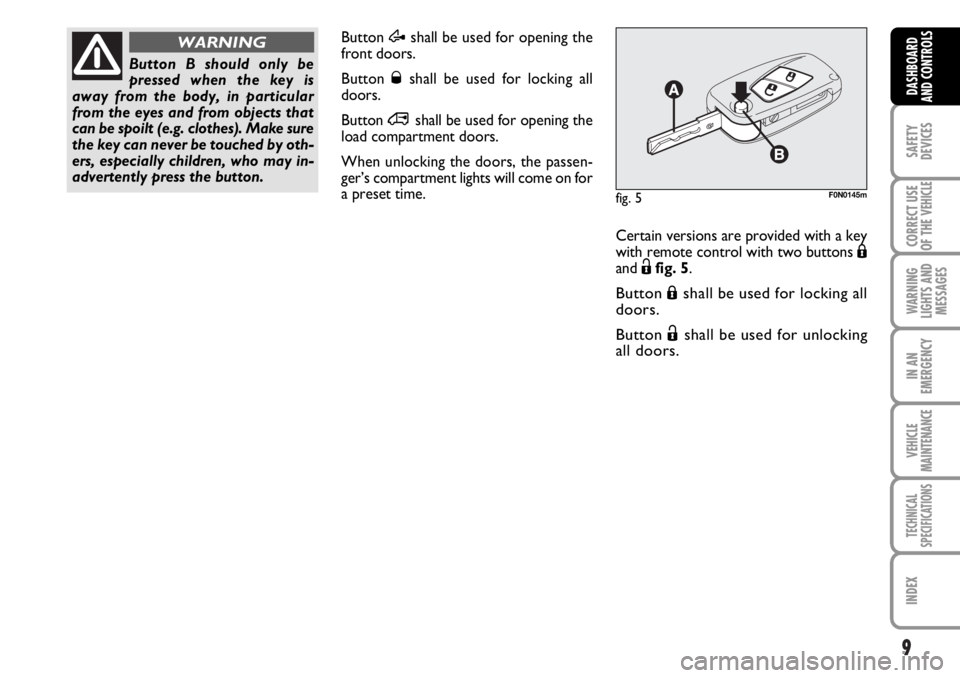
Button Æshall be used for opening the
front doors.
Button Øshall be used for locking all
doors.
Button
∞shall be used for opening the
load compartment doors.
When unlocking the doors, the passen-
ger’s compartment lights will come on for
a preset time.
Button B should only be
pressed when the key is
away from the body, in particular
from the eyes and from objects that
can be spoilt (e.g. clothes). Make sure
the key can never be touched by oth-
ers, especially children, who may in-
advertently press the button.
WARNING
fig. 5F0N0145m
Certain versions are provided with a key
with remote control with two buttons Á
and Ëfig. 5.
Button Áshall be used for locking all
doors.
Button Ëshall be used for unlocking
all doors.
Page 11 of 238
10
SAFETY
DEVICES
CORRECT USE
OF THE
VEHICLE
WARNING
LIGHTS AND
MESSAGES
IN AN
EMERGENCY
VEHICLE
MAINTENANCE
TECHNICAL
SPECIFICATIONS
INDEX
DASHBOARD
AND CONTROLS
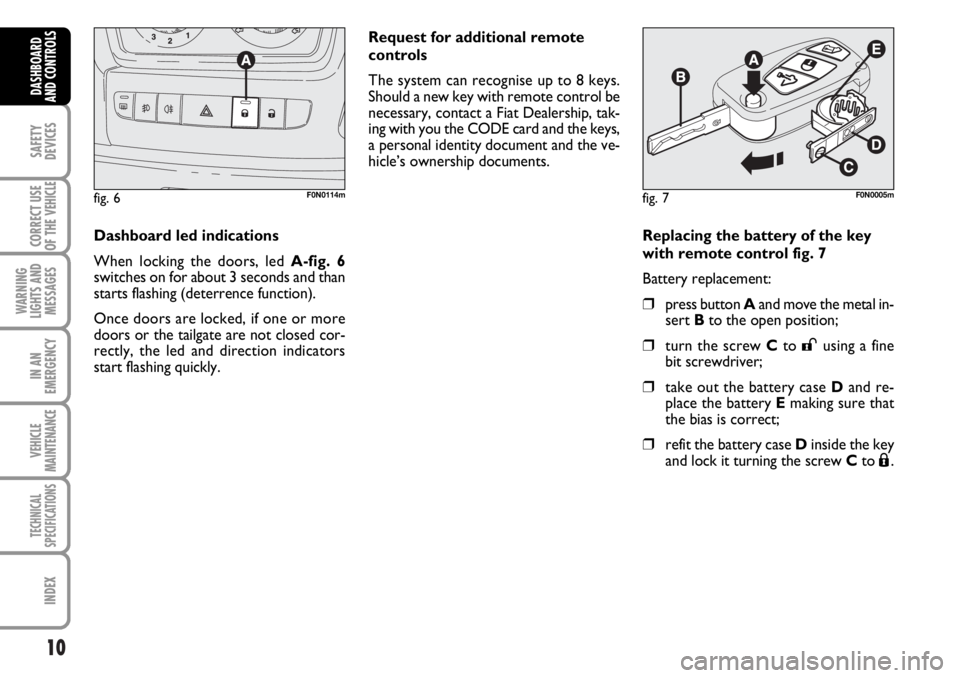
Replacing the battery of the key
with remote control fig. 7
Battery replacement:
❒press button Aand move the metal in-
sert Bto the open position;
❒turn the screw Cto :using a fine
bit screwdriver;
❒take out the battery case Dand re-
place the battery Emaking sure that
the bias is correct;
❒refit the battery case Dinside the key
and lock it turning the screw Cto Á.
fig. 7F0N0005m
Request for additional remote
controls
The system can recognise up to 8 keys.
Should a new key with remote control be
necessary, contact a Fiat Dealership, tak-
ing with you the CODE card and the keys,
a personal identity document and the ve-
hicle’s ownership documents.
Dashboard led indications
When locking the doors, led A-fig. 6
switches on for about 3 seconds and than
starts flashing (deterrence function).
Once doors are locked, if one or more
doors or the tailgate are not closed cor-
rectly, the led and direction indicators
start flashing quickly.
fig. 6F0N0114m
Page 12 of 238
11
SAFETY
DEVICES
CORRECT USE
OF THE
VEHICLE
WARNING
LIGHTS AND
MESSAGES
IN AN
EMERGENCY
VEHICLE
MAINTENANCE
TECHNICAL
SPECIFICATIONS
INDEX
DASHBOARD
AND CONTROLS
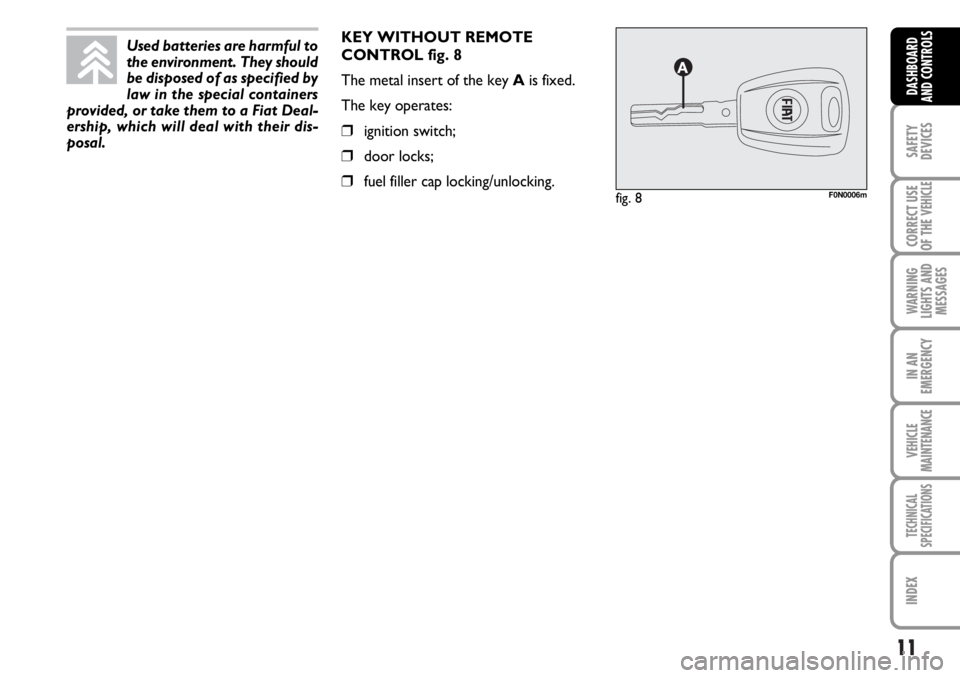
KEY WITHOUT REMOTE
CONTROL fig. 8
The metal insert of the key Ais fixed.
The key operates:
❒ignition switch;
❒door locks;
❒fuel filler cap locking/unlocking.fig. 8F0N0006m
Used batteries are harmful to
the environment. They should
be disposed of as specified by
law in the special containers
provided, or take them to a Fiat Deal-
ership, which will deal with their dis-
posal.
Page 13 of 238
Type of key
Key without
remote control
Key with remote control
Direction
indicators flashing
(only with key with
remote control)
Deterrence led
12
SAFETY
DEVICES
CORRECT USE
OF THE
VEHICLE
WARNING
LIGHTS AND
MESSAGES
IN AN
EMERGENCY
VEHICLE
MAINTENANCE
TECHNICAL
SPECIFICATIONS
INDEX
DASHBOARD
AND CONTROLS
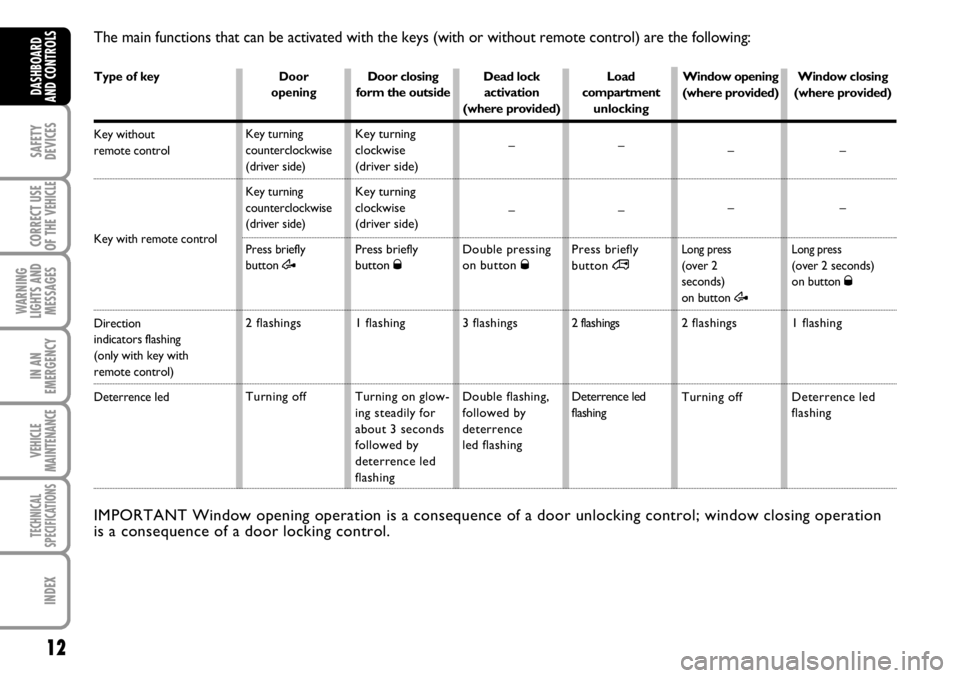
The main functions that can be activated with the keys (with or without remote control) are the following:
Door
opening
Key turning
counterclockwise
(driver side)
Key turning
counterclockwise
(driver side)
Press briefly
button
Æ
2 flashings
Turning offDoor closing
form the outside
Key turning
clockwise
(driver side)
Key turning
clockwise
(driver side)
Press briefly
button Ø
1 flashing
Turning on glow-
ing steadily for
about 3 seconds
followed by
deterrence led
flashingDead lock
activation
(where provided)
–
–
Double pressing
on button Ø
3 flashings
Double flashing,
followed by
deterrence
led flashingLoad
compartment
unlocking
–
–
Press briefly
button ∞
2 flashings
Deterrence led
flashing
IMPORTANT Window opening operation is a consequence of a door unlocking control; window closing operation
is a consequence of a door locking control.
Window closing
(where provided)
–
–
Long press(over 2 seconds)
on button Ø
1 flashing
Deterrence led
flashing Window opening
(where provided)
–
–
Long press(over 2
seconds)
on button
Æ
2 flashings
Turning off
Page 14 of 238
13
SAFETY
DEVICES
CORRECT USE
OF THE
VEHICLE
WARNING
LIGHTS AND
MESSAGES
IN AN
EMERGENCY
VEHICLE
MAINTENANCE
TECHNICAL
SPECIFICATIONS
INDEX
DASHBOARD
AND CONTROLS
IGNITION
DEVICE
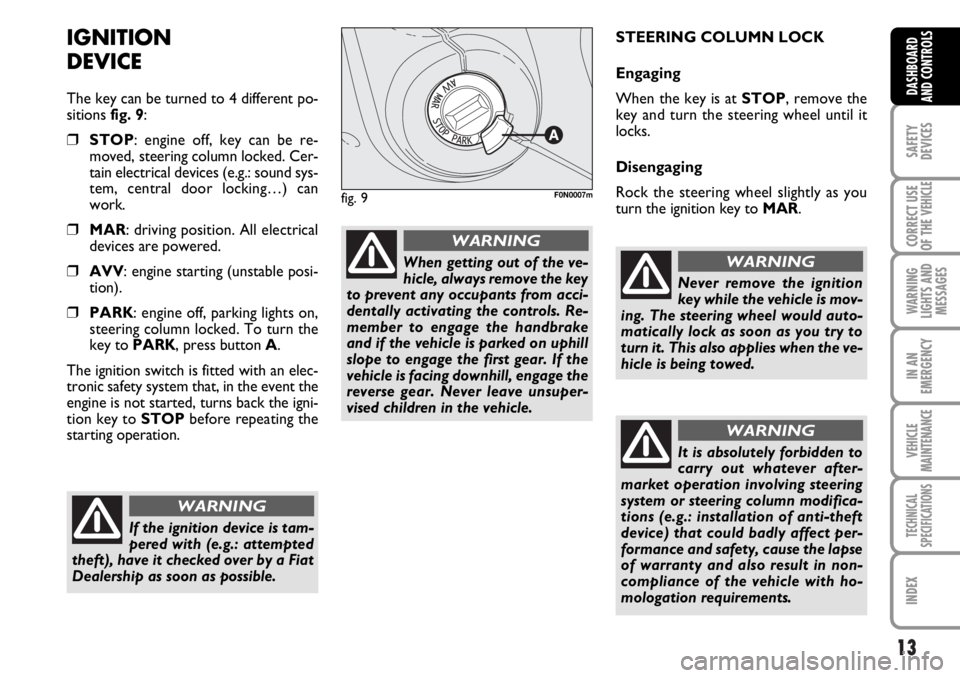
The key can be turned to 4 different po-
sitions fig. 9:
❒STOP: engine off, key can be re-
moved, steering column locked. Cer-
tain electrical devices (e.g.: sound sys-
tem, central door locking…) can
work.
❒MAR: driving position. All electrical
devices are powered.
❒AVV: engine starting (unstable posi-
tion).
❒PARK: engine off, parking lights on,
steering column locked. To turn the
key to PARK, press button A.
The ignition switch is fitted with an elec-
tronic safety system that, in the event the
engine is not started, turns back the igni-
tion key to STOPbefore repeating the
starting operation.STEERING COLUMN LOCK
Engaging
When the key is at STOP, remove the
key and turn the steering wheel until it
locks.
Disengaging
Rock the steering wheel slightly as you
turn the ignition key to MAR.
If the ignition device is tam-
pered with (e.g.: attempted
theft), have it checked over by a Fiat
Dealership as soon as possible.
WARNING
When getting out of the ve-
hicle, always remove the key
to prevent any occupants from acci-
dentally activating the controls. Re-
member to engage the handbrake
and if the vehicle is parked on uphill
slope to engage the first gear. If the
vehicle is facing downhill, engage the
reverse gear. Never leave unsuper-
vised children in the vehicle.
WARNING
fig. 9F0N0007m
Never remove the ignition
key while the vehicle is mov-
ing. The steering wheel would auto-
matically lock as soon as you try to
turn it. This also applies when the ve-
hicle is being towed.
WARNING
It is absolutely forbidden to
carry out whatever after-
market operation involving steering
system or steering column modifica-
tions (e.g.: installation of anti-theft
device) that could badly affect per-
formance and safety, cause the lapse
of warranty and also result in non-
compliance of the vehicle with ho-
mologation requirements.
WARNING
Page 19 of 238
18
SAFETY
DEVICES
CORRECT USE
OF THE
VEHICLE
WARNING
LIGHTS AND
MESSAGES
IN AN
EMERGENCY
VEHICLE
MAINTENANCE
TECHNICAL
SPECIFICATIONS
INDEX
DASHBOARD
AND CONTROLS
DIGITAL DISPLAY
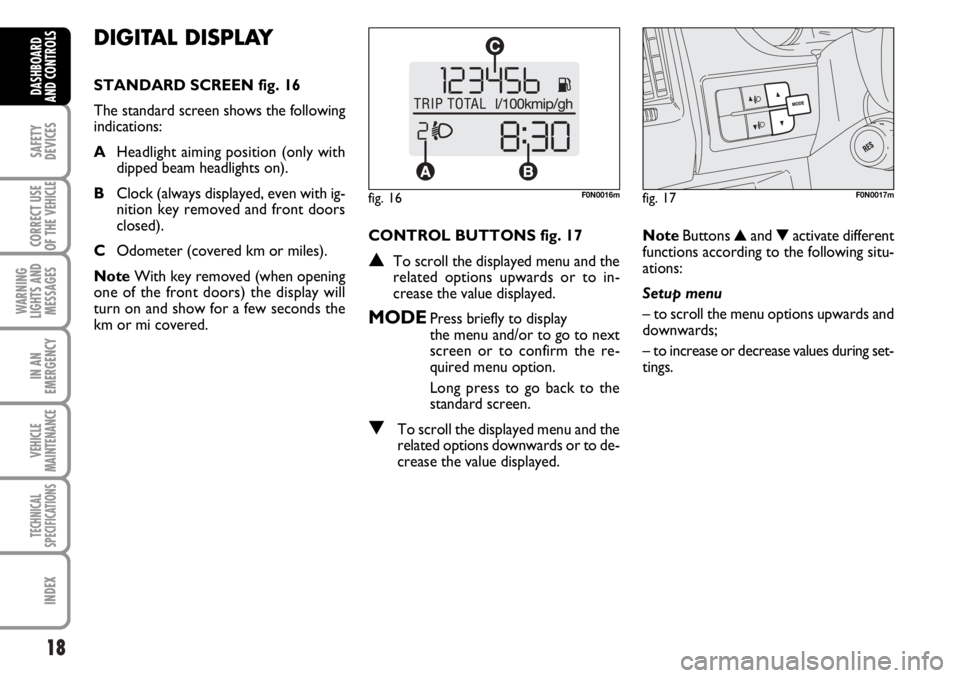
STANDARD SCREEN fig. 16
The standard screen shows the following
indications:
AHeadlight aiming position (only with
dipped beam headlights on).
BClock (always displayed, even with ig-
nition key removed and front doors
closed).
COdometer (covered km or miles).
NoteWith key removed (when opening
one of the front doors) the display will
turn on and show for a few seconds the
km or mi covered.CONTROL BUTTONS fig. 17
▲To scroll the displayed menu and the
related options upwards or to in-
crease the value displayed.
MODEPress briefly to display
the menu and/or to go to next
screen or to confirm the re-
quired menu option.
Long press to go back to the
standard screen.
▼To scroll the displayed menu and the
related options downwards or to de-
crease the value displayed.NoteButtons ▲and ▼activate different
functions according to the following situ-
ations:
Setup menu
– to scroll the menu options upwards and
downwards;
– to increase or decrease values during set-
tings.
fig. 16F0N0016mfig. 17F0N0017m
Page 25 of 238
24
SAFETY
DEVICES
CORRECT USE
OF THE
VEHICLE
WARNING
LIGHTS AND
MESSAGES
IN AN
EMERGENCY
VEHICLE
MAINTENANCE
TECHNICAL
SPECIFICATIONS
INDEX
DASHBOARD
AND CONTROLS
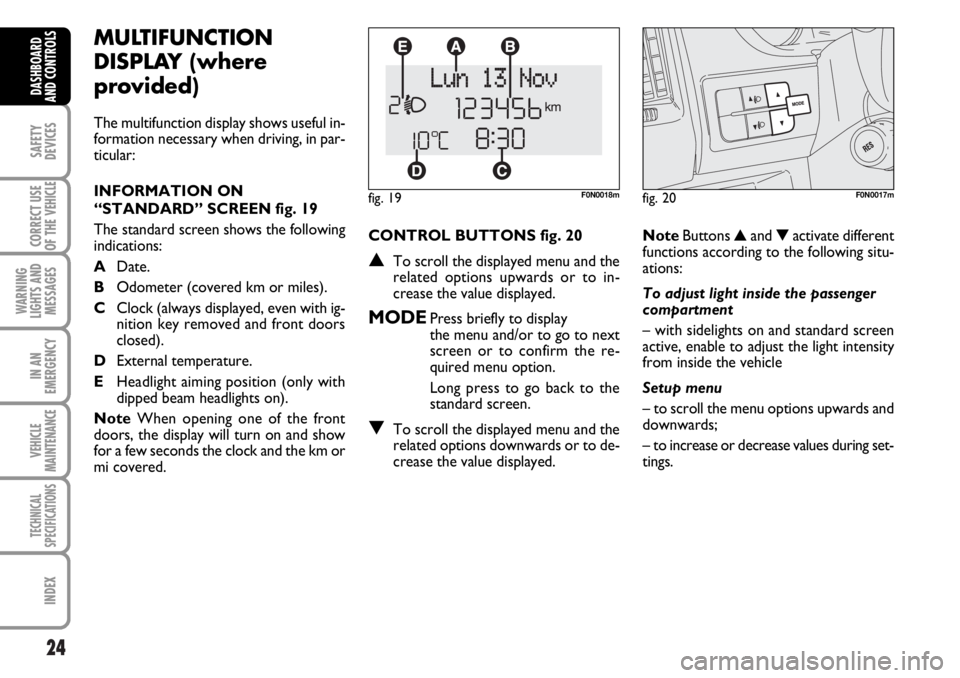
CONTROL BUTTONS fig. 20
▲To scroll the displayed menu and the
related options upwards or to in-
crease the value displayed.
MODEPress briefly to display
the menu and/or to go to next
screen or to confirm the re-
quired menu option.
Long press to go back to the
standard screen.
▼To scroll the displayed menu and the
related options downwards or to de-
crease the value displayed.
MULTIFUNCTION
DISPLAY (where
provided)
The multifunction display shows useful in-
formation necessary when driving, in par-
ticular:
INFORMATION ON
“STANDARD” SCREEN fig. 19
The standard screen shows the following
indications:
ADate.
BOdometer (covered km or miles).
CClock (always displayed, even with ig-
nition key removed and front doors
closed).
DExternal temperature.
EHeadlight aiming position (only with
dipped beam headlights on).
NoteWhen opening one of the front
doors, the display will turn on and show
for a few seconds the clock and the km or
mi covered.
fig. 19F0N0018m
NoteButtons ▲and ▼activate different
functions according to the following situ-
ations:
To adjust light inside the passenger
compartment
– with sidelights on and standard screen
active, enable to adjust the light intensity
from inside the vehicle
Setup menu
– to scroll the menu options upwards and
downwards;
– to increase or decrease values during set-
tings.
fig. 20F0N0017m
Page 30 of 238

29
SAFETY
DEVICES
CORRECT USE
OF THE
VEHICLE
WARNING
LIGHTS AND
MESSAGES
IN AN
EMERGENCY
VEHICLE
MAINTENANCE
TECHNICAL
SPECIFICATIONS
INDEX
DASHBOARD
AND CONTROLS
Automatic door locking with
vehicle running (Autoclose)
When activated (On), this function locks
automatically the doors when the vehicle
speed exceeds 20 km/h.
To activate (On) or to deactivate (Off) this
function proceed as follows:
– briefly press button MODEto display
the submenu;
– briefly press button MODE : (On) or
(Off) will flash on the display (according to
previous setting);
– press button ▲or ▼for setting;
– briefly press button MODEto go back
to the menu screen or press the button
for long to go back to the standard screen
without storing settings;
– press again button MODEfor long to
go back to the standard screen or to the
main menu according to the current menu
level. Audio repetition (See radio)
With this function the display repeats in-
formation relevant to the sound system.
– Radio: selected radio station frequency
or RDS message, automatic tuning acti-
vation or AutoSTore;
– audio CD, MP3 CD: track number;
– CD Changer: CD number and track
number;
To activate (On) or to deactivate (Off)
sound system info displaying proceed as
follows:
– briefly press button MODE: (On) or
(Off)will flash on the display (according to
previous setting);
– press button ▲or ▼for setting;
– briefly press button MODEto go back
to the menu screen or press the button
for long to go back to the standard screen
without storing settings.Set unit (Units)
With this function it is possible to set the
units through three sub-menus: “Distances”,
“Consumption” and “Temperature”.
To set the required unit proceed as follows:
– briefly press button MODE, to display
the three sub-menus;
– press button ▲or ▼to surf the three
sub-menus;
– select the required sub-menu and then
press briefly button MODE;
– if selecting “Distances”: briefly press button
MODEthe display will show “km” or “mi”
(according to previous setting);
– press button ▲or ▼for setting;
– if selecting “Consumption”: briefly press but-
ton MODEthe display will show “km/l”,
“l/100km” or “mpg” (according to previous
setting);
Page 66 of 238
65
SAFETY
DEVICES
CORRECT USE
OF THE
VEHICLE
WARNING
LIGHTS AND
MESSAGES
IN AN
EMERGENCY
VEHICLE
MAINTENANCE
TECHNICAL
SPECIFICATIONS
INDEX
DASHBOARD
AND CONTROLS
CEILING LIGHTS
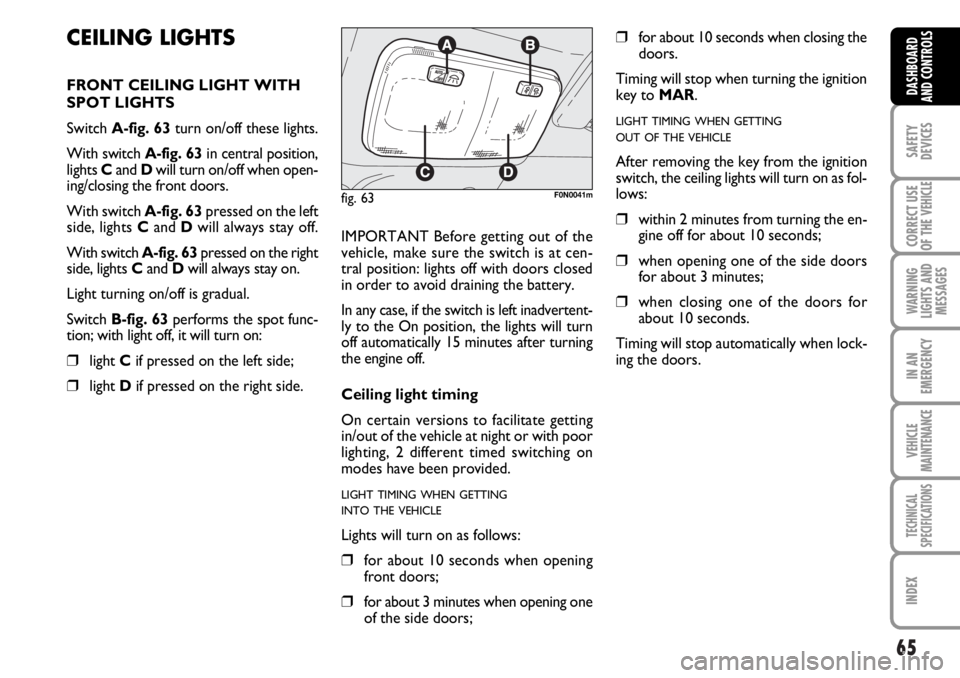
FRONT CEILING LIGHT WITH
SPOT LIGHTS
Switch A-fig. 63turn on/off these lights.
With switch A-fig. 63in central position,
lights Cand Dwill turn on/off when open-
ing/closing the front doors.
With switch A-fig. 63pressed on the left
side, lights Cand Dwill always stay off.
With switch A-fig. 63pressed on the right
side, lights Cand Dwill always stay on.
Light turning on/off is gradual.
Switch B-fig. 63performs the spot func-
tion; with light off, it will turn on:
❒light Cif pressed on the left side;
❒light Dif pressed on the right side.IMPORTANT Before getting out of the
vehicle, make sure the switch is at cen-
tral position: lights off with doors closed
in order to avoid draining the battery.
In any case, if the switch is left inadvertent-
ly to the On position, the lights will turn
off automatically 15 minutes after turning
the engine off.
Ceiling light timing
On certain versions to facilitate getting
in/out of the vehicle at night or with poor
lighting, 2 different timed switching on
modes have been provided.
LIGHT TIMING WHEN GETTING
INTO THE VEHICLE
Lights will turn on as follows:
❒for about 10 seconds when opening
front doors;
❒for about 3 minutes when opening one
of the side doors;
❒for about 10 seconds when closing the
doors.
Timing will stop when turning the ignition
key to MAR.
LIGHT TIMING WHEN GETTING
OUT OF THE VEHICLE
After removing the key from the ignition
switch, the ceiling lights will turn on as fol-
lows:
❒within 2 minutes from turning the en-
gine off for about 10 seconds;
❒when opening one of the side doors
for about 3 minutes;
❒when closing one of the doors for
about 10 seconds.
Timing will stop automatically when lock-
ing the doors.
fig. 63F0N0041m