phone FIAT DUCATO 244 2002 3.G Connect NavPlus Manual
[x] Cancel search | Manufacturer: FIAT, Model Year: 2002, Model line: DUCATO 244, Model: FIAT DUCATO 244 2002 3.GPages: 246, PDF Size: 3.39 MB
Page 140 of 246
CONNECT Nav
139
The CONNECT system is able to de-
tect both internal faults and faults due
to overheating.INTERNAL FAULTS
If the system detects an internal fault
on a certain module (audio, telephone,
etc…), the system will “freeze” the
last available screen and it will start di-
agnostics.
For a set period of time the system
monitors the involved module for
troubleshooting. If time-out expires
with no result, the system will adopt
the best repair action (e.g.: resetting
involved module hardware).OVERTEMPERATURE
FAULTS
If the temperature of a CONNECT
system hardware module (audio, tele-
phone, CD player, etc..) exceeds the
max. limit, the involved module will
detect overtemperature and the dis-
play will show a dedicated warning
message.
The involved module will automati-
cally be limited or disabled. In extreme
cases the system is turned off auto-
matically until regular operating tem-
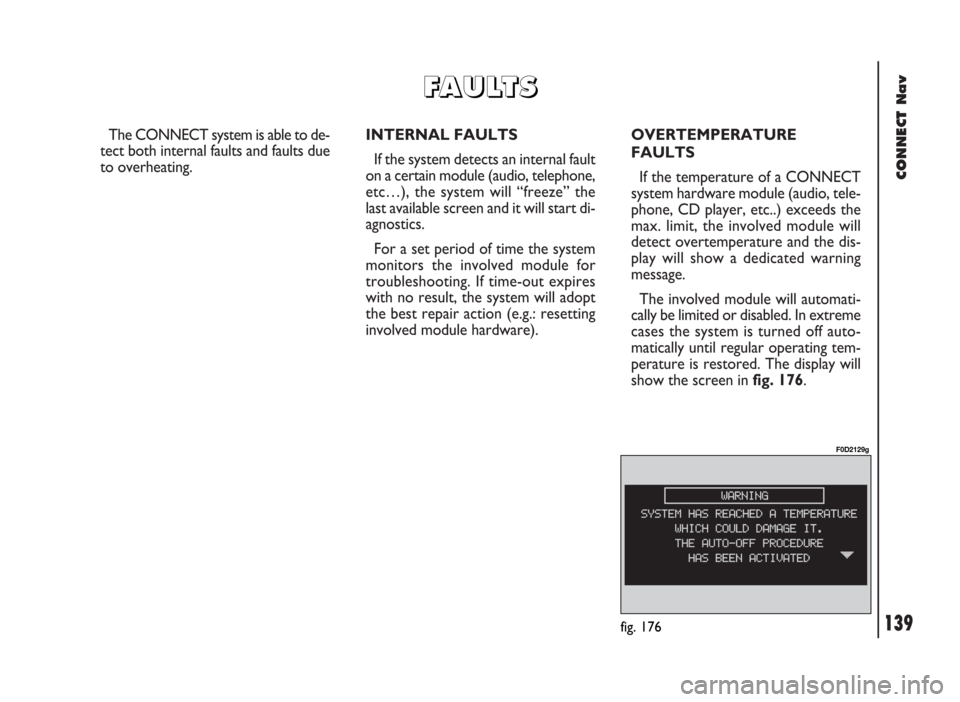
perature is restored. The display will
show the screen in fig. 176.
fig. 176
F0D2129g
F F
A A
U U
L L
T T
S S
Page 141 of 246
CONNECT Nav
140
“Audio” module
overheating
In case of “Audio” module over-
heating, current audio volume is au-
tomatically limited regardless of the
current audio source (radio, CD).
The display will show a proper warn-
ing message.“CD player” module
overheating
In case of “CD player” module over-
heating, no CD will be played: no au-
dio CD or MP3 CD will be played and
the navigation functions will not be
guaranteed (unless navigation without
CD has been previously activated).
The display will show a proper warn-
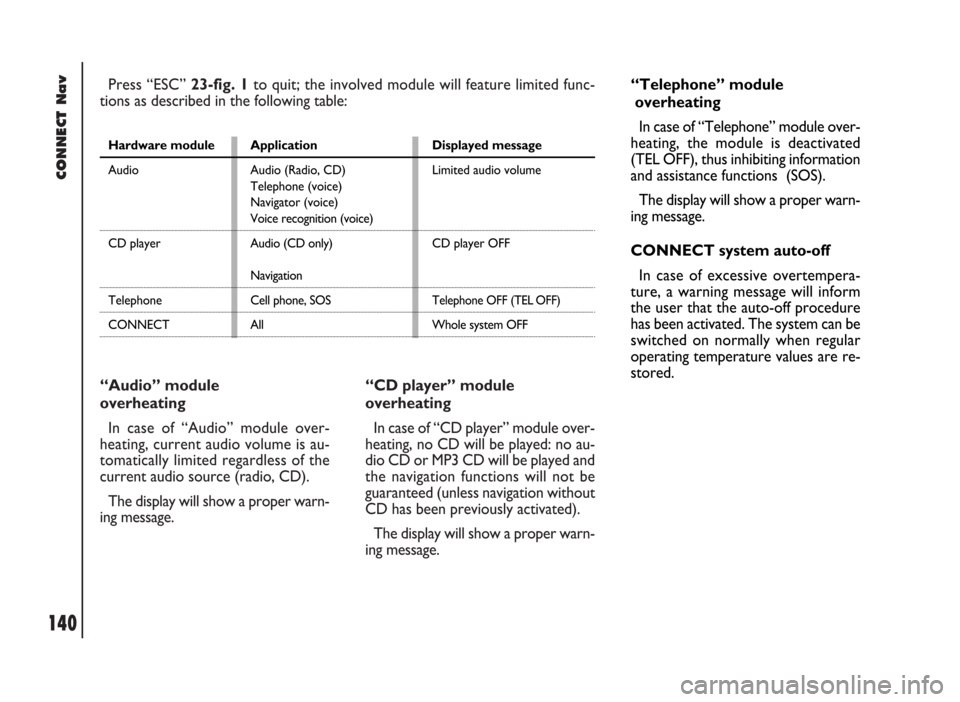
ing message. Press “ESC” 23-fig. 1to quit; the involved module will feature limited func-
tions as described in the following table:
Hardware module
Audio
CD player
Telephone
CONNECTApplication
Audio (Radio, CD)
Telephone (voice)
Navigator (voice)
Voice recognition (voice)
Audio (CD only)
Navigation
Cell phone, SOS
AllDisplayed message
Limited audio volume
CD player OFF
Telephone OFF (TEL OFF)
Whole system OFF
“Telephone” module
overheating
In case of “Telephone” module over-
heating, the module is deactivated
(TEL OFF), thus inhibiting information
and assistance functions (SOS).
The display will show a proper warn-
ing message.
CONNECT system auto-off
In case of excessive overtempera-
ture, a warning message will inform
the user that the auto-off procedure
has been activated. The system can be
switched on normally when regular
operating temperature values are re-
stored.
Page 142 of 246
CONNECT Nav+
141
Volume adjustment ........................................................... 156
Protection against overheating ....................................... 157
MAIN SCREEN (MAIN)............................................ 158
RADIO ................................................................................. 158
COMPACT DISC PLAYER (CD) .................................. 159
TELEPHONE ....................................................................... 159
DROP-DOWN MENU .................................................... 160
MEMORIZE function ......................................................... 160
SETUP function .................................................................. 160
Fleet management .............................................................. 161
Speed limit alarm ................................................................ 164
Modem (data interface) .................................................... 167
Setup-connect ..................................................................... 170
AUDIO............................................................................... 172 ADVICE, CONTROLS AND
GENERAL INFORMATION................................... 145
ADVICE ................................................................................ 145
Road safety .......................................................................... 145
Reception conditions ........................................................ 145
Care and maintenance ...................................................... 145
System software updating ................................................ 146
BUTTONS AND SELECTORS ...................................... 148
Front panel controls ......................................................... 149
Controls on steering wheel ............................................ 151
GENERAL INFORMATION ........................................... 152
Important notes for use
and road safety ................................................................... 152
Multifunction information display .................................. 153
System switching on / off and stand-by ........................ 154
Choosing the operating mode ........................................ 155
Choosing the menu functions ......................................... 155
CONNECT Nav+
Page 143 of 246

CONNECT Nav+
142
EON function (enhanced other network) ................... 181
AUTOSTORE function
(automatic station storage) ............................................. 182
ST/MONO function .......................................................... 183
CD MODE .......................................................................... 183
TA function (traffic information) ................................... 184
SCAN function (brief playback) ..................................... 184
SHUFFLE function (random playback) .......................... 184
CD SETUP menu ............................................................... 184
AUDIO SETUP menu (audio adjustments) ................. 185
CELLULAR TELEPHONE (TEL)......................... 186
GENERAL INFORMATION ........................................... 186
Preliminary operations ..................................................... 187
– telephone card insertion .............................................. 187
– PIN code entry ............................................................... 188
Screen options .................................................................... 188
Accepting calls .................................................................... 189
Telephone call ..................................................................... 189
– manual dialling ................................................................. 190 SCREEN OPTIONS AND FUNCTIONS .................... 172
AUDIO SETUP FUNCTION (audio adjustments) .... 173
Treble adjustment (treble) .............................................. 173
Bass adjustment (bass) .................................................... 173
Loudness function .............................................................. 173
Equalizer function .............................................................. 174
Equal. man. function .......................................................... 174
SDV function
(volume changing with speed) ........................................ 175
BAL/FADER function (sound distribution) .................. 175
RADIO MODE ................................................................... 176
Frequency function
(tuning stations) .................................................................. 176
AUDIO SETUP function (audio adjustments) ............ 177
TA function (traffic information) ................................... 177
AF function (seeking alternative frequencies) ............. 179
LOC-DX function (tuner sensitivity
adjustment) .......................................................................... 180
PTY function
(choosing a type of programme) .................................... 180
Page 150 of 246

CONNECT Nav+
149
FRONT PANEL CONTROLS fig. 1
Certain controls have multiple functions which depend on the system operating conditions active. Turning on the function
chosen is in some cases controlled by the push duration (short or long), as shown in the following table.
Legend Short push function Long push function (less than 1 second) (more than 1 second)
1 - 2 - 3 Numbers “1”, “2”, “3”, “4”, “5”, “6” of phone keypad Storing stations no.1-2-3-4-5-6
4 - 5 - 6Calling stored stations
7Number “7” of telephone keypad –
8Number “8” of telephone keypad –
9Number “9” of telephone keypad –
10Number “0” of telephone keypad Pause in playing an audio CD
Play/Stop audio CD
11 - *Symbol (*) of telephone keypad –
Radio mode: seeking first station
that can be tuned with lower frequency
CD mode: select previous track
12 - #Symbol (#) of telephone keypad –
Radio mode: seeking first station
that can be tuned with higher frequency
CD mode: select next track
13 -
òForwarding the phone call set Refusing the incoming call
Accepting the incoming call
Ending the call in progress
14 -ôVoice recognition function on/off Voice command memo
Page 151 of 246

CONNECT Nav+
150
Legend Short push function Long push function (less than 1 second) (more than 1 second)
15 - SRCOperating mode choice: –
FM1-FM2-FM3-LW-MW-CD
16System on/off (pressing the knob) –
Volume control (turning the knob)
17 - MAIN/DARKSelecting main screen Darkening monitor (stand-by)
18 - AUDIO/OFFSelecting radio screen. Turning radio on Turning radio off
19 - TEL/OFFSelecting phone screen. Turning telephone on Turning telephone off
20 - NAV/MUTESelecting navigation function Excluding navigator voice messages
(NAV/MUTE function)
Reset voice messages
21 - TRIPSelecting computer screen –
22Selecting functions (turning the knob). Confirming selected –
function (pressing the knob). Drop-down menu
on (pressing the knob with MAIN or navigation screen)
23 - ESCExit screen selected. Return to higher level –
of menu, deleting functions that have not been confirmed
24 - RPTRepetition of last navigator voice instruction –
25 -•Display of Information and Assistance Services menu –
26 -˚Eject navigator CD-ROM or Audio CD –
27Slot for SIM telephone card –
28Slot for navigator CD-ROM and Audio CD –
Page 152 of 246
CONNECT Nav+
151
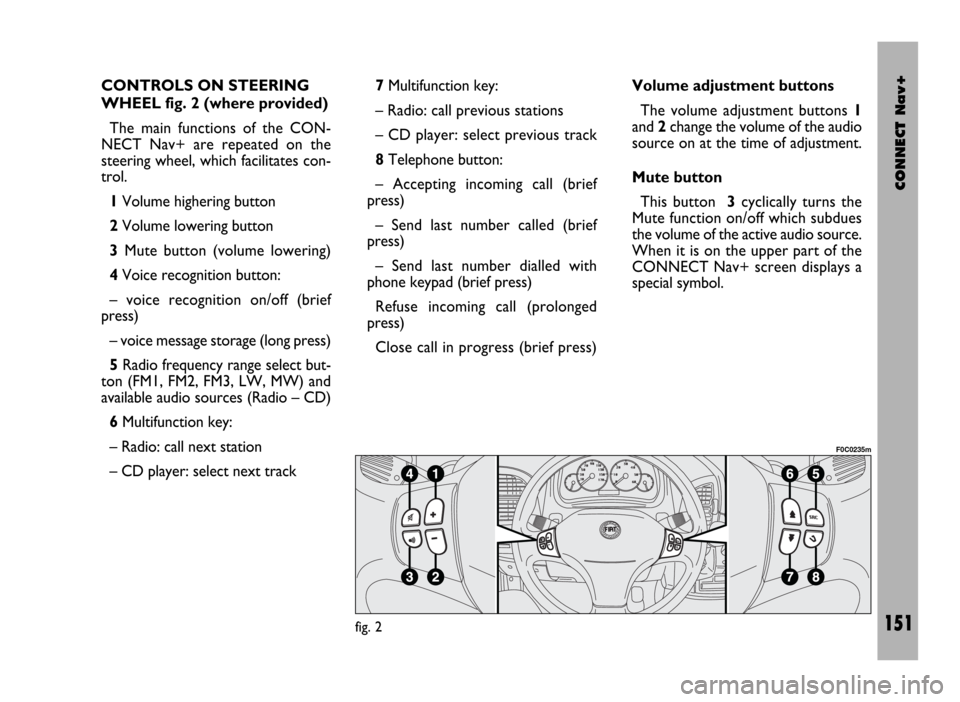
CONTROLS ON STEERING
WHEEL fig. 2 (where provided)
The main functions of the CON-
NECT Nav+ are repeated on the
steering wheel, which facilitates con-
trol.
1Volume highering button
2Volume lowering button
3Mute button (volume lowering)
4Voice recognition button:
– voice recognition on/off (brief
press)
– voice message storage (long press)
5Radio frequency range select but-
ton (FM1, FM2, FM3, LW, MW) and
available audio sources (Radio – CD)
6Multifunction key:
– Radio: call next station
– CD player: select next track 7Multifunction key:
– Radio: call previous stations
– CD player: select previous track
8Telephone button:
– Accepting incoming call (brief
press)
– Send last number called (brief
press)
– Send last number dialled with
phone keypad (brief press)
Refuse incoming call (prolonged
press)
Close call in progress (brief press)Volume adjustment buttons
The volume adjustment buttons 1
and 2change the volume of the audio
source on at the time of adjustment.
Mute button
This button 3cyclically turns the
Mute function on/off which subdues
the volume of the active audio source.
When it is on the upper part of the
CONNECT Nav+ screen displays a
special symbol.
fig. 2
F0C0235m
Page 153 of 246

CONNECT Nav+
152
Voice recognition button
Button 4turns on voice recognition
as follows:
– brief press on the button: voice
recognition on/off
– prolonged press on the button:
voice message storage.
Frequency range and audio
source select button
To cyclically select the frequency
ranges and audio sources available,
briefly and repeatedly press the “SRC”
button 5.
The frequencies and sources avail-
able are: FM1, FM2, FM3, LW, MW,
CD.
Multifunction keys
Multifunction keys 6and 7makes it
possible to call the preset radio sta-
tions in the frequency band set and se-
lect the next or previous track when
playing a CD.Press key 6to choose the next sta-
tions or to play the next CD track.
Press key 7to choose the previous
stations or to play the previous CD
track.
Telephone button
Button 8activates the main functions
of the telephone, depending on the
conditions active when the button is
pressed and the length of the press
(short or long).
Short push:
– taking an incoming call
– sending a call to the last number di-
alled previously
– sending a call to the number dialled
using the phone keypad.
Long push:
– reject incoming call.GENERAL
INFORMATION
IMPORTANT NOTES FOR
USE AND ROAD SAFETY
To avoid creating dangerous situa-
tions for yourself and others in use of
the system, please pay attention to the
following points:
– the CONNECT Nav+ must be
used keeping full control of the vehi-
cle; in the case of doubt in the use of
the functions, it is necessary to stop
before performing the various opera-
tions;
– use of the cell phone is prohibited
near explosive substances.
The navigation system allows you to
reach your destination, indicating each
route change stored on the navigation
CD-ROM. In fact, in calculating the
route, the system takes into account
of all the information stored concern-
Page 154 of 246
CONNECT Nav+
153
ing the roads, advising the best route.
However it cannot take account of the
traffic, sudden interruptions or any
other inconvenience.In carrying out any manoeuvre it is
always necessary to follow the rules of
the road, regardless of the advice giv-
en by the navigation system. If you
leave the suggested route, the naviga-
tion system will calculate a new one
and suggest it to you.
GENERAL INFORMATION
The CONNECT Nav+ controls and
provides information for the following
systems and functions:
– Radio with CD-ROM or Audio CD
player
– GSM Dual Band cell phone with
voice commands
– Navigation system
– On-board computer
– Information and assistance services.
The interface is the multifunction in-
formation display for all the integrat-
ed components.MULTIFUNCTION
INFORMATION DISPLAY
The colour display comprises a 5”
TFT (approx. 7.5 x 10.3 cm) and 320H
x 234V pixel screen.
The display brightness can be
changed depending on the environ-
ment conditions and the driver’s re-
quirements, storing two settings, day
and night, according to the settings
performed in the “Setup / Setup-
CONNECT / Day brightness – Night
brightness”.
Brightness can be switched from day
to night and vice versa if external lights
are on and if light conditions in the
passenger compartment are compat-
ible.
The navigation system
helps the driver while dri-
ving by suggesting, vocally and
graphically, the best route to be fol-
lowed to reach the preset destina-
tion. The suggestions given by the
navigation system do not exempt
the driver from full responsibility
due to driving behaviour and com-
pliance with road and other traffic
regulations. The responsibility for
road safety always and anyway lies
with the vehicle’s driver.
WARNING
Page 155 of 246

CONNECT Nav+
154
SYSTEM SWITCHING ON/OFF
AND STAND-BY
The system may be in one of the fol-
lowing conditions:
– off, with all functions disabled;
– normal status, with all functions ac-
tive or activatable;
– stand-by, with functions partially
active and screen darkened.
Switching the system on
The system is turned on automati-
cally turning the ignition key to MAR.
When the ignition key is at STOP
or removed, the system is turned on
pressing the knob 16-fig. 1or key
•
25-fig. 1for the “Emergency call” (to
use the phone it is necessary to en-
ter the PIN code).Switching the system off
The system is turned off automati-
cally when the ignition key is moved
to STOP. The conditions and func-
tions active before turning off are
memorised and brought back the next
time the engine is started.
Turning off is delayed if a phone call,
an “Emergency call” or a voice com-
mand language change is in progress,
and it will take place after about 20
minutes if the call is over or, if not at
the end of it.
If the system was turned on with the
knob 16-fig. 1or key
•25-fig. 1,
with the ignition key at STOPor re-
moved, it is turned off pressing the
knob again 16-fig. 1or automatically
after 20 minutes, to preserve the bat-
tery.Stand-by (Dark)
During operation with the ignition
key engaged, the system may be set to
stand-by with a prolonged press on
the “MAIN” key 17-fig. 1. This oper-
ating condition (Dark) corresponds to
a dark screen with the volume off, but
the system continues working invisi-
bly, therefore the phone is ready to
receive.
If during stand-by the limit of an ac-
tive function is exceeded, the corre-
sponding warning will be shown.
To bring the system back to the nor-
mal operating condition, briefly press
the “MAIN” key 17-fig. 1or key
•
25-fig. 1for the “Emergency call” (to
use the phone it is necessary to en-
ter the PIN code).