phone FIAT DUCATO 244 2002 3.G Connect NavPlus Manual
[x] Cancel search | Manufacturer: FIAT, Model Year: 2002, Model line: DUCATO 244, Model: FIAT DUCATO 244 2002 3.GPages: 246, PDF Size: 3.39 MB
Page 156 of 246

CONNECT Nav+
155
CHOOSING THE
OPERATING MODE
The operating mode is selected
pressing one of the following keys
fig. 1:
– MAIN key 17= MAIN SCREEN
– AUDIO key 18= RADIO WITH
CD PLAYER
– TEL key 19= TELEPHONE
– NAV key 20= NAVIGATOR
– key 14= VOICE RECOGNITION
– TRIP key 21= ON-BOARD
COMPUTER
– key •25= CALL FOR INFOR-
MATION AND ASSISTANCE.
For each operating mode the corre-
sponding menu is shown on the dis-
play.CHOOSING THE MENU
FUNCTIONS
The different operating modes of the
CONNECT Nav+ allow access to dif-
ferent menus, with functions that in
turn show other submenus on the dis-
play and so on.
The procedures for choosing and
confirming the functions of the differ-
ent menus and submenus are howev-
er the same and they are described be-
low.
To go back to the previous screen
from a submenu or to exit the various
operating modes, press “ESC” 23-
fig. 1.Choosing a function
To select a function of the menu on
the display, simply turn the knob 22-
fig. 1in one of the two directions un-
til showing the function required.
Confirming the function chosen
To confirm the function selected,
press the knob 22-fig. 1.
IMPORTANTOn the menu or
submenu pages showing “OK”, to
store the functions chosen it is nec-
essary to exit the corresponding
screen confirming the “OK” function.
Leaving the page of the menu or sub-
menu with the “ESC” key 23-fig. 1,
the previous functions are restored in-
stead of the new settings.
Page 157 of 246
CONNECT Nav+
156
VOLUME ADJUSTMENT
To increase the volume: turn the
knob 16-fig. 1clockwise.
To lower the volume: turn the knob
16-fig. 1counter-clockwise.
During adjustment, the volume lev-
el is shown graphically on the display
(only in the main menu of audio
sources).
IMPORTANTThe volume of
PTY31 Alarm/Traffic Announcement
(TA), telephone, telephone ringer and
voice recognition can be adjusted sep-
arately.
Automatic volume lowering
during phone calls
During phone calls, the radio volume
is turned down automatically and the
screen shows the telephone symbol.MUTE function (turning down
the audio volume)
To turn off the volume of the audio
system (Radio, CD), with any operat-
ing mode on (MAIN, NAV, TRIP),
keep the button 18-fig. 1pressed; this
way the radio turns off and the display
shows the wording “Audio OFF”. To
turn the radio on again, briefly press
the button 18-fig. 1, thereby turning
the audio function on again with the
corresponding screen.
NAV MUTE function (excluding
navigator voice messages)
To turn off the navigator voice in-
structions keep the “NAV” key
pressed 20-fig. 1. The volume will
lower gradually (Soft Mute function)
and the display will show the word-
ing “NAV MUTE”.
Too high a volume may be
a danger for the driver and
for other persons in the traffic. The
volume should therefore always be
adjusted in such a way as to still be
able to hear the noises in the sur-
rounding environment (for example
horns, ambulances, police cars,
etc.).
WARNING
Page 160 of 246

CONNECT Nav+
159
COMPACT DISC
PLAYER (CD)
When the CD player is working the
display shows the following:
– track number (number of track be-
ing played);
– “TA” if the traffic information re-
ception function is on.
TELEPHONE
When the telephone is working the
following are shown on the display:
– name of telephone network access
provider and field strength;
– name or telephone number and du-
ration of conversation during a call;
– remaining credit available on phone
card (if available by network provider);
– symbols and wordings associated
with the phone settings:
call ringer off
“forwarding” function on
“disable” function on
telephone off or no network
SMS message received, not read;– display of “SIM absent” warning if
the SIM card is not inserted;
– display of “enter PIN” or “faulty
card” or “seek network” or “emer-
gency only” or “enter PUK” message
depending on the case;
– display of “dialling interrupted”
warning in the case of momentary in-
terruption of call;
– display of “call over” warning;
– display of “no connection” warning
for interruption of connection from
the network;
– display of “number busy” warning;
– display of “no answer” warning.
Page 164 of 246
CONNECT Nav+
163
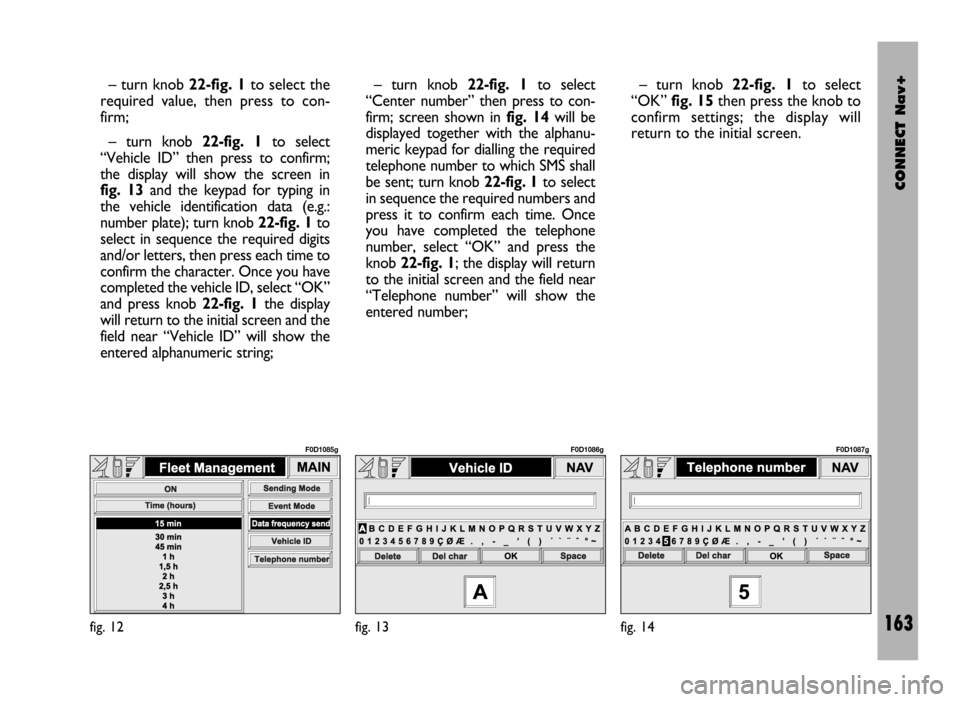
– turn knob 22-fig. 1to select the
required value, then press to con-
firm;
– turn knob 22-fig. 1to select
“Vehicle ID” then press to confirm;
the display will show the screen in
fig. 13and the keypad for typing in
the vehicle identification data (e.g.:
number plate); turn knob 22-fig. 1to
select in sequence the required digits
and/or letters, then press each time to
confirm the character. Once you have
completed the vehicle ID, select “OK”
and press knob 22-fig. 1the display
will return to the initial screen and the
field near “Vehicle ID” will show the
entered alphanumeric string;– turn knob 22-fig. 1to select
“Center number” then press to con-
firm; screen shown in fig. 14will be
displayed together with the alphanu-
meric keypad for dialling the required
telephone number to which SMS shall
be sent; turn knob 22-fig. 1to select
in sequence the required numbers and
press it to confirm each time. Once
you have completed the telephone
number, select “OK” and press the
knob 22-fig. 1; the display will return
to the initial screen and the field near
“Telephone number” will show the
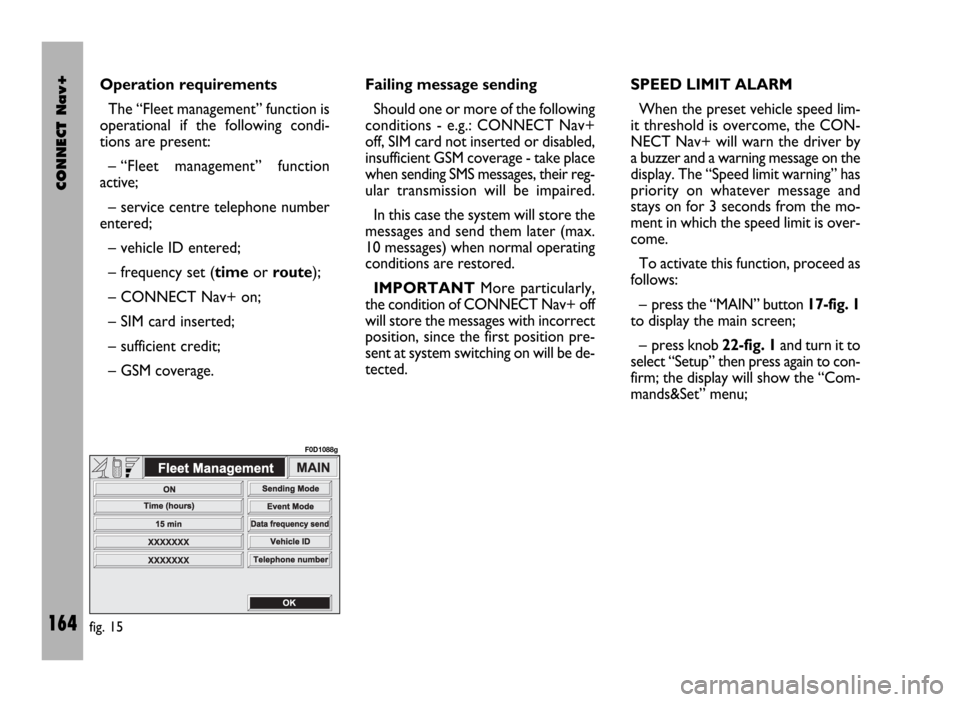
entered number;– turn knob 22-fig. 1to select
“OK” fig. 15then press the knob to
confirm settings; the display will
return to the initial screen.
fig. 12
F0D1085g
fig. 13
F0D1086g
fig. 14
F0D1087g
Page 165 of 246
CONNECT Nav+
164
Operation requirements
The “Fleet management” function is
operational if the following condi-
tions are present:
– “Fleet management” function
active;
– service centre telephone number
entered;
– vehicle ID entered;
– frequency set (timeor route);
– CONNECT Nav+ on;
– SIM card inserted;
– sufficient credit;
– GSM coverage.Failing message sending
Should one or more of the following
conditions - e.g.: CONNECT Nav+
off, SIM card not inserted or disabled,
insufficient GSM coverage - take place
when sending SMS messages, their reg-
ular transmission will be impaired.
In this case the system will store the
messages and send them later (max.
10 messages) when normal operating
conditions are restored.
IMPORTANTMore particularly,
the condition of CONNECT Nav+ off
will store the messages with incorrect
position, since the first position pre-
sent at system switching on will be de-
tected.SPEED LIMIT ALARM
When the preset vehicle speed lim-
it threshold is overcome, the CON-
NECT Nav+ will warn the driver by
a buzzer and a warning message on the
display. The “Speed limit warning” has
priority on whatever message and
stays on for 3 seconds from the mo-
ment in which the speed limit is over-
come.
To activate this function, proceed as
follows:
– press the “MAIN” button 17-fig. 1
to display the main screen;
– press knob 22-fig. 1and turn it to
select “Setup” then press again to con-
firm; the display will show the “Com-
mands&Set” menu;
fig. 15
F0D1088g
Page 168 of 246

CONNECT Nav+
167
MODEM (data interface)
This function enables to connect an
external device (e.g.: portable com-
puter) to the CONNECT Nav+ that
in this case will act as a modem. To im-
plement such configuration the link be-
tween the external device and the
CONNECT Nav+ connection (to be
found in central position under the
dashboard) shall be performed using
the cable provided with the system.
The max. data transmission speed is
that provided for the cellular tele-
phone mode (TEL) and is equal to 9.6
Kbps, as established by the commu-
nication with GSM cell network.
During data transmission (modem
function on), the CONNECT Nav+
condition is the following:
– telephone mode off (TEL-OFF);
– incoming calls blocked;– call forwarding blocked;
– navigator (NAV) function can be
activated; if navigation is on data trans-
mission can be slow;
– all audio functions (radio, CD) can
be activated
– emergency call can be forwarded
by pressing •25-fig. 1.IMPORTANTThe modem func-
tion cannot be activated during a call.
IMPORTANTPress button •to
abort the modem function; the system
will restore the GSM telephone mode
for the selected function and will re-
quest to enter the PIN code; data ex-
changed during transmission will be
lost (unless data back-up have been
performed by user’s computer appli-
cations).
The modem function will not be re-
stored automatically by the system
when the emergency or service call is
over. To restore it repeat the proce-
dure from the beginning.
Page 170 of 246
CONNECT Nav+
169
Once the modem has been proper-
ly installed, the portable computer can
use all the applications provided for
telematic connections to data base -
external servers, etc.; more particu-
larly the following can be used:
– Hiper Terminal;
– Microsoft Explorer or Netscape
for Internet and its applications (pro-
vided the user has an “Internet
provider”);
– Microsoft Mail or Groupwise (for
e-mail address).To activate the Modem function,
proceed as follows:
– press the “MAIN” button17-fig. 1
to display the main screen;
– press the knob 22-fig. 1and turn
it to select “Setup” then press the
knob to confirm; the display will show
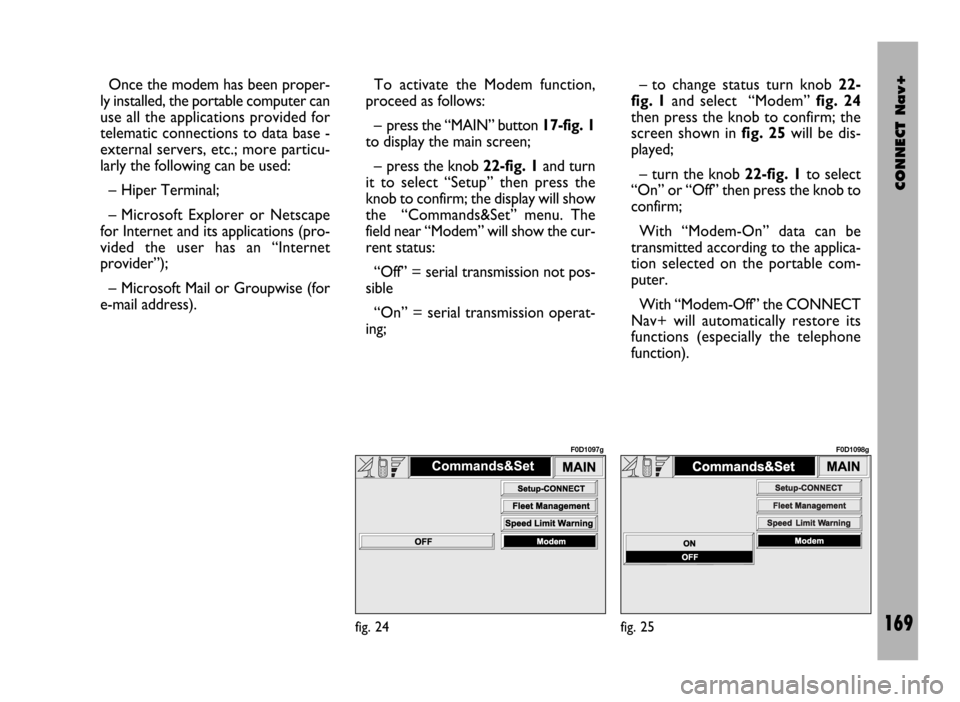
the “Commands&Set” menu. The
field near “Modem” will show the cur-
rent status:
“Off” = serial transmission not pos-
sible
“On” = serial transmission operat-
ing;– to change status turn knob 22-
fig. 1and select “Modem” fig. 24
then press the knob to confirm; the
screen shown in fig. 25will be dis-
played;
– turn the knob 22-fig. 1to select
“On” or “Off” then press the knob to
confirm;
With “Modem-On” data can be
transmitted according to the applica-
tion selected on the portable com-
puter.
With “Modem-Off” the CONNECT
Nav+ will automatically restore its
functions (especially the telephone
function).
fig. 24
F0D1097g
fig. 25
F0D1098g
Page 173 of 246
CONNECT Nav+
172
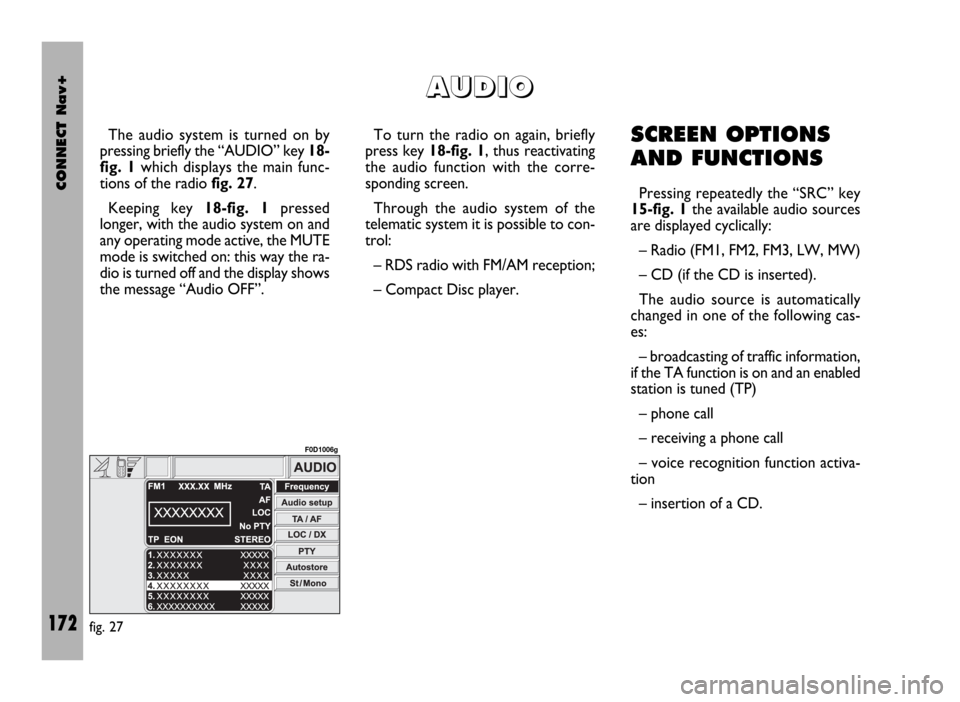
The audio system is turned on by
pressing briefly the “AUDIO” key 18-
fig. 1which displays the main func-
tions of the radio fig. 27.
Keeping key 18-fig. 1pressed
longer, with the audio system on and
any operating mode active, the MUTE
mode is switched on: this way the ra-
dio is turned off and the display shows
the message “Audio OFF”. To turn the radio on again, briefly
press key 18-fig. 1, thus reactivating
the audio function with the corre-
sponding screen.
Through the audio system of the
telematic system it is possible to con-
trol:
– RDS radio with FM/AM reception;
– Compact Disc player.SCREEN OPTIONS
AND FUNCTIONS
Pressing repeatedly the “SRC” key
15-fig. 1the available audio sources
are displayed cyclically:
– Radio (FM1, FM2, FM3, LW, MW)
– CD (if the CD is inserted).
The audio source is automatically
changed in one of the following cas-
es:
– broadcasting of traffic information,
if the TA function is on and an enabled
station is tuned (TP)
– phone call
– receiving a phone call
– voice recognition function activa-
tion
– insertion of a CD.
A A
U U
D D
I I
O O
fig. 27
F0D1006g
Page 182 of 246

CONNECT Nav+
181
– Rock music
– Easy Listening Music
– Light classical
– Serious classical
– Other music
– Weather
– Finance
– Children’s program
– Social Affairs
– Religion
– Phone in
– Travel
– Leisure
– Jazz music
– Country music
– National music
– Oldies music
– Folk music
– Documentary
– Alarm Test
– Alarm.To change the type of PTY pro-
gramme press keys 11-fig. 1oR 12-
fig. 1or one of the 6 preset keys. If
the display shows the frequency or
station name, pressing keys 11-fig. 1
or 12-fig. 1the type of the current
programme will be shown.
To store the current programme
type on one of the 6 preset keys, press
the required preset key at length (over
2 seconds).
To seek a station with this pro-
gramme, follow the instructions giv-
en in the “Automatic tuning” para-
graph.
If no station is available with this type
of programme, the station selected
previously is returned and for about 2
seconds the display will show “NO-
PTY”.
To exit the screen with the list of PTY
programmes, choose a type of pro-
gramme, or “No PTY” if you do not
wish to set a programme type. “EON” FUNCTION
(ENHANCED OTHER
NETWORK)
In certain countries there are circuits
which group together several stations
enabled to broadcast traffic informa-
tion.
In this case the programme of the
station being heard will be temporar-
ily interrupted to receive the traffic an-
nouncement (only with the TA func-
tion on), every time they are broad-
cast by one of the stations of the same
circuit.
When the station tuned belongs to
an EON circuit the display shows the
initials “EON”.
Page 187 of 246
CONNECT Nav+
186
The CONNECT Nav+ is fitted with
a Dual Band GMS cellular telephone
with handsfree feature. The GSM
(Global System for Mobile Commu-
nication) standard is now available in
many countries and offers excellent
coverage: for information about the
areas served currently by the GSM
networks and those available in the fu-
ture, contact your network provider.
The cellular telephone functions are
displayed by pressing briefly the “TEL”
19-fig. 1or the telephone key 13-
fig. 1. If the telephone screen is accessed
pressing key 13-fig. 1, the display will
show the last number called without
actually calling it: to make the call,
press the 13-fig. 1again. Press “ESC”
23-fig. 1to return to the main tele-
phone screen.
To clear the telephone function
menu from the display, keep the “TEL”
key 19-fig. 1pressed; to display it
again, press the key briefly.GENERAL
INFORMATION
The cellular telephone has many
functions which simplify use:
– PIN code (Personal Identification
Number) to prevent unauthorised
telephone use
– PIN change
– activation/deactivation of PIN re-
quest at access
– incoming calls acceptance and re-
fusal
– start a telephone call
– emergency call (even without SIM
card and without entering PIN code)
– reading the telephone numbers
stored on the SIM card
– entering a new telephone number
on the SIM card
– deleting a telephone number from
the SIM card
C C
E E
L L
L L
U U
L L
A A
R R
T T
E E
L L
E E
P P
H H
O O
N N
E E
( (
T T
E E
L L
) )