ABS FIAT DUCATO 250 2009 3.G Blue And Me Manual
[x] Cancel search | Manufacturer: FIAT, Model Year: 2009, Model line: DUCATO 250, Model: FIAT DUCATO 250 2009 3.GPages: 82, PDF Size: 0.51 MB
Page 48 of 82

47
Supported playlist formats
The Media Player supports the following
playlist formats:
❒.m3u – file containing a list of tracks.
(release 1 and 2)
❒.wpl – Windows®-based file containing
a playlist. (playlist capacity limit for this
format is 300Kb). Playlists with exten-
sion .wpl can be built with Microsoft
®
Windows Media®Player.
The Media Player does not support nest-
ed or linked playlists. Playlist tracks rela-
tive and absolute paths are supported.
The Media Player does not support
playlists built by application software based
on specific criteria.
The Media Player will play playlists with
paths leading to digital audio files in fold-
ers.
For further details on how to build
playlists for Blue&Me™, refer to section
PRACTICAL HINTS FOR USING THE
MEDIA PLAYER.
Trade-marks
Microsoft®and Windows®are Microsoft Corporation registered trade-marks.
Sony®is a Sony Corporation registered trade-mark.
Ericsson®is a Telefonaktiebolaget LM Ericsson registered trade-mark.
Motorola®is a Motorola, Inc. registered trade-mark.
Nokia®is a Nokia Corporation registered trade-mark.
Siemens®is a Siemens AG registered trade-mark.
Orange
™is an Orange Personal Communications Services Limited registered trade-mark.
Audiovox®is an Audiovox Corporation registered trade-mark.
Bluetooth®is a Bluetooth®SIG, Inc registered trade-mark.
Lexar
™and JumpDrive®are Lexar Media, Inc. registered trade-marks.
SanDisk®and Cruzer™are SanDisk Corporation registered trade-marks.
iPod, iTunes, iPhone are Apple Inc. registered trade-marks.
The other trade-marks are proprietary of the respective Companies.
603_97_223 DUCATO BLUE&ME PACK8.2 GB 1ed 5-08-2009 15:36 Pagina 47
Page 68 of 82
67
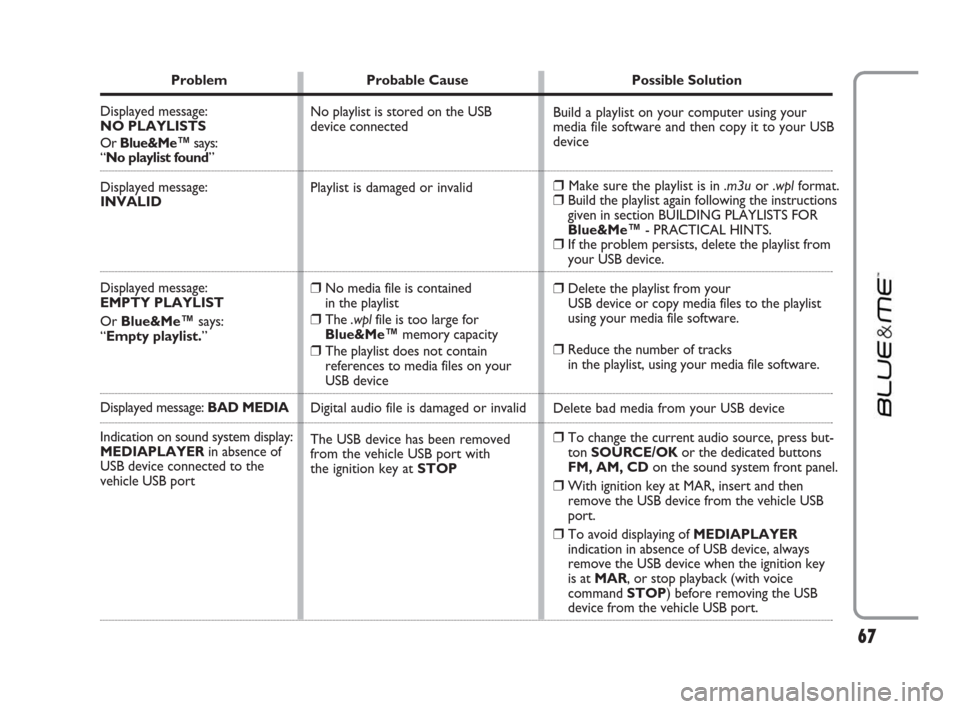
Problem Probable Cause Possible Solution
Displayed message:
NO PLAYLISTS
Or Blue&Me™says:
“No playlist found”
Displayed message:
INVALID
Displayed message:
EMPTY PLAYLIST
Or Blue&Me™says:
“Empty playlist.”
Displayed message: BAD MEDIA
Indication on sound system display:
MEDIAPLAYERin absence of
USB device connected to the
vehicle USB port
Build a playlist on your computer using your
media file software and then copy it to your USB
device
❒Make sure the playlist is in .m3uor .wplformat.❒Build the playlist again following the instructions
given in section BUILDING PLAYLISTS FOR
Blue&Me™- PRACTICAL HINTS.
❒If the problem persists, delete the playlist from
your USB device.
❒Delete the playlist from your
USB device or copy media files to the playlist
using your media file software.
❒Reduce the number of tracks
in the playlist, using your media file software.
Delete bad media from your USB device
❒To change the current audio source, press but-
ton SOURCE/OK or the dedicated buttons
FM, AM, CDon the sound system front panel.
❒With ignition key at MAR, insert and then
remove the USB device from the vehicle USB
port.
❒To avoid displaying of MEDIAPLAYER
indication in absence of USB device, always
remove the USB device when the ignition key
is at MAR, or stop playback (with voice
command STOP) before removing the USB
device from the vehicle USB port. No playlist is stored on the USB
device connected
Playlist is damaged or invalid
❒No media file is contained
in the playlist
❒The .wplfile is too large for
Blue&Me™memory capacity
❒The playlist does not contain
references to media files on your
USB device
Digital audio file is damaged or invalid
The USB device has been removed
from the vehicle USB port with
the ignition key at STOP
603_97_223 DUCATO BLUE&ME PACK8.2 GB 1ed 5-08-2009 15:36 Pagina 67