ESP FIAT FIORINO 2018 Owner handbook (in English)
[x] Cancel search | Manufacturer: FIAT, Model Year: 2018, Model line: FIORINO, Model: FIAT FIORINO 2018Pages: 196, PDF Size: 4.99 MB
Page 154 of 196
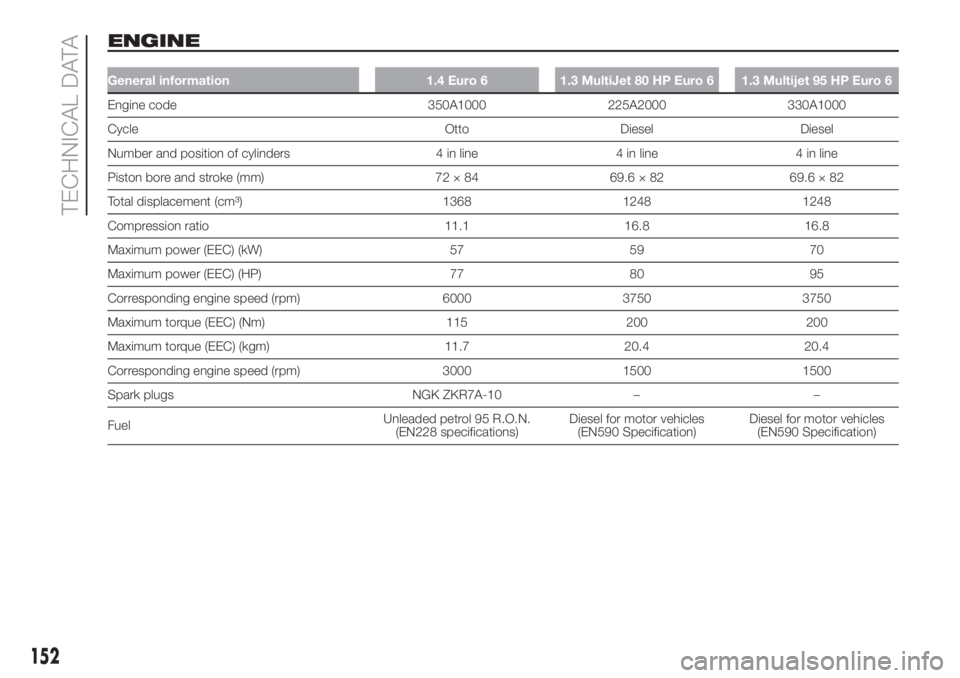
ENGINE
General information 1.4 Euro 6 1.3 MultiJet 80 HP Euro 6 1.3 Multijet 95 HP Euro 6
Engine code 350A1000 225A2000 330A1000
Cycle Otto Diesel Diesel
Number and position of cylinders 4 in line 4 in line 4 in line
Piston bore and stroke (mm) 72 × 84 69.6 × 82 69.6 × 82
Total displacement (cm³) 1368 1248 1248
Compression ratio 11.1 16.8 16.8
Maximum power (EEC) (kW) 57 59 70
Maximum power (EEC) (HP) 77 80 95
Corresponding engine speed (rpm) 6000 3750 3750
Maximum torque (EEC) (Nm) 115 200 200
Maximum torque (EEC) (kgm) 11.7 20.4 20.4
Corresponding engine speed (rpm) 3000 1500 1500
Spark plugs NGK ZKR7A-10 – –
FuelUnleaded petrol 95 R.O.N.
(EN228 specifications)Diesel for motor vehicles
(EN590 Specification)Diesel for motor vehicles
(EN590 Specification)
152
TECHNICAL DATA
Page 155 of 196
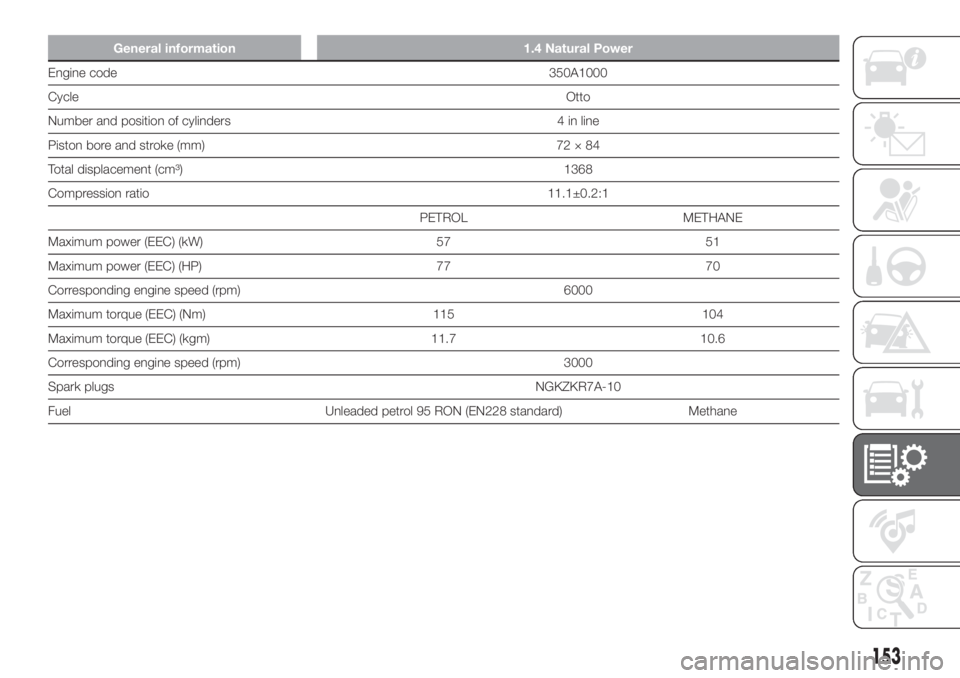
General information 1.4 Natural Power
Engine code350A1000
CycleOtto
Number and position of cylinders 4 in line
Piston bore and stroke (mm) 72 × 84
Total displacement (cm³) 1368
Compression ratio 11.1±0.2:1
PETROL METHANE
Maximum power (EEC) (kW) 57 51
Maximum power (EEC) (HP) 77 70
Corresponding engine speed (rpm) 6000
Maximum torque (EEC) (Nm) 115 104
Maximum torque (EEC) (kgm) 11.7 10.6
Corresponding engine speed (rpm) 3000
Spark plugsNGKZKR7A-10
Fuel Unleaded petrol 95 RON (EN228 standard) Methane
153
Page 162 of 196
WEIGHTS AND
LOADS
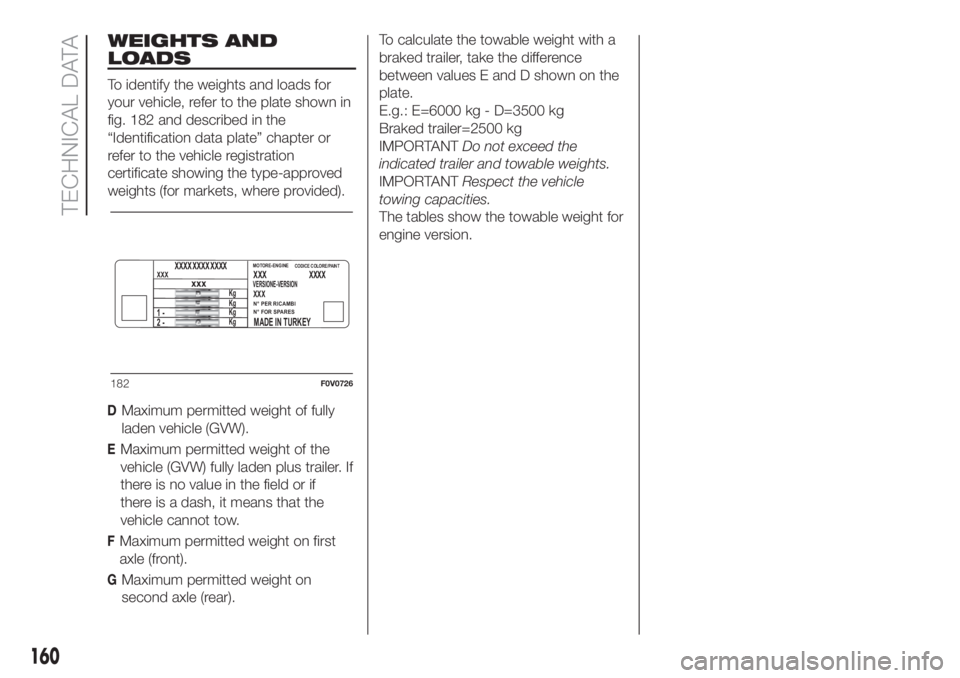
To identify the weights and loads for
your vehicle, refer to the plate shown in
fig. 182 and described in the
“Identification data plate” chapter or
refer to the vehicle registration
certificate showing the type-approved
weights (for markets, where provided).
160
TECHNICAL DATA
DMaximum permitted weight of fully
laden vehicle (GVW).
EMaximum permitted weight of the
vehicle (GVW) fully laden plus trailer. If
there is no value in the field or if
there is a dash, it means that the
vehicle cannot tow.
FMaximum permitted weight on first
axle (front).
GMaximum permitted weight on
second axle (rear).
XXXXXX
XXXVERSIONE-VERSION
N° PER RICAMBI
N° FOR SPARES
MADE IN TURKEY
XXXXxxx
MOTORE-ENGINECODICE COLORE/PAINT
2 - 1 -
Kg
Kg
Kg
Kg
XXXX XXXX XXXX
182F0V0726
To calculate the towable weight with a
braked trailer, take the difference
between values E and D shown on the
plate.
E.g.: E=6000 kg - D=3500 kg
Braked trailer=2500 kg
IMPORTANTDo not exceed the
indicated trailer and towable weights.
IMPORTANTRespect the vehicle
towing capacities.
The tables show the towable weight for
engine version.
Page 171 of 196
PRESCRIPTIONS FOR HANDLING THE VEHICLE AT THE END OF
ITS LIFE
Fiat has been committed for many years to safeguarding the environment through the constant improvement of its production
processes and manufacturing products that are increasingly "eco-compatible". To assure customers of the best possible
service in terms of respecting environmental laws and in response to European Directive 2000/53/EC governing vehicles at the
end of their life, Fiat is offering their customers the opportunity of handing over their vehicle (*) at the end of its life without
incurring any additional costs.
The European Directive sets out that when the vehicle is handed over, the last keeper or owner should not incur any expenses
as a result of it having a zero or negative market value. In particular, in almost all European Union countries, until 1st January
2007, vehicles registered after 1st July 2002 will be collected free of charge, whilst from 2007 collection will be free of charge
irrespective of the year of registration as long as the vehicle contains its basic components (in particular, the engine and
bodywork) and has no additional waste.
To hand your vehicle over at the end of its life without extra cost, contact a Fiat Dealership or authorised collection and
scrapping centres. These centres have been carefully chosen to offer high quality service for the collection, treatment and
recycling of vehicles at their end of life, respecting the surrounding environment.
You can find further information on these collection and scrapping centres either from a Fiat or Fiat Commercial Vehicle
Dealership or by calling the freephone number 00800 3428 0000 or by going on the Fiat website.
(*) Vehicle for transporting passengers with a maximum of nine seats and a total permitted weight of 3.5 t
169
Page 173 of 196
RADIO
(for versions/markets, where provided)
The radio has been designed according
to the specifications of the passenger
compartment, with a personalised
design matching the style of the
dashboard perfectly.
TIPS
Road safety
Please, learn how to use all different
radio functions (e.g. save stations)
before beginning to drive.
Reception conditions
Reception conditions change
constantly while driving. Reception may
be interfered with by the presence of
mountains, buildings or bridges,
especially when you are far away from
the broadcaster.
IMPORTANT The volume may be
increased when receiving traffic
information and news.
153)
Care and maintenance
Clean the cover with a soft anti-static
cloth only. Cleaning and polishing
products may damage the surface.ANTITHEFT PROTECTION
The radio is equipped with an anti-theft
protection system based on the
exchange of information between the
radio and the electronic control unit
(Body Computer) present on the
vehicle.
This system guarantees maximum
safety and prevents the secret code
from being entered each time the radio
power supply is disconnected.
If the check has a positive outcome, the
radio will start to function, whereas if
the comparison codes are not the
same or if the electronic control unit
(Body Computer) is replaced, the
device will ask the user to enter the
secret code according to the procedure
described in the paragraph below.
Entering the secret code
When the radio is switched on, if the
secret code is requested, the display
will show the word "Code" for about 2
seconds followed by four dashes "- -
- -".
The code is made up of four digits from
1 to 6, each corresponding to one of
the dashes.
To enter the first digit, press the
corresponding button of the preset
stations (from 1 to 6). Enter the other
code digits in the same way.If the four digits are not entered within
20 seconds, the display will show
"Enter code----".Ifthis occurs, it is
not considered an incorrect code entry.
After entering the fourth digit (within
20 seconds), the radio will work.
If an incorrect code is entered, the radio
will emit a sound and the display
shows the text "Radio blocked/wait" to
notify the user of the need to enter
the correct code.
Each time the user enters an incorrect
code, the waiting time will gradually
increase (1 min, 2 min, 4 min, 8 min, 16
min, 30 min,1h, 2h, 4h, 8h, 16h, 24h)
up to a maximum of 24 hours. The
waiting time will be shown on the
display with the text "Radio blocked/
wait". After the text has disappeared it
is possible to start the code entering
procedure again.
Vehicle radio passport
This document certifies ownership of
the car radio. The car radio passport
shows the radio model, serial number
and secret code.
IMPORTANT Keep the radio passport in
a safe place so that you can give the
information to the relevant authorities if
the radio is stolen.
171
Page 177 of 196
175
Radio functions
Button Functions Mode
Radio station search:
Automatic search
Manual searchAutomatic search: press
orbuttons (hold the
button down for fast forward)
Manual search: press
orbuttons (hold the button
down for fast forward)
123456Store current radio stationLong button press for memory preset 1 to 6
respectively
Stored station recall Brief press on buttons for memory preset 1 to 6
.
CD function
Button Functions Mode
CD ejection Short button press
Play previous/next track Brief press oforbuttons
Fast forwarding/rewinding CD track Long press of
orbuttons
Playing previous/next folder (for CD-MP3)
Playing previous/next folder (for CD CHANGER)Brief press oforbuttons
Page 181 of 196
Each time the button is pressed the
following bands are selected cyclically:
Pressing the FM AS button: “FM1”,
“FM2” or “FMA”;
Pressing the AM button: “MW1”,
“MW2”.
Each band is highlighted by the name
in the display. The last station selected
on the respective frequency band will
be tuned into.
PRESET BUTTONS
The buttons numbered from 1 to 6 are
used to set the following preset
stations:
18 in the AM band; 6 in FM1, 6 in
FM2, 6 in FMT or "FMA" (on some
versions);
12 in the MW band.
To listen to a preset station, select the
desired frequency band and then briefly
press the corresponding preset button
(from 1 to 6).
By pressing the preset button for more
than 2 seconds, the tuned station will
be stored. The storing phase is
confirmed by an acoustic signal.
AUTOMATIC TUNING
Briefly press the
orbutton to start
the automatic tuning search for the
next station that can be received in the
selected direction.If the button
orpressed down
longer, the fast search starts. When the
button is released, the tuner will stop
on the next station that can be
received.
If the TA function (traffic news) is on, the
tuner searches only for stations that
broadcast traffic news.
MANUAL TUNING
This is used to manually search for
stations in the preselected band. Select
the desired frequency band and then
press the
orbutton briefly and
repeatedly to start to the search in the
desired direction. If the
orbutton
is pressed longer, the fast search will
start and then stop when the button is
released.
AUTOSTORE FUNCTION (automatic
station storage)
To activate the Autostore function, hold
the FM AS button pressed until a beep
is heard. With this function, the radio
automatically stores the 6 stations with
the strongest signal in decreasing
order on the FMA frequency band.
During the automatic storing process,
the text “Autostore” flashes on the
display.Press the FM AS button again to stop
the Autostore function: the radio will
again tune into the station listened
to before the activation of the function.
When the Autostore scan is concluded,
the radio will automatically tune into
the first preset station on the FMA band
(preset 1).
The stations that have a strong signal at
that moment are then automatically
stored in the preselected band in the
buttons numbered 1 to 6.
When the Autostore function is
activated within the MW band, the FMA
band is automatically selected and the
function is performed.
IMPORTANT Sometimes the Autostore
function is not able to find 6 stations
with a strong signal. In this case, the
strongest stations stored will be
duplicated in the free preset buttons.
IMPORTANT When the Autostore
function is activated, the stations that
were previously stored in the FMA band
are deleted.
179
Page 185 of 196
183
WARNING
ROOF RACK/SKI RACK
Distribute the load evenly and pay attention to side winds when driving.
Never exceed the maximum permitted loads (see chapter "Technical specifications").
INSTRUMENT PANEL
If the needle for the engine coolant temperature reaches the red area, stop the engine immediately and contact a Fiat Dealership.
“COMFORT-MATIC" TRANSMISSION Messages on the display
If the warning light(together with the message in the display) continues to remain on in the panel, go to a Fiat Dealership.
If the message is still shown in the display, contact a Fiat Dealership.
To keep the clutch in good condition, do not use the accelerator to keep the car stationary (e.g. when stopped facing uphill); the clutch
could be damaged by overheating. Use the brake pedal instead and operate the accelerator only when you are ready to set off.
BODYWORK
Some automatic systems equipped with old generation blades and/or with a poor maintenance can damage the paint, promoting the
creation of microscoring which give an opaque/coated appearance to the paint, especially on dark colours. In this case, just lightly polish with
specific products.
WARNING
BODYWORK
Detergents pollute the environment. The vehicle should be washed in areas equipped for collecting and purifying the liquid used in the
washing process.