check FIAT FREEMONT 2016 1.G Owners Manual
[x] Cancel search | Manufacturer: FIAT, Model Year: 2016, Model line: FREEMONT, Model: FIAT FREEMONT 2016 1.GPages: 412, PDF Size: 3.36 MB
Page 2 of 412

We really know your car because we invented, designedand built it: we know every single detail. At
Fiat Service authorised workshops you can find
technicians who are trained by us, offering quality and professionalism for all your service requirements.
Fiat workshops are always close to you for your
servicing operations, repairs and seasonal checks and our experts will offer practical recommendations for keeping your car in the best possible condition.
When you use Genuine Parts you keep the reliability, comfort and performance features of your new car over time.
Always ask for Genuine Parts and insist on them
being fitted to your car. We recommend them because we know they are derived from our continued
commitment to research and development and our use of highly innovative technologies.
For these reasons, you can rely on Genuine Parts
because they are the only ones designed specifically for your car.
WHY CHOOSE
GENUINE PARTS
1742586_EE_FIAT_Freemont_OM_cover.indd 28/27/14 3:52 PM
Page 4 of 412
All ourGenuine Parts undergorigorous testing, both in design and build stages, by specialists who check the use of
cutting-edge materials andtest their reliability.
This guarantees performance and safety in the long term for both you and the passengers in your automobile.
Always insist on a Genuine Partand check that it has been used.
Page 17 of 412
WARNING! (Continued)
• Allowing children to be in a vehicle unattended
is dangerous for a number of reasons. A child or
others could be seriously or fatally injured. Chil-
dren should be warned not to touch the parking
brake, brake pedal or the transmission gear se-
lector.
• Do not leave the Key Fob in or near the vehicle
or in a location accessible to children, and do not
leave the ignition of a vehicle equipped with
Keyless Enter-N-Go™ in the ACC or ON/RUN
mode. A child could operate power windows,
other controls, or move the vehicle.
• Do not leave children or animals inside parked
vehicles in hot weather. Interior heat build-up
may cause serious injury or death.
An unlocked car is an invitation to
thieves. Always remove the Key Fob from
vehicle, cycle the ignition OFF and lock
all doors when leaving the vehicle unattended.
SENTRY KEY®
The Sentry Key® Immobilizer system prevents unau-
thorized vehicle operation by disabling the engine. The
system does not need to be armed or activated. Op-
eration is automatic, regardless of whether the vehicle
is locked or unlocked.
The system uses a Key Fob with Remote Keyless Entry
(RKE) transmitter, a Keyless Ignition Node (KIN) and a
RF receiver to prevent unauthorized vehicle operation.
Therefore, only Key Fobs that are programmed to the
vehicle can be used to start and operate the vehicle.
After cycling the ignition to the ON/RUN position, the
Vehicle Security Light will turn on for three seconds for
a bulb check. If the light remains on after the bulb
check, it indicates that there is a problem with the
electronics. In addition, if the light begins to flash after
the bulb check, it indicates that someone used an
invalid Key Fob to start the engine. Either of these
conditions will result in the engine being shut off after
two seconds.
If the Vehicle Security Light turns on during normal
vehicle operation (vehicle running for longer than 10
seconds), it indicates that there is a fault in the elec-
tronics. Should this occur, have the vehicle serviced as
soon as possible by an authorized dealer.
11
KNOWING
YOUR
VEHICLE
SAFETY
STAR
TING
AND
DRIVING
WARNING
LIGHTS
AND
MESSAGES
IN AN
EMERGENCY
SERVICING
AND CARE
TECHNICAL
SPECIFICATIONS
CONTENTS
Page 21 of 412
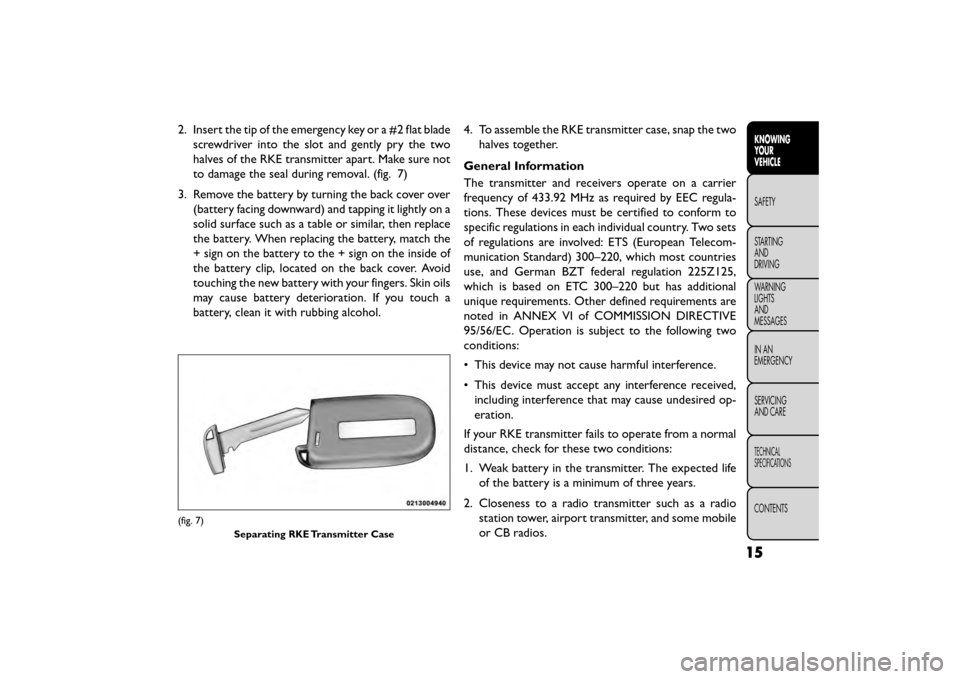
2. Insert the tip of the emergency key or a #2 flat bladescrewdriver into the slot and gently pry the two
halves of the RKE transmitter apart. Make sure not
to damage the seal during removal. (fig. 7)
3. Remove the battery by turning the back cover over (battery facing downward) and tapping it lightly on a
solid surface such as a table or similar, then replace
the battery. When replacing the battery, match the
+ sign on the battery to the + sign on the inside of
the battery clip, located on the back cover. Avoid
touching the new battery with your fingers. Skin oils
may cause battery deterioration. If you touch a
battery, clean it with rubbing alcohol. 4. To assemble the RKE transmitter case, snap the two
halves together.
General Information
The transmitter and receivers operate on a carrier
frequency of 433.92 MHz as required by EEC regula-
tions. These devices must be certified to conform to
specific regulations in each individual country. Two sets
of regulations are involved: ETS (European Telecom-
munication Standard) 300–220, which most countries
use, and German BZT federal regulation 225Z125,
which is based on ETC 300–220 but has additional
unique requirements. Other defined requirements are
noted in ANNEX VI of COMMISSION DIRECTIVE
95/56/EC. Operation is subject to the following two
conditions:
• This device may not cause harmful interference.
• This device must accept any interference received, including interference that may cause undesired op-
eration.
If your RKE transmitter fails to operate from a normal
distance, check for these two conditions:
1. Weak battery in the transmitter. The expected life of the battery is a minimum of three years.
2. Closeness to a radio transmitter such as a radio station tower, airport transmitter, and some mobile
or CB radios.
(fig. 7)
Separating RKE Transmitter Case
15
KNOWING
YOUR
VEHICLE
SAFETY
STAR
TING
AND
DRIVING
WARNING
LIGHTS
AND
MESSAGES
IN AN
EMERGENCY
SERVICING
AND CARE
TECHNICAL
SPECIFICATIONS
CONTENTS
Page 29 of 412
Left Front Turn Signal Light Out (with a single chime)
Left Rear Turn Signal Light Out (with a single chime)
Right Front Turn Signal Light Out (with a single chime)
Right Rear Turn Signal Light Out (with a single chime)
RKE Battery Low (with a single chime)
Personal Settings Not Available – Vehicle Not in PARK
(for versions/markets, where provided)
Left/Right Front Door Ajar (one or more doors open,
with a single chime if speed is above 1.6 km/h)
Left/Right Rear Door Ajar (one or more doors open,
with a single chime if speed is above 1.6 km/h)
Door(s) Ajar (with a single chime if vehicle is in motion)
Liftgate Ajar (with a single chime)
Low Washer Fluid (with a single chime)
Ignition or Accessory On
Vehicle Not in Park (for versions/markets, where pro-
vided)
Key Left Vehicle
Key Not Detected
Low Tire Pressure (with a single chime). Refer to
information on “Tire Pressure” and “Tire Pressure
Monitor” in “Knowing Your Vehicle”.Inflate Tire to XXX. Refer to information on "Tire
Pressure" and "Tire Pressure Monitor" in "Knowing
Your Vehicle."
Service TPM System (with a single chime). Refer to
information on “Tire Pressure Monitor” in “Knowing
Your Vehicle”.
Oil Change Required (with a single chime)
Check Gascap (refer to “Adding Fuel” in “Knowing
Your Vehicle”)
Oil Change Due (with a single chime)
Exhaust System — Regeneration Required Now. Un-
der conditions of exclusive short duration and low
speed driving and low speed driving cycles, the engine
and exhaust after-treatment system may never reach
the conditions required to remove the trapped PM. If
this occurs the “Exhaust System Regeneration Re-
quired Now” message will be displayed on the EVIC. By
driving your vehicle at highway speeds for as little as 30
minutes, you can remedy the condition in the particu-
late filter system by allowing the trapped PM to be
removed to restore the system to normal operating
condition.
23
KNOWING
YOUR
VEHICLE
SAFETY
STAR
TING
AND
DRIVING
WARNING
LIGHTS
AND
MESSAGES
IN AN
EMERGENCY
SERVICING
AND CARE
TECHNICAL
SPECIFICATIONS
CONTENTS
Page 31 of 412
• Electronic Stability Control OFF (ESC OFF) Indi-
cator LightThis light indicates the Electronic Stability
Control system (ESC) has been turned off by
the driver.
EVIC RED TELLTALE LIGHTS
This area will show reconfigurable red telltales. These
telltales include:
• Door Ajar This light will turn on to indicate that one or
more doors may be ajar.
• Oil Pressure Warning Light This light indicates low engine oil pressure. If the
light turns on while driving, stop the vehicle and
shut off the engine as soon as possible. A chime will
sound when this light turns on.
Do not operate the vehicle until the cause is corrected.
This light does not show how much oil is in the engine.
The engine oil level must be checked under the hood. • Charging System Light
This light shows the status of the electrical
charging system. The light should come on when
the ignition is first cycled ON and remain on briefly as
a bulb check. If the light stays on or comes on while
driving, turn off some of the vehicle's non-essential
electrical devices or increase engine speed (if at idle). If
the charging system light remains on, it means that the
vehicle is experiencing a problem with the charging
system. Obtain SERVICE IMMEDIATELY. See an autho-
rized dealer.
If jump starting is required, refer to “Jump Starting
Procedures” in “In An Emergency”.
• Electronic Throttle Control (ETC) Light This light informs you of a problem with the
Electronic Throttle Control (ETC) system.
The light will come on when the ignition is
first turned ON and remain on briefly as a
bulb check. If the light does not come on during
starting, have the system checked by an authorized
dealer.
25
KNOWING
YOUR
VEHICLE
SAFETY
STAR
TING
AND
DRIVING
WARNING
LIGHTS
AND
MESSAGES
IN AN
EMERGENCY
SERVICING
AND CARE
TECHNICAL
SPECIFICATIONS
CONTENTS
Page 42 of 412
Doors & Locks
• Auto Lock (for versions/markets, where pro-
vided)
When this feature is selected, all doors will lock auto-
matically when the vehicle reaches a speed of 24 km/h.
To make your selection, press the Auto Lock button on
the touchscreen, until a check-mark appears next to
setting, indicating that the setting has been selected.
Press the back arrow button on the touchscreen to
return to the previous menu.
• Auto Unlock on Exit (for versions/markets,
where provided)
Press the Auto Unlock on Exit button on the touch-
screen to change this display. When this feature is
selected, all doors will unlock when the vehicle is
stopped and the transmission is in the PARK or NEU-
TRAL position and the driver's door is opened. To
make your selection, press the Auto Unlock on Exit
button on the touchscreen, select On or Off followed
by pressing the arrow back button on the touchscreen.
• Flash Lights with Lock (for versions/markets,
where provided)
Press the Flash Lights with Lock button on the touch-
screen to change this display. When this feature is
selected, the front and rear turn signals will flash when
the doors are locked or unlocked with the RKE trans-
mitter. To make your selection, press the Flash Lightswith Lock button on the touchscreen, select On or Off
followed by pressing the arrow back button on the
touchscreen.
• Remote Door Unlock Order (for versions/
markets, where provided)
Press the Remote Door Unlock Order button on the
touchscreen to change this display. When
Unlock
Driver Door Only On 1st Press is selected, only the
driver's door will unlock on the first press of the RKE
transmitter UNLOCK button. When Driver Door 1st
Press is selected, you must press the RKE transmitter
UNLOCK button twice to unlock the passenger's
doors. When Unlock All Doors On 1st Press is
selected, all of the doors will unlock on the first press
of the RKE transmitter UNLOCK button.
NOTE: If the vehicle is equipped with Keyless Enter-
N-Go™ (Passive Entry) and the EVIC is programmed
to Unlock All Doors 1st Press, all doors will unlock no
matter which Passive Entry equipped door handle is
grasped. If Driver Door 1st Press is programmed, only
the driver’s door will unlock when the driver’s door is
grasped. With Passive Entry, if Driver Door 1st Press is
programmed pressing the handle more than once will
only result in the driver’s door opening. If driver door
first is selected, once the driver door is opened, the
interior door lock/unlock switch can be used to unlock
all doors (or use RKE transmitter).
36
KNOWING YOUR
VEHICLE
SAFETY
STAR
TINGAND
DRIVING
WARNING LIGHTSAND
MESSAGES
IN AN
EMERGENCY
SERVICINGAND CARE
TECHNICAL
SPECIFICATIONS
CONTENTS
Page 46 of 412
Phone/Bluetooth®
• Paired Devices
This feature shows which phones are paired to the
Phone/Bluetooth® system. For further information,
refer to the Uconnect® Supplement.
CUSTOMER PROGRAMMABLE FEATURES
— Uconnect® 8.4 SETTINGS
In this mode the Uconnect® system allows you to
access programmable features that may be equipped
such as Display, Clock, Safety/Assistance, Lights, Doors
& Locks, Auto-On Comfort, Engine Off Operation,
Compass Settings, Audio and Phone/Bluetooth® set-
tings.
NOTE:Only one touchscreen area may be selected at
a time.
When making a selection, scroll up or down until the
preferred setting is highlighted, then press and release
the preferred setting until a check-mark appears next
to the setting, showing that setting has been selected.
Display
• Display Mode (for versions/markets, where pro-
vided)
When in this display you may select one of the auto
display settings. To change Mode status press and
release the Day, Night or Auto button on the touch- screen followed by pressing the arrow back button on
the touchscreen.
NOTE:
The usage of the Parade Mode feature will
cause the radio to activate the “Display Brightness
With Headlights OFF” control even though the head-
lights are on.
• Display Brightness with Headlights ON (for
versions/markets, where provided)
When in this display you may select display brightness
with the headlights on and the headlights off. Adjust the
brightness with the + and – setting buttons on the
touchscreen or by selecting any point on the scale in
between the + and – buttons on the touchscreen
followed by pressing the arrow back button on the
touchscreen.
• Display Brightness with Headlights OFF (for
versions/markets, where provided)
When in this display you may select display brightness
with the headlights on and the headlights off. Adjust the
brightness with the + and – setting buttons on the
touchscreen or by selecting any point on the scale in
between the + and – buttons on the touchscreen
followed by pressing the arrow back button on the
touchscreen.
40
KNOWING YOUR
VEHICLE
SAFETY
STAR
TINGAND
DRIVING
WARNING LIGHTSAND
MESSAGES
IN AN
EMERGENCY
SERVICINGAND CARE
TECHNICAL
SPECIFICATIONS
CONTENTS
Page 48 of 412
• Set Time Hours
When in this display you may select the time display
settings. To make your selection, press the Set Time
button on the touchscreen, adjust the hours using the
up and down buttons on the touchscreen, followed by
pressing the arrow back button on the touchscreen
when all selections are complete.
• Set Time Minutes
When in this display you may select the time display
settings. To make your selection, press the Set Time
button on the touchscreen, adjust the minutes using
the up and down buttons on the touchscreen, followed
by pressing the arrow back button on the touchscreen
when all selections are complete.
• Time Format
When in this display you may select the time display
settings. To make your selection, press the Set Time
button on the touchscreen, select 12 hr or 24 hr
followed by pressing the arrow back button on the
touchscreen when all selections are complete.
• Show Time in Status Bar (for versions/markets,
where provided)
When in this display you may turn on or shut off the
digital clock in the status bar. To change the Show Time
Status setting press and release the On or Off button
on the touchscreen followed by pressing the arrow
back button on the touchscreen.Safety / Assistance
• Park Assist (for versions/markets, where pro-
vided)
The Rear Park Assist system will scan for objects
behind the vehicle when the transmission shift lever is
in REVERSE and the vehicle speed is less than 11 km/h.
The system can be enabled with Sound Only, Sound
and Display, or turned OFF. To change the Park Assist
status press and release the Off, Sound Only or Sounds
and Display button followed by pressing the arrow back
button on the touchscreen.
• Parkview Backup Camera (for versions/markets,
where provided)
Your vehicle may be equipped with the ParkView®
Rear Back Up Camera that allows you to see an
on-screen image of the rear surroundings of your
vehicle whenever the shift lever is put into REVERSE.
The image will be displayed on the radio touchscreen
display along with a caution note to “check entire
surroundings” across the top of the screen. After five
seconds this note will disappear. The ParkView® cam-
era is located on the rear of the vehicle above the rear
License plate. To make your selection, press the
Parkview Backup Camera check box in the "Safety &
Driving Assistance" menu to enable/disable the
Parkview Backup Camera.
42
KNOWING
YOUR
VEHICLE
SAFETY
STAR
TINGAND
DRIVING
WARNING LIGHTSAND
MESSAGES
IN AN
EMERGENCY
SERVICINGAND CARE
TECHNICAL
SPECIFICATIONS
CONTENTS
Page 50 of 412
• Flash Headlights With Lock (for versions/
markets, where provided)
When this feature is selected, the front and rear turn
signals will flash when the doors are locked or unlocked
with the RKE transmitter. To make your selection,
press the Flash Headlights with Lock button on the
touchscreen, select On or Off followed by pressing the
arrow back button on the touchscreen.
Doors & Locks
• Auto Lock (for versions/markets, where pro-
vided)
When this feature is selected, all doors will lock auto-
matically when the vehicle reaches a speed of 24 km/h.
To make your selection, press the “Auto Lock” button
on the touchscreen, until a check-mark appears next to
setting, indicating that the setting has been selected.
Press the back arrow button on the touchscreen to
return to the previous menu.
• Auto Unlock on Exit (for versions/markets,
where provided)
When this feature is selected, all doors will unlock
when the vehicle is stopped and the transmission is in
the PARK (for versions/markets, where provided) or
NEUTRAL position and the driver's door is opened. To
make your selection, press the Auto Unlock on Exit
button on the touchscreen, select On or Off followed
by pressing the arrow back button on the touchscreen.• Flash Headlight with Lock (for versions/markets,
where provided)
When this feature is selected, the front and rear turn
signals will flash when the doors are locked or unlocked
with the RKE transmitter. To make your selection,
press the Flash Lights with Lock button on the touch-
screen, select On or Off followed by pressing the
arrow back button on the touchscreen.
• 1st Press of Key Fob Unlocks (for versions/
markets, where provided)
When
Unlock Driver Door Only On 1st Press is
selected, only the driver's door will unlock on the first
press of the RKE transmitter UNLOCK button. When
Driver Door 1st Press is selected, you must press the
RKE transmitter UNLOCK button twice to unlock the
passenger's doors. When Unlock All Doors On 1st
Press is selected, all of the doors will unlock on the
first press of the RKE transmitter UNLOCK button.
44
KNOWING YOUR
VEHICLE
SAFETY
STAR
TINGAND
DRIVING
WARNING LIGHTSAND
MESSAGES
IN AN
EMERGENCY
SERVICINGAND CARE
TECHNICAL
SPECIFICATIONS
CONTENTS