check FIAT FREEMONT 2016 1.G User Guide
[x] Cancel search | Manufacturer: FIAT, Model Year: 2016, Model line: FREEMONT, Model: FIAT FREEMONT 2016 1.GPages: 412, PDF Size: 3.36 MB
Page 63 of 412
WARNING!
Driving a vehicle with the head re-
st r
aints removed or improperly adjusted
could cause serious injury or death in the event of
a collision.The head restraints should be checked
prior to operating the vehicle and never adjusted
while the vehicle is in motion.
THIRD ROW PASSENGER SEATS (Seven
Passenger Models)
These head restraints are non-adjustable and non-
removable. However, you can fold them forward when
they are not in use by passengers.
WARNING!
Do not allow a passenger to sit in a third
row s
eat without having the head re-
straint unfolded and locked in place. Failure to
follow this warning may result in personal injury
to the passenger in the event of a collision. 60/40 SPLIT SECOND-ROW PASSENGER
SEATS
To provide additional storage area, each second-row
passenger seat can be folded flat. This allows for ex-
tended cargo space and still maintains some seating
room if needed.
NOTE:
Prior to folding the second-row passenger
seat, make sure the front seatback is not in a reclined
position. This will allow the second-row seat to fold
easily.
WARNING!
• It is extremely dangerous to ride in a
carg o
area, inside or outside of a vehicle.
In a collision, people riding in these areas are
more likely to be seriously injured or killed.
• Do not allow people to ride in any area of your
vehicle that is not equipped with seats and seat
belts.
• Be sure everyone in your vehicle is in a seat and
using a seat belt properly.
• On seven passenger models, do not allow a
passenger to sit in a third row seat with the
second row seatback(s) folded flat . In a collision,
the passenger could slide underneath the seat
belt and be seriously or even fatally injured.
57
KNOWING
YOUR
VEHICLE
SAFETY
STAR
TING
AND
DRIVING
WARNING
LIGHTS
AND
MESSAGES
IN AN
EMERGENCY
SERVICING
AND CARE
TECHNICAL
SPECIFICATIONS
CONTENTS
Page 81 of 412
CLIMATE CONTROL FUNCTIONS
A/C (Air Conditioning)
The Air Conditioning (A/C) button allows the opera-
tor to manually activate or deactivate the air condition-
ing system. When the air conditioning system is turned
on, cool dehumidified air will flow through the outlets
into the cabin. For improved fuel economy, press the
A/C button to turn off the air conditioning and manu-
ally adjust the blower and airflow mode settings. Also,
make sure to select only Panel, Bi-Level or Floor
modes.
NOTE:
• For Manual Climate Controls, if the system is in Mix,Floor or Defrost Mode, the A/C can be turned off,
but the A/C system shall remain active to prevent
fogging of the windows.
• If fog or mist appears on the windshield or side glass, select Defrost mode and adjust blower speed if
needed.
• If your air conditioning performance seems lower than expected, check the front of the A/C condenser
(located in front of the radiator), for an accumulation
of dirt or insects. Clean with a gentle water spray
from the front of the radiator and through the
condenser.
MAX A/C
MAX A/C sets the control for maximum cooling per-
formance.
Press and release to toggle between MAX A/C and the
prior settings. The button on the touchscreen illumi-
nates when MAX A/C is ON.
In MAX A/C, the blower level and mode position can
be adjusted to desired user settings. Pressing other
settings will cause the MAX A/C operation to switch to
the selected setting and MAX A/C to exit.
Recirculation Control
When outside air contains smoke, odors, or
high humidity, or if rapid cooling is desired,
you may wish to recirculate interior air by
pressing the Recirculation control button.
The recirculation indicator will illuminate when this
button is selected. Push the button a second time to
turn off the Recirculation mode and allow outside air
into the vehicle.
75
KNOWING
YOUR
VEHICLE
SAFETY
STAR
TING
AND
DRIVING
WARNING
LIGHTS
AND
MESSAGES
IN AN
EMERGENCY
SERVICING
AND CARE
TECHNICAL
SPECIFICATIONS
CONTENTS
Page 90 of 412
A/C (Air Conditioning)
The Air Conditioning (A/C) button allows the opera-
tor to manually activate or deactivate the air condition-
ing system. When the air conditioning system is turned
on, cool dehumidified air will flow through the outlets
into the cabin. For improved fuel economy, press the
A/C button to turn off the air conditioning and manu-
ally adjust the blower and airflow mode settings. Also,
make sure to select only Panel, Bi-Level or Floor
modes.
NOTE:
• For Manual Climate Controls, if the system is in Mix,Floor or Defrost Mode, the A/C can be turned off,
but the A/C system shall remain active to prevent
fogging of the windows.
• If fog or mist appears on the windshield or side glass, select Defrost mode and adjust blower speed if
needed.
• If your air conditioning performance seems lower than expected, check the front of the A/C condenser
(located in front of the radiator), for an accumulation
of dirt or insects. Clean with a gentle water spray
from behind the radiator and through the condenser.
Fabric front fascia protectors may reduce airflow to
the condenser, reducing air conditioning perfor-
mance. MAX A/C
MAX A/C sets the control for maximum cooling per-
formance.
Press and release to toggle between MAX A/C and the
prior settings. The button on the touchscreen illumi-
nates when MAX A/C is ON.
In MAX A/C, the blower level and mode position can
be adjusted to desired user settings. Pressing other
settings will cause the MAX A/C operation to switch to
the prior settings and the MAX A/C indicator will turn
off.
Recirculation Control
When outside air contains smoke, odors, or
high humidity, or if rapid cooling is desired,
you may wish to recirculate interior air by
pressing the Recirculation control button.
The recirculation indicator will illuminate when this
button is selected. Push the button a second time to
turn off the Recirculation mode and allow outside air
into the vehicle.
84
KNOWING YOUR
VEHICLE
SAFETY
STAR
TINGAND
DRIVING
WARNING LIGHTSAND
MESSAGES
IN AN
EMERGENCY
SERVICINGAND CARE
TECHNICAL
SPECIFICATIONS
CONTENTS
Page 101 of 412
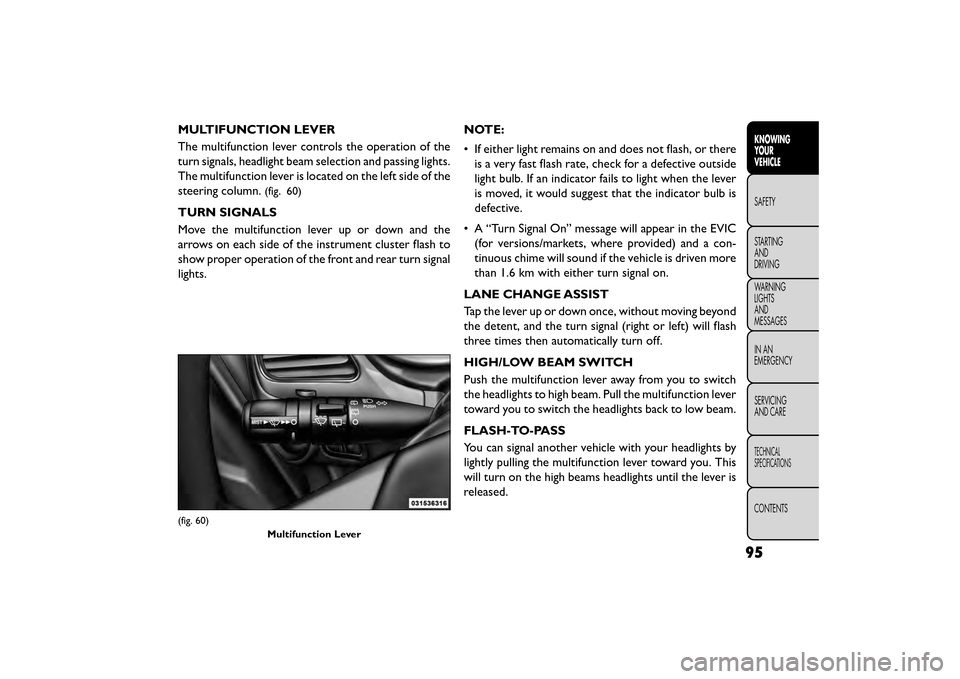
MULTIFUNCTION LEVER
The multifunction lever controls the operation of the
turn signals, headlight beam selection and passing lights.
The multifunction lever is located on the left side of the
steering column.
(fig. 60)
TURN SIGNALS
Move the multifunction lever up or down and the
arrows on each side of the instrument cluster flash to
show proper operation of the front and rear turn signal
lights.NOTE:
• If either light remains on and does not flash, or there
is a very fast flash rate, check for a defective outside
light bulb. If an indicator fails to light when the lever
is moved, it would suggest that the indicator bulb is
defective.
• A “Turn Signal On” message will appear in the EVIC (for versions/markets, where provided) and a con-
tinuous chime will sound if the vehicle is driven more
than 1.6 km with either turn signal on.
LANE CHANGE ASSIST
Tap the lever up or down once, without moving beyond
the detent, and the turn signal (right or left) will flash
three times then automatically turn off.
HIGH/LOW BEAM SWITCH
Push the multifunction lever away from you to switch
the headlights to high beam. Pull the multifunction lever
toward you to switch the headlights back to low beam.
FLASH-TO-PASS
You can signal another vehicle with your headlights by
lightly pulling the multifunction lever toward you. This
will turn on the high beams headlights until the lever is
released.
(fig. 60) Multifunction Lever
95
KNOWING
YOUR
VEHICLE
SAFETY
STAR
TING
AND
DRIVING
WARNING
LIGHTS
AND
MESSAGES
IN AN
EMERGENCY
SERVICING
AND CARE
TECHNICAL
SPECIFICATIONS
CONTENTS
Page 130 of 412
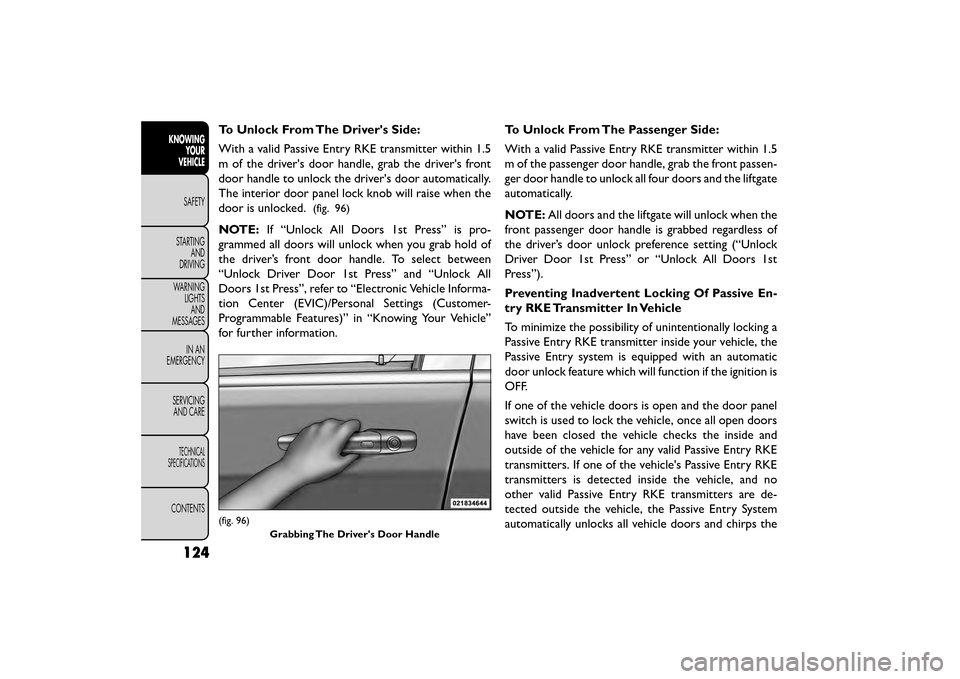
To Unlock From The Driver's Side:
With a valid Passive Entry RKE transmitter within 1.5
m of the driver's door handle, grab the driver's front
door handle to unlock the driver's door automatically.
The interior door panel lock knob will raise when the
door is unlocked.
(fig. 96)
NOTE:If “Unlock All Doors 1st Press” is pro-
grammed all doors will unlock when you grab hold of
the driver’s front door handle. To select between
“Unlock Driver Door 1st Press” and “Unlock All
Doors 1st Press”, refer to “Electronic Vehicle Informa-
tion Center (EVIC)/Personal Settings (Customer-
Programmable Features)” in “Knowing Your Vehicle”
for further information. To Unlock From The Passenger Side:
With a valid Passive Entry RKE transmitter within 1.5
m of the passenger door handle, grab the front passen-
ger door handle to unlock all four doors and the liftgate
automatically.
NOTE:
All doors and the liftgate will unlock when the
front passenger door handle is grabbed regardless of
the driver’s door unlock preference setting (“Unlock
Driver Door 1st Press” or “Unlock All Doors 1st
Press”).
Preventing Inadvertent Locking Of Passive En-
try RKE Transmitter In Vehicle
To minimize the possibility of unintentionally locking a
Passive Entry RKE transmitter inside your vehicle, the
Passive Entry system is equipped with an automatic
door unlock feature which will function if the ignition is
OFF.
If one of the vehicle doors is open and the door panel
switch is used to lock the vehicle, once all open doors
have been closed the vehicle checks the inside and
outside of the vehicle for any valid Passive Entry RKE
transmitters. If one of the vehicle's Passive Entry RKE
transmitters is detected inside the vehicle, and no
other valid Passive Entry RKE transmitters are de-
tected outside the vehicle, the Passive Entry System
automatically unlocks all vehicle doors and chirps the
(fig. 96)
Grabbing The Driver's Door Handle
124
KNOWINGYOUR
VEHICLE
SAFETY
STAR
TINGAND
DRIVING
WARNING LIGHTSAND
MESSAGES
IN AN
EMERGENCY
SERVICINGAND CARE
TECHNICAL
SPECIFICATIONS
CONTENTS
Page 132 of 412
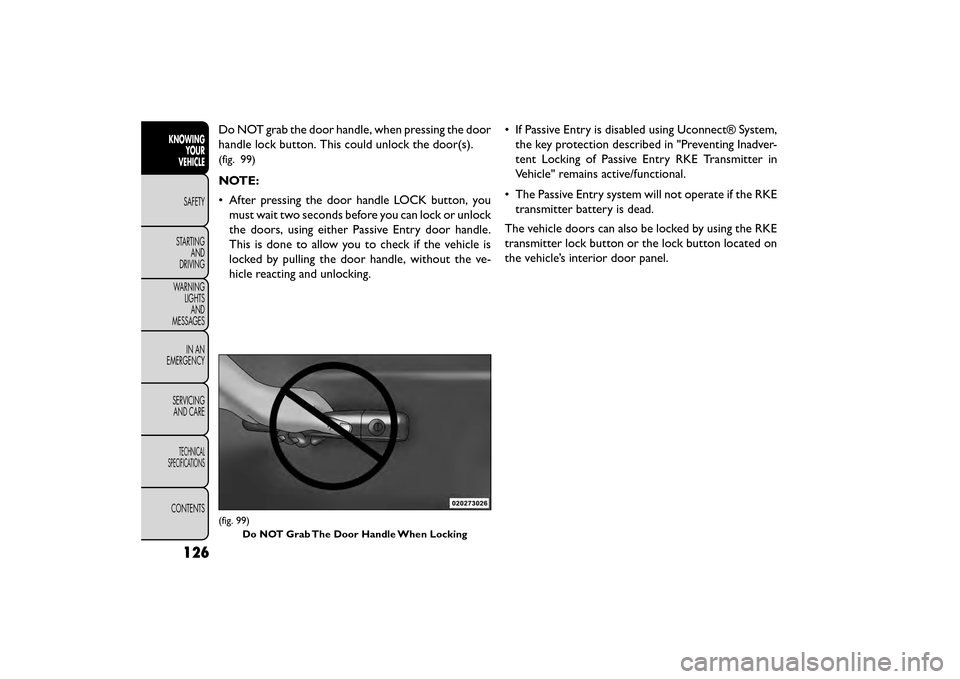
Do NOT grab the door handle, when pressing the door
handle lock button. This could unlock the door(s).
(fig. 99)
NOTE:
• After pressing the door handle LOCK button, youmust wait two seconds before you can lock or unlock
the doors, using either Passive Entry door handle.
This is done to allow you to check if the vehicle is
locked by pulling the door handle, without the ve-
hicle reacting and unlocking. • If Passive Entry is disabled using Uconnect® System,
the key protection described in "Preventing Inadver-
tent Locking of Passive Entry RKE Transmitter in
Vehicle" remains active/functional.
• The Passive Entry system will not operate if the RKE transmitter battery is dead.
The vehicle doors can also be locked by using the RKE
transmitter lock button or the lock button located on
the vehicle’s interior door panel.
(fig. 99) Do NOT Grab The Door Handle When Locking
126
KNOWING YOUR
VEHICLE
SAFETY
STAR
TINGAND
DRIVING
WARNING LIGHTSAND
MESSAGES
IN AN
EMERGENCY
SERVICINGAND CARE
TECHNICAL
SPECIFICATIONS
CONTENTS
Page 144 of 412
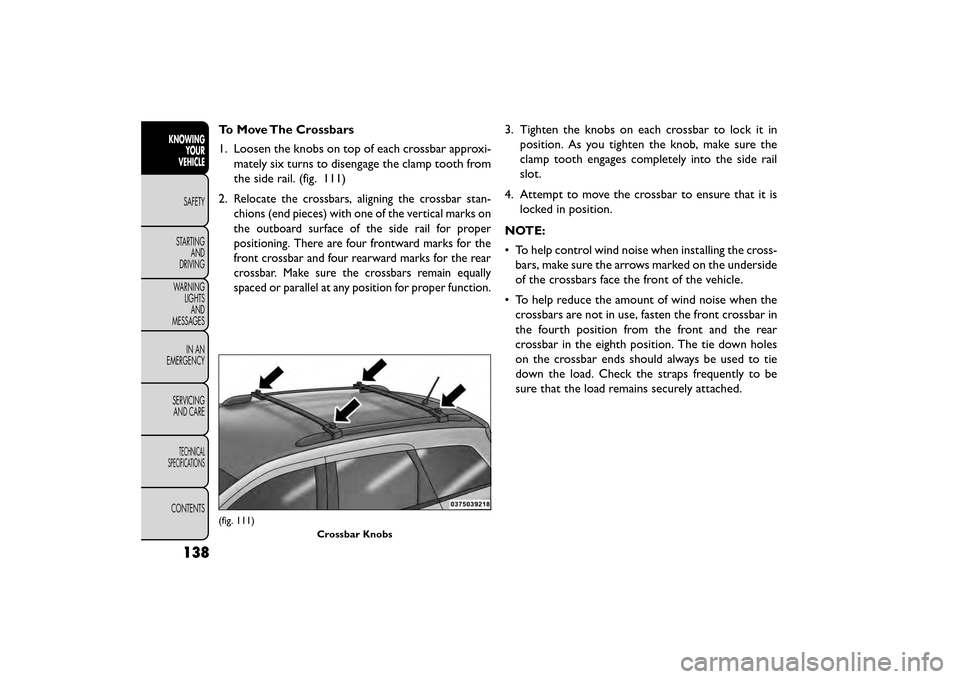
To Move The Crossbars
1. Loosen the knobs on top of each crossbar approxi-mately six turns to disengage the clamp tooth from
the side rail. (fig. 111)
2.
Relocate the crossbars, aligning the crossbar stan-
chions (end pieces) with one of the vertical marks on
the outboard surface of the side rail for proper
positioning. There are four frontward marks for the
front crossbar and four rearward marks for the rear
crossbar. Make sure the crossbars remain equally
spaced or parallel at any position for proper function.
3. Tighten the knobs on each crossbar to lock it in position. As you tighten the knob, make sure the
clamp tooth engages completely into the side rail
slot.
4. Attempt to move the crossbar to ensure that it is locked in position.
NOTE:
• To help control wind noise when installing the cross- bars, make sure the arrows marked on the underside
of the crossbars face the front of the vehicle.
• To help reduce the amount of wind noise when the crossbars are not in use, fasten the front crossbar in
the fourth position from the front and the rear
crossbar in the eighth position. The tie down holes
on the crossbar ends should always be used to tie
down the load. Check the straps frequently to be
sure that the load remains securely attached.
(fig. 111)
Crossbar Knobs
138
KNOWINGYOUR
VEHICLE
SAFETY
STAR
TINGAND
DRIVING
WARNING LIGHTSAND
MESSAGES
IN AN
EMERGENCY
SERVICINGAND CARE
TECHNICAL
SPECIFICATIONS
CONTENTS
Page 146 of 412
BRAKE SYSTEM
Your vehicle is equipped with dual hydraulic
brake systems. If either of the two hydraulic
systems loses normal capability, the remaining system
will still function. However, there will be some loss of
overall braking effectiveness. This will be evident by
increased pedal travel during application and greater
pedal force required to slow or stop the vehicle. In
addition, if the malfunction is caused by a leak in the
hydraulic system, the “Brake System Warning Light”
will turn on as the brake fluid level drops in the master
cylinder.
In the event power assist is lost for any reason (i.e.,
repeated brake applications with the engine OFF) the
brakes will still function. However, the effort required
to brake the vehicle will be much greater than that
required with the power system operating.
WARNING!
• Riding the brakes can lead to brake
f ailure
and possibly a collision. Driving
with your foot resting or riding on the brake
pedal can result in abnormally high brake tem-
peratures, excessive lining wear, and possible
brake damage.You would not have your full brak-
ing capacity in an emergency.
• Driving a vehicle with the “Brake Warning
Light” on is dangerous. A significant decrease in
braking performance or vehicle stability during
braking may occur. It will take you longer to stop
the vehicle or will make your vehicle harder to
control. You could have a collision. Have the ve-
hicle checked immediately.
140
KNOWING YOUR
VEHICLE
SAFETY
STAR
TINGAND
DRIVING
WARNING LIGHTSAND
MESSAGES
IN AN
EMERGENCY
SERVICINGAND CARE
TECHNICAL
SPECIFICATIONS
CONTENTS
Page 147 of 412
ANTI-LOCK BRAKE SYSTEM (ABS)
This system aids the driver in maintaining vehicle con-
trol under adverse braking conditions. The system
controls hydraulic brake pressure to prevent wheel
lock-up to help avoid skidding on slippery surfaces
during braking. Refer to “Anti-Lock Brake System
(ABS)” under “Knowing Your Vehicle/Electronic Brake
Control System” for further information.
WARNING!
The ABS cannot prevent the natural laws
of ph ysi
cs from acting on the vehicle, nor
can it increase the traction afforded by prevailing
road conditions. ABS cannot prevent accidents,
including those resulting from excessive speed in
turns, driving on very slippery surfaces, or hydro-
planing.The capabilities of an ABS-equipped ve-
hicle must never be exploited in a reckless or
dangerous manner, which could jeopardize the
user's safety or the safety of others.
ELECTRONIC BRAKE CONTROL
SYSTEM
Your vehicle is equipped with an advanced electronic
brake control system commonly referred to as ESC.
This system includes Anti-Lock Brake System (ABS),
Brake Assist System (BAS), Traction Control System
(TCS), Electronic Roll Mitigation (ERM), Electronic
Stability Control (ESC), Trailer Sway Control (TSC)
and Hill Start Assist (HSA). These systems work to-
gether to enhance both vehicle stability and control in
various driving conditions.
ANTI-LOCK BRAKE SYSTEM (ABS)
The Anti-Lock Brake System (ABS) provides increased
vehicle stability and brake performance under most
braking conditions. The system automatically “pumps”
the brakes during severe braking conditions to prevent
wheel lock-up.
When the vehicle is driven over 11 km/h, you may also
hear a slight clicking sound as well as some related
motor noises. These noises are the system performing
its self check cycle to ensure that the ABS is working
properly. This self check occurs each time the vehicle is
started and accelerated past 11 km/h.
141
KNOWING
YOUR
VEHICLE
SAFETY
STAR
TING
AND
DRIVING
WARNING
LIGHTS
AND
MESSAGES
IN AN
EMERGENCY
SERVICING
AND CARE
TECHNICAL
SPECIFICATIONS
CONTENTS
Page 156 of 412
POWER STEERING
The standard power steering system will give you good
vehicle response and increased ease of maneuverability
in tight spaces. The system will provide mechanical
steering capability if power assist is lost.
If for some reason the power assist is interrupted, it
will still be possible to steer your vehicle. Under these
conditions, you will observe a substantial increase in
steering effort, especially at very low vehicle speeds
and during parking maneuvers.
NOTE:
• Increased noise levels at the end of the steeringwheel travel are considered normal and do not
indicate that there is a problem with the power
steering system.
• Upon initial start-up in cold weather, the power steering pump may make noise for a short amount of
time. This is due to the cold, thick fluid in the
steering system. This noise should be considered
normal, and it does not in any way damage the
steering system.
Prolonged operation of the steering sys-
tem at the end of the steering wheel
travel will increase the steering fluid tem-
perature and it should be avoided when possible.
Damage to the power steering pump may occur.
POWER STEERING FLUID CHECK
Checking the power steering fluid level at a defined
service interval is not required. The fluid should only be
checked if a leak is suspected, abnormal noises are
apparent, and/or the system is not functioning as an-
ticipated. Coordinate inspection efforts through an
authorized dealer.
150
KNOWING YOUR
VEHICLE
SAFETY
STAR
TINGAND
DRIVING
WARNING LIGHTSAND
MESSAGES
IN AN
EMERGENCY
SERVICINGAND CARE
TECHNICAL
SPECIFICATIONS
CONTENTS