check FIAT FREEMONT 2016 1.G Owner's Manual
[x] Cancel search | Manufacturer: FIAT, Model Year: 2016, Model line: FREEMONT, Model: FIAT FREEMONT 2016 1.GPages: 412, PDF Size: 3.36 MB
Page 157 of 412
Do not use chemical flushes in your
power steering system as the chemicals
can damage your power steering compo-
nents. Such damage is not covered by the New
Vehicle Limited Warranty.
WARNING!
Fluid level should be checked on a level
surf a
ce and with the engine off to pre-
vent injury from moving parts and to ensure
accurate fluid level reading. Do not overfill. Use
only manufacturer's recommended power steer-
ing fluid.
If necessary, add fluid to restore to the proper indi-
cated level. With a clean cloth, wipe any spilled fluid
from all surfaces.
TIRE PRESSURE MONITOR SYSTEM
(TPMS)
The Tire Pressure Monitor System (TPMS) will warn
the driver of a low tire pressure based on the vehicle
recommended cold placard pressure.
The tire pressure will vary with temperature by about
0.07 BAR for every 7°C. This means that when the
outside temperature decreases, the tire pressure will
decrease. Tire pressure should always be set based on
cold inflation tire pressure. This is defined as the tire
pressure after the vehicle has not been driven for at
least three hours, or driven less than 1.6 km after a
three hour period. The cold tire inflation pressure
must not exceed the maximum inflation pressure
molded into the tire sidewall. Refer to “Tires – General
Information” in “Technical Specifications” for informa-
tion on how to properly inflate the vehicle’s tires. The
tire pressure will also increase as the vehicle is driven.
This is normal and there should be no adjustment for
this increased pressure.
151
KNOWING
YOUR
VEHICLE
SAFETY
STAR
TING
AND
DRIVING
WARNING
LIGHTS
AND
MESSAGES
IN AN
EMERGENCY
SERVICING
AND CARE
TECHNICAL
SPECIFICATIONS
CONTENTS
Page 158 of 412
The TPMS will warn the driver of a low tire pressure if
the tire pressure falls below the low-pressure warning
limit for any reason, including low temperature effects
and natural pressure loss through the tire.
The TPMS will continue to warn the driver of low tire
pressure as long as the condition exists, and will not
turn off until the tire pressure is at or above the
recommended cold placard pressure. Once the low
tire pressure warning (Tire Pressure Monitoring Tell-
tale Light) illuminates, you must increase the tire pres-
sure to the recommended cold placard pressure in
order for the Tire Pressure Monitoring Telltale Light to
turn off.
NOTE:When filling warm tires, the tire pressure may
need to be increased to an additional 0.3 BAR above
the recommended cold placard pressure in order to
turn the Tire Pressure Monitoring Telltale Light off.
The system will automatically update and the Tire
Pressure Monitoring Telltale Light will turn off once the
system receives the updated tire pressures. The vehicle
may need to be driven for up to 20 minutes above
25 km/h in order for the TPMS to receive this informa-
tion.• The TPMS has been optimized for the
original equipment tires and wheels.
TPMS pressures and warning have been
established for the tire size equipped on your
vehicle. Undesirable system operation or sensor
damage may result when using replacement
equipment that is not of the same size, type,
and/or style.Aftermarket wheels can cause sensor
damage. Using aftermarket tire sealants may
cause the Tire Pressure Monitoring System
(TPMS) sensor to become inoperable. After using
an aftermarket tire sealant it is recommended
that you take your vehicle to an authorized deal-
ership to have your sensor function checked.
• After inspecting or adjusting the tire pressure,
always reinstall the valve stem cap.This will pre-
vent moisture and dirt from entering the valve
stem, which could damage theTire Pressure Moni-
toring Sensor.
152
KNOWING YOUR
VEHICLE
SAFETY
STAR
TINGAND
DRIVING
WARNING LIGHTSAND
MESSAGES
IN AN
EMERGENCY
SERVICINGAND CARE
TECHNICAL
SPECIFICATIONS
CONTENTS
Page 159 of 412
NOTE:
• The TPMS is not intended to replace normal tire careand maintenance, or to provide warning of a tire
failure or condition.
• The TPMS should not be used as a tire pressure gauge while adjusting your tire pressure.
• Driving on a significantly under-inflated tire causes the tire to overheat and can lead to tire failure.
Under-inflation also reduces fuel efficiency and tire
tread life, and may affect the vehicle’s handling and
stopping ability.
• The TPMS is not a substitute for proper tire mainte- nance, and it is the driver’s responsibility to maintain
correct tire pressure using an accurate tire pressure
gauge, even if under-inflation has not reached the
level to trigger illumination of the Tire Pressure
Monitoring Telltale Light.
• Seasonal temperature changes will affect tire pres- sure, and the TPMS will monitor the actual tire
pressure in the tire. BASE SYSTEM
The Tire Pressure Monitor System (TPMS) uses wire-
less technology with wheel rim mounted electronic
sensors to monitor tire pressure levels. Sensors,
mounted to each wheel as part of the valve stem,
transmit tire pressure readings to the receiver module.
NOTE:
It is particularly important for you to check
the tire pressure in all of the tires on your vehicle
monthly and to maintain the proper pressure.
The TPMS consists of the following components:
• Receiver Module
• Four Tire Pressure Monitoring Sensors
• Tire Pressure Monitoring Telltale Light
Tire Pressure Monitoring Low Pressure
Warnings
The Tire Pressure Monitoring Telltale Light will
illuminate in the instrument cluster and a chime
will sound when tire pressure is low in one or more of
the four active road tires. Should this occur, you should
stop as soon as possible, check the inflation pressure of
each tire on your vehicle, and inflate each tire to the
vehicle’s recommended cold placard pressure value.
153
KNOWING
YOUR
VEHICLE
SAFETY
STAR
TING
AND
DRIVING
WARNING
LIGHTS
AND
MESSAGES
IN AN
EMERGENCY
SERVICING
AND CARE
TECHNICAL
SPECIFICATIONS
CONTENTS
Page 161 of 412
5. Once you repair or replace the original road tire andreinstall it on the vehicle in place of the compact
spare, the TPMS will update automatically and the
TPMS Telltale Light will turn off, as long as no tire
pressure is below the low-pressure warning limit in
any of the four active road tires. The vehicle may
need to be driven for up to 20 minutes above
25 km/h in order for the TPMS to receive this
information.
TPMS Deactivation And Reactivation
The TPMS can be deactivated if replacing all four wheel
and tire assemblies (road tires) with wheel and tire
assemblies that do not have TPMS Sensors, such as
when installing winter wheel and tire assemblies on
your vehicle.
To deactivate the TPMS, first, replace all four wheel and
tire assemblies (road tires) with those not equipped
with TPM Sensors. Then, drive the vehicle for at least
20 minutes above 25 km/h. The TPMS will chime and
the TPM Telltale Light will flash on and off for 75
seconds and then remain on solid. Upon the next
ignition switch cycle, the TPMS will no longer chime or
turn on the Tire Pressure Monitoring Telltale Light. To reactivate the TPMS, first, replace all four wheel and
tire assemblies (road tires) with those equipped with
TPM Sensors. Then, drive the vehicle for up to 20
minutes above 25 km/h. The TPMS will chime and the
Tire Pressure Monitoring Telltale Light will flash on and
off for 75 seconds.
PREMIUM SYSTEM — (for versions/markets,
where provided)
The Tire Pressure Monitor System (TPMS) uses wire-
less technology with wheel rim mounted electronic
sensors to monitor tire pressure levels. Sensors,
mounted to each wheel as part of the valve stem,
transmit tire pressure readings to the receiver module.
NOTE:
It is particularly important for you to check
the tire pressure in all of the tires on your vehicle
monthly and to maintain the proper pressure.
The TPMS consists of the following components:
• Receiver module
• Four Tire Pressure Monitoring Sensors
• Various Tire Pressure Monitoring System messages, which display in the Electronic Vehicle Information
Center (EVIC)
• Tire Pressure Monitoring Telltale Light
155
KNOWING
YOUR
VEHICLE
SAFETY
STAR
TING
AND
DRIVING
WARNING
LIGHTS
AND
MESSAGES
IN AN
EMERGENCY
SERVICING
AND CARE
TECHNICAL
SPECIFICATIONS
CONTENTS
Page 170 of 412
•Park Assist is only a parking aid and it is
unable to recognize every obstacle, in-
cluding small obstacles. Parking curbs
might be temporarily detected or not detected at
all. Obstacles located above or below the sensors
will not be detected when they are in close prox-
imity.
• The vehicle must be driven slowly when using
Park Assist in order to be able to stop in time when
an obstacle is detected. It is recommended that
the driver looks over his/her shoulder when using
Park Assist .
WARNING!
• Drivers must be careful when backing
up e
ven when using Park Assist . Always
check carefully behind your vehicle, look behind
you, and be sure to check for pedestrians, ani-
mals, other vehicles, obstructions, and blind spots
before backing up.You are responsible for safety
and must continue to pay attention to your sur-
roundings. Failure to do so can result in serious
injury or death.
(Continued)
WARNING! (Continued)
• Before using Park Assist , it is strongly recom-
mended that the ball mount and hitch ball as-
sembly is disconnected from the vehicle when the
vehicle is not used for towing. Failure to do so can
result in injury or damage to vehicles or obstacles
because the hitch ball will be much closer to the
obstacle than the rear fascia when the loud-
speaker sounds the continuous tone. Also, the
sensors could detect the ball mount and hitch ball
assembly, depending on its size and shape, giving
a false indication that an obstacle is behind the
vehicle.
164
KNOWING YOUR
VEHICLE
SAFETY
STAR
TINGAND
DRIVING
WARNING LIGHTSAND
MESSAGES
IN AN
EMERGENCY
SERVICINGAND CARE
TECHNICAL
SPECIFICATIONS
CONTENTS
Page 171 of 412
PARKVIEW® REAR BACK UP
CAMERA (for versions/markets,
where provided)
Your vehicle may be equipped with the ParkView®
Rear Back Up Camera that allows you to see an
on-screen image of the rear surroundings of your
vehicle whenever the shift lever is put into REVERSE.
The ParkView® camera is located on the rear of the
vehicle above the rear License plate. The image will be
displayed in the touchscreen display along with a cau-
tion note to “check entire surroundings” across the top
of the screen. After five seconds this note will disap-
pear.
When the vehicle is shifted out of REVERSE, the rear
camera mode is exited and the last selected touch-
screen appears again.
If your vehicle is equipped with the Camera Delay
feature and it is turned ON, the rear camera image will
be displayed for up to 10 seconds when the vehicle is
shifted out of REVERSE unless the forward vehiclespeed exceeds 13 km/h, the transmission is shifted into
"PARK" or the vehicle's ignition is cycled to the OFF
position.
Static grid lines will illustrate the width of the vehicle
while a dashed center-line will indicate the center of
the vehicle to assist with parking or aligning to a
hitch/receiver. The static grid lines will show separate
zones that will help indicate the distance to the rear of
the vehicle.
NOTE:
The ParkView® Rear Back Up Camera has
programmable modes of operation that may be se-
lected through the Uconnect® System. Refer to
“Uconnect® Settings” in “Knowing Your Vehicle” for
further information.
Different colored zones indicate the distance to the
rear of the vehicle.
The following table shows the approximate distances
for each zone:
Zone Distance to the rear of the vehicle
Red 0-30cm
Yellow 30 cm-1m
Green 1 m or greater
165
KNOWING
YOUR
VEHICLE
SAFETY
STAR
TING
AND
DRIVING
WARNING
LIGHTS
AND
MESSAGES
IN AN
EMERGENCY
SERVICING
AND CARE
TECHNICAL
SPECIFICATIONS
CONTENTS
Page 172 of 412
WARNING!
Drivers must be careful when backing up
ev en
when using the ParkView® Rear
Back Up Camera. Always check carefully behind
your vehicle, and be sure to check for pedestri-
ans, animals, other vehicles, obstructions, or blind
spots before backing up. You are responsible for
the safety of your surroundings and must con-
tinue to pay attention while backing up. Failure
to do so can result in serious injury or death.
• To avoid vehicle damage, ParkView®
should only be used as a parking aid.The
ParkView® camera is unable to view ev-
ery obstacle or object in your drive path.
• To avoid vehicle damage, the vehicle must be
driven slowly when using ParkView® to be able to
stop in time when an obstacle is seen. It is recom-
mended that the driver look frequently over his/
her shoulder when using ParkView®.
NOTE: If snow, ice, mud, or any foreign substance
builds up on the camera lens, clean the lens, rinse with
water, and dry with a soft cloth. Do not cover the lens.
NAVIGATION SYSTEM (for
versions/markets, where
provided)
Refer to your Uconnect® User Manual.
166
KNOWING YOUR
VEHICLE
SAFETY
STAR
TINGAND
DRIVING
WARNING LIGHTSAND
MESSAGES
IN AN
EMERGENCY
SERVICINGAND CARE
TECHNICAL
SPECIFICATIONS
CONTENTS
Page 185 of 412
Replacing The Remote Control Batteries
The remote control requires two AAA batteries for
operation. To replace the batteries:
• Locate the battery compartment on the back of theremote, then slide the battery cover downward.
• Replace the batteries, making sure to orient them according to the polarity diagram shown.
• Replace the battery compartment cover.
Headphones Operation
The headphones receive two separate channels of
audio using an infrared transmitter from the video
screen.
If no audio is heard after increasing the volume control,
verify that the screen is turned on and in the down
position and that the channel is not muted and the
headphone channel selector switch is on the desired
channel. If audio is still not heard, check that fully
charged batteries are installed in the headphones.
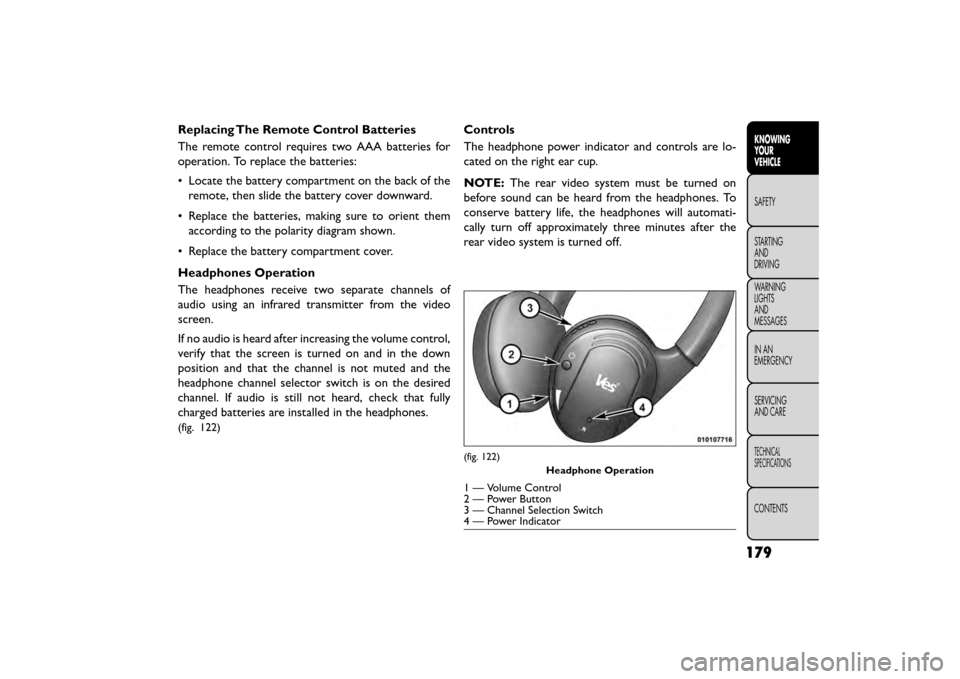
(fig. 122)
Controls
The headphone power indicator and controls are lo-
cated on the right ear cup.
NOTE: The rear video system must be turned on
before sound can be heard from the headphones. To
conserve battery life, the headphones will automati-
cally turn off approximately three minutes after the
rear video system is turned off.
(fig. 122)
Headphone Operation
1 — Volume Control
2 — Power Button
3 — Channel Selection Switch
4 — Power Indicator
179
KNOWING
YOUR
VEHICLE
SAFETY
STAR
TING
AND
DRIVING
WARNING
LIGHTS
AND
MESSAGES
IN AN
EMERGENCY
SERVICING
AND CARE
TECHNICAL
SPECIFICATIONS
CONTENTS
Page 191 of 412
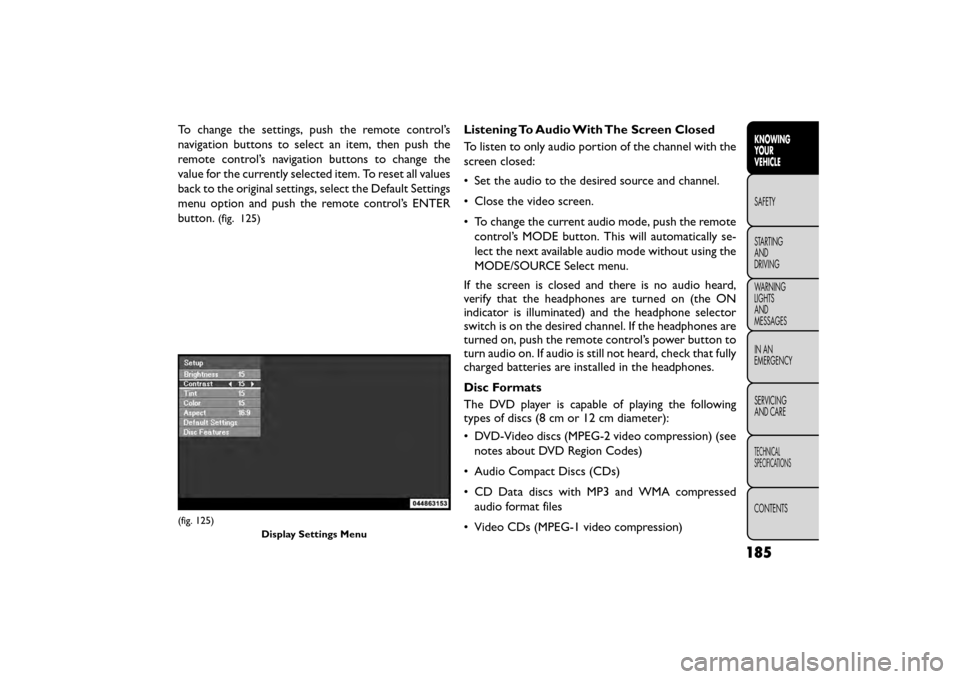
To change the settings, push the remote control’s
navigation buttons to select an item, then push the
remote control’s navigation buttons to change the
value for the currently selected item. To reset all values
back to the original settings, select the Default Settings
menu option and push the remote control’s ENTER
button.
(fig. 125)
Listening To Audio With The Screen Closed
To listen to only audio portion of the channel with the
screen closed:
• Set the audio to the desired source and channel.
• Close the video screen.
• To change the current audio mode, push the remotecontrol’s MODE button. This will automatically se-
lect the next available audio mode without using the
MODE/SOURCE Select menu.
If the screen is closed and there is no audio heard,
verify that the headphones are turned on (the ON
indicator is illuminated) and the headphone selector
switch is on the desired channel. If the headphones are
turned on, push the remote control’s power button to
turn audio on. If audio is still not heard, check that fully
charged batteries are installed in the headphones.
Disc Formats
The DVD player is capable of playing the following
types of discs (8 cm or 12 cm diameter):
• DVD-Video discs (MPEG-2 video compression) (see notes about DVD Region Codes)
• Audio Compact Discs (CDs)
• CD Data discs with MP3 and WMA compressed audio format files
• Video CDs (MPEG-1 video compression)
(fig. 125) Display Settings Menu
185
KNOWING
YOUR
VEHICLE
SAFETY
STAR
TING
AND
DRIVING
WARNING
LIGHTS
AND
MESSAGES
IN AN
EMERGENCY
SERVICING
AND CARE
TECHNICAL
SPECIFICATIONS
CONTENTS
Page 192 of 412
DVD Region Codes
The DVD player and many DVD discs are coded by
geographic region. These region codes must match in
order for the disc to play. If the region code for the
DVD disc does not match the region code for the
player, the disc will stop playing and a warning will be
displayed.
DVD Audio Support
When a DVD-Audio disc is inserted in the DVD player,
the DVD-Audio title on the disc is played by default
(most DVD-Audio discs also have a Video title, but the
Video title is ignored). All multi-channel program ma-
terial is automatically mixed down to two channels,
which may result in a lowered apparent volume level. If
you increase the volume level to account for this
change in level, remember to lower the volume before
changing the disc or to another mode.
Recorded Discs
The DVD player will play CD-R and CD-RW discs
recorded in CD-Audio or Video-CD format, or as a
CD-ROM containing MP3 or WMA files. The player
will also play DVD-Video content recorded to a
DVD-R, DVD-RW and DVD-ROM discs.
If you record a disc using a personal computer, there
may be cases where the DVD player may not be able to
play some or the entire disc, even if it is recorded in acompatible format and is playable on other players. To
help avoid playback problems, use the following guide-
lines when recording discs.
• Open sessions are ignored. Only sessions that are
closed are playable.
• For multi-session CDs that contain only multiple CD-Audio sessions, the player will renumber the
tracks so each track number is unique.
• For CD Data (or CD-ROM) discs, always use the ISO-9660 (Level 1 or Level 2), Joliet, or UDF format.
CD-DA may also be used for PCM Audio contained
on CD-Based Data.
• The player recognizes a maximum of 512 files and 99 folders per CD-R and CD-RW disc.
• Mixed media recordable DVD formats will only play the Video_TS portion of the disc.
If you are still having trouble writing a disc that is
playable in the DVD player, check with the disc record-
ing software publisher for more information about
burning playable discs.
The recommended method for labeling recordable
discs (CD-R, CD-RW, DVD-R and DVD-RW) is with a
permanent marker. Do not use adhesive labels as they
may separate from the disc, become stuck, and cause
permanent damage to the DVD player.
186
KNOWING YOUR
VEHICLE
SAFETY
STAR
TINGAND
DRIVING
WARNING LIGHTSAND
MESSAGES
IN AN
EMERGENCY
SERVICINGAND CARE
TECHNICAL
SPECIFICATIONS
CONTENTS