lock FIAT PANDA 2009 169 / 2.G User Guide
[x] Cancel search | Manufacturer: FIAT, Model Year: 2009, Model line: PANDA, Model: FIAT PANDA 2009 169 / 2.GPages: 226, PDF Size: 5.29 MB
Page 21 of 226
20
KNOW YOUR
VEHICLE
SAFETY
CORRECT USE
OF THE CAR
WARNING LIGHTS
AND MESSAGES
IN
AN EMERGENCY
CAR
MAINTENANCE
TECHNICAL
SPECIFICATIONS
INDEX
Selecting an option from the main menu without submenu:
– briefly press the button MODE to select the main menu
option to be changed;
– press buttons + or − (with a single press) to select the
new setting;
– briefly press the button MODE to store the new set-
ting and at the same time go back to the previously se-
lected main menu option.
Selecting of an option from the main menu with submenu:
– briefly press the button MODE to display the first sub-
menu option;
– press buttons + or − (with a single press) to scroll
through all submenu options;
– briefly press the buttonMODE to select the displayed
submenu option and to open the relevant set-up menu;
– press buttons + or − (with a single press) to choose a
new setting for this submenu option;
– briefly press the button MODE to store the new set-
ting and at the same time go back to the previously se-
lected submenu option. Passenger compartment light adjustment
– to adjust instrument panel, sound system and automat-
ic climate control system display brightness when the stan-
dard screen is active.
Setup menu
– within the menu, they allow you to scroll up and down
through the options;
– during setting operations they increase or decrease
the values.
SETUP MENU fig. 28
The menu comprises a series of functions arranged in a cy-
cle which can be selected through buttons
+and
−to ac-
cess the different select operations and settings (setup)
given in the following paragraphs.
A submenu is provided for some items (Setting the clock
and Set units).
The setup menu is activated by pressing briefly the but-
ton MODE.
Single presses on buttons + or − will scroll the setup menu
options.
Operating modes are different according to the charac-
teristic of the option selected.
001-030 PANDA EN 7-10-2009 13:39 Pagina 20
Page 22 of 226
21KNOW YOUR
VEHICLESAFETY
CORRECT USE
OF THE CAR
WARNING LIGHTS
AND MESSAGES
IN
AN EMERGENCY
CAR
MAINTENANCE
TECHNICAL
SPECIFICATIONS
INDEX
Press the button MODE for long:
– to return to the set up menu if you are in the main menu;
– to return to the main menu if you are at another point
of the menu (e.g.: at submenu option setting level, at sub-
menu level or at main menu option setting level);
– to save only the changes stored by the user (and con-
firmed by pressing button MODE).
The setup menu is timed; when quitting the menu due to
timing expiry, only the changes already stored by the user
(and confirmed by pressing briefly the button MODE) will
be saved. Selecting “Date” and “Set Clock”:
– briefly press the button MODE to select the first value
to be changed (e.g. hours/minutes or year/month/day);
– press buttons + or −(with a single press) to select the
new setting;
– briefly press the button MODE to store the new setting
and at the same time go to the next setup menu option. If
the processed option is the last one, the system brings you
back to the previously selected menu option.
001-030 PANDA EN 7-10-2009 13:40 Pagina 21
Page 24 of 226
23KNOW YOUR
VEHICLESAFETY
CORRECT USE
OF THE CAR
WARNING LIGHTS
AND MESSAGES
IN
AN EMERGENCY
CAR
MAINTENANCE
TECHNICAL
SPECIFICATIONS
INDEX
Trip B On/Off (trip B data)
This function can be used to activate (On) or deactivate
(Off) the Trip B displaying (partial trip).
For further information see “Trip computer”.
Proceed as follows to switch the function on and off:
– briefly press the button MODE: “On” or “Off” flash on
the display (depending on the previous setting);
– press the button + or − to select;
– briefly press the button MODE to go back to the menu
screen or press the button for a prolonged time to go back
to the standard screen without storing the settings.
Setting the clock (Set time)
This function enables to set the clock through two sub-
menus: “Time” and “Format”.
To carry out the adjustment, proceed as follows:
– briefly press the button MODE, the display will show the
two submenus “Time” and “Format”;
– press the button
+or − to switch between the two
submenus;
– once you have selected the submenu to be changed,
press the button MODE briefly;
– when accessing the “Time” submenu:briefly press the but-
ton MODE : “hours” will flash on the display;
– press the button + or − for setting;
– briefly press the button MODE: “minutes” starts flash-
ing on the display;
– press the button + or − for setting; Speed limit (Speed Beep)
This function is used to set the car speed limit (km/h or
mph); the driver is immediately alerted when this limit is
exceeded (see chapter “Warning lights and messages”).
To set the desired speed limit, proceed as follows:
– briefly press the button MODE: the display will show the
wording “Speed Beep”;
– press button
+or
−to select speed limit activation (On)
or deactivation (Off);
– if the function has been activated (On), press the but-
tons + or − to select the required speed limit and then
press MODE to confirm.
NOTE The possible setting is between 30 and 250 km/h, or
between 20 and 155 mph depending on the previously set unit
see “Setting the distance unit” – “Measurement units” de-
scribed below. The setting will increase/decrease by five units
each time the button + /
−
is pressed. Hold the button
+/
−pressed to increase/decrease the setting rapidly and au-
tomatically. Complete the setting by single pressing the but-
ton when you approach the required value.
– press the button MODE briefly to return to the menu
screen or press the button for a prolonged time to go back
to the standard screen without storing settings.
To cancel the setting, proceed as follows:
– briefly press the button MODE: “On” flashes on the
display;
– press the button −: “Off” flashes on the display;
– briefly press the button MODE to go back to the menu
screen or press the button for a prolonged time to go back
to the standard screen without storing the settings.
001-030 PANDA EN 7-10-2009 13:40 Pagina 23
Page 26 of 226
25KNOW YOUR
VEHICLESAFETY
CORRECT USE
OF THE CAR
WARNING LIGHTS
AND MESSAGES
IN
AN EMERGENCY
CAR
MAINTENANCE
TECHNICAL
SPECIFICATIONS
INDEX
– briefly press the MODE button: “On” or “Off” will flash
on the display (depending on the previous setting);
– press the button + or − to select;
– briefly press the button MODE to go back to the sub-
menu screen or press the button for a prolonged time to
go back to the standard screen without storing settings;
– press the button MODE again for a longer time to go
back to the standard screen or to the main menu according
to the current menu level displayed.
Set units (Measurement units)
With this function it is possible to set the units through three
submenus: “Distances”, “Consumption” and “Temperature”.
To set the required unit proceed as follows:
– briefly press the button MODE to display the three
submenus;
– press the button + or − to switch between the three
submenus;
– once you have selected the submenu to be changed, press
the MODE button briefly;
– when accessing the “Distance” submenu:and briefly press the
button MODE and the display will show “km” or “mi”
(depending on the previous setting);
– press the button + or − to select; Audio repetition (See radio)
With this function the display shows information about the
sound system.
– Radio: selected radio station frequency or RDS message,
automatic tuning activation or AutoSTore;
– Audio CD, MP3 CD: track number;
– CD Changer: CD number and track number;
– Tape: operating mode.
To show the sound system information on the display (On)
or clear it (Off), proceed as follows:
– briefly press the button MODE: (On) or (Off) will flash
on the display (depending on the previous setting);
– press the button + or − to select;
– briefly press the button MODE to go back to the menu
screen or press the button for a prolonged time to go back
to the standard screen without storing the settings.
Automatic central door locking
with car running
(Autoclose)
When activated (On), this function locks automatically the
doors when the vehicle speed exceeds 20 km/h.
Proceed as follows to activate (On) or deactivate (Off) this
function:
– briefly press the button MODE to display one submenu;
001-030 PANDA EN 7-10-2009 13:40 Pagina 25
Page 32 of 226
F0Z0029m
fig. 31
F0Z0030m
fig. 32
SEATSFRONT SEATS
Only make adjustments when the car is
stationary.
WARNING
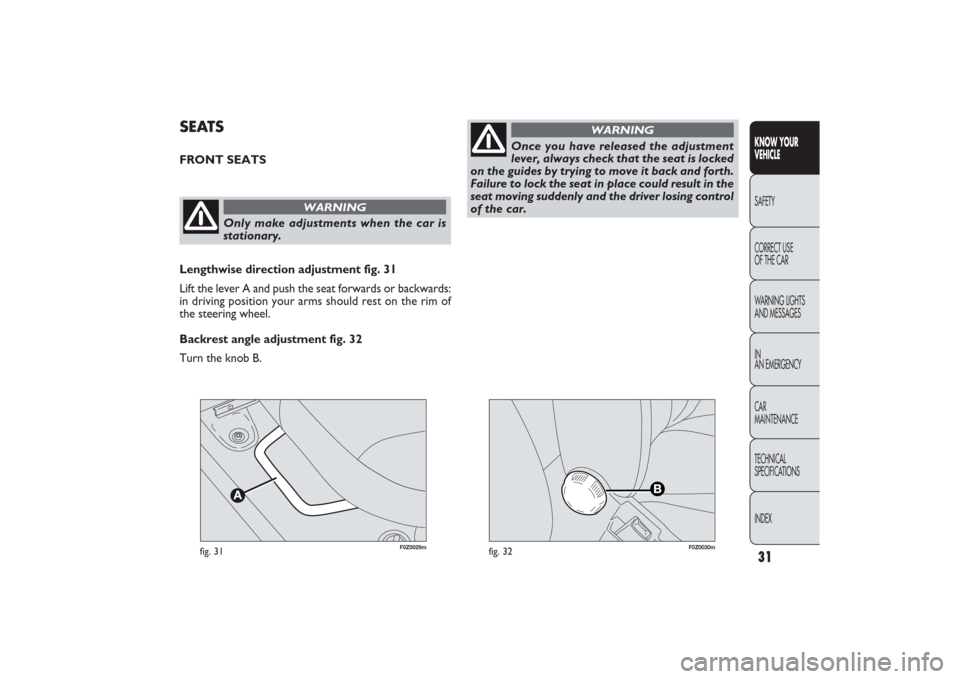
Lengthwise direction adjustment fig. 31
Lift the lever A and push the seat forwards or backwards:
in driving position your arms should rest on the rim of
the steering wheel.
Backrest angle adjustment fig. 32
Turn the knob B.
Once you have released the adjustment
lever, always check that the seat is locked
on the guides by trying to move it back and forth.
Failure to lock the seat in place could result in the
seat moving suddenly and the driver losing control
of the car.
WARNING
31KNOW YOUR
VEHICLESAFETY
CORRECT USE
OF THE CAR
WARNING LIGHTS
AND MESSAGES
IN
AN EMERGENCY
CAR
MAINTENANCE
TECHNICAL
SPECIFICATIONS
INDEX
031-064 PANDA EN 7-10-2009 13:43 Pagina 31
Page 34 of 226
33KNOW YOUR
VEHICLESAFETY
CORRECT USE
OF THE CAR
WARNING LIGHTS
AND MESSAGES
IN
AN EMERGENCY
CAR
MAINTENANCE
TECHNICAL
SPECIFICATIONS
INDEX
F0Z0033m
fig. 34
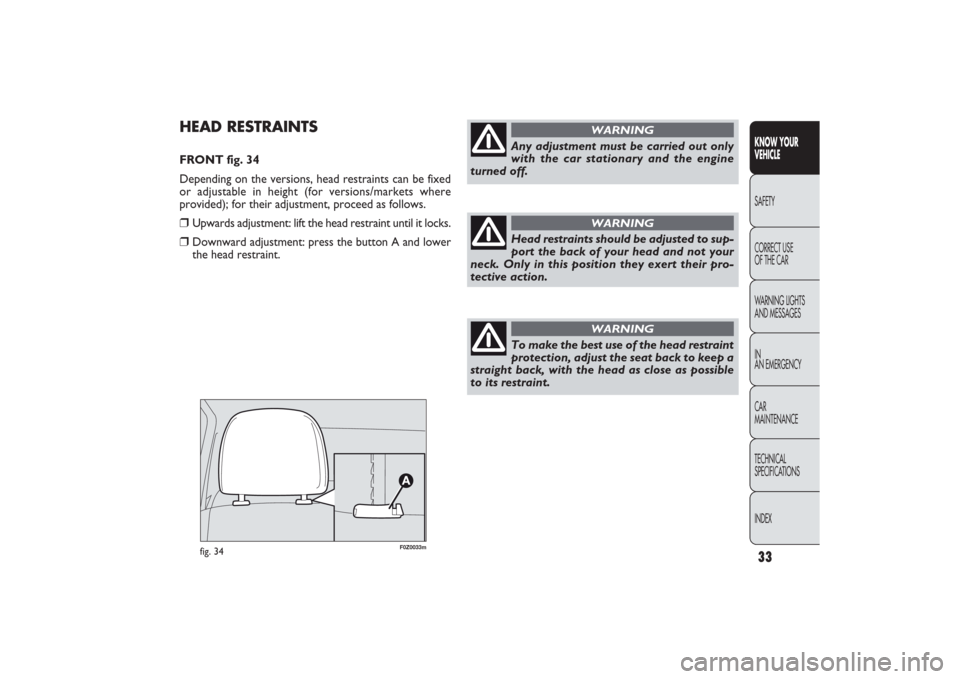
HEAD RESTRAINTSFRONT fig. 34
Depending on the versions, head restraints can be fixed
or adjustable in height (for versions/markets where
provided); for their adjustment, proceed as follows.❒
Upwards adjustment: lift the head restraint until it locks.
❒
Downward adjustment: press the button A and lower
the head restraint.
Any adjustment must be carried out only
with the car stationary and the engine
turned off.
WARNING
Head restraints should be adjusted to sup-
port the back of your head and not your
neck. Only in this position they exert their pro-
tective action.
WARNING
To make the best use of the head restraint
protection, adjust the seat back to keep a
straight back, with the head as close as possible
to its restraint.
WARNING
031-064 PANDA EN 7-10-2009 13:43 Pagina 33
Page 35 of 226
F0Z0034m
fig. 35
F0Z0061m
fig. 36
STEERING WHEELThe steering wheel can be adjusted in height
(for versions/markets where provided).
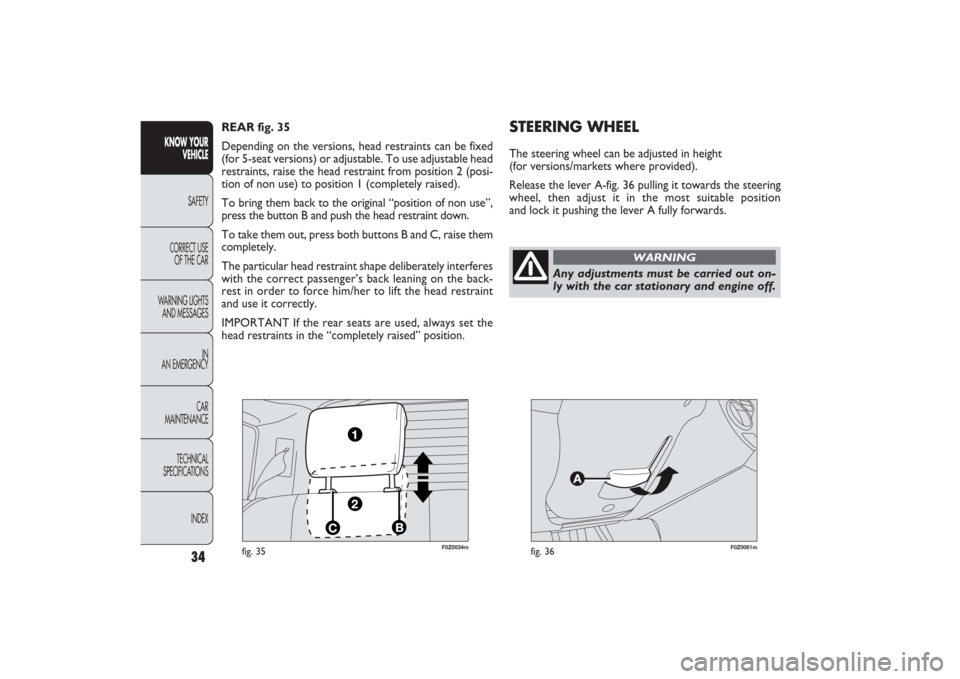
Release the lever A-fig. 36 pulling it towards the steering
wheel, then adjust it in the most suitable position
and lock it pushing the lever A fully forwards. REAR fig. 35
Depending on the versions, head restraints can be fixed
(for 5-seat versions) or adjustable. To use adjustable head
restraints, raise the head restraint from position 2 (posi-
tion of non use) to position 1 (completely raised).
To bring them back to the original “position of non use”,
press the button B and push the head restraint down.
To take them out, press both buttons B and C, raise them
completely.
The particular head restraint shape deliberately interferes
with the correct passenger’s back leaning on the back-
rest in order to force him/her to lift the head restraint
and use it correctly.
IMPORTANT If the rear seats are used, always set the
head restraints in the “completely raised” position.
34
KNOW YOUR
VEHICLE
SAFETY
CORRECT USE
OF THE CAR
WARNING LIGHTS
AND MESSAGES
IN
AN EMERGENCY
CAR
MAINTENANCE
TECHNICAL
SPECIFICATIONS
INDEX
Any adjustments must be carried out on-
ly with the car stationary and engine off.
WARNING
031-064 PANDA EN 7-10-2009 13:43 Pagina 34
Page 53 of 226
F0Z0032m
fig. 51
Ceiling light timing (lens central position)
Three different switching-on modes are provided:❒
when opening one door a three-minute timing will start,
to be repeated each time one door is opened;
❒
approximately 10-second timing will start when re-
moving the ignition key within two minutes from turn-
ing the engine off;
❒
approximately 10-second timing will start when open-
ing the doors (by both remote control or key into
driver’s door lock).
Two switching-off modes are provided:
❒
when closing all doors, the 3-minute timing will go
off and a 10-second one will start. This timing will
go off when turning the key to MAR;
❒
when locking the doors (by both remote control or key
into driver’s door lock), the ceiling light goes off.
On Emotion and Dynamic versions, the ceiling light will
switch on and off gradually; the ceiling light will switch off
automatically 15 minutes after turning the engine off.
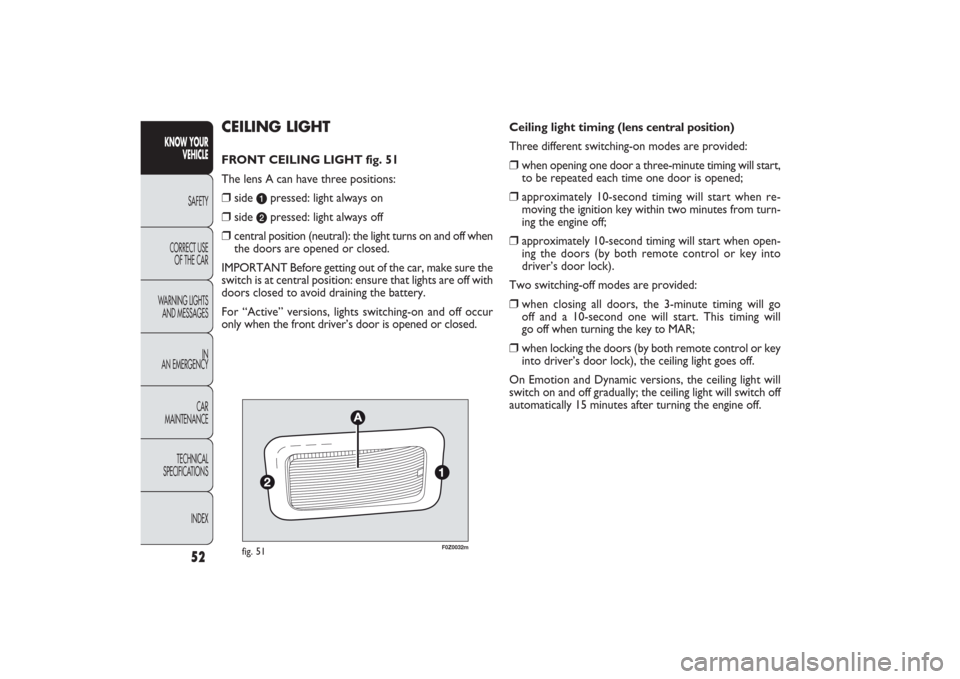
CEILING LIGHTFRONT CEILING LIGHT fig. 51
The lens A can have three positions:❒
side
a
pressed: light always on
❒
side
b
pressed: light always off
❒
central position (neutral): the light turns on and off when
the doors are opened or closed.
IMPORTANT Before getting out of the car, make sure the
switch is at central position: ensure that lights are off with
doors closed to avoid draining the battery.
For “Active” versions, lights switching-on and off occur
only when the front driver’s door is opened or closed.
52
KNOW YOUR
VEHICLE
SAFETY
CORRECT USE
OF THE CAR
WARNING LIGHTS
AND MESSAGES
IN
AN EMERGENCY
CAR
MAINTENANCE
TECHNICAL
SPECIFICATIONS
INDEX
031-064 PANDA EN 7-10-2009 13:43 Pagina 52
Page 55 of 226
F0Z0028m
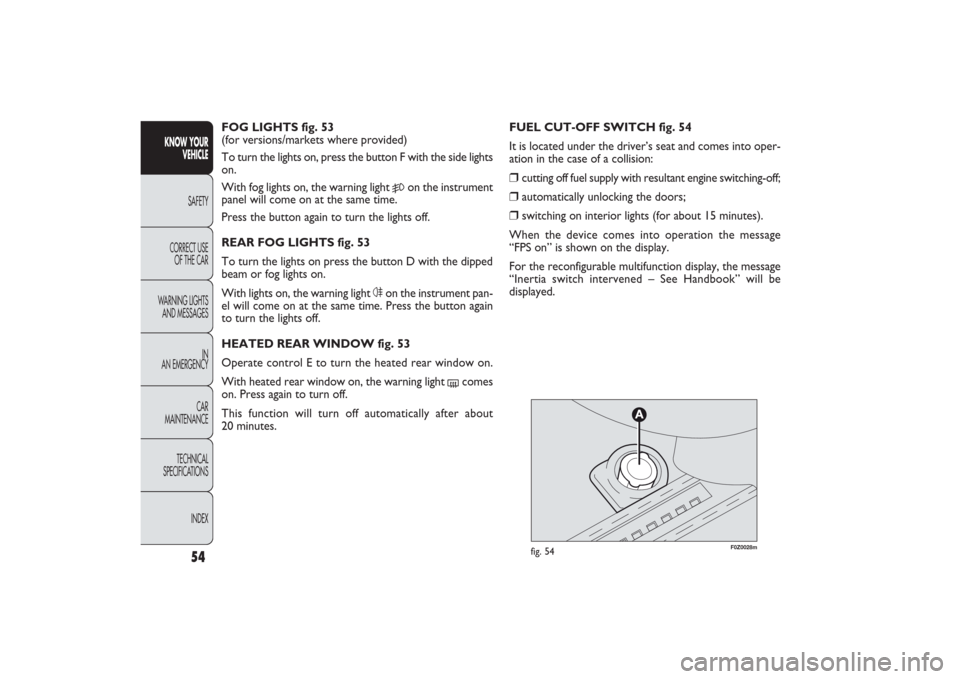
fig. 54
FUEL CUT-OFF SWITCH fig. 54
It is located under the driver’s seat and comes into oper-
ation in the case of a collision:❒
cutting off fuel supply with resultant engine switching-off;
❒
automatically unlocking the doors;
❒
switching on interior lights (for about 15 minutes).
When the device comes into operation the message
“FPS on” is shown on the display.
For the reconfigurable multifunction display, the message
“Inertia switch intervened – See Handbook” will be
displayed. FOG LIGHTS fig. 53
(for versions/markets where provided)
To turn the lights on, press the button F with the side lights
on.
With fog lights on, the warning light
5
on the instrument
panel will come on at the same time.
Press the button again to turn the lights off.
REAR FOG LIGHTS fig. 53
To turn the lights on press the button D with the dipped
beam or fog lights on.
With lights on, the warning light 4on the instrument pan-
el will come on at the same time. Press the button again
to turn the lights off.
HEATED REAR WINDOW fig. 53
Operate control E to turn the heated rear window on.
With heated rear window on, the warning light
(
comes
on. Press again to turn off.
This function will turn off automatically after about
20 minutes.
54
KNOW YOUR
VEHICLE
SAFETY
CORRECT USE
OF THE CAR
WARNING LIGHTS
AND MESSAGES
IN
AN EMERGENCY
CAR
MAINTENANCE
TECHNICAL
SPECIFICATIONS
INDEX
031-064 PANDA EN 7-10-2009 13:43 Pagina 54
Page 58 of 226
57KNOW YOUR
VEHICLESAFETY
CORRECT USE
OF THE CAR
WARNING LIGHTS
AND MESSAGES
IN
AN EMERGENCY
CAR
MAINTENANCE
TECHNICAL
SPECIFICATIONS
INDEX
F0Z0273m
fig. 58
F0Z0065m
fig. 60
˙
˙˙˙
F0Z0038m
fig. 59
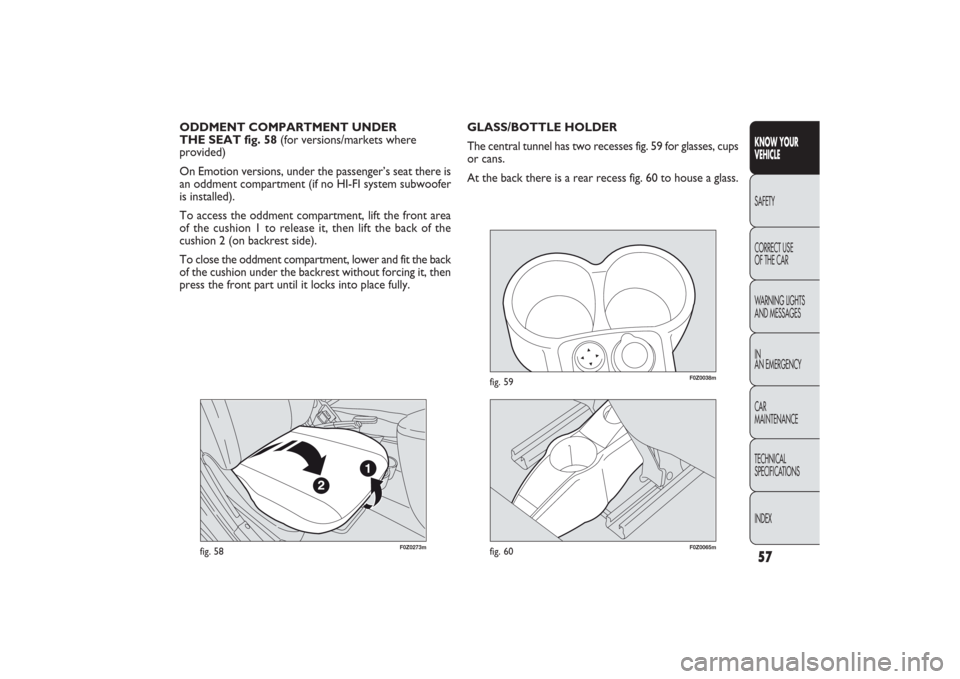
GLASS/BOTTLE HOLDER
The central tunnel has two recesses fig. 59 for glasses, cups
or cans.
At the back there is a rear recess fig. 60 to house a glass. ODDMENT COMPARTMENT UNDER
THE SEAT fig. 58 (for versions/markets where
provided)
On Emotion versions, under the passenger’s seat there is
an oddment compartment (if no HI-FI system subwoofer
is installed).
To access the oddment compartment, lift the front area
of the cushion 1 to release it, then lift the back of the
cushion 2 (on backrest side).
To close the oddment compartment, lower and fit the back
of the cushion under the backrest without forcing it, then
press the front part until it locks into place fully.
031-064 PANDA EN 7-10-2009 13:43 Pagina 57