Speed FIAT PANDA 2009 169 / 2.G Owners Manual
[x] Cancel search | Manufacturer: FIAT, Model Year: 2009, Model line: PANDA, Model: FIAT PANDA 2009 169 / 2.GPages: 226, PDF Size: 5.29 MB
Page 9 of 226
8
KNOW YOUR
VEHICLE
SAFETY
CORRECT USE
OF THE CAR
WARNING LIGHTS
AND MESSAGES
IN
AN EMERGENCY
CAR
MAINTENANCE
TECHNICAL
SPECIFICATIONS
INDEX
F0Z0682m
fig. 7
When a speed of over 20 km/h is reached, the doors will
be automatically locked if this specific function was set (on-
ly on versions with multifunction reconfigurable display).
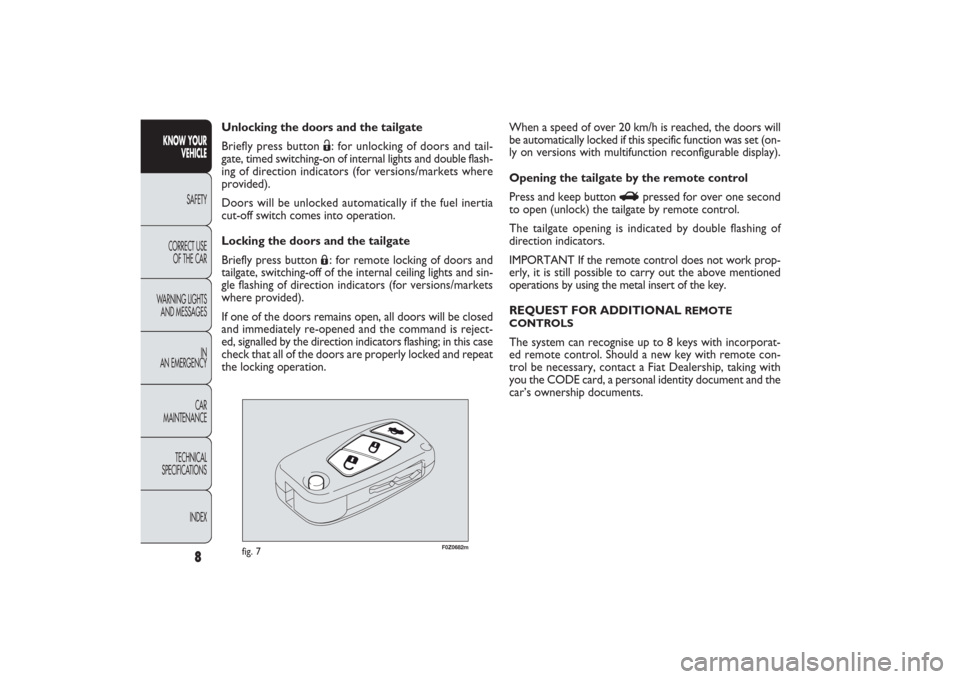
Opening the tailgate by the remote control
Press and keep button
R
pressed for over one second
to open (unlock) the tailgate by remote control.
The tailgate opening is indicated by double flashing of
direction indicators.
IMPORTANT If the remote control does not work prop-
erly, it is still possible to carry out the above mentioned
operations by using the metal insert of the key.
REQUEST FOR ADDITIONAL
REMOTE
CONTROLS
The system can recognise up to 8 keys with incorporat-
ed remote control. Should a new key with remote con-
trol be necessary, contact a Fiat Dealership, taking with
you the CODE card, a personal identity document and the
car’s ownership documents. Unlocking the doors and the tailgate
Briefly press button
Ë: for unlocking of doors and tail-
gate, timed switching-on of internal lights and double flash-
ing of direction indicators (for versions/markets where
provided).
Doors will be unlocked automatically if the fuel inertia
cut-off switch comes into operation.
Locking the doors and the tailgate
Briefly press button Á: for remote locking of doors and
tailgate, switching-off of the internal ceiling lights and sin-
gle flashing of direction indicators (for versions/markets
where provided).
If one of the doors remains open, all doors will be closed
and immediately re-opened and the command is reject-
ed, signalled by the direction indicators flashing; in this case
check that all of the doors are properly locked and repeat
the locking operation.
001-030 PANDA EN 7-10-2009 13:39 Pagina 8
Page 12 of 226
11KNOW YOUR
VEHICLESAFETY
CORRECT USE
OF THE CAR
WARNING LIGHTS
AND MESSAGES
IN
AN EMERGENCY
CAR
MAINTENANCE
TECHNICAL
SPECIFICATIONS
INDEX
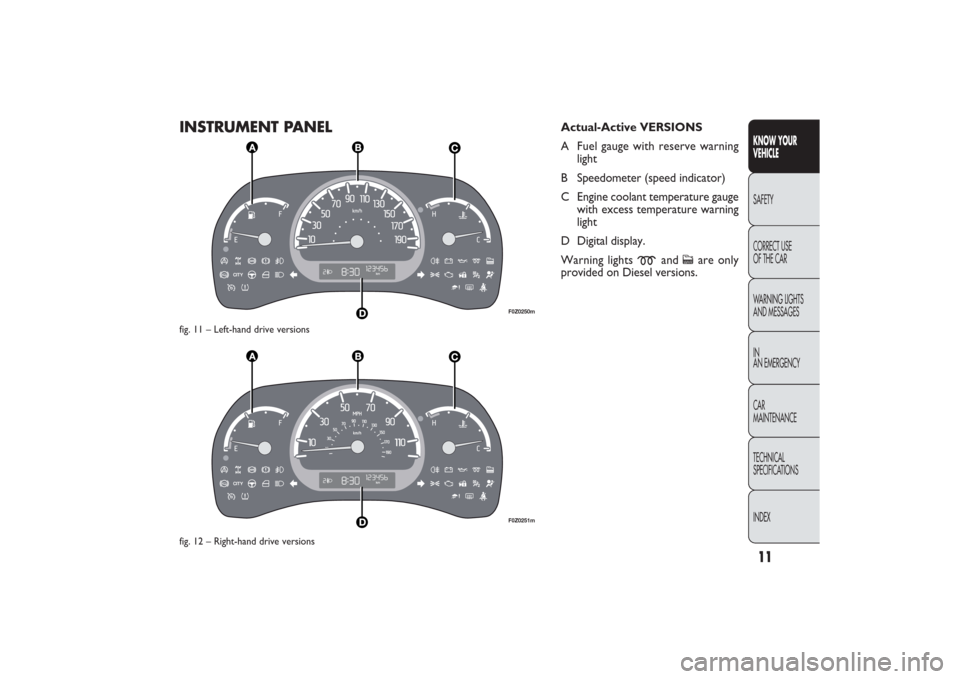
INSTRUMENT PANEL
F0Z0250mF0Z0251m
Actual-Active VERSIONS
A Fuel gauge with reserve warning
light
B Speedometer (speed indicator)
C Engine coolant temperature gauge
with excess temperature warning
light
D Digital display.
Warning lights
m
and
c
are only
provided on Diesel versions.
fig. 11 – Left-hand drive versions
fig. 12 – Right-hand drive versions
001-030 PANDA EN 7-10-2009 13:39 Pagina 11
Page 13 of 226
12
KNOW YOUR
VEHICLE
SAFETY
CORRECT USE
OF THE CAR
WARNING LIGHTS
AND MESSAGES
IN
AN EMERGENCY
CAR
MAINTENANCE
TECHNICAL
SPECIFICATIONS
INDEX
F0Z0252mF0Z0253m
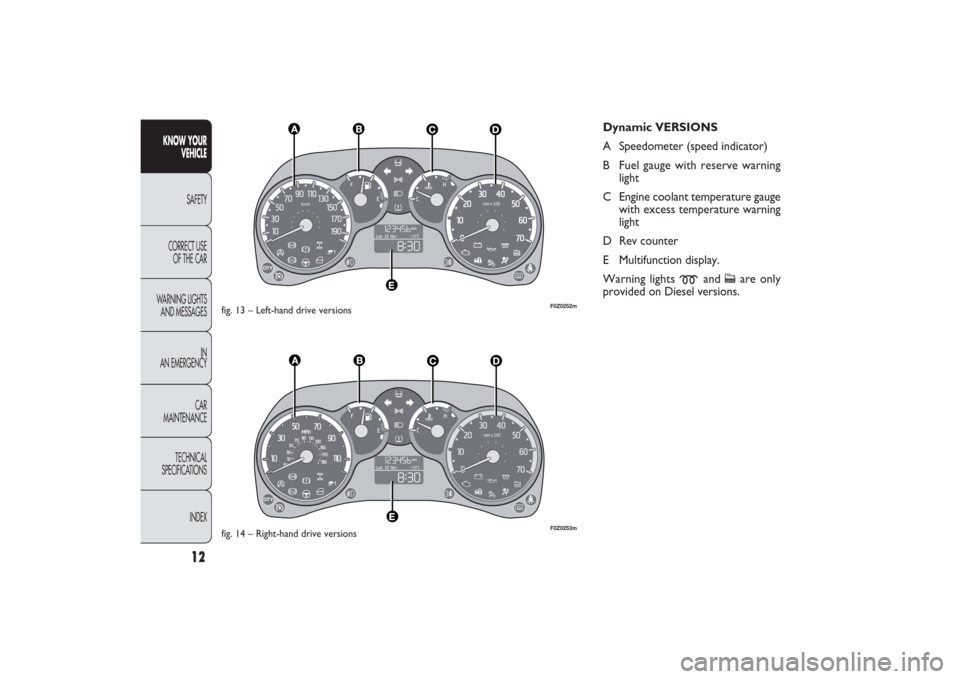
Dynamic VERSIONS
A Speedometer (speed indicator)
B Fuel gauge with reserve warning
light
C Engine coolant temperature gauge
with excess temperature warning
light
D Rev counter
E Multifunction display.
Warning lights
m
and
c
are only
provided on Diesel versions.
fig. 13 – Left-hand drive versions
fig. 14 – Right-hand drive versions
001-030 PANDA EN 7-10-2009 13:39 Pagina 12
Page 14 of 226
13KNOW YOUR
VEHICLESAFETY
CORRECT USE
OF THE CAR
WARNING LIGHTS
AND MESSAGES
IN
AN EMERGENCY
CAR
MAINTENANCE
TECHNICAL
SPECIFICATIONS
INDEX
F0Z0635mF0Z0636m
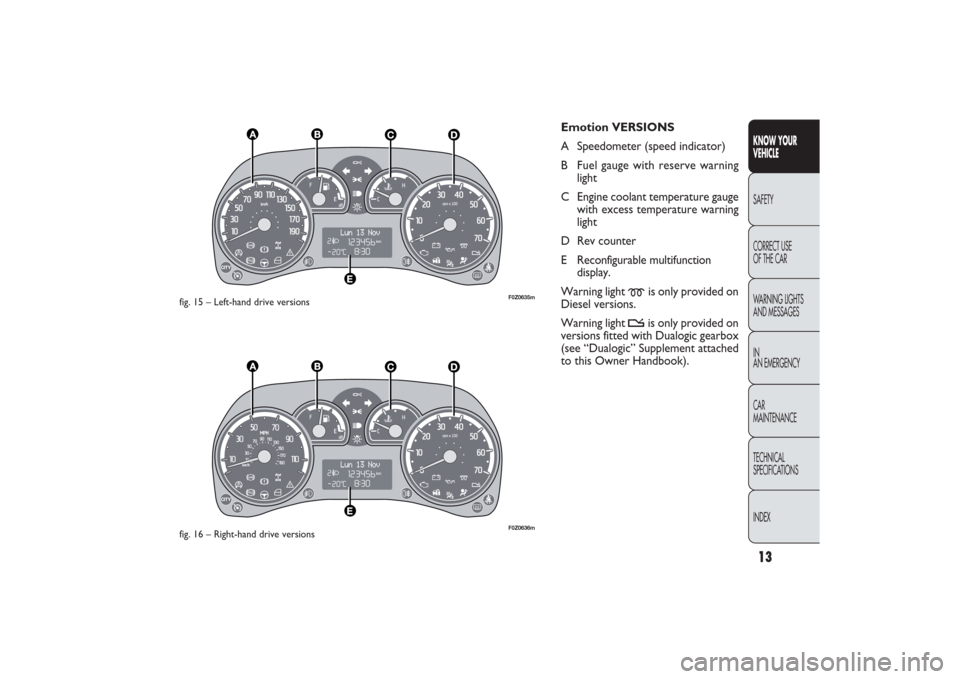
Emotion VERSIONS
A Speedometer (speed indicator)
B Fuel gauge with reserve warning
light
C Engine coolant temperature gauge
with excess temperature warning
light
D Rev counter
E Reconfigurable multifunction
display.
Warning light
m
is only provided on
Diesel versions.
Warning light
t
is only provided on
versions fitted with Dualogic gearbox
(see “Dualogic” Supplement attached
to this Owner Handbook).
fig. 15 – Left-hand drive versions
fig. 16 – Right-hand drive versions
001-030 PANDA EN 7-10-2009 13:39 Pagina 13
Page 15 of 226
14
KNOW YOUR
VEHICLE
SAFETY
CORRECT USE
OF THE CAR
WARNING LIGHTS
AND MESSAGES
IN
AN EMERGENCY
CAR
MAINTENANCE
TECHNICAL
SPECIFICATIONS
INDEX
F0Z0146m
fig. 17
F0Z0256m
fig. 18
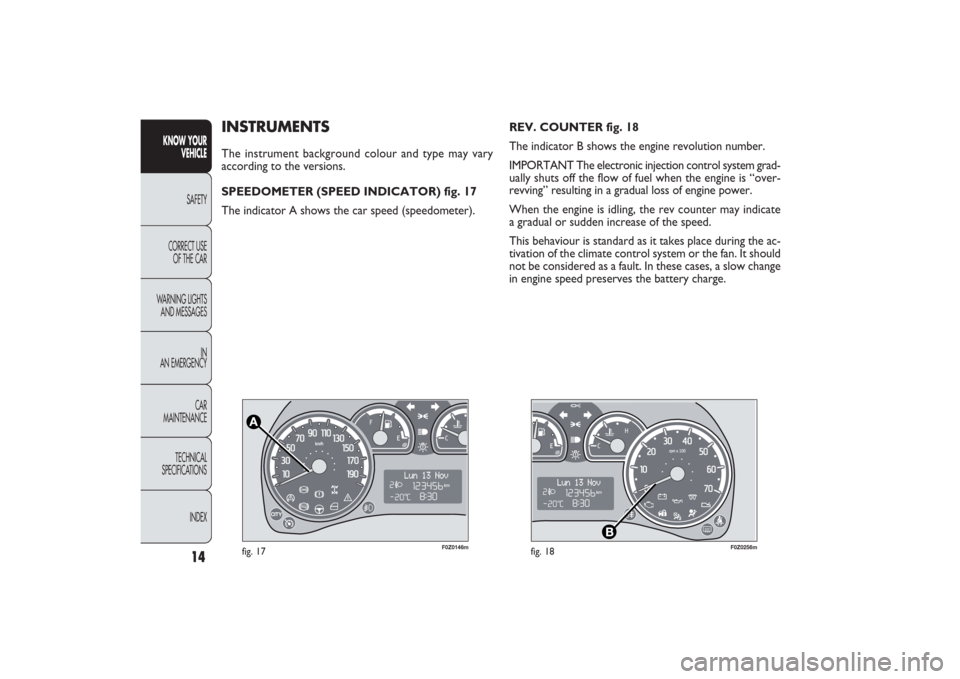
REV. COUNTER fig. 18
The indicator B shows the engine revolution number.
IMPORTANT The electronic injection control system grad-
ually shuts off the flow of fuel when the engine is “over-
revving” resulting in a gradual loss of engine power.
When the engine is idling, the rev counter may indicate
a gradual or sudden increase of the speed.
This behaviour is standard as it takes place during the ac-
tivation of the climate control system or the fan. It should
not be considered as a fault. In these cases, a slow change
in engine speed preserves the battery charge.
INSTRUMENTSThe instrument background colour and type may vary
according to the versions.
SPEEDOMETER (SPEED INDICATOR) fig. 17
The indicator A shows the car speed (speedometer).
001-030 PANDA EN 7-10-2009 13:39 Pagina 14
Page 23 of 226
22
KNOW YOUR
VEHICLE
SAFETY
CORRECT USE
OF THE CAR
WARNING LIGHTS
AND MESSAGES
IN
AN EMERGENCY
CAR
MAINTENANCE
TECHNICAL
SPECIFICATIONS
INDEX
Day
Year
MODE
button
pressed
briefly Month
DeutschPortuguês
English
Español
Français
Italiano
Nederlands
Polski
Example:
EXIT MENUTRIP B DATA
SET TIME
SET DATE
SEE RADIO
AUTOCLOSE
MEASUREMENT UNIT
LANGUAGE BUZZER VOLUME SERVICE
BUTTON VOLUMESPEED BEEP
fig. 28Example:
+
−
+
–
– +
– +
–
– +
+++
–––
++ – –+ +
–
MODE
button
pressed
briefly
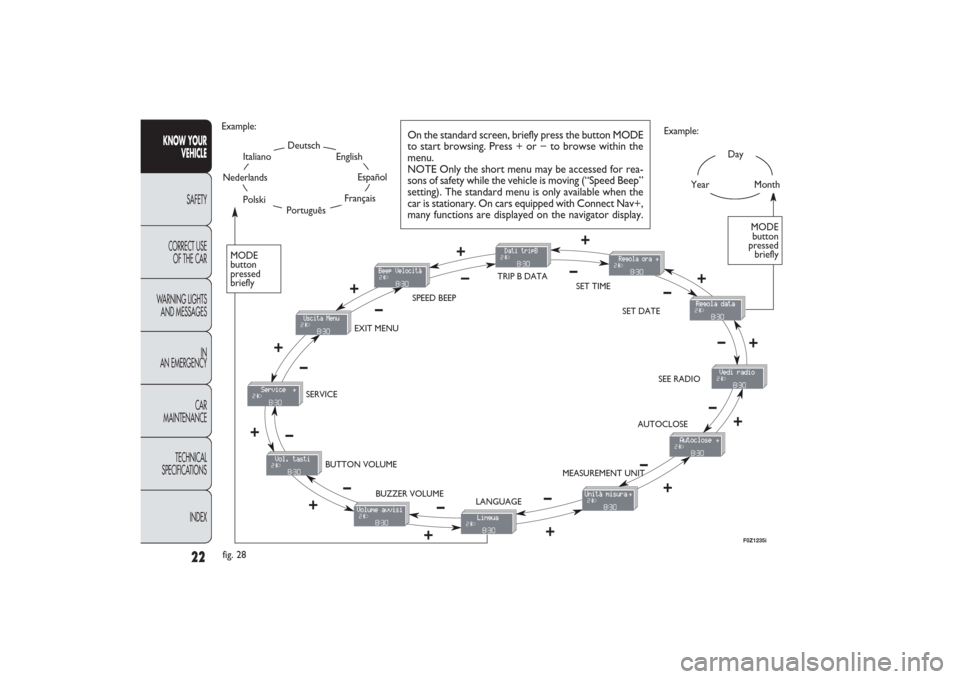
On the standard screen, briefly press the button MODE
to start browsing. Press + or − to browse within the
menu.
NOTE Only the short menu may be accessed for rea-
sons of safety while the vehicle is moving (“Speed Beep”
setting). The standard menu is only available when the
car is stationary. On cars equipped with Connect Nav+,
many functions are displayed on the navigator display.
F0Z1235i
001-030 PANDA EN 7-10-2009 13:40 Pagina 22
Page 24 of 226
23KNOW YOUR
VEHICLESAFETY
CORRECT USE
OF THE CAR
WARNING LIGHTS
AND MESSAGES
IN
AN EMERGENCY
CAR
MAINTENANCE
TECHNICAL
SPECIFICATIONS
INDEX
Trip B On/Off (trip B data)
This function can be used to activate (On) or deactivate
(Off) the Trip B displaying (partial trip).
For further information see “Trip computer”.
Proceed as follows to switch the function on and off:
– briefly press the button MODE: “On” or “Off” flash on
the display (depending on the previous setting);
– press the button + or − to select;
– briefly press the button MODE to go back to the menu
screen or press the button for a prolonged time to go back
to the standard screen without storing the settings.
Setting the clock (Set time)
This function enables to set the clock through two sub-
menus: “Time” and “Format”.
To carry out the adjustment, proceed as follows:
– briefly press the button MODE, the display will show the
two submenus “Time” and “Format”;
– press the button
+or − to switch between the two
submenus;
– once you have selected the submenu to be changed,
press the button MODE briefly;
– when accessing the “Time” submenu:briefly press the but-
ton MODE : “hours” will flash on the display;
– press the button + or − for setting;
– briefly press the button MODE: “minutes” starts flash-
ing on the display;
– press the button + or − for setting; Speed limit (Speed Beep)
This function is used to set the car speed limit (km/h or
mph); the driver is immediately alerted when this limit is
exceeded (see chapter “Warning lights and messages”).
To set the desired speed limit, proceed as follows:
– briefly press the button MODE: the display will show the
wording “Speed Beep”;
– press button
+or
−to select speed limit activation (On)
or deactivation (Off);
– if the function has been activated (On), press the but-
tons + or − to select the required speed limit and then
press MODE to confirm.
NOTE The possible setting is between 30 and 250 km/h, or
between 20 and 155 mph depending on the previously set unit
see “Setting the distance unit” – “Measurement units” de-
scribed below. The setting will increase/decrease by five units
each time the button + /
−
is pressed. Hold the button
+/
−pressed to increase/decrease the setting rapidly and au-
tomatically. Complete the setting by single pressing the but-
ton when you approach the required value.
– press the button MODE briefly to return to the menu
screen or press the button for a prolonged time to go back
to the standard screen without storing settings.
To cancel the setting, proceed as follows:
– briefly press the button MODE: “On” flashes on the
display;
– press the button −: “Off” flashes on the display;
– briefly press the button MODE to go back to the menu
screen or press the button for a prolonged time to go back
to the standard screen without storing the settings.
001-030 PANDA EN 7-10-2009 13:40 Pagina 23
Page 26 of 226
25KNOW YOUR
VEHICLESAFETY
CORRECT USE
OF THE CAR
WARNING LIGHTS
AND MESSAGES
IN
AN EMERGENCY
CAR
MAINTENANCE
TECHNICAL
SPECIFICATIONS
INDEX
– briefly press the MODE button: “On” or “Off” will flash
on the display (depending on the previous setting);
– press the button + or − to select;
– briefly press the button MODE to go back to the sub-
menu screen or press the button for a prolonged time to
go back to the standard screen without storing settings;
– press the button MODE again for a longer time to go
back to the standard screen or to the main menu according
to the current menu level displayed.
Set units (Measurement units)
With this function it is possible to set the units through three
submenus: “Distances”, “Consumption” and “Temperature”.
To set the required unit proceed as follows:
– briefly press the button MODE to display the three
submenus;
– press the button + or − to switch between the three
submenus;
– once you have selected the submenu to be changed, press
the MODE button briefly;
– when accessing the “Distance” submenu:and briefly press the
button MODE and the display will show “km” or “mi”
(depending on the previous setting);
– press the button + or − to select; Audio repetition (See radio)
With this function the display shows information about the
sound system.
– Radio: selected radio station frequency or RDS message,
automatic tuning activation or AutoSTore;
– Audio CD, MP3 CD: track number;
– CD Changer: CD number and track number;
– Tape: operating mode.
To show the sound system information on the display (On)
or clear it (Off), proceed as follows:
– briefly press the button MODE: (On) or (Off) will flash
on the display (depending on the previous setting);
– press the button + or − to select;
– briefly press the button MODE to go back to the menu
screen or press the button for a prolonged time to go back
to the standard screen without storing the settings.
Automatic central door locking
with car running
(Autoclose)
When activated (On), this function locks automatically the
doors when the vehicle speed exceeds 20 km/h.
Proceed as follows to activate (On) or deactivate (Off) this
function:
– briefly press the button MODE to display one submenu;
001-030 PANDA EN 7-10-2009 13:40 Pagina 25
Page 28 of 226
27KNOW YOUR
VEHICLESAFETY
CORRECT USE
OF THE CAR
WARNING LIGHTS
AND MESSAGES
IN
AN EMERGENCY
CAR
MAINTENANCE
TECHNICAL
SPECIFICATIONS
INDEX
Note The “Scheduled servicing plan” ensures car servic-
ing every 20,000 km (or 12,000 miles). This is automati-
cally displayed when the ignition key is in the MAR posi-
tion, from 2,000 km (or the equivalent in miles) before the
service and reappears every 200 km (or the equivalent
in miles). Below 200 km servicing indications are more fre-
quent. The displaying will be in kilometres or miles de-
pending on the measurement unit settings. When the next
scheduled servicing is approaching (“coupon”), the mes-
sage “Service” will appear on the display followed by
the number of kilometres or miles left when the key is
turned to MAR. Contact a Fiat Dealership to carry out any
service operation provided by the “Scheduled servicing
plan” and to reset the display.
Exit Menu
This is the last function that closes the cycle of settings
listed in the menu screen.
Briefly press the button MODE to go back to the standard
screen without storing the settings.
Press the button
–to return to the first menu option
(Speed Lim.). Adjust the button volume (Button Vol.)
This function is used to set the volume (8 levels) of the
beep accompanying the activation of the buttons MODE,
+ and –.
To set the desired volume, proceed as follows:
– briefly press the button MODE: the previously set
volume “level” will flash on the display;
– press the button + or – for setting;
– briefly press the button MODE to go back to the menu
screen or press the button for a prolonged time to go back
to the standard screen without storing the settings.
Scheduled Servicing (Service)
By this function you can display information about the
mileage intervals for car servicing.
To consult this display, proceed as follows:
– briefly press the button MODE: the display shows ser-
vice requirements in km or mi according to the previous
setting (see paragraph “Measurement units”);
– briefly press the button MODE to go back to the menu
screen or press the button for a prolonged time to go back
to the standard screen.
001-030 PANDA EN 7-10-2009 13:40 Pagina 27
Page 29 of 226
28
KNOW YOUR
VEHICLE
SAFETY
CORRECT USE
OF THE CAR
WARNING LIGHTS
AND MESSAGES
IN
AN EMERGENCY
CAR
MAINTENANCE
TECHNICAL
SPECIFICATIONS
INDEX
– Average consumption B (for versions/markets where
provided)
– Average speed B
– Trip time B (driving time).
NOTE “Trip B” function can be excluded (see paragraph
“Trip B on”). “‘Range to empty” cannot be reset.
Values displayed
Range (for versions/markets where provided)
This value shows the distance that the car can still cover
before needing fuel, assuming that driving conditions are
kept unvaried. The display will show the reading “----”
when the following events take place:
– range value lower than 50 km (or 30 mi)
– car parked with engine running for long.
Trip distance
This value shows the distance covered from the start of
the new mission.Average consumption (for versions/markets where provided)This value shows the average consumption from the start
of the new mission.Instant consumption (for versions/markets where provided)This indicates instant fuel consumption and it is constant-
ly updated. The display will show “----” if the car is parked
with the engine running.
TRIP COMPUTER (for versions/markets, where provided)
General features
The “Trip computer” is provided on cars fitted with mul-
tifunction display or reconfigurable multifunction display.
With ignition key at MAR, the “Trip computer” displays
information about the operating status of the car. This
function comprises the “General trip” concerning the
“complete mission” of the car (journey) and “Trip B”, (on-
ly available on reconfigurable multifunction display), con-
cerning the partial mission of the car; this function is in-
cluded in the general trip information (as shown in fig. 30).
Both functions can be reset (reset means start of a new
journey).
“General Trip” displays the figures relating to:
– Range to empty (for versions/markets, where provided)
– Trip distance
– Average consumption (for versions/markets where pro-
vided)
– Instant consumption (for versions/markets where pro-
vided)
– Average speed
– Trip time (driving time).
“Trip B”, available on the reconfigurable multifunction dis-
play only, shows only the figures relating to:
– Trip distance B
001-030 PANDA EN 7-10-2009 13:40 Pagina 28