Time FIAT SEDICI 2009 2.G Owner's Guide
[x] Cancel search | Manufacturer: FIAT, Model Year: 2009, Model line: SEDICI, Model: FIAT SEDICI 2009 2.GPages: 270, PDF Size: 3.44 MB
Page 113 of 270
112
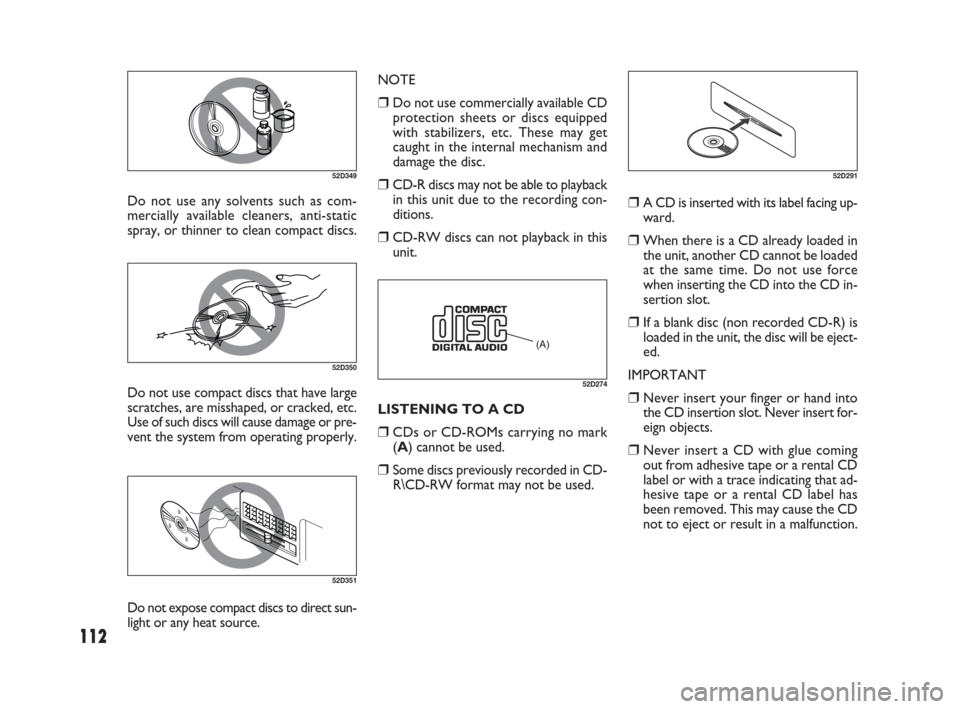
Do not use any solvents such as com-
mercially available cleaners, anti-static
spray, or thinner to clean compact discs.
52D349
52D350
Do not use compact discs that have large
scratches, are misshaped, or cracked, etc.
Use of such discs will cause damage or pre-
vent the system from operating properly.LISTENING TO A CD
❒CDs or CD-ROMs carrying no mark
(A) cannot be used.
❒Some discs previously recorded in CD-
R\CD-RW format may not be used. NOTE
❒Do not use commercially available CD
protection sheets or discs equipped
with stabilizers, etc. These may get
caught in the internal mechanism and
damage the disc.
❒CD-R discs may not be able to playback
in this unit due to the recording con-
ditions.
❒CD-RW discs can not playback in this
unit.
52D351
(A)
52D274
52D291
❒A CD is inserted with its label facing up-
ward.
❒When there is a CD already loaded in
the unit, another CD cannot be loaded
at the same time. Do not use force
when inserting the CD into the CD in-
sertion slot.
❒If a blank disc (non recorded CD-R) is
loaded in the unit, the disc will be eject-
ed.
IMPORTANT
❒Never insert your finger or hand into
the CD insertion slot. Never insert for-
eign objects.
❒Never insert a CD with glue coming
out from adhesive tape or a rental CD
label or with a trace indicating that ad-
hesive tape or a rental CD label has
been removed. This may cause the CD
not to eject or result in a malfunction.
Do not expose compact discs to direct sun-
light or any heat source.
071-128 SEDICI LUM FL GB 1E 19-06-2009 12:05 Pagina 112
Page 115 of 270
114
NOTE The Auto Volume Control (AVC)
function automatically adjusts (increas-
es/decreases) the sound volume in accor-
dance with vehicle speed.
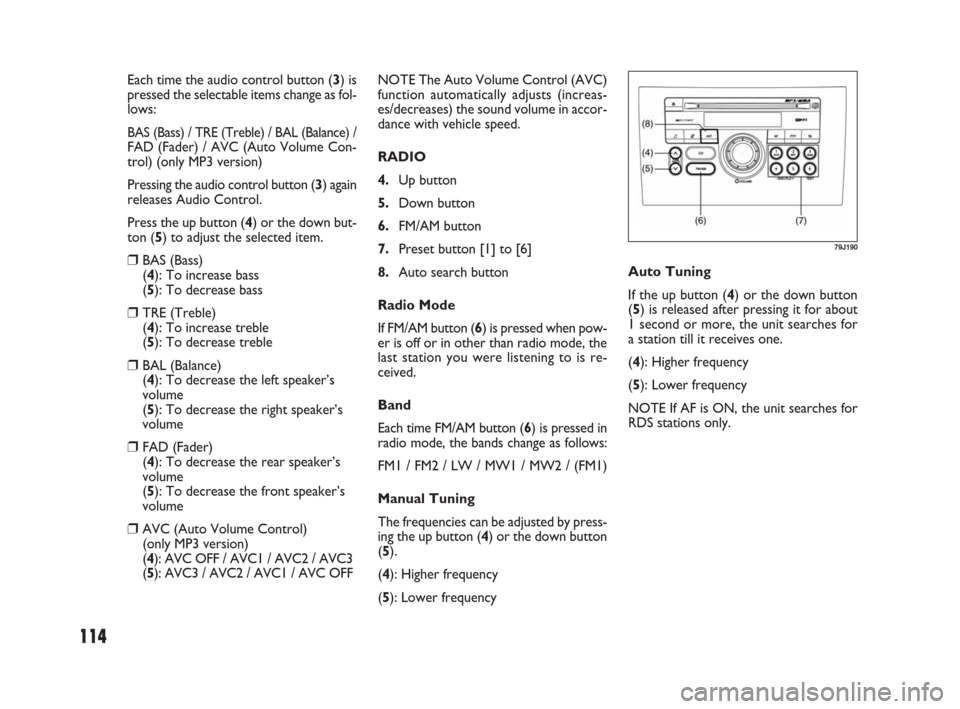
RADIO
4.Up button
5.Down button
6.FM/AM button
7.Preset button [1] to [6]
8.Auto search button
Radio Mode
If FM/AM button (6) is pressed when pow-
er is off or in other than radio mode, the
last station you were listening to is re-
ceived.
Band
Each time FM/AM button (6) is pressed in
radio mode, the bands change as follows:
FM1 / FM2 / LW / MW1 / MW2 / (FM1)
Manual Tuning
The frequencies can be adjusted by press-
ing the up button (4) or the down button
(5).
(4): Higher frequency
(5): Lower frequency Each time the audio control button (3) is
pressed the selectable items change as fol-
lows:
BAS (Bass) / TRE (Treble) / BAL (Balance) /FAD (Fader) / AVC (Auto Volume Con-
trol) (only MP3 version)
Pressing the audio control button (3) again
releases Audio Control.
Press the up button (4) or the down but-
ton (5) to adjust the selected item.
❒BAS (Bass)
(4): To increase bass
(5): To decrease bass
❒TRE (Treble)
(4): To increase treble
(5): To decrease treble
❒BAL (Balance)
(4): To decrease the left speaker’s
volume
(5): To decrease the right speaker’s
volume
❒FAD (Fader)
(4): To decrease the rear speaker’s
volume
(5): To decrease the front speaker’s
volume
❒AVC (Auto Volume Control)
(only MP3 version)
(4): AVC OFF / AVC1 / AVC2 / AVC3
(5): AVC3 / AVC2 / AVC1 / AVC OFFAuto Tuning
If the up button (4) or the down button
(5) is released after pressing it for about
1 second or more, the unit searches for
a station till it receives one.
(4): Higher frequency
(5): Lower frequency
NOTE If AF is ON, the unit searches for
RDS stations only.
79J190
071-128 SEDICI LUM FL GB 1E 19-06-2009 12:05 Pagina 114
Page 117 of 270
116
❒ REG (Region)
An area in which the AF function may be
used to select stations can be set. When
REG is ON, the AF function is effective
in the present area only.
❒ PS (Program Service Name)
Instead of the frequency, the name of the
broadcast station appears.
❒ PTY (Program Type)
Programs can be searched for by PTY.❒ TA (Traffic Announcement)
The unit can search for stations emitting
TP (traffic programmes), and tune in to
such stations in preference to others. Sta-
tions emitting TP are called TP stations.
❒ EON (Enhanced Other
Network)
RDS information is updated constantly in
response to the current position.
The “EON” indicator remains lit while
RDS information is received.
❒ Emergency Announcement
Reception
Emergency announcements are automat-
ically received and displayed.
AF/REG On/Off
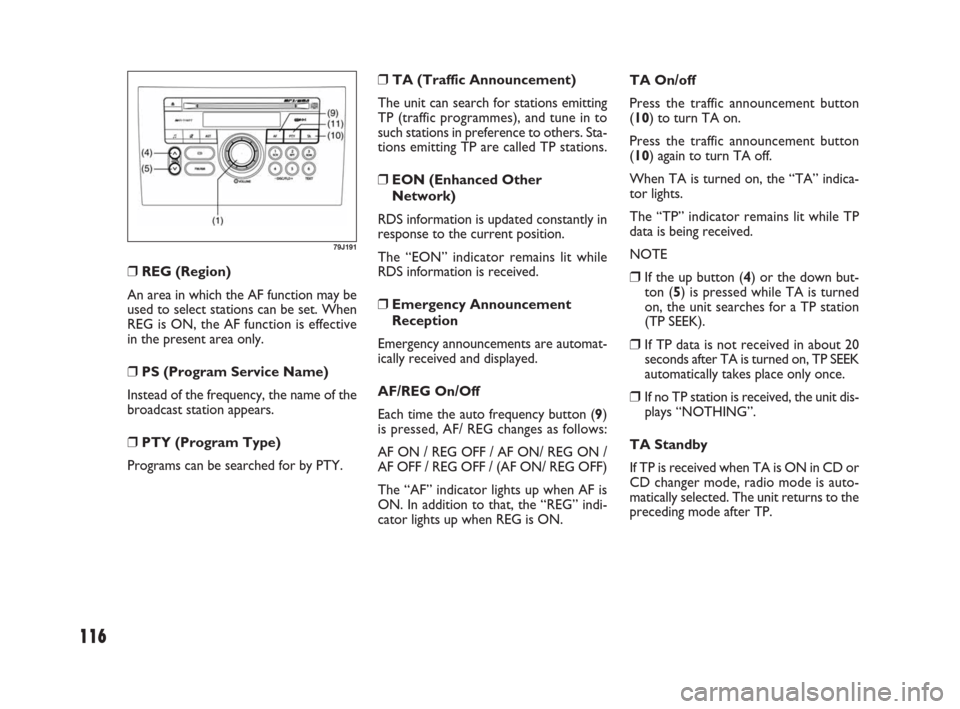
Each time the auto frequency button (9)
is pressed, AF/ REG changes as follows:
AF ON / REG OFF / AF ON/ REG ON /
AF OFF / REG OFF / (AF ON/ REG OFF)
The “AF” indicator lights up when AF is
ON. In addition to that, the “REG” indi-
cator lights up when REG is ON.
79J191
TA On/off
Press the traffic announcement button
(10) to turn TA on.
Press the traffic announcement button
(10) again to turn TA off.
When TA is turned on, the “TA” indica-
tor lights.
The “TP” indicator remains lit while TP
data is being received.
NOTE
❒If the up button (4) or the down but-
ton (5) is pressed while TA is turned
on, the unit searches for a TP station
(TP SEEK).
❒If TP data is not received in about 20
seconds after TA is turned on, TP SEEK
automatically takes place only once.
❒If no TP station is received, the unit dis-
plays “NOTHING”.
TA Standby
If TP is received when TA is ON in CD or
CD changer mode, radio mode is auto-
matically selected. The unit returns to the
preceding mode after TP.
071-128 SEDICI LUM FL GB 1E 19-06-2009 12:05 Pagina 116
Page 121 of 270
120
MP3/WMA PLAYER
(for versions/markets, where provided)
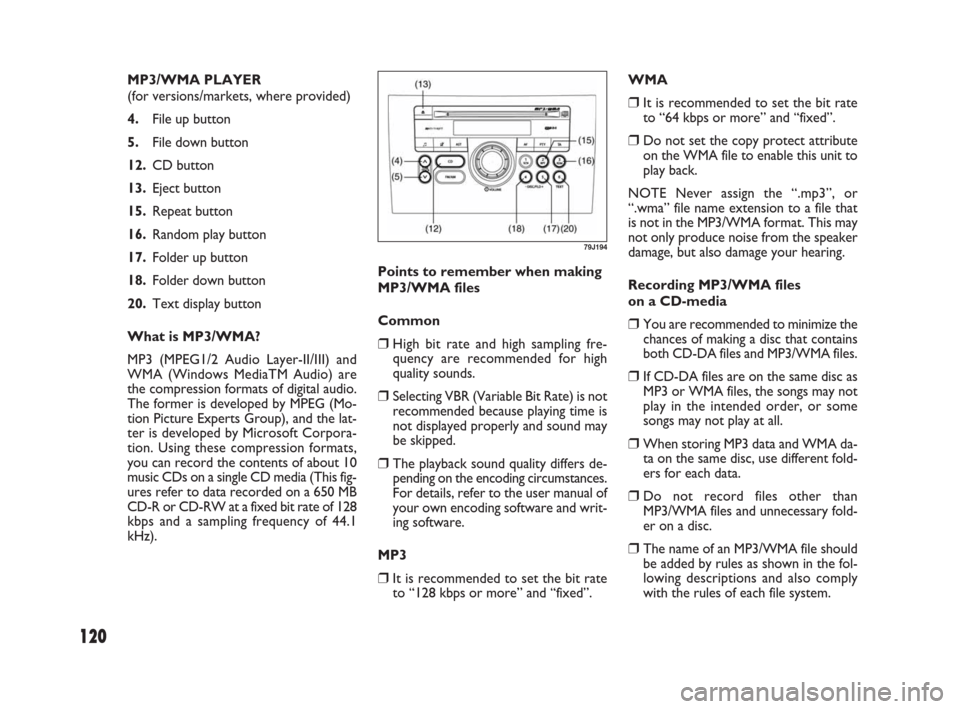
4.File up button
5.File down button
12.CD button
13.Eject button
15.Repeat button
16.Random play button
17.Folder up button
18.Folder down button
20.Text display button
What is MP3/WMA?
MP3 (MPEG1/2 Audio Layer-II/III) and
WMA (Windows MediaTM Audio) are
the compression formats of digital audio.
The former is developed by MPEG (Mo-
tion Picture Experts Group), and the lat-
ter is developed by Microsoft Corpora-
tion. Using these compression formats,
you can record the contents of about 10
music CDs on a single CD media (This fig-
ures refer to data recorded on a 650 MB
CD-R or CD-RW at a fixed bit rate of 128
kbps and a sampling frequency of 44.1
kHz).Points to remember when making
MP3/WMA files
Common
❒High bit rate and high sampling fre-
quency are recommended for high
quality sounds.
❒Selecting VBR (Variable Bit Rate) is not
recommended because playing time is
not displayed properly and sound may
be skipped.
❒The playback sound quality differs de-
pending on the encoding circumstances.
For details, refer to the user manual of
your own encoding software and writ-
ing software.
MP3
❒It is recommended to set the bit rate
to “128 kbps or more” and “fixed”.WMA
❒It is recommended to set the bit rate
to “64 kbps or more” and “fixed”.
❒Do not set the copy protect attribute
on the WMA file to enable this unit to
play back.
NOTE Never assign the “.mp3”, or
“.wma” file name extension to a file that
is not in the MP3/WMA format. This may
not only produce noise from the speaker
damage, but also damage your hearing.
Recording MP3/WMA files
on a CD-media
❒You are recommended to minimize the
chances of making a disc that contains
both CD-DA files and MP3/WMA files.
❒If CD-DA files are on the same disc as
MP3 or WMA files, the songs may not
play in the intended order, or some
songs may not play at all.
❒When storing MP3 data and WMA da-
ta on the same disc, use different fold-
ers for each data.
❒Do not record files other than
MP3/WMA files and unnecessary fold-
er on a disc.
❒The name of an MP3/WMA file should
be added by rules as shown in the fol-
lowing descriptions and also comply
with the rules of each file system.
79J194
071-128 SEDICI LUM FL GB 1E 19-06-2009 12:05 Pagina 120
Page 123 of 270
![FIAT SEDICI 2009 2.G Owners Guide 122
User ID Setting
❒Press the power on/ off knob (1) to
turn off the power.
❒With numbered buttons (19) with
number [3] and [4] kept depressed at
the same time; press the power on/ off
knob (1) f](/img/10/4723/w960_4723-122.png "FIAT SEDICI 2009 2.G Owners Guide 122
User ID Setting
❒Press the power on/ off knob (1) to
turn off the power.
❒With numbered buttons (19) with
number [3] and [4] kept depressed at
the same time; press the power on/ off
knob (1) f")
122
User ID Setting
❒Press the power on/ off knob (1) to
turn off the power.
❒With numbered buttons (19) with
number [3] and [4] kept depressed at
the same time; press the power on/ off
knob (1) for about 1 second or more.
The unit displays “SEC”.
❒With the up button (4) kept depressed,
press the numbered button (19) with
number [1].
The unit displays “- - - -”.
❒Press the numbered buttons (19) with
number [1] to [4], and enter the user
ID. Each button corresponds to each
digit, and the number increases each
time the button is pressed. For exam-
ple, to raise the digit second from the
left to 3, press the numbered button
(19) with number [2] four times. ANTI-THEFT SYSTEM (SEC)
1.Power on/ off knob – Volume control
knob
4.Up button
11.Program type button
19.Numbered buttons [1] to [4]
You can set up a 4-digit ID to prevent
theft. Once you set up the ID, the unit is
inoperable without the ID when this unit
or the battery is removed.
NOTE
❒If the wrong user ID is entered 10
times, the unit displays “HELP” and can-
not be operated.
❒If you should forget your user ID, con-
sult your Fiat Dealership.
79J195
Text Display
Each time the text display button (20) is
pressed in MP3/ WMA mode, the display
change as follows:
Elapsed Time / Folder Name / File Name /
(Elapsed Time)
NOTE For scrolling text, hold down the
text display button (20) for 2 seconds or
more.
REPEAT Play
For repeat play (playing the present file re-
peatedly), press the repeat button (15).
To release repeat play, press the repeat
button (15) again.
The “RPT” indicator remains lit during re-
peat play.
RANDOM Play
For random play (playing the disc files at
random), press the random play button
(16).
To release random play, press the random
play button (16) again.
The “RDM” indicator remains lit during
random play.
071-128 SEDICI LUM FL GB 1E 19-06-2009 12:05 Pagina 122
Page 124 of 270
123
User ID Entry
Once the ID is set up, this unit displays
“SEC” to prompt you to enter your user
ID when the power is turned on again in
the case of removal of this unit or the bat-
tery.
The unit cannot be used unless the ID is
entered in the following order.
NOTE The unit does not display “SEC”
when the power is turned on within 20
seconds from the last use.
❒With the up button (4) kept depressed,
press the numbered button (19) with
number [1].
The unit displays “- - - -”.
❒Press the numbered buttons (19) with
number [1] to [4], and enter the user
ID. Each button corresponds to each
digit. Enter the stored user ID.
❒Press program type button (11) for
about 2 second or more to enter.
Power is switched off.
When you switch the unit back on, it is
in radio mode for normal use.Erasing User ID
Your stored user ID can be erased. After
erasing it, you may set a new user ID.
Therefore, you can change your user ID
as often as you like.
❒Press the power on/off knob (1) to turn
off the power.
❒With the numbered buttons (19) with
numbers [3] and [4] kept depressed at
the same time, press the power on/ off
know (1) for about 1 second or more.
The unit displays “SEC”.
❒With the up button (4) kept depressed,
press the numbered button (19) with
number [1].
The unit displays “- - - -”.
❒Press the numbered buttons (19) with
number [1] to [4], and enter the user ID.
Each button corresponds to each digit.
Enter the stored user ID.
❒Press the program type button (11) for
about 2 seconds or more to enter.
The power is turned off approx, 10 sec-
onds after “- - - -” is displayed.
❒Press the program type button (11) for
about 2 second or more to enter.
Power is switched off after the unit dis-
plays “SEC”.
Once the ID is set up, the ID is re-
quired at power-on when this unit or
the battery has been removed.
071-128 SEDICI LUM FL GB 1E 19-06-2009 12:05 Pagina 123
Page 132 of 270
131
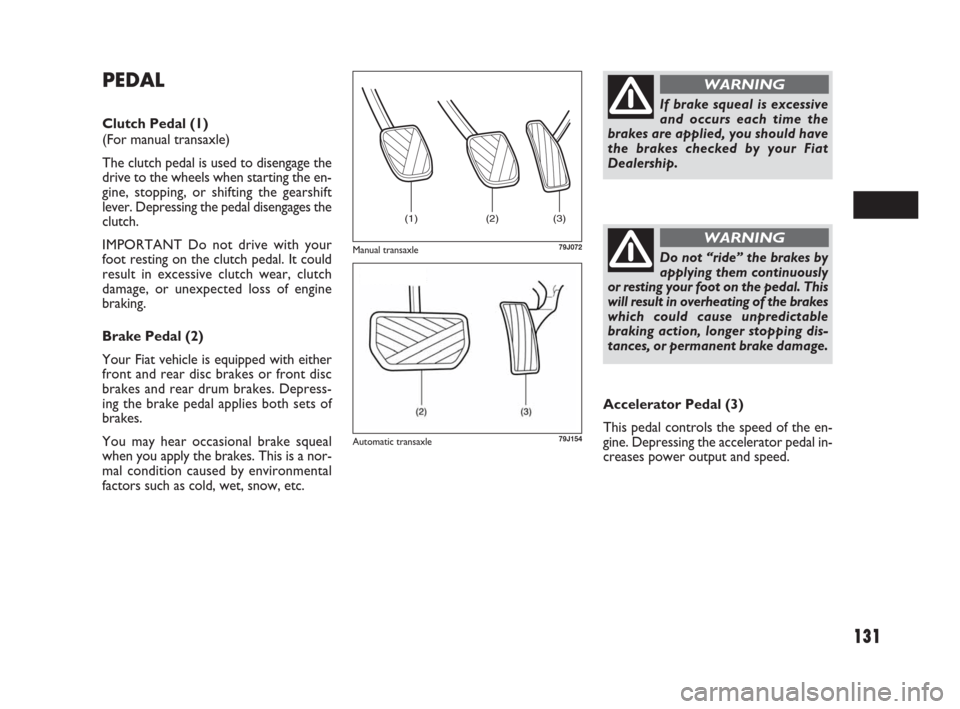
PEDAL
Clutch Pedal (1)
(For manual transaxle)
The clutch pedal is used to disengage the
drive to the wheels when starting the en-
gine, stopping, or shifting the gearshift
lever. Depressing the pedal disengages the
clutch.
IMPORTANT Do not drive with your
foot resting on the clutch pedal. It could
result in excessive clutch wear, clutch
damage, or unexpected loss of engine
braking.
Brake Pedal (2)
Your Fiat vehicle is equipped with either
front and rear disc brakes or front disc
brakes and rear drum brakes. Depress-
ing the brake pedal applies both sets of
brakes.
You may hear occasional brake squeal
when you apply the brakes. This is a nor-
mal condition caused by environmental
factors such as cold, wet, snow, etc.Accelerator Pedal (3)
This pedal controls the speed of the en-
gine. Depressing the accelerator pedal in-
creases power output and speed.
(1) (2) (3)
79J072
If brake squeal is excessive
and occurs each time the
brakes are applied, you should have
the brakes checked by your Fiat
Dealership.
WARNING
Do not “ride” the brakes by
applying them continuously
or resting your foot on the pedal. This
will result in overheating of the brakes
which could cause unpredictable
braking action, longer stopping dis-
tances, or permanent brake damage.
WARNINGManual transaxle
79J154Automatic transaxle
129-148 SEDICI LUM FL GB 1E 19-06-2009 13:31 Pagina 131
Page 133 of 270
132
FUEL FILLER CAP
The fuel filler cap is located on the left rear
side of the vehicle. The fuel filler lid can be
unlocked by pulling up the opener lever lo-
cated on the outboard side of the driver’s
seat and locked by simply closing the lid.
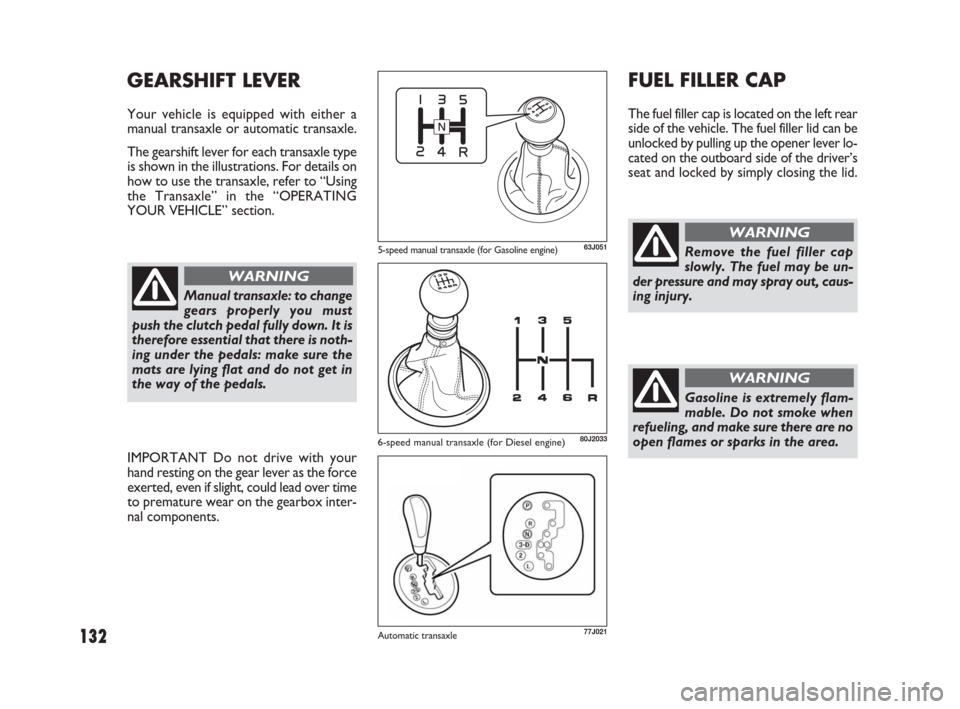
GEARSHIFT LEVER
Your vehicle is equipped with either a
manual transaxle or automatic transaxle.
The gearshift lever for each transaxle type
is shown in the illustrations. For details on
how to use the transaxle, refer to “Using
the Transaxle” in the “OPERATING
YOUR VEHICLE” section.
63J051
80J2033
Remove the fuel filler cap
slowly. The fuel may be un-
der pressure and may spray out, caus-
ing injury.
WARNING
Gasoline is extremely flam-
mable. Do not smoke when
refueling, and make sure there are no
open flames or sparks in the area.
WARNING
Manual transaxle: to change
gears properly you must
push the clutch pedal fully down. It is
therefore essential that there is noth-
ing under the pedals: make sure the
mats are lying flat and do not get in
the way of the pedals.
WARNING
IMPORTANT Do not drive with your
hand resting on the gear lever as the force
exerted, even if slight, could lead over time
to premature wear on the gearbox inter-
nal components.
5-speed manual transaxle (for Gasoline engine)
77J021Automatic transaxle
6-speed manual transaxle (for Diesel engine)
129-148 SEDICI LUM FL GB 1E 19-06-2009 13:31 Pagina 132
Page 139 of 270
138
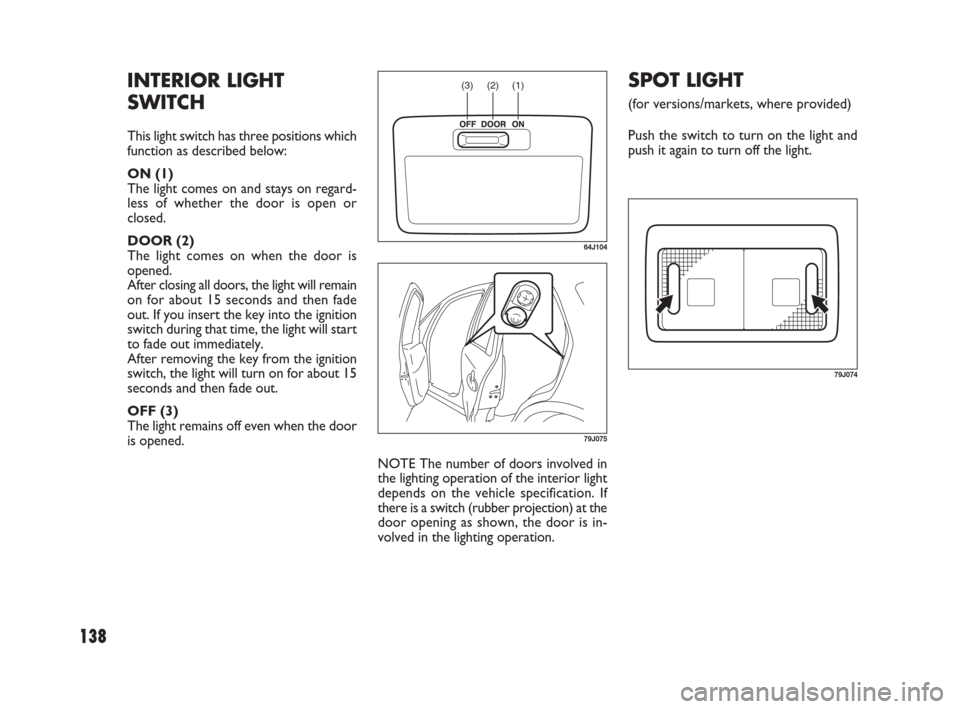
NOTE The number of doors involved in
the lighting operation of the interior light
depends on the vehicle specification. If
there is a switch (rubber projection) at the
door opening as shown, the door is in-
volved in the lighting operation.
SPOT LIGHT
(for versions/markets, where provided)
Push the switch to turn on the light and
push it again to turn off the light.
INTERIOR LIGHT
SWITCH
This light switch has three positions which
function as described below:
ON (1)
The light comes on and stays on regard-
less of whether the door is open or
closed.
DOOR (2)
The light comes on when the door is
opened.
After closing all doors, the light will remain
on for about 15 seconds and then fade
out. If you insert the key into the ignition
switch during that time, the light will start
to fade out immediately.
After removing the key from the ignition
switch, the light will turn on for about 15
seconds and then fade out.
OFF (3)
The light remains off even when the door
is opened.
(1) (2) (3)
64J104
79J075
79J074
129-148 SEDICI LUM FL GB 1E 19-06-2009 13:31 Pagina 138
Page 147 of 270
146
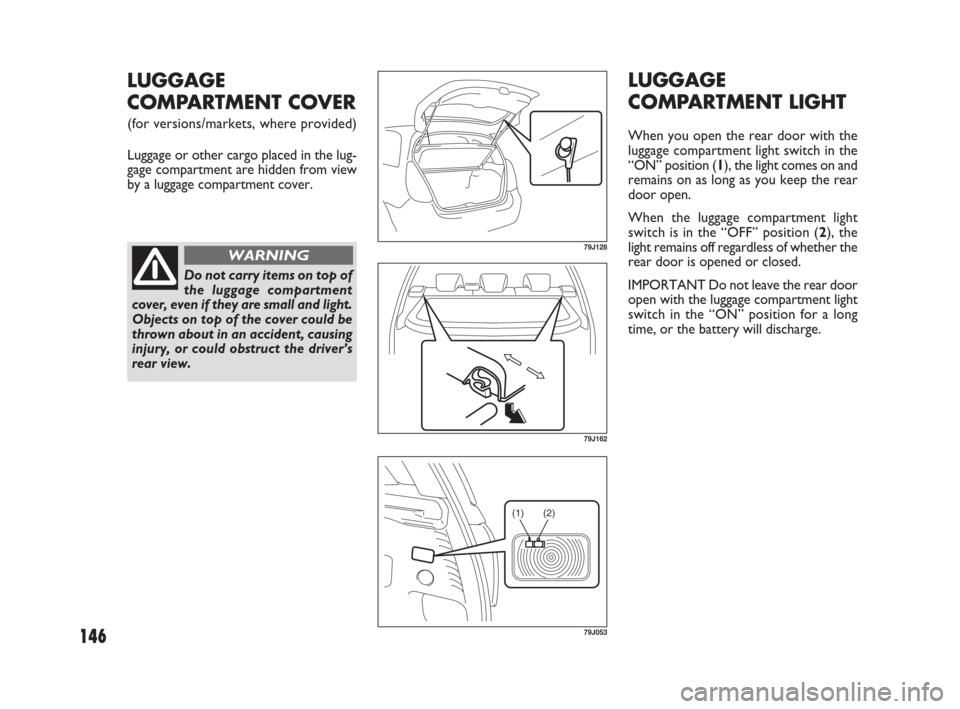
LUGGAGE
COMPARTMENT LIGHT
When you open the rear door with the
luggage compartment light switch in the
“ON” position (1), the light comes on and
remains on as long as you keep the rear
door open.
When the luggage compartment light
switch is in the “OFF” position (2), the
light remains off regardless of whether the
rear door is opened or closed.
IMPORTANT Do not leave the rear door
open with the luggage compartment light
switch in the “ON” position for a long
time, or the battery will discharge.
LUGGAGE
COMPARTMENT COVER
(for versions/markets, where provided)
Luggage or other cargo placed in the lug-
gage compartment are hidden from view
by a luggage compartment cover.
79J128
79J162
(1) (2)
79J053
Do not carry items on top of
the luggage compartment
cover, even if they are small and light.
Objects on top of the cover could be
thrown about in an accident, causing
injury, or could obstruct the driver’s
rear view.
WARNING
129-148 SEDICI LUM FL GB 1E 19-06-2009 13:31 Pagina 146